1
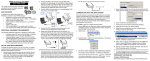
New User Orientation Hi-Tech Software Solutions Reporting > Custom Reporting > Resident - Clinical Custom Reporting NRPK You can design listings of information that you have entered into residents’ face sheets; for example: Resident names and room numbers Birth dates and age Religions Medicare and Medicaid numbers Admit and discharge dates. If you have already created and saved report designs, the program will first display a list of these reports (on right). To print a report listed on this screen, click the checkbox in front of the report name to check mark it. . (You can select more than one.) Click Print at bottom of the screen. To design and print a new report, click New Report. See the next page. To delete an existing report design, select report title and click Delete. To change an existing report design, select that report and click Edit. The report will display the existing report design screens for you to change and record. See the next page. Click End to end the program without printing. G:\HITECH\Webinars\Webinar Docs\NewUser.doc Printed 1/2/13 Page 15