1
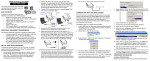
New User Orientation Hi-Tech Software Solutions Hi-Tech Menu System HTS Login Menu The Login Menu is the first screen that displays when you click the HTS icon on your desktop. This menu displays all HTS applications. After you log in, you can access the applications used at your facility, based on menu security. Update Memo Alert After an update is installed, when you log in, the Master Menu will display the Review Program Update Changes message (on right). Click the following: View Memo Now to display/print the memo. Remind Me Later to display the Alert again in 24 hours for this User ID. Don’t Remind Me Again to stop the display of this Alert for this User ID. The Alert will be displayed for up to 30 days until the user clicks View Memo Now or Don’t Remind Me Again G:\HITECH\Webinars\Webinar Docs\NewUser.doc Printed 1/2/13 Page 2