1
Playing and Editing the Deposition Video
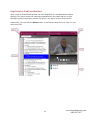
To start playing the video connected with the transcript from a specific line, simply tap the
line number or group of words on the transcript you would like to view in the video. Once
you tap the line you want to view, the video immediately plays.
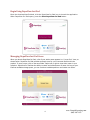
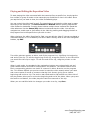
You can control the video itself as well. The page buttons navigate the video page by page
according to the transcript. The Fast Forward and Rewind buttons quickly progress the
video forward or backward. Pressing these buttons multiple times increases the speed the
video advances. Use the Pause/Play button to start and stop the video. You can also
navigate to a certain spot or time stamp in the video by pressing and dragging the ball on
the progress line to the specific time you wish to view.
When viewing a clip within DepoView for iPad, you can edit the video if it shows unrelated or
unwanted content, or if it mistakenly cuts off or adds in dialog. Next to the video navigation
buttons, tap Edit.
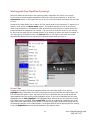
Two white pointers appear at either end of the progress line, signifying the beginning
and end of the clip. To edit the beginning of the clip, drag the pointer on the left where
you would like the clip to begin. To edit the end of the clip, drag the pointer on the
right.
When in edit mode, the standard video navigation buttons are replaced with red and
green tweak buttons and seek to start/seek to end buttons. The tweak buttons move
their corresponding pointers one tenth of a second in either direction on the progress
line. This feature affords you precise control to start the video exactly where you want
and remove parts of words or someone clearing their throat, giving you a cleaner
beginning and end to a clip. The seek to start and seek to end buttons on either side of
the play button allow you to review the beginning and end of the video. When you press
the seek to end button, the video plays the last three seconds of the clip.
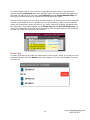
When you are satisfied with the changes you make to a clip, tap Save.
13
www.GeorgiaReporting.com
(404) 389-1155