1
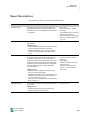
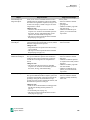
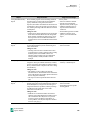
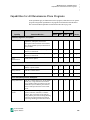
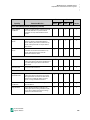
..... APPENDIX A: CAPABILITIES Capabilities for All Renaissance Place Programs District Capability School Determines Who Can… Admin. Staff Admin. Staff Teacher Filter Reports by Characteristics Limit reports to students who’ve been assigned specific characteristics in Renaissance Place. Filter Reports by Ethnicity Limit reports to students with specific ethnicities, which are set when you add students or edit their information. Manage Reporting Periods Set the reporting periods for Renaissance Place consolidated reports. Reporting periods are time periods that you can select for the report. + + + Manage Data Consolidation Schedule data consolidation, which gathers data from all products to include in Renaissance Place reports. You can set the date, times, and recurrence. (The default schedule is 2:00 AM daily.) + + + + Change Data Editing Preference Change the Data Editing Restrictions preference, which prevents users from changing data that is automatically updated from another source, such as your district’s SIS. The preference is under Product Administration. Other users cannot see it. + – – – Manage District Preferences Change district-level preferences. Most products do not have district-level preferences; however, AssessmentMaster has preferences that can only be changed if you have this capability. + – – – Manage School Preferences Change school-level preferences for any product, such as the Accelerated Math Scoring preference or the STAR Reading Testing Password preference. District personnel can change these for any school. School personnel can change them for their school. + + + View District Preferences View district preferences, such as the Data Editing Restrictions preference or district-level preferences in AssessmentMaster. + – – – View School Preferences View school-level preferences for any Renaissance Place product. Reports (continued) Software Preferences = available + = can be added Accelerated Math Software Manual – = unavailable 167