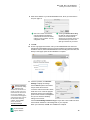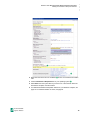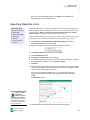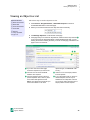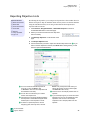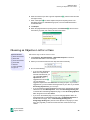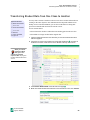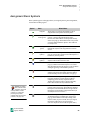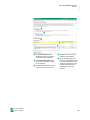
1
Math Management Software Software Manual Learn how to: • Manage libraries and objective lists • Set up and manage the Assignment Book • Print and score student assignments • Set preferences for page layout, TOPS™ Report, and AccelScan™ • Customize and print Accelerated Math reports Renaissance Learning PO Box 8036 Wisconsin Rapids, WI 54495-8036 Toll-Free Phone Number: (800) 338-4204 Local: (715) 424-3636 Outside the US: 1.715.424.3636 Fax: (715) 424-4242 Email (general questions): [email protected] Email (technical questions): [email protected] Web Site: www.renlearn.com Copyright Notice Copyright © 2009 by Renaissance Learning, Inc. All Rights Reserved. This publication is protected by US and international copyright laws. It is unlawful to duplicate or reproduce any copyrighted material without authorization from the copyright holder. This document may be reproduced only by staff members in schools that have a license for Accelerated Math, Renaissance Place Edition software. For more information, contact Renaissance Learning, Inc., at the address above. The Accelerated logo, Accelerated Math, 2Know!, AccelScan, NEO, NEO 2, Renaissance, Renaissance Learning, the Renaissance Learning logo, Renaissance Place, Renaissance Receiver, and Renaissance Responder are trademarks of Renaissance Learning, Inc., and its subsidiaries, registered, common law, or pending registration in the United States and in other countries. Macintosh and Safari are registered trademarks of Apple Inc., registered in the US and other countries. Internet Explorer and Windows are registered trademarks of Microsoft Corporation in the United States and/or other countries. Adobe, Flash, Reader, and Shockwave are either registered trademarks or trademarks of Adobe Systems Incorporated in the United States and/or other countries. Firefox is a registered trademark of the Mozilla Foundation. This product includes software developed by the Apache Software Foundation (www.apache.org/). This product includes software developed by the OpenSSL Project for use in the OpenSSL Toolkit (www.openssl.org/). As technology advances, it becomes necessary for software companies to drop support for older operating systems and thirdparty software. It is the responsibility of customers to keep their computers, networks, operating systems, and third-party software up-to-date and functional. Although Renaissance Learning will not discontinue support for older products immediately, we will continue to evaluate system requirements and do our best to provide advance notice when it becomes necessary to raise our requirements. 12/2009 AMRP v.3.5 CP2 C ONTENTS W e l c o m e t o A c c e l er a t e d M a t h . . . . . . . . . . . . . . . . . . . 1 How It Works in Your Classroom . . . . . . . . . . . . . . . . . . . . . . . . . . . . . . . . . . . . . . . . 1 Programs You Will Use . . . . . . . . . . . . . . . . . . . . . . . . . . . . . . . . . . . . . . . . . . . . . . . . . 2 Accelerated Math Software . . . . . . . . . . . . . . . . . . . . . . . . . . . . . . . . . . . . . . . . . . . . . . . . . .2 Renaissance Place Management System . . . . . . . . . . . . . . . . . . . . . . . . . . . . . . . . . . . . . . .2 AccelScan Software . . . . . . . . . . . . . . . . . . . . . . . . . . . . . . . . . . . . . . . . . . . . . . . . . . . . . . . . 3 Renaissance Responder Software . . . . . . . . . . . . . . . . . . . . . . . . . . . . . . . . . . . . . . . . . . . . 3 Tools to Help You with Accelerated Math . . . . . . . . . . . . . . . . . . . . . . . . . . . . . . . . . 3 Online Manuals and Tips . . . . . . . . . . . . . . . . . . . . . . . . . . . . . . . . . . . . . . . . . . . . . . . . . . . 3 Online Help. . . . . . . . . . . . . . . . . . . . . . . . . . . . . . . . . . . . . . . . . . . . . . . . . . . . . . . . . . . . . . .4 Other Resources . . . . . . . . . . . . . . . . . . . . . . . . . . . . . . . . . . . . . . . . . . . . . . . . . . . . . . . . . . .4 Getting Started . . . . . . . . . . . . . . . . . . . . . . . . . . . . . 5 Checking Software Requirements . . . . . . . . . . . . . . . . . . . . . . . . . . . . . . . . . . . . . . . . 5 Logging In and Changing Your Password. . . . . . . . . . . . . . . . . . . . . . . . . . . . . . . . . . 6 Navigating the Software . . . . . . . . . . . . . . . . . . . . . . . . . . . . . . . . . . . . . . . . . . . . . . . . 7 Switching Roles . . . . . . . . . . . . . . . . . . . . . . . . . . . . . . . . . . . . . . . . . . . . . . . . . . . . . . . 7 Logging Out and Closing the Software . . . . . . . . . . . . . . . . . . . . . . . . . . . . . . . . . . . . 7 Setting Up the Accelerated Math Software. . . . . . . . . . . . . . . . . . . . . . . . . . . . . . . . . 8 Setup Checklist . . . . . . . . . . . . . . . . . . . . . . . . . . . . . . . . . . . . . . . . . . . . . . . . . . . . . . . . . . . .8 Setting Up the Scanner . . . . . . . . . . . . . . . . . . . . . . . 9 Connecting the Scanner to the Computer. . . . . . . . . . . . . . . . . . . . . . . . . . . . . . . . . . 9 Installing the AccelScan Software . . . . . . . . . . . . . . . . . . . . . . . . . . . . . . . . . . . . . . . 10 Downloading the Software . . . . . . . . . . . . . . . . . . . . . . . . . . . . . . . . . . . . . . . . . . . . . . . . . 10 Installing the Scanning Software on Windows Computers . . . . . . . . . . . . . . . . . . . . . . . 11 Installing the Scanning Software on Macintosh Computers . . . . . . . . . . . . . . . . . . . . . . 13 AccelScan Software Updates . . . . . . . . . . . . . . . . . . . . . . . . . . . . . . . . . . . . . . . . . . . 16 Software Updates in Versions 1.42 and 1.43 . . . . . . . . . . . . . . . . . . . . . . . . . . . . . . . . . . . 16 Software Updates in Version 2.x . . . . . . . . . . . . . . . . . . . . . . . . . . . . . . . . . . . . . . . . . . . . 16 U s i n g t h e R e n a i s s a n c e R e s p o n d e r P r o g r a m . . . . . . . 17 Setting Up the Renaissance Receiver and Using Responders or NEO 2 Laptops . . . . . . . . . . . . . . . . . . . . . . . . . . . . . . . . . . . . . . . . . . . . . . . . . . . . . . . . . . . . . 17 Accelerated Math Software Manual i ..... CONTENTS Installing the Renaissance Responder Software . . . . . . . . . . . . . . . . . . . . . . . . . . . 17 Downloading the Software . . . . . . . . . . . . . . . . . . . . . . . . . . . . . . . . . . . . . . . . . . . . . . . . . 17 Installing the Renaissance Responder Software on Windows Computers . . . . . . . . . . 19 Installing the Renaissance Responder Software on Macintosh Computers . . . . . . . . 20 L i b r a r i e s . . . . . . . . . . . . . . . . . . . . . . . . . . . . . . . . . 22 What Are Libraries? . . . . . . . . . . . . . . . . . . . . . . . . . . . . . . . . . . . . . . . . . . . . . . . . . . 22 How to Install Your Accelerated Math Libraries . . . . . . . . . . . . . . . . . . . . . . . . . . . 22 Viewing Library Information . . . . . . . . . . . . . . . . . . . . . . . . . . . . . . . . . . . . . . . . . . . 23 Printing the Library Guide or Scope and Sequence. . . . . . . . . . . . . . . . . . . . . . . . . 24 Adding Libraries for a School. . . . . . . . . . . . . . . . . . . . . . . . . . . . . . . . . . . . . . . . . . . 25 Removing Libraries for a School . . . . . . . . . . . . . . . . . . . . . . . . . . . . . . . . . . . . . . . . 26 O b j e c t i v e s . . . . . . . . . . . . . . . . . . . . . . . . . . . . . . . . 27 What Are Objectives? . . . . . . . . . . . . . . . . . . . . . . . . . . . . . . . . . . . . . . . . . . . . . . . . . 27 What Are Objective Lists? . . . . . . . . . . . . . . . . . . . . . . . . . . . . . . . . . . . . . . . . . . . . . 27 Shared Objective Lists Versus My Lists . . . . . . . . . . . . . . . . . . . . . . . . . . . . . . . . . . 27 Shared Lists . . . . . . . . . . . . . . . . . . . . . . . . . . . . . . . . . . . . . . . . . . . . . . . . . . . . . . . . . . . . . 27 My Lists (Private Lists) . . . . . . . . . . . . . . . . . . . . . . . . . . . . . . . . . . . . . . . . . . . . . . . . . . . .28 Creating Objective Lists . . . . . . . . . . . . . . . . . . . . . . . . . . . . . . . . . . . . . . . . . . . . . . . 28 Creating an Objective List Starting from the Libraries Page. . . . . . . . . . . . . . . . . . . . . .28 Creating an Objective List Starting from the Assignment Book or Extended Response Page . . . . . . . . . . . . . . . . . . . . . . . . . . . . . . . . . . . . . . . . . . . . . . . . . . . . . . .30 Adding Objectives by Library . . . . . . . . . . . . . . . . . . . . . . . . . . . . . . . . . . . . . . . . . . . . . . . 31 Adding Objectives by Searching by Objective Name . . . . . . . . . . . . . . . . . . . . . . . . . . . .33 Adding Objectives by Searching by State Standard Code . . . . . . . . . . . . . . . . . . . . . . . .34 Importing Objective Lists . . . . . . . . . . . . . . . . . . . . . . . . . . . . . . . . . . . . . . . . . . . . . . 35 Viewing an Objective List . . . . . . . . . . . . . . . . . . . . . . . . . . . . . . . . . . . . . . . . . . . . . . 36 Exporting Objective Lists . . . . . . . . . . . . . . . . . . . . . . . . . . . . . . . . . . . . . . . . . . . . . . 37 Choosing an Objective List for a Class . . . . . . . . . . . . . . . . . . . . . . . . . . . . . . . . . . . 38 Copying an Objective List . . . . . . . . . . . . . . . . . . . . . . . . . . . . . . . . . . . . . . . . . . . . . . 40 Adding Objectives to a List or Removing Them from a List . . . . . . . . . . . . . . . . . . 41 Changing the Order of Objectives in a List . . . . . . . . . . . . . . . . . . . . . . . . . . . . . . . . 46 Marking Objectives Related to Specific Standards . . . . . . . . . . . . . . . . . . . . . . . . . 48 Editing Objective List Information . . . . . . . . . . . . . . . . . . . . . . . . . . . . . . . . . . . . . . 49 Deleting Objective Lists . . . . . . . . . . . . . . . . . . . . . . . . . . . . . . . . . . . . . . . . . . . . . . . 50 Accelerated Math Software Manual ii ..... CONTENTS T h e A s s i g n m e n t B o o k . . . . . . . . . . . . . . . . . . . . . . . 51 How Students Master Objectives in the Assignment Book. . . . . . . . . . . . . . . . . . . 51 Viewing the Assignment Book for a Class. . . . . . . . . . . . . . . . . . . . . . . . . . . . . . . . . 52 Assigning Objectives to Students in the Assignment Book. . . . . . . . . . . . . . . . . . . 53 Transferring Student Data from One Class to Another. . . . . . . . . . . . . . . . . . . . . . 55 Assignment Book Symbols . . . . . . . . . . . . . . . . . . . . . . . . . . . . . . . . . . . . . . . . . . . . . 56 Intervene . . . . . . . . . . . . . . . . . . . . . . . . . . . . . . . . . . . . . . . . . . . . . . . . . . . . . . . . . . . 57 Mastery Criteria . . . . . . . . . . . . . . . . . . . . . . . . . . . . . . . . . . . . . . . . . . . . . . . . . . . . . . 59 Mastery Criteria Defined . . . . . . . . . . . . . . . . . . . . . . . . . . . . . . . . . . . . . . . . . . . . . . . . . . .59 How to Change the Mastery Criteria for an Objective . . . . . . . . . . . . . . . . . . . . . . . . . . 60 Printing Assignments . . . . . . . . . . . . . . . . . . . . . . . . . . . . . . . . . . . . . . . . . . . . . . . . . 63 Types of Assignments . . . . . . . . . . . . . . . . . . . . . . . . . . . . . . . . . . . . . . . . . . . . . . . . . . . . .63 Make Sure You Have the Renaissance Place Print Plug-In . . . . . . . . . . . . . . . . . . . . . . .64 How to Print a Practice . . . . . . . . . . . . . . . . . . . . . . . . . . . . . . . . . . . . . . . . . . . . . . . . . . . .66 How to Print an Exercise. . . . . . . . . . . . . . . . . . . . . . . . . . . . . . . . . . . . . . . . . . . . . . . . . . . 67 How to Print a Test . . . . . . . . . . . . . . . . . . . . . . . . . . . . . . . . . . . . . . . . . . . . . . . . . . . . . . .69 How to Print a Diagnostic Test. . . . . . . . . . . . . . . . . . . . . . . . . . . . . . . . . . . . . . . . . . . . . . 71 Student Capacity Limit . . . . . . . . . . . . . . . . . . . . . . . . . . . . . . . . . . . . . . . . . . . . . . . . 73 Reprinting Assignments . . . . . . . . . . . . . . . . . . . . . . . . . . . . . . . . . . . . . . . . . . . . . . . 73 How to Reprint an Assignment for One Student . . . . . . . . . . . . . . . . . . . . . . . . . . . . . . . 73 How to Reprint an Assignment for More Than One Student . . . . . . . . . . . . . . . . . . . . . 75 Deleting Assignments . . . . . . . . . . . . . . . . . . . . . . . . . . . . . . . . . . . . . . . . . . . . . . . . . 76 How to Delete an Assignment for One Student . . . . . . . . . . . . . . . . . . . . . . . . . . . . . . . . 76 How to Delete an Assignment for More Than One Student . . . . . . . . . . . . . . . . . . . . . . 77 Scoring Assignments . . . . . . . . . . . . . . . . . . . . . . . . . . . . . . . . . . . . . . . . . . . . . . . . . . 78 How to Score Assignments Using AccelScan . . . . . . . . . . . . . . . . . . . . . . . . . . . . . . . . . .78 How to Score Assignments in the Assignment Book . . . . . . . . . . . . . . . . . . . . . . . . . . . 80 Rescoring Assignments. . . . . . . . . . . . . . . . . . . . . . . . . . . . . . . . . . . . . . . . . . . . . . . . 81 Putting Objectives on Hold. . . . . . . . . . . . . . . . . . . . . . . . . . . . . . . . . . . . . . . . . . . . . 82 Resetting Objectives . . . . . . . . . . . . . . . . . . . . . . . . . . . . . . . . . . . . . . . . . . . . . . . . . . 84 Viewing a Sample Problem or Worked Example for an Objective . . . . . . . . . . . . . 86 Unassigning Objectives. . . . . . . . . . . . . . . . . . . . . . . . . . . . . . . . . . . . . . . . . . . . . . . . 87 Viewing Student Details . . . . . . . . . . . . . . . . . . . . . . . . . . . . . . . . . . . . . . . . . . . . . . . 89 Printing Reports from the Assignment Book . . . . . . . . . . . . . . . . . . . . . . . . . . . . . . 91 How to Print the Diagnostic or Status of the Class Report in the Assignment Book . . . . . . . . . . . . . . . . . . . . . . . . . . . . . . . . . . . . . . . . . . . . . . . . . . . . . . . . . . . . . . . . 91 How to Print the TOPS Report in the Assignment Book . . . . . . . . . . . . . . . . . . . . . . . . .92 Copying Settings from One Class to Another . . . . . . . . . . . . . . . . . . . . . . . . . . . . . . 93 Using the Math Glossary. . . . . . . . . . . . . . . . . . . . . . . . . . . . . . . . . . . . . . . . . . . . . . . 95 Accelerated Math Software Manual iii ..... CONTENTS Using Renaissance Responders or NEO 2 Laptops w i t h A c c e l e r a t e d M a t h R P . . . . . . . . . . . . . . . . . . . . 97 How to Start a Session . . . . . . . . . . . . . . . . . . . . . . . . . . . . . . . . . . . . . . . . . . . . . . . . . . . . . 97 How Students Use the Renaissance Responder or NEO 2 Laptop to Enter Their Answers . . . . . . . . . . . . . . . . . . . . . . . . . . . . . . . . . . . . . . . . . . . . . . . . . . . . . . . .98 How to End a Session . . . . . . . . . . . . . . . . . . . . . . . . . . . . . . . . . . . . . . . . . . . . . . . . . . . . .99 Using Renaissance Home Connect with Accelerated M a t h R P . . . . . . . . . . . . . . . . . . . . . . . . . . . . . . . . . 100 How to Make Sure a Computer Has Adobe Flash Player and Adobe Reader . . . 100 How Students Use Renaissance Home Connect to Complete Practices and Exercises . . . . . . . . . . . . . . . . . . . . . . . . . . . . . . . . . . . . . . . . . . . . . . . . . . . . . . . 101 How Students View Their Accelerated Math Progress in Renaissance Home Connect . . . . . . . . . . . . . . . . . . . . . . . . . . . . . . . . . . . . . . . . . . . . . . . . . . . . . . 105 How Students View Worked Examples in Renaissance Home Connect . . . . . . . 108 How Students Use the Math Glossary. . . . . . . . . . . . . . . . . . . . . . . . . . . . . . . . . . . 112 Differences between Renaissance Home Connect and Parent Login . . . . . . . . . 114 Renaissance Home Connect . . . . . . . . . . . . . . . . . . . . . . . . . . . . . . . . . . . . . . . . . . . . . . . 114 Parent Access to Renaissance Place . . . . . . . . . . . . . . . . . . . . . . . . . . . . . . . . . . . . . . . . . 114 E x t e n d e d R e s p o n s e A s s i g n m e n t s . . . . . . . . . . . . . . . 115 Symbols on the Extended Response Pages. . . . . . . . . . . . . . . . . . . . . . . . . . . . . . . 115 How Extended Response Assignments Work . . . . . . . . . . . . . . . . . . . . . . . . . . . . 115 Viewing the Extended Response Page for a Class . . . . . . . . . . . . . . . . . . . . . . . . . 116 Printing or Reprinting Extended Response Assignments. . . . . . . . . . . . . . . . . . . 117 Scoring or Rescoring Extended Response Assignments . . . . . . . . . . . . . . . . . . . . 119 Transferring Extended Response Assignment Data from Other Classes . . . . . . 120 Viewing Extended Response Problems. . . . . . . . . . . . . . . . . . . . . . . . . . . . . . . . . . 120 Printing Reports from the Extended Response Page . . . . . . . . . . . . . . . . . . . . . . 121 How to Print the Extended Response Diagnostic or Status Report . . . . . . . . . . . . . . . 121 How to Print the TOPS Report on the Extended Response Page . . . . . . . . . . . . . . . . . 122 Deleting Extended Response Assignments. . . . . . . . . . . . . . . . . . . . . . . . . . . . . . . 124 T e a m s a n d G o a l s . . . . . . . . . . . . . . . . . . . . . . . . . . . 125 About Goals . . . . . . . . . . . . . . . . . . . . . . . . . . . . . . . . . . . . . . . . . . . . . . . . . . . . . . . . 125 Setting Goals . . . . . . . . . . . . . . . . . . . . . . . . . . . . . . . . . . . . . . . . . . . . . . . . . . . . . . . 125 Accelerated Math Software Manual iv ..... CONTENTS About Teams and Team Sets . . . . . . . . . . . . . . . . . . . . . . . . . . . . . . . . . . . . . . . . . . 126 Adding Team Sets . . . . . . . . . . . . . . . . . . . . . . . . . . . . . . . . . . . . . . . . . . . . . . . . . . . 127 Adding Teams to a Set. . . . . . . . . . . . . . . . . . . . . . . . . . . . . . . . . . . . . . . . . . . . . . . . 128 Assigning Students to Teams . . . . . . . . . . . . . . . . . . . . . . . . . . . . . . . . . . . . . . . . . . 129 How to Automatically Divide Students Among Teams . . . . . . . . . . . . . . . . . . . . . . . . . 129 How to Manually Select Students for Each Team . . . . . . . . . . . . . . . . . . . . . . . . . . . . . 129 How to Change the Students on a Team . . . . . . . . . . . . . . . . . . . . . . . . . . . . . . . . . . . . . 131 Editing Team Set Names and Owners. . . . . . . . . . . . . . . . . . . . . . . . . . . . . . . . . . . 132 Editing Team Names. . . . . . . . . . . . . . . . . . . . . . . . . . . . . . . . . . . . . . . . . . . . . . . . . 133 Deleting Teams from Sets. . . . . . . . . . . . . . . . . . . . . . . . . . . . . . . . . . . . . . . . . . . . . 134 Deleting Team Sets . . . . . . . . . . . . . . . . . . . . . . . . . . . . . . . . . . . . . . . . . . . . . . . . . . 135 Printing Reports from the Teams & Goals Page. . . . . . . . . . . . . . . . . . . . . . . . . . . 135 R e p o r t s . . . . . . . . . . . . . . . . . . . . . . . . . . . . . . . . . . 137 About Renaissance Place and Accelerated Math Reports . . . . . . . . . . . . . . . . . . . 137 Using Accelerated Math Reports . . . . . . . . . . . . . . . . . . . . . . . . . . . . . . . . . . . . . . . 138 Check for Adobe Reader before You Generate Reports . . . . . . . . . . . . . . . . . . . . . . . . . 138 Printing Accelerated Math Reports . . . . . . . . . . . . . . . . . . . . . . . . . . . . . . . . . . . . . . . . . 138 About Reporting Parameter Groups . . . . . . . . . . . . . . . . . . . . . . . . . . . . . . . . . . . . . . . . 142 Report Descriptions . . . . . . . . . . . . . . . . . . . . . . . . . . . . . . . . . . . . . . . . . . . . . . . . . 143 Diagnostic Export . . . . . . . . . . . . . . . . . . . . . . . . . . . . . . . . . . . . . . . . . . . . . . . . . . . 150 Engaged Time . . . . . . . . . . . . . . . . . . . . . . . . . . . . . . . . . . . . . . . . . . . . . . . . . . . . . . 150 Parent Reports . . . . . . . . . . . . . . . . . . . . . . . . . . . . . . . . . . . . . . . . . . . . . . . . . . . . . . 150 How to Give Parents Direct Access to the Accelerated Math Parent Reports . . . . . . . 150 How Parents Print Reports . . . . . . . . . . . . . . . . . . . . . . . . . . . . . . . . . . . . . . . . . . . . . . . . 151 P r e f e r e n c e s . . . . . . . . . . . . . . . . . . . . . . . . . . . . . . . 153 Changing Classroom Preferences . . . . . . . . . . . . . . . . . . . . . . . . . . . . . . . . . . . . . . 153 How to Change the Class Marking Periods Preference . . . . . . . . . . . . . . . . . . . . . . . . . 153 How to Change the Extended Response Preference . . . . . . . . . . . . . . . . . . . . . . . . . . . 154 How to Change the Page Layout Preference . . . . . . . . . . . . . . . . . . . . . . . . . . . . . . . . . . 155 How to Change the Practice Preference. . . . . . . . . . . . . . . . . . . . . . . . . . . . . . . . . . . . . . 156 How to Change the Printing Preference . . . . . . . . . . . . . . . . . . . . . . . . . . . . . . . . . . . . . 157 How to Change the Renaissance Home Connect Preference (If Available). . . . . . . . . 158 How to Change the Scoring Preference . . . . . . . . . . . . . . . . . . . . . . . . . . . . . . . . . . . . . . 159 How to Change the TOPS Report Preference . . . . . . . . . . . . . . . . . . . . . . . . . . . . . . . . .160 Changing the General Preference (a User Preference) . . . . . . . . . . . . . . . . . . . . . 161 Accelerated Math Software Manual v ..... CONTENTS A p p e n d i x A : C a p a b i l i t i e s . . . . . . . . . . . . . . . . . . . . . 162 User Groups in the Software . . . . . . . . . . . . . . . . . . . . . . . . . . . . . . . . . . . . . . . . . . 162 Capabilities for All Renaissance Place Programs. . . . . . . . . . . . . . . . . . . . . . . . . . 164 Accelerated Math Capabilities . . . . . . . . . . . . . . . . . . . . . . . . . . . . . . . . . . . . . . . . . 168 I n d e x . . . . . . . . . . . . . . . . . . . . . . . . . . . . . . . . . . . 169 Accelerated Math Software Manual vi W ELCOME TO A CCELERATED M ATH Accelerated Math Renaissance Place (RP) Edition is a computer-based system that manages and monitors students’ mathematics practice from first grade through calculus. Accelerated Math automatically performs these essential tasks: • Prints assignments for each student • Scores students’ work and gives immediate feedback • Gives you diagnostic information each day through individual student and class reports • Tells you which mathematics objectives students have mastered and which ones are giving them difficulty Accelerated Math will help you individualize instruction and student work in your classroom. How It Works in Your Classroom A typical Accelerated Math classroom operates something like this: 1. You assign objectives to students in the Accelerated Math Assignment Book. The TOPS Report and the next assignment are printed automatically. When students submit an assignment, the TOPS Report tells them their scores, the answers they missed, and the specific objectives they need more practice on. The next practice assignment may provide additional practice on objectives that need more work and on new objectives to replace those mastered. 2. You provide instruction on Accelerated Math objectives. 3. In Accelerated Math, you print an individualized practice assignment for each student based on the objectives you assigned. 4. Students work on the printed practice assignments. They may record their answers on Accelerated Math scan cards and then feed their scan cards into the scanner, or they may enter their answers on a Renaissance Responder, on a NEO 2 laptop, or in Renaissance Home Connect (if it’s available) for automatic scoring. 5. Accelerated Math scores each student’s work, and prints both a TOPS Report and the student’s next practice assignment. 6. The student reworks any problems missed, and you and the student discuss the TOPS Report and any corrections. 7. When the student meets the practice mastery criteria for an objective (see page 59), you print a test for that student. 8. Students work on their printed tests, recording their answers on Accelerated Math scan cards for AccelScan scoring or entering them with a Renaissance Responder or NEO 2 laptop for automatic scoring. 9. Accelerated Math scores the tests, and you and the student discuss the TOPS Report and any corrections. 10. When the student meets the test mastery criteria, the objective is mastered. Review problems from the objective will start appearing on practices two weeks after this. Accelerated Math Software Manual 1 Programs You Will Use ..... WELCOME TO ACCELERATED MATH Programs You Will Use Accelerated Math RP has four components: the Accelerated Math software, the Renaissance Place Management system, the AccelScan software, and the Renaissance Responder software. Accelerated Mat h Software The Accelerated Math software—accessible from the Renaissance Place Home page— will manage the program in your classrooms and keep track of students’ progress. What You’ll Use Accelerated Math to Do For information on installing and registering your Accelerated Math software, see the Renaissance Place Installation Guide. See Page Get tips, manuals, and other documents to help you use Accelerated Math in your classroom 3 View information about libraries 23 Create objective lists if you want to make your own instead of using the ones that were automatically created for each library 28 Choose an objective list for each class 38 Assign objectives to students 53 Print assignments 63 Score assignments 78 View information about students’ work on objectives 89 Create teams 126 Set goals 125 Print reports 91 Set preferences 153 Renaissance Pl ace Management System For information on the Renaissance Place management system, see the Renaissance Place Software Manual or online help. The Renaissance Place management system—also accessible from the Renaissance Place Home page—lets you view and manage district, school, student, teacher, parent, course, and class information in the Renaissance Place database, which is shared by all Renaissance Place Edition software used in your district or school. The tasks you can perform in the management program depend on your user level. For example, administrators have more management tasks to perform than teachers. Sample tasks may include: • Adding, editing, or deleting courses and classes, and assigning teachers and students to them • Selecting a different school year to work in • Viewing student information or clearing a lock if a student’s login is denied Accelerated Math Software Manual 2 Tools to Help You with Accelerated Math ..... WELCOME TO ACCELERATED MATH • Downloading software needed to run Renaissance Place programs • Printing reports with data from multiple Renaissance Place programs AccelScan Soft ware The AccelScan software is the link between Accelerated Math and the scanner. It reads students’ answers on their scan cards and automatically scores their work. Instructions for setting up the scanner and installing the AccelScan software begin on page 10. Renaissance Responder Sof tware The Renaissance Responder software allows you to have students use either Renaissance Responders or NEO 2 laptops to enter their answers to Accelerated Math assignments. These answers are then scored automatically. (To set up the Renaissance Receiver and Renaissance Responders, see the instructions that came with the classroom response system. For more about the Responder SmartApplet, see the NEO 2 Quick Guide.) To install the Renaissance Responder software for Accelerated Math, see page 17. Tools to Help You with Accelerated Math You’ll find many tools in the software to help you learn how to use Accelerated Math: • Online manuals and tips • Online help • Other resources Online Manuals and Tips If you’re reading this online, you’ve already discovered the Manuals link in the upperright corner of any page in the program. Clicking that link lists the documents available for the Renaissance Learning programs installed on your server. For Accelerated Math, you’ll find these documents helpful: Do you still have questions? Send general questions about the software to: [email protected]. Send technical questions to: [email protected]. You can also call Renaissance Learning at (800) 338-4204. Accelerated Math Software Manual Document What It Gives You Accelerated Math Software Manual • General information about the program • Step-by-step instructions for working with the program Accelerated Math Software Tips for Getting Started • Helpful hints to get you started using the program Renaissance Place Software Manual • Procedures for managing all school and district information • Instructions for consolidating data and generating custom reports How to Read a Math Implementation Report • Information to help you interpret data in the Renaissance Place Implementation Progress and Status Reports 3 Tools to Help You with Accelerated Math ..... WELCOME TO ACCELERATED MATH Online Hel p To access the online help, click Help in the upper-right corner of any page. The help opens in a separate window as shown below. B C A A The Help link is on every page in the program. Click it to get more information about the page currently displayed in the program. B To navigate the help, use the buttons at the top of the Help page. • Click Contents to display the table of contents for the help. • Click Index to display an alphabetical list of topics. • Click Search to find a help topic using words or phrases. • Click Back to view previously selected help pages. • Click Other Help to see a list of the Renaissance Place programs installed on your server and click the program name to view its help. • Click Close Help to close the help. C This logo lets you know you’re in the Accelerated Math help. If you go to another program’s help, the logo for that program will appear. Other Resources The Accelerated Math software contains other resources to help you use Accelerated Math in your classroom. Click Resources in the Accelerated Math task list on the Home page to find forms, plans, charts, tips, routines, research, and other helpful documents. Accelerated Math Software Manual 4 G ETTING S TARTED Checking Software Requirements To check that a specific computer has the necessary software to run Accelerated Math—such as Adobe Reader for displaying reports or Adobe Flash Player for displaying worked examples of problems—click Check Software Requirements on the Renaissance Place Welcome page A before you log in. Client or supporting software should be installed by a user who is logged in on the computer as an administrator or as a member of the Administrators group with administrative rights; this will make the software available to all users of the computer. A The Software Requirements page will open with a list of all the necessary software and (in some cases) audio samples, animations, and links for testing programs that are currently installed. If any programs are missing or need to be updated, click the install Version link B for that program. B Accelerated Math Software Manual 5 ..... GETTING STARTED Logging In and Changing Your Password For the most up-to-date software, hardware, and operating system requirements for Accelerated Math, visit www.renlearn.com/requirements. If you are planning to use AccelScan scanners with Accelerated Math, you need to install the AccelScan scanning software; see page 10. If you are planning to use Renaissance Responders with Accelerated Math, you will need the Renaissance Responder program; see page 17. Logging In and Changing Your Password Use these instructions to log in to Renaissance Place, change your password—either by choice or when the software requires it—and access the Accelerated Math program. 1. In your Web browser, go to the URL for Renaissance Place. Supported browsers include Internet Explorer, Firefox, and Safari. 2. On the Welcome page, click Teacher/Administrator. 3. Enter your user name and password. To change your password, check the Change Password box. 4. Click Log In. If you’re not changing your password, your Home page opens. If the Change Password page opens and you didn’t choose to change your password when logging in, one of two things has happened. Either your system administrator wants you to change it for security reasons or you haven’t changed it in a year and the software requires it. Accelerated Math Software Manual 5. If you are changing your password, enter it now, type it again to verify it, and click Save to open your Home page. 6 Navigating the Software ..... GETTING STARTED Na viga ting the Softw are The navigation bar at the top of each page shows you where you are in the software, as shown here. If you need to go back to a previous page, use the links in the navigation bar rather than the Web browser’s Back button, which can sometimes give you unexpected results. For example, if you’re on the Manage Objectives page and want to go to the Home page, click Home in the navigation bar. Switching Roles Some people in your district or school may be assigned more than one role, or they may be assigned to more than one school. For example, the librarian in the high school might also teach a class in one of the middle schools. Renaissance Place keeps track of these multiple roles and school assignments. You can switch between roles or schools after you log in or any time while you are using the software. On the Home page, choose a role from the User Type drop-down list: For more information, see the Renaissance Place Software Manual. Logging Out and Closing the Software Automatic logout after 20 minutes. If you don’t use Accelerated Math for about 20 minutes, it automatically logs you out, and you’ll have to log in again when you return to the software. Accelerated Math Software Manual When you’ve finished working in Accelerated Math, log out to keep your data secure. 1. Click Log Out in the upper-right corner of any page. 2. Close the software by closing your Web browser. 7 ..... GETTING STARTED Setting Up the Accelerated Math Software S e t t i n g U p t he A c c e l e r a t e d M a t h S of t w a r e Much of the preliminary setup for Accelerated Math will occur before you log in the first time. For example, the software will probably be installed and registered on a central server in your district or school for you to access. Setup Checklist The tasks listed below must be performed after Accelerated Math is installed and registered on the server and as you start using it in your classroom. You may or may not be the one required to do any of these tasks. Usually Performed By District Task Admin. School Staff Admin. Staff Teacher Where to Find Instructions Install Accelerated Math libraries Page 22 Enter district information Renaissance Place Software Manual Add school years Add school information Add school administrators and district staff Add teachers, school staff, and students; add parents, if desired Add school marking periods Add courses and classes, assign teachers— designate a lead teacher for each Accelerated Math classroom—and enroll students in classes Set the Class Marking Period preference Create objective lists and add objectives to them (if you want to create your own instead of using the lists that were automatically created for each library) Select an objective list for each class Assignment Book and for extended response assignments Assign objectives to students Page 153 Page 28 Page 38 Page 53 Print your students’ assignments Page 63 Make sure teacher and student computers have the necessary software installed Adobe Reader: Page 5 AccelScan: Page 11 Responder: Page 17 Accelerated Math Software Manual 8 S ETTING U P THE S CANNER The AccelScan scanner reads and scores scan cards containing students’ answers for their assignments. Connecting the Scanner to the Computer You’ll connect the scanner to a computer that has the Accelerated Math software running on it. Check system requirements. Before you connect the scanner to the computer, check the system requirements at www.renlearn.com/requirements. 1. AccelScan models 2110, 2210, and 1100 Serial: Plug the round connector on the AccelScan power cable into the matching port on the AccelScan, and plug the scanner into an electrical outlet. AccelScan model 1100 USB: You received a power cord and a power supply box with a cable attached. Connect the power cord to the power supply box. Then, plug the small round connector into the AccelScan, and plug the power cord into an electrical outlet. 2. Connect the data cable coming from the AccelScan to the matching port on your computer. If the data cable has a USB connector, attach it to your computer’s USB port. If not, do the following: • For Windows Computers: Attach the 9-pin serial port adapter to the end of the AccelScan cable and then attach the cable to your computer. • For Macintosh Computers: Connect the data cable to an 8-pin female serial port on your computer, such as the printer or modem port. 3. For AccelScan model 1100 USB, see the user’s guide that came with your scanner to install the AccelScan drivers. 4. Follow the steps in the next section to install and set up the scanner software. Accelerated Math Software Manual 9 Installing the AccelScan Software ..... SETTING UP THE SCANNER I n s t a l l i n g t h e Ac c e l S c a n S o f t w a r e The AccelScan scanning software reads students’ answers on scan cards and scores them. The software must be installed on every computer used for scanning. Downloading the Softwar e 1. Before logging in on the Renaissance Place Welcome page, click Check Software Requirements in the lower-left corner of the page. Supporting client software should be installed by a user who is logged in on the computer as an administrator or as a member of the Administrators group with administrative rights; this will make the software accessible to all users of the computer. If you are already logged in to the program, you can also click Product Administration under Renaissance Place on the Home page and then click Download Supporting Software. A B 2. Write down the server name or IP address A shown. You’ll need this information later. 3. Click the AccelScan link for your operating system B. Accelerated Math Software Manual 10 Installing the AccelScan Software ..... SETTING UP THE SCANNER 4. Select Save when the system asks if you want to run or save the file. If you are using a Macintosh computer and it asks you whether to unstuff the file, choose to unstuff it. When the download is complete, close the window. 5. To install the scanning software on your Windows computer, continue with the steps below. To install the software on a Macintosh computer, see page 13. Installing the Scanning Software on Windows Comput er s 1. Close any programs you have open on your computer. 2. Double-click the AccelScanInstaller1.43Win.exe file that you just downloaded. 3. When the setup page below opens, click Next >. 4. When the system asks you which folder to store the software in, click Next > to accept the suggested destination folder, or click Browse to select a different folder before you click Next >. 5. Click Finish when the installation is complete. 6. Double-click the AccelScan icon. 7. Enter the name of your Accelerated Math server or the IP address you wrote down in step 2 on page 10. A B A This is the number of minutes the scanning software will attempt to communicate with the server before notifying you of a problem. You may change this number. Accelerated Math Software Manual B Checking the Enable Server Ping box tells the scanning software to check communication with the server every five minutes. This is not recommended if you have a slow (dial-up) connection to your server. 11 Installing the AccelScan Software ..... SETTING UP THE SCANNER 8. Click OK. 9. On the Login page shown below, enter your Accelerated Math user name and password and click Log In to open the scanning software. If the scanning software, AccelScan scanner, and Accelerated Math are communicating with each other, the Ready to Scan page opens and the installation is complete. 10. If there’s a problem, click Scanner Settings to display the settings shown here. Scanner sensitivity. The Sensitivity setting determines how sensitive the AccelScan is to marks on a scan card. If you find the scanner needs to be more or less sensitive, you can come back to this page to change it at any time. Log into the AccelScan Scanning software, select the Edit menu, and choose AccelScan Settings. 11. Use the Port drop-down list to select the port where the scanner is connected. If the scanner has a switch, make sure it is on. Once the program detects the scanner, the exclamation point over the scanner icon disappears and you can choose a sensitivity setting for the scanner. 12. Check the Allow Background Scanning box if you want to scan cards even when the AccelScan software is in the background on your computer. 13. When you’ve finished, click OK. The installation is complete. Accelerated Math Software Manual 12 Installing the AccelScan Software ..... SETTING UP THE SCANNER Installing t he Scanning Software on Macintosh Computers Installing Version 2.x on Macintosh OS 10.4–10.5 Computers 1. Close any programs you have open on your computer. 2. Double-click the AccelScan 2.0.dmg file that you downloaded. The volume will open. 3. Double-click the AccelScan package file. 4. Click Continue on the Welcome panel of the Install AccelScan assistant. 5. Click the drive where you want to install the software. Then, click Continue. 6. Click Install on the next panel. 7. Enter the administrator user name and password when the program asks for this information; then, click OK. 8. An alert will tell you that you must restart your computer after installation. Click Continue Installation. 9. Click Restart when the installation is complete. Your computer will restart. You may have extra steps to perform to install the OS X scanner driver. Follow the instructions and restart the computer after installation. 10. Open the Applications folder on the drive where you installed the software. Then, double-click AccelScan in that folder. Setting the Timeout and enabling a server ping. To see the server communication settings, click the AccelScan menu and choose Preferences; then, click Server. You can set the Timeout value, which determines how long the software will attempt to communicate with the server before notifying you of a problem. You can also check the Enable Server Ping box if you want the software to check communication with the server every five minutes (not recommended for dial-up connections). Accelerated Math Software Manual 11. Enter the IP address of your Accelerated Math server, which you wrote down in step 2 on page 10. 12. Click OK. 13. On the Login page, enter your Accelerated Math user name and password and click Log In to open the scanning software. If the scanning software, AccelScan scanner, and Accelerated Math are communicating with each other, the Ready to Scan page will open. The installation is complete. 13 Installing the AccelScan Software ..... SETTING UP THE SCANNER If there’s a problem, click Scanner Settings to display the Scanner settings. Use the Port drop-down list to select the port where the scanner is connected. If the scanner has a switch, make sure it is on. Once the program detects the scanner, the exclamation point over the scanner icon disappears and you can choose a sensitivity setting for the scanner. Check the Allow Background Scanning box if you want to scan cards even when the AccelScan software is in the background on your computer. When you’ve finished, click OK. The installation is complete. Installing Version 1.42 on Macintosh OS 9 and OS 10.2.8–10.3.9 Computers 1. Close any programs you have open on your computer. 2. Double-click AccelScan1.42 in the location where you downloaded the .dmg file. (You may need to double-click the AccelScan1.42.dmg file first.) A folder will open. 3. Double-click AccelScanInstaller1.42Mac. 4. When the AccelScan page opens, click Continue. 5. If the folder highlighted on the page is where you want to store the AccelScan software, click Choose. If not, click the drives icon (OS 9) or scroll to the left (OS 10.2.8–10.3.9) and select your hard drive. Find and select the folder where you want to install the software. Click Choose. The program may ask you to restart after installation if CarbonLib was updated. 6. You may have extra steps to perform to install the OS 10 scanner driver. Follow the instructions and restart the computer after installation. 7. Double-click the AccelScan icon in the folder where you installed it. Accelerated Math Software Manual 14 Installing the AccelScan Software ..... SETTING UP THE SCANNER 8. Enter the IP address of your Accelerated Math server, which you wrote down in step 2 on page 10. B C B This is the number of minutes the scanning software will attempt to communicate with the server before notifying you of a problem. You may change this number. C Checking the Enable Server Ping box tells the scanning software to check communication with the server every five minutes. This is not recommended if you have a slow (dial-up) connection to your server. 9. Click OK. 10. On the Login page shown below, enter your Accelerated Math user name and password and click Log In to open the scanning software. If the scanning software, AccelScan scanner, and Accelerated Math are communicating with each other, the Ready to Scan page opens and the installation is complete. 11. If there’s a problem, click Scanner Settings to display the settings. Scanner sensitivity. The Sensitivity setting determines how sensitive the AccelScan is to marks on a scan card. If you find the scanner needs to be more or less sensitive, you can come back to this page to change it at any time. Log into the AccelScan Scanning software, select the Edit menu, and choose AccelScan Settings. Use the Port drop-down list to select the port where the scanner is connected. If the scanner has a switch, make sure it is on. Once the program detects the scanner, the exclamation point over the scanner icon disappears and you can choose a sensitivity setting for the scanner. Check the Allow Background Scanning box if you want to scan cards even when the AccelScan software is in the background on your computer. When you’ve finished, click OK. The installation is complete. Accelerated Math Software Manual 15 AccelScan Software Updates ..... SETTING UP THE SCANNER AccelScan Software Updates Software Updates in Versions 1. 42 and 1.43 Your AccelScan software automatically checks for updates when you start the program. If updates are available, follow the instructions in the messages you see. Software Updates in Version 2.x The AccelScan software automatically checks for updates when you start the program. However, you can also check for updates while running the program by clicking the AccelScan menu and choosing Check for Updates. When an update is available, you will see a message about the update. You can click a link in the message to see more information about the update. If the update is optional, the message will include an Ignore button. You can click Ignore to continue using the AccelScan software without installing the update. When you choose to ignore an update, the software will not bring it to your attention again when it automatically checks for updates, but you will see it again if you choose to check for updates yourself using the item in the AccelScan menu. To download and install an update, click Download. Double-click the file that you downloaded to begin installing the update. Accelerated Math Software Manual 16 U SING THE R ENAISSANCE R ESPONDER P ROGRAM If your class has a Renaissance Receiver and either Renaissance Responders or NEO 2 laptops, students can use the Responders or NEO 2 laptops to enter their answers for Accelerated Math assignments. Setting Up the Renaissance Receiver and Using Responders or NEO 2 Laptops To find out how to connect your Renaissance Receiver and start using Renaissance Responders, refer to the instructions that you received with the classroom response system. To find out more about the Responder SmartApplet on NEO 2 laptops, refer to the NEO 2 Quick Guide. I n s t a l l i n g t h e R e n a i s s an c e R e s p o n d e r S o f t w a r e Before you can use Renaissance Responders or NEO 2 laptops with Accelerated Math, you must install the Renaissance Responder client software on each computer that has a Renaissance Receiver. Downloading the Softwar e Supporting client software should be installed by a user who is logged in on the computer as an administrator or as a member of the Administrators group with administrative rights; this will make the software accessible to all users of the computer. Accelerated Math Software Manual 1. Before logging in on the Renaissance Place Welcome page, click Check Software Requirements in the lower-left corner of the page. If you are a district or school administrator or teacher and you are already logged in to the program, you can also click Product Administration under Renaissance Place on the Home page and then click Download Supporting Software. 17 Installing the Renaissance Responder Software ..... USING THE RENAISSANCE RESPONDER PROGRAM A B 2. Write down the server name or IP address A shown. You’ll need this information later. 3. Click the Renaissance Responder link for your operating system B. 4. Select Save when the system asks if you want to run or save the file. When the download is complete, close the window. 5. To install the Renaissance Responder software on your Windows computer, see page 19. To install the software on a Mac, see page 20. Accelerated Math Software Manual 18 Installing the Renaissance Responder Software ..... USING THE RENAISSANCE RESPONDER PROGRAM Installing t he Renaissance Responder Software on Windows Computers 1. Close any programs you have open on your computer. 2. Double-click the ResponderInstaller1.04WinUS.msi file that you just downloaded. 3. When the Renaissance Responder Setup Wizard opens, click Next >. 4. When the system asks you which folder to store the software in, click Next > to accept the suggested destination, or click Browse to select a different folder before you click Next >. Disk Cost: Click the Disk Cost button to see how much space is available and how much the program will take. 5. Click Next > again to confirm installation. 6. Click Close when the installation is complete. 7. To start the program, click Start Programs Renaissance Responder Renaissance Responder. The program may not ask you to enter the server address. If it doesn’t, the program may have chosen the server that you’re using for the AccelScan Scanning software. If you want to choose a different server, click the Edit menu and choose Server Settings before you log in. Accelerated Math Software Manual 8. Enter the name of your Accelerated Math server or the IP address you wrote down when you downloaded the program. 9. Click OK. 19 Installing the Renaissance Responder Software ..... USING THE RENAISSANCE RESPONDER PROGRAM 10. On the Login page, enter your Accelerated Math user name and password and click Log In. The Renaissance Responder session will open, and students can begin using their Renaissance Responders or NEO 2 laptops for Accelerated Math. For more information, see page 97. Installing t he Renaissance Responder Software on Macintosh Comput er s 1. Close any programs you have open on your computer. 2. Double-click the ResponderInstaller1.05MacUS.dmg file that you just downloaded. 3. Double-click Renaissance Responder Installer in the folder that opens. 4. Enter your user name and password for the computer when the Installer asks you to do this. Then, click OK. 5. The program will begin installing the Renaissance Responder program in the Applications folder on your hard drive. At the beginning of the installation, the program may tell you that the installer will automatically restart your computer once the files have been installed; if this message appears, click OK. 6. After installation, double-click Renaissance Responder in the folder that opens. (If the computer restarted, this folder appears after the restart.) The program may not ask you to enter the server address. If it doesn’t, the program may have chosen the server that you’re using for the AccelScan Scanning software. If you want to choose a different server, click the Edit menu and choose Server Settings before you log in. Accelerated Math Software Manual 7. Enter the name of your Accelerated Math server or the IP address you wrote down when you downloaded the program. 20 Installing the Renaissance Responder Software ..... USING THE RENAISSANCE RESPONDER PROGRAM 8. Click OK. 9. On the Login page, enter your Accelerated Math user name and password and click Log In. The Renaissance Responder program will start, and students can begin using their Renaissance Responders or NEO 2 laptops for Accelerated Math. For more information, see page 97. Accelerated Math Software Manual 21 L IBRARIES What Are Libraries? To see the objectives in your libraries, refer to the Library Guide and Scope and Sequence for each library. To print these documents, see page 24. Accelerated Math libraries are the source of the problems on students’ Accelerated Math assignments and tests. Within each library, closely related problems are grouped by objective. Libraries include the objectives for a specific grade level, math subject, state requirements, or textbook. They are designed to follow common curriculum guidelines and the content of widely used math textbooks. Accelerated Math has two types of libraries: • Standard libraries are the source of the objectives and problems in class Assignment Books. • Extended response libraries provide challenging problems and projects that emphasize problem-solving and higher-order thinking skills. They are used to generate extended response assignments. (See page 115.) You received at least one library with Accelerated Math; if you purchased a subscription, you received a full set of Accelerated Math libraries, which are installed by Renaissance Learning or your server administrator. If Renaissance Learning does not host your server, your server administrator can follow the instructions below to install libraries. When libraries are installed, Accelerated Math automatically creates an objective list for each library; the list includes all objectives from the library in the default order. After the libraries are installed, teachers can either create objective lists (see page 28) or select one of the lists that were created automatically (see page 38). How to Install Your Accelerated Math Libraries If Renaissance Learning hosts your Renaissance Place server, we install your libraries for you. If not, your server administrator must follow these steps at the server to install libraries after Accelerated Math has been installed and registered. This process may take some time. 1. Insert your Accelerated Math Libraries CD into the server. 2. If the Accelerated Math Content Installer starts automatically, go to step 3. If not, view the contents of the CD and double-click AMContentInstaller.exe. Accelerated Math Software Manual 22 ..... LIBRARIES Viewing Library Information 3. In the Accelerated Math Content Installer, click Install. 4. The program will show you the progress as it installs each library. When installation is complete, click Exit. 5. If you received more than one Libraries CD, repeat the steps above for each CD. Viewing Library Information Who Can Do This? District Administrator District Staff School Administrator School Staff Teachers To change capabilities, see page 162. Follow these steps to see a list of your installed libraries. 1. Click Libraries in the list of Accelerated Math tasks on the Home page. 2. Select your school from the School drop-down list if necessary A. (Different schools may have different libraries.) A B C A Choose a school. Each school may own different libraries. B The links on the left side of this page allow you to add libraries, manage or view objective lists, and print reports. Accelerated Math Software Manual C Click a library name to see more information about that library, such as the classes using the library, the available documents, and the standards associated with the library. 23 ..... LIBRARIES Printing the Library Guide or Scope and Sequence Printing the Library Guide or Scope and Sequence Who Can Do This? District Administrator District Staff School Administrator School Staff Teachers To change capabilities, see page 162. You need Adobe Reader to view or print these documents. (On Macintosh computers, you can use the Preview program instead.) To find out if your computer has Adobe Reader, click Check Software Requirements on the Welcome page before you log in to the software. For detailed instructions, see page 138. Each standard library has a library guide and a scope and sequence document. • Library Guides include each topic and objective in the library and sample problems for each objective. • The Scope and Sequence lists the topics and objectives in the library. Extended Response libraries also have scope and sequence documents, but they do not have library guides. To view or print the documents for a library, follow these steps: 1. View the list of libraries for your school. See page 23. 2. Click the name of the library you want to view. 3. Click the name of the library document that you want to print A. The document will open in Adobe Reader or the Macintosh OS X Preview program. A 4. If the document opens in Adobe Reader, click the Adobe Reader buttons to save or print it. (Do not use the browser’s print option.) If the document opens in the Macintosh Preview program, click the File menu and choose Print. 5. When you’ve finished, click Return to Libraries. Accelerated Math Software Manual 24 ..... LIBRARIES Adding Libraries for a School Adding Libraries for a School Who Can Do This? District Administrator District Staff School Administrator School Staff Teachers To change capabilities, see page 162. Normally, Accelerated Math automatically adds the libraries for each school as you install them. However, if you’ve removed libraries from a school, and you want to add them again, follow the steps below. 1. View the list of libraries for the school. See page 23. 2. Click Add Libraries. 3. If necessary, choose a different school from the School drop-down list A. 4. Check the box next to each library you want to add for the school (if any are available) B. 5. Click Add C. A B C 6. Click Done to go back to the Libraries page. Accelerated Math Software Manual 25 ..... LIBRARIES Removing Libraries for a School Removing Libraries for a School Who Can Do This? District Administrator District Staff School Administrator School Staff Teachers To change capabilities, see page 162. Normally, Accelerated Math automatically adds the libraries for each school as you install them. If you don’t want a school to use some of the available libraries, you can remove those libraries by following the steps below. Removing the library doesn’t delete the library; it just removes it from the available list for the selected school. If you change your mind, you can add libraries again later; see page 25. 1. View the list of libraries for the school. See page 23. 2. Click Remove in the row for a library A. (You can’t remove a library that a class is using. See the Classes Using column on the Libraries page.) The library will be removed for this school, but not other schools. A Accelerated Math Software Manual 26 O BJECTIVES What Are Objectives? Objectives are closely related problems that focus on a skill within a specific math topic. Accelerated Math groups problems into objectives. Teachers assign objectives to students, and students work to master these objectives (see page 51). On assignments, Accelerated Math chooses problems from the assigned objectives. Objectives from standard libraries are used in class Assignment Books. Objectives from extended response libraries are used on the Extended Response page for your classes. The next few sections describe how to create lists of objectives and how to select a list for your class. Before you create objective lists, you may want to review the Scope and Sequence or Library Guide for each library; see page 24. What Are Objective Lists? Share objective lists to avoid duplication. Teachers who use the same objectives can use the same objective list in their classes. Teachers, administrators, or other staff can set up objective lists that include the objectives they’d like their students to work on. You can also use the objective lists that were automatically created for each library when the libraries were installed; these lists include all objectives from the library in the default order. You must choose a list to use in the Assignment Book or Extended Response page for each Accelerated Math class. You can use the same list for more than one class to save time or to ensure that your classes are working on the same material. The person who creates an objective list is the owner of that list, but you can change the owner later; see page 49. You can export objective lists (see page 37), and other teachers can import them for use in their classes (see page 35). Shared Objective Lists Versus My Lists When a school or district administrator creates an objective list, he or she can choose whether to share the list or leave it in the My Lists (private) category. Shared List s Shared objective lists can be selected and used by others for their classes. When a district or program administrator creates a shared objective list, any teacher in any school can select and use that list. When a school administrator creates a list, any Accelerated Math Software Manual 27 ..... OBJECTIVES Creating Objective Lists teacher in that administrator’s school can use the list. Teachers cannot share the lists they create. Shared lists that were created by the district or program administrator can only be changed by that administrator. Shared lists that were created by a school administrator can be changed by that school administrator or the district administrator. My Lists (Private Lists) Any teacher or administrator can create a private objective list (My Lists). These objective lists cannot be selected or changed by other teachers, but they may be changed by the owner. District administrators can change anyone’s private lists; school administrators can change private lists created within their school. Creating Objective Lists Do you need to create objective lists? If you plan to use all objectives from just one library in the default order, you can simply use one of the lists that were automatically created. You can create objective lists from the Libraries page, a class Assignment Book, or a class Extended Response page. If you create an objective list starting from a class Assignment Book, the list will be automatically selected for that class. If you create a list starting from the Libraries page, it will not be automatically selected for any class. (See page 38 to choose a list for a class.) If another class already has an objective list that you would like to use, you can select that objective list (see page 38). If it is not available to you on this server, the other class can export it (see page 37) and you can import it (see page 35). Creating an Objective List Starti ng f rom the Li brari es Page Who Can Do This? District Administrator District Staff School Administrator School Staff Teachers 1. Click Libraries in the list of Accelerated Math tasks on the Home page. 2. Select your school from the School drop-down list if the drop-down list is available. 3. Click Manage Objectives on the left side of the page. 4. Click Create New List on the left side of the page. To change capabilities, see page 162. Accelerated Math Software Manual 28 ..... OBJECTIVES Creating Objective Lists 5. Enter the information for the objective list. A B C Things to know about objective lists: If you create a list, you are the owner of that list, and you can make changes to the list (including the owner); see page 49. Administrators can also change lists owned by others. If you share a list, it can be used by other teachers; for more information, see page 27. A Enter a list name that makes it easy for teachers to identify the list. It’s a good idea to include the grade level or library name. B Standard lists have objectives for class Assignment Books. Extended response lists have more challenging objectives for use on the Extended Response page. C Sharing a list allows others to use the list; see page 27. Only administrators can share lists; teachers cannot. If a school administrator creates a shared list, any teacher in the administrator’s school can use it. If a district administrator creates a shared list, anyone in any school can use it. 6. Click Next >. Objectives will appear in the order in which they’re added. For example, if you add all Grade 2 objectives and then add a few Grade 1 objectives, the Grade 2 objectives will appear first. To change the order, see page 46. Accelerated Math Software Manual 7. Next, you need to choose the objectives that you want to include on the new list. To start, click the drop-down list and choose whether to add objectives by library, by searching for objective names, or by searching for standard codes. Then, follow the instructions for the approach you chose: • To add objectives by library, see page 31. • To add them by searching for objective names, see page 33. • To add them by searching for state standard codes, see page 34. 29 ..... OBJECTIVES Creating Objective Lists Creating an Objective List Starting f rom the Assignment Book or Extended Response Page Who Can Do This? District Administrator District Staff School Administrator 1. Click Assignment Book or Extended Response in the list of Accelerated Math tasks on the Home page. (Choose the page where you will use this new list.) 2. Select your school and class from the drop-down lists if necessary. The list will be assigned to the class you choose. School Staff Teachers To change capabilities, see page 162. 3. Do one of the following: • If you are in the Assignment Book and no objective list has been selected so far, choose New objective list that I will create; then, click Select. • If you are viewing the Extended Response page and no objective list has been selected so far, click Add Objectives. Then, click Create New List on the left side of the Manage Objectives page, or click New objective list that I will create in the green box and then click Select. • If you are changing objective lists in an Assignment Book or Extended Response page, click Manage Objectives on the left side of the page. Then, click Create New List on the Manage Objectives page. 4. Enter the information for the objective list. Things to know about objective lists: If you create a list, you are the owner of that list. You can change the owner later; see page 49. The Permissions determine who can use a list; see page 27. A B A Enter a list name that makes it easy for teachers to identify the list. It’s a good idea to include the grade level or library name. B Sharing a list allows others to use the list; see page 27. Only administrators can share lists; teachers cannot. If a school administrator creates a shared list, any teacher in the administrator’s school can use it. If a district administrator creates a shared list, anyone in any school can use it. 5. Click Next >. Accelerated Math Software Manual 30 Objectives will appear in the order in which they’re added. For example, if you add all Grade 2 objectives and then add a few Grade 1 objectives, the Grade 2 objectives will appear first. To change the order, see page 46. ..... OBJECTIVES Creating Objective Lists 6. Next, you need to choose the objectives that you want to include on the new list. To start, click the drop-down list and choose whether to add objectives by library, by searching for objective names, or by searching for standard codes. Then, follow the instructions for the approach you chose: • To add objectives by library, see the instructions below. • To add them by searching for objective names, see page 33. • To add them by searching for state standard codes, see page 34. Adding Objectives by Library If you choose to add objectives by library, you can click Add All in the row for a library A to add all the library’s objectives to the list, or you can click Add to select individual objectives to add from a library. On the Add/Remove Objectives page, the objectives that you add are listed on the right side of the page. To see sample problems from an objective, click in the row for an objective B. If your subscription gives you access to worked examples, you may also see C next to some objectives; click this icon to see the steps required to solve a sample problem and the answer. Click Remove All in the row for a library D if you accidentally added that library’s objectives, or click Remove to select specific objectives to remove from your list. You can also click the X in the row for an objective E to remove that objective from the list. A D B E C Accelerated Math Software Manual 31 ..... OBJECTIVES Creating Objective Lists If you click Add or Remove in the row for a library, on the next page, check the box for each objective you want to add or remove and click Add or Remove. H G F H G F I I F Check these boxes to choose the objectives you want to add or remove. (To select all objectives listed on this page, check the box next to Objective at the top of the column.) G You won’t see all available objectives at once, but H The scroll bar is another way to move through the list of available objectives in this library. Click the vertical bar and drag it to go to another part of the list. I Click Add or Remove when you’ve finished choosing the individual objectives. you can click Next >> and << Previous to see more of the objectives that are available for the library. Click Done on the Add/Remove Objectives page to finish creating the list and adding its objectives. Accelerated Math Software Manual 32 ..... OBJECTIVES Creating Objective Lists Adding Objectives by Sear ching by Objective Name Enter part or all of the objective name (or key terms) A and click Search B. The search results will show the matching objectives that aren’t in your list C and those that are D. The results identify the library that each objective is from. Check the box next to objectives that you want to add in the first list E; then, click Add F. A G B C H E F D I If you prefer to limit the search to certain libraries, click Advanced Search first G; then, check the box next to each library you want to search in and click Select. Below the drop-down list in the Search for Objectives box, you’ll see the libraries that will be included in your next search. To remove objectives in the search results that are already in your list, check the box next to each of these objectives in the second list of search results (Objectives currently in Objective List); then, click Remove. Accelerated Math Software Manual In the search results and the list of objectives to the right, note the icons next to the objective descriptions H. Click to see sample problems. If your subscription gives you access to worked examples, you may also see next to some objectives; click this icon to see the steps required to solve a sample problem and the answer. If you want to remove an objective you’ve added, click the X I next to the objective in the list to the right. When you’ve finished adding objectives, click Done on the Add/Remove Objectives page to finish creating the list. 33 ..... OBJECTIVES Creating Objective Lists Adding Objectives by Sear ching by State Standard Code Enter the standard tag code A and click Search B. The search results will show the matching objectives that aren’t in your list C and those that are D. The results identify the library that each objective is from. Check the box next to objectives that you want to add in the first list E; then, click Add F. A G B C To remove objectives in the search results that are already in your list, check the box next to each of these objectives in the second list of search results (Objectives currently in Objective List); then, click Remove. E D H I If you prefer to limit the search to certain libraries, click Advanced Search first G; then, check the box next to each library you want to search in and click Select. Below the drop-down list in the Search for Objectives box, you’ll see the libraries that will be included in your next search. In the search results and the list of objectives to the right, note the icons next to the objective descriptions H. Click to see sample problems. If your subscription gives you access to worked examples, you may also see next to some objectives; click this icon to see the steps required to solve a sample problem and the answer. If you want to remove an objective you’ve added, click the X I next to the objective in the list to the right. Accelerated Math Software Manual 34 ..... OBJECTIVES Importing Objective Lists When you’ve finished adding objectives, click Done on the Add/Remove Objectives page to finish creating the list. Importing Objective Lists Who Can Do This? District Administrator District Staff School Administrator School Staff Teachers To change capabilities, see page 162. By following these steps, you can import objective lists that have been exported from Accelerated Math. This is useful when you want to use an objective list from another school or district. Make sure that you have the libraries that were used to create the list so no objectives are removed when you import it. Accelerated Math makes the user who imports a list the owner of that list; if you want to change the owner, edit the list information by following the steps on page 49. 1. Click Libraries, Assignment Book, or Extended Response in the list of Accelerated Math tasks on the Home page. 2. Select your school and class from the drop-down lists if necessary. 3. Click Manage Objectives on the left side of the page. 4. Click Import Objective List. 5. Click Browse or Choose File on the next page. 6. In the dialog box that opens, find and select the objective list export file. (The file name will end with .xmldata.) Then, click Open or Choose. 7. Click Next >. 8. Check the objective list details to make sure this is the list you want to import A. Then, choose whether you want to share the list with other teachers B. (For more information about shared lists, see page 27.) If you chose the Assignment Book in step 1, you can assign the list you’re importing to the class you selected in the Assignment Book by checking the box C. Click Import to continue. A If the name of the imported list matches one that’s already in your database, the program will rename the list and show you the new name when it confirms the list has been imported. Accelerated Math Software Manual B C 9. Click Done when the program tells you the list has been imported. 35 ..... OBJECTIVES Viewing an Objective List Viewing an Objective List Who Can Do This? District Administrator District Staff School Administrator School Staff Teachers To change capabilities, see page 162. Follow these steps to view the objectives in a list. 1. Click Libraries, Assignment Book, or Extended Response in the list of Accelerated Math tasks on the Home page. 2. Select your school and class from the drop-down lists if necessary. 3. Click Manage Objectives on the left side of the page. 4. If the page asks you to choose an objective list, select it from the drop-down list A. (If you came from the Assignment Book or Extended Response page, you are viewing the list that is used by the class you chose on that page.) Scroll down the page to see more of the list. A B C D E A If you came from the Libraries page, choose the objective list you want to see. B Click this arrow to see the standards related to each objective. C Click the magnifying glass to search for specific objectives. Then, enter key terms in the window that appears and click Search. The objectives that matched your search will be listed. To see all the Accelerated Math Software Manual objectives again, click Show All under “Library.” D Click this icon to see sample problems from the objective. E If your subscription gives you access to worked examples, this icon may be available for some objectives. Click the icon to see the steps required to solve a sample problem from the objective. 36 ..... OBJECTIVES Exporting Objective Lists Exporting Objective Lists Who Can Do This? District Administrator District Staff School Administrator School Staff Teachers To change capabilities, see page 162. By following the steps below, you can export an objective list so that another school or district can import it. Keep in mind that others who may want to use the list should be using the same libraries that you are using so that when the list is imported, no objectives will be removed. 1. Click Libraries, Assignment Book, or Extended Response in the list of Accelerated Math tasks on the Home page. 2. Select your school and class from the drop-down lists if necessary. 3. Click Manage Objectives on the left side of the page. 4. Click Export Objective List. 5. Choose the list that you want to export from the first drop-down menu A. If you want to see the objectives in that list, click View. While viewing the list, you will have the options described below. A H I C B D E F G B You won’t see all the available objectives at once, but you can click Next >> and << Previous to see more of the objectives that are available for the library. C You can also move the bar to go to another section of the objective list. D Click this arrow to show the standards related to each objective. The standards will appear below the description of each objective in the list. E To search for specific objectives, click the Search. Only the objectives that match your search will be listed. To see the full list again, click Show All under “Library.” F Click this icon to see sample problems from an objective. G If your subscription gives you access to worked examples, this icon may be available for some objectives. Click the icon to see the steps required to solve a sample problem from the objective. magnifying glass, enter key terms, and click Accelerated Math Software Manual 37 ..... OBJECTIVES Choosing an Objective List for a Class 6. Enter the name that you want to give the exported list H. (It doesn’t need to match the original name.) 7. Enter a description I if it will be helpful to the person importing the list. The description will only be available during import; it won’t be visible elsewhere in Accelerated Math. 8. Click Export. 9. When the program finishes exporting the list, click Download J. Save the list to the location you prefer, and note the file name and location. J Choosing an Objective List for a Class Who Can Do This? District Administrator District Staff School Administrator School Staff Teachers To change capabilities, see page 162. Accelerated Math Software Manual Follow these steps to choose a list for a class. 1. Click Libraries, Assignment Book, or Extended Response in the list of Accelerated Math tasks on the Home page. 2. Select your school and class from the drop-down lists if necessary. 3. Do one of the following: • If you are in the Assignment Book and no objective list has been selected so far, you A can choose An existing objective list, or if a suggested list is shown A, you can choose the suggested objective list. Click Select after choosing an option. If you chose a suggested list, you have finished choosing the list for your class. If you clicked An existing objective list, go on to step 4. • If you are viewing the Extended Response page and no objective list has been selected so far, click Add Objectives. Then, click Select/Copy Existing List on the left side of the Manage Objectives page, or click An existing objective list in the green box and click Select. • If you are on the Libraries page, or if you are changing objective lists in an Assignment Book or Extended Response page, click Manage Objectives on the left side of the page. Then, click Select/Copy Existing List or Assign/Copy Existing List. (The link name depends on the page you came from.) The page that you will see next has the same name as the link you clicked. 38 ..... OBJECTIVES Choosing an Objective List for a Class 4. If the page asks you to choose a list type, click Standard or Extended Response B. Standard lists have objectives for the Assignment Book. Extended Response lists have more challenging objectives used on the Extended Response page. 5. Click the type of list you want to choose C: Should I use the selected list without changes or make a copy? Do you want this class to work on the same objectives as the other classes that are using this objective list? If so, choose to use the selected list without changes. If you want to make changes to the list, but you don’t want the changes to affect the other classes (or you don’t have permission to change the original list), make a copy of the list. • Library lists are automatically created when the libraries are installed for your school. They include all objectives from the library in the default order. You can use these lists, but you can’t change the objective order or the objectives included. • Shared lists are created by district or school administrators and shared with teachers in the school or district. If you aren’t the list owner or an administrator, you can’t change the list, but you can use it for your class. For more information about shared lists, see page 27. • My lists are lists that you have created and chosen not to share with others. (If you are a teacher, all lists that you create fall into this category.) You can use these objective lists for your classes and make changes to them as needed. 6. After clicking the type of list you want, use the drop-down list behind that option to choose the list that you want to select for the class. 7. If the page lets you choose a class, click Class D; then, click the drop-down list and choose the class. (If you came from the Assignment Book or Extended Response page, you chose the class on that page.) 8. Click one of the List Options E to decide whether to use the list as is or to create and use a new copy. (For more about copying lists, see page 40.) If you decide to make a copy, enter a new list name and choose whether to share the list (see page 27). C B C E D E 9. Click Save to finish choosing the list with the options you chose. Accelerated Math Software Manual 39 ..... OBJECTIVES Copying an Objective List Copying an Objective List Who Can Do This? District Administrator District Staff School Administrator School Staff Teachers To change capabilities, see page 162. To save time, you can copy another list that is similar to one you’d like to create. For example, you can choose to copy one of the objective lists that were created for a library if you want to add or remove objectives or put them in a different order. If your list will be exactly the same as the original list, consider choosing that list for your class instead; see page 38. 1. Click Libraries in the list of Accelerated Math tasks on the Home page. (Although you can also choose the Assignment Book or Extended Response page, it’s best to start from the Libraries page to avoid selecting the copied list for the class you’re working with.) 2. Select your school from the drop-down list if necessary. 3. Click Manage Objectives on the left side of the page. 4. Click Assign/Copy Existing List. List types: Standard lists have objectives for the Assignment Book. Extended Response lists have more challenging objectives that are used on the Extended Response page. 5. Click a list type (Standard or Extended Response A). 6. Click the type of list to copy B: • Library lists are automatically created when the libraries are installed for your school. They include all objectives from the library in the default order. You can use these lists, but you can’t change the objective order or the objectives included. A B C • D Shared lists are created by district or school E administrators and shared with teachers in the school or district. If you aren’t the list owner or an administrator, you cannot change the list, but you can use it for your class. For more information about shared lists, see page 27. • My lists are lists that you have created and chosen not to share with others. (If you are a teacher, all lists that you create fall into this category.) You can use these objective lists for your classes and make changes to them as needed. 7. After clicking a list type, use the drop-down list next to that option to choose the list you want to copy. 8. If you want to assign the copy of the list to a class, click Class C; then, click the drop-down list and choose the class. 9. Click Make a copy of the list D. Remember: When you make a copy, any changes that you make to this objective list won’t affect classes that are using the original list. 10. Enter a new list name and choose whether to share the list E. (For more about shared lists, see page 27.) 11. Click Save to finish copying the list with the options you chose. Accelerated Math Software Manual 40 ..... OBJECTIVES Adding Objectives to a List or Removing Them from a List Adding Objectives to a List or Removing Them from a List Who Can Do This? District Administrator District Staff School Administrator School Staff Teachers To change capabilities, see page 162. After an objective list has been created, you may decide to add more objectives or to remove objectives that you don’t want to use for your classes. If you are using one of the objective lists that was created automatically for each library, you cannot add or remove objectives; however, you can make a copy of the list (see page 40) and add or remove objectives in the new copy of the list. Follow these steps to add objectives to a list or remove them from a list: 1. Click Libraries, Assignment Book, or Extended Response in the list of Accelerated Math tasks on the Home page. 2. Select your school and class from the drop-down lists if necessary. 3. Click Manage Objectives on the left side of the page. 4. If the page asks you to choose an objective list, select it from the drop-down list. (If you came from the Assignment Book or Extended Response page, you are changing the list that is used by the class you chose on that page.) 5. Click Add/Remove. (If the link is not available, you are not the list owner or an administrator, or you’ve chosen one of the lists that was generated automatically for each library.) Objectives will appear in the order in which they’re added. For example, if you add all Grade 2 objectives and then add a few Grade 1 objectives, the Grade 2 objectives will appear first. To change the order, see page 46. Accelerated Math Software Manual 6. Next, you need to choose the objectives that you want to add or remove. To start, click the drop-down list and choose whether to add objectives by library, by searching for objective names, or by searching for standard codes. Then, follow the instructions for the approach you chose: • To add objectives by library, see page 42. • To add them by searching for objective names, see page 44. • To add them by searching for state standard codes, see page 45. 41 ..... OBJECTIVES Adding Objectives to a List or Removing Them from a List Adding or Removing Objectives by Library If you choose to add objectives by library, you can click Add All in the row for a library A to add all the library’s objectives to the list, or you can click Add to select individual objectives to add from a library. On the Add/Remove Objectives page, the objectives that you add are listed on the right side of the page. To see sample problems from an objective, click in the row for an objective B. If your subscription gives you access to worked examples, you may see C next to some objectives; click this icon to see the steps required to solve a sample problem and the answer. Click Remove All in the row for a library D if you accidentally added that library’s objectives, or click Remove to select specific objectives to remove from your list. You can also click the X in the row for an objective E to remove that objective from the list. A D B E C Accelerated Math Software Manual 42 ..... OBJECTIVES Adding Objectives to a List or Removing Them from a List If you click Add or Remove in the row for a library, on the next page, check the box for each objective you want to add or remove and click Add or Remove. G F E G F E H H E Check these boxes to choose the objectives you want to add or remove. (To select all objectives listed on this page, check the box next to Objective at the top of the column.) F You won’t see all available objectives at once, but G The scroll bar is another way to move through the list of available objectives in this library. Click the vertical bar and drag it to go to another part of the list. H Click Add or Remove when you’ve finished choosing the individual objectives. you can click Next >> and << Previous to see more of the objectives that are available for the library. Click Done on the Add/Remove Objectives page to finish adding or removing objectives. Accelerated Math Software Manual 43 ..... OBJECTIVES Adding Objectives to a List or Removing Them from a List Adding or Removing Objectives by Searching by Objective Name Enter part or all of the objective name (or key terms) A and click Search B. The search results will show the matching objectives that aren’t in your list C and those that are D. The results identify the library that each objective is from. Check the box next to each objective that you want to add in the first list E; then click Add F. A G B C H To remove objectives in the search results that are already in your list, check the box next to each of these objectives in the second list of search results (Objectives currently in Objective List); then, click Remove. E F D I If you prefer to limit the search to certain libraries, click Advanced Search first G; then, check the box next to each library you want to search in and click Select. Below the drop-down list in the Search for Objectives box, you’ll see the libraries that will be included in your next search. In the search results and the list of objectives to the right, note the icons next to the objective descriptions H. Click to see sample problems. If your subscription gives you access to worked examples, you may also see next to some objectives; click this icon to see the steps required to solve a sample problem and the answer. If you want to remove an objective you’ve added, click the X I next to the objective in the list to the right. When you’ve finished adding objectives, click Done on the Add/Remove Objectives page. Accelerated Math Software Manual 44 ..... OBJECTIVES Adding Objectives to a List or Removing Them from a List Adding or Removing Objectives by Searching by State Standard Code Enter the standard tag code A and click Search B. The search results will show the matching objectives that aren’t in your list C and those that are D. The results identify the library that each objective is from. Check the box next to each objective that you want to add in the first list E; then, click Add F. A G B C To remove objectives in the search results that are already in your list, check the box next to each of these objectives in the second list of search results (Objectives currently in Objective List); then, click Remove. E F D H I If you prefer to limit the search to certain libraries, click Advanced Search first G; then, check the box next to each library you want to search in and click Select. Below the drop-down list in the Search for Objectives box, you’ll see the libraries that will be included in your next search. In the search results and the list of objectives to the right, note the icons next to the objective descriptions H. Click to see sample problems. If your subscription gives you access to worked examples, you may also see next to some objectives; click this icon to see the steps required to solve a sample problem and the answer. Accelerated Math Software Manual 45 ..... OBJECTIVES Changing the Order of Objectives in a List If you want to remove an objective you’ve added, click the X I next to the objective in the list to the right. When you’ve finished, click Done on the Add/Remove Objectives page. Changing the Order of Objectives in a List Who Can Do This? District Administrator District Staff School Administrator School Staff Teachers To change capabilities, see page 162. Follow the steps below to change the order of objectives in a list. Keep in mind that the change will affect every class that is using the list! If you are using one of the objective lists that was created automatically for each library, you cannot change the order of objectives; however, you can make a copy of the list (see page 40) and change the order of objectives in the new copy of the list. 1. Click Libraries, Assignment Book, or Extended Response in the list of Accelerated Math tasks on the Home page. 2. Select your school and class from the drop-down lists if necessary. 3. Click Manage Objectives on the left side of the page. If the Reorder link isn’t available, you aren’t the list owner or an administrator, or you have chosen one of the objective lists that was automatically generated for each library. (You can’t change those lists.) For more about shared objective lists, see page 27. Accelerated Math Software Manual 4. If you came from the Libraries page, choose the objective list that you want to change from the drop-down list. (If you came from the Assignment Book or Extended Response page, you are changing the list that is used by the class you chose on that page.) 5. Click Reorder on the left side of the page. 6. Click the link that shows how you want to change the objective order: • Reorder by Library: Choose this if you want to keep the objectives from each library together. You will choose the objective order by library name. On the next page, enter the order number for each library; then, click Save. 46 • ..... OBJECTIVES Changing the Order of Objectives in a List Reorder by Objective: Choose this if you want to move individual objectives. On the next page, check the box for the objective you want to move. Then, click one of the buttons: Move Up A moves the objective up the number of positions you entered next to the button. Move Down B moves the objectives down the number of positions you specify. Move To C moves the objective to the exact position you have entered. To find out more about the objectives, you can click D to see sample problems. If your subscription gives you access to worked examples, you may also see E next to some objectives; click this icon to see the steps required to solve a sample problem and the answer to the problem. You can select and move one objective, or you can select and move multiple objectives together. When you’ve finished, click Save. A D B C E • The Library Guide or Scope and Sequence shows the original objective order for each library. To print these documents for a library, see page 24. Accelerated Math Software Manual Restore Default Order: Choose this if you want to put the objectives back in the order that you’ll find in the library itself. If you have objectives from more than one library, Accelerated Math will group each library’s objectives together and put them in grade level order. For example, grade 2 objectives would come before grade 3 objectives. After you choose this option, click OK to confirm that you want to restore the default order. 47 ..... OBJECTIVES Marking Objectives Related to Specific Standards Marking Objectives Related to Specific Standards Who Can Do This? District Administrator District Staff School Administrator School Staff Teachers To change capabilities, see page 162. “Marking” objectives means making them appear in boldface in your Assignment Book pages. Accelerated Math automatically marks the objectives that are related to your state standards. By following these steps, you can change which objectives are marked in a specific objective list. 1. Click Libraries, Assignment Book, or Extended Response in the list of Accelerated Math tasks on the Home page. 2. Select your school and class from the drop-down lists if necessary. 3. Click Manage Objectives on the left side of the page. 4. If you came from the Libraries page, choose the objective list that you want to change from the drop-down list. (If you came from the Assignment Book or Extended Response page, you are changing the list that is used by the class you chose on that page.) 5. Click Objective Standards on the left side of the page. (If the link is not available, you don’t have permission to change this list. For more information, see “Shared Objective Lists Versus My Lists” on page 27.) 6. Check the box next to each standard for which you want to mark objectives. 7. Click Done. Accelerated Math will identify the objectives related to the standards that are checked, and those standards will appear in boldface. Accelerated Math Software Manual 48 ..... OBJECTIVES Editing Objective List Information Editing Objective List Information Who Can Do This? District Administrator District Staff School Administrator School Staff Teachers To change capabilities, see page 162. When you edit objective list information, you can change the name, the owner, and whether the list is shared. 1. Click Libraries in the list of Accelerated Math tasks on the Home page. 2. Select your school from the drop-down list if necessary. 3. Click Manage Objectives on the left side of the page. 4. Click View/Edit Lists on the left side of the page. 5. Click Edit A in the row for the list you want to change. This link is not available in the following situations: • for standard library lists (marked with the ° symbol after the View link B) • for teachers, the link is not available for shared lists owned by administrators • for school administrators, the link is not available for shared lists owned by the district administrator B A 6. Make your changes to the objective list: Accelerated Math Software Manual • Enter a new name if necessary C. Use a list name that makes it easy for teachers to identify the list. • Select a new owner from the drop-down list if necessary D. The list owner can change the list regardless of the permissions level. • If you are an administrator, choose whether to share the list E. If you are a school administrator, your shared lists can be used by any teacher in your school. If you are a district administrator, your shared lists can be used by any teacher in the district. (See page 27 for more information on shared lists.) C D E 49 ..... OBJECTIVES Deleting Objective Lists 7. Click Save. 8. Click Done. Deleting Objective Lists Who Can Do This? District Administrator District Staff School Administrator School Staff Teachers To change capabilities, see page 162. You can delete lists that are not being used by any class. 1. Click Libraries in the list of Accelerated Math tasks on the Home page. 2. Select your school from the drop-down list if necessary. 3. Click Manage Objectives on the left side of the page. 4. Click View/Edit Lists on the left side of the page. 5. Click Delete in the row for the list you want to delete A. This link is not available in the following situations: • for objective lists that are being used by classes • for standard library lists (marked with the ° symbol after the View link on this page) • for teachers, the link is not available for shared lists owned by administrators • for school administrators, the link is not available for shared lists owned by the district administrator A 6. Click OK to confirm that you want to delete the list. 7. Click Done. Accelerated Math Software Manual 50 T HE A SSIGNMENT B OOK The Assignment Book is where you assign most student work and monitor student progress. This chapter will tell you how to manage student work. How Students Master Objectives in the Assignment Book 1. The teacher assigns objectives to students. See page 53. 2. The teacher prints practices (page 66) or exercises (page 67) for the students. The status of the objectives on these assignments changes to Working (two green arrows ). 3. The students finish the practices or exercises. Intervene: If the status of an objective changes to Intervene, the student needs more help with the objective; see page 57. 4. Students complete the assignments and scan cards or enter their answers using the Responder or NEO 2 (see page 97) or Renaissance Home Connect (see page 101). If they use scan cards, students can use AccelScan to scan their answers for scoring (see page 78), or teachers can score the assignments manually in Accelerated Math (see page 80). The status of the objectives depends on how many problems the students answered correctly (see Mastery Criteria on page 59). If students need more practice, the status is Ready to Work (one green arrow ); if they answered most or all problems correctly, the status is Ready to Test (one yellow arrow ). 5. When a student is ready to test, the teacher prints the test (see page 69), and the objective’s status changes to Testing (two yellow arrows ). 6. The student completes the test. Scoring Preference: The Scoring preference for each class determines which assignments students can score themselves or which they can complete using the Responder or NEO 2. See page 159. Accelerated Math Software Manual 7. The student scores the test using AccelScan (page 78) or Responders or NEO 2 laptops (see page 97), or the teacher scores it manually in Accelerated Math (page 80). If the student needs to try again, the objective status changes back to Ready to Test. If the student answered most or all problems correctly, the status is Mastered ( ). (The mastery criteria determine when students have mastered the objective; see page 59.) 8. Two weeks after a student masters an objective, Accelerated Math starts including review problems on practices. The mastery criteria determine when a student has answered enough review problems correctly; at that point, the status changes to Reviewed ( ), and the student’s practices and tests will not include any more problems from the objective. 51 ..... THE ASSIGNMENT BOOK Viewing the Assignment Book for a Class Viewing the Assignment Book for a Class Who Can Do This? District Administrator District Staff School Administrator School Staff Teachers Each class has its own Assignment Book. In the Assignment Book, teachers choose an objective list (see page 38), assign objectives, print and score assignments, and monitor student work. Follow these steps to view an Assignment Book for a specific class: 1. Click Assignment Book in the list of Accelerated Math tasks on the Home page. 2. If necessary, select your school and class from the drop-down lists A. To change capabilities, see page 162. A F B E D G C A Use the drop-down lists to choose the school and class. B The dates show when outstanding (unscored) practices, tests, exercises, and diagnostic tests were printed. Dates are bold when the assignment was printed more than 3 school days ago. C Move the mouse over a date to see the assignment form number and included objectives. D A number in parentheses shows how many objectives students are ready to test on. Accelerated Math Software Manual E The Action column shows which students need objectives assigned, which need assignments printed, and which require intervention because they’re having difficulties. Click the message to start the action. F If students need assignments printed, or if they have objectives marked Intervene, you can click one of the messages above the table of students to print assignments for multiple students. G The left column lists the tasks you can do. Some require you to check the boxes next to students before clicking the link. 52 ..... THE ASSIGNMENT BOOK Assigning Objectives to Students in the Assignment Book A s s i g n i n g O b j e c t i v e s t o S tu d e n t s i n t h e A s s i g n m e n t B o o k Who Can Do This? District Administrator District Staff School Administrator School Staff Teachers To change capabilities, see page 162. After an objective list has been chosen for a class (see page 38), the teacher can start assigning the objectives to students. When you assign an objective, Accelerated Math can start including it on assignments, and Accelerated Math can keep track of student progress on the objective. Follow these steps: 1. View the Assignment Book for the class that needs objectives assigned. See page 52. 2. Check the box next to each student who needs objectives assigned A. To select all students in the class, check the box next to Student at the top of the column. 3. Click Assign on the left side of the page B. B There are other ways to assign objectives. The Assignment Book shows you which students need more objectives assigned. Click Assign Objs in the Action column to assign objectives to one of these students. In the Practice preference, you can also choose to allow Accelerated Math to automatically assign a certain number of objectives to students with no objectives when a new practice is printed; see page 156. A 4. On the Assign Objectives page, find the objectives you want to assign. You may need to click Next >> and << Previous to go to the correct part of the objective list. Check the box next to each objective that you want to assign. Then, click Assign. Accelerated Math Software Manual 53 ..... THE ASSIGNMENT BOOK Assigning Objectives to Students in the Assignment Book Page with one student selected H G I E C J F Page with multiple students selected E H G D J C C The symbols show you the status of objectives that have already been assigned. Move your mouse over a symbol to see its name, or click Legend to see the name of all symbols. D If you chose more than one student, to choose the same objective for all students, check the box at the top of a column. Move your mouse over the objective number to see a description. E If you chose one student, the objective descriptions are shown next to the boxes. If you chose more than one, you can scroll through a list of descriptions at the top of the page. Click to see sample problems. F If your subscription gives you access to worked examples, this icon may be available for some objectives. Click the icon to see the steps required to solve a sample problem from the objective. G If you want to assign another group of objectives, you can go to another part of the list by moving the scroll bar (if you chose one student) or using the drop-down list (if you chose multiple students). H You can also click Next >> to go to the next group of objectives or << Previous to go back. I If you chose just one student, click this arrow to see the standards related to each objective. J Click the magnifying glass to search for specific objectives. Then, enter key terms in the window that opens and click Search. The objectives that matched your search will be listed. To see all the objectives again, click Show All under “Library.” 5. The objectives that you’ve assigned are now marked with the Assigned symbol. Click Done to go back to the Assignment Book. Accelerated Math Software Manual 54 ..... THE ASSIGNMENT BOOK Transferring Student Data from One Class to Another Transferring Student Data from One Class to Another Who Can Do This? District Administrator District Staff School Administrator School Staff Teachers To change capabilities, see page 162. You may want to transfer a student’s work from one class to another if the student is working on the same objectives. If an administrator has imported students from a desktop version of Accelerated Math, you can also use this feature to bring their previous Accelerated Math work into the current version. You can transfer data if • The work from the old class is within the same marking period as the new class. • The student is no longer enrolled in the original class. 1. View the Assignment Book for the class that you want to transfer student work into. See page 52. 2. Check the box next to each student who needs data transferred A. To select all students in the class, check the box next to Student at the top of the column. When you transfer Assignment Book data, you’re also transferring extended response data. The program transfers all the student’s work at once. A B 3. Click Transfer Student Data on the left side of the page B. 4. Make sure that all students have data that can be transferred. Then, click Transfer. Accelerated Math Software Manual 55 Assignment Book Symbols ..... THE ASSIGNMENT BOOK Assignment Book Symbols These symbols appear on the pages where you assign objectives, print assignments, and monitor student progress: Symbol Name Assigned Ready to Work (green) Working (green) Ready to Test (yellow) Review: Two weeks after students master objectives, they’ll see review problems on their practices. To change the percentage of practice problems that can be review problems, see page 156. Accelerated Math Software Manual What It Means The objective is assigned to the student(s), but no assignment has been printed for this objective. The student has completed and scored at least one practice or exercise that includes the objective. However, the student hasn’t met the practice mastery criteria (see page 59). The student needs a new practice or exercise that includes the objective. The student is not ready to test. The student is working on a practice or exercise that includes the objective. The assignment has not been scored. The student has met the practice mastery criteria (see page 59), so he or she is ready to test on this objective. A test has not yet been printed. Testing (yellow) The student is working on a test that includes this objective. The test has not been scored. Mastered The student has met the test mastery criteria (see page 59) and has mastered the objective. Two weeks after the student masters the objective, review problems will begin appearing on the student’s practices. Intervene The student has worked many problems for an objective without progressing. This symbol means the student needs more help. For more information, see page 57. Diagnosing The student is working on a diagnostic test. Diagnostic tests allow students to master objectives without completing practice mastery requirements first. Teachers can use these tests for objectives that they believe their students already understand well. Reviewed The student has met all mastery requirements for practice, testing, and review. The student has finished the objective. Accelerated Math will no longer include the objective on the student’s assignments unless you manually choose it for exercises. Hold The teacher has put the objective on hold (see page 82). To make the objective available again, assign it (see page 53). If the student was already working on the objective when you put it on hold, when you assign it, the objective will return to its previous status. (Intervene objectives return to the Assigned status.) 56 Intervene ..... THE ASSIGNMENT BOOK Intervene The status for an objective changes to Intervene ( ) if Mastery Criteria and Intervene. The mastery criteria sets both the number of problems required and the number students must answer correctly. For more information, see page 59. • Students work three times the required number of practice problems without meeting the practice mastery criteria (see page 59). Practice problems appear on practices and exercises. • Students work twice the required number of test problems without meeting the test mastery criteria. • Students work twice the required number of review problems without meeting the review mastery criteria. Intervene means the student needs more help with this objective. Accelerated Math will not include the objective on more assignments unless you take action. We recommend that you discuss the objective with your student and re-teach the information if necessary. When the student is ready to work on the objective again, click Intervene in the Assignment Book and remove the Intervene status by doing one of the following: • If the objective changed to Intervene while the student was working on practices or exercises, click Print Exercise on the Intervene page to print an exercise that includes the objective (A on the next page). Then, check the objectives to include in the exercise C and click Next >. On the next page, choose the answer format (assisted-response or free-response) and enter the number of objectives to include; then, click Print. The status of the objective will change to Working. • If the objective changed to Intervene while the student was working on tests or review problems, click Print Diagnostic on the Intervene page to print a diagnostic test that includes the objective B. Then, check the objectives to include in the diagnostic test C and click Next >. On the next page, choose the answer format; then, click Print. The status of the objective will change to Diagnosing. Accelerated Math will once again monitor the student’s progress on the objective, and it will include the objective on future assignments. Accelerated Math Software Manual 57 Intervene ..... THE ASSIGNMENT BOOK A B C D E A Choose Print Exercise if the student was working on practices or exercises for the objectives. B Choose Print Diagnostic Test if the student was working on tests for the objectives. C Check the objectives that you want to include in the exercise or test. Accelerated Math Software Manual D Click this icon to see sample problems for an objective. E If your subscription gives you access to worked examples, this icon may be available for some objectives. Click the icon to see the steps required to solve a sample problem from the objective. 58 Mastery Criteria ..... THE ASSIGNMENT BOOK Mastery Criteria Mast er y Cri teria Def ined Mastery criteria are the requirements students must meet to master the objective. Each objective has three sets of mastery criteria: practice, test, and review. Use the Objective List Report to see mastery criteria. The Objective List Report shows you the mastery criteria for each objective that you’re using in your Assignment Book. To print the report, see page 138. Mastery criteria set how many problems students must complete and how many they must answer correctly to progress from one stage to another. For the steps students follow to master objectives, see page 51. Type of Mastery Criteria What It Controls Practice The number of practice or exercise problems students must answer correctly to show they are ready for testing. Test The number of test problems students must answer correctly to master an objective. Review The number of review problems students must answer correctly to complete work on an objective. (Review problems appear on practices starting two weeks after students master an objective.) Examples: Suppose the practice mastery criteria for objective 1 is “5 correct out of the last 6 problems (minimum).” • Maria has completed only four problems from the objective, so even if she has answered them all correctly, she can’t go on to testing yet. She needs to complete at least six problems from the objective. • Alex has completed seven problems from the objective. He answered the first four problems and the sixth one correctly, but he answered the fifth and seventh incorrectly. Since he has only answered four of the last six problems correctly, he is not yet ready for testing. • Luis has completed six problems from the objective, and he has answered the last five correctly. His objective is marked Ready to Test. The objective can be included on Luis’ next test. To change the mastery criteria for an objective, see the next section. Accelerated Math Software Manual 59 Mastery Criteria ..... THE ASSIGNMENT BOOK How t o Change the Mastery Crit eria for an Objective Who Can Do This? District Administrator District Staff School Administrator School Staff Teachers To change capabilities, see page 162. By changing the mastery criteria, you can decide how many problems students must answer correctly in each of these stages: • Practice mastery criteria set how students can go from Ready to Work and Working to Ready to Test. • Test mastery criteria set how students can go from Ready to Test and Testing to Mastered. • Review mastery criteria set how students can go from Mastered to Reviewed. For more about mastery criteria, see page 59. Extended response objectives use passing percentage instead of mastery criteria. You can change the passing percentage required by changing the Extended Response preference for your class; see page 154. The same objective may have different mastery criteria in different objective lists. The Permissions for a list determine who can change its mastery criteria; see page 27. 1. On your Home page, click Assignment Book or Libraries. 2. Select the school from the drop-down list if necessary. 3. If you went to the Assignment Book, select the class that is using the objective list. 4. Click Manage Objectives on the left side of the page. 5. If you came through the Libraries page, choose the objective list from the dropdown list. Any class that is using that objective list will be affected by the changes. 6. Click Edit Objective Mastery. (If this link isn’t available, you don’t have permission to change mastery criteria for this list; see page 27.) 7. On the next page, check the box next to each objective that needs mastery criteria changes. If you choose to change the mastery criteria for entire libraries instead, check the box next to each library that needs changes. Accelerated Math Software Manual 60 Mastery Criteria A C EF H G ..... THE ASSIGNMENT BOOK D I B A Click Library or Objective to choose whether to change mastery criteria for an entire library or individual objectives. B Check these boxes to choose the objectives or libraries that need mastery criteria changes. To select all objectives that are listed on the page you’re viewing, check the box next to Objective at the top of the list. C The scroll bar is one way to move through the objective list. Drag the vertical bar to go to another part of the list. D You can also click Next >> or << Previous to see other parts of this objective list. E Click this arrow to see the standards related to each objective. Accelerated Math Software Manual F Click the magnifying glass to search for specific objectives. Then, enter key terms in the window that opens and click Search. The objectives that matched your search will be listed. To see all the objectives again, click Show All under “Library.” G Click this icon to see sample problems from the objective. H If your subscription gives you access to worked examples, this icon may be available for some objectives. Click the icon to see the steps required to solve a sample problem from the objective. I Note that this page shows the current mastery criteria for each objective. For more about mastery criteria, see page 59. 61 Mastery Criteria ..... THE ASSIGNMENT BOOK 8. Click Edit Mastery. Whose mastery criteria am I changing? Your changes affect any class that is using the objective list. However, they don’t affect classes that are using other lists, even if they’re using the same objectives. 9. Check the box next to each type of criteria that you want to change. Then, enter the new numbers for the criteria. If you prefer to go back to the original (default) criteria for this objective, click Default. 10. Click Save. 11. If you want to change the mastery criteria for other objectives or libraries, repeat steps 7 through 10. If you have finished, click Done. Accelerated Math Software Manual 62 Printing Assignments ..... THE ASSIGNMENT BOOK Printing Assignments Types of Assignments Accelerated Math lets you print four types of assignments: Assignment Type Types of Problems Objectives Included Who Can Score Assignments Using AccelScan Purpose Practice Assistedresponse (multiple choice) Assigned ( ) or Ready to Work ( ) Student (page 78) or Teacher To reinforce what the student has learned, and to provide the time on task needed for students to progress. Exercise Assistedresponse or free-response Any chosen by teacher. Student (page 78*) or Teacher Use in class to reinforce daily lessons, or use to provide more practice on specific objectives. Test Assistedresponse or free-response Ready to Test ( ) Student (page 78*) or Teacher To demonstrate mastery of an objective. Diagnostic Test Assistedresponse or free-response Any chosen by teacher Student (page 78*) or Teacher To test students who haven’t met the mastery criteria for an objective. Use diagnostic tests for objectives that you believe your students can master without practice. * You can use the Scoring preference to disable student scoring; see page 159. The preference also determines which assignments students can complete using the Renaissance Responder or NEO 2. The Renaissance Home Connect preference determines whether students can use Renaissance Home Connect to complete practices and exercises (if Renaissance Home Connect is available for your school). Accelerated Math Software Manual 63 Printing Assignments ..... THE ASSIGNMENT BOOK Make Sure You Have the Renaissance Place Pr int Plug-In Who Can Do This? District Administrator District Staff School Administrator School Staff Teachers To change capabilities, see page 162. If you have not changed the Printing preference for your classes (see page 157), each computer that you will use to print assignments must have the Renaissance Place Print Plug-In installed. Follow the steps below to download and install the plug-in. Your first step depends on what you have already done in the software: If You Are Viewing the Assignment Book or Extended Response Page 1. Click the red Install Plug-In message on the Assignment Book or Extended Response page. 2. A knowledge base article will open. In this article, click the HERE link for your operating system. Save the file. 3. Follow the instructions in the article to install the plug-in. Supporting client software should be installed by a user who is logged in on the computer as an administrator or as a member of the Administrators group with administrative rights; this will make the software accessible to all users of the computer. If You Have Tried to Print an Assignment Without the Plug-In 1. Click the message that appeared on the View Assignment page. 2. A knowledge base article will open. In this article, click the HERE link for your operating system. Save the file. 3. Follow the instructions in the article to install the plug-in. If You Are Somewhere Else in the Software 1. If you have not yet logged in, click Check Software Requirements on the Renaissance Place Welcome page. If you are logged in but you have not yet tried to print an assignment, click Product Administration under the Renaissance Place tasks on your Home page. Then, click Download Supporting Software. Accelerated Math Software Manual 64 Printing Assignments ..... THE ASSIGNMENT BOOK 2. On the bottom of the list of Supporting Software, click install Version A for the Renaissance Place Print Plug-In if it is shown as not being installed. A 3. A knowledge base article will open. In this article, click the HERE link for your operating system. Save the file. 4. Follow the instructions in the article to install the plug-in. Accelerated Math Software Manual 65 Printing Assignments ..... THE ASSIGNMENT BOOK How t o Pri nt a Pr acti ce Who Can Do This? District Administrator District Staff 1. View the Assignment Book for the class that needs practices. See page 52. 2. Do one of the following: • To print a practice for one student who needs work, click Print Assignment in the row for that student A. On the page that appears next, click the Practice option and click Next >. • To print a practice for all students in the class who have no work, click Print Assignments for all students with no work above the list of students B. On the page that opens next, click the Practice option and click Next >. • If you want to choose specific students to print practices for, check the box next to each of these students C. To select all students in the class, check the box next to Student at the top of the column. Then, click Print Practice on the left side of the page D. School Administrator School Staff Teachers To change capabilities, see page 162. D B Install Plug-In message. If you see this message in red on your Assignment Book page, you need the Renlearn Print Plug-In to print assignments. (See page 64.) C A 3. Note the available practice objectives on the right side of the page; then, click the assignment size that you want to print. Student Capacity Limit: If you have reached the student capacity limit for Accelerated Math, you can’t print assignments for students who haven’t already completed Accelerated Math work. This page will show you which students can’t receive assignments. Accelerated Math Software Manual F E E Small assignments should take students about 10 minutes to complete, medium about 20 minutes, and large about 30 minutes. The Practice preference sets the sizes; see page 156. F These are the objectives each student can practice. If any students have an outstanding (unscored) practice, the practice won’t be printed for them. 66 Printing Assignments ..... THE ASSIGNMENT BOOK 4. Click Print. If you don’t have the print plug-in, you will see a message on the View Assignment page. See page 64 for more information. 5. The assignment will either print directly or open in Adobe Reader. The Printing preference (page 157) sets how assignments are printed for your class. • If you are previewing the assignment, click the Adobe Reader print button (not the browser’s print function) to print the assignments. • If you are printing assignments directly to the printer, Accelerated Math will notify you when the assignments have been printed. How t o Print an Exercise Who Can Do This? District Administrator District Staff 1. View the Assignment Book for the class that needs exercises. See page 52. 2. Do one of the following: • To print an exercise for one student who needs work, click Print Assignment in the row for that student A. On the page that opens next, click the Exercise option and click Next >. • To print an exercise for all students in the class who have no work, click Print Assignments for all students with no work above the list of students B. On the page that opens next, click the Exercise option and click Next >. • If you want to choose specific students to print exercises for, check the box next to each of these students C. To select all students in the class, check the box next to Student at the top of the column. Then, click Print Exercise on the left side of the page D. School Administrator School Staff Teachers To change capabilities, see page 162. Install Plug-In message. If you see this message in red on your Assignment Book page, you need the Renlearn Print Plug-In to print assignments. (See page 64.) D B C A Student Capacity Limit: If you have reached the student capacity limit for Accelerated Math, you can’t print assignments for students who haven’t already completed Accelerated Math work. This page will show you which students can’t receive assignments. Accelerated Math Software Manual 3. Use the Answer Format drop-down list (E on the next page) to choose the type of problems you want to include: Assisted-Response (multiple-choice) or FreeResponse. If you choose free-response, an answer key will be printed with the assignments. (Free-response problems can’t be completed using Responders, NEO 2, or Renaissance Home Connect.) 4. Enter the number of problems to include from each objective on the exercise F. 67 ..... THE ASSIGNMENT BOOK Printing Assignments 5. If you are printing the assignment for more than one student, click the Problem Generation drop-down list G and choose whether students should get Identical assignments or Individual (unique) ones. 6. If you choose identical and you chose free-response problems, click the FreeResponse Answer Key drop-down list H and choose whether to print just one answer key or one for each student. 7. Find the objectives that you want to include on your students’ exercises, and check the box next to each of those objectives. Page with one student selected Page with multiple students selected E F L K M N O P E F G H M I O Q P L J K N Q I If you chose more than one student, you can scroll through this list to see objective descriptions. J To choose the same objective for all students (if you chose more than one), check the box at the top of a column. If only objective numbers are shown, move your mouse over the number to see a description. K You’ll see part of the class objective list. Click Next >> and << Previous to go forward and back through the objective list. L Another way to go to another part of the list is to move the vertical scroll bar (if you chose just one student) or use the drop-down list (if you chose more than one student). M Click this arrow to show the standards related to objectives. Click it again to hide the standards. N To search for specific objectives, click the magnifying glass. In the window that opens, type key terms in the objectives; then, click Search. The list will show only the objectives that matched your search; to see all objectives again, click Show All. O To see sample problems for an objective, click this icon. P If your subscription gives you access to worked examples, this icon may be available for some objectives. Click the icon to see the steps required to solve a sample problem from the objective. Q The symbols show you the status of each objective for each student. To see their names, position your mouse over a symbol or click Legend. Accelerated Math Software Manual 68 Printing Assignments ..... THE ASSIGNMENT BOOK 8. Click Print. If you don’t have the print plug-in, you will see a message on the View Assignment page. See page 64 for more information. 9. The assignment will either print directly or open in Adobe Reader. The Printing preference (page 157) sets how assignments are printed for your class. • If you are previewing the assignment, click the Adobe Reader print button (not the browser’s print function) to print the assignments. • If you are printing assignments directly to the printer, Accelerated Math will notify you when the assignments have been printed. How t o Print a Test Who Can Do This? District Administrator District Staff 1. View the Assignment Book for the class that needs tests. See page 52. 2. Do one of the following: • To print a test for one student who has no work and at least one objective ready to test, click Print Assignment in the row for that student A. On the page that opens next, click the Test option and click Next >. • To print a test for all students in the class with no work who have objectives ready to test, click Print Assignments for all students with no work above the list of students B. On the page that opens next, click the Test option and click Next >. • If you want to choose specific students to print tests for, check the box next to each of these students C. To select all students in the class, check the box next to Student at the top of the column. Then, click Print Test on the left side of the page D. School Administrator School Staff Teachers To change capabilities, see page 162. The Test column shows you which students have objectives marked Ready to Test. Install Plug-In message. If you see this message in red on your Assignment Book page, you need the Renlearn Print Plug-In to print assignments. (See page 64.) D B C Accelerated Math Software Manual A 69 Printing Assignments ..... THE ASSIGNMENT BOOK 3. Enter the maximum number of objectives that you want to include. Free-response tests can’t be scored using Renaissance Responders or NEO 2 laptops regardless of the setting in the Scoring preference. If you don’t have the print plug-in, you will see a message on the View Assignment page. See page 64 for more information. Accelerated Math Software Manual 4. Click the type of problems you want to include: Assisted-Response (multiplechoice) or Free-Response. If you choose free-response, an answer key will be printed with the tests. 5. On the right side of the page, note the objectives for which each student will receive a test. (Students who have no testable objectives won’t receive a test.) To continue, click Print. 6. The assignment will either print directly or open in Adobe Reader. The Printing preference (page 157) sets how assignments are printed for your class. • If you are previewing the assignment, click the Adobe Reader print button (not the browser’s print function) to print the assignments. • If you are printing assignments directly to the printer, Accelerated Math will notify you when the assignments have been printed. 70 Printing Assignments ..... THE ASSIGNMENT BOOK How t o Print a Diagnostic Test Who Can Do This? District Administrator District Staff 1. View the Assignment Book for the class that needs diagnostic tests. See page 52. 2. Do one of the following: • To print a diagnostic test for one student with no work, click Print Assignment in the row for that student A. On the page that opens next, click the Diagnostic option and click Next >. • To print a diagnostic test for all students in the class with no work, click Print Assignments for all students with no work above the list of students B. On the page that opens next, click the Diagnostic option and click Next >. • If you want to choose specific students to print diagnostic tests for, check the box next to each of these students C. To select all students in the class, check the box next to Student at the top of the column. Then, click Print Diagnostic on the left side of the page D. School Administrator School Staff Teachers To change capabilities, see page 162. Install Plug-In message: If you see this message in red on your Assignment Book page, you need the Renlearn Print Plug-In to print assignments. (See page 64.) D B C Student Capacity Limit: If you have reached the student capacity limit for Accelerated Math, you can’t print assignments for students who haven’t already completed Accelerated Math work. This page will show you which students can’t receive assignments. Accelerated Math Software Manual A 3. Click the Answer Format drop-down list to choose the type of problems you want to include: Assisted-Response (multiple-choice) or Free-Response E. If you choose free-response, an answer key will be printed with the assignments. 4. If you are printing the assignment for more than one student, click the Problem Generation drop-down list F and choose whether students should get Identical assignments or Individual (unique) ones. 5. If you choose identical assignments and free-response problems, click the FreeResponse Answer Key drop-down list G and choose whether to print just one answer key or one for each student. 6. Find the objectives that you want to include on your students’ diagnostic tests, and check the box next to each of those objectives. 71 Printing Assignments ..... THE ASSIGNMENT BOOK Page with one student selected E K J L N O P M Page with multiple students selected E F G H L N O K J M I P H If you chose more than one student, you can scroll through this list to see objective descriptions. I To choose the same objective for all students (if you chose more than one), check the box at the top of a column. If only objective numbers are shown, move your mouse over the number to see a description. J You’ll see part of the class objective list. Click Next >> and << Previous to go forward and back through the objective list. K Another way to go to another part of the list is to move the vertical scroll bar (if you chose just one student) or use the drop-down list (if you chose more than one student). M To search for specific objectives, click the magnifying glass. In the window that opens, type key terms in the objectives; then, click Search. The list will show only the objectives that matched your search; to see all objectives again, click Show All. N To see sample problems for an objective, click this icon. O If your subscription gives you access to worked examples, this icon may be available for some objectives. Click the icon to see the steps required to solve a sample problem from the objective. P The symbols show you the status of each objective for each student. To see their names, position your mouse over a symbol or click Legend. L Click this arrow to show the standards related to objectives. Click it again to hide the standards. Accelerated Math Software Manual 72 Student Capacity Limit ..... THE ASSIGNMENT BOOK 7. Click Print. If you don’t have the print plug-in, you will see a message on the View Assignment page. See page 64 for more information. 8. The assignment will either print directly or open in Adobe Reader. The Printing preference (page 157) sets how assignments are printed for your class. • If you are previewing the assignment, use the Adobe Reader button (not the browser’s print function) to print the assignments. • If you are printing assignments directly to the printer, Accelerated Math will notify you when the assignments have been printed. Student Capacity Limit Your Accelerated Math student capacity limit determines how many students can receive Accelerated Math assignments during your subscription. Your school or district purchased this capacity with the software. Each student that has received at least one Accelerated Math assignment counts toward your student capacity limit. If you delete students, make them inactive, or unenroll them from their schools in Renaissance Place, the students will no longer count toward the Accelerated Math student capacity limit. If you reach your student capacity limit, you cannot print assignments for students who have not yet received an Accelerated Math assignment during this period. Accelerated Math will notify you that you have reached the student capacity limit. If you need to expand the limit, contact Renaissance Learning to purchase the expansion. You will receive a new subscription code. (If Renaissance Learning hosts your server, we will enter the code for you.) To enter the new code (if necessary), or to manage student capacity, see the Renaissance Place Software Manual. Reprinting Assignments How you reprint assignments depends on whether you are reprinting for one student or more than one student. See the steps below and on the next page. How t o Repri nt an Assignment for One Student Who Can Do This? District Administrator District Staff School Administrator School Staff Teachers 1. View the Assignment Book for the class that needs assignments reprinted. See page 52. 2. Click the student’s name in the Assignment Book. 3. On the Student Detail page, click Reprint in the row for the Outstanding Assignment that you need to reprint A. (You can reprint outstanding/unscored assignments, but not scored assignments.) To change capabilities, see page 162. Accelerated Math Software Manual 73 Reprinting Assignments ..... THE ASSIGNMENT BOOK A 4. Click the reprint option you prefer. You can reprint the assignment with the original problems or with new problems. If you don’t have the Renaissance Learning print plugin on this computer, you will see a message on the View Assignment page. You must download and install the plugin before reprinting the assignment. See page 64 for more information. Accelerated Math Software Manual 5. If the assignment had free-response problems, and you are reprinting with the original problems, check the box for each item that you want to reprint (the assignment and/or the answer key). 6. Click Reprint. 7. The assignment will either print directly or open in Adobe Reader. The Printing preference (page 157) sets how assignments are printed for your class. • If you are previewing the assignment, click the Adobe Reader print button (not the browser’s print function) to print the assignments. • If you are printing assignments directly to the printer, Accelerated Math will notify you when the assignments have been printed. 74 Reprinting Assignments ..... THE ASSIGNMENT BOOK How to Reprint an Assignment for More Than One Student Who Can Do This? District Administrator District Staff School Administrator School Staff 1. View the Assignment Book for the class that needs assignments reprinted. See page 52. 2. Check the box next to each student who needs an assignment reprinted A. To select all students in the class, check the box next to Student at the top of the column. Teachers To change capabilities, see page 162. B A 3. Click Reprint/Delete on the left side of the page B. 4. Click the type of assignment that you need to reprint; then, click Reprint. If you don’t have the Renaissance Learning print plugin on this computer, you will see a message on the View Assignment page. You must download and install the plugin before reprinting the assignment. See page 64 for more information. Accelerated Math Software Manual 5. Click the reprint option you prefer. You can reprint the assignment with the original problems or with new problems. If the assignment had free-response problems, and you are reprinting with the original problems, check the box for each item that you want to reprint (the assignment and/or the answer key). 6. Click Reprint. 7. The assignment will either print directly or open in Adobe Reader. The Printing preference (page 157) sets how assignments are printed for your class. • If you are previewing the assignment, click the Adobe Reader print button (not the browser’s print function) to print the assignments. • If you are printing assignments directly to the printer, Accelerated Math will notify you when the assignments have been printed. 75 Deleting Assignments ..... THE ASSIGNMENT BOOK Deleting Assignments How you delete assignments depends on whether you are deleting them for one student or more than one student. How to Delete an Assignment for One Student Who Can Do This? District Administrator District Staff School Administrator School Staff Teachers 1. View the Assignment Book for the class that needs assignments deleted. See page 52. 2. Click the student’s name in the Assignment Book. 3. On the Student Detail page, click Delete in the row for the Outstanding assignment that you need to delete A. (You can delete outstanding/unscored assignments, but not scored assignments.) To change capabilities, see page 162. A Accelerated Math Software Manual 76 Deleting Assignments ..... THE ASSIGNMENT BOOK How t o Delete an Assignment for More Than One Student Who Can Do This? District Administrator District Staff School Administrator School Staff 1. View the Assignment Book for the class that needs assignments deleted. See page 52. 2. Check the box next to each student who needs an assignment deleted A. To select all students in the class, check the box next to Student at the top of the column. Teachers To change capabilities, see page 162. B A 3. Click Reprint/Delete on the left side of the page B. 4. Click the type of assignment that you need to delete; then, click Delete. Accelerated Math Software Manual 77 Scoring Assignments ..... THE ASSIGNMENT BOOK Scoring Assignments Accelerated Math assignments can be scored using any of these methods: • Responder or NEO 2: If students use Renaissance Responders or NEO 2 laptops to enter their answers, Accelerated Math scores the responses automatically. (See page 98.) • AccelScan Scanning Software: If students enter their answers on a scan card, the student or teacher can insert the card into an AccelScan for automatic scoring. • Renaissance Home Connect: If students use Renaissance Home Connect to enter their answers to practices and exercises (if Renaissance Home Connect is available), Accelerated Math scores the responses automatically. (See page 101.) • Manual Scoring in the Software: Teachers can score assignments in the Accelerated Math software by manually entering students’ answers. How t o Scor e Assignments Using AccelScan Who Can Do This? District Administrator District Staff School Administrator School Staff Teachers Students To change capabilities, see page 162. Teachers can use the AccelScan and AccelScan Scanning software to score any type of Assignment Book assignment, including free-response assignments. To score freeresponse assignments with the scanner, teachers can fill in a card for each student and mark A for every correct answer and B for every incorrect answer. Students can use the AccelScan and the Scanning Software to score practices and assisted-response exercises and tests. You can use the Scoring preference to limit students to scoring practices only. See page 159. 1. Make sure each student has entered his or her form number for this assignment at the top of the card. If you don’t have the form number, do one of the following: Form numbers: Form numbers identify the student and the assignment. Each student has a unique form number, and form numbers are unique for each type of assignment. (For example, a student’s practices and exercises have different form numbers.) Accelerated Math keeps using a form number for a student and assignment type until the card is full or almost full to make the best use of your scan cards. Accelerated Math Software Manual • Check the student’s printed assignment. The form number is at the top. • In the Assignment Book, position your mouse over the print date. The form number will appear. • Print a Status of the Class Report and include the Assignments Printed section. This section of the report includes form numbers for unscored assignments. 2. Make sure the AccelScan is plugged in. If the AccelScan scanner has a switch, make sure it is on. 3. Start the AccelScan Scanning software: • Windows: Click Start Programs AccelScan Scanning Software AccelScan. • Macintosh: For version 1.42, find the folder where you installed AccelScan; for version 2.0, open the Applications folder on your hard drive. Double-click the AccelScan icon. 78 Scoring Assignments In Student Mode, students can’t access program settings, and the Scoring preference limits what students can score; see page 159. To exit Student Mode in version 1.42–1.43 of the software, click the File menu and choose Teacher Mode. To exit Student Mode in version 2.x, click the button shown in step 5 again. You must enter your user name and password when you exit Student Mode. ..... THE ASSIGNMENT BOOK 4. Enter your user name and password, even if students will be scoring their own assignments. Then, click Log In. When the software has detected the scanner, you will see a Ready to scan message. If the software is not ready to scan, click Scanner Settings, make sure the correct port is selected, and click OK. 5. If students will scan their own cards, click (version 1.42–1.43) or (version 2.0). This puts the software in Student Mode. 6. For AccelScan model 2110 (shown) or 2210: Insert the card face up, with the form number going into the scanner first as shown to the right. For AccelScan model 1100 USB: Insert the card face down, with the form number going into the scanner first. For AccelScan model 1100 Serial: Insert the card face up, with the form number going into the scanner first. Messages during scoring. The software will notify you if it finds a problem during scoring. The most common problems are incorrect form numbers on the card, answers marked next to the wrong problem numbers, multiple answers marked for the same problem, or stray marks on the card. Read the message in the software. If necessary, click Score again, or click Cancel. Accelerated Math Software Manual 7. The scanner will scan the answers on the card, and the software will score the assignment and print the TOPS Report. If the scored assignment was a practice, the software may also print the student’s next practice (see the Scoring preference on page 159). The scanner will eject the card. 8. When your students have finished scoring assignments, click Log Out. 79 Scoring Assignments ..... THE ASSIGNMENT BOOK How t o Scor e Assignments in t he Assignment Book Who Can Do This? District Administrator District Staff School Administrator School Staff Teachers To change capabilities, see page 162. 1. View the Assignment Book for the class that needs assignments scored. See page 52. 2. Click Keyboard Score on the left side of the page. 3. Enter the first student’s form number; then, click Score. 4. For assisted-response assignments, click or type the letter that shows the student’s answer to each problem. For free-response assignments, click Correct or Incorrect for each problem. If the problems are split into more than one page, click Next > to go forward and < Previous to go back. Form numbers: Form numbers identify the student and the assignment. Each student has a unique form number, and form numbers are unique for each type of assignment. (For example, a student’s practices and exercises have different form numbers.) Accelerated Math keeps using a form number for a student and assignment type until the card is full or almost full to make the best use of your scan cards. 5. Click Save. The assignment will be scored. 6. To score another student’s assignment, enter the form number and click Score. To finish scoring for now, click Done; a TOPS Report will be printed for each assignment you scored. Accelerated Math Software Manual 80 Rescoring Assignments ..... THE ASSIGNMENT BOOK Rescoring Assignments Who Can Do This? District Administrator District Staff School Administrator 1. View the Assignment Book for the class that needs assignments rescored. See page 52. 2. Do one of the following: • Click the student’s name in the Assignment Book to see Student Details. In the list of Outstanding (unscored) assignments, click Rescore in the row for the assignment. • Click Keyboard Score on the left side of the page, type the form number, and click Rescore. On the next page, click Rescore in the row for the assignment that needs to be scored again. School Staff Teachers To change capabilities, see page 162. 3. To change the student’s answers for assisted-response assignments, click the answer the student gave to each problem. For free-response assignments, click Correct or Incorrect for each problem. If the problems are split into more than one page, click Next > to go forward and < Previous to go back. 4. Click Save. The assignment will be rescored. 5. If you entered a form number, you can enter another one and click Rescore or click Done; a TOPS Report will be printed for each assignment you rescored. Accelerated Math Software Manual 81 Putting Objectives on Hold ..... THE ASSIGNMENT BOOK Putting Objectives on Hold Who Can Do This? District Administrator District Staff School Administrator School Staff Teachers To change capabilities, see page 162. When you put an objective on hold, Accelerated Math will not include the objective on any assignments. You can make objectives that are on hold active again by assigning them. When you reassign the objectives, most will return to their previous status. However, objectives that were marked Intervene ( ) will go back to the Assigned ( ) state, and all work on those objectives will be lost. 1. View the Assignment Book for the class that needs objectives put on hold. See page 52. 2. Check the box next to each student who needs an objective put on hold A. To select all students in the class, check the box next to Student at the top of the column. B A 3. Click Hold/Unassign/Reset on the left side of the page B. 4. Find the objectives that you want to put on hold, and check the box next to each of those objectives. Accelerated Math Software Manual 82 Putting Objectives on Hold ..... THE ASSIGNMENT BOOK Page with one student selected C D G F H J I Page with multiple students selected F H I C D G E J C You’ll see part of the class objective list. Click Next >> and << Previous to move forward and back through the objective list. D Another way to go to another part of the list is to move the vertical scroll bar (if you chose just one student) or use the dropdown list (if you chose multiple students). E If you selected more than one student, you can check the box at the top of a column to choose the same objective for all the students. If only objective numbers are shown, move your mouse over the number to see a description, or scroll through the descriptions at the top of the page. F Click this arrow to show the standards related to objectives. Click it again to hide the standards. Accelerated Math Software Manual G To search for specific objectives, click the magnifying glass. In the window that opens, type key terms in the objectives; then, click Search. The list will show only the objectives that matched your search; to see all objectives again, click Show All. H To see sample problems for an objective, click this icon. I If your subscription gives you access to worked examples, this icon may be available for some objectives. Click the icon to see the steps required to solve a sample problem from the objective. J The symbols show you the status of each objective for each student. To see their names, position your mouse over a symbol or click Legend. 83 Resetting Objectives 5. Click Hold. You will see the Hold symbol ( ..... THE ASSIGNMENT BOOK ) next to each of the objectives. 6. Click Done. Resetting Objectives School Administrator When you reset an objective, Accelerated Math permanently removes all of a student’s scored work for that objective and returns the status to Assigned ( ). Outstanding (unscored) assignments that include the objective can still be scored, but the student’s work on the objective will not be counted toward progress on that objective. School Staff 1. View the Assignment Book for the class that needs objectives reset. See page 52. Who Can Do This? District Administrator District Staff Teachers To change capabilities, see page 162. 2. Check the box next to each student who needs an objective reset A. To select all students in the class, check the box next to Student at the top of the column. B A 3. Click Hold/Unassign/Reset on the left side of the page B. 4. Find the objectives that you want to reset, and check the box next to each of those objectives. Accelerated Math Software Manual 84 Resetting Objectives ..... THE ASSIGNMENT BOOK Page with one student selected C D G F H J I Page with multiple students selected F H I C D G E J C You’ll see part of the class objective list. Click Next >> and << Previous to move forward and back through the objective list. D Another way to go to another part of the list is to move the vertical scroll bar (if you chose just one student) or use the dropdown list (if you chose multiple students). E If you selected more than one student, you can check the box at the top of a column to choose the same objective for all the students. If only objective numbers are shown, move your mouse over the number to see a description, or scroll through the descriptions at the top of the page. F Click this arrow to show the standards related to objectives. Click it again to hide the standards. Accelerated Math Software Manual G To search for specific objectives, click the magnifying glass. In the window that opens, type key terms in the objectives; then, click Search. The list will show only the objectives that matched your search; to see all objectives again, click Show All. H To see sample problems for an objective, click this icon. I If your subscription gives you access to worked examples, this icon may be available for some objectives. Click the icon to see the steps required to solve a sample problem from the objective. J The symbols show you the status of each objective for each student. To see their names, position your mouse over a symbol or click Legend. 85 ..... THE ASSIGNMENT BOOK Viewing a Sample Problem or Worked Example for an Objective 5. Click Reset. 6. Click OK when the program asks if you are sure you want to reset the objectives. You’ll see the Assigned symbol ( ) next to each of the objectives. 7. Click Done. Viewing a Sample Problem or Worked Example for an Objective Who Can Do This? District Administrator District Staff School Administrator School Staff Teachers To change capabilities, see page 162. By following the steps below, you can view a sample problem or a worked example for one objective. (Some objectives don’t have worked examples available.) Sample problems do not include the answer; the problems are shown just as your students would see them. Worked examples show the steps in solving a problem and the answer. If Renaissance Home Connect is available for your school, students can also view worked examples in Renaissance Home Connect (see page 108). Another way to see sample problems for each objective is to view or print the Library Guide for a library. See page 24. 1. On the Home page, click Assignment Book or Libraries. 2. Select the school from the School drop-down list if necessary. 3. If you went to the Assignment Book, select the class from the Class drop-down list if necessary. 4. Click Manage Objectives on the left side of the page. You can also see sample problems when you print exercises or diagnostic tests, assign objectives, put objectives on hold, or reset or unassign objectives. In the list of objectives on these pages, click the icons next to the objective description to view sample problems or worked examples (if available). 5. If you came from the Libraries page, choose the objective list from the drop-down list A. 6. Scroll down the page to look through the list. When you find the objective that you B to view a sample problem or C to see a are interested in, click worked example. (Worked examples are only available if your subscription includes access to them; not all objectives have worked examples.) A B C Accelerated Math Software Manual 86 Unassigning Objectives ..... THE ASSIGNMENT BOOK 7. The sample problem or worked example will open in a separate window. You may need to scroll to see all of it. To print a sample problem, print the Web page. To print a worked example, use the Adobe Reader buttons within the window. (On Macintosh computers that don’t have Adobe Reader, right-click in the worked example window and choose Print Frame.) Unassigning Objectives Who Can Do This? District Administrator District Staff School Administrator School Staff Teachers To change capabilities, see page 162. You can unassign objectives that have the Assigned ( ) status. You cannot unassign objectives for which students have done any work unless you reset the objectives first (see page 84). 1. View the Assignment Book for the class that needs objectives unassigned. See page 52. 2. Check the box next to each student who needs an objective unassigned A. To select all students in the class, check the box next to Student at the top of the column. B A 3. Click Hold/Unassign/Reset on the left side of the page B. 4. Find the objectives that you want to unassign, and check the box next to each of those objectives. Accelerated Math Software Manual 87 Unassigning Objectives ..... THE ASSIGNMENT BOOK Page with one student selected C D G F H J I Page with multiple students selected F H I C D G E J C You’ll see part of the class objective list. Click Next >> and << Previous to move forward and back through the objective list. D Another way to go to another part of the list is to move the vertical scroll bar (if you chose just one student) or use the dropdown list (if you chose multiple students). E If you selected more than one student, you can check the box at the top of a column to choose the same objective for all the students. If only objective numbers are shown, move your mouse over the number to see a description, or scroll through the descriptions at the top of the page. F Click this arrow to show the standards related to objectives. Click it again to hide the standards. Accelerated Math Software Manual G To search for specific objectives, click the magnifying glass. In the window that opens, type key terms in the objectives; then, click Search. The list will show only the objectives that matched your search; to see all objectives again, click Show All. H To see sample problems for an objective, click this icon. I If your subscription gives you access to worked examples, this icon may be available for some objectives. Click the icon to see the steps required to solve a sample problem from the objective. J The symbols show you the status of each objective for each student. To see their names, position your mouse over a symbol or click Legend. 88 Viewing Student Details ..... THE ASSIGNMENT BOOK 5. Click Unassign. All symbols will be removed for these objectives. If the program tells you some objectives could not be unassigned, you chose some objectives that have not yet been assigned. This can happen when you select an objective at the top of the column, and some students have never had the objective assigned. 6. Click Done. Viewing Student Details Who Can Do This? District Administrator District Staff School Administrator School Staff Teachers To change capabilities, see page 162. Accelerated Math Software Manual When you view student details, you can see students’ outstanding assignments, the assignments they recently completed, and their status for every objective in the Assignment Book. 1. View the Assignment Book for the class. See page 52. 2. Click the student’s name in the Assignment Book to see the Student Detail page. See the next page for an example and for more information about the options available when you view student details. 89 Viewing Student Details ..... THE ASSIGNMENT BOOK A B C E F D G I H J A To change to a different student, choose the student name from the drop-down list. B These links let you reprint or delete unscored assignments. C These links let you rescore scored assignments, reprint their TOPS Reports, or view scored assignments. Click view all assignments below the list to see a complete list. D You’ll see a portion of the class objective list. (The General preference determines how much you’ll see; see page 161.) Click Next >> and << Previous to move forward and back through the objective list. E You can also use this scroll bar to move through the list. Drag the vertical bar to go to a different part of the list. F The symbols show you the status of their names, position your mouse over a symbol or click Legend in the upperright corner of the page. G Click this arrow to show the standards related to objectives. Click it again to hide the standards. H To search for specific objectives, click the magnifying glass. In the window that opens, type key terms in the objectives; then, click Search. The list will show only the objectives that matched your search; to see all objectives again, click Show All. I To see sample problems for an objective, click this icon. J If your subscription gives you access to worked examples, this icon may be available for some objectives. Click the icon to see the steps required to solve a sample problem from the objective. each objective for each student. To see Accelerated Math Software Manual 90 ..... THE ASSIGNMENT BOOK Printing Reports from the Assignment Book P r i n t i ng R e p o r t s f r o m t h e A s s ig n m e nt B oo k How to Print the Diagnostic or St at us of t he Class Report in the Assignment Book Who Can Do This? District Administrator District Staff School Administrator School Staff 1. View the Assignment Book for the class. See page 52. 2. Click the name of the report (Diagnostic or Status of the Class) on the left side of the page. 3. The Report Progress page will open until the report is ready. Then, the report will open in Adobe Reader, either within your browser window or a separate window. C Teachers To change capabilities, see page 162. A B A Use the Adobe Reader buttons You can also print these reports from the Reports page. See page 138. Accelerated Math Software Manual to save or print the report. Do not use the browser’s print function. If the report opened in the Macintosh OS X Preview program, click the File menu and choose Print. B These links let you customize the report or choose a different Accelerated Math report. C Click Assignment Book in the navigation bar at the top to go back to your class Assignment Book. 91 ..... THE ASSIGNMENT BOOK Printing Reports from the Assignment Book How t o Pri nt the TOPS Report in t he Assi gnment Book Who Can Do This? District Administrator District Staff School Administrator 1. View the Assignment Book for the class. See page 52. 2. Check the box next to each student who needs a TOPS Report reprinted A. To select all students in the class, check the box next to Student at the top of the column. School Staff Teachers To change capabilities, see page 162. B A 3. Click TOPS on the left side of the page B. 4. If you chose just one student, the next page will show you the assignments that the student has completed. Click Reprint in the row for the assignment C. If you chose more than one student, go to the next step; Accelerated Math will print each student’s most recent TOPS Report. C Accelerated Math Software Manual 92 ..... THE ASSIGNMENT BOOK Copying Settings from One Class to Another 5. The Report Progress page will appear until the report is ready. Then, the report will open in Adobe Reader, either within your browser window or a separate window. D E D Use the Adobe Reader buttons to save or print the report. Do not use the browser’s print function. If the report opened in the Macintosh OS X Preview program, click the File menu and choose Print. E This link takes you back to the Assignment Book. Copying Settings from One Class to Another Who Can Do This? You can copy these settings from one class to another: District Administrator • The selected objective lists for the Assignment Book and Extended Response page District Staff • The class preference settings (see page 153) School Administrator School Staff Teachers To change capabilities, see page 162. Accelerated Math Software Manual This can save you time if you want all your classes to use the same objectives and preference settings. 1. View the Assignment Book (see page 52). (You don’t need to choose the class.) 93 ..... THE ASSIGNMENT BOOK Copying Settings from One Class to Another 2. Click Copy Settings A. A 3. Use the first set of drop-down lists to choose the school year, then the class you want to copy settings from (B on the next page). It’s important to choose the school year first since classes are different in different school years. 4. Use the second set of drop-down lists to choose the school year and class that you want to copy the settings to C. 5. Check the box for each item that you want to copy D. You can copy the Standard objective list for the Assignment Book, the Extended Response objective list, and/or the classroom preferences. Accelerated Math Software Manual 94 Using the Math Glossary ..... THE ASSIGNMENT BOOK 6. Click Copy. B C D Using the Math Glossary Accelerated Math includes a math glossary to help you define terms that appear in problems for your students’ objectives. The terms available in the glossary depend on the Accelerated Math libraries that your school has. Follow the steps below to use the math glossary. If your school has Renaissance Home Connect available, students can also access the glossary themselves; see page 112. 1. On your Home page, click Assignment Book. 2. Click Math Glossary on the left side of the Assignment Book. 3. On the Math Glossary page, there are a few ways to find a term: B D C B To search for a term, enter it here, and then click Go. If Accelerated Math finds matching terms, those terms will be listed with brief definitions. Click a term to see a full definition. Accelerated Math Software Manual C Click a letter to see all available terms that begin with that letter, or click View All to see a list of all the terms in the glossary. D Click the Grade drop-down list to choose the grade ranges for which you want to see definitions, or choose All Grades. 95 Using the Math Glossary ..... THE ASSIGNMENT BOOK 4. Click a term to see the full definition. You can then click the speaker icon E to hear the pronunciation. If the definition has a Play button F, click it to see an animation that helps explain the term. E G F 5. If you want to return to your previous search results, click Return to Search G. If you want to do a new search, use the fields above the definition as described in step 3. Accelerated Math Software Manual 96 U SING R ENAISSANCE R ESPONDERS OR NEO 2 L APTOPS WITH A CCELERATED M ATH RP Setting up the Receiver and Responders. To connect your Receiver and Responders, see the instructions that you received with the classroom response system. To install the Renaissance Responder program, see page 17. If you are using a Renaissance Receiver and either Renaissance Responders or NEO 2 laptops in your classroom, your students can use the Responders or NEO 2 laptops to enter their answers to any assisted-response (multiple-choice) Accelerated Math assignment. Responders and NEO 2 laptops can’t be used for free-response assignments or Extended Response assignments. The Scoring Preference determines whether students can use the Responder or NEO 2 for exercises and tests. If the student uses the Responder or NEO 2 for a practice, the preference also determines whether the student’s next practice prints automatically. See page 159. Follow these steps to use Renaissance Responders or NEO 2 laptops with Accelerated Math RP: 1. Make sure your students have printed copies of the assignments. (The questions do not appear on the Responder.) 2. Start the Renaissance Responder program (see the steps below). 3. Ask your students to use the Responders or NEO 2 laptops to enter their answers (see page 98). 4. End the session (see page 99). How t o Start a Session 1. Start the program: You can’t use AccelTest or the 2Know! Toolbar at the same time you use the Renaissance Responder program with Responders or NEO 2 laptops. The Receiver can only work with one program at a time. If you try to use the Renaissance Responder program at the same time you are using AccelTest or the 2Know! Toolbar, the Receiver and the Responders or NEO 2 laptops will only recognize the first program you started. Accelerated Math Software Manual • Windows: Click Start Programs Renaissance Responder Renaissance Responder. • Macintosh: Open the Applications folder on your hard drive; then, open the Renaissance Responder folder. Double-click Renaissance Responder. If the program can’t communicate with the server, click Server Settings and enter the server name or IP address. (For Macintosh computers, use the IP address.) 2. Enter the user name and password that you use to log into the Accelerated Math RP software. Then, click Log In. The Renaissance Responder program will start, with the Renaissance Wireless Server Utility running in the background. In the Renaissance Responder program, you can see which students are working on assignments, their form numbers and assignment types, and which items they’ve completed. For example, in the session shown on the next page, Charlotte is working on a practice. She is working on problem 4 and has completed 3 of the 18 problems on this practice. Students will disappear from the list as they complete the assignments. 97 Using the Math Glossary ..... USING RENAISSANCE RESPONDERS OR NEO 2 LAPTOPS WITH ACCELERATED MATH RP How Students Use t he Renaissance Responder or NEO 2 Laptop to Enter Their Answers 1. If you are using a Renaissance Responder, press and hold On/Off on the Responder for a few seconds to turn it on. If you are using a NEO 2, press on/off to start it. Then, press applets. Use the arrow keys to move the cursor down next to Responder; then, press enter. 2. If you are using a Renaissance Responder and the Responder shows a student name and asks for a PIN (personal identification number), have the student enter the PIN that you are using with AccelTest. Although Accelerated Math does not use this information, the PIN must be entered if you have assigned an owner to the Responder. Do you have more than one Receiver with the same name? This can make it hard for students to choose the right one. To find out how to change the name of one Receiver, see the instructions that you received with the classroom response system or the NEO 2 Quick Guide. 3. If you are using a Renaissance Responder, with Join Session highlighted in the main menu, press Select. 4. The Responder or NEO 2 will either show you a list of Receivers or ask if you want to stay connected to a specific one. If it shows you a list, use the arrow buttons to move to the server you want to choose. When it is highlighted, press Select or Enter. If it asks if you want to stay connected to a specific server, press yes (True) on the Renaissance Responder or Y for yes on NEO 2, or press no (False) on the Responder or N for no on NEO 2. After entering your answer, press Enter. 5. Enter your form number. Then, press Enter. 6. If the Responder or NEO 2 tells you to wait until your assignment is retrieved, press Enter again. Accelerated Math Software Manual 98 Using the Math Glossary ..... USING RENAISSANCE RESPONDERS OR NEO 2 LAPTOPS WITH ACCELERATED MATH RP 7. When the screen shows your name and form number, press yes (True) on the Responder or Y for yes on NEO 2. (If it shows the wrong name, press no on the Responder or N on NEO 2.) 8. Press Enter. 9. Use the letter keys (A, B, C, and D) to enter your answer to each question. Then, press Enter. You can skip problems and come back to them later. To go to a specific problem, see the options in the table below. If the student turns off the Responder or NEO 2 without finishing, the student can join the session again by following these steps. The assignment will go back to the last problem the student was working on. Buttons to Press on Responder What You Can Do Keys to Press on NEO 2 Use the arrow keys to go forward and back one question. Press ?. Then, use the up arrow button to go back one question and the down arrow button to go to the next question. To use the arrow keys to scroll instead, press ? again. Press -?. Then, use the up arrow key to go back one question and the down arrow key to go to the next question. To use the arrow keys to scroll instead, press -? again. Go to a specific question number. Press Select, enter the problem number, and press Enter. Press find, enter the problem number, and press enter. Go to the end of the question. — Press -. Go to the beginning of the question. — Press -. 10. When you’ve answered the last problem, the Responder or NEO 2 asks if you’re ready to submit your work. If you are, press yes (True) on the Responder or Y for yes on the NEO 2. Then, press Enter. 11. When the Responder or NEO 2 confirms that the assignment is complete (or asks you to wait while it is saved), press Enter. You will be asked to get your TOPS Report at the printer. How t o End a Session First, check to see if students have finished entering their answers. Then, click End Session. You will go back to the login. If some students are still entering their answers, the program asks you whether to score the assignments with the answers entered so far or save them to be completed later. Click one of the options; then, click OK. Accelerated Math Software Manual 99 U SING R ENAISSANCE H OME C ONNECT WITH A CCELERATED M ATH RP Depending on the license your district has purchased and the settings chosen by your program administrator, you may have access to Renaissance Home Connect. If so, the administrator and teachers will see a Renaissance Home Connect tab on the Home page. If your school has Renaissance Home Connect available, students can score their own assisted-response practices and exercises in Renaissance Home Connect if this is allowed by the Accelerated Math Renaissance Home Connect preference for their class (see page 158). Students can also view their progress in Renaissance Home Connect. Before students use Renaissance Home Connect, check the following: • If students use Renaissance Home Connect at school, check the computers they will be using as described in the next section to make sure those computers have Adobe Reader and Adobe Flash Player installed. If students will only be using Renaissance Home Connect from their homes, their parents can check their home computers for the necessary software. • Make sure each student knows the Renaissance Home Connect Web address, which is slightly different from the Renaissance Place URL. This address is available in the informational letter that teachers and administrators can print from the Renaissance Place Home page. • Make sure the student knows his or her user name and password. This information is available in the Accelerated Math Student Information Report (see page 148). • If students will be completing assignments in Renaissance Home Connect, make sure they have printed copies of those assignments since the problems aren’t shown in Renaissance Home Connect. How to Make Sure a Computer Has Adobe Flash Player and Adobe Reader Renaissance Home Connect requires Adobe Flash Player and Adobe Reader. To find out whether a computer has these two free programs, follow these steps: 1. In a Web browser, go to the Renaissance Home Connect address provided by the school. This address is available in the informational letter that teachers and administrators can print from the Renaissance Place Home page. 2. Enter a student’s user name and password and click Log In. Accelerated Math Software Manual 100 How Students Use Renaissance Home Connect to Complete Practices and Exercises ..... USING RENAISSANCE HOME CONNECT WITH ACCELERATED MATH RP 3. If you see the student’s progress in reading or math, the computer has the necessary software. If the page you see tells you to upgrade or install free browser software, you need to install Adobe Flash Player and/or Adobe Reader. You may see one or two links, depending on the software you need. Click each link to go to a knowledge base article that tells you what you need and where to download the software. After doing this, log in to Renaissance Home Connect again (or return to the Renaissance Home Connect window if you stayed on the page with the links). Click Retry. Renaissance Home Connect will recognize that you have installed the software. How Students Use Renaissance Home Connect to Complete Practices and Exercises If the Renaissance Home Connect preference allows students to score their own assisted-response practices and exercises (see page 158), students follow these steps to complete these assignments in Renaissance Home Connect. (Students cannot use Renaissance Home Connect for free-response exercises.) 1. The student gets the printed copy of the assignment. 2. In a Web browser, the student goes to the address provided by the teacher or school. This address is available in the informational letter that teachers and administrators can print from the Renaissance Place Home page. 3. The student enters his or her user name and password and clicks Log In. You need Adobe Flash Player and Adobe Reader to use Renaissance Home Connect. If after logging in you see a page that tells you to upgrade or install free browser software, you may not have these programs. See page 100 for more information. Accelerated Math Software Manual 101 How Students Use Renaissance Home Connect to Complete Practices and Exercises ..... USING RENAISSANCE HOME CONNECT WITH ACCELERATED MATH RP 4. On the math tab in Renaissance Home Connect, on the Accelerated Math tab, the student clicks Practices and Exercises A. A Accelerated Math Software Manual 102 ..... USING RENAISSANCE HOME CONNECT WITH ACCELERATED MATH RP How Students Use Renaissance Home Connect to Complete Practices and Exercises 5. To the right, the student will see information about his or her unscored (outstanding) practice and exercises B. B D C E The student can reprint an assignment if necessary by clicking Reprint C. The assignment will open. If it opens in Adobe Reader, the student clicks the Adobe Reader print button. If it opens in the Macintosh OS 10 Preview program, the student clicks the File menu and chooses Print. The student clicks Done after printing. If the Renaissance Home Connect preference allows students to score practices and exercises, assisted-response assignments will have a Score Assignment link D that the student can click to begin. (Free-response assignments like the exercise shown above E won’t have this link.) Accelerated Math Software Manual 103 How Students Use Renaissance Home Connect to Complete Practices and Exercises ..... USING RENAISSANCE HOME CONNECT WITH ACCELERATED MATH RP 6. The student types or clicks the letter that represents his or her answer to each problem. If the student is typing responses, the green highlighting shows which problem the student can enter an answer for next. When the student has finished entering answers, he or she clicks Score My Responses. Accelerated Math Software Manual 104 ..... USING RENAISSANCE HOME CONNECT WITH ACCELERATED MATH RP How Students View Their Accelerated Math Progress in Renaissance Home Connect 7. The TOPS Report opens. If it opens in Adobe Reader, the student clicks the Adobe Reader print button F. If it opens in the Macintosh OS 10 Preview program, the student clicks the File menu and chooses Print. G F 8. The student clicks Done to close the report G. 9. The student clicks Log Out in the upper-right corner of the page when he or she has finished using Renaissance Home Connect. H o w S t u d e n t s V i e w T h e i r A c c e le r a t e d M a t h P r o g r e s s i n Renaissance Home Connect Students follow these steps to view their Accelerated Math progress in Renaissance Home Connect. Parents can be given the Renaissance Home Connect address and student login information so they can also view the student’s progress. Within Renaissance Home Connect, students or parents can also click Email Setup to send email invitations to others who may want to view the student’s progress. Accelerated Math Software Manual 1. In a Web browser, the student goes to the address provided by the teacher or school. This address is available in the informational letter that teachers and administrators can print from the Renaissance Place Home page. 2. The student enters his or her user name and password and clicks Log In. 105 How Students View Their Accelerated Math Progress in Renaissance Home Connect You need Adobe Flash Player and Adobe Reader to use Renaissance Home Connect. If after logging in you see a page that tells you to upgrade or install free browser software, you may not have these programs. See page 100 for more information. ..... USING RENAISSANCE HOME CONNECT WITH ACCELERATED MATH RP 3. On the math tab in Renaissance Home Connect, on the Accelerated Math tab, the student first sees a summary of his or her work on tests. The tab shows the following: • the student’s overall test percent correct A • the number of mastered objectives (and the progress toward the goal if one is set) B • the overall score for the student’s last test C • the score for each objective on that test D To the right, the student can see the number of objectives that are currently ready to test E and the number he or she has mastered F. The student can click View All to view all objectives to test or all objectives mastered. E A F B C D Accelerated Math Software Manual 106 ..... USING RENAISSANCE HOME CONNECT WITH ACCELERATED MATH RP How Students View Their Accelerated Math Progress in Renaissance Home Connect 4. If the student wants to view information about practices and exercises, the student clicks Practices and Exercises just under the Accelerated Math tab G. After doing this, the student can see the following information: • his or her overall average percent correct for practices and exercises H • the score for the last practice assignment I as well as how many problems he or she answered correctly for each objective and which answers were incorrect J To the right, the student can see the form number for each current practice and exercise K. The student may have the option of reprinting or scoring the assignment, depending on the assignment type and the settings for the class Renaissance Home Connect preference (see page 158). G H K I J 5. The student clicks Log Out in the upper-right corner of the page when he or she has finished using Renaissance Home Connect. Accelerated Math Software Manual 107 How Students View Worked Examples in Renaissance Home Connect ..... USING RENAISSANCE HOME CONNECT WITH ACCELERATED MATH RP How Students View Worked Examples in Renaissance Home Connect For some objectives, Accelerated Math has worked examples, which show students the steps required to solve a sample problem and the answer. Students follow these steps to see worked examples. 1. On the math tab in Renaissance Home Connect, on the Accelerated Math tab, students click View A under Worked Examples while viewing either test or practice and exercise information. A Accelerated Math Software Manual 108 How Students View Worked Examples in Renaissance Home Connect ..... USING RENAISSANCE HOME CONNECT WITH ACCELERATED MATH RP 2. The Worked Examples page shows the objectives from the student’s last practice, but the student can use the drop-down lists to find other objectives. When the student finds an objective for which he or she wants to see a worked example, the student clicks the objective name. B C B Use this drop-down list to choose whether to see objectives from your practices, exercises, or tests, objectives you’ve mastered, or all objectives. C When this drop-down list is available, use it to choose whether to see objectives from your last or current practice or exercise, objectives from your last test, or objectives that you are ready to take a test for. The options available depend on what you chose in the first drop-down list. 3. When students find an objective that they’d like to see a worked example for, they click the objective name. Not all objectives have worked examples; only objective names that are links have them. Accelerated Math Software Manual 109 How Students View Worked Examples in Renaissance Home Connect ..... USING RENAISSANCE HOME CONNECT WITH ACCELERATED MATH RP 4. The next page will show a sample problem, the steps required to solve it, and the answer. If students want to print or save the example, they can click Print or Save D. D Accelerated Math Software Manual 110 How Students View Worked Examples in Renaissance Home Connect ..... USING RENAISSANCE HOME CONNECT WITH ACCELERATED MATH RP 5. When students choose to print or save a worked example, it opens in Adobe Reader or in Preview within the browser window. If Adobe Reader is installed, use the Adobe Reader buttons E to print or save the worked example. If the worked example opens in Preview, right-click within the example window and choose Print Frame from the menu that appears. E Accelerated Math Software Manual 111 How Students Use the Math Glossary ..... USING RENAISSANCE HOME CONNECT WITH ACCELERATED MATH RP How Students Use the Math Glossary Renaissance Home Connect also includes a math glossary, which students can use to find definitions of some terms used in their Accelerated Math assignments. Students follow these steps: 1. On the math tab in Renaissance Home Connect, on the Accelerated Math tab, students can click Math Glossary A while viewing either test or practice and exercise information. A Accelerated Math Software Manual 112 How Students Use the Math Glossary ..... USING RENAISSANCE HOME CONNECT WITH ACCELERATED MATH RP 2. On the Math Glossary page, there are a few ways to find a term: B C D B To search for a term, enter it here, and then click Go. If Accelerated Math finds matching terms, those terms will be listed with brief definitions. Click a term to see a full definition. C Click a letter to see all available terms View All to see a list of all the terms in the glossary. D Click the Grade drop-down list to choose the grade ranges for which you want to see definitions, or choose All Grades. that begin with that letter, or click 3. Click a term to see the full definition. You can then click the speaker icon E to hear the pronunciation. If the definition has a Play button F, click it to see an animation that helps explain the term. E G F Accelerated Math Software Manual 113 ..... USING RENAISSANCE HOME CONNECT WITH ACCELERATED MATH RP Differences between Renaissance Home Connect and Parent Login 4. If you want to see the results of your previous search again, click Return to Search (G on the previous page). If not, click Done to go back to the progress screens in Renaissance Home Connect. Differences between Renaissance Home Connect and Parent Login Renaissance Home Connect and Parent Access are two services school districts may offer to their students, parents, and guardians. Renai ssance Home Connect • Renaissance Home Connect is used by students, but may also be used by parents or to send updates to others. • The school district decides if Renaissance Home Connect will be used or not. • A district administrator enables or disables Renaissance Home Connect. • Renaissance Home Connect uses a unique URL/Web address (different from the one used by parents to log in to Renaissance Place). • Teachers send an informational letter home with students to help students and parents get started. • Parents or students may specify up to six email addresses to receive updates on the student’s progress. • Students use to view their Accelerated Math progress, view sample problems, and use the math glossary. (They can also use it to view Accelerated Reader progress and to search for books, and they can use it to practice MathFacts in a Flash skills.) Parent Access to Renaissance Place • This option is used by parents only. • The school district decides if Parent Access will be used or not, mainly by deciding whether to add parents and provide them with their login information. For some districts, the Parent login link may be removed upon request. • A district or school administrator can add parents to the program and/or allow parents to request access (as long as the parents have the correct server address). • Parents go to the same URL/Web address that teachers, administrators, staff, and students use in school (different from the one used by Renaissance Home Connect). However, parents do not see the information that school personnel see. • Parents access reports of student progress in each program. • If a parent has more than one child in the school district, Parent Access provides information about each child. Accelerated Math Software Manual 114 E XTENDED R ESPONSE A SSIGNMENTS Symbols on the Extended Response Pages The Extended Response section of the software uses these symbols for each completed assignment: Symbol Name What It Means (None) Unassigned The assignment has not been assigned to the student. Passed The student’s percent correct score is high enough to pass the assignment. The score appears next to the symbol. The Extended Response preference sets the passing percentage; see page 154. Failed The student’s percent correct score was below the passing percentage. The score appears next to the symbol. The Extended Response preference sets the passing percentage; see page 154. How Extended Response Assignments Work For extended response assignments, you can’t use the Renaissance Responder, NEO 2, or Renaissance Home Connect. Accelerated Math Software Manual 1. The teacher prints an extended response assignment for the student. 2. The student completes the assignment. 3. The teacher scores the assignment, which is then marked Passed ( ) or Failed ( ). The Extended Response preference sets the passing percentage; see page 154. You can reprint the assignment if you want the student to try again. 115 Viewing the Extended Response Page for a Class ..... EXTENDED RESPONSE ASSIGNMENTS Viewing the Extended Response Page for a Class Who Can Do This? District Administrator District Staff School Administrator School Staff Each class has its own Extended Response page, where teachers choose an objective list (see page 38) and print and score extended response assignments. Follow these steps to view the Extended Response page for a specific class: 1. Click Extended Response in the list of Accelerated Math tasks on the Home page. 2. If necessary, select your school and class from the drop-down lists A. Teachers To change capabilities, see page 162. A C B D A Use the drop-down lists to choose the school and class if necessary. B The Outstanding column shows you how many assignments each student is working on. These are the assignments that have been printed, but not scored. Accelerated Math Software Manual C The Last Printed Assignment column shows you which extended response objective the student is working on. D The left column lists the tasks you can perform. Be sure to select students before printing assignments or transferring student data. 116 ..... EXTENDED RESPONSE ASSIGNMENTS Printing or Reprinting Extended Response Assignments Printing or Reprinting Extended Response Assignments Who Can Do This? District Administrator District Staff 1. View the Extended Response page for the class. See page 116. 2. Check the box next to each student who needs an assignment A. To select all students in the class, check the box next to Student at the top of the column. School Administrator School Staff Teachers To change capabilities, see page 162. B A Install Plug-In message. If you see this message in red on your Extended Response page, you need the Renlearn Print Plug-In to print assignments. (See page 64.) 3. Click Print on the left side of the page B. 4. Check each item that you want to print—the assignment itself and/or the answer key. To check the boxes, click in them. (See C on the next page.) 5. Find the objectives for which you want to print assignments, and check the box next to each of those objectives. Accelerated Math Software Manual 117 ..... EXTENDED RESPONSE ASSIGNMENTS Printing or Reprinting Extended Response Assignments Page with one student selected C E D F I Page with multiple students selected H Student Capacity Limit: If you have reached the student capacity limit for Accelerated Math, you can’t print assignments for students who haven’t already completed Accelerated Math work. This page will show you which students can’t receive assignments. C F D E F G I C Check each item that you want to print or reprint: the assignment and/or the answer key. D You’ll see part of the class objective list. Click Next >> and << Previous to move forward and back through the objective list. E Another way to go to another part of the list is to move the vertical scroll bar (if you chose just one student) or use the drop-down list (if you chose more than one student). F To search for specific objectives, click the magnifying glass. In the window that opens, type key terms in the objectives; then, click Accelerated Math Software Manual Search. The list will show only the objectives that matched your search; to see all objectives again, click Show All. G If you selected more than one student, you can check the box at the top of a column to choose the same objective for all the students. Move your mouse over the number to see a description, or scroll through the descriptions at the top of the page. H Click this icon to see the problem for an objective. I The symbols show you which assignments the student passed ( ) and failed ( ). 118 ..... EXTENDED RESPONSE ASSIGNMENTS Scoring or Rescoring Extended Response Assignments 6. Click Print. If you don’t have the Renlearn Print PlugIn, you will see a message on the View Assignment page. See page 64 for more information. 7. The assignment will either print directly or open in Adobe Reader. The Printing preference (page 157) sets how assignments are printed for your class. • If you are previewing the assignment, click the Adobe Reader print button (not the browser’s print function) to print the assignments. • If you are printing assignments directly to the printer, Accelerated Math will notify you when the assignments have been printed. Scoring or Rescoring Extended Response Assignments Who Can Do This? District Administrator District Staff 1. View the Extended Response page for the class. See page 116. 2. Do one of the following: • Click Score on the left side of the page. Enter the student’s form number and click Score (for unscored assignments) or Rescore (for assignments that have been scored before). • Click the student’s name to see the student’s details. Then, click Score in the row for an unscored assignment or Rescore in the row for a scored assignment. School Administrator School Staff Teachers To change capabilities, see page 162. 3. Enter the number of points that you want to award the student for each category. For guidance, consult the answer key that you printed with the assignment. (To reprint the answer key, see page 117.) 4. Click Save. 5. If you entered a form number, on the next page you can enter another form number and click Score or Rescore, or you can click Done. TOPS Reports will be printed for each scored or rescored assignment. Accelerated Math Software Manual 119 ..... EXTENDED RESPONSE ASSIGNMENTS Transferring Extended Response Assignment Data from Other Classes Transferring Extended Response Assignment Data from Other Classes When you transfer a student’s data in the Assignment Book, you are also transferring the extended response assignment data. See page 55. You can click the Transfer Student Data link in either the Assignment Book or the Extended Response page. Viewing Extended Response Problems Who Can Do This? District Administrator District Staff School Administrator School Staff Teachers To change capabilities, see page 162. By following the steps below, you can view a sample problem for one objective. (Some objectives don’t have sample problems available.) 1. On the Home page, click Extended Response or Libraries. 2. Select the school from the School drop-down list if necessary. 3. If you went to the Extended Response page, select the class from the Class drop-down list if necessary. 4. Click Manage Objectives on the left side of the page. 5. If you came from the Libraries page, choose the objective list from the drop-down list. All objectives from that list will be listed, and you can scroll through them. To search for specific objectives, click the magnifying glass A. In the window that opens, type key terms in the objectives; then, click Search. The list will show only the objectives that matched your search; to see all objectives again, click Show All under “Library.” 6. Find the objective; then, click its name. You can also choose to see the problems when you print extended response assignments. If you’re printing assignments for multiple students, click the icon next to the description of an objective at the top of the page. If you’re printing assignments for one student, click the objective name; then, click Example on the Objective Detail page. Accelerated Math Software Manual A B 7. Click the icon after the objective description B. The sample problem will open in a separate window; you may need to scroll to see all of it. You can print the sample problem as you would any Web page. When you’ve finished viewing the sample problem, close the window. 120 ..... EXTENDED RESPONSE ASSIGNMENTS Printing Reports from the Extended Response Page Printing Reports from the Extended Response Page How t o Print the Extended Response Diagnostic or Status Repor t Who Can Do This? District Administrator District Staff School Administrator School Staff 1. View the Extended Response page for the class. See page 116. 2. Click the name of the report (Extended Response Diagnostic or Extended Response Status) on the left side of the page. 3. The Report Progress page will appear until the report is ready. Then, the report will open in Adobe Reader, either within your browser window or a separate window. Teachers To change capabilities, see page 162. C A B A Use the Adobe Reader buttons to You can also print these reports from the Reports page. See page 138. Accelerated Math Software Manual save or print the report. Do not use the browser’s print function. If the report opened in the Macintosh OS X Preview program, click the File menu and choose Print. B These links let you customize the report or choose a different Accelerated Math report. C Click Extended Response in the navigation bar to go back to the Extended Response page. 121 ..... EXTENDED RESPONSE ASSIGNMENTS Printing Reports from the Extended Response Page How t o Pri nt the TOPS Report on the Extended Response Page Who Can Do This? District Administrator District Staff School Administrator 1. View the Extended Response page for the class. See page 116. 2. Check the box next to each student who needs a TOPS Report reprinted A. To select all students in the class, check the box next to Student at the top of the column. School Staff Teachers To change capabilities, see page 162. A B 3. Click Extended Response TOPS B on the left side of the page. 4. If you chose just one student, the next page will show you the assignments that the student has completed. Click Reprint TOPS in the row for the assignment C. If you chose more than one student, go to the next step; Accelerated Math will print each student’s most recent TOPS Report. C Accelerated Math Software Manual 122 ..... EXTENDED RESPONSE ASSIGNMENTS Printing Reports from the Extended Response Page 5. The Report Progress page will appear until the report is ready. Then, the report will open in Adobe Reader, either within your browser window or a separate window. D E D Use the Adobe Reader buttons to save or print the report. Do not use the browser’s print function. If the report opened in the Macintosh OS X Preview program, click the File menu and choose Print. Accelerated Math Software Manual E Click this link to go back to the Extended Response page. 123 ..... EXTENDED RESPONSE ASSIGNMENTS Deleting Extended Response Assignments De le ting Exte nde d R e s p o n s e A s s i g n m e n t s Who Can Do This? District Administrator By following these steps, you can delete unscored assignments, but you cannot delete assignments that have been completed (scored). District Staff 1. View the Extended Response page for the class. See page 116. School Administrator 2. Click the student’s name to view student details. School Staff 3. In the list of outstanding (unscored) assignments, click Delete in the row for the assignment A. Teachers To change capabilities, see page 162. A Accelerated Math Software Manual 124 T EAMS AND G OALS About Goals In Accelerated Math, you can set two types of student goals: • Objective Goal: This is the number of objectives that you would like each student to master during the time period you select. • Test Percent Correct Goal: This is the student’s average percent correct on tests during the time period. Goals are necessary if you want to use teams. Team results and standings are based on each team member’s progress toward his or her goals. The Goal History Report shows your students’ progress toward goals. The Team Status and Team Standings Reports show team progress. Setting Goals Who Can Do This? District Administrator 1. Click Teams & Goals in the list of Accelerated Math tasks on your Home page. 2. If necessary, select your school from the School drop-down list. District Staff School Administrator School Staff Teachers To change capabilities, see page 162. Class marking periods aren’t just the marking periods that have been added for your school; they’re the ones you’ve selected for your class. You can choose them here or in the Class Marking Periods preference for your class; see page 153. Accelerated Math Software Manual 3. Click Manage Goals on the left side of the page. 4. If necessary, select your class from the Class drop-down list on the Manage Goal page. 5. If there is a Class Marking Period drop-down list, select a class marking period (or All Class Marking Periods). If there is no drop-down list, click Select Class Marking Periods. On the next page, click Select next to each marking period that you want to use for goals. (You can’t choose overlapping marking periods.) Then, click Save. On the Manage Goal page, choose the class marking period that you’d like to set goals for. 125 ..... TE A M S A N D G O A L S About Teams and Team Sets Math Goal-Setting Chart. To find this chart, click Resources in the list of Accelerated Math tasks on your Home page. Then, click Forms and Charts and click Math Goal-Setting Chart. 6. Enter an Objective Goal and a Test % Correct Goal for each student. Choose appropriate goals for the size of the marking period. (The Math Goal-Setting Chart in the Resources can help you set the objective goals.) Note that the test percent correct goal must be at least 85%. 7. Click Save to save the goals. 8. Click Done to leave the page. About Teams and Team Sets Each team is a part of a team set. Use a team set to group together teams whose progress you want to compare. For example, a team set could include teams for the same class, teacher, or grade. Team sets have an owner, who has full control over the structure of the team set. Teachers can change team sets they own. School administrators can change any team set in their school. District administrators can change any team set for any school. Accelerated Math Software Manual 126 ..... TE A M S A N D G O A L S Adding Team Sets Adding Team Sets Who Can Do This? District Administrator 1. Click Teams & Goals in the list of Accelerated Math tasks on your Home page. 2. If necessary, select your school from the drop-down list A. District Staff School Administrator School Staff B Teachers A To change capabilities, see page 162. 3. Click Add Team Set on the left side of the page B. 4. Enter the team set name; then, click Add. Your new team set will be added to the list on the right side of the page. 5. Click Done. 6. Go on to page 128 to add the teams for the set. Accelerated Math Software Manual 127 ..... TE A M S A N D G O A L S Adding Teams to a Set Adding Teams to a Set Who Can Do This? District Administrator District Staff 1. Click Teams & Goals in the list of Accelerated Math tasks on your Home page. 2. If necessary, select your school from the drop-down list A. The Teams & Goals page will list the team sets available for that school. School Administrator School Staff A Teachers To change capabilities, see page 162. B 3. Click Manage Teams in the row for the team set that needs new teams B. The next page will list the teams in the set. 4. Click Add Team. 5. Enter a new team name; then, click Add. Your new team will be added to the list on the right side of the page. Repeat this step for each team. 6. Click Done to leave this page. Accelerated Math Software Manual 128 ..... TE A M S A N D G O A L S Assigning Students to Teams Assigning Students to Teams You can automatically divide students among teams or manually select the students who will be assigned to each team. How t o Aut omati cal ly Di vide St udents Among Teams Who Can Do This? District Administrator District Staff 1. Click Teams & Goals in the list of Accelerated Math tasks on your Home page. 2. If necessary, select your school from the drop-down list A. The Teams & Goals page will list the team sets available for that school. School Administrator School Staff Teachers A To change capabilities, see page 162. B 3. Click Manage Teams in the row for the team set that needs students assigned to teams B. The next page will list the teams in the set. 4. Click Auto Team Select. 5. If the program notifies you that there are no students in your teams, click OK; then, on the next page, check the box next to each class you want to include and click Done. 6. If you want to make changes on the Change Enrollment Page, click each student’s team drop-down list and choose a different team. If you make changes, click Save. 7. When you have finished, click Done. How t o Manually Select Students for Each Team Who Can Do This? District Administrator District Staff 1. Click Teams & Goals in the list of Accelerated Math tasks on your Home page. 2. If necessary, select your school from the drop-down list A. The Teams & Goals page will list the team sets available for that school. School Administrator School Staff Teachers A To change capabilities, see page 162. B Accelerated Math Software Manual 129 ..... TE A M S A N D G O A L S Assigning Students to Teams 3. Click Manage Teams in the row for the team set that needs students assigned to teams B. The next page will list the teams in the set. 4. Click Add/Remove Students in the row for a team. 5. To add a student to the team, search for the student, check the box next to the student’s name, and click < Add. To remove a student from the team, click Remove in the list on the left side of the page, or click Remove All at the top of the column to remove all students. C D E F C These students are on the team (or will be when you click Save). D Enter student information and click Search to search for a student. You don’t need to enter all the information or entire names to find a student. If you select just the grade or class, the search will find all of your students in that grade or class. E If the search results list is long, click Next >> and << Previous to move through the list. When you do this, any students you had checked in this part of the list will be added to the team automatically. F To choose all students in the search results you’re viewing, check the box next to Student. 6. Click Save. To assign students to another team, repeat steps 4–6. Accelerated Math Software Manual 130 ..... TE A M S A N D G O A L S Assigning Students to Teams How t o Change the Students on a Team Who Can Do This? District Administrator District Staff 1. Click Teams & Goals in the list of Accelerated Math tasks on your Home page. 2. If necessary, select your school from the drop-down list A. The Teams & Goals page will list the team sets available for that school. School Administrator School Staff Teachers A To change capabilities, see page 162. B 3. Click Manage Teams in the row for the team set that needs changes to team assignments B. The next page will list the teams in the set. 4. Click Change Enrollment. By default, the next page will show the students assigned to all teams. C D Accelerated Math Software Manual 131 ..... TE A M S A N D G O A L S Editing Team Set Names and Owners 5. If necessary, click the Team drop-down list and choose the team whose enrollment you want to change C. 6. To change a student’s team, click the drop-down list in the row for that student and choose a different team D. 7. Click Save. 8. Click Done. Editing Team Set Names and Owners Who Can Do This? District Administrator District Staff 1. Click Teams & Goals in the list of Accelerated Math tasks on your Home page. 2. If necessary, select your school from the drop-down list A. The Teams & Goals page will list the team sets available for that school. School Administrator School Staff Teachers A To change capabilities, see page 162. B 3. Click Edit in the row for the team set that needs changes B. 4. You can enter a new team name or select a new team owner from the drop-down list. Remember that teachers can only change team sets they own, school administrators can change team sets in the school, and district administrators can change team sets in any school. 5. Click Save. Accelerated Math Software Manual 132 ..... TE A M S A N D G O A L S Editing Team Names Editing Team Names Who Can Do This? District Administrator District Staff 1. Click Teams & Goals in the list of Accelerated Math tasks on your Home page. 2. If necessary, select your school from the drop-down list A. The Teams & Goals page will list the team sets available for that school. School Administrator School Staff Teachers A To change capabilities, see page 162. B 3. Click Manage Teams in the row for the team set that needs changes B. The next page will list the teams in the set. 4. Click Edit in the row for the team that needs changes. 5. Enter a new name for the team; then, click Save. Accelerated Math Software Manual 133 ..... TE A M S A N D G O A L S Deleting Teams from Sets Deleting Teams from Sets Who Can Do This? District Administrator District Staff 1. Click Teams & Goals in the list of Accelerated Math tasks on your Home page. 2. If necessary, select your school from the drop-down list A. The Teams & Goals page will list the team sets available for that school. School Administrator School Staff Teachers A To change capabilities, see page 162. B 3. Click Manage Teams in the row for the team set that needs teams deleted =B. The next page will list the teams in the set. 4. Click Delete in the row for the team that you want to delete C. C 5. Click Done. Accelerated Math Software Manual 134 ..... TE A M S A N D G O A L S Deleting Team Sets Deleting Team Sets Who Can Do This? District Administrator District Staff 1. Click Teams & Goals in the list of Accelerated Math tasks on your Home page. 2. If necessary, select your school from the drop-down list A. The Teams & Goals page will list the team sets available for that school. School Administrator School Staff Teachers A To change capabilities, see page 162. B 3. Click Delete in the row for the team set that you want to delete B. 4. If there are teams in the set, the software will notify you that the data will be permanently deleted. To continue, click OK. Printing Reports from the Teams & Goals Page Who Can Do This? District Administrator By following these steps, you can print the Goal History Report, the Team Standings Report, or the Team Status Report for a school. District Staff 1. Click Teams & Goals in the list of Accelerated Math tasks on your Home page. School Administrator 2. If necessary, select your school from the drop-down list. The Teams & Goals page will list the team sets available for that school A. School Staff Teachers To change capabilities, see page 162. A B 3. Click the report name on the left side of the page (Goal History, Team Standings Chart, or Team Status) B. 4. The Report Progress page will appear until the report is ready. Then, the report will open in Adobe Reader, either within your browser window or a separate window. Accelerated Math Software Manual 135 ..... TE A M S A N D G O A L S Printing Reports from the Teams & Goals Page E C D C Use the Adobe Reader buttons to save or print the report. Do not use the browser’s print function. If the report opened in the Macintosh OS X Preview program, click the File menu and choose Print. Accelerated Math Software Manual D These links let you customize the report or choose a different Accelerated Math report. E Click Teams & Goals in the navigation bar to go back to the Teams & Goals page. 136 R EPORTS Accelerated Math reports give you more information about your students’ work and your Accelerated Math classes and teachers. About Renaissance Place and Accelerated Math Reports This software includes two types of reports: Renaissance Place reports and Accelerated Math reports. When you click Consolidated Reports A under Renaissance Place, administrators and teachers can generate reports with data from more than one Renaissance Place product. For more information, see the Renaissance Place Software Manual. When you click Reports B under Accelerated Math, you can generate reports about your students’ work in Accelerated Math. You can also see Accelerated Math data in Dashboards. For more information, see the Renaissance Place Software Manual. A B Accelerated Math Software Manual 137 ..... REPORTS Using Accelerated Math Reports Using Accelerated Math Reports Check f or Adobe Reader before You Generate Reports Downloading Adobe Reader. You can also download Adobe Reader from the Client Install page. On your Home page, click Product Administration, then Download Supporting Software. Then, click the Install link next to Adobe Reader. Accelerated Math uses Adobe Reader to generate reports. To find out if the Reader is installed on your computer, click Check Software Requirements on the Welcome page before you log in. On this page, click Test Adobe Reader to find out if the program is installed and functioning. If the test doesn’t launch the program, click the install Version link for Adobe Reader A. You will go to a Web site where you can download and install Adobe Reader. A Printing Accelerated Math Reports Who Can Do This? District Administrator District Staff School Administrator School Staff Teachers 1. Click Reports in the Accelerated Math task list on the Home page. 2. Select your school from the drop-down list if necessary. To change capabilities, see page 162. Accelerated Math Software Manual 138 ..... REPORTS Using Accelerated Math Reports 3. Click the report name in the list. Accelerated Math Software Manual 139 ..... REPORTS Using Accelerated Math Reports 4. If the Report Options page opens, choose the custom options you prefer on that page. Each report has its own set of options. (If the page doesn’t open, the report doesn’t have custom options.) After choosing the options, click View Report. A B A For many reports, you can choose students by name, grade, or class. Use the drop-down list or click one of the links provided. Accelerated Math Software Manual B Reporting parameter groups let you choose students with common traits. For more information, see page 142. 140 ..... REPORTS Using Accelerated Math Reports Don’t use the browser’s print function! If the report opens in a browser window, don’t try to print it using the browser’s buttons or menus. Only the top of the page will print. 5. Accelerated Math will generate the report. When it’s ready, the report will open in the browser window or a separate window. To save or print it, use the Adobe Reader buttons. AB C On Macintosh computers, the report may open in Preview. If so, click the File menu and choose Print to print it. A Click the save button to save the report. B Click the print button to print the C These options let you customize a report or go back to choose a different one. report. Accelerated Math Software Manual 141 ..... REPORTS Using Accelerated Math Reports About Reporting Parameter Groups Reporting parameter groups let you limit reports to students with common traits. For some reports that have custom options, you can choose a reporting parameter group from a drop-down list. You can also create or change a group by clicking Create New or Edit Selected; this page will open: A B C A By entering an Enroll Date, you select students enrolled in the school before the date you specify. B You can specify each student’s ethnicity, gender, language, and grade when you add the student or edit his or her information. See the Renaissance Place Software Manual. Accelerated Math Software Manual C You can assign characteristics to students separately. You can also add your own custom characteristics and assign them to students. See the Renaissance Place Software Manual. 142 ..... REPORTS Report Descriptions Report Descriptions This table lists the reports in the Accelerated Math software. Report Why You’d Use It Things You Can Change Certificate Report Recognizes students who have mastered objectives or completed libraries. Each certificate includes a title, the student name, the accomplishment, and blanks for two signatures. You may select: • classes or students to include • date range • accomplishment to be recognized • labels for the signatures • border (elementary, middle, high school, or standard, which is for any level) Class Report Lists your Accelerated Math classes, their teachers, and their students. No custom options. Things to Note • Only Accelerated Math classes are included. To make a class an Accelerated Math class, check the Accelerated Math box when you assign teachers to the class, or assign products to the classes in the course. Diagnostic Report Gives you an overview of student and class progress in the Assignment Book. The report includes diagnostic codes, the average percent correct for each type of assignment and review, the engaged time, the average number of objectives mastered per week, the number of objectives mastered through regular and diagnostic tests and all tests, and the average grade level for mastered objectives. Things to Note • Diagnostic codes are defined on the report. They help you see potential problems. • Engaged time estimates how much actual time your students are spending working math problems. For more information, see page 150. • This report can also be printed from the Assignment Book (see page 91). Enrollment Report Lists students in your classes and the teacher assigned to each class. You may select: • classes or students to include • date range • grouping used • whether to include a page break after each group • whether to include the report options you’ve selected on the report itself No custom options. Things to Note • Like the Class Report, this report includes only designated Accelerated Math classes. Accelerated Math Software Manual 143 ..... REPORTS Report Descriptions Report Extended Response Diagnostic Report Why You’d Use It Gives you an overview of student and class work on extended response assignments. The report includes the number of assignments completed, average scores for each score category, and the average score for the assignments as a whole. Things to Note • The answer isn’t the only factor in an extended response score. Teachers award students points for the answer, strategy, and understanding. (Some objectives don’t have all three categories.) • This report can also be printed from the Extended Response page (see page 121). Extended Response Status Report Lists extended response objectives for which assignments have been printed but not scored, and the date those assignments were printed. Things You Can Change You may select: • classes or students to include • date range • grouping used • whether to include a page break after each group • whether to include the report options you’ve selected on the report itself You may select: • classes to include Things to Note • Assignments that were printed more than five days ago are marked. • This report can also be printed from the Extended Response page (see page 121). Extended Response Student Record Report Summarizes extended response work for each student. The report includes the objectives each student has worked on, the scores for each category, total score, and the date each assignment was completed and scored. Things to Note • The answer isn’t the only factor in an extended response score. Teachers award students points for the answer, strategy, and understanding. Goal History Report Shows each student’s progress toward his or her goals. The report includes the student’s objective goal for the period, the actual number of objectives mastered, the percentage of the goal met, the student’s average percent correct for practice assignments and tests, and the student’s test percent correct goal. You may select: • classes or students to include • date range • whether to include all objectives or only the most recently worked objectives • whether to include a page break after each student • whether to include the report options you’ve selected on the report itself You may select: • classes or students to include • whether to identify students by name or ID Things to Note • Goals are set for the selected class marking periods. See the Class Marking Periods preference on page 153. • To set student goals, see page 125. • This report can also be printed from the Teams & Goals page (see page 135). Accelerated Math Software Manual 144 ..... REPORTS Report Descriptions Report Why You’d Use It Things You Can Change Group Standards Mastery Report Shows student progress toward mastering standards from the agency you select. The report includes the agency, standards, and tag names, the related objectives, the number of students who have tested on each objective, the average percent correct for the last test, and the percentage of the class that has mastered each objective. You may select: • classes or students to include • percent correct required for objective mastery on this report • whether to limit the report to objectives that students have worked on • the standards agencies to include • whether to print the report options you’ve selected on the report Things to Note • On this report, mastered objectives aren’t necessarily those that are marked Mastered in the Assignment Book. Instead, on the Report Options page, you set the test percent correct a student must achieve on each objective for it to be considered mastered on the report. Learning Card Reference Report Lists the objectives in your class objective list. The report includes the library names and learning card colors and numbers. You may select: • classes to include Things to Note • Learning cards are tools for students who want to review the steps in solving a problem. They can help students practice or learn skills on their own. Learning cards provide step-by-step methods for solving problems, and they include a worked example. Library Report Lists the installed libraries and the classes that are using them. The report includes each library’s edition, revision, and version, the teacher for each class using a library, and the number of objectives the class is using from the library. You may select: • summary or detailed report Things to Note • The summary version of this report lists the information above. The detailed version also lists the name of the objective list and the objectives that each class is using from each library. • This report can also be printed from the Libraries page. Marking Period Progress Report Shows student progress by marking period. For each marking period, the report includes the class median of mastered objectives, average scores for each type of assignment and review problems, and the percentage of students at risk. Graphs show some of this information in another form. You may select: • classes to include • all marking periods or specific marking periods Things to Note • Students are at risk if their number of mastered objectives is less than half the class median. They’re also considered at risk if they have a low percent correct for practice problems, test problems, or review problems, or if they have objectives marked Intervene (see page 57). Accelerated Math Software Manual 145 ..... REPORTS Report Descriptions Report Why You’d Use It Things You Can Change Mastery Chart Lists the objectives used in each class Assignment Book. The report includes the number of students who have mastered the objective and the percentage of the class that has done so. You may select: • classes to include Objective List Report Lists the objectives being used in each class Assignment Book. The report includes each objective’s description and mastery criteria. (For more about mastery criteria, see page 59.) The report can also include extended response objectives, their descriptions, and the number of points possible for answer, strategy, and understanding. You may select: • classes or objective lists to include • whether to include extended response objectives Things to Note • This is a good way to see the mastery criteria for all objectives in your class objective list. • This report can also be printed from the Libraries page. Parent Report Gives parents or guardians a summary of their students’ work. The report includes the student’s average percent correct for practice, test, and review problems, the number of objectives mastered, and the student’s goals for mastered objectives and test percent correct. It compares the student’s work to the class median. Things to Note • Parents can print this report for their children; see page 150. • Teachers can choose to print this report in Spanish on the Report Options page. • This report explains terms that may not be familiar to parents. Ranking Report Ranks students by number of objectives mastered, percent correct for test, practice, and review problems, and overall percent correct. Things to Note • Diagnostic tests are included in the test percent correct. • Exercises are included in the practice percent correct. Accelerated Math Software Manual You may select: • classes or students to include • date range • whether to compare students to the class median • whether to print the report(s) in Spanish • whether to include blanks for teacher and parent signatures You may select: • class or students to include • date range • whether to include all students or only the number of top students you specify • sorting used • whether to include a ranking based on review problem scores • whether to print the report options you’ve selected on the report. 146 Report Schoolwide Summary Report Why You’d Use It Summarizes the work of each class on Accelerated Math assignments. The report includes the number of students, the total number of objectives mastered, the average number of objectives mastered and the median, the average percent correct for each type of assignment and review problems, and the percent of students at risk. ..... REPORTS Report Descriptions Things You Can Change You may select: • date range • sorting used • whether to print the report options you’ve selected on the report Things to Note • Students are at risk if their number of mastered objectives is less than half the class median. They’re also considered at risk if they have a low percent correct for practice problems, test problems, or review problems, or if they have objectives marked Intervene (see page 57). Status of the Class Report Provides a day-to-day overview of your class’s current work. The report shows you which students have objectives marked Intervene and which students are working on assignments, need assignments printed, or need objectives assigned. It also shows you the date and type of the last completed assignment and the date when unscored assignments were printed. The report includes the number of objectives each student has ready for testing and lists objectives that are causing difficulties for the class. If you include the Assignments Printed section, the report shows you the form numbers, problem numbers, and dates for each unscored assignment and the number of school days since work was last printed. You may select: • classes to include • whether to include a list of unscored assignments with detailed information Things to Note • This report is an excellent way to keep track of your students’ daily work. You can make sure students have assignments and objectives, and you can make sure students are completing the assignments they’ve been given. • This report can also be printed from the Assignment Book (see page 91). Student Detail Report Lists students enrolled in classes. Includes each student’s ID, gender, date of birth, grade level, ethnicity, and characteristics. No custom options. Things to Note • To find out how to set this information for each student, see the Renaissance Place Software Manual. • The report won’t show ethnicity and characteristics if your administrator has taken away your capability for viewing them; see page 162. Accelerated Math Software Manual 147 Report Student Grouping Report Why You’d Use It Lists the objectives your students are working on and the students who are working on each objective. The report includes the current status of each student’s work and the student’s average score for practices/exercises and tests. Things to Note • Diagnostic tests are included in the report data. Student Information Report Lists each Accelerated Math student’s name, ID, gender, date of birth, grade, user name, and password. Things to Note • To find out how to set this information for each student, see the Renaissance Place Software Manual. • If your school has Renaissance Home Connect available, this report can be an easy way to get your students’ user names and passwords. They will need this information to log in to Renaissance Home Connect. Student Record Report Lists each student’s active objectives, Intervene objectives, and mastered objectives. The report includes details about the student’s work on each objective, such as the date ready to test, the date tests were scored, the date objectives were mastered or marked Intervene, and average percent correct on each type of problem. Things to Note • Parents can print this report for their children; see page 150. Parents have fewer custom options—they can choose the number of objectives to include and whether to include only mastered objectives. Student Standards Mastery Report Accelerated Math Software Manual For each student, this report lists the standards and tags related to the objectives they have worked on, the objectives themselves, the student’s percent correct on the last test with the objective, and whether the student has mastered the objective. ..... REPORTS Report Descriptions Things You Can Change You may select: • classes to include • minimum number of students who must work on an objective before it is included on the report • whether to print the report options you’ve selected on the report You may select: • classes to include • grouping used (none or by class, grade, or teacher) • sorting used (by last name or ID) • whether to include a page break after each group (if grouping is used) • whether to print the report options you’ve selected on the report You may select: • classes or students to include • date range • whether to limit the report to the number of objectives you specify • whether to include a page break after each student • whether to include only mastered objectives • whether to print the report options you’ve selected on the report You may select: • classes or students to include • percent correct required for objective mastery on this report • whether to include a page break after each student • whether to limit the report to objectives that students have worked on • the standards agencies to include • whether to print the report options you’ve selected on the report 148 ..... REPORTS Report Descriptions Report Teacher Report Why You’d Use It Lists Accelerated Math teachers, their user names, classes, and class position. Things You Can Change No custom options. Things to Note • This report can help the administrator see which teachers are using Accelerated Math. • When teachers print the report, it includes only their information. It doesn’t include other teachers. • Only teachers of Accelerated Math classes are included. To make a class an Accelerated Math class, check the Accelerated Math box when you assign teachers to the class or assign products to the classes in the course. Team Standings Chart Uses a bar graph to compare team progress toward objective mastery goals. The percentage that shows team progress is the number of objectives mastered divided by the team goal. (The average test percent correct goal is not included.) Things to Note • The number of objectives mastered by each team member is limited to his or her goal so strong members can’t have too great an effect. • Team reports are always based on current team assignments, even if you’re reporting on a past marking period when the teams were different. Team Status Report Shows how well each team member is progressing toward goals. The report includes both goals for each student and the student’s actual achievement. (For more about goals, see page 125.) Things to Note • Team reports are always based on current team assignments, even if you’re reporting on a past marking period when the teams were different. TOPS Report Shows the results for an individual assignment. The report includes the student’s score and the objectives included. Unless you’re reprinting the report, it also includes a summary of work for the class marking period and school year. The report may also show which problems the student answered incorrectly; for assisted-response assignments, it may show the correct answer for each of these problems. You may select: • team sets to include • date range • sorting used • whether to print the report options you’ve selected on the report You may select: • team sets to include • date range • whether to identify students by name or ID Not customizable when you print it, but you can set the TOPS Report preference for your class to control what’s included; see page 160. Things to Note • This report prints automatically after assignments, and it can be reprinted from the Assignment Book (see page 92) or Extended Response page (see page 122). • Marking period results are based on the class marking periods. See the Class Marking Periods preference on page 153. School year results are based on the duration of the class. Accelerated Math Software Manual 149 ..... REPORTS Diagnostic Export Diagnostic Export Use the Diagnostic Export in Renaissance Place to provide Diagnostic Report data to Renaissance Learning. You can also use the export file to import information into spreadsheets or other databases. For more information and for instructions, see the Renaissance Place Software Manual. Enga ge d Time Days off set in Renaissance Place can affect the value used for the number of school days in the reporting period. Keep this in mind if your administrator has entered days off for your school in Renaissance Place. The Engaged Time calculation appears on the Diagnostic Report. This shows how much actual time students are likely spending working problems for Accelerated Math objectives. This is how Engaged Time is calculated: (number of objectives mastered) × (50 minutes per objective) number of school days in the reporting period Parent Reports How t o Give Parents Direct Access to t he Accelerated Math Par ent Reports Parents can print the Accelerated Math Parent and Student Records Reports themselves if you do the following: • Add the parents to the software and assign their children. • Give the parents the address to the software and the ability to access the server from their browser. • Send parents their user names and passwords. To find out how to add parents and how parents can request access, see the Renaissance Place Software Manual. Note: If your school has Renaissance Home Connect available, parents can also log in to Renaissance Home Connect using the student’s login information to view the student’s progress. Accelerated Math Software Manual 150 ..... REPORTS Parent Reports How Parents Pri nt Reports Adobe Reader is required to view reports. Like personnel, parents need Adobe Reader to view reports. Tell parents that they can click the Get Adobe Reader button to go to a Web site where they can find out how to download and install the program. 1. After logging in, select one of your children from the Student drop-down list if you have more than one child using the software. 2. If your child has data from more than one school, a School drop-down list will appear as shown above; choose the school for which you want to view reports. 3. In the Accelerated Math task list on the Home page, click Parent Report to print an English Parent Report or Informe en Español Para los Padres to print a Spanish Parent Report. You can also click the Student Record Report. 4. If you chose the Student Record Report, the Report Options page will open. Choose whether to include all objectives your child has worked on or only a limited number. Then, decide whether to include just mastered objectives or objectives that your child is still practicing as well. When you’ve finished choosing the options, click View Report. Accelerated Math Software Manual 151 5. The report will open in the browser window or a separate window. Click the Adobe Reader buttons to save or print the report. Make sure you don’t use the browser’s print function; if you do, only the top of the page will print. On Macintosh computers, the report may open in Preview. If so, click the File menu and choose Print to print it. A B A Click the save button to save the report. Accelerated Math Software Manual ..... REPORTS Parent Reports B Click the print button to print the report. 152 P REFERENCES Accelerated Math has two types of preferences: • Classroom preferences can be different for each class. They control scoring and automatic practice printing, marking periods for goals and reports, the extended response passing percent, assignment page layout, practice size, assignment printing options, and the information on TOPS Reports. • The user preference (the General preference) can be set differently for every user. It allows you to choose how many items you see at once in vertical lists with Next >> and << Previous links. Changing Classroom Preferences The following procedures describe how administrators and teachers can change the Classroom preferences. Other district and school staff can view the preferences, but they can’t change them. How t o Change the Class Marking Periods Prefer ence Who Can Do This? District Administrator District Staff School Administrator School Staff Teachers Use the Class Marking Periods preference to choose which marking periods you want to use for setting goals. (For more on goals, see page 125.) Your class marking periods are also used to show marking period results in reports, such as the Goal History Report, the Team Status Report, and TOPS Reports. 1. Click Preferences in the list of Accelerated Math tasks on the Home page. 2. Select the school and class if necessary from the drop-down lists on the page. To change capabilities, see page 162. 3. Click Class Marking Periods. 4. Choose the marking periods that you want to use for the class: Accelerated Math Software Manual • Click Select next to the marking periods that you want to select for this class. You cannot select overlapping marking periods. • In the selected marking periods, you can click Remove for a marking period to delete it from the list. 153 ..... PREFERENCES Changing Classroom Preferences The marking periods in the bottom list are the ones added by the district or school administrator for your school. For more information, see the Renaissance Place Software Manual. 5. Click Save. How t o Change the Extended Response Preference Who Can Do This? District Administrator District Staff School Administrator School Staff The Extended Response preference sets the passing percentage for your students’ extended response assignments. Since this is a class preference, each class can use a different passing score. 1. Click Preferences in the list of Accelerated Math tasks on the Home page. 2. Select the school and class if necessary from the drop-down lists on the page. Teachers To change capabilities, see page 162. 3. Click Extended Response. 4. Enter the new percent correct that you want to use for this class. Any changes will affect new assignments and assignments that have already been scored. To go back to the original percent correct, click Default. 5. Click Save. Accelerated Math Software Manual 154 ..... PREFERENCES Changing Classroom Preferences How t o Change the Page Layout Preference Who Can Do This? The Page Layout preference sets the following for your class: District Administrator • Font size on assignments District Staff • Answer placement on assignments School Administrator School Staff • Whether assignments list the objectives included Teachers To change capabilities, see page 162. 1. Click Preferences in the list of Accelerated Math tasks on the Home page. 2. Select the school and class if necessary from the drop-down lists on the page. 3. Click Page Layout. 4. Choose the preference settings: • Click one of the available font sizes A. • Click an answer placement option B. Automatic means the program chooses the best arrangement to save vertical space. Horizontal means the answers are always in a row behind or below the problem. Vertical means the answers are always in a list below the problem. • If you want to see a list of the objectives on the first page of each assignment, check the box C. • If you want to go back to the original settings, click Default. A B C 5. Click Save. Accelerated Math Software Manual 155 ..... PREFERENCES Changing Classroom Preferences How t o Change the Practice Preference Who Can Do This? District Administrator District Staff School Administrator School Staff Teachers To change capabilities, see page 162. The Practice preference sets the size for small, medium, and large practices. Practice sizes are defined by the time required for most students, not the number or problems. Accelerated Math uses each problem’s difficulty level to determine how much time it should take the average student to complete. By default, small practices are intended to take about 10 minutes, medium practices should take about 20 minutes, and large practices should take about 30 minutes. You can also use this preference to choose the default size, and you can choose the percent of practice problems that can be review problems from Mastered ( ) objectives. The Automatically Assign Objectives option in this preference allows you to automatically assign objectives to students who have mastered all their assigned objectives and who have no review objectives. The objectives are automatically assigned when the next practice is printed for the students. 1. Click Preferences in the list of Accelerated Math tasks on the Home page. 2. Select the school and class if necessary from the drop-down lists on the page. 3. Click Practice. 4. Choose the preference settings: Accelerated Math Software Manual • Click the default practice size that you prefer (A on the next page). • Enter the number of minutes that should be required for each practice size B. • Enter the percent of practice problems that can be review from Mastered ( objectives C. • Choose the number of objectives that may be automatically assigned to students who have no assigned or review objectives when a new practice is printed D. 0-Off means no objectives will be automatically assigned; other numbers are the maximum that may be assigned. (Accelerated Math will only assign the number of objectives needed to create the practice in the selected size.) • If you want to go back to the original settings, click Default. ) 156 ..... PREFERENCES Changing Classroom Preferences A B C D 5. Click Save. How t o Change the Printing Preference Who Can Do This? District Administrator The Printing preference determines how assignments are printed for your class. You can enable or disable these features: District Staff • Duplex (double-sided) printing. School Administrator • Preview before printing. When you enable preview, assignments will open in Adobe Reader before you print them, just as reports do. If Preview is not selected, Accelerated Math sends assignments directly to the default printer for the computer you’re using. School Staff Teachers To change capabilities, see page 162. • Embed fonts. Embedding fonts includes them in the assignment file just in case these fonts are not available on your computer or printer. By default, this option is checked so that all fonts are embedded; this helps prevent problems printing special characters, which are used on many assignments. If special characters are printed incorrectly on assignments because the fonts aren’t available, students can be confused and may be unable to complete the assignments correctly. If the viewing and printing of special characters is not a problem at your school, you can remove the check mark to print assignments more quickly. 1. Click Preferences in the list of Accelerated Math tasks on the Home page. 2. Select the school and class if necessary from the drop-down lists on the page. 3. Click Printing. Accelerated Math Software Manual 157 ..... PREFERENCES Changing Classroom Preferences 4. Choose the Printing preference settings: If you choose to use duplex printing on Windows computers, you must also set up your printer to print duplex by default in the printer properties. • Check the Enable duplex printing box if you want to print assignments double-sided. • Check the second box if you want to preview the assignment before you print it. • Leave the third box checked if you want to embed fonts in assignments, or remove the check mark if you need to print assignments more quickly. • If you want to go back to the original settings (both boxes empty), click Default. This will remove the check marks from the first two preferences and check the third preference. 5. Click Save. How t o Change the Renaissance Home Connect Preference (If Available) School Administrator If Renaissance Home Connect is available for your school (see page 100), this preference is also available. (You will not see the preference if Renaissance Home Connect is not available.) The Renaissance Home Connect preference sets whether students can score their own assisted-response practices and exercises within Renaissance Home Connect. Follow these steps to change the preference: School Staff 1. Click Preferences in the list of Accelerated Math tasks on the Home page. Who Can Do This? District Administrator District Staff Teachers To change capabilities, see page 162. 2. Select the school and class if necessary from the drop-down lists on the page. 3. Click Renaissance Home Connect. 4. If the box is checked A, students can score their own practices and A exercises within Renaissance Home Connect. To do this, they refer to the printed copy of their assignments and click or type their answers within Renaissance Home Connect (see page 101). Make changes to the preference as needed. (If you click Default, the box will be checked.) 5. Click Save. Accelerated Math Software Manual 158 ..... PREFERENCES Changing Classroom Preferences How t o Change the Scor ing Preference Who Can Do This? District Administrator District Staff School Administrator School Staff Teachers To change capabilities, see page 162. The Scoring preference controls two settings: • Which assignments students can score themselves in the AccelScan software’s student mode, or which ones students can take using the Renaissance Responder or NEO 2. (For more about AccelScan scoring, see page 78; to find out how students use the Renaissance Responder or NEO 2 with Accelerated Math, see page 97.) • Whether a student’s next practice will print automatically when the student scores his or her current practice using AccelScan or Renaissance Home Connect or when the student completes the practice using a Renaissance Responder or NEO 2. (The next practice can only be printed if the student has objectives that are Assigned or Ready to Work ). 1. Click Preferences in the list of Accelerated Math tasks on the Home page. 2. Select the school and class if necessary from the drop-down lists on the page. 3. Click Scoring. 4. Choose the settings: • If you want the student’s next practice to print automatically, check the first box. • If you want to allow students to score exercises and tests in the AccelScan software’s Student Mode, or if you want them to be able to use a Renaissance Responder or NEO 2 to complete exercises and tests, check the second box. • If you want to go back to the original settings (both boxes checked), click Default. 5. Click Save. Accelerated Math Software Manual 159 ..... PREFERENCES Changing Classroom Preferences How t o Change the TOPS Report Pr eference Who Can Do This? District Administrator This preference determines what is included in TOPS Reports for your class. (For more about TOPS Reports, see page 149.) You can choose whether to include the following: District Staff • The correct answers for missed assisted-response problems. School Administrator • Learning card information. Learning cards from Renaissance Learning show two problems for an objective. The first one shows how the problem is solved, step by step. The card guides the student through solving the second problem. School Staff Teachers To change capabilities, see page 162. • A summary of student work. • A blank for the parent’s signature. Follow these steps to change the preference: 1. Click Preferences in the list of Accelerated Math tasks on the Home page. 2. Select the school and class if necessary from the drop-down lists on the page. 3. Click TOPS Report. 4. To choose the preference settings, check the box next to each item you want to include on TOPS Reports for your class. If you want to go back to the original settings, click Default. 5. Click Save. Accelerated Math Software Manual 160 ..... PREFERENCES Changing the General Preference (a User Preference) C h a n g i n g t h e G e n e r a l P r e f e re n c e ( a U s e r P r e f e r e n c e ) Who Can Do This? District Administrator The General preference is a user preference. Every person who uses Accelerated Math can choose his or her own setting for this preference. Teachers In Accelerated Math, some pages have vertical lists that are too long to show on one page. This includes the many pages that list the objectives for a class, such as the Student Detail page or the page you use to print exercises for individual students. The General preference sets how many items you will see at one time in those lists; you can click Next >> and << Previous on those pages to move to another part of the list. To change capabilities, see page 162. 1. Click Preferences in the list of Accelerated Math tasks on the Home page. District Staff School Administrator School Staff 2. Select the school if necessary from the School drop-down list at the top of the page. (The class selection does not apply to this preference.) This preference doesn’t affect horizontal tables. On some pages, such as the Print Exercise page for multiple students, objectives are put in horizontal tables instead of lists. The General preference doesn’t affect these tables. 3. Click General. 4. Enter the number of items that you want to see at one time in vertical lists. If you want to go back to the original setting (20), click Default. 5. Click Save. Accelerated Math Software Manual 161 A PPENDIX A: C APABILITIES Capabilities give users the right to perform specific tasks in the software and are preassigned based on: • The user group you belong to and the position you hold in your district or school • The tasks that group usually performs The tables beginning on page 164 list the tasks that users can perform in Renaissance Place and Accelerated Math with the standard set of capabilities. To change the capabilities for groups of users or individual users, see the instructions in the Renaissance Place Software Manual. District or school administrators can change the capabilities assigned to: • New users added to a specific group • Groups of current users already in the database • A specific person User Groups in the Software The Renaissance Place software contains these seven user groups: • District Administrators • School Administrators • District Staff • School Staff • Parents • Students • Teachers Each person added to the Renaissance Place database is assigned to a user group and a specific position within that group. The positions included in each user group are listed below. Some positions appear in more than one category and have capabilities for each category they appear in. District Administrators • Assistant Superintendent • District Superintendent District Staff Accelerated Math Software Manual • Academic Testing Coordinator • Other District Staff • Admissions Director • Personnel Director • Curriculum Director • Reading Specialist • Custodian—District • Secretary—District • Director of Education • Special Education Director • Food Service Director • Technology/Computer Director • Gifted/Talented Director • Title I Director • Library/Media Director • Vocational Education Coordinator 162 User Groups in the Software ..... APPENDIX A: CAPABILITIES School Administrators • Assistant Principal • Principal • Librarian/Reading Coordinator School Staff • At Risk Coordinator • Physical Therapist • Athletic Director • Physician • Athletic Trainer • Reading Specialist • Audiologist • School Nurse • Custodian—School • School Psychologist • Educational Diagnostician • Secretary—School • ESL Coordinator • Social Worker • Food Service Worker • Speech Therapist • Guidance Counselor • Teacher’s Aide • Interpreter • Teacher Appraiser • Librarian/Media Specialist • Teacher Facilitator • Occupational Therapist • Teacher Supervisor • Other School Staff • Technology/Computer Coordinator Teachers • ESL Teacher • Lead Teacher • Other Teachers • Team Teacher Students Students will log in to use some software programs. However, they do not log in for Accelerated Math (unless Renaissance Home Connect is available). Parents Parents may be added to the database by administrators or staff so they can log in to view reports. Accelerated Math Software Manual 163 ..... APPENDIX A: CAPABILITIES Capabilities for All Renaissance Place Programs C a p a b i l i t i e s f o r A l l R e n ai s s a n c e P l a c e P r o g r a m s Some capabilities apply to all Renaissance Place programs, while others are for specific programs. The general capabilities for all programs are described in the table below. The Accelerated Math capabilities are described in the table on page 168. District Capability Determines Who Can… School Admin. Staff Admin. Staff Teacher Installation, Registration, and Updates Product Registration Register Renaissance Place product registration, subscription, and content subscription codes and school serial numbers; also, manage student capacity for Renaissance Place products. + + + + Manage Content Manage content on the server, such as quizzes, libraries, or assessments. View Content View content on the server, such as quizzes, libraries, or assessments. Server Administration Install software updates. + – – – District and School Information Manage District Change district information, such as the name, address, or phone number. + – – – Manage Schools Add, edit, or delete schools. – – – View Schools View information on schools in the district. – – – School Years, Marking Periods, and Days Off Manage School Year Add, edit, or delete school years, set the default school year, or copy classes from one school year to another. District personnel can set the default school year for district personnel and teachers. School personnel can set it for their school. + Manage Marking Periods Add, edit, or delete marking periods, such as quarters, semesters, trimesters, or summer sessions. They are used for reports and goal setting. District personnel can manage marking periods for any school. School personnel can only manage marking periods for their school. + + + = available + = can be added Accelerated Math Software Manual – = unavailable 164 ..... APPENDIX A: CAPABILITIES Capabilities for All Renaissance Place Programs District Capability Determines Who Can… School Admin. Staff Admin. Staff Teacher Enroll or unenroll students. District personnel can enroll students in any school. School personnel can only enroll students in their schools. + + Manage Courses and Classes Add, edit, and delete courses and classes, assign teachers to classes, and enroll students in classes. District personnel can do this for any school; school personnel can only do this for their schools. + View Courses and Classes View course and class information. District personnel can view the information for any school. School personnel can view the information for their school. + + Manage Personnel Add, edit, or delete personnel information. District personnel can do this for the district or any school. School personnel can do this for their school. + + View Personnel View personnel information. + + Manage Students and Enrollments Add, edit, or delete student information. District personnel can do this for any school. School personnel can do this for their school. This does not include the ability to import, export, or merge student information. + + View Students and Enrollments View student information, including school and class enrollment. Merge Students Merge duplicate student records into one. District personnel can merge student records for any school. School personnel can merge student records for their school. + + + School Years, Marking Periods, and Days Off (continued) Manage School Enrollment Courses and Classes Personnel Information Student Information = available + = can be added Accelerated Math Software Manual – = unavailable 165 ..... APPENDIX A: CAPABILITIES Capabilities for All Renaissance Place Programs District Capability School Determines Who Can… Admin. Staff Admin. Staff Teacher District-Level Student Export and District-Level Student Import Export student information at all levels for any student at any school or import students into any school. + – – – School-Level Student Export and School-Level Student Import Export student groups within a specific school or import students into a school. – – + + Teacher-Level Student Export and Teacher-Level Student Import Export students of a specific teacher or import students into classes for a specific teacher. – – + + Manage Parents Add, edit, or delete parent information. + + View Parents View parent information for parents in the database. + Manage Classroom Activities Manage student assignments, goals, scores, and classroom reports, including Record and Assignment Books. + + School-Level Access Access all classes in all Renaissance Place products. + + + View Classroom View classroom work, such as student assignments, goals, and scores, including Record and Assignment Books. + + District Reports View reports for all levels: district, schools, teachers, classes, or students. + – – – School Reports View reports for individual schools and their teachers, classes, and students. + + Teacher Reports View reports for an individual teacher’s classes. – Parent Reports View parent reports. – Student Information (continued) Parent Information Classroom Work Reports = available + = can be added Accelerated Math Software Manual – = unavailable 166 ..... APPENDIX A: CAPABILITIES Capabilities for All Renaissance Place Programs District Capability School Determines Who Can… Admin. Staff Admin. Staff Teacher Filter Reports by Characteristics Limit reports to students who’ve been assigned specific characteristics in Renaissance Place. Filter Reports by Ethnicity Limit reports to students with specific ethnicities, which are set when you add students or edit their information. Manage Reporting Periods Set the reporting periods for Renaissance Place consolidated reports. Reporting periods are time periods that you can select for the report. + + + Manage Data Consolidation Schedule data consolidation, which gathers data from all products to include in Renaissance Place reports. You can set the date, times, and recurrence. (The default schedule is 2:00 AM daily.) + + + + Change Data Editing Preference Change the Data Editing Restrictions preference, which prevents users from changing data that is automatically updated from another source, such as your district’s SIS. The preference is under Product Administration. Other users cannot see it. + – – – Manage District Preferences Change district-level preferences. Most products do not have district-level preferences; however, AssessmentMaster has preferences that can only be changed if you have this capability. + – – – Manage School Preferences Change school-level preferences for any product, such as the Accelerated Math Scoring preference or the STAR Reading Testing Password preference. District personnel can change these for any school. School personnel can change them for their school. + + + View District Preferences View district preferences, such as the Data Editing Restrictions preference or district-level preferences in AssessmentMaster. + – – – View School Preferences View school-level preferences for any Renaissance Place product. Reports (continued) Software Preferences = available + = can be added Accelerated Math Software Manual – = unavailable 167 ..... APPENDIX A: CAPABILITIES Accelerated Math Capabilities District Capability School Determines Who Can… Admin. Staff Admin. Staff Teacher Manage Default Capabilities Choose the capabilities for any person or group using Renaissance Place software. District personnel can manage capabilities for any group at any school or at the district. School personnel can only manage capabilities for personnel at their school. + + + View Default Capabilities View the capabilities given to new users in each group. Capabilities for existing users may be different. District personnel can view capabilities for district personnel and personnel in any school. School personnel can view capabilities for their school. + Software Preferences (continued) = available + = can be added – = unavailable Accelerated Math Capabilities District Capability School Determines Who Can… Admin. Staff Admin. Staff Teacher Create District Accelerated Math Objective Lists Create an Accelerated Math objective list that can be used by any teacher in any school. Objective lists set the objectives included in the class Assignment Book. + + + Create School Accelerated Math Objective Lists Create or import an Accelerated Math objective list that can be used by any teacher in a specific school. + View Accelerated Math Team Data on Reports View team data. District personnel can see team data for any school. School personnel can see team data for their schools. Teachers can see team data for their classes. + = available + = can be added Accelerated Math Software Manual – = unavailable 168 I NDEX Numerics 2Know! classroom response system, 17 A AccelScan installing software, 10 scoring assignments with, 78 setup, 9 software, 3 software updates, 16 Acrobat Reader, 138 Adding libraries for a school, 25 Adding objectives to an objective list, 41 Adding team sets, 127 Adding teams to a set, 128 Adobe Reader, 138 Allow background scanning, 12, 15 Answer placement on assignments, 155 Assigned, 56 Assigning objectives to students, 53 Assigning students to teams, 129 Assignment Book, 51 Assigned, 56 assigning objectives to students, 53 copying class settings, 93 deleting assignments, 76 Diagnosing, 56 Hold, 56 Intervene, 56 Mastered, 56 mastering objectives, 51 printing assignments, 63 printing reports, 91 printing TOPS Reports, 92 putting objectives on hold, 82 Ready to Test, 56 Ready to Work, 56 reprinting assignments, 73 rescoring assignments, 81 Accelerated Math Software Manual resetting objectives, 84 Reviewed, 56 scoring assignments, 78 student details, 89 symbols, 56 Testing, 56 transferring student data to another class, 55 unassigning objectives, 87 viewing, 52 Working, 56 Assignments answer placement, 155 appearance of, 155 completing in Renaissance Home Connect, 101 completing with NEO 2, 97 completing with Renaissance Responders, 97 deleting, 76 diagnostic test, 63 exercise, 63 extended response, 115 font size, 155 layout, 155 outstanding, 89 practice, 63 printing, 63 reprinting in Assignment Book, 73 rescoring extended response, 119 rescoring in Assignment Book, 81 scoring in the Assignment Book, 78 test, 63 text size, 155 types, 63 unscored, 89 viewing scored, 90 B Back, 7 Background scanning, 12, 15 169 C Capabilities, 162 Accelerated Math, 168 Renaissance Place, 164 user groups, 162 Capacity, 73 Certificate Report, 143 Changing mastery criteria for objectives, 60 Changing students on a team, 131 Changing the order of objectives in lists, 46 Changing your password, 6 Characters printing incorrectly on assignments, 157 Check software requirements, 5 Checking for updates to AccelScan software, 16 Choosing an objective list for a class, 38 Choosing the school to work in, 7 Class Marking Periods preference, 153 Class Report, 143 Classes choosing an objective list, 38 copying settings, 93 goals, 125 preferences, 153 transferring student data, 55 viewing Assignment Book, 52 viewing extended response assignments, 116 Classroom preferences, 153 Class Marking Periods, 153 Extended Response, 154 Page Layout, 155 Practice, 156 Printing, 157 Renaissance Home Connect, 158 Scoring, 159 TOPS Report, 160 Closing the software, 7 Connecting AccelScan, 9 Copying class settings, 93 Copying classroom preference settings, 93 Copying objective lists, 40 Creating objective lists, 28 Customizing reports, 139 D Deleting assignments, 76 Deleting extended response assignments, 124 Deleting objective lists, 50 Accelerated Math Software Manual ..... INDEX Deleting objectives from objective lists, 41 Deleting team sets, 135 Deleting teams from sets, 134 Diagnosing, 56 Diagnostic export, 150 Diagnostic Report, 143 Diagnostic test, 63 printing, 71 District administrators, 162 District staff, 162 Double-sided printing, 157 Downloading Adobe Reader, 138 Duplex printing, 157 E Editing objective lists, 49 Editing team names, 133 Editing team set names and owners, 132 Email, 3 Embedding fonts in assignments, 157 Enable server ping, 11, 15 Ending a Renaissance Responder session, 99 Engaged time, 150 Enrollment Report, 143 Examples of problems, 86 sample problems, 86 worked examples, 86 Exercise, 63 printing, 67 Exiting the software, 7 Export, diagnostic, 150 Exporting objective lists, 37 Extended response assignments, 115, 121 deleting, 124 Diagnostic Report, 144 libraries, 22 preference for passing percentage, 154 printing, 117 problems, viewing, 120 reprinting, 117 rescoring, 119 scoring, 119 Status Report, 144 Student Record Report, 144 transferring, 120 viewing assignments for class, 116 170 ..... INDEX F L Fonts embedding in assignments, 157 size on assignments, 157 Learning Card Reference Report, 145 Libraries adding for a school, 25 defined, 22 extended response, 22 installing, 22 printing Library Guide and Scope and Sequence, 24 removing for a school, 26 standard, 22 viewing information, 23 Library Guide, 24 Library Report, 145 Logging out, 7 G General preference, 161 Glossary, 95, 112 in Renaissance Home Connect, 112 in the Assignment Book, 95 Goal History Report, 144 Goals, 125 objectives mastered, 126 setting, 125 test percent correct, 126 Group Standards Mastery Report, 145 H Help, 4 Hold, 56, 82 Home Connect, 100 completing practice assignments in, 101 parent access vs. Renaissance Home Connect, 114 preference, 158 viewing Accelerated Math progress in, 105 How Accelerated Math works, 1 How to Read a Math Implementation Report, 3 M Manual for Accelerated Math, 3 Manual scoring, 80 Marking Period Progress Report, 145 Mastered, 56 Mastering objectives, 51 Mastery Chart, 146 Mastery criteria, 59 changing, 60 practice, 59 review, 59 test, 59 Math glossary, 95, 112 in Renaissance Home Connect, 112 in the Assignment Book, 95 My lists (private lists), 27 I Importing objective lists, 35 Installing Accelerated Math, 2 Installing AccelScan software, 10 Installing libraries, 22 Installing Renaissance Responder Client software, 17 Intervene, 56, 57 N Navigation bar, 7 NEO 2, 17 ending a session, 99 how to enter answers to assignments, 98 starting a session, 97 using with Accelerated Math, 97 K Keyboard scoring, 80 Accelerated Math Software Manual 171 O Objective lists, 27 adding objectives to, 41 changing objective order, 46 choosing for a class, 38 copying, 40 creating, 28 deleting, 50 deleting objectives from, 41 editing, 49 exporting, 37 importing, 35 marking objective for certain standards, 48 my lists (private), 27 permissions, 27 removing objectives from, 41 shared, 27 viewing, 36 Objectives, 27 assigning to students, 53 changing mastery criteria, 60 changing order in list, 46 defined, 27 exporting lists, 37 goals, 126 how students master, 51 importing lists, 35 marking for standards, 48 mastering, 51 putting on hold, 82 resetting, 84 unassigning, 87 viewing lists, 36 viewing sample problems, 86 viewing worked examples, 86 Order of objectives, changing, 46 Outstanding assignments, 89 P Page Layout preference, 155 Parent Report, 146 how parents can print it, 150 Parents, 163 giving access to reports, 150 parent access vs. Renaissance Home Connect, 114 printing reports, 150, 151 Password, changing, 6 Accelerated Math Software Manual ..... INDEX Permissions for objective lists, 27 Plug-in for printing, 64 Practice, 63 printing, 66 Practice mastery criteria, 59 Practice preference, 156 Practice size (minutes), 156 Preferences, 153 Class Marking Periods, 153 Classroom, 153 Extended Response, 154 General, 161 Page Layout, 155 Practice, 156 Printing, 157 Renaissance Home Connect, 158 Scoring, 159 TOPS Report, 160 Previewing assignments before printing, 157 Previous page, 7 Print plug-in, 64 Printing assignments, 63 diagnostic tests, 71 double-sided, 157 exercises, 67 extended response assignments, 117 practices, 66 tests, 69 Printing Library Guides, 24 Printing preference, 157 Printing reports, 121, 138 from the Extended Response page, 121 from the Teams and Goals page, 135 in the Assignment Book, 91 parents, 151 Printing Scope and Sequence, 24 Printing TOPS Reports in the Assignment Book, 92 Programs that come with Accelerated Math, 2 R Ranking Report, 146 Ready to Test, 56 Ready to Work, 56 Removing libraries for a school, 26 Removing objectives from objective lists, 41 Renaissance Home Connect, 100 completing practice assignments in, 101 172 parent access vs. Renaissance Home Connect, 114 preference, 158 viewing Accelerated Math progress in, 105 Renaissance Place capabilities, 164 management system, 2 print plug-in, 64 reports, 137 software manual, 3 Renaissance Responder, 17 ending a session, 99 how to enter answers to assignments, 98 installing software, 17 starting a session, 97 using with Accelerated Math, 97 Renaissance Responder Client Software, installing, 17 Reordering objectives, 46 Reporting parameter groups, 142 Reports, 137, 138 Certificate, 143 Class, 143 custom options, 143 customizing, 139 descriptions, 143 Diagnostic, 143 Enrollment, 143 Extended Response Diagnostic, 144 Extended Response Status, 144 Extended Response Student Record, 144 for parents, 150 Goal History, 144 Group Standards Mastery, 145 how parents print, 151 Learning Card Reference, 145 Library, 145 Marking Period Progress, 145 Mastery Chart, 146 Parent, 146 printing, 138 printing from Extended Response page, 121 printing from Teams and Goals page, 135 printing in Assignment Book, 91 Ranking, 146 reporting parameter groups, 142 Schoolwide Summary, 147 Status of the Class, 147 Student Detail, 147 Student Grouping, 148 Student Information, 148 Accelerated Math Software Manual ..... INDEX Student Record, 148 Student Standards Mastery, 148 Teacher, 149 Team Standings Chart, 149 Team Status, 149 TOPS, 149 Reprinting assignments in the Assignment Book, 73 Reprinting extended response assignments, 117 Requirements, 5 Rescoring assignments in the Assignment Book, 81 Rescoring extended response assignments, 119 Resetting objectives, 84 Resources for Accelerated Math, 4 Responder, 17 ending a session, 99 how to enter answers to assignments, 98 installing software, 17 starting a session, 97 using with Accelerated Math, 97 Responder software, installing, 17 Review mastery criteria, 59 Reviewed, 56 Roles, switching, 7 S Sample problems, 86 Scanner setup, 9 Scanner software, installing, 10 School administrators, 163 School staff, 163 School, choosing, 7 Schoolwide Summary Report, 147 Scope and Sequence, 24 Scored assignments, viewing, 90 Scoring assignments in the Assignment Book, 78 using AccelScan, 78 using manual keyboard entry, 80 using Renaissance Home Connect, 101 using Responders or NEO 2, 98 Scoring extended response assignments, 119 Scoring preference, 159 Server ping, 11, 15 Setting goals for students, 125 Setting up Accelerated Math, 8 Shared objective lists, 27 Software manual for Accelerated Math, 3 Software requirements, 5 173 Software Tips for Accelerated Math, 3 Standard libraries, 22 Standards, marking related objectives, 48 Starting a Renaissance Responder session, 97 Status of the Class Report, 147 Student capacity limit, 73 Student Detail Report, 147 Student details, 89 Student Grouping Report, 148 Student Information Report, 148 Student Record Report, 148 how parents can print it, 150 Student Standards Mastery Report, 148 Students, 163 assigning objectives to, 53 deleting assignments, 76 goals, 125 limit for Accelerated Math assignments, 73 transferring data from one class to another, 55 unassigning objectives, 87 Switching roles, 7 Symbols in Assignment Book, 56 System requirements, 5 T Teacher Report, 149 Teachers, 163 Team sets, 126 adding, 127 adding teams, 128 assigning students to teams, 129 changing team membership, 131 deleting, 135 deleting teams from, 134 editing names and owners, 132 editing team names, 133 owners, 132 Team Standings Chart, 149 Team Status Report, 149 Teams, 125, 126 adding sets, 127 adding to a set, 128 assigning students to, 129 changing student members, 131 deleting, 134 deleting sets, 135 editing names, 133 Accelerated Math Software Manual ..... INDEX Test, 63 printing, 69 Test mastery criteria, 59 Test percent correct goal, 126 Testing, 56 Timeout, 7, 11, 15 TOPS Report, 92, 149 preference, 160 printing from Extended Response page, 122 printing in Assignment Book, 92 TOPS Report preference, 160 Transferring extended response assignment data, 120 Transferring student data from one class to another, 55 U Unassigning objectives in the Assignment Book, 87 Unscored assignments, 89 Updating AccelScan software, 16 User groups, 162 User manual for Accelerated Math, 3 User preference, General, 161 User type, 7 V Viewing a class Assignment Book, 52 Viewing extended response problems, 120 Viewing library information, 23 Viewing objective lists, 36 Viewing sample problems for objectives, 86 Viewing scored assignments, 90 Viewing student details, 89 Viewing student progress in Renaissance Home Connect, 105 Viewing worked examples for objectives, 86 W Worked examples, 86 Working, 56 174 2911 Peach Street, Wisconsin Rapids, WI 54494 (800) 338-4204 Email: [email protected] Web: www.renlearn.com