1
Fast Setup
Chapter 3
Fast Setup
Follow these instructions to get your 527E up-and-running as quickly as possible. The intent of
this section is fast setup. If you need something clarified, then you’ll find the answer elsewhere in
this manual.
Connections
Connect your input source to the appropriate XLR or Euroblock connector. Connect the 527E’s
output to line-level input using the line-level XLR or Euroblock output connector. If you need to
feed a mic-level input, use the mic-level XLR output connector.
If you are using a condenser microphone, refer to “Phantom Powering Condenser Microphones” in
Chapter 6 before depressing the PHANTOM POWER switch.
Caution
Failure to connect the 527E to the proper AC mains voltage may cause fire and/or
internal damage. There are no user serviceable parts inside the chassis. Refer all
service to qualified service personnel or to the factory.
Warning
Lethal voltages are present inside the chassis. There are no user serviceable parts
inside the chassis. Refer all service to qualified service personnel or to the factory.
Connect the AC input to an AC power source of the proper voltage and frequency, as marked on the
rear of the unit.
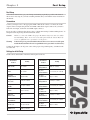
Settings for Initial Setup
Set the controls and switches on the front and rear panel as follows:
Se tting
Front Pane l
Control
Se tting
MIC GAIN
12 o'clock
EQ Low
FREQUENCY
160 (12 o'clock)
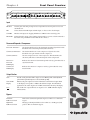
MIX
12 o'clock
EQ Low
BANDWIDTH
1.5 octaves (12 o'clock)
Expander
THRESHOLD
0 (max CW)
EQ Low
CUT/BOOST
0 (12 o'clock)
Compressor
Threshold
- 10 (12 o'clock)
EQ Mid
FREQUENCY
2.5K (12 o'clock)
Compressor
RATIO
2:1 (12: o'clock)
EQ Mid
BANDWIDTH
1.5 octaves (12 o'clock)
GAIN
0 (12 o'clock)
EQ Mid
CUT/BOOST
0 (12 o'clock)
BYPASS
EXP/COMP
IN
EQ High
FREQUENCY
2.5K (11 o'clock)
EQ High
BANDWIDTH
1.5 octaves (12 o'clock)
EQ High
CUT/BOOST
0 (12 o'clock)
BYPASS
EQ/FILTERS
IN
LOW CUT
22 (10 o'clock)
HIGH CUT
18K (3 o'clock)
527E
Front Pane l
Control
3