1
Metadata Browser
1.18 Logger Module
Table 1–32
Logger Module (Reference No. - )
Problem
Details
Description
Logs not updating in the APP and Web Layer.
Cause
Logger related files not configured correctly.
Type
Configuration
Solution
Verify if LOGS folder exist in $FIC_
HOME/ficapp/common/FICServer/ and $WEB_SERVER_
HOME/../<context>/../ locations. If logs folder does not exits
then create it and restart the servers and check again.
In addition, verify the path given for each Logger
RevLog4jConfig.xml in $FIC_HOME/conf/ and $WEB_
SERVER_HOME/../<context>/../conf/. If it is incorrect, then
update them and then restart the servers and check.
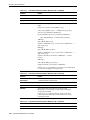
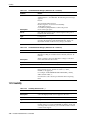
Table 1–33
Logger Module (Reference No. - )
Problem
Details
Description
How to send logs to support when issues are found in OFSAA
Cause
.
Type
.Environment
Solution
.
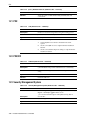
1.19 Metadata Archive/Restore
Table 1–34
Metadata Archive/Restore (Reference No. - 15872162)
Problem
Details
Description
In the Archive Metadata screen, after mapping you click Finish.
In the status message, it appears as undetermined. There is a
null pointer exception with respect to filter servlet.
Cause
Web.xml
Type
Configuration
Solution
Verify the Filter Servlet configuration in web.xml. To validate,
open web.xml in Internet Explorer and check if it opens correct
the same and check the issue. If this issue persists contact Oracle
Support.
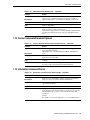
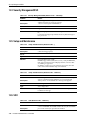
1.20 Metadata Browser
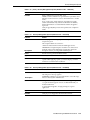
Table 1–35
Metadata Browser (Reference No. - 14737387)
Problem
Details
Description
Unable to view the Mapping and Metadata browser screen.
Cause
Entries must be wrong in DB_MASTER table.
Type
Setup and Maintenance
Troubleshooting of OFSAA Infrastructure 1-13