1
Firmware Upgrade Process
activate
Activate the newly uploaded firmware. This command can be used for activating the newly
uploaded firmware if there was no activate parameter passed to the upgrade command.
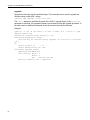
ipmitool hpm activate
Example:
ipmitool -I lan -H 192.168.0.2 -A none -T 0x82 -B 0 -t 0x74 -b 7 hpm
activate
PICMG HPM.1 Upgrade Agent 1.0:
rollback
Perform a manual rollback on the IPM controller. This command can be used to roll back from
the newly uploaded firmware to the old one.
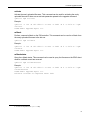
ipmitool hpm rollback
Example:
ipmitool -I lan -H 192.168.0.2 -A none -T 0x82 -B 0 -t 0x74 -b 7 hpm
rollback
PICMG HPM.1 Upgrade Agent 1.0:
rollbackstatus
Query the rollback status. This command can be used to query the firmware on the IPMC about
whether a rollback event has occurred.
ipmitool hpm rollbackstatus
Example:
ipmitool -I lan -H 192.168.0.2 -A none -T 0x82 -B 0 -t 0x74 -b 7 hpm
rollbackstatus
PICMG HPM.1 Upgrade Agent 1.0:
Rollback occured2 on component mask: 0x01
2. “occured” is misspelled in the ipmitool utility.
67