1
SMP-PRO SERIES
USER MANUAL
7-2-7 Fr equency of Ser ver
Communication
If you connect SMP players
to CMS version 5.0 or earlier,
please set frequency to 5 or
4, otherwise you may see
the invalid status of SMP
connection in Client List or
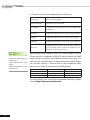
You can adjust the frequency parameters for several SMP/
CMS services. The frequency value is from 5 (Frequent) to 1
(Infrequent). If you don’t need to update contents from CMS to
SMP frequently, you can lower the frequency and reduce the
traffic on your network.
Communication Frequency Table
SuperMonitor.
Value
Central Schedule Configuration
SuperMonitor keep alive
(period per area)
(period every heartbeat)
5
10 seconds
20 seconds
4
30 seconds
30 seconds
3
60 seconds
60 seconds
2
180 seconds
180 seconds
1
600 seconds
600 seconds
7-2-8 RS-232 Setting
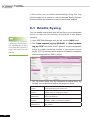
You can configure RS-232 commands here.
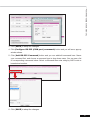
1. Click [RS-232 parameters] button and you will see a popup window.
2. Here you can configure RS-232 parameters such as “Baud
Rate”, “Data-bit”, “Parity”, “Flow Control” and “Stop Bit”.
Please make sure the parameters you configure here consist with
the connected device.
90