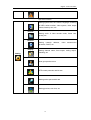
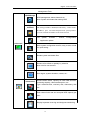
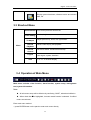
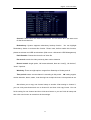
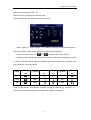
1
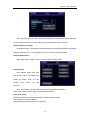
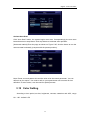
-1-
Digital Video Recorder
Welcome
Thank you for purchasing our DVR!
This operating manual is designed to be a reference tool for
the installation and operation of your system.
Disclaimer: We. reserves the right without notice to change,
add, modify or remove any information and materials on this
manual in any manner and at any time. All materials accurate
through carefully checking, but we shall not be responsible to bear
the consequence if any errors.
Digital Video Recorder
Features
u Embedded Linux OS;
u Embedded Web Server easy for remote monitoring;
u Support mobile phone viewer (Windows Mobile/Symbian/iPhone/ Android/BlackBerry)
u Support multiple DDNS (Oray, 3322, DynDNS);
u support 2TB HDD;
u H.264 compression algorithm, flexible for network transmission
u 4/8/16 channels video input
u 1 channel VGA video output,1 channel BNC video output
u RS-485 interface support PTZ and comparable for all protocols
u RS232 interface support keyboard control, series port connection and upgrade, matrix
control, etc
u Multi-level user management
Compression
u
u
u
u
H.264 video compression, 25fps CIF,variable bit rate and frame rate. Both video
quality and compression rate configurable
Support 1 channel / 2 channels / 4 channels / 8 channels / 16 channels video & signal,
real-time compression for each channel, synchronized video and audio
Resolution D1(704*576)、CIF(352*288)、QCIF(176*144)video resolution
OSD setup date and time Support multi masking zones
Storage
u
Support TB HDD (1TB = 1000GB), 1 / 2 / 4 /8SATA interface support varies of HDD
volume combination
u
Backup from USB interface (USB Disk, USD HDD, USB CD/DVD Burner. etc)
u
Easy backup method: network download to remote client
u
Non-working HDD hibernation, reduce the working temperature and power
consumption
u
Looping record
u
Special video file format, prevent malice tampering and overwritten
Network
u
10BaseT/100BaseT/1000BaseTX, RJ45
Digital Video Recorder
u
Web setting, playback and review, DVR status check, alarm and video storage.
u
Network PTZ control and setting the camera’s parameter: iris, zoom, etc.
u
Remote alarm and system log enquiry.
u
Record file enquiry and real-time playback mode
u
Multi-level user management and administrator authorization
u
Networking method: PSTN、ISDN、ADSL、DDNS、LAN、WEB, etc.
u
Network real-time multi channel playback
Video Playback
◆ Real-time recording for every channel, support 16 Ch. synchronous playback
u
Search the playback recorded files on DVR through network;
u
Multiple recording mode: manual, normal, alarm trigger, motion detection, and pre
-recording
u
Live video search and record video search
u
Playback mode: slow play, fast play, backward play and frame play
u
On-display accurate time when playback
u
In full-screen playback mode, digital zoom
Real-time Monitoring
u Support PAL / NTSC
u High definition, clear video live display
u On-display video channel status information: recording, motion detection, video loss,
video freeze
u Video split and channel looping display
u Video adjustment: hue, contrast, saturation, brightness
u On-display character overlay: camera name and location, time and date
u Analog video output and VGA output, support monitor and TV display
u On-display bit rate and recording occupied hard disk storage (MB/h).
u System log enquiry
Audio
u 1 / 4 / 8 /16channels audio input, 1 channel audio output
u Synchronized video & audio input
u Remote intercom while live review
Digital Video Recorder
u Synchronized video & audio recording for every channel
u Synchronized video & audio playback
Alarm
u
1/2/4Ch. relay output;
u Intelligent features: tracking, perimeter control, intrusion, retrograde, pacing,
suspicious object, missing object and camera tampering;
u
Pre-recording time can be set;
u Motion detection can be set in any camera. Decide whether to activate alarm and
flashing light or other alarm devices according to whether there is moving or changes
of objects in the motion detection areas.
u 4 / 8 / 16 channels alarm input, 2 groups alarm output
u Support IR sensor, smoke detector and other alarm devices
u Alarm linkage mode, alarm trigger start to recording and invoke flash light, bell or
other alarm devices
u Pre-recording mode: pre-recording before alarm trigger started
u Motion detection and relay
u Multi channel alarm reply output, easy to implement all the alarm applications
u Protection Circuit on alarm input and output
Intelligent Features
u
User Friendly GUI, front panel, remote control and mouse
u
u
PTZ control by mouse and Controller
Intelligent alarm features: tracking, perimeter control, intrusion, retrograde, pacing,
suspicious object, missing object and camera tampering;
u
Fast & convenience shortcut operation: copy & paste for same settings
Digital Video Recorder
Contents
1
INTRODUCTION.................................................................................................................................9
1.1 PURPOSE........................................................................................................................................9
1.2 SCOPE ............................................................................................................................................9
1.3 REFERENCE ....................................................................................................................................9
2
INSTRUCTIONS .................................................................................................................................9
2.1HARDWARE ENVIRONMENT ...............................................................................................................9
2.2SOFTEWARE ENVIRONMENT ...........................................................................................................10
2.3NETWORK ......................................................................................................................................10
2.4 FRONT PANEL INSTRUCTION ........................................................................................................ 11
2.4.1 REAR PANEL INSTRUCTION.......................................................................................................13
2.5MOUSE ...........................................................................................................................................14
2.6REMOTE CONTROLLER ...................................................................................................................15
3
SYSTEM INTRODUCTION ..............................................................................................................16
3.1 SYSTEM MENU TREE ...................................................................................................................16
3.2 MAIN MENU ..................................................................................................................................17
3.3 SHORTCUT MENU .........................................................................................................................20
3.4 OPERATION OF MAIN MENU ..........................................................................................................20
3.5 RECORD .......................................................................................................................................21
3.5.1 Schedule .................................................................................................................................21
3.5.2 Playback..................................................................................................................................23
3.5.3Backup…..................................................................................................................................24
3.6 ALARM ..........................................................................................................................................24
3.6.1 Motion Detection.....................................................................................................................25
3.6.2 Privacy Mask...........................................................................................................................27
3.6.3 Video Lost ...............................................................................................................................29
3.6.4 Alarm Input..............................................................................................................................31
3.6.5 Alarm Output ...........................................................................................................................33
3.6.6 Abnormity ................................................................................................................................34
3.7 SETTING .......................................................................................................................................35
3.7.1 General....................................................................................................................................36
3.7.2 Encode.. ........................................................................................................................ ……..37
3.7.3 Network...…………………………………………………………………………………………39
3.7.4Display…..................................................................................................................................41
3.7.5 Account.................................................................................................................................42
3.7.6 PTZ…… ..................................................................................................................................45
3.7.7 RS232…..................................................................................................................................46
3.7.8 Tour…… ..................................................................................................................................47
3.8 ADANCED......................................................................................................................................47
3.8.1 HDD Management..................................................................................................................47
Digital Video Recorder
3.8.2 Digital Channel(only for NVR or Hybrid DVR) ..............................................................48
3.8.3 USB Update............................................................................................................................49
3.8.4 Configuration...........................................................................................................................49
3.8.5 Maintenance ...........................................................................................................................50
3.8.6 Default… .................................................................................................................................51
3.8.7 Exit…….. ..................................................................................................................................51
3.9 SYSTEM INFORMATION ..................................................................................................................52
3.9.1 HDD Information.....................................................................................................................52
3.9.2 BPS……..................................................................................................................................53
3.9.3 LOG……...................................................................................................................................54
3.9.4 Version….................................................................................................................................54
3.10
RECORD CONTROL .................................................................................................................55
3.11
PTZ CONTROL .......................................................................................................................56
3.12
COLOR SETTING .....................................................................................................................59
3.13
TV ADJUST .............................................................................................................................60
ADDENDA A FAQ..................................................................................................................................61
ADDENDA B DVR INSTALLATION....................................................................................................65
HDD INSTALLATION..............................................................................................................................65
RACK MOUNTING .................................................................................................................................68
Video Input and Output....................................................................................................................69
AUDIO INPUT AND OUTPUT ...................................................................................................................70
Alarm input and output ....................................................................................................................71
PTZ control connection....................................................................................................................73
ADDENDA C OVERVIEW OF NAVIGATION AND CONTROLS ........................................................74
System Boot up................................................................................................................................74
Login………… ..................................................................................................................................74
System Shutdown ............................................................................................................................75
Auto Resume after Power Failure...................................................................................................75
Replace Button Battery....................................................................................................................75
ADDENDA D: WEB CLIENT OPERATION ............................................................................................76
IE BROWSER SETUP............................................................................................................................76
LOGIN ..................................................................................................................................................76
TOOLBAR .............................................................................................................................................77
PREVIEW WINDOW SWITCH ..................................................................................................................77
REVIEW THE CHANNEL .........................................................................................................................78
PTZ CONTROL FUNCTION.....................................................................................................................79
COLOR SETTING ..................................................................................................................................81
OTHER SETTING...................................................................................................................................82
WEB CLIENT CONFIGURE....................................................................................................................83
SYSTEM INFO ......................................................................................................................................83
SYSTEM SETTING ................................................................................................................................84
Digital Video Recorder
General………..................................................................................................................................84
Encode……… ..................................................................................................................................85
Schedule……. ..................................................................................................................................86
Tip…………… ..................................................................................................................................86
RS2332……… .................................................................................................................................87
Network……… .................................................................................................................................88
ALARM .................................................................................................................................................91
ADVANCED...........................................................................................................................................92
User Account....................................................................................................................................94
1 Introduction
1.1 Purpose
This user manual is provided mainly for the project managers, sales personnel, end users,
engineering installers and other related personnel, facilitating the installation and
maintenance and improving the work efficiency.
1.2 Scope
u
Usage of the user manual: project managers, project installers, maintenance
personel and end users, etc.
u Content of the user manual: introduction and instructions of the features,
parameters of embedded DVRs
u Models of DVRs in this user manual: We series of embedded DVRs
1.3 Reference
u
GA/T367-2001
Technical requirements for video security monitoring
system;
u
GA/T368-2001
Technical requirements for intrusion alarm system;
u
GB8898-2001
Safety requirements of audio, video and similar electronic
equipment.
2 Instructions
2.1Hardware Environment
u Power: 100V ~ 240V AC, UPS or voltage stabilizer for better power input
u Cables: Cat 5 network cable, AV cable, audio cable, 485 control cable
9
Digital Video Recorder
u Temperature: 0°C—55°C, too heat or freeze will cause the malfunction of DVR,
strictly prohibit to install the DVR above the heat source
u Humidity: 10%--90%, keep the DVR away from rain or wet place, installation
must stay away from water source
u Ventilation: install the DVR in an airy place, keep away from dusty
u Installation: horizon installation or cabinet installation, protective casing needed
when outdoor installation
2.2Softeware Environment
u OS: embedded Linux system
u Device firmware: Universal version
(Please check We website for latest
version)
2.3Network
u Protocols: TCP/IP、HTTP、DNS、DHCP、ARP、RARP etc.
10
Digital Video Recorder
Press mouse middle button Switch from TV mode to VGA mode!
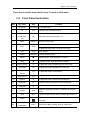
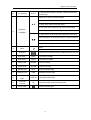
2.4 Front Panel Instruction
S/N
Key name
Sign
Function
1
Channel
CH1-CH16
2
FN
FN
Shortcut and Assistant function
10+
Switch the channel more than 10
1-16 video input
Channel
3
combination
key
4
Menu
MENU
5
ESC
ESC
Enter the main menu
Close upper interface or controls
In playback mode,click it to back to live view
6
PTZ
PTZ
7
Search
SEARCH
8
Pause
■
Paused mode, click this button to realize
9
Play
u
Playback mode, click this button to realize
10
Play Previous
I|
In playback mode, playback the previous video
11
Play Next
}I
In playback mode, playback the next video
II/|
In playback mode, reverse back
12
Reverse
/Pause
PTZ control
Search recording files
13
Play/ Pause
}/II
In playback mode,play or pause
14
Rewind
7
In playback mode, rewind the recording file
15
Slow Play
►
Multiple slow play speeds or normal playback
16
Fast play
8
Various fast speeds and normal playback.
17
Record
REC
18
HDD
INFO
19
Power
20
Key
combination
Manually stop/start recording, working with direction
keys
When the HDD haved, status indicator light will be on
DVR will turn off when you hold this button for 5
seconds
MULT
Switch from BNC viewing mode to VGA mode
11
Digital Video Recorder
21
Fun shift key
SHIFT
In input mode,to shift the number, character and other
function key
Move up or down to choose subject
Increase or decrease numbers
pq
In drop-down menu mode,edit setup
In live view mode, enter CH1 to CH16 in full screen
22
Up/Down,
Click shift,then type number of 1 or 4
Left/Right
In main menu or sub menu,click left/right to edit setup
When playback, click these buttons to control playback
t u
In live view mode,enter CH1 to CH16 in full screen
Click shift,then type number of 2 or 3
23
Menu
8
Enter
Enter Main Menu
24
USB port
25
HDD LED 1
HDD1
The status of HDD1
26
HDD LED 2
HDD2
The status of HDD2
27
Ready LED
READY
DVR is running
28
Alarm LED
ALARM
Alarm is running
29
Record LED
REC
Record indicator light
30
Network LED
LINK
Network indicator light
STATUS
The status of the DVR
31
32
33
Status indicator
light
IR remote
reveiver
Power LED
USB port for USB devices like USB disk,mouse and son
IR
Infrared remote control receiving area
Power indicator light
12
Digital Video Recorder
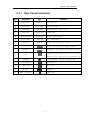
2.4.1 Rear Panel Instruction
S/N
Key name
sign
Function
1
Video IN
Video IN
2
Video LOOP
Video LOOP
3
CVBS OUT
CVBS OUT
1 channel BNC video output
4
SPOT OUT
SPOT OUT
1 BNC SPOT
5
AUDIO OUTPUT
AUDIO OUT
1 RCA
6
AUDIO INPUT
AUDIO IN
RCA
7
Line in
LINE IN
Audio input from other device
8
ALARM/RS485/RS232
9
VGA OUTPUT
10
USB
11
NETWORK
12
MIC output
13
MIC input
MIC input
14
E-SATA
E-SATA
15
HDMI interface
BNC Video IN
BNC Video LOOP
AUDIO OUTPUT
AUDIO INPUT
Alarm input and output/RS485 /RS232
VGA OUTPUT,such as monitor、LCD TV、Projector
Comnect USB removeable device,such as flash
memory、mouse、USB removeable disk and so on
NET INTERFACE,connect to LAN or WAN
MIC output
HDMI ouput
13
Digital Video Recorder
2.5 Mouse
* For right-hand mouse
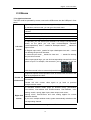
The DVR could be operated by mouse, connect the USB mouse into the USB port in front
panel
System pops up password input dialogue box if you have not logged in.
In real-time monitor mode, you can go to the main menu.
When you have selected one menu item, left click mouse to view menu
content.
Implement the control operation.
Modify checkbox or motion detection status.
Click combo box to pop up drop down list.
Left click
mouse
In input box, you can select input methods. Left click the corresponding
button on the panel you can input numeral/English character
(small/capitalized). Here ← stands for backspace button. _ stands for
space button.
In English input mode: _stands for input a backspace icon and ← stands
for deleting the previous character.
In numeral input mode: _ stands for clear and ← stands for deleting
the previous numeral.
When input special sign, you can click corresponding numeral in the front
panel to input. For example, click numeral 1 you can input“/” , or you can
click the numeral in the on-screen keyboard directly.
Implement special control operation such as double click one item in the
file list to playback the video.
Double left
click mouse
Right click
mouse
In multiple-window mode, double left click one channel to view in
full-window.
Double left click current video again to go back to previous
multiple-window mode.
In real-time monitor mode, pops up shortcut menu: one-window,
four-window, nine-window and sixteen-window, Pan/Tilt/Zoom, color
setting, search, record, alarm input, alarm output, main menu.
Among which, Pan/Tilt/Zoom and color setting applies for current
selected channel.
If you are in multiple-window mode, system automatically switches to the
corresponding channel.
Exit current menu without saving the modification.
14
Digital Video Recorder
In numeral input box:
Press
Increase or decrease numeral value.
Switch the items in the check box.
middle
Page up or page down
button
Move
Select current control or move control
mouse
Select motion detection zone
Drag mouse
Select privacy mask zone.
2.6Remote Controller
(1)
(2)
(3)
(4)
(5)(6) (7)(8)
Remote Control Keys
Serial
mumber
Name
1
Multi-window button
Same function as Multi-window button in the front panel
2
Numeric button
Code input/number input/channel switch
3
【ESC】
Same function as 【Esc】button in the front panel
4
Direction button
Same function as direction button in the front panel
5
ADD
Input the number of DVR to control it
6
FN
Assistant function
7
Record control
Control the record
8
Record mode
Same function as “Record mode”
Function
15
Digital Video Recorder
3 System Introduction
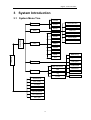
3.1 System Menu Tree
Schedule
Record
Search
Motion Detection
Camera Masking
Backup
Video Lost
Alarm
General
Encode
Alarm Input
Alarm Output
Main Menu
Network
Abnormality
Display
Setting
Account
PTZ
System
RS232
HDD Manage
Tour
Digital Channel
USB Update
Tool
HDD Information
Configuration
Maintenance
BPS
Info
Default
Log
Version
Pan/Tilt/Zoom
Color Setting
T V Adjust
Record Playback
Record Control
Record Backup
Video Split
16
Shut Down
Digital Video Recorder
3.2 Main Menu
Recording and Alarm
Main Menu
Schedule
Record
Function
Sub Menu
Search
Time setting for record, motion detection, external
alarm.
Time operated setting per day per week (Period
time for record, receive external alarm signal, motion
detection)
Record enquiry and playback, sorted by video type
(All, alarm, motion detection, all alarm), channels,
time, the result will be displayed in file list, choose the
file to play
R- Regular recording file A – Alarming recoding file
M – Motion detection file H-Manual
Backup
Record backup operation and setting
Motion Detection
Camera Masking
Video Lost
Alarm
Alarm Input
Include channel, enable/off, sensitive, detection zone,
arming time, output time delay, alarm linkage, PTZ
linkage, pre-recording, patrol setting etc., copy &
paste for same settings
Include channel, enable/off, sensitive, detection zone,
arming time, output time delay, alarm linkage, PTZ
linkage, pre-recording, patrol setting etc., copy &
paste for same settings
Include channel, enable/off, arming time, output time
delay, alarm linkage, PTZ linkage, pre-recording,
patrol setting etc., copy & paste for same settings
Include channel, enable/off, alarm input type, arming
time, output time delay, alarm linkage, PTZ linkage,
pre-recording, patrol setting etc., copy & paste for
same settings
Alarm Output
Alarm Mode, setting, on/off and status
Abnormity
Abnormity setting, on/off and linkage action (Alarm
output)
17
Digital Video Recorder
Sys term Function
General
Setting system time, time format, language, recording
in HDD, series number, video system, video output
format, stand-by time, etc.
Encode
Setting audio & video encode mode, frame rate,
quality, etc.
Network
Setting network address,
protocols, DHCP, etc.
Display
Setting
video
transmission
Setting channel name, front output, coding output,
masking, etc.
Account
User group and account
PTZ
PTZ control protocols and bit rate
RS232
Setting series port and bit rate
Tour
Setting preview, tour time, etc.
18
Digital Video Recorder
Management Tools
HDD Manage
HDD management, delete data and etc.
Note: System will restart after setting HDD
Digital
Channel
USB Update
Advanced
The settings includes Channel,Decode Policy,Video/Audio,
IP address,port,user name and password,preset position,
you can search the IP address in the local network
File
system, U-BOOT , Kernel,
Application update
Configuration,
Configuration
Save system configuration as a file, easy to save or load
for quick setting.
Maintenance
Restart system and delete files.
Default
Restore all to default or partially by selection
Note: Not for user account
Shut Down
User logout, system shutdown, restart, etc...
Info
HDD
Information
SATA interface status, capacity for each HDD and total,
remaining capacity, video start/stop time, etc.
Type: read-write disk, read-only disk, redundancy disk
etc.
BPS
Each channel’s bit rate and occupied HDD capacity per
hour.
Log
Display important event log and designate needed log.
19
Digital Video Recorder
Version
Display system hardware, software version and release
date, etc.
3.3 Shortcut Menu
Menu
Pan/Tilt/Zoom
PTZ control protocols and bit rate
Color Setting
Set hue, brightness, contrast, saturation
TV Adjust
Adjust picture’s up, down, left, right deflate.
Record
Playback
Record video inquiry and playback
Record
Control
Set record status: schedule/manual/stop
Logout
User logout, system shutdown
View
1 / 4 / 8 / 16 channel display
3.4 Operation of Main Menu
Main menu includes: video function, alarm function, system setup, management
tool, system information.
Note:
u All sub-menu setup will be effective by confirming “SAVE”, otherwise ineffective.
u When check box ¢ is highlighted, it means certain function is selected. If unfilled
means not selected.
Enter main menu method:
1, press ENTER button on the panel to enter main menu directly
20
Digital Video Recorder
2, press Esc button on the panel, select MAIN MENU.
3.5 Record
Note: User should have “Record” authority, HDD should be installed and format
properly
Setting video setup and playba ck function, including schedule, motion detection,
and exterior alarm setting. Inquire according to video type (ALL, NORMAL, ALARM,
MOTION DETECTION), channel, time. The result will be displayed in a list
3.5.1 Schedule
When the system boots up, it is in default 24-hour regular mode. You can set
record type and time in schedule interface. Setting at Main menu> Video function>
video setting.
Including schedule setting regarding Regular(R), motion detection video (M), Alarm
(A)
Manual (H)
21
Digital Video Recorder
Channel: Please select the channel number first. You can select “all” if you want to set
for the whole channels.
Redundancy: System supports redundancy backup function.
You can highlight
Redundancy button to activate this function. Please note, before enable this function,
please set at least one HDD as redundant. (Main menu->Advanced->HDD Management)
Pack Duration: Choose the time slice of video file
Pre-record: record the video previously than motion detection
Record control: single option, “●” means selected, there are “config”, “all the time”,
“close” 3 options.
Week day: There are eight options: ranges from Saturday to Sunday and all.
Time period: means current channel is recording in this period. “■” setting regular,
motion detection, alarm, status, it can be single or multiple choices. 6 time periods to set.
Also allows you to copy one channel setup to another. After setting in channel 1,
you can click paste button and turn to channel 2 and then click copy button. You can
finish setting for one channel and then click save button or you can finish all setup and
then click save button to memorize all the settings.
22
Digital Video Recorder
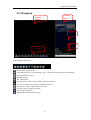
3.5.2 Playback
Channle
Select
Playback
Window
File List
File
Informati
Search Inquiry
The control bar instruction :
:Pause button in replay mode。
:first click this button, it will rewind the video,click again it will pause the slow playback。
:stop to playback the video。
:slow play the files
:fast play the files
:previous frame. (it only works when the playback is paused)
:next frame. (it only works when the playback is paused)
:previous file. Click to replay the previouse file。
:next file. Click to replay the next file。
:To circulate the playback。
:multi-channel showing in one screen。
23
Digital Video Recorder
3.5.3Backup
Backup the recorded files to local storage device, support USB storage devices,
support FAT32, NTFS;
Detect: Detect the USB portable device connected with DVR, and display the device
name, Free space / Total space status
Erase: erase all the data in the USB device
USB Backup: list and backup the selected file, to the USB Devices, could be sorted
by Record type, channel, time
Start: Backup start
3.6Alarm
Sub-menu: motion detection, camera masking, video lost, alarm input, alarm output,
abnormality.
24
Digital Video Recorder
3.6.1 Motion Detection
By analyzing video, when system detects sensitive moving signal, it will start motion
detection alarm.
Operation method:
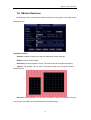
Channel: select the channel you want to implement motion detection.
Enable: function enable switch
Sensitivity: System supports 6 levels. The sixth level has the highest sensitivity.
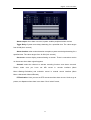
Region: can set 396(22*18)zones. The black is open zone; the pink is motion
detection zone.
Schedule: Click set button, you can see an interface is shown as in below. Here you
can set your own setup for business day and non-business day 。
25
Digital Video Recorder
Alarm output: when alarm occurred, system enables peripheral alarm devices
Tigger Delay: System auto delays detecting for a specified time. The value ranges
from 0-600 (Unit: second)
Alarm duration: when motion detection complete, system auto delays detecting for a
specified time. The value ranges from 10-300 (Unit: second)
On-screen: reverse display means allowing on-screen. There is connection motion
on the screen when alarm signal happens.
Channel: select the channel to activate recording function once alarm occurred.
Please
make
sure
you
have
set
MD
record
in
encode
interface
(Main
Menu->Setting->Schedule) and schedule record in manual record interface (Main
Menu->Advanced->Manual Record)
PTZ activation: Here you can set PTZ movement when alarm occurs. Such as go to
preset, tour &pattern when there is an alarm. Click “select” button,
26
Digital Video Recorder
Latch: when motion detection, system auto delays recording for a specified time. The
value ranges from 10-300 (Unit: second)
Buzzer: Default is “off”
Tour: Here you can enable tour function when alarm occurs. It is a one-window
tour.
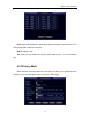
3.6.2 Privacy Mask
When someone viciously masks lens, the system can alert you to guarantee video
continuity. You can select Alarm output, On-screen, PTZ Linkage.
27
Digital Video Recorder
Operation method:
Channel: select the channel to record when camera mask occurred.
Enable: function enable switch
Sensitivity: there are six levels. The six-level has the highest sensitivity.
Period: Click set button, you can see an interface is shown as below. Here you can
set for business day and non-business day. You can set up six time period, but they can’t
be repeated. The linear graphics show the period, you can copy the setting to other days
Alarm output: when camera masking occurred, system enables peripheral alarm
devices
Latch: when camera masking, system auto delays detecting for a specified time. The
value ranges from 10-300 (Unit: second)
On-screen: reverse display means allowing on-screen. There is connection motion
on the screen when alarm signal happens.
Channel: select the channel to activate recording function once alarm occurred.
Please
make
sure
you
have
set
MD
record
in
encode
interface
(Main
Menu->Setting->Schedule) and schedule record in manual record interface (Main
Menu->Advanced->Manual Record)
PTZ activation: Here you can set PTZ movement when alarm occurs. Such as go to
preset, tour &pattern when there is an alarm. Click “select” button,
28
Digital Video Recorder
Recording Latch: when motion detection complete, system auto delays recording
for a specified time. The value ranges from 10-300 (Unit: second)
Buzzer: Default is “Off”
Tour: Here you can enable tour function when alarm occurs. It is a one-window
tour.
3.6.3 Video Lost
When video loss happens, you can select ALARM OUTPUT or video loss show
information in local mainframe screen.
29
Digital Video Recorder
Operation method:
Channel: select the channel you want to enable lens shading alarm.
Enable: function enable switch
Period: Click set button, you can see an interface is shown as in below. Here you can
set for business day and non-business day. You can set up six time period, but they can’t
be repeated. The linear graphics show the period, you can copy the setting to other days
Alarm output: when alarm occurred, system enables peripheral alarm devices.
Latch: when video lost complete, system auto delays detecting for a specified time.
The value ranges from 10-300 (Unit: second)
30
Digital Video Recorder
Show Message: reverse display means allowing on-screen. There is connection
motion on the screen when alarm signal happens.
Channel: select the channel to record when video loss occurred.
PTZ activation: Here you can set PTZ movement when alarm occurs. Such as go to
preset, tour & pattern when there is an alarm.
Channel: select the channel to activate recording function once alarm occurred.
Please
make
sure
you
have
set
MD
record
in
encode
interface
(Main
Menu->Setting->Schedule) and schedule record in manual record interface (Main
Menu->Advanced->Manual Record)
Recording Latch: when video lost complete, system auto delays recording for a
specified time. The value ranges from 10-300 (Unit: second)
Buzzer: Default is “off”
Tour; Here you can enable tour function when alarm occurs. It is a one-window
tour.
3.6.4 Alarm Input
Setting at main menu>alarm function>alarm input.
According to the introduction of 2.4 alarm input/output device connection, please
31
Digital Video Recorder
make sure you have properly connected alarm devices such as Alarm, lighter)
User can save each channel configure or save once till all channels are set
Alarm input: select alarm channel number
Enable: function enable switch
Type: normal open or normal close.
Period: Click set button, you can see an interface is shown as in below. Here you can
set for business day and non-business day. You can set up six time period, but they can’t
be repeated. The linear graphics show the period, you can copy the setting to other days
Latch: Here is for you to set proper delay duration. Value ranges from 0 to 600
32
Digital Video Recorder
seconds.
Alarm output: activate peripheral alarm device when motion detection occurred.
Show message: System can pop up a message to alarm you in the local host screen
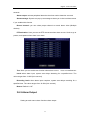
if you enabled this function
Record channel: you can select proper channel to record alarm video (Multiple
choices)
PTZ activation: Here you can set PTZ movement when alarm occurs. Such as go to
preset, tour& pattern when there is an alarm.
Tour: Here you can enable tour function when alarm occurs. It is a one-window tour
Latch: when alarm input, system auto delays detecting for a specified time. The
value ranges from 10-300 (Unit: second)
Recording Latch: when alarm input complete, system auto delays recording for a
specified time. The value ranges from 10-300 (Unit: second)
Buzzer: Default is “off”
3.6.5 Alarm Output
Setting at main menu>alarm function>alarm output.
33
Digital Video Recorder
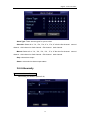
Alarm Type: There are two types for you to select.
Schedule: Select all or “1”●, “2”●, “3”●, “4”● , “5”●, “6”● for the first channel、second
channel、third channel or forth channel、fifth channel、sixth channel.
Manual: Select all or “1”●, “2”●, “3”●, “4”● , “5”●, “6”●for the first channel、second
channel、third channel or forth channel、fifth channel、sixth channel.
Stop: close alarm output.
Status: current device alarm output status.
3.6.6 Abnormity
Main menu→Alarm→Abnormity
Abnormality, as shows in picture 5-22,
34
Digital Video Recorder
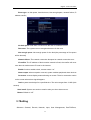
Event type: no disk space, hard disk error, Not enough space, network failure ,IP
address conflict,
No disk space: DVR does not connect to the disk or hardware is error.
Disk error: The system can not recognize because of disk error
Not enough space: Not enough space for the disk (the percentage of free space
will be showed)
Network failure: The network connection disrupted or network connection error
IP conflict: The IP address of disk recorder network is fixed, the conflict will occur
once there is another same IP is set in the internet.
Enable: function enable switch, reverse means “on”
Alarm output: when exception occurred, system enables peripheral alarm devices
On-screen: reverse display means allowing on-screen. There is connection motion
on the screen when alarm signal happens.
Latch: system auto delays for a specified time. The value ranges from 10-300 (Unit:
second)
Send email: System can send out email to alert you when alarm occurs.
Buzzer: Default is “off”
3.7Setting
Submenu: General, Encode, Network, Input, User Management, Pan/Tilt/Zoom,
35
Digital Video Recorder
Serial Port, Tour.
Note: system setup will be done by user who has the authority
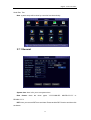
3.7.1 General
System time: here is for you to set system time
Date format: there are three types:
YYYYY-MM-DD: MM-DD-YYYYY or
DD-MM-YYYY.
DST: Here you can set DST time and date. Please enable DST function and then click
set button.
36
Digital Video Recorder
Date separator: there are three denotations to separate date: dot, beeline and
solidus.
Time format: 24-hour and 12-hour
Language: system supports languages: Chinese (simplified), English,
HDD full: Here is for you to select working mode when hard disk is full. There are two
options: stop recording or rewrite.
Stop or rewrite may be selected while no space for the disk. The condition of stopping
recording is the present working disk is full or under covering and the next disk is
non-empty. The condition of rewrite is the present working disk is full and the next disk is
non-empty.
Audio Set: Bit Size、Sample Rate、Sample Bit, Compression format ,for audio
source you can choouse MIC input or LINE input, set Mute,the default volume is 100.
DVR No: when you are using one remote control to control several DVRs, you can
give a name to each DVR for your management.
Video standard: There are two formats: NTSC and PAL.
Pack duration: Here is for you to set proper User’s operation duration. Value ranges
from 0 to 60 Minutes. User need re-login the system after time out.
3.7.2 Encode
Support dual streaming: main streaming and sub streaming
37
Digital Video Recorder
Channel: select channel number
Compression: H.264;
Resolution: CIF or QCIF
Frame rate: PAL:1-25 f/s, 25 levels optional;NTSC:1-30 f/s, 30 levels optional
Bit rate: system supports two types: CBR and VBR
Quality: There are six levels ranging from 1 to 6. The sixth level has the highest
image quality.
Bit rate: 0kb/s-4096kb/s optional
Frame interval: can set 1 frame, 2-12 optional.
Copy the same settings to all channels.
38
Digital Video Recorder
3.7.3 Network
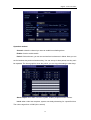
IP address, Subnet mask, Gateway: input from Front panel figure buttons to modify IP
address, and subnet mask, gateway.
DHCP: highlight means select Dynamic Host Configuration Protocol;
TCP port: Default 34567, configurable according to user’s demand
HTTP port: Default 80, configurable according to user’s demand
UDP port: Default 37778, configurable according to user’s demand
Max connection: system support maximal 10 users. 0 means there is no connection
QoS: Here you can select the priority between fluency/video qualities
Network download: System can process the downloaded data first if you enable this
function.
SMTP Server: Input server address and then enable this function.
39
Digital Video Recorder
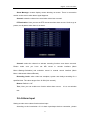
Port: Default value is 25. You can modify it if necessary.
User Name: The sender email account user name.
Password:
The
sender
email
account password.
Sender: Sender email address.
Subject: Input email subject here.
Receiver: Receiver email address.
Note: Please fulfill the postfix of the
mail
address
if
it
is
virtual,(e.g.
[email protected]) otherwise it is not
allowed. (e.g. xxxx)
DNS
Primary DNS: According to local
DNS
Secondary DNS :According to local DNS
DDNSDDNS Type: Support DDNS server
Domain Name: Your self-defined domain name.
User: The user name you input to log in the server.
Password: The password you input
to log in the server..
PPPoE
User name: ADSL user name
40
Digital Video Recorder
Password: ADSL password
IP address: IP is distributed after successful dialing
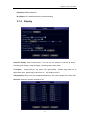
3.7.4 Display
Channel display: Click modify button. You can see an interface is shown as above,
,
including time display, channel display, recording state, alarm state .
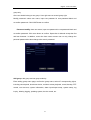
TV Adjust:
Adjust picture’s up, down, left, right deflate. Please drag slide bar to
adjust each item, adjust range value from 0 ~ 100, default value 0
Transparency: Here is for you to adjust transparency. The value ranges from 128 to 255.
Channel: select the channel needed to set.
41
Digital Video Recorder
Cover area (Private masking): Here is for you to set window blanking section. You can
drag you mouse to set proper section size
Time Display: You can select to display time by IE or playback.
Channel Display: You can select to display channel name by IE or playback.;
Setting: You can move or change the display location of “time display” , ”channel display”
3.7.5 Account
Management user account
Note:
The user name and group name can consist of six bytes. characters, number, underline,
subtraction sign, dot, other characters are not allowed.
System account adopts two-level management: group and user. No limit to group or user
amount.
For group or user management, there are two levels: admin and user.
User management adopts group and user 2 class ways, group name can not repeat, user
name can not repeat, each user must belong to certain group; one user can belong to one
42
Digital Video Recorder
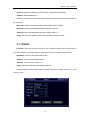
group only.
One user should belong to one group. User right can not exceed group right.
Modify password: select user name, input new password in new password blank and
re-confirm password. Click SAVE button to confirm
Password modify: elect user name, input new password in new password blank and
re-confirm password. Click save button to confirm. Space bar is allowed except the first
and last character. In addition, users who have users account can not only change the
personal password but also change other users’ password.
Add group: add group and set group authority
Enter adding group menu page, confirm the group name, select 47 corresponding rights,
including control panel, shut down device, real time review, playback, record, backup, PTZ
control, user account, system information, alarm input/output setup, system setup, log
inquiry, deleting logging, updating system, device control, etc.
43
Digital Video Recorder
Modify group: modify existing group.
Add user: add group user and select corresponding rights
44
Digital Video Recorder
There are 2 default users: “admin” “guest”.
“admin” users have administrator right. The default password is “123456” for all 2
default users’ account. “guest” user only can review playback and backup.
About reusable function: this function allows multiple users use the same account to
login.
Once select the user to a group, the user authority can not surpass this group authority
property.
We recommend that normal user’s authority lower than other advanced user.
3.7.6 PTZ
Note: The camera video should be in the current screen. Before setup, please
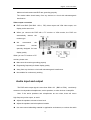
check the following connections are right:
Address: input corresponding PTZ address.
Decoder A (B) line connects with DVR A (B) line.
Boot up the DVR, input user name and password.
In the main menu, click setting, and then click Pan/Tilt Control button。
Channel: select the current camera channel.
45
Digital Video Recorder
Protocol: select corresponding PTZ protocol, 18 protocols embedded.
Address: default address is 1.
Attention: this address must accord with camera’s address; otherwise camera can not
be controlled.
Baud rate: select corresponding baud rate. Default value is 9600.
Data bits: select corresponding data bits. Default value is 8.
Stop bits: select corresponding stop bits. Default value is 1.
Parity: there are five options: odd/even/none/blank. Default is none.
3.7.7 RS232
Function: There are various devices for you to select. Console is for serial port or
min-end platform to upgrade program. Keyboard is for you to control current device.
Baudrate: You can select proper baud rate.
Data bit: You can select proper data bit.
Stop bit: There are three values: 1/2.
Parity: there are 4 choices: none/odd/even/blank
System default Console, Baud rate is 115200, data bit is 8 digits, stop bit is 1, and
Parity is none.
46
Digital Video Recorder
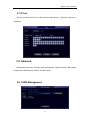
3.7.8 Tour
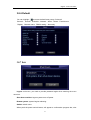
Set tour and time, interval is 5-120s, includes single picture, 4 pictures, 8 pictures, 9
/16pictures.
3.8 Adanced
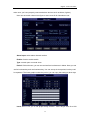
Management tool menu includes: HDD management, Digital Channel, USB update,
Configuration, Maintenance, Default, and Shut Down.
3.8.1 HDD Management
47
Digital Video Recorder
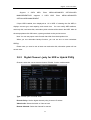
Support
2
SATA
MANAGEMENT.DVR
HDD.
supports
Enter
2
MENU>ADVANCED
SATA
HDD.
Enter
OPTION>HDD
MENU>ADVANCED
OPTION>HDD MANAGEMENT.
If 2pcs HDD installed, then displayed as 1-2 in HDD. If selecting the first HDD, it
displays current type, total capacity, and record time. You can modify HDD attribute,
read-only disk, read-write disk, redundancy disk or delete all the data in the HDD. After all
the setups please click OK button, system goes back to the previous menu
Note: You can set proper mode for each hard disk from the dropdown list.
When you use redundant backup function, you can set one or more redundant
HDD(s).
Please note you need to set at least one read-write disk, otherwise system will not
record video.
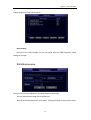
3.8.2 Digital Channel(only for NVR or Hybrid DVR)
Channel: select the current camera channel. Enable: function enable switch
Type: normal open or normal close.
Decode Policy: Set the digital channel policy, there are 5 selects
Video Audio: Select the Audio or Video or both
Remote Channle: Select the channel for remote
48
Digital Video Recorder
Steamtype: Main stream or Sub stream
IP Address: Set the device IP address
Port: Set the port value
Preset: Set the device preset
Name: Set the user name
Password: Set the user password
Device Search: Search the device and list in the below
3.8.3
USB Update
Connect to the USB port on the rear panel with the USB device, which has upgrade
file, and then select the file to upgrade. The upgrade includes kernel, u-boot, setting,
applications and file system.
3.8.4 Configuration
Output setting
Connect to the USB interface on the rear panel with the USB equipment, set the
49
Digital Video Recorder
system output into a file named cfg.coi
Input setting
Connect to the USB interface on the rear panel with the USB equipment, select
setting file to input.
3.8.5 Maintenance
Here you can set auto-reboot time and auto-delete old files setup.
You can select proper setup from dropdown list.
After all the setups please click save button, system goes back to the previous menu.
50
Digital Video Recorder
3.8.6 Default
You can highlight
to restore default factory setup. Select all
General 、Encode、Schedule、Network、Alarm、Detect、Pan/tilt/zoom
Display、Channel name、RS232 setting、Abnormity
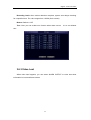
3.8.7 Exit
Logout: exit menu, you need to provide password again when entering the menu
next time.
Shut down machine: logout system turns off power
Restart system: system begins rebooting.
Switch: switch users
When push the power switch button, will appear a confirmation progress bar, shut
51
Digital Video Recorder
down 3 seconds after, can been cancelled during progress.
You have to input password to exit
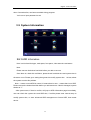
3.9 System Information
3.9.1 HDD Information
Here is to list hard disk type, total space, free space, video start time and status
Note:
Please remove the broken hard disk before you add a new one.
Once there is a hard disk confliction, please check hard disk time and system time is
the same or not. Please go to setting then general to modify system time. At last, reboot
the system to solve this problem.
Note: ○ means current HDD is normal. X means there is error. - means there is no HDD.
Please remove the broken hard disk before you add anew one. If disk is damaged, system
shows as “?”
After system start, if there is conflict, will jump to HDD information page immediately,
user can check the system time and HDD time, If conflict please enter normal setup to
modify system time, or enter advanced HDD management to format HDD, then restart
device.
52
Digital Video Recorder
HDD array according to SATA interface sequence. For example, SATA1 HDD in the
first, SATA2 HDD in the last.
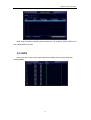
3.9.2 BPS
Here is for you to view current video data stream (KB/s) and occupied hard d isk
storage (MB/h)
53
Digital Video Recorder
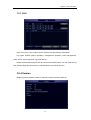
3.9.3 LOG
Here is for you to view system log file. System lists the following information.
Log types include system operation, configuration operation, data management,
alarm event, record operation, log clear and etc.
Pleased select start time and end time, then click search button. You can view the log
files. Please page up/down button to view if there are more than ten files.
3.9.4 Version
Display system hardware’s feature, software version and issue date etc.
54
Digital Video Recorder
3.10
Record Control
There are two ways for you to go to manual record menu.
Right click mouse or in the main menu, Advanced->Manual Record.
In live viewing mode, click record button in the front panel or record button in the remote
control
There are three statuses: schedule/manual/stop. Highlight icon“○” to select corresponding
channel.
1.
Manual: the highest priority. After manual setup, all selected channels will begin
ordinary recording.
2.
Schedule:
channel
records
as
you
have
set
in
recording
setup
(Main
Menu->Setting->Schedule)
3.
Stop: all channels stop recording.
Enable all channel recording: system enable all channel recording
Stop all channel recording: System stops all channel recording
1.Enable/disable record
Please check current channel status: “○” means it is not in recording status, “●” means it is
in recording status.
You can use mouse or direction key to highlight channel number.
Enable all channel recording
Highlight ○ below All, you can enable all channel recording.
All channel schedule record
55
Digital Video Recorder
Please highlight “ALL” after “Schedule”.
When system is in schedule recording, all channels will record as you have previously set
(Main menu->Setting->Schedule).
The corresponding indication light in front panel will turn on
2.All channel manual record
Please highlight “ALL” after “Manual.”.
When system is in manual recording, all scheduled set up you have set in will be null
((Main menu->Setting->Schedule)).
You can see indication light in front panel turns on, system begins manual record now.
3.Stop all channel recording
Please highlight “ALL” after “Stop”.
System stops all channel recording no matter what mode you have set in the menu (Main
menu->Setting->Schedule)
3.11
PTZ Control
Note: The protocols not supported will be displayed in grey color.
Here you can set the following items: Step, Speed, Zoom, Focus, Iris, Presets, Patrol,
56
Digital Video Recorder
Pattern, Line Scan, AGC, BLC, etc.
Hide PTZ menu by double click the menu title.
Click Pan/Tilt/Zoom, the interface is shown as below,
Speed: mainly to control direction. For example, step 8 is much faster than step 1.
(Input the number 1~8 by mouse click or front panel, 8 is the biggest)
Click icon zoom, focus, iris,
and
to adjust zoom, focus and iris
Please click direction arrows to adjust PTZ position. There are total 8 direction arrows,
up, down, left, right, left-up, right-up, left-down, right-down respectively. (up, down, left,
right only when using front panel)
Name
Function
key
function
Shortcut
key
Function
key
function
Zoom
Near
Far
Focus
Near
Far
Iris
close
Open
Shortcut
Key
Click the “set” button. The interface is shown as below. (shortcut key: video key “●”) .
Here you can set the following items: Preset, Tour, Pattern, and Border.
57
Digital Video Recorder
The function in figure 2 mainly according to protocols. If not support will be displayed
as gray, right click mouse or press ESC key on the front panel back to figure 1.
Patrol setup (Tour Setup)
Click patrol button. The interface is shown as below. Input preset number and add this
preset to a patrol (tour). For each patrol (tour), you can input max 80 presets.
Activate Patrol (tour)
Input patrol (tour) number in the No. blank and click patrol button
Pattern Setup
Click pattern button and then
click “begin” button. The interface is
shown as below. Then you can
modify
zoom,
focus,
iris
and
direction.
Click “end” button. You can memorize all these operations as pattern 1.
Input mode value in the No. blank, and click pattern button.
Auto Scan Setup
Click border button. Use direction arrows to select camera left limit
Then please click left limit button
Repeat the above procedures to set right limit.
58
Digital Video Recorder
Activate Auto Scan
Click “Auto Scan” button, the system begins auto scan. Correspondingly, the auto scan
button becomes to stop button. Click stop button to terminate scan operation.
[Horizontal rotation] Enter the page as shows on Figure 5-65, click the button to turn the
camera rotate horizontally (compare with the present position).
Note: Preset, tour and pattern all need the value to be the control parameter. You can
define it as you require. You need to refer to your speed dome user’s manual for Aux
definition. In some cases, it can be used for special process.
3.12 Color Setting
According to time period, set hue, brightness, contrast, saturation and AGC, range
is0~100,default is 50
59
Digital Video Recorder
3.13
TV Adjust
Adjust picture’s up, down, left, right deflate. Please drag slide bar to adjust each
item, adjust range value from 0 ~ 100, default value 0.
60
Digital Video Recorder
Addenda A FAQ
1. DVR cannot boot up properly.
There are following possibilities:
u
Input power is not correct.
u
u
Power connection is not correct.
Power switch button is damaged.
u
Program upgrade is wrong.
u
u
HDD malfunction or something wrong with HDD ribbon.
Front panel error.
u
Main board is damaged.
2. Remote control does not work.
There are following possibilities:
u
Remote control address is not correct.
u
Distance is too far or control angle is too small.
u
Remote control battery power is low
u
Remote control is damaged or DVR front panel is damaged.
u
Check if the system is lockup, login again
3. DVR often automatically shuts down or stop running.
There are following possibilities:
u
Input voltage is not stable or it is too low.
u
HDD malfunction or something wrong wit the ribbon.
u
Button power is not enough.
u
Front video signal is not stable.
u
u
Working environment is too harsh, too much dust.
Hardware malfunction.
4. System cannot detect hard disk.
There are following possibilities:
u
HDD is broken.
u
u
HDD ribbon is damaged.
HDD cable connection is loose.
5. There is no video output whether it is one-channel, multiple-channel or
all-channel output.
There are following possibilities:
u
u
Program is not compatible. Please upgrade to the latest version.
Brightness is 0. Please restore factory default setup.
u
There is no video input signal or it is too weak.
u
u
Check privacy mask setup or your screen saver.
DVR hardware malfunctions.
61
Digital Video Recorder
6. Real-time video color is distorted.
There are following possibilities:
u
When using BNC output, NTSC and PAL setup is not correct. The real-time video
becomes black and white.
u
DVR and monitor resistance is not compatible.
u
u
Video transmission is too long or degrading is too huge.
DVR color or brightness setup is not correct.
7. Cannot search local records.
There are following possibilities:
u
HDD ribbon is damaged.
u
u
HDD is broken.
Upgraded program is not compatible.
u
The recorded file has been overwritten.
u
Record function has been disabled.
8. Video is distorted when searching local records.
There are following possibilities:
u
Video quality setup is too low.
u
Program read error, bit data is too small. There is mosaic in the full screen. Please
restart the DVR to solve this problem.
u
HDD data ribbon error.
u
HDD malfunction.
u
DVR hardware malfunctions.
9. There is no audio when monitor.
There are following possibilities:
u It is not a power picker.
u
It is not a power acoustics.
u
u
Audio cable is damaged.
DVR hardware malfunctions.
10. There is audio when monitor but there is no audio when system playback.
There are following possibilities:
u
Setup is not correct. Please enable audio function
u
Corresponding channel has no video input. Playback is not continuous when the
screen is blue.
11. Time display is not correct.
There are following possibilities:
u
Setup is not correct
u
Battery contact is not correct or voltage is too low.
62
Digital Video Recorder
u
Crystal is not broken.
12. DVR cannot control PTZ.
There are following possibilities:
u Front panel PTZ error
u
PTZ decoder setup, connection or installation is not correct.
u
u
Cable connection is not correct.
PTZ setup is not correct.
u
PTZ decoder and DVR protocol is not compatible.
u
u
PTZ decoder and DVR address is not compatible.
When there are several decoders, please add 120 Ohm between the PTZ decoder
A/B cables furthest end to delete the reverberation or impedance matching.
u
Otherwise the PTZ control is not stable.
The distance is too far.
13. Motion detection function does not work.
There are following possibilities:
u
Period setup is not correct.
u
Motion detection zone setup is not correct.
u
Sensitivity is too low.
u
For some versions, there is hardware limit.
14. Cannot log in client-end or web.
There are following possibilities:
u
For Windows 98 or Windows ME user, please update your system to Windows 2000
sp4. Or you can install client-end software of lower version. Please note right now, our
DVR is not compatible with Windows VISTA control.
u
u
ActiveX control has been disabled.
No dx8.1 or higher. Please upgrade display card driver.
u
Network connection error.
u
u
Network setup error.
Password or user name is invalid.
u
Client-end is not compatible with DVR program.
15. There is only mosaic no video when preview or playback video file remotely.
There are following possibilities:
u
u
Network fluency is not good.
Client-end resources are limit.
u
There is multiple-cast group setup in DVR. This mode can result in mosaic. Usually
u
we do not recommend this mode.
There is privacy mask or channel protection setup.
u
Current user has no right to monitor.
u
DVR local video output quality is not good.
63
Digital Video Recorder
16. Network connection is not stable.
There are following possibilities:
u
u
Network is not stable.
IP address conflict.
u
MAC address conflict.
u
PC or DVR network card is not good.
17. Alarm signal cannot been disarmed.
There are following possibilities:
u Alarm setup is not correct.
u
Alarm output has been open manually.
u
u
Input device error or connection is not correct.
Some program versions may have this problem. Please upgrade your system.
18. Alarm function is null.
There are following possibilities:
u
Alarm setup is not correct.
u
Alarm cable connection is not correct.
u
Alarm input signal is not correct.
u
There are two loops connect to one alarm device.
19. Record storage period is not enough.
There are following possibilities:
u
Camera quality is too low. Lens is dirty. Camera is installed against the light. Camera
aperture setup is not correct.
u
HDD capacity is not enough.
u
HDD is damaged.
20. Cannot playback the downloaded file.
There are following possibilities:
u There is no media player.
u
No DXB8.1 or higher graphic acceleration software.
u
There is no DivX503Bundle.exe control when you play the file transformed to AVI via
media player.
u
No DivX503Bundle.exe or ffdshow-2004 1012 .exe in Windows XP OS.
21. Forget local menu operation password or network password
Please contact your local service engineer or our sales person for help. We can guide you
to solve this problem.
64
Digital Video Recorder
Addenda B
DVR installation
Check unpacked DVR
u
When you receive the DVR from the shipping agency, please check whether
there is any visible damage to the DVR appearance.
u
Open the box to check the accessories. Please check the items in
accordance with the list on the warranty card
u
Remove the protective film of the DVR
Front Panel and rear Panel
u
This series DVR has two different front panels. You can refer to instruction
u
The product model in front panel is the important information, please check
with your orders
u
The sticker on the rear panel is very important for our sales service, please
keep it in a good situation, do not tear up, and diskard. It is needed to
provide the product series number when you call for sales service
Check after open the case converter
Please check whether there is any visible damage on the cover, and the data
cable in front panel, power cable, fan power connections.
Please carefully read those warning and any query please contact us.
1.
Before installation, please open the package and check all the components listed.
Note: See attachment file B
2.
All installation and operation here should conform to local electrical safety codes
3.
The DVR should be installed in a cool, dry place away from direct sunlight,
inflammable, explosive substances and etc. Heavy stress, violent vibration or water
splash are not allowed during transportation, storage and installation.
HDD installation
DVR need install HDD first, 1 ~ 2 HDDs could be installed into DVR enclosure (no
65
Digital Video Recorder
capacity limit), we recommend high-speed HDD 7200rpm or higher, and the SATA cable
included in package
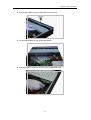
1.Loosen the screws on the top cover
2.open the cover
3. Put the HDD on the HDD bracket
66
Digital Video Recorder
4. Use provided HDD screws, install HDD on the bracket
5. Fix the HDD bracket on the DVR HDD bracket
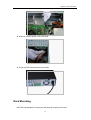
6. Use SATA cable connect to the DVR main board SATA ports,
67
Digital Video Recorder
8. And then connect power cord to the HDD
9. Close the DVR enclosure and screw firmly
Rack Mounting
We DVR uses standard 2U enclosure and adapt for industry rack mount
68
Digital Video Recorder
Steps and notes:
1 Fix the enclosure by 6 screws
2 Temperature should be lower than 35℃ (95°f).
3 15 cm (6 Inch) free space around the unit, be sure air flow is not obstructed.
4 Install the unit from top to bottom
5 Please check input voltage and device power button match or not.
This version of User’s Manual for Standard 1U / 2U and Compact enclosure,
Video Input and Output
Video input connections:
u
DVR
provide
BNC
video
input
connector, input signal format PAL /
NTSC (1.0VP-P,75Ω)
u
We suggest use coaxial cable for
better
video
quality,
video
gain
amplifier device or optic fiber may
needed if long distance transmission
u
Please make sure all coaxial cables
are connected filmy.
u
Note:
The
camera
should
be
installed in a proper location,
avoid
direct
sunshine
backlighting, or low lighting.
We recommend using the
camera
with
backlighting
compensation and low light
compensation function
69
Digital Video Recorder
Make sure both camera and DVR are grounding properly
The coaxial cable should away from any devices or circuit with electromagnetic
interference
Video output connection
u
DVR have BNC (PAL BNC 1.0VP-P, 75Ω) video output and VGA video output, can
display at the same time
u
When you connect the DVR with a TV monitor or VGA monitor, the DVR can
automatically
detects
the
monitor type
u
We
recommend
surveillance
the
monitor
specially designed for best
display quality
When you use TV monitor or PC
monitor, please note:
u
Make sure the monitor grounding properly
u
Degaussing frequently for better display quality
u
Away from any devices or circuit with electromagnetic interference
u
Not suitable for continuously working
Audio input and output
The DVR audio output signal is more than 200mv 1K (BNC or RCA),can directly
connect to low impedance headphones, active speakers, or other devices via amplifier
Note: if the active speakers and microphones are too close, there will cause
high-frequency noise output, to avoid:
u
Adjust the speakers volume to lower level
u
Adjust the speakers and microphones location
u
Use more sound-absorbing material in application environment, to reduce the audio
70
Digital Video Recorder
reflection
u
Use better directional microphones
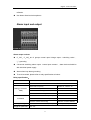
Alarm input and output
Alarm output sockets
u
C1 NO1 ; C2 NO2 are 2 groups normal open linkage output(switching value),
"↓ ":grounding
u
2 channels switching alarm output(normal open contact), alarm device should be
with individual power supply
u
Alarm when loop alarm grounding
u
To avoid overload, please refer to relay specification as below:
Relay specification:
JRC-27F
Model:
Material of the touch
Silver
Rated switch capacity
30VDC 2A, 125VAC 1A
Rating (resistance
Maximum switch power
125VA 160W
load)
Maximum switch voltage
250VAC, 220VDC
Maximum switch currency
1A
Between contacts with same polarity
1000VAC 1minute 50/60Hz
Between contacts with different polarity
1000VAC 1minute 50/60Hz
Between contact and winding
1000VAC 1minute 50/60Hz
Between contacts with same polarity
1500V (10×160us)
Insulation
Surge voltage
Length of open time
Max 3ms.
71
Digital Video Recorder
Length of close time
Longevity
Max 3ms.
Mechanical
50×106 times (3Hz)
Electrical
200×103 times (0.5Hz)
-40℃ ~+70℃
Temperature
Alarm output note:
Max alarm output no more than 1A
u
Avoid the power overload when output loop, may cause the damage
u
Use the co contactor to isolate when high-power load
Alarm input sockets:
u
Show
on
the
figure,
the
second row 1, 2, 3, 4, 5, 6, 7,
8, corresponded to
alarm
input ALARM1~ALARM8
u
Alarm input type could be
normal open or normal close
u
Grounding
joining-up
in
parallel with Alarm detector and DVR
u
Alarm detector NC port connected to DVR alarm input(ALARM)
u
The alarm device should be grounding with DVR when use the outer power supply
Alarm input note:
u
Grounding alarm input
u
Alarm input require the
grounding voltage signal
u
Use the co contactor to
isolate when the alarm
device connected to 2 sets
of DVR, or 1 set of
DVR
and other device
72
Digital Video Recorder
PTZ control connection
Show as on figure, “RS-485, A, B” refer to RS485 A, B wire, connect to encoder or
other control device
PTZ & DVR connection
1、Connect the speed dome camera RS485 cable to DVR RS 485 port
2、Connect the speed dome camera video cable to DRV video input
3、Connect power supply
PTZ connection note:
u
Make sure both grounding for PTZ decoder and DVR, or else common mode voltage
will cause the malfunction of PTZ control, we recommend to use the shielded
twisted-pair cable
u
Avoid the high voltage power interference, ensure the good cable wiring and avoid
the lightning stroke
u
120-ohms resistance should be needed to ensure the signal quality, if more PTZ
decoder connected
u
The DVR RS485 cable should not be parallel connected with other RS485 devices
u
The voltage between decoder wire A,B port should be less than 5V
u
Make sure the grounding for front device
73
Digital Video Recorder
Addenda C overview of Navigation and Controls
System Boot up
Connect the power supply, press switcher on backside panel, indicator light up
and DVR boot up. Default display mode is multiple picture output
System will start record video if set at schedule record mode, and the record
channel indicator light up.
Login
When the system boots up, Click Enter or left click mouse, you can see the login
interface.
There are 2 default users: “admin” “guest”.
“admin” users have administrator right. The default password is “123456” for all 2
default users’ account. “guest” user only can review playback and backup.
Password protection: you can input password 5 times within 30 minutes,
otherwise the account will be locked.
For your system security, please modify you password after first login.
You can use USB mouse, front panel, remote controller or keyboard to input.
About input method: Click
to switch between numeral, English character
(small/capitalized) and Chinese
74
Digital Video Recorder
System Shutdown
Note: Power off system before change the HDD.
Method 1: Press the POWER button at the front over 3sec to stop the disc video
recorder, then shut the power off at the rear panel.
Method 2: System menu -> Shut down the system
Method 3: System menu -> Main menu ->Management tools -> Shut down the
system.
Preview
Enter into “Preview” menu, you can setup date and time according to “General
Setting”, or setup the channel name according to “Output Mode”
The logo displayed on
The logo displayed on the screen
1
the
screen
when
2
when motion detection
recording
The logo displayed on
The logo displayed on the screen
3
the screen when video
4
when camera masking occur
lost occur
Auto Resume after Power Failure
The system can automatically backup video and resume previous working status after
power failure.
Replace Button Battery
Please make sure to use the same battery model if possible.
We recommend replace battery regularly (such as one-year) to guarantee system
time accuracy
75
Digital Video Recorder
Addenda D: WEB CLIENT OPERATION
IE Browser Setup
Please make sure your PC installed Microsoft Internet Explorer 6.0, and DirectX
9.0 or higher version.,
Note: Please turn off the Firewall and Antivirus Software if necessary. When
log in the DVR first time, if all the functions run properly, in this case you could set
the Security as default level.
Login
This chapter mainly introduces DVR’s Web client-end operation.
Open IE and input DVR address in the address column. For example, if your DVR IP
is 192.168.1.108, then please input http:// 192.168.1.108 in IE address column...
System pops up warning information to ask you whether install webrec.cab control
or not. Please click yes button Please input your user name and password.
Default factory name is admin and password is 123456
Note: For security reasons, please modify your password after you first login
Please check the following items:
6.1
Network connection is right
6.2
DVR and PC network setup is right. IP address, Subnet Mask, Gateway,
Please refer to network setup(main menu->setting->network)
3, Use order ping ***.***.***.***(* DVR IP address) to check connection is OK or not. TTL
value 64
4. Web OCX will be downloading and install automatically, when update a new OCX, old
version OCX should be uninstalled
System can automatically download latest web control and the new version can
overwrite the previous one.
76
Digital Video Recorder
WEB client review interface
After you logged in, you can see the main window, double click the channel number in
the right side tree structure, when the icon becomes a small camera, you can review this
channel.
Toolbar
There are few function buttons in the toolbar, at upside and downside
Playback:Record video inquiry, playback and download
Configuration:DVR parameter configuration。
About: DVR Web Server version;
Quit: Quit the Web Server。
Preview window switch
:Set Fluency
:Full screen display;
:Single channel display
77
Digital Video Recorder
:4-channel display;
:6-channel display;
:8-channel display;
:9-channel display;
: 13-channel display;
:16-channel display;
:20-channel display;
:25-channel display;
:36-channel display。
Review the channel
Double click the channel number in the right side tree structure, when the icon
become a small camera, you can review this channel.
78
Digital Video Recorder
Review
Review toolbar in the up-right side of channel, shown as below
;
: Capture picture. You can snapshoot important video. All images are
memorized in folder C:\RC\;
: Local record. When you click local record button, the system begins recording
and this button becomes highlighted, all videos are memorized in folder C:\RC\ ;
: voice talk
: Close video。
PTZ control function
WEB client’s PTZ function:
79
Digital Video Recorder
u
u
u
u
u
u
u
u
u
u
u
Direction Key: 8 direction keys, Click and holding for continuous control.
Step Speed: Control PTZ speed and patrol speed.
Zoom: adjust and control PTZ zoom
Focus: adjust and control PTZ focus
Iris: adjust and control PTZ iris.
Presets: Call preset after set preset value
Pattern: you can input pattern value and then click start record button to begin PTZ
movement.
Flip: control PTZ camera to start vertical flip
Auto Scan: control PTZ camera to start auto scan
Auto tour: input auto tour value and preset value. Click add button, you have added
one preset in the tour
PTZ: Auto scan, Tour, Pattern, Present settings
80
Digital Video Recorder
Click PTZ setup button you can see the following interface
u Click the PTZ camera channel, move the camera to you desired location and then
click left limit button. Then move the camera again and then click right limit button to
set a right limit. Now you have set one auto scan
u Click the PTZ camera channel, move the camera to your desired location and then
input preset value. Click add button, you have set one preset. You can click to set one
preset, or delete one preset
u Click the PTZ camera channel, input auto tour value and preset value. Click add
button, you have added one preset in the tour. Repeat the above procedures you
can add more presets in one tour.
Color setting
Set hue, brightness, contrast, saturation and AGC
: Brightness;
: Contrast;
81
Digital Video Recorder
: Hue;
: Saturation;
: Reset all to default;
Other setting
snapshot:Snapshot, and path:C:\RC\
record path:Record path:C:\RC\
reboot:Restart the device
record size:Set file size
82
Digital Video Recorder
WEB CLIENT Configure
System Info
In the main window, click config button, you can see an interface is shown as
u
System Information: Click device configuration button, you can see the following
interface, Hardware version, HDD information, Interface, Log inquiry.
u Setting: Setting includes the following items: General, Encode setup, Schedule,
RS232, Network, MUL-DDNS, FTP, Alarm setup, Detect, Pan/Tilt/Zoom, Tool
Advanced: set DVR’s record, auto maintenance
83
System Setting
General
General interface is shown as below.;
u
u
u
u
u
u
u
u
System time: Here is for you to modify system time. Please click Save after your
modification
Data format: Here you can select data format from the dropdown list.
Data separator: Please select separator such as – or /.
Time format: there are two options: 24-H and 12-H.
HDD full: there are two options: stop recording or overwrite the previous files when
HDD is full.
Pack duration: Here you can select file size. Default setup is 60 minutes.
Device No.: when you are using one remote control to manage multiple DVRs, you
can give these DVRs serial numbers respectively. Click address button in your
remote control and then input the correct device number, now you can control the
DVR now.
Video standard: PAL. (for your reference only)
84
Digital Video Recorder
Encode
Encode setup includes the following items
u
u
u
u
u
u
u
u
u
u
u
u
u
Channel: Here is for you to select a channel.
Compression: H.264;
Data stream: Regular and extra data stream;
AV enable: Video/Audio. System only displays video by default. You need to manually
enable audio function
Resolution: CIF / QCIF
Differentiating rate: stocking differentiating rate’s type is CIF or QCIF;
Bit rate: There are two options: CBR and VBR. You can only set video quality in VBR
mode, 10Kb/s-4096Kb/s variable
Frame rate: The value ranges from 1f/s to 25f/s (PAL) and 1f/s to 30f/s (NTSC)
Bit rate number: set bit rate according to web status, 10kb/s-4096kb/s adjustable;
Frame interval: can set 1 frame, 2-12 optional.
Image control: brightness, contrast, color, saturation and AGC for selected channel;
OSD Overlay: time, date, title overlay.
Click “copy” as following chart showing:
85
Digital Video Recorder
Schedule
Schedule includes the following interface
When DVR boots up, it is in 24-hour continuous record. In this interface you can set record
type, record time and period. Record type includes regular record(R), motion detection
record (M) and alarm record (A).
u Channel: select the channel number you desire.
u Week: you can select from the dropdown list. Or you can select at the bottom of the
interface.
u Prerecord: system can record the three to five seconds video before activating the
record operation into the file.(Depends on data size)
u Period: There are six periods for you to set. Please click set button of the
corresponding period. Please note all the setup here shall be in one day. E.g. 00.00 to
24.00.
Tip
After you finished setup for one channel, you can click “save as” button, system
pops up the following interface. Now you can copy one channel setup to other
channels.;
86
RS2332
RS232 includes the following items.
u Function: There are various devices for you to select. Console is for serial port or
min-end platform to upgrade program. Keyboard is for you to use special keyboard to
control current device.
u Baud rate: Please select as you desire.
u Data bit: The value ranges from 5 to 8.
u Stop bit: There are three options: 1/1.5/2.
u Parity: There are three options: none/odd /even.
87
Network
Network interface is shown as below.
This interface includes the following items;
u
u
DNS: Set DNS and backup DNS address
DDNS: Set DDNS type, Domain name, User name, Password;
88
Digital Video Recorder User Manual
u
UPNP: Set UPNP, Web Port, TCP Port
u
PPPoE: Set PPPoE User name, password, and IP address
u
PTZ: Set PTZ channel, protocols, bitrate, stop bit, data bit, varity, Default:
PELCOD,1,9600,8,1,
89
Digital Video Recorder User Manual
Reset to default: Reset selected functions to default
90
Digital Video Recorder User Manual
Alarm
Alarm in: Select corresponding alarm in channel
Video Detect: Set video detection area, latch, output channel, PTZ, Buzzer.
Alarm output: select alarm activation channel when alarm occurs.
91
Digital Video Recorder User Manual
Exception Deal: Event type: no disk space, hard disk error, Not enough space,
network failure ,IP address conflict, Buzzer, send e-mail
Advanced
set DVR’s record, Read, Write, auto maintenance。
Disk Manage: Set HDD as Read, Write, Read-only, Reduncey, Erase the data,
92
Digital Video Recorder User Manual
Restore
Upgrade: Select update file to upgrade the DVR;
93
Digital Video Recorder User Manual
Record Control : Set record status: Schedule / Manual / Stop
User Account
User Account: Management user account, adding users, modity users,
password, group.
Auto Maintenance, Reboot, auto delete old file
94