1
INTREPID User Manual
Library | Help | Top
Moving platform data reduction (C10)
2
| Back |
Moving platform data reduction worked example
Overview
1 Import the raw data into INTREPID line datasets using the Import tool.
2
Use editors to identify and define NS-EW lines of interest.
3
Create ancillary fields (timeofday, YYYYMMDD)
4
Add factory calibration information to the file gravimeter.cfg.
5
Allocate standard field names and INTREPID alias names.
6
Reconstruct the cross-coupling field from the monitor data.
7
Filter the monitor data to remove noise.
8
Reconstruct the observed gravity signal from raw components.
9
Filter the reconstructed observed gravity signal to remove noise.
10 Calibrate, correct for Eotvos, Earth tide, platform motion and drift.
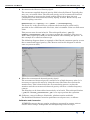
11 Use the profile editor to view reconstructed observed gravity signal.
Preliminary notes
The example data can be found in install_path/sample_data/cookbooks/
moving_platform.
The data we shall use for this example comprises three N-S lines crossing three E-W
lines, for nine intersections. The data is in LaCoste and Romberg Air-Sea System II
format. Air-Sea System II produces two types of data files, with file extensions
“.DAT” and “.ENV”. The data file has 21 comma separated records, recorded once
per second. The environment file contains information about system conditions
during data acquisition, and includes the k-factor and gain coefficients for the
monitors. It is recorded once every 10 seconds.
The data files are in the Rawdata directory and called S-133.DAT and S-133.ENV.
Library | Help | Top
© 2012 Intrepid Geophysics
| Back |