1
INTREPID User Manual
Library | Help | Top
Moving platform data reduction (C10)
3
| Back |
Steps to follow
1
Import the ASCII files S-133.DAT and S-133.ENV into INTREPID line
datasets.
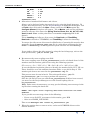
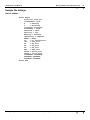
For the file S-133.DAT, use ASCII Columns input format with the following
data definition file (DDF). In our worked example, this DDF is called
import_dat.ddf.
TYPE(LINE)
char 1-4 character*10
Seq 6-6 integer*4
Year 6-9 integer*4
Month 11-12 integer*4
Day 14-15 integer*4
HH 17-18 integer*4
MM 20-21 integer*4
SS 23-27 real*4
Jday 29-31 integer*4
Gravity 33-40 real*4
Spr_ten 42-49 real*4
Beam 51-61 real*4
Vcc 63-70 real*4
AL 72-79 real*4
AX 81-88 real*4
VE 90-97 real*4
AX2 99-106 real*4
Xacc2 108-115 real*4
Lacc2 117-124 real*4
Xacc 126-133 real*4
Lacc 135-142 real*4
Eotvos 144-151 real*4
longitude 153-165 real*8 PROJ(GEODETIC,WGS84) IsX
latitude 167-179 real*8 PROJ(GEODETIC,WGS84) IsY
velocity 181-187 real*4
heading 189-196 real*4
GROUP BY Seq
You can run the INTREPID Import tool either interactively or in batch. If you
wish to run it in batch, the task specification (.job) file import_dat.job is set
up to perform the operation.
To run the task, launch a command window and type the command:
fmanager.exe –batch import_dat.job
INTREPID imports the data and creates a Line dataset called
marine_grav..DIR. This is our primary dataset. Note that because we are
creating a Line dataset, we need to define a line or sequence number. The format
of the raw data does not include an explicit line number, so we need to create one.
The Seq field in the DDF file is defined for this purpose. It does not matter what
value it is assigned on import, so long as it exists. We will be changing it later.
Library | Help | Top
© 2012 Intrepid Geophysics
| Back |