1
Materials Properties Menu:
Material:
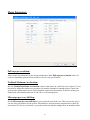
Pull down the Material Properties menu to observe a selection of various materials. Pre-select the
values of speed and tool positions for each of the materials. The default values are simply that.
LinkMotion can be employed to work with many different types of machines. Hence, there is no single
value appropriate for all different machines. User’s experience will dictate the values for his/her
machines.
The values can be inches per second or millimeters per second or centimeters per second. General
Options menu allows you to make your selection for this measure of units.
Per-Pen/Color Settings:
Jobs can be designed in color and job feed rate speeds can be defined as percentage of declared values
for each of the color. One of the applications of this feature is to design the same job in different colors
on different layers and sequence the layers appropriately.
Following are the color/pen values for the LinkMotion printer driver. RGB values are given in percent.
Pen number
--------------1
Color
-------Black
R
--0
G
--0
B
--0
21