1
Lightning/2000™
version 6.6
User’s Manual
Copyright © 2014, Aninoquisi
July, 2014
112 Bruce Street
Huntland, TN 37345
Phone: 931.469.7608
e-Mail: [email protected]
World-Wide Web: www.aninoquisi.com
L I G H T N I N G / 2 0 0 0
Table of Contents
A Warning ________________________________________ 7
Introduction _________________________________________ 9
About Lightning/2000… _____________________________ 9
System Requirements ______________________________ 10
Lightning/2000 Installation _________________________ 12
Background Map Installation _______________________ 13
Device Driver Installation __________________________ 13
Basic Operation _____________________________________ 17
Using the Built-in Help _____________________________ 17
How Lightning/2000 Works _________________________ 18
The Boltek Hardware ______________________________ 20
CPU Usage _______________________________________ 21
Running Lightning/2000 ___________________________ 22
Customizing Lightning/2000’s Performance ___________ 23
Operating modes __________________________________ 24
Customizing the Colors, Fonts, and Alarms ____________ 25
Other Customizations ______________________________ 26
The Background Map ________________________________ 27
About the Background Map ________________________ 27
Status Bar _______________________________________ 28
Popup Menus_____________________________________ 28
Changing Map Object Colors _______________________ 29
Displaying/Hiding Map Layers ______________________ 29
Map Object Visibility ______________________________ 30
ii
R E A L - T I M E
L I G H T N I N G
D E T E C T I O N
Editing the Background Map _______________________ 30
Naming Map Objects ______________________________ 32
The Windows _______________________________________ 33
Raw Lightning Data _______________________________ 34
Real-time Lightning _______________________________ 38
Analysis _________________________________________ 41
Threat Assessment ________________________________ 44
Stroke Rate Graph ________________________________ 46
Rates ___________________________________________ 47
Totals ___________________________________________ 50
Control Panel ____________________________________ 52
Storm Statistics ___________________________________ 55
Detector Status ___________________________________ 61
NOWCast _______________________________________ 62
Summary ________________________________________ 62
Records _________________________________________ 63
The General Status Line ___________________________ 64
Archive Player ___________________________________ 65
The Custom Summary Window ________________________ 69
Overview ________________________________________ 69
Commands_______________________________________ 73
Keywords _______________________________________ 74
The Rate Counters ___________________________________ 77
The Major Counters_______________________________ 78
The Flash Rate Counters ___________________________ 81
The Percent Counters______________________________ 87
3
L I G H T N I N G / 2 0 0 0
The Stroke Rate Counters __________________________ 92
The Stroke Rate Change Counters ___________________ 96
Menu Commands ___________________________________ 105
File Menu _______________________________________ 105
Edit Menu ______________________________________ 109
Window Menu ___________________________________ 110
Options Menu ___________________________________ 114
Help Menu ______________________________________ 116
Counters Menu __________________________________ 117
Panels Menu ____________________________________ 129
Popup Menus ______________________________________ 131
Accessing Popup Menus ___________________________ 131
Popup Menu Reference ___________________________ 132
Using the Dialogs ___________________________________ 159
Align Map Dialog ________________________________ 160
Hardware Settings Dialog _________________________ 161
Range Scaling Dialog _____________________________ 167
Screen Captures Dialog ___________________________ 171
Alarm Properties Dialog __________________________ 187
Stroke Click Sound Dialog _________________________ 188
Stroke Types Dialog ______________________________ 190
E-Mail Options Dialog ____________________________ 192
FTP Options Dialog ______________________________ 197
Custom Summary Manager Dialog __________________ 200
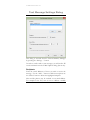
Text Message Settings Dialog ______________________ 204
Software Squelch Dialog __________________________ 206
4
R E A L - T I M E
L I G H T N I N G
D E T E C T I O N
Settings Dialog __________________________________ 207
Graph Stroke Types and Colors Dialog ______________ 211
Layer Order Dialog ______________________________ 213
Selected Topics ____________________________________ 215
Raw Lightning Data vs. Real-time Lightning _________ 215
Alerts __________________________________________ 216
Energy _________________________________________ 218
Noises __________________________________________ 219
Range Determination _____________________________ 220
Nearby Flashes __________________________________ 221
Sending E-mail via The Custom Summary ___________ 222
Antenna Placement _______________________________ 222
Troubleshooting _________________________________ 224
A Lightning Primer _________________________________ 227
Thunderstorms and Lightning Types ________________ 227
Recognizing Patterns of Strokes ____________________ 235
Lightning as an Indicator of Storm Behavior _________ 238
The Stroke Sort Process and Other Limitations _______ 242
Additional Information Sources ____________________ 244
Alphabetical Keyword List____________________________ 247
Custom Summary Language Definition _________________ 257
Custom Summary Commands and Keywords_____________ 259
Commands______________________________________ 259
Count Keywords _________________________________ 269
Date/Time Keywords _____________________________ 275
Miscellaneous Keywords __________________________ 286
5
L I G H T N I N G / 2 0 0 0
Peak Count Keywords ____________________________ 294
Percent and Ratio Keywords _______________________ 299
Records Keywords _______________________________ 302
Total Count Keywords ____________________________ 311
Trend Keywords _________________________________ 314
Custom Summary Examples __________________________ 319
Performing Screen Captures and FTP _______________ 319
Sending E-Mail or Text Messages ___________________ 322
Sending Place-Specific E-Mail ______________________ 323
Sending Text Messages to Local Recipients ___________ 325
Sending Place-Specific Text Messages _______________ 325
Posting Status Updates to Your Twitter Account ______ 326
Index ____________________________________________ 327
6
R E A L - T I M E
L I G H T N I N G
D E T E C T I O N
A Warning
Lightning/2000 produces information on several levels that
can be used to detect approaching storms. Don’t allow your
enthusiasm for tracking severe weather to cloud your
judgment however. You should not depend solely on
Lightning/2000 for your severe weather warnings.
Though we believe that Lightning/2000 is a useful tool in
your severe-weather preparedness arsenal, it shouldn’t be used
for the protection of life or property. Pay attention to other
sources of information such as Doppler radar or weather
radio. Multiple red alerts from Lightning/2000 should be
taken seriously.
When they occur, it’s a sign that
thunderstorms are in your area. Small storms however may
not generate multiple alerts. Such storms can pop up with no
warning, yet they are still capable of producing dangerous
cloud to ground lightning.
Lightning’s most common victims tend to be your electronic
equipment, especially your computer.
Lightning most
frequently enters your computer through the phone line. It’s
for this reason that we recommend using a surge protector
with phone line protection. It is also a good idea to run any
coaxial cables (from cable TV or satellite dishes) through a
surge protector.
You should also avoid talking on a corded phone during
thunderstorms. Using a cellular or cordless phone (as long as
you’re indoors) is relatively safe.
Lightning routinely occurs several miles out in front of an
approaching storm. Whether you’re actively tracking a storm
or not, you should disconnect the phone or cable line from its
modem if threatening weather approaches. By taking a
minute to do these things, you could save yourself several
thousand dollars in damages.
7
L I G H T N I N G / 2 0 0 0
An approaching tornado calls for immediate action. Seek
shelter on the lowest floor or basement of the building you’re
in near the center of the building. Avoid windows at all costs.
Under no circumstances should you waste time by opening
windows! If you’re in a mobile home, you should seek shelter
outside by lying flat against the ground (or better yet, in a
ditch or culvert) away from trees and automobiles.
Aninoquisi cannot be held responsible for injury or death
resulting from use of this software contrary to this warning.
8
R E A L - T I M E
L I G H T N I N G
D E T E C T I O N
Chapter 1
Introduction
About Lightning/2000… • System
Requirements • Lightning/2000 Installation
• Background Map Installation • Device
Driver Installation
About Lightning/2000…
Lightning/2000 is a software tool that can be used to replay
“canned” lightning archive files created by Lightning/2000, or
when used on a system that has the Boltek lightning detection
hardware and antenna, can detect and analyze real-time
lightning data.
Though every effort has been made, a certain percentage of
actual lightning strokes will be misidentified as noises. In
general, the precise location of any particular lightning flash as
plotted by Lightning/2000 cannot be guaranteed.
However with the advent of Lightning/2000 v4.6, the
ability to determine – in most cases – when an individual
lightning flash is relatively nearby became possible.
When such flashes are detected, a special “storm” is depicted.
Rather than being a wedge shape, these special nearby storms
are circular or elliptical. When one of these storms is shown,
there is an excellent chance that lightning is imminent or is
occurring in the immediate area.
9
L I G H T N I N G / 2 0 0 0
In version 5.4 and later, the use of CID (Compact Intercloud
Discharge) strokes can identify many more nearby lightning
flashes with a high degree of accuracy and a false alarm rate of
nearly zero. Also, the option to require nearby flashes to
include CID strokes is now available (Options | Settings…
from the main menu). This option can reduce the false alarm
rate for identifying nearby flashes using the previously proven
technique (first included in version 4.6) to zero. However if
storms in your area typically do not produce CID strokes,
then this option should not be enabled.
System Requirements
•
The Boltek lightning detector is required for
detection of lightning.
•
A Pentium 1 GHz processor or faster is
recommended for lightning detection.
•
At least 256 MB of memory is recommended
above and beyond the amount of memory
required by Windows.
•
Windows XP, Windows Server, Windows Vista,
Windows 7 (32-bit and 64-bit versions) and
Windows 8 (32-bit and 64-bit versions) are
supported. (Only Windows XP is supported
when using the old ISA StormTracker card.)
•
10 Mb of hard-drive space is required for the
basic installation, though daily archive files will
eventually consume much more than this.
•
A graphics card with at least 640x480 resolution
with at least 32K colors is strongly
recommended. Unexpected artifacts will occur if
10
R E A L - T I M E
L I G H T N I N G
D E T E C T I O N
using a graphics driver mode with only 16 or 256
colors.
Aninoquisi is not responsible for
problems observed in such a case.
•
Do not attempt to run Lightning/2000 and
any other software that accesses the lightning
detection hardware at the same time.
11
L I G H T N I N G / 2 0 0 0
Lightning/2000 Installation
If you have a Lightning/2000 CD, just insert the CD into
your computer’s CD drive. The Lightning/2000 setup
program should start up automatically. If it does not, navigate
to the CD and run the installation program manually.
If you downloaded a ZIP file from the Aninoquisi website,
just double-click on the file and run the setup program that’s
in the ZIP folder.
You will be prompted for a password during the installation
process. That password will be in a text file on the CD, or
will have been sent to you via email.
12
R E A L - T I M E
L I G H T N I N G
D E T E C T I O N
Background Map Installation
The largest or most detailed background map should be
copied automatically from your Lightning/2000 installation
CD to the Lightning/2000 installation directory on your
computer. To install a different map, follow the procedure
below.
The procedure for installing a background map is very
straightforward. The .AMF format of the supplied map(s) is
proprietary to Aninoquisi. Maps in this format are available
only from Aninoquisi.
If you move and need new
background maps, they can be produced for a small fee.
1. Start Lightning/2000 by choosing the lightning icon
on the Programs menu (available from the Start
button).
2. Choose Install map… from the File menu.
3. Choose the map you wish to install and click the OK
button. The map, if necessary, will be copied to the
Lightning/2000 installation directory on your hard
drive and installed as your default background map.
Device Driver Installation
If you are running Lightning/2000 under Windows XP and
using the Boltek StormTracker ISA card (no longer in production),
you will first need to install the included Windows XP device
driver.
13
L I G H T N I N G / 2 0 0 0
The installation of this driver is not required to use the Boltek
LD-250 portable lightning detector, nor is it required when
using the Boltek StormTracker PCI card.
If you are using the LD-350, the installation of the proper
driver should happen automatically when you plug the LD350 into a USB port and turn on the power to the unit. If this
does not happen, you may download the driver from the
Aninoquisi website’s Downloads page.
However if you are using the StormTracker PCI card, you will
first have to install its device driver. Lightning/2000 will not
be able to access the PCI card unless device driver is installed.
The installer for the PCI device driver can be found on the
Lightning/2000 installation CD, or it can be downloaded
from the Aninoquisi website’s Downloads page. The current
version of the PCI device driver has its own installer to make
its installation easy and quick.
Here is the procedure for installing the "genport" device
driver for the ISA card in Windows XP:
1. Double-click the "Add Hardware" applet in the Control
Panel.
2. Press the "Next>" button.
3. Let the wizard search for new hardware (it shouldn't
find any).
4. Click the "Yes, I have already connected the hardware
button"
5. Select "Add a new hardware device" (scroll to the
bottom of the list box) and click the "Next>" button.
6. Select "Install the hardware that I manually select from
a list (Advanced)" and click the "Next>" button.
7. Ensure that "Show All Devices" is selected and click
the "Next>" button.
14
R E A L - T I M E
L I G H T N I N G
D E T E C T I O N
8. After waiting for it to think a while, click the "Have
Disk..." button.
9. Click the "Browse..." button and navigate to the folder
where Lightning/2000 is installed (C:\Program
Files\Aninoquisi\Lightning2000 is the default folder).
10. Select the "genport" file.
11. Click the "OK" button.
12. Select the "Lightning/2000" driver and click "OK".
15
L I G H T N I N G / 2 0 0 0
16
R E A L - T I M E
L I G H T N I N G
D E T E C T I O N
Chapter 2
Basic Operation
Using the Built-in Help • How
Lightning/2000 Works • The Boltek
Hardware • CPU Usage • Running
Lightning/2000 • Customizing
Lightning/2000’s performance • Operating
modes • Customizing the Colors, Fonts, and
Alarms • Other Customizations
Using the Built-in Help
You can display help on almost any topic. Most dialog boxes
have a Help button.
You can double-click on many items on the screen (each
counter, for example) to display help on the item.
Pressing the F1 key while a menu selection is highlighted will
display help on that menu selection.
Most of the popup menus (accessed by right-clicking in a
window) have a Help… command that you can select to
display help on a window.
Select Help | Contents… from the main menu to display to
display the main help table of contents.
17
L I G H T N I N G / 2 0 0 0
How Lightning/2000 Works
Every lightning flash (whether it’s cloud-to-ground (CG) or
intercloud/intracloud (IC)) produces several electric pulses
(strokes) that are picked up by the antenna on your Boltek
system. Each of these strokes is analyzed to determine
whether it is lightning or not. The ones that aren’t lightning
are categorized as “noises”.
Note: only the LD-350, the StormTracker ISA or PCI
hardware allows you to discriminate between IC and CG
strokes. When using the LD-250, all strokes detected are of
the “unknown” type. This is because the LD-250 only passes
along very general information about each stroke, rather than
the detailed waveforms that are extracted from the other
hardware.
A noise can be either non-lightning electrical activity or
lightning that cannot be sufficiently analyzed. Some nonlightning electrical activity looks enough like lightning that it
slips through the analysis and is logged as a lightning stroke.
Particularly during times of heavy lightning activity, some
strokes are so garbled that they cannot be discriminated as
CG or IC. These are discarded as noises. Most of these
garbled strokes are IC strokes. It is entirely possible that the
number of noises will equal or exceed the number of strokes
during times of heavy activity. This is normal and is not a
problem with the system. With version 4 of Lightning/2000,
a substantial percentage of these formerly discarded IC
strokes can be recovered. Because of their borderline nature,
they are not plotted unless you have selected the “Plot
recovered noises” option from the Options menu or the
Control Panel.
The “good” strokes are saved for analysis. The results of this
analysis end up being displayed in the Analysis window, the
18
R E A L - T I M E
L I G H T N I N G
D E T E C T I O N
Threat Assessment window, and, optionally, the Real-time
Lightning window.
Each lightning stroke is displayed in two different ways as
soon as it is detected. The detector activity window shows
the strength of each incoming stroke. The Raw Lightning
Data window plots each stroke according to its strength and
direction. No distance information is displayed in the Raw
Lightning Data window.
The Raw Lightning Data window can be converted into the
Real-time Lightning window by choosing Raw Lightning
Data Properties | Real-time lightning from the window’s
popup menu, or by choosing Options | Real-time
lightning from the main menu, or by checking the “Realtime” checkbox on the Control Panel. The Real-time
Lightning window attempts to plot individual lightning flashes
in a geographic position, superimposed on a background map.
The positions of flashes in the Real-time Lightning window
are derived from the information developed by and displayed
in the Analysis window. Every minute, the flashes that have
been detected over the last few minutes are analyzed as a
group to come up with storm data that is displayed in the
Analysis window.
By giving the user a variety of ways to look at lightning data,
we’ve tried to “cover all the bases.” The thinking is that even
though any single component of the Lightning/2000 display
may not be sufficient to come up with a decent analysis of
what’s going on, all of the information taken together lets the
user construct a good picture.
The general status line at the bottom of the main window is
our attempt to perform a meta-analysis on all of the
information and come up with a “best guess” at how alert you
ought to be. When the general status line turns red, you need
to consult any sources of weather information available to
find out exactly what’s happening.
19
L I G H T N I N G / 2 0 0 0
And with the custom summary, you can construct your own
criteria for what constitutes an alert and change the general
status alert level independently.
Because of the inexact nature of the analysis process, it is not
uncommon for a general status alert to be displayed when a
storm is still some distance away. The alternative would have
been to not display an alert when a storm was potentially
nearby. In general, more false alarms will occur than missed
alerts. Missed alerts are less common.
With the advent of Lightning/2000 v4.6, the ability to
determine – in many cases – when an individual
lightning flash is relatively nearby became possible.
When such flashes are detected, a special “storm” is depicted.
Rather than being a wedge shape, these special nearby storms
are circular or elliptical. When one of these storms is shown,
there is an excellent chance that lightning is imminent or is
occurring in the immediate area.
Please do not contact Aninoquisi when a false alarm occurs.
This is a normal part of the operation of Lightning/2000. We
are constantly striving to reduce the incidence of false alarms.
Check our website regularly for updates of Lightning/2000
components.
The Boltek Hardware
For Lightning/2000 to be able to detect and display live
lightning data, one of the Boltek lightning detection hardware
systems must be connected to the computer.
There are currently four hardware choices: the StormTracker
PCI card or StormTracker ISA card (no longer in
production), both of which install inside your computer, the
LD-250, which connects to your computer via the serial port
20
R E A L - T I M E
L I G H T N I N G
D E T E C T I O N
(or to a USB port with the included adaptor), and the LD-350,
which connects to a USB port.
With the StormTracker card or the LD-350, Lightning/2000
has access to the raw waveform description of each lightning
stroke. Analysis performed on these waveforms enables
Lightning/2000 to determine what kind of lightning (CG or
IC) is occurring.
The LD-250 performs its own analysis on each lightning
stroke. It does not determine what kind of lightning stroke
has occurred. Therefore when using the LD-250, all lightning
strokes will be displayed using the colors and symbols defined
for the “unknown” stroke type.
Do not attempt to run Lightning/2000 and any other
software that accesses the Boltek hardware at the same
time.
CPU Usage
When there is little or no lightning activity, Lightning/2000’s
usage of your computer’s CPU is minimized. However, when
there is significant lightning activity, the lightning detection
hardware is checked continuously so that no lightning activity
will be missed.
You may, if you desire, cause Lightning/2000 to check the
Boltek hardware continuously by setting the appropriate
option in the Settings Dialog (Options | Settings… from
the main menu).
It is normal during times of significant lightning activity for
Lightning/2000 to attempt to use as much of the computer’s
processor as possible. Though other tasks may be performed
by the computer at these times, they will proceed more slowly
than if there was little or no lightning activity.
21
L I G H T N I N G / 2 0 0 0
Running Lightning/2000
After a successful installation, click the “Start” button, click
“Programs”. The Lightning/2000 icon will be at or near the
end of the “Programs” menu. Click this icon to start
Lightning/2000.
Important: if you are running Lightning/2000 under Windows
2000 or Windows XP, and using the Boltek ISA StormTracker, you
will first need to install the device driver. Instructions for this procedure
are in Chapter 1.
When running Lightning/2000 on Windows 7 or Windows 8
systems, it is possible that you will need administrator
privileges to run the program. You can cause any program to
run with administrator privileges by right-clicking on the
program’s executable and then clicking on the
“Compatibility” tab and then checking the “Run this program
as an administrator” box. The Lightning/2000 executable is
named “lightning.exe”. It is normally located in the folder
“C:\Program Files (x86)\Aninoquisi\Lightning2000.
The first thing you need to do is to install your background
map that was supplied when you purchased Lightning/2000.
When installing Lightning/2000 from a CD, the largest map
file on the CD will automatically be installed. If you wish to
install a different map, choose File | Install map… from the
main menu and then pick your map file.
If your
Lightning/2000 purchase was via a download of the installer
and a ZIP file that contains your map, you will have to extract
the map file from the ZIP before you can install the map.
The first time Lightning/2000 runs, it will read settings from
the default preferences files. The windows will then be
arranged so that each window is visible (except for the
Summary , NOWCast, Records, Analysis, and Storm Statistics
windows), and no window spills outside the frame of the
main window.
22
R E A L - T I M E
L I G H T N I N G
D E T E C T I O N
The next thing you need to do is to open the Hardware
Settings Dialog (Options | Hardware…) and enable the
lightning detection hardware. See Chapter 8 for details on
this dialog box.
You will probably want to customize the appearance of the
Lightning/2000 display to suit your needs. Basically, rightclicking the mouse on any visible element causes a popup
menu to appear. These popup menus contain various options
that can be changed.
Customizing Lightning/2000’s
Performance
There are a few system parameters that may be dependent on
your particular installation. The placement of your antenna
and your location partly determine how your system will
perform. Since we can’t allow for the peculiarities of your
installation, there are some parameters that can be changed
that will affect how Lightning/2000 analyzes data.
The Hardware selection in the Options menu controls the
squelch. The higher the squelch is turned up, the fewer weak
strokes will be detected and processed by Lightning/2000.
Turning up the squelch will not only affect the energy ratio,
but could affect how storms are ranged. Storms may be
ranged too closely if the squelch is turned up too high. You
should generally leave the squelch at 0 or 1 to get the most
accurate analysis of the data, though a squelch setting of 4 or
5 with the LD-350 will provide an equivalent level of noise
rejection. Though setting the squelch to a higher level will
prevent many noises from being detected, those noises aren’t
included in the data analysis no matter what squelch setting
you choose.
23
L I G H T N I N G / 2 0 0 0
When used in conjunction with the Range Scaling dialog, the
squelch can be used to adjust how storms are ranged.
The Range Scaling dialog can be used to affect how the range
to storms is determined. You can use this dialog to multiply
the range to a storm by a constant factor that depends on the
original range of the storm. See chapter 8 for details on the
Range Scaling dialog.
Operating modes
The user interface of Lightning/2000 can be viewed in one of
several modes: simple mode, stroke mode, flash mode, and
advanced mode. Flash mode and stroke mode implement the
“classic” look of the user interface. However you are free to
arrange the windows and counters in whatever fashion you
wish in any mode.
The “mode” is basically a pre-defined look to the user
interface. You may select one of the modes by choosing
Window | Arrange from the main menu.
Older versions of Lightning/2000 detected only strokes.
Each stroke represents a single detection from the lightning
detection hardware. But lightning actually occurs as flashes.
Each flash is what we think of when we see a bolt of
lightning. A flash consists of many strokes. The closer a
lightning flash is, the more strokes will be detected from it.
Nearby flashes have been observed to consist of greater than
100 strokes in extreme cases.
As each lightning stroke is processed, it is checked to see if it
belongs to any of the current lightning flashes. Once no more
strokes are seen as belonging to a flash, the flash is released
into the system and is tallied.
24
R E A L - T I M E
L I G H T N I N G
D E T E C T I O N
In both the simple and advanced modes, flashes are displayed
in the Real-time Lightning window; however the Raw
Lightning Data window may be switched between the display
of strokes and flashes.
In one of the “classic” modes (choose Window | Arrange |
Classic from the main menu), either flashes or strokes may
be displayed. You may change whether flash or stroke
information is presented by choosing Options | Flash mode
from the main menu.
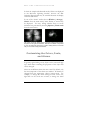
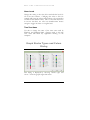
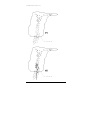
The picture on the left shows strokes in the Raw Lightning Data window;
the picture on the right shows flashes. Whereas it is difficult or impossible
to pick out where the actual storm is when viewing strokes, it becomes
easy to do so when looking at the flashes.
Customizing the Colors, Fonts,
and Alarms
In general, right-clicking on any object on the screen will pop
up a small menu containing the properties of the object that
can be changed.
There are 64 different alarms that can sound. By default, only
the most important of the alarms are enabled. All alarms are
changed from the appropriate object’s popup menu. For
example, to change the alarm settings for the stroke rate,
right-click on the stroke rate counter; to change the alarm
25
L I G H T N I N G / 2 0 0 0
settings for the IC percentage, right-click on the IC% counter,
and so forth.
The storm range alarms may only be changed from within the
Analysis window. The general status line alarms may be
changed by right-clicking on the status line.
Other Customizations
The contents of the Custom Summary Window and the
General Status Line may be customized by changing the
templates used. The custom summaries currently running
may be changed in the Custom Summary Manager. Choose
Options | Custom Summary Manager… from the main
menu to access the Custom Summary Manager.
By using one of the custom summary commands, the General
Status Line alert level and the background color of the
Custom Summary window may be changed.
Because the Status Line and the Custom Summary Window
are controlled by a template that is a simple text file, that
template file may be edited with any ordinary text editor (such
as Notepad).
By changing the #Write and #WriteLine commands
contained in the template files, you may change the text that is
written out in the Custom Summary Window and/or Status
Line from English to any language.
26
R E A L - T I M E
L I G H T N I N G
D E T E C T I O N
Chapter 3
The Background
Map
About the Background Map • Status Bar •
Popup Menus • Changing Map Object
Colors • Displaying/Hiding Map Layers •
Map Object Visibility • Editing the
Background Map • Naming Map Objects
About the Background Map
The background map uses a “flat” projection. Each degree of
latitude spans the same distance on the screen as each degree
of longitude. This means that for locations further from the
equator, circles drawn on the map will appear increasingly
elliptical. Despite this, each storm or lightning flash plotted
on the map is in the precise position that is calculated for it.
Because of the limitations in the old maps (prior to version 6),
this was not always the case.
The map consists of several “layers”. Each layer is a single
type of map object (i.e. countries, states, grid lines, roads,
rivers, etc.). Any layer may be made visible or invisible by
right-clicking on the map and checking or unchecking the
layer on the “Layers” sub-menu.
27
L I G H T N I N G / 2 0 0 0
Status Bar
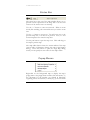
The status bar at the top of the map window allows you to
perform various operations on the map, and to see the exact
location of the mouse cursor on the map.
Use the “+” button to enter zoom mode. When in zoom
mode, click and drag a box around the area you wish to zoom
into.
Use the “-“ button to zoom out. You will zoom out to the
previous map view, or if there is no previous view, to a view
that encompasses two times the map area.
Use the pan button to pan the map view. Click and drag on
the map to pan the map.
The map radius button shows the current radius of the map
view in miles or kilometers (change the units in the Settings
dialog). Press this button to open the Align Map dialog,
where you can specify an exact value for the map’s radius.
Popup Menus
Right-click on the background map to display the map’s
popup menu. The popup menu contains four sub-menus: (1)
the sub-menu for the window you clicked in (Real-time
Lightning, Threat Assessment, or Analysis), (2) the sub-menu
28
R E A L - T I M E
L I G H T N I N G
D E T E C T I O N
for the particular map object that you clicked on, (3) the “Add
Map Object” sub-menu, and (4) the “Layers” sub-menu.
The window’s sub-menu allows you to change various
properties of the window itself, including the map’s center.
The map object’s sub-menu contains various properties of the
particular map object that you clicked on (such as color or
font). The “Add Map Object” sub-menu allows you to add a
variety of different objects to the map. The “Layers” submenu allows you to turn off or turn on any of the various
map layers.
Changing Map Object Colors
Changing the color of any object on the map is easy. Just right-click
on the particular object whose color you want to change. The
second sub-menu on the popup menu will contain all of the
properties of the object. For objects with an area, choose
“Color…” to change its color. For objects drawn with just a line
(like rivers), choose “Outline | Color…” from the menu.
Displaying/Hiding Map Layers
Right-click on the map. The fourth sub-menu in the popup
menu is the “Layers” menu. It contains a list of map layers
(in order from the first layer drawn to the last layer drawn).
Each displayed layer has a check mark next to it. Unchecking
a layer makes it invisible; checking a layer makes it visible.
29
L I G H T N I N G / 2 0 0 0
Map Object Visibility
Most elements of the map itself (cities, rivers, roads, etc.) are
only visible if you zoom in on the map. The zoom level at
which a particular map feature appears is related to the size of
the map feature. For map objects that occupy an area (like
cities), the larger in area the map object, the further zoomed
out you can be and still see the object. For map objects that
are lines (like rivers), the longer the map object, the further
zoomed out you can be. For map objects that are just a point
(like places), they are only visible if you are zoomed in to a
small area.
Cities and places may be made to appear no matter how
zoomed out your are. Right-click on the city or place and
check the “Always Visible” selection from the map object’s
“Properties” sub-menu.
Editing the Background Map
Adding New Map Features
Right-click on the background map and select the "Add Map
Object" sub-menu from the popup menu. You may add a
variety of objects to the map, including places, roads, and
freshwater features.
Select the map object you wish to add and then click on the
map where you would like the map object to go.
Editing Map Features
To edit the shape of a map feature, right-click on the map
feature and choose "Edit" from the map feature’s
30
R E A L - T I M E
L I G H T N I N G
D E T E C T I O N
“Properties” sub-menu. You will then see the nodes that
define the shape of the map feature. You may click and drag
a node to a new position. Double-clicking on a node adds a
new node to the feature.
Right-click on the feature and choose "Edit" again to quit
editing that object and return the object to its normal
appearance.
Naming a City or Place
To change the name of a city or place, right-click on the city
or place and choose "Name..." from the “Properties” submenu. To remove the name of a place, right-click on it,
choose “Name…” from the “Properties” sub-menu and
delete the current name and click the OK button.
Moving a Place's Name
To change where the name of a place is drawn, click on the
name and drag it to a new position.
Deleting Map Features
To delete a map feature, right-click on the map feature and
select "Delete..." from its Properties sub-menu. You will be
asked to confirm the deletion.
Saving Changes to the Map
If you have made changes to the background map, you may
choose "File | Save map..." from the main menu. If you
have changed the map and not saved the changes, you will be
asked if you want to save those changes when closing
Lightning/2000.
31
L I G H T N I N G / 2 0 0 0
Naming Map Objects
Attach a name to a map object by right-clicking on the map
object and choosing “Name…” from its sub-menu on the
popup menu.
Names of roads are somewhat different than names of other
map objects. You can enter just a number for the road name
and that number will be displayed inside a generic road
symbol.
You can enter a road number preceded by one of these
combinations of letters. Each one of these will cause a special
road symbol to be displayed:
A
AS
AUS
B
BAB
C
D
E
FA
G
I
M
NH
NZ
S
US
a generic “A” level road
an Autostrada
an Australian federal highway
a generic “B” level road
a German autobahn (Bundesautobahn)
a generic “C” level road
a generic “D” level road
a Euroroute
a France Autoroute
a China federal highway
a U.S. Interstate highway
a Great Britain motorway
an India national highway
a New Zealand state highway
a U.S. state highway
a U.S. federal highway
32
R E A L - T I M E
L I G H T N I N G
D E T E C T I O N
Chapter 4
The Windows
Raw Lightning Data • Real-time Lightning
• Analysis • Threat Assessment • Stroke
Rate History • Rates • Totals • Storm
Statistics • Detector Status • NOWCast •
Summary • Records • The General Status
Line
33
L I G H T N I N G / 2 0 0 0
Raw Lightning Data
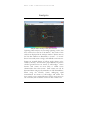
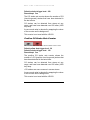
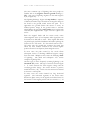
Closer storm to the west, with more distant storms to the north. Note the
“tail” of strokes pointing towards the center of the screen towards the west.
The Raw Lightning Data window contains exactly what the
name implies. Lightning strokes are grouped into one of 6
ages: oldest, older, old, new, newer, and newest. Each stroke
type in each of the 6 ages may be drawn in a different color
and shape. There are 8 types of strokes displayed: +CG
(positive cloud-to-ground), -CG (negative cloud-to-ground),
+IC (positive intercloud/intracloud), -IC (negative
intercloud/intracloud), +CID (positive compact intercloud
discharge), -CID (negative intercloud discharge), Leader, and
Unknown. CID strokes can be displayed only when strokes
are being displayed. Switch to stroke mode by right-clicking
in the window and choosing Raw Lightning Data
34
R E A L - T I M E
L I G H T N I N G
D E T E C T I O N
Properties | Settings | View | Strokes from the popup
menu.
For Boltek StormTracker or LD-350 users, the first 7 stroke
types will be displayed. For Boltek LD-250 users, only the
“Unknown” stroke type is used. The LD-250 performs its
own rudimentary analysis on each lightning stroke and only
passes along the amplitude of each stroke. The serial
connection used by the LD-250 does not support the data
rate necessary to pass along the raw stroke information that is
necessary to perform a sophisticated analysis.
Each of the 6 ages of strokes remains on the screen for an
amount of time (up to an hour) that you define. Change the
stroke shapes, colors, and persistences by right-clicking in the
window and choosing Raw Lightning Data Properties |
Strokes… to display the Stroke Types dialog.
The stroke types most likely to be indicative of nearby or
severe storms will be plotted last (i.e. on top). Here is the
order in which strokes are plotted (each stroke type will be
plotted on top of the stroke types later in the list):
•
+IC
•
-IC
•
-CG
•
+CG
•
+CID
•
-CID
•
Leader
•
Unknown
You can also convert the Raw Lightning Data window to the
Real-time Lightning window by choosing Real-time
lightning from the window’s popup menu. While more
aesthetically pleasing to most users since it displays lightning
35
L I G H T N I N G / 2 0 0 0
stroke on a background map, only the Raw Lightning Data
window allows you to see fine detail a storm’s structure, such
as the prevalence of CG versus IC strokes, and their relative
amplitudes.
The data in the Raw Lightning Data window has been
processed only enough to determine its strength and
direction. Stronger flashes (they aren’t necessarily nearer
flashes) are displayed closer to the center of the window.
Flashes to the north are displayed towards the top of the
window (but only if your antenna is aligned properly); flashes
to the south are displayed towards the bottom of the window,
and so on. (The alignment of the antenna may be changed in
the Hardware Settings dialog.)
In stroke mode, every stroke will be displayed the instant it is
detected. But in flash mode, only those flashes that are
determined to not be reflections will be displayed. (The
aggressiveness of the reflection determination may be
changed by choosing Options | Reflection rejection from
the main menu.) The selection of flash mode or stroke mode
is available only when using one of the “classic” window
arrangements. The display of flashes is the default when
using the “simple” or “advanced” window arrangements.
In advanced mode (choose Window | Arrange | Advanced
from the main menu), you may choose between the display of
flashes or raw strokes. To do this, right-click in the window
and choose Raw Lightning Data Properties | Settings |
View from the popup menu. You can choose between
viewing strokes and flashes in the Settings Dialog.
One of the hallmarks of a nearby storm as it appears in this
window is a “tail” of stronger strokes. Because stronger
strokes are plotted closer to the center of the window, these
“tails” will point towards the center of the screen.
More distant storms won’t exhibit this feature. They are
characterized by a cluster of strokes further from the center
of the screen.
36
R E A L - T I M E
L I G H T N I N G
D E T E C T I O N
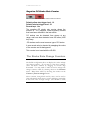
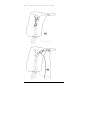
A moderately distant storm to the north-northwest. There is no “tail” of
strokes towards the center of the screen. A somewhat more nearby storm
can be seen to the northeast.
The contents of the Raw Lightning Data window may be
copied to the clipboard by choosing Copy from the Edit
menu.
The click sound produced by new strokes may be changed by
right-clicking in the window and choosing Raw Lightning
Data Properties | Sound… from the window’s popup
menu. Some users have reported that the click sound stops
playing after Lightning/2000 has been running for a while,
particularly during times of heavy lightning activity. We have
researched this problem, and it appears to be due to
irregularities with sound card drivers and/or Windows’
implementation of the function used to play the click sound.
Clicking on a cluster of strokes or flashes in the Raw
Lightning Data window opens the Storm Statistics window,
which displays detailed data about a storm.
37
L I G H T N I N G / 2 0 0 0
Real-time Lightning
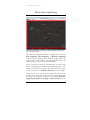
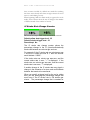
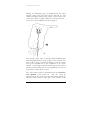
Real-time Lightning window showing a powerful, relatively nearby storm
with some close strokes.
The Real-time Lightning window is displayed by choosing
Raw Lightning Data Properties | Real-time lightning
from the Raw Lightning Data window’s popup menu (by
right-clicking in the window). Incoming lightning strokes are
analyzed using a variety of statistical techniques.
Those strokes that cannot be correlated with an actual storm
will not be displayed in the Real-time Lightning window. The
setting of the reflection rejection option can affect how many
strokes are drawn. See reflection rejection for more details.
The positions of the strokes in this window are based on the
position of storms in the Analysis window. Display storms in
the Real-time Lightning window by choosing Real-time
Lightning Properties | Settings | Show storms from the
38
R E A L - T I M E
L I G H T N I N G
D E T E C T I O N
window’s right-click menu. Click on one of the storms to
display detailed information about the storm in the Storm
Statistics window.
The border of the window will change color to indicate when
a yellow or red storm range alert is in effect. The Analysis
window is the central authority for determining when a storm
range alert is in effect.
With the advent of Lightning/2000 v4.6, the ability to
determine – in many cases – when an individual
lightning flash is relatively nearby became possible.
When such flashes are detected, a special “storm” is depicted.
Rather than being a wedge shape, these special nearby storms
are circular or elliptical. When one of these storms is shown,
there is an excellent chance that lightning is imminent or is
occurring in the immediate area.
The popup menu also contains options for toggling the
display of the range rings and azimuth radials. The click
sound produced by new strokes may be changed by rightclicking in the window and choosing Real-time Lightning
Properties | Sound… from the window’s popup menu.
You can configure any element within the window (including
map features) by right-clicking on the element or map feature.
Because of the constantly changing nature of the strokes from
a particular storm, the Analysis window may indicate that a
storm is moving back and forth from one minute to the next.
The Real-time Lightning window attempts to smooth out
such momentary changes so that storms do not wander
around as much when the individual strokes are plotted there.
When first starting Lightning/2000, it takes as long as 30
seconds for strokes to be plotted in the Real-time Lightning
window. This is because a sufficient number of strokes must
be accumulated to perform a reliable analysis of the storms
that may be present. It is not possible to tell from a single
39
L I G H T N I N G / 2 0 0 0
stroke or flash how far away it is when using the Boltek
hardware.
Also, the very first stroke detected in a particular direction will
not be plotted. A single detection cannot be reliably placed
within a storm. Multiple strokes in a particular direction need
to occur before a “storm” is detected in that direction.
An image of the Real-time Lightning window can be captured
and saved to a file in any or all of three formats (PNG, BMP,
or JPG). See screen capture in the index to locate details
The Real-time Lightning window can be made to resize itself
(every 5 minutes) so that the majority of lightning activity is
displayed by choosing Real-time Lightning Properties |
Settings | Auto zoom from the right-click menu. The auto
zoom option is not available when using a BMP or JPG
background map.
40
R E A L - T I M E
L I G H T N I N G
D E T E C T I O N
Analysis
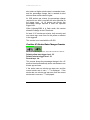
Analysis window showing a storm just to the west.
Lightning/2000 analyzes the incoming lightning strokes that
have occurred over the last 5-20 minutes. The results of this
analysis are displayed in the Analysis window. Denser areas in
the raw data window are identified as “storms”. A “storm”
doesn’t necessarily mean a single, well-defined storm however.
Storms are normally drawn as hollow wedge shapes, colorcoded by intensity. Storms with a preponderance of positive
cloud-to-ground strokes are shown as solid wedges. That’s
because such storms are more likely to exhibit severe
characteristics than other storms. Such storms can only be
discerned when using the StormTracker or LD-350 hardware.
When using the LD-250, storms undergoing rapid
intensification are shown as solid wedges, and storms that
have recently seen a marked decrease in their stroke rates are
also colored in, but in a darker version of their outline color.
41
L I G H T N I N G / 2 0 0 0
Individual thunderstorms may occupy a large area, but
frequently the area of the storm that is producing the bulk of
the lightning is quite small. A single storm may have a
number of lightning producing areas. Heavy lightning
production doesn’t always correlate with the severity of the
storm, and a low level of lightning doesn’t always mean a
storm should not be monitored.
Lightning/2000 is one more tool in your arsenal of tools that
can be used to gauge the severity of approaching storms.
Using it as your only source of weather data is not advisable
however.
At the current time it isn’t possible for Lightning/2000 (or
any other single-antenna lightning detection system) to detect
a storm that’s “hidden” behind a nearer storm if they are both
in the same direction. This is perhaps the most common
reason for inaccurate ranging of storms. If two storms lie
along the same line of azimuth, the result in the analysis
window will be a single storm that lies midway between the
two.
We use the gross features of lightning strokes to determine
their range. The analysis performed is similar to statistical
techniques used in predicting election results. Just as it’s ill
advised to make an election prediction based on polling a
small number of voters, the ranging on small storms is only
an approximation. However storms that get ranged closely are
likely to be close no matter how many strokes they contain.
The “squatness” of the storm (the distance between the inner
and outer edges of its range box) is an indicator of how
confident Lightning/2000 is in the ranging. Big storms will
have a more squat appearance than small storms. More
strokes means more confidence in the ranging. Think of the
length of the range box as “error bars” on the range.
This having been said, there’s still the possibility of a bad
ranging taking place. The ranging algorithm isn’t foolproof,
42
R E A L - T I M E
L I G H T N I N G
D E T E C T I O N
but it seems to perform better than anything we’ve seen
before.
The number of CID strokes per minute is an excellent
indicator of a close storm. A distant storm will never be seen
to produce a large number of CID strokes.
The energy ratio counter is also a good indicator of whether
or not a storm is nearby. Frequent red alerts on this counter
is a sign that you should check a radar at your earliest
opportunity.
With the advent of Lightning/2000 v4.6, the ability to
determine – in many cases – when an individual
lightning flash is relatively nearby became possible.
When such flashes are detected, a special “storm” is depicted.
Rather than being a wedge shape, these special nearby storms
are circular or elliptical. When one of these storms is shown,
there is an excellent chance that lightning is imminent or is
occurring in the immediate area.
You can configure any element (including map features) of
the analysis window by right-clicking on the element. The
analysis window is updated once per minute during real-time
lightning detection, and once per simulated minute while
playing back an archive (however it won’t be updated more
than once per second no matter what speed an archive is
played back at).
Clicking on a storm’s range box will display the Storm
Statistics window. See Storm Statistics window for more
details.
The settings of the red and yellow alert range rings (as well as
other properties pertaining to the analysis window) can be
changed by right-clicking in the Analysis window.
The storm range alarms are triggered by the information in
this window. When a storm range alarm is triggered, a
colored border will be drawn around the Analysis window, the
43
L I G H T N I N G / 2 0 0 0
Threat Assessment window, and the Real-time Lightning
window (if the analysis is shown there).
The Analysis window can be made to resize itself (every 5
minutes) so that the majority of lightning activity is displayed
by choosing Analysis Properties | Settings | Auto zoom
from the right-click menu
The contents of the Analysis window may be copied to the
clipboard by choosing Copy from the Edit menu.
Threat Assessment
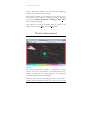
A severe storm off to the northwest, with a local, non-severe storm just to
the west.
The Threat Assessment window is a depiction of storm
activity over the last 5-20 minutes. The information in this
window is based on the average position of all lightning
flashes detected in the last 5-20 minutes.
When the stroke rate is at least 500 per minute, only the last 5
minutes worth of flashes are used. If the stroke rate is at least
44
R E A L - T I M E
L I G H T N I N G
D E T E C T I O N
100 per minute, the last 10 minutes worth of flashes are used.
If the stroke rate is at least 50 per minute, the last 15 minutes
of flashes are used. Stroke rates below 50 per minute cause
the previous 20 minutes of flash data to be used.
The average range of all strokes in a similar direction is used
to calculate the placement of the colored areas in the Threat
Assessment window. Through this averaging technique, a
more realistic appraisal of storm activity can be determined.
With the advent of Lightning/2000 v4.6, the ability to
determine – in many cases – when an individual
lightning flash is relatively nearby became possible.
When such flashes are detected, a special “storm” is depicted.
Rather than being a wedge shape, these special nearby storms
are circular or elliptical. When one of these storms is shown,
there is an excellent chance that lightning is imminent or is
occurring in the immediate area.
The Threat Assessment window employs reflection rejection
(Options | Settings… from the main menu), if you have
that option turned on.
You may click on a storm in this window and display more
detailed statistics about the storm.
The border of the window will change color to indicate when
a yellow or red storm range alert is in effect. The Analysis
window determines when a storm range alert is in effect.
The Threat Assessment window can be made to resize itself
(every 5 minutes) so that the majority of lightning activity is
displayed by choosing Threat Assessment Properties |
Settings | Auto zoom from the right-click menu. The auto
zoom option is not available when using a BMP or JPG
background map.
The contents of the Threat Assessment window may be
copied to the clipboard by choosing Copy from the Edit
menu.
45
L I G H T N I N G / 2 0 0 0
Stroke Rate Graph
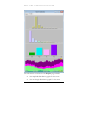
The dramatically increasing CG flash rate is indicative of a severe storm.
This graph shows the flash rates.
The rate of nearby flashes increases as the storm approaches.
The total stroke rate plus the noise rate.
The stroke rate graph shows you at a glance the rate of change
of lightning activity. You can change the length of time that
the graph comprises from 15 minutes to 24 hours by rightclicking on the graph.
The peak activity (within the length of the graph) is indicated
with a text label. Several other text labels indicate the time at
various points over the period covered by the graph. The
font used to draw the labels can be changed by right-clicking
on the label.
Version 6 of Lightning/2000 allows you to show a variety of
rate information on the graph. Flash rates, strokes rates, and
other information may be shown. You may select the
information you want to appear on the graph by choosing
Stroke types and colors… from the graph’s right-click
menu.
46
R E A L - T I M E
L I G H T N I N G
D E T E C T I O N
The graph is automatically rescaled so that the peak level
occupies the entire height of the graph. The graph update
interval is dependent on the width of the graph window and
the length of the graph.
During times of no lightning activity, occasional electrical
discharges may be detected. During these periods, the graph
will take on a “picket fence” appearance, with each picket
representing a single stroke or flash. This is normal and is not
indicative of a problem.
The Stroke Rate History window is very useful for spotting
trends in storm activity. A sudden increase in the flash rate
can be clearly seen. Also, a sudden surge in the fraction of
+CG strokes or –IC strokes becomes obvious, and can be an
indicator of a severe storm.
An image of the Stroke Rate History can be saved to a file at a
specified interval. See the Screen Captures dialog for details.
The contents of the graph window may be copied to the
clipboard for use in other applications by choosing the Copy
command from the Edit menu.
Rates
The Rates window as it appears when using the Boltek StormTracker
hardware.
47
L I G H T N I N G / 2 0 0 0
The Rates window as it appears when using the LD-250.
The Rates window in advanced mode when using the StormTracker.
The Rates window in simple mode when using the StormTracker.
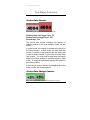
The Rates window contains 31 counters. The leftmost group
contains the most important counters: the total flash rate
counter, the strong stroke rate counter, the noise rate counter,
and the CID stroke rate counter.
When using the LD-250, since there is no stroke type
information, only 6 counters are displayed: the total flash rate
counter, the strong stroke rate counter, the noise rate counter,
the stroke rate percentage change counter, and the stroke rate
counter.
You may make individual counters invisible or visible by
selecting them on the Counters menu. You may drag
individual counters to new positions. Counters may also be
resized by clicking and dragging the edge or corner of the
counter.
The default simple mode configuration displays only 6
counters. The non-displayed counters can be viewed by
dragging down the bottom of the Rates window.
The stroke rate counters are updated as often as once every
one-tenth of a second. The stroke subtype percentage
48
R E A L - T I M E
L I G H T N I N G
D E T E C T I O N
counters are updated as often as every half second, as are the
stroke rate change counters.
You can change the look of each counter in this window
individually by right-clicking on the counter or its label. You
can change the look of all the counters or labels at the same
time by choosing an option from the Counters menu on the
menu bar at the top of the main window.
A record value in a counter is denoted by the counter taking
on an “inverted” look (the colors of the counter’s digits and
background are reversed).
49
L I G H T N I N G / 2 0 0 0
Totals
50
R E A L - T I M E
L I G H T N I N G
D E T E C T I O N
The Totals window (in flash or stroke mode) as it appears when using the
LD-250.
The Totals window as it appears in advanced mode when using the Boltek
StormTracker or LD-350.
The Totals window contains the number of strokes of each of
the various stroke types, as well as energy and noises, that has
been detected since midnight.
You can change the look of each counter in this window
individually by right-clicking on the counter or its label. You
can change the look of all the counters or labels at the same
51
L I G H T N I N G / 2 0 0 0
time by choosing an option from the Counters menu on the
menu bar at the top of the main window.
It was originally thought that the total number of strokes
detected would always be greater than the total number of
flashes detected. This was because each flash must consist of
at least one stroke. However it is possible to observe a flash
total that is greater than the stroke total. If a stroke occurs
just before midnight, it will be included in the totals for that
day. But the corresponding flash can be registered just after
midnight because we must wait to be sure that no other
strokes will occur that are part of that flash. When this
unlikely event occurs, we can see the flash total counter at “1”
and the stroke total counter at “0”. This seemingly
impossible situation will continue until a flash occurs that
contains more than one stroke.
A record value in a counter is denoted by the counter taking
on an “inverted” look (the colors of the counter’s digits and
background are reversed).
Control Panel
The Control Panel window allows you to quickly change
various settings.
On the Stroke types tab, you can toggle the drawing of any of
the stroke types without having to open the Stroke Types
Dialog.
Since CID strokes are strokes and not flashes (they are
components of flashes), the will not be displayed if you are
52
R E A L - T I M E
L I G H T N I N G
D E T E C T I O N
viewing flashes in the Real-time Lightning window or Raw
Lightning Data window.
You may view strokes in the Raw Lightning Data window.
Right-click in the window and choose "Settings..." from the
popup menu to select the "View | Strokes" option.
On the Stroke ages tab, you can toggle the drawing of any of
the 6 stroke ages without having to open the Stroke Types
Dialog.
On the Other settings tab, you can switch between raw
lightning data and real-time lightning modes, as well as switch
between stroke mode and flash mode. You can also toggle
the drawing of strokes that are recovered noises.
The Dialogs tab has shortcut buttons that activate several
different dialog boxes.
The Gauges tab lets you see how often the lightning detector
is being queried for a new stroke, and how many strokes have
been allocated by the system at any given time.
Hardware access meter
This meter indicates how frequently Lightning/2000 is able to
check the lightning detection hardware to see if a lightning
stroke has been detected.
53
L I G H T N I N G / 2 0 0 0
During periods of little or no lightning activity,
Lightning/2000 only checks the lightning detection hardware
intermittently. At these times, the system load meter will only
have the first or second bar lit.
Allocated strokes counter
This counter shows the total number of strokes allocated at
any time. During times of little activity, this number will not
change.
54
R E A L - T I M E
L I G H T N I N G
D E T E C T I O N
Storm Statistics
55
L I G H T N I N G / 2 0 0 0
The Storm Statistics window appears whenever you click on a
storm in the Analysis window, or (optionally) the Real-time
Lightning window. It is also displayed when you click on a
group of stroke or flashes in the Raw Lightning Data window.
The information presented here is meant to offer a detailed
look at the character of a storm. The Stats page of the
window contains text information that may be copied to the
clipboard. The Graphs page contains a concise look at storm
characteristics presented graphically.
The information contained on the Stats page includes:
•
The date and time the information is valid for
•
The general classification of the storm
o
A “distant” storm is one that lies beyond the
yellow alert range ring
o
A “regional” storm is one that lies between
the yellow and red alert range rings
o
A “nearby” storm is one the lies inside the
red alert range ring
o
(The distances of the alert range rings may be
set in the Analysis window or the Real-time
Lightning window.)
•
The bearing of the storm (North=0, East=90,
South=180, West=270)
•
The ranging chain -- a record of how Lightning/2000
determined the range of the storm.
•
The estimated range boundaries of the storm
•
The number of strokes examined in the storm
•
How many of those strokes were unique (usable).
•
How many strokes were recorded in the last minute
56
R E A L - T I M E
L I G H T N I N G
D E T E C T I O N
•
How many strokes were recorded in the minute
before that
•
How many strokes were recorded in the last 5
minutes
•
The stroke density in strokes per angular degree per
minute
•
The estimated severity index (100 or above indicates
a very severe storm)
•
The average amplitude of all strokes in the storm
•
The average amplitude of all usable CG strokes in the
storm
•
The average recent amplitude
•
The maximum amplitude detected
•
The average wavelength (in arbitrary units) of all
usable CG strokes in the storm (not available when
using the LD-250.)
•
The average wavelength (in arbitrary units) of all
strokes in the storm (not available when using the
LD-250.)
•
The energy ratio of the storm
•
The percentage of CG strokes in the storm (not
available when using the LD-250.)
•
The CG flash multiplicity. This is the ratio of the
number of CG strokes to the number of CG flashes.
A flash may consist of one or more strokes, so this
number represents the average number of strokes per
flash. The flash multiplicity will typically increase as a
storm draws closer. (Not available when using the
LD-250.)
57
L I G H T N I N G / 2 0 0 0
•
The IC flash multiplicity. This is the ratio of the
number of IC strokes to the number of IC flashes. A
flash may consist of one or more strokes, so this
number represents the average number of strokes per
flash. The flash multiplicity will typically increase as a
storm draws closer. (Not available when using the
LD-250.)
•
The number of unique CG flashes in the storm (Not
available when using the LD-250.)
•
The number of CG stroke subtypes in the storm
(Not available when using the LD-250.)
•
The number of unique IC flashes in the storm (Not
available when using the LD-250.)
•
The number of IC stroke subtypes in the storm (Not
available when using the LD-250.)
•
The number of recovered noises in the storm.
Recovered noises are IC strokes whose precise
characteristics cannot be determined. (Not available
when using the LD-250.)
•
The number of leader strokes in the storm (Not
available when using the LD-250.)
•
The number of compact intercloud discharge (CID)
strokes in the storm (Not available when using the
LD-250.)
58
R E A L - T I M E
L I G H T N I N G
D E T E C T I O N
The information contained on the Graphs page includes:
•
The amplitude distribution graph for the storm
•
The wavelength distribution graph for the storm
59
L I G H T N I N G / 2 0 0 0
•
•
The stroke type distribution graph for the storm.
(The distribution of flashes is shown when in flash
mode, simple mode, or advanced mode)
o
Negative cloud-to-ground
o
Positive cloud-to-ground
o
Negative intercloud
o
Positive intercloud
o
Leaders
o
Compact intercloud discharge
The stroke rate history for the storm. The
information in the stroke distribution graph may be
changed by choose Strokes types and colors…
from the graph’s right-click menu.
The amplitude distribution graph shows the distribution of
the amplitudes of the strokes in the storm, from lowest to
highest. More nearby storms will have more high amplitude
strokes, while distant storms will show mainly low amplitude
strokes.
The wavelength distribution graph shows the distribution of
the wavelengths of the strokes in the storm, from lowest to
highest.
The stroke type distribution graph shows the relative number
of the various stroke types within the storm. More +CG
strokes (or flashes, when in flash mode, simple mode, or
advanced mode) tend to indicate a greater chance of a severe
storm.
The stroke rate history graph shows the stroke rate trend of
the storm over the last 5 minutes. The colors and fonts used
in this stroke rate history graph may be changed
independently of the colors in the Stroke Rate History
window, though it is advisable to make them the same for
purposes of clarity.
60
R E A L - T I M E
L I G H T N I N G
D E T E C T I O N
Right-click on elements in this window to change their
properties.
Detector Status
The Detector Status window in simple and advanced modes.
The Detector Status window gives a visual indication of each
incoming lightning stroke. The signal strength meters are
updated immediately following the detection of a stroke. The
number of segments lighted is directly proportional to the
strength of the stroke. Strong strokes light all of the
segments. The peaks are held for 2 seconds.
You can cause a “click” sound to play for each stroke that is
detected. Right-click on the Detector Activity window and
choose Sound… to activate this option.
When using the StormTracker hardware, the top row of the
signal strength meters shows IC strokes and the bottom row
shows CG strokes.
When using the LD-250, the top row of the signal strength
meters shows the north-south amplitude of the stroke and the
bottom row shows the east-west amplitude.
The clock displays the time in the local format, based on your
Regional Settings in the Windows Control Panel. The time
zone abbreviation is formed by using the first letter of each
word in the name of your time zone. You may change the
names of the time zones for your area by choosing Options |
Settings… from the main menu.
The system load meter shows how often the software is able
to check the detector board. There isn’t any significant
chance of data being lost due to excessive system load unless
61
L I G H T N I N G / 2 0 0 0
the system load meter spends a lot of time in the red area.
Occasional peaks in the yellow or red segments are normal.
They occur when the system is performing a particularly
computation-intensive operation, such as updating the
analysis window or the graph window.
During periods of little or no lightning activity,
Lightning/2000 only checks the lightning detection hardware
intermittently. The system load meter will light only the first
bar at these times.
NOWCast
The NOWCast window presents recent statistics textually.
Any alerts in effect are listed. The recent history of the stroke
rate, the strong stroke rate, the energy rate, the rates of the
stroke subtypes (if using the StormTracker hardware) and the
noise rate are detailed.
NOWCasts are not saved automatically, but the current
NOWCast may be saved at any time by choosing Save |
NOWCast from the File menu. The hotkey for this action is
F5.
If you’re viewing a NOWCast, it can be saved to any location
by choosing Save as… from the File menu.
Summary
The Summary window gives a summary of lightning activity
since midnight local time. The total number of strokes,
strong strokes, energy units, the various stroke subtypes (if
using the StormTracker hardware) and noises are presented
62
R E A L - T I M E
L I G H T N I N G
D E T E C T I O N
along with their average rates. Additionally the total amount
of time spent under the various alerts is given. Peak counts
for each of the counters are listed. Finally, statistics on the
number of archive files on your hard drive are given.
Each day’s summary is saved to a file at midnight. The
summary file is a text file that can be opened with a simple
word processor such as Wordpad or Notepad. Saved
summaries can also be opened from Lightning/2000 by
choosing Open | Summary… from the File menu.
The current summary may be saved to the hard disk by
choosing Save | Summary from the File menu. The hotkey
for this action is F6.
Records
The Records window contains a list of record setting values
that have been recorded since you installed Lightning/2000.
The window is updated each time a new record value is
recorded.
Both the record value and the date and (if applicable) the time
the record value was achieved are recorded.
A record value in a counter is denoted by the counter taking
on an “inverted” look (the colors of the counter’s digits and
background are reversed).
The records are stored in the Windows Registry. If you install
Lightning/2000 on a new computer, and you wish to retain
the records that have already been set, you can export the
record information from the Registry.
The records are stored in the Registry key:
“HKEY_CURRENT_USER\Software\Aninoquisi\Lightnin
g2000\Records”. Choose “File | Export” from the Registry
63
L I G H T N I N G / 2 0 0 0
editor’s main menu to save the records to a file that can then
be taken over to the new computer and imported into the
Registry there.
The General Status Line
The general status line at the bottom of the main window
represents Lightning/2000’s assessment of the threat level
presented by recent lightning activity. It is based on the
recent counts and the analysis window. In general, a red alert
will not be shown unless cloud to ground lightning can be
expected near your location.
The text displayed in the General Status Line is based on the
contents of a template file. The default template file is “Status
Line Template.txt”, located in the Lightning/2000 installation
folder.
The contents of the template file may consist of any of the
keywords or commands used for the Custom Summary
Window. See the chapter pertaining to that window for
details.
If you want to experiment with either the custom summary
template or status line template, you should make a copy of it
first so that any changes you make can be abandoned if they
don't work out so well.
You can use a command to change the alert level of the
General Status Line. These commands are typically used
when a set of conditions occurs that merits the attention of
the user, such as when a severe storm is determined to be
relatively nearby.
Because of the limited amount of space on the General Status
Line, the text output by its template should be limited to what
will fit onto the status line. That text may consist of multiple
64
R E A L - T I M E
L I G H T N I N G
D E T E C T I O N
lines. Multiple lines output by the status line template will be
concatenated together so that they occupy a single line.
A general red alert, unlike any other red alert, always remains
in effect for at least 5 minutes.
The general status line (when using the default template) will
describe thunderstorm activity as being either "nearby",
"regional", or "distant". A nearby storm is one that is
depicted as being inside the red alert distance (as defined in
the Analysis window). A regional storm is one that is
depicted as being inside the yellow alert distance (as defined in
the Analysis window), but outside the red alert distance. A
distant storm is one outside of the yellow alert distance.
The intensity of a storm is listed as one of four levels:
thundershower, thunderstorm, strong thunderstorm, or
severe thunderstorm.
Archive Player
The archive player controls the playback of archive files or
recent activity. The archive player is accessed by choosing
View from the File menu. The speed of the playback can be
controlled with the up and down arrow buttons. The
playback may be paused, stopped, or reset by pressing the
appropriate button.
Only one archive or recent activity playback may be active at
any time. If you’re playing back an archive file and wish to
view recent activity, you will have to cancel the archive
playback first.
65
L I G H T N I N G / 2 0 0 0
During archive playback, the detector status window, the
general status line, the summary and NOWCast windows
reflect the real-time lightning activity, not the activity
presented by the archive.
At any time during the playback of an archive, you can press
the export button to start exporting archived lightning flashes
to a format that can be read by Google Earth. You may also
export data in a comma delimited text format.
Press the export button a second time to interrupt the
exporting of flashes.
You may start and stop the exporting of flashes any number
of times.
Though Google Earth can (presumably) display any number
of flashes, its operation can become somewhat sluggish when
it is asked to display a large number of flashes. We have
found that displaying over 100,000 flashes causes its operation
to become quite a bit slower. Displaying 10,000 or fewer
flashes seems to cause little or no slowdown.
When you close the archive player (or exit Lightning/2000),
you will be prompted for the name of the file that is to receive
the exported data.
The playback rate of the archive is an exact indication of how
long it will take to complete the playback of the archive. For
example, playing back a daily archive that comprises 24 hours
at 100x will take exactly 0.24 hours (or a little over 14
minutes).
Playing back archives at high rates of speed will tax slower
systems. If the archive contains a large number of strokes,
high-speed playback will probably tax even a fast machine.
Archive playback at high speeds can be made to go more
smoothly. Minimizing windows that have components that
are updated frequently will keep those windows from being
updated, thus making the archive playback go more smoothly.
66
R E A L - T I M E
L I G H T N I N G
D E T E C T I O N
The biggest offender is the Real-time Lightning/Raw
Lightning Data window. High-speed archive playback goes
much more smoothly when this window is minimized.
When you first play back an archive file that was recorded
with a different kind of lightning detection hardware than
what you have, a special preferences file “Foreign Archive
Preferences” will be created. Changes you make to the colors,
fonts, alarm levels, or other preferences while running a
“foreign” archive will be automatically saved to the “Foreign
Archive Preferences” file when you exit the archive player.
67
L I G H T N I N G / 2 0 0 0
68
R E A L - T I M E
L I G H T N I N G
D E T E C T I O N
Chapter 5
The Custom
Summary Window
Overview • Commands • Keywords
Overview
For a complete description of every Custom Summary
command and keyword, see Appendix D.
This window executes a series of commands to display text,
change the color of the window, and play sounds. It gets the
text it displays from a file in the Lightning/2000 installation
folder. The default name of the file is "Custom Summary
Template.txt", but any text file can be used as the custom
summary template.
The custom summary template is a text file that can be edited
just like any other text file. On most systems, the Notepad
application is the default application for editing text files.
Word processors (such as Microsoft Word) will not produce a
text file by default, however most can produce a plain text file
as an option.
You may change the name of the text file used by the Custom
Summary window by right-clicking in the window and
choosing “Custom Summary Manager…” from the popup
menu. See the manual section on the Custom Summary
69
L I G H T N I N G / 2 0 0 0
Manager for details on how to change or edit the text file used
as a template.
A template file is also used to generate the text displayed on
the General Status Line. That template file is of the same
format, and may use any of the keywords or commands used
in the Custom Summary Window.
If you want to experiment with either the custom summary
template or status line template, you should make a copy of it
first so that any changes you make can be abandoned if they
don't work out so well.
The custom summary window gives you unprecedented
flexibility and control over what information is displayed, and
(optionally) what information is automatically emailed or sent
to your Twitter account. You might (for example) create a
very brief custom summary that gets sent to as a text message
to cell phones (assuming they can be reached via an email
address), or a highly specific and descriptive custom summary
that is to be emailed to a list of clients. It is entirely up to
you.
If you have chosen to email the custom summary, the first
line of text in the custom summary will be used as the title of
the email.
See the Email Options Dialog for more
information.
The text file that generates the Custom Summary window
consists of a series of statements. A statement may either be
a conditional statement (one starting with if) or a command.
The most frequently used commands are the ones used to
write text into the window (the #Write and #WriteLine
commands).
A comment line is any line beginning with a semicolon (;)
character. Comment lines will not be included in the Custom
Summary window. They are mainly for use in complex
custom summary templates so that you can explain how you
are using the various keywords in the template.
70
R E A L - T I M E
L I G H T N I N G
D E T E C T I O N
You may also end any line with a comment by typing a
semicolon. Any text on the line after the semicolon will not
be included in the custom summary window.
All keywords used in the Custom Summary start with the @
character. Commands start with the # character. There are 5
reserved words that you can use to control which commands
are executed: if, then, else, elseif, and endif.
The structure of an if statement is:
if expression then
One or
more statements
elseif expression then
One or more statements
elseif expression then
One or more statements
else expression then
One or more statements
endif
Only the if, then, and endif parts of the if statement are
required. Both the elseif and else parts are optional. There
may be any number of elseif parts, but there may only be one
else part. The else part is executed only if neither the if part
nor any of the elseif parts were executed.
A statement in the if, else, or elseif parts may be a command
or another if statement.
An “expression” is basically any kind of mathematical
expression, usually containing one or more of the keywords.
There are several special symbols and words that can be used
in an expression:
>
<
=
<>
<=
>=
and
greater than
less than
equals
not equals
less than or equals to
greater than or equals to
a logical and of two expressions
71
L I G H T N I N G / 2 0 0 0
or
xor
+
*
/
div
a logical or of two expressions
a logical exclusive or of two expressions
the sum of two expressions or the concatenation of
two quoted strings
the difference of two expressions
the multiplication of two expressions
the division of two expressions
the division of two expressions, truncated to a whole
number
Here are a few examples of valid if statements:
if @StrokeCount( 5 ) > 1000 then
#AlertStatusLineYellow
endif
if ( @CGFlashCount > 50 ) and ( @StrokeCount > 1000 )
then
#AlertStatusLineYellow
if @CloseStormCount > 0 then
#Sound( ‘beep5’ )
#WriteLine( ‘A storm is nearby.’ )
endif
endif
if @HardwareType = 0 then
#WriteLine( ‘No lightning detector is installed.’ )
elseif @HardwareType = 1 then
#WriteLine( ‘LD-250 installed’ )
elseif @HardwareType = 4 then
#WriteLine( ‘LD-350 installed’ )
else
#WriteLine( ‘StormTracker installed’ )
endif
When using “and” in an expression, the part after the “and” is
evaluated only if the part before the “and” is true. This is
because the entire expression (before and after) can be true
only if the before part is true and the after part is true. If the
before part is false, then the entire expression is false whether
or not the after part is true. Since it does not matter in this
case if the after part is true or false, there is no sense in
wasting time evaluating the after part.
72
R E A L - T I M E
L I G H T N I N G
D E T E C T I O N
When using “or” in an expression, the part after the “or” is
evaluated only if the part before the “or” is false. This is
because the entire expression (before or after) can be false
only if the before part is false and the after part is false. If the
before part is true, then the entire expression is true whether
or not the after part is true. Since it does not matter in this
case if the after part is true or false, there is no sense in
wasting time bothering to evaluate the after part.
For a complete description of the format of the custom
summary template, see Appendix C, “Custom Summary
Language”.
A complete description of all Custom Summary commands
and keywords may be found in Appendix D.
Some examples of Custom Summary templates can be found
in Appendix E.
Commands
A command is any word preceded by a # sign. There are 3
commands that may be included in a template file that pertain
to the general status line (the #AlertStatusLine commands)
at the bottom of the main window, so they should only be
used in templates for the general status line.
A command is typically issued as a result of one or more
conditions being true. For example, the status line template
may determine that a severe storm is nearby and issue the
#AlertStatusLineRed command.
By using the custom summary commands, a wide variety of
actions may be taken. Screen captures may be produced (in
73
L I G H T N I N G / 2 0 0 0
addition to or instead of the normal automatic screen capture
process). Text files may be produced, consisting of virtually
any information, and then be sent to a server via FTP.
Commands may be sent to a serial port to control external
devices. Text may be written to the Custom Summary
window, consisting of an almost unlimited variety of
information produced by Lightning/2000. An automatically
generated email may be sent.
The names of the commands are not case sensitive.
Keywords
Keywords that evaluate to a per minute stroke or flash count
can be followed by a parameter. Then the count will evaluate
to the number of strokes or flashes in the last N minutes,
where N is the parameter.
The parameter "N" may be either a positive integer, or a
positive real number. Real numbers less than 1 must start
with a zero.
For example, "0.1" is a valid parameter, but ".1" is not.
For example, the @CGFlashCount keyword will evaluate to
the number of CG flashes in the last minute, but if you
specify @CGFlashCount( 2 ), then it will evaluate to the
number of CG flashes in the last 2 minutes.
@CGFlashCount( 1 ) is identical to @CGFlashCount.
There is a limit of 60 minutes for the various stroke counts.
By default, the @Peak keywords will return the peak count
for the day.
Entering ( N ) (where N is a number of minutes) after the
@Peak keyword will return the peak value in the last N
minutes.
74
R E A L - T I M E
L I G H T N I N G
D E T E C T I O N
The @Trend keywords return a percentage difference
between an earlier count and the current count.
Keywords are not case sensitive, so @cgflashcount is
identical to @CGFlashCount or @CGFLASHCOUNT.
75
L I G H T N I N G / 2 0 0 0
76
R E A L - T I M E
L I G H T N I N G
D E T E C T I O N
Chapter 6
The Rate Counters
The Major Counters • The Percent Counters
• The Flash Rate Counters • The Stroke
Rate Change Counter
The counters in the Rates window convey a wealth of
information, though some are considered to be more
important than others. The most important counters are on
the left side of the window and are: the stroke or flash rate
counter, the strong stroke rate counter, the energy ratio
counter, and the noise rate counter.
A counter panel consists of the following parts:
•
The counter (the digits displayed)
•
The background
•
The caption (in the lower-left corner of the panel)
•
The alert bar (optional)
The properties of any of the counter’s parts may be changed
by right-clicking on the item you wish to change.
Most of the counters in the Rates window can have record
values. A new record is indicated by the counter taking on an
“inverted” look – the colors for the counter text and the
background are reversed.
77
L I G H T N I N G / 2 0 0 0
The Major Counters
Stroke Rate Counter
Stroke rate counter, shown with and without an alert bar.
Default yellow alert trigger level: 50
Default red alert trigger level: 250
Record kept: Yes
The stroke rate counter indicates the number of
lightning strokes of all kinds detected within the last
minute.
In stroke mode, this counter is located at the far left of
the Rates window. In flash mode, the total flash rate
counter is located in that position and the stroke rate
counter’s default location is just below the total flash
rate counter. You may need to drag down the bottom
edge of the Rates window to view this counter in flash
mode. In simple and advanced modes, this counter is
prominently visible.
A new record value is denoted by swapping the colors
of the counter and its background.
Stroke Rate Change Counter
Stroke rate change counter, shown with and without an alert bar.
78
R E A L - T I M E
L I G H T N I N G
D E T E C T I O N
Default yellow alert trigger level: 25
Default red alert trigger level: 50
Record kept: No
The stroke rate change counter shows the percentage
change in the stroke rate between one minute ago
and now.
For example, if the stroke rate one minute ago was
100 and the stroke rate now is 120, then the counter
would read “+20%”; if the stroke rate one minute ago
was 120, and the stroke rate now is 100, then the
counter would read “-17%”.
If the stroke rate one minute ago was zero, and the
current stroke rate is zero, "--" is displayed. If the
stroke rate one minute ago was zero, and the current
stroke rate is non-zero, "*" is displayed.
Sudden changes in the stroke rate for a storm could
be signs that the storm is exhibiting potentially
dangerous behavior. A rapid increase in stroke rate
followed immediately by a rapid decrease, or vice
versa has been linked to certain severe
characteristics, such as hail, microbursts, and even
tornadoes.
When you specify a trigger level for the red or yellow
alert, you are specifying the percentage change that
must occur if the stroke rate is 100 strokes per
minute. The percentage change that is needed for
alert status at higher stroke rates is somewhat lower,
and the percentage change that is needed for alert
status at lower stroke rates is higher.
At 1000 strokes per minute, the percentage change
required for an alert is one-half the value specified as
the trigger level. At 10 strokes per minute, the
79
L I G H T N I N G / 2 0 0 0
percentage change required is twice the specified
trigger level.
Energy Ratio Counter
Energy rate counter, shown with and without an alert bar.
Default yellow alert trigger level: 150
Default red alert trigger level: 250
Record kept: No
This counter shows the energy ratio over the last
minute.
The energy ratio is an arbitrary measure of the energy
contained in lightning strokes. It is a good indicator of
a close storm. An energy ratio of over 150% is a good
sign of a relatively nearby storm.
Sometimes the first indicator that a thundershower is
forming nearby will be the red alert on the energy ratio
counter.
At least five strokes per minute must occur before
either the red or yellow energy ratio alert will be
indicated.
Noise Rate Counter
The noise rate counter has no alarms associated with it.
Record kept: Yes
The noise rate counter shows the number of noises
that have been received in the last minute.
80
R E A L - T I M E
L I G H T N I N G
D E T E C T I O N
A noise is defined as any electrical discharge that
cannot be positively identified as a lightning flash.
Noises include electrical noise from household
appliances, signals transmitted by wireless electronic
devices, and lightning strokes that have an
insufficiently well-defined waveform.
During times of heavy activity, as many or more
noises than strokes may be detected. Most of these
noises are intercloud or intracloud (IC) strokes that
cannot be positively identified as such.
A new record value is denoted by swapping the colors
of the counter and its background.
The Flash Rate Counters
Total Flash Rate Counter
Total flash rate counter, shown with and without an alert bar.
Default yellow alert trigger level: 50
Default red alert trigger level: 250
Record kept: Yes
The total flash rate counter shows the total number of
flashes of all kinds in the last minute. This includes
CG and IC flashes. For the LD-250, this counter
81
L I G H T N I N G / 2 0 0 0
shows an accurate estimate of the total number of
flashes per minute.
A new record value is denoted by swapping the colors
of the counter and the background.
Nearby Flash Rate Counter
Nearby flash rate counter, shown with and without an alert bar.
Default yellow alert trigger level: 1
Default red alert trigger level: 2
Record kept: Yes
The nearby flash rate counter shows the number of
nearby flashes within the last minute.
Nearby flashes are very likely to be no more than a
few miles away. With version 4.6 and later of the
software,
only
flashes
that
exhibit
certain
characteristics are logged as nearby flashes. This is a
significant change from older versions when this
counter registered strong flashes.
(The Custom
Summary language keywords still refer to these types
of flashes as “strong” flashes rather than “nearby”
flashes.) If you want to reset the record value for this
counter from its previous value, right-click on the
counter and choose Reset record… from the popup
menu.
A red alert on this counter is almost always an
indication that a storm is nearby. It is not necessarily
an indicator that the storm is going to impact your
location, since the storm may be moving away from
you.
82
R E A L - T I M E
L I G H T N I N G
D E T E C T I O N
A new record value is denoted by swapping the colors
of the counter and its background.
CG Flash Rate Counter
The CG flash rate counter, shown with and without an alert bar.
Default yellow alert trigger level: 20
Default red alert trigger level: 100
Record kept: Yes
The CG flash rate counter shows the number of cloudto-ground flashes recorded in the last minute. A CG
flash is what is ordinarily thought of as a lightning bolt.
Each flash is composed of one or more (typically 3 to
10) strokes. Each of these strokes can be detected
by the lightning detector if the flash occurs closely
enough to the detector. For distant flashes, it is
normal to detect only the strongest stroke of the flash.
A new record value is denoted by swapping the colors
of the counter and the background.
This counter is not used with the LD-250.
Positive CG Flash Rate Counter
The +CG flash rate counter, shown with and without alert bars.
Default yellow alert trigger level: 25
Default red alert trigger level: 100
83
L I G H T N I N G / 2 0 0 0
Record kept: Yes
The +CG flash rate counter shows the number of
positive cloud-to-ground strokes in the last minute.
Positive CG strokes are more common in severe
storms.
A new record value is denoted by swapping the colors
of the counter and the background.
This counter is not used with the LD-250.
Negative CG Flash Rate Counter
The -CG flash rate counter, shown with and without alert bars.
Default yellow alert trigger level: 25
Default red alert trigger level: 100
Record kept: Yes
The -CG flash rate counter shows the number of
positive cloud-to-ground strokes in the last minute.
A new record value is denoted by swapping the colors
of the counter and the background.
This counter is not used with the LD-250.
IC Flash Rate Counter
The IC flash rate counter, shown with and without an alert bar.
Default yellow alert trigger level: 2
84
R E A L - T I M E
L I G H T N I N G
D E T E C T I O N
Default red alert trigger level: 10
Record kept: Yes
The IC flash rate counter shows the number of
intercloud flashes in the last minute.
Each flash is composed of at least one stroke, but IC
flashes have been observed to be comprised of 30 or
more strokes during nearby storms.
A new record value is denoted by swapping the colors
of the counter and the background.
This counter is not used with the LD-250.
Negative IC Flash Rate Counter
The -IC flash rate counter, shown with and without an alert bar.
Default yellow alert trigger level: 25
Default red alert trigger level: 100
Record kept: Yes
The -IC flash rate counter shows the number of
negative intercloud flashes in the last minute. A
correlation between –IC flashes and storm severity
has been observed.
Each flash is composed of at least one stroke, but IC
flashes have been observed to be comprised of 30 or
more strokes during nearby storms.
A new record value is denoted by swapping the colors
of the counter and the background.
This counter is not used with the LD-250.
85
L I G H T N I N G / 2 0 0 0
Positive IC Flash Rate Counter
The +IC flash rate counter, shown with and without an alert bar.
Default yellow alert trigger level: 25
Default red alert trigger level: 100
Record kept: Yes
The +IC flash rate counter shows the number of
positive intercloud flashes in the last minute.
Each flash is composed of at least one stroke, but IC
flashes have been observed to be comprised of 30 or
more strokes during nearby storms.
A new record value is denoted by swapping the colors
of the counter and the background.
This counter is not used with the LD-250.
CID Stroke Rate Counter
The CID stroke rate counter, shown with and without an alert bar.
Default yellow alert trigger level: 2
Default red alert trigger level: 10
Record kept: Yes
The CID stroke rate counter shows the number of
compact intercloud discharges recorded in the last
minute. The CID stroke is discussed in more detail in
Appendix A, A Lightning Primer.
86
R E A L - T I M E
L I G H T N I N G
D E T E C T I O N
CID strokes are only detected from relatively nearby
storms, those within 150 miles or 250 km. It is rare to
see more than a single CID stroke in a minute from a
storm that is more than 100 miles or 150 km away. A
CID stroke rate of 5 or more is a very good sign that a
storm is relatively nearby. On rare occasions, it is
possible to see CID strokes from more distant storms.
A new record value is denoted by swapping the colors
of the counter and the background.
Since CID strokes are strokes and not flashes (they
are components of flashes), the will not be displayed if
you are viewing flashes in the Real-time Lightning
window or Raw Lightning Data window.
You may view strokes in the Raw Lightning Data
window.
Right-click in the window and choose
"Settings..." from the popup menu to select the "View |
Strokes" option.
This counter is not used with the LD-250.
The Percent Counters
Since these counters’ alarms are not based on stroke rates, but
on percentages, it is possible to see yellow and even red alerts
triggered for these counters even with no lightning activity
within several hundred miles. For example, a distant severe
storm is likely to have an abundance of positive CG strokes
over negative CG strokes – a condition that would trigger an
alert on the “+CG%” counter.
When in flash mode (rather than stroke mode), the percent
counters indicate the percentage of flashes rather than
strokes.
87
L I G H T N I N G / 2 0 0 0
IC Percent Counter
No alarm is associated with the IC percent counter.
Record kept: No
The IC percent counter shows the percentage of IC
(intercloud/intracloud) strokes compared to the total
number of strokes in the last minute. CID (compact
intercloud discharge) strokes are included as IC
strokes.
For example, if the stroke rate is 200 and the IC
stroke rate is 50, this counter would indicate “25%”.
IC strokes are more commonly detected from
relatively nearby storms (within 250 km or 150 miles).
As a storm approaches, the percentage of IC strokes
will typically rise. However, it depends a lot on the
nature of the storm. For this reason, there is no
longer an alarm associated with the IC percent
counter.
When running Lightning/2000 in flash mode, this
counter shows the percentage of IC flashes, rather
than strokes.
At least 10 strokes per minute must occur before the
red or yellow alert is triggered.
This counter is not used with the LD-250.
Positive IC Percent Counter
The +IC percent counter has no alarms associated with it.
88
R E A L - T I M E
L I G H T N I N G
D E T E C T I O N
Record kept: No
The positive IC percent counter shows the percentage
of +IC (positive intercloud/intracloud) strokes
compared to the number of IC strokes in the last
minute.
For example, if the IC stroke rate is 50 and the +IC
stroke rate is 40, this counter would indicate “80%”.
IC strokes are more commonly detected from
relatively nearby storms (within 250 km or 150 miles).
As a storm approaches, the percentage of IC strokes
will typically rise.
When running Lightning/2000 in flash mode, this
counter shows the percentage of +IC flashes, rather
than strokes.
+IC strokes are the more common type of IC stroke
detected.
This counter is not used with the LD-250.
Negative IC Percent Counter
The –IC percent counter has no alarms associated with it.
Record kept: No
The negative IC percent counter shows the
percentage of -IC (negative intercloud/intracloud)
strokes compared to the number of IC strokes in the
last minute.
IC strokes are more commonly detected from
relatively nearby storms (within 250 km or 150 miles).
89
L I G H T N I N G / 2 0 0 0
As a storm approaches, the percentage of IC strokes
will typically rise.
-IC strokes are the less common type of IC stroke
detected. A preponderance of –IC stroke versus +IC
strokes is a trait commonly associated with severe
storms.
When running Lightning/2000 in flash mode, this
counter shows the percentage of -IC flashes, rather
than strokes.
At least 10 IC strokes per minute must occur before
the red or yellow alert is triggered.
This counter is not used with the LD-250.
CG Percent Counter
The CG percent counter has no alarms associated with it.
Record kept: No
The CG percent counter shows the percentage of CG
(cloud-to-ground) strokes compared to the total
number of strokes in the last minute.
For example, if the stroke rate is 100 and the CG
stroke rate is 75, this counter would indicate “75%”.
CG strokes can be detected from storms at any
range, and have been detected from storms over 600
miles (1000 km) away.
When running Lightning/2000 in flash mode, this
counter shows the percentage of CG flashes, rather
than strokes.
This counter is not used with the LD-250.
90
R E A L - T I M E
L I G H T N I N G
D E T E C T I O N
Positive CG Percent Counter
The +CG percent counter, shown with and without an alert bar.
Default yellow alert trigger level: 25
Default red alert trigger level: 50
Record kept: No
The positive CG percent counter shows the
percentage of +CG (positive cloud-to-ground) strokes
compared to the number of CG strokes in the last
minute.
For example, if the stroke rate is 50 and the CG
stroke rate is 45, this counter would indicate “90%”.
CG strokes can be detected from storms at any
range, and have been detected from storms over 600
miles (1000 km) away.
+CG strokes are the less common type of CG stroke,
and are associated more with severe storms, though
they do occur in ordinary storms too. They have been
observed to be more likely to occur in the average
thunderstorm as the storm begins to dissipate.
In the Analysis window, storms that have
preponderance of +CG strokes are colored in.
a
When running Lightning/2000 in flash mode, this
counter shows the percentage of +CG flashes, rather
than strokes.
At least 10 CG strokes per minute must occur before
the red or yellow alert is triggered.
This counter is not used with the LD-250.
91
L I G H T N I N G / 2 0 0 0
Negative CG Percent Counter
There are no alarms associated with the –CG percent counter.
Record kept: No
The negative CG percent counter shows the
percentage of -CG (negative cloud-to-ground) strokes
compared to the number of CG strokes in the last
minute.
For example, if the CG stroke rate is 40 and the –CG
stroke rate is 20, then this counter would indicate
“50%”.
CG strokes can be detected from storms at any
range, and have been detected from storms over 600
miles (1000 km) away.
When running Lightning/2000 in flash mode, this
counter shows the percentage of -CG flashes, rather
than strokes.
-CG strokes are the more common type of CG stroke.
This counter is not used with the LD-250.
The Stroke Rate Counters
The alarm levels of the stroke rate counters are set by default
so that yellow alerts can be triggered by storms that are still
moderately far away. Red alerts on these counters will not
normally be triggered until a storm is either fairly nearby, or is
extremely intense and more distant.
92
R E A L - T I M E
L I G H T N I N G
D E T E C T I O N
IC Stroke Rate Counter
The IC stroke rate counter, shown with and without an alert bar.
Default yellow alert trigger level: 50
Default red alert trigger level: 250
Record kept: Yes
The IC stroke rate counter shows the number of IC
(intercloud/intracloud) strokes that have been
detected in the last minute. CID (compact intercloud
discharge) strokes are included in this total.
IC strokes are more easily detected from storms that
are relatively nearby (within 150 km or 250 miles).
A new record value is denoted by swapping the colors
of the counter and its background.
This counter is not used with the LD-250.
Positive IC Stroke Rate Counter
The +IC stroke rate counter, shown with and without an alert bar.
Default yellow alert trigger level: 30
Default red alert trigger level: 150
Record kept: Yes
The positive IC stroke rate counter shows the number
of +IC (positive intercloud/intracloud) strokes that
have been detected in the last minute.
IC strokes are more easily detected from relatively
nearby storms (within 250 km or 150 miles).
93
L I G H T N I N G / 2 0 0 0
Positive IC strokes are the more common type of IC
strokes.
A new record value is denoted by swapping the colors
of the counter and its background.
This counter is not used with the LD-250.
Negative IC Stroke Rate Counter
The –IC stroke rate counter, shown with and without an alert bar.
Default yellow alert trigger level: 30
Default red alert trigger level: 150
Record kept: Yes
The negative IC stroke rate counter shows the
number of -IC (negative intercloud/intracloud) strokes
that have been detected in the last minute.
IC strokes are more easily detected from relatively
nearby storms (within 250 km or 150 miles).
Negative IC strokes are the less common type of IC
strokes. A preponderance of –IC stroke versus +IC
strokes has been associated with severe storms.
A new record value is denoted by swapping the colors
of the counter and its background.
This counter is not used with the LD-250.
CG Stroke Rate Counter
The CG stroke rate counter, shown with and without an alert bar.
Default yellow alert trigger level: 40
94
R E A L - T I M E
L I G H T N I N G
D E T E C T I O N
Default red alert trigger level: 200
Record kept: Yes
The CG stroke rate counter shows the number of CG
(cloud-to-ground) strokes that have been detected in
the last minute.
CG strokes can be detected from storms at any
range, and have been detected over 600 miles (1000
km) away.
A new record value is denoted by swapping the colors
of the counter and its background.
This counter is not used with the LD-250.
Positive CG Stroke Rate Counter
The +CG stroke rate counter, shown with and without an alert counter.
Default yellow alert trigger level: 20
Default red alert trigger level: 100
Record kept: Yes
The positive CG stroke rate counter shows the
number of +CG (positive cloud-to-ground) strokes that
have been detected in the last minute.
CG strokes can be detected from storms at any
range, and have been detected over 600 miles (1000
km) away.
+CG strokes are more common in severe storms.
A new record value is denoted by swapping the colors
of the counter and its background.
This counter is not used with the LD-250.
95
L I G H T N I N G / 2 0 0 0
Negative CG Stroke Rate Counter
The –CG stroke rate counter, shown with and without an alert bar.
Default yellow alert trigger level: 10
Default red alert trigger level: 50
Record kept: Yes
The negative CG stroke rate counter shows the
number of -CG (negative cloud-to-ground) strokes
that have been detected in the last minute.
CG strokes can be detected from storms at any
range, and have been detected over 600 miles (1000
km) away.
-CG strokes are the most common type of CG stroke.
A new record value is denoted by swapping the colors
of the counter and its background.
This counter is not used with the LD-250.
The Stroke Rate Change Counters
The default configuration does not display the stroke subtype
rate change counters. If you want to view these counters,
resize the Rates window by dragging its bottom edge
downward. You may need to make the stroke subtype rate
change counters visible by selecting them on the Counters
menu. Make them visible by choosing the counter on the
Counters | Percent changes menu.
These counters, though little used by most, can be used to
glean information about how a storm is behaving, particularly
if the stroke rates are high enough. The decision to make
96
R E A L - T I M E
L I G H T N I N G
D E T E C T I O N
these counters invisible by default was made after realizing
that there were already more than enough counters for most
users to watch during a storm.
When Lightning/2000 is in flash mode (as opposed to stroke
mode), these counters show the rate of change in the number
of flashes instead of the number of strokes.
IC Stroke Rate Change Counter
The IC stroke rate change counter, shown with and without an alert bar.
Default yellow alert trigger level: 25
Default red alert trigger level: 50
Record kept: No
The IC stroke rate change counter shows the
percentage change in the IC (intercloud/intracloud)
stroke rate between one minute ago and now.
For example, if the IC stroke rate one minute ago was
1 and the IC stroke rate now is 3, then this counter
would indicate “+200%”.
If the stroke rate one minute ago was zero, and the
current stroke rate is zero, "--" is displayed. If the
stroke rate one minute ago was zero, and the current
stroke rate is non-zero, "*" is displayed.
A sudden change in the IC stroke rate may signal a
change in the character of a storm and could indicate
behavior that needs to be monitored.
When you specify a trigger level for the red or yellow
alert, you are specifying the percentage change that
must occur if the IC stroke rate is 100 strokes per
minute. The percentage change that is needed for
97
L I G H T N I N G / 2 0 0 0
alert status at higher stroke rates is somewhat lower,
and the percentage change that is needed for alert
status at lower stroke rates is higher.
At 1000 strokes per minute, the percentage change
required for an alert is one-half the value specified as
the trigger level. At 10 strokes per minute, the
percentage change required is twice the specified
trigger level.
When Lightning/2000 is in flash mode, this counter
shows the change in the IC flash rate.
At least 10 IC strokes per minute, both currently and
one minute ago, must occur for the yellow or red alert
to be triggered.
This counter is not used with the LD-250.
Positive IC Stroke Rate Change Counter
The +IC stroke rate change counter, shown with and without an alert bar.
Default yellow alert trigger level: 25
Default red alert trigger level: 50
Record kept: No
This counter shows the percentage change in the +IC
positive intercloud/intracloud) stroke rate between one
minute ago and now.
If the stroke rate one minute ago was zero, and the
current stroke rate is zero, "--" is displayed. If the
stroke rate one minute ago was zero, and the current
stroke rate is non-zero, "*" is displayed.
98
R E A L - T I M E
L I G H T N I N G
D E T E C T I O N
A sudden change in the +IC stroke rate may signal a
change in the character of a storm and could indicate
behavior that needs to be monitored.
When you specify a trigger level for the red or yellow
alert, you are specifying the percentage change that
must occur if the +IC stroke rate is 100 strokes per
minute. The percentage change that is needed for
alert status at higher stroke rates is somewhat lower,
and the percentage change that is needed for alert
status at lower stroke rates is higher.
At 1000 strokes per minute, the percentage change
required for an alert is one-half the value specified as
the trigger level. At 10 strokes per minute, the
percentage change required is twice the specified
trigger level.
When Lightning/2000 is in flash mode, this counter
shows the change in the +IC flash rate.
At least 10 +IC strokes per minute, both currently and
one minute ago, must occur for the yellow or red alert
to be triggered.
This counter is not used with the LD-250.
Negative
Counter
IC
Stroke
Rate
Change
The –IC stroke rate change counter, shown with and without an alert bar.
Default yellow alert trigger level: 25
Default red alert trigger level: 50
Record kept: No
99
L I G H T N I N G / 2 0 0 0
This counter shows the percentage change in the -IC
(negative intercloud/intracloud) stroke rate between
one minute ago and now.
If the stroke rate one minute ago was zero, and the
current stroke rate is zero, "--" is displayed. If the
stroke rate one minute ago was zero, and the current
stroke rate is non-zero, "*" is displayed.
A sudden change in the -IC stroke rate may signal a
change in the character of a storm and could indicate
behavior that needs to be monitored.
When you specify a trigger level for the red or yellow
alert, you are specifying the percentage change that
must occur if the -IC stroke rate is 100 strokes per
minute. The percentage change that is needed for
alert status at higher stroke rates is somewhat lower,
and the percentage change that is needed for alert
status at lower stroke rates is higher.
At 1000 strokes per minute, the percentage change
required for an alert is one-half the value specified as
the trigger level. At 10 strokes per minute, the
percentage change required is twice the specified
trigger level.
When Lightning/2000 is in flash mode, this counter
shows the change in the -IC flash rate.
At least 10 -IC strokes per minute, both currently and
one minute ago, must occur for the yellow or red alert
to be triggered.
This counter is not used with the LD-250.
100
R E A L - T I M E
L I G H T N I N G
D E T E C T I O N
CG Stroke Rate Change Counter
The CG stroke rate change counter, shown with and without an alert bar.
Default yellow alert trigger level: 25
Default red alert trigger level: 50
Record kept: No
This counter shows the percentage change in the CG
(cloud-to-ground) stroke rate between one minute ago
and now.
If the stroke rate one minute ago was zero, and the
current stroke rate is zero, "--" is displayed. If the
stroke rate one minute ago was zero, and the current
stroke rate is non-zero, "*" is displayed.
A sudden change in the CG stroke rate may signal a
change in the character of a storm and could indicate
behavior that needs to be monitored.
When you specify a trigger level for the red or yellow
alert, you are specifying the percentage change that
must occur if the CG stroke rate is 100 strokes per
minute. The percentage change that is needed for
alert status at higher stroke rates is somewhat lower,
and the percentage change that is needed for alert
status at lower stroke rates is higher.
At 1000 strokes per minute, the percentage change
required for an alert is one-half the value specified as
the trigger level. At 10 strokes per minute, the
percentage change required is twice the specified
trigger level.
When Lightning/2000 is in flash mode, this counter
shows the change in the CG flash rate.
101
L I G H T N I N G / 2 0 0 0
At least 10 CG strokes per minute, both currently and
one minute ago, must occur for the yellow or red alert
to be triggered.
This counter is not used with the LD-250.
Positive
Counter
CG
Stroke
Rate
Change
The +CG stroke rate change counter, shown with and without an alert bar.
Default yellow alert trigger level: 25
Default red alert trigger level: 50
Record kept: No
This counter shows the percentage change in the
+CG (positive cloud-to-ground) stroke rate between
one minute ago and now.
If the stroke rate one minute ago was zero, and the
current stroke rate is zero, "--" is displayed. If the
stroke rate one minute ago was zero, and the current
stroke rate is non-zero, "*" is displayed.
A sudden change in the +CG stroke rate may signal a
change in the character of a storm and could indicate
behavior that needs to be monitored.
When you specify a trigger level for the red or yellow
alert, you are specifying the percentage change that
must occur if the +CG stroke rate is 100 strokes per
minute. The percentage change that is needed for
alert status at higher stroke rates is somewhat lower,
and the percentage change that is needed for alert
status at lower stroke rates is higher.
102
R E A L - T I M E
L I G H T N I N G
D E T E C T I O N
At 1000 strokes per minute, the percentage change
required for an alert is one-half the value specified as
the trigger level. At 10 strokes per minute, the
percentage change required is twice the specified
trigger level.
When Lightning/2000 is in flash mode, this counter
shows the change in the +CG flash rate.
At least 10 +CG strokes per minute, both currently
and one minute ago, must occur for the yellow or red
alert to be triggered.
Negative
Counter
CG
Stroke
Rate
Change
The –CG stroke rate change counter, shown with and without an alert bar.
Default yellow alert trigger level: 25
Default red alert trigger level: 50
Record kept: No
This counter shows the percentage change in the -CG
(negative cloud-to-ground) stroke rate between one
minute ago and now.
If the stroke rate one minute ago was zero, and the
current stroke rate is zero, "--" is displayed. If the
stroke rate one minute ago was zero, and the current
stroke rate is non-zero, "*" is displayed.
A sudden change in the -CG stroke rate may signal a
change in the character of a storm and could indicate
behavior that needs to be monitored.
When you specify a trigger level for the red or yellow
alert, you are specifying the percentage change that
103
L I G H T N I N G / 2 0 0 0
must occur if the -CG stroke rate is 100 strokes per
minute. The percentage change that is needed for
alert status at higher stroke rates is somewhat lower,
and the percentage change that is needed for alert
status at lower stroke rates is higher.
At 1000 strokes per minute, the percentage change
required for an alert is one-half the value specified as
the trigger level. At 10 strokes per minute, the
percentage change required is twice the specified
trigger level.
When Lightning/2000 is in flash mode, this counter
shows the change in the -CG flash rate.
At least 10 -CG strokes per minute, both currently and
one minute ago, must occur for the yellow or red alert
to be triggered.
104
R E A L - T I M E
L I G H T N I N G
D E T E C T I O N
Chapter 7
Menu Commands
File Menu • Edit Menu • Window Menu •
Options Menu • Help Menu • Counters
Menu • Panels Menu
This chapter is a reference that describes the effects of each
command available from the main menu. To display help on
a menu command, use the mouse to highlight the command
and press the F1 key.
File Menu
The File menu contains commands that affect files on your
hard disk.
File | Open | NOWCast…
Open a saved NOWCast.
File | Open | Summary…
Open a saved summary.
File | Save
This command is available only when you are viewing
a saved NOWCast or summary and you have made
105
L I G H T N I N G / 2 0 0 0
changes to the file.
made to be saved.
It causes the changes you’ve
File | Save | NOWCast…
Save the current NOWCast to your hard disk. The F5
key can also be used for this command.
File | Save | Summary…
Saves the current summary to your hard disk. The F6
key can also be used to access this command. The
summary is saved automatically at midnight.
File | Save as…
This command is available when you’re viewing a
NOWCast or summary. It allows you to save the
contents of the window to a file on your hard disk.
File | View | Archive…
Use this command to play back a saved archive file.
Large archive files may take a few seconds to load,
even on a fast machine.
File | View | Recent activity | 5 mins.
This command causes the activity over the last 5
minutes to be loaded into the archive player for
review. The Ctrl+5 key combination can be used to
access this command.
File | View | Recent activity | 10 mins.
This command causes the activity over the last 10
minutes to be loaded into the archive player for
review. The Ctrl+1 key combination can be used to
access this command.
106
R E A L - T I M E
L I G H T N I N G
D E T E C T I O N
File | View | Recent activity | 20 mins.
This command causes the activity over the last 20
minutes to be loaded into the archive player for
review. The Ctrl+2 key combination can be used to
access this command.
File | View | Recent activity | 30 mins.
This command causes the activity over the last 30
minutes to be loaded into the archive player for
review. The Ctrl+3 key combination can be used to
access this command.
File | View | Recent activity | 60 mins.
This command causes the activity over the last 60
minutes to be loaded into the archive player for
review. The Ctrl+6 key combination can be used to
access this command.
File | View | Recent archive
View one of the 5 most recently played archive files.
File | Install map…
Install your background map into the Analysis, Realtime Lightning, and Threat Assessment windows. Use
this command to install the background map that was
supplied with Lightning/2000.
The .AMF format is proprietary to Aninoquisi. Maps in
this format are obtainable only from Aninoquisi.
File | Load colors…
Loads the preferences in a preference file, but does
not load maps, window sizes and positions. Only the
107
L I G H T N I N G / 2 0 0 0
colors, fonts, alarm settings, stroke shapes, and other
similar information are loaded.
File | Load preferences…
Load a complete set of preferences. This will load not
only colors, fonts, alarm settings, etc., but also maps,
map settings, and window sizes, positions, and all
other pertinent information.
File | Save preferences…
Saves your current preferences to a file. It’s a good
idea to save your preferences after you change any
aspect of the Lightning/2000 display. This way you
will always be able to recover that custom look even if
the preferences are inadvertently changed.
There are three special preferences files that may be
created during the operation of Lightning/2000. You
may save preferences to this file, but you should not
rename it.
The “Foreign Archive Preferences” preferences file
contains your preferences when playing back an
archive file that was recorded on a computer with a
different kind of lightning detection hardware than
what you have.
The “Flash Mode Preferences” preferences file
contains your preferences when operating in the
classic flash mode.
The “Stroke Mode Preferences” preferences file
contains your preferences when operating in the class
stroke mode.l
108
R E A L - T I M E
L I G H T N I N G
D E T E C T I O N
File | Print…
Prints the contents of the window. This command is
only available from the NOWCast or Summary
windows.
File | Exit
Exit Lightning/2000.
Edit Menu
The Edit menu contains commands for manipulating text or
the contents of the clipboard. The contents of the clipboard
may be pasted into any Windows application that supports the
use of the clipboard.
Edit | Cut
Cuts the selection from the window to the clipboard.
This command is available from any text window.
Edit | Copy
Copies the selection to the clipboard without deleting
it. This command is available from any text window,
as well as the analysis window, the graph window, and
the raw lightning data window.
Copying the contents of one of the graphical windows
to the clipboard allows pictures of those windows to be
pasted into other applications.
109
L I G H T N I N G / 2 0 0 0
Edit | Paste
Paste the contents of the clipboard into the text
window at the cursor’s location.
Edit | Delete
Delete the selected text from the window.
Edit | Select all
Select the entire contents of the text window.
Window Menu
The Window menu contains commands used to manipulate
the arrangement of windows within Lightning/2000.
Window | Arrange icons
Arranges the icons of any minimized windows at the
bottom of the screen. For a reason known only to
Windows, in some screen resolutions this command
causes the icons to be arranged so they are slightly
out of the main window. This causes the scroll bars to
appear in the main window. If this happens to you,
you will have to manually drag the icons so that they
all lie entirely within the confines of the main window.
Window | Minimize all
Minimizes all open windows.
110
R E A L - T I M E
L I G H T N I N G
D E T E C T I O N
Window | Arrange | Simple
This menu command will cause all of the
Lightning/2000 windows to be resized and tiled within
the main window so that they are all arranged logically
and no window occupies any space outside of the
main window.
Because of a peculiarity with Windows, if the Windows
task bar is larger than its default size (because you
have chosen to use a larger font) it is possible that the
arrangement of Lightning/2000 windows will spill over
the bottom edge of the main window. In that case,
you will have to slightly move the windows and
minimized icons to eliminate the appearance of the
scroll bars.
The counters within the Rates and Totals windows will
also be arranged in a logical manner. Not all counters
will be visible, though they can still be viewed by
dragging down the bottom of the window’s bottom
border.
Many of the windows will be minimized, though they
can still be easily accessed by selecting them from the
list of windows in the Windows menu.
This window arrangement presents a minimum of
information. Select Window | Arrange | Advanced to
view a more robust display.
No title bars will be visible on the various windows in
this arrangement (except for the minimized windows).
To restore a window’s title bar, right-click in the
window and choose Show title bar from the popup
menu.
111
L I G H T N I N G / 2 0 0 0
Window | Arrange | Classic | With title bars
This menu command will cause all of the
Lightning/2000 windows to be resized and tiled within
the main window so that they are all arranged logically
and no window occupies any space outside of the
main window.
Because of a peculiarity with Windows, if the Windows
task bar is larger than its default size (because you
have chosen to use a larger font) it is possible that the
arrangement of Lightning/2000 windows will spill over
the bottom edge of the main window. In that case,
you will have to slightly move the windows and
minimized icons to eliminate the appearance of the
scroll bars.
The counters within the Rates and Totals windows will
also be arranged in a logical manner. Not all counters
will be visible, though they can still be viewed by
dragging down the bottom of the window’s bottom or
right border.
Many of the windows will be minimized, though they
can still be easily accessed by selecting them from the
list of windows in the Windows menu.
This arrangement of windows is the same as the
“Smart tile” arrangement in previous versions of
Lightning/2000.
Window | Arrange | Classic | Without title
bars
This menu command will cause all of the
Lightning/2000 windows to be resized and tiled within
the main window so that they are all arranged logically
and no window occupies any space outside of the
main window.
112
R E A L - T I M E
L I G H T N I N G
D E T E C T I O N
Because of a peculiarity with Windows, if the Windows
task bar is larger than its default size (because you
have chosen to use a larger font) it is possible that the
arrangement of Lightning/2000 windows will spill over
the bottom edge of the main window. In that case,
you will have to slightly move the windows and
minimized icons to eliminate the appearance of the
scroll bars.
The counters within the Rates and Totals windows will
also be arranged in a logical manner. Not all counters
will be visible, though they can still be viewed by
dragging down the bottom of the window’s bottom
border.
Many of the windows will be minimized, though they
can still be easily accessed by selecting them from the
list of windows in the Windows menu.
This arrangement of windows is the same as the
“Smart tile” arrangement in previous versions of
Lightning/2000, but without the windows’ title bars.
To restore a window’s title bar, right-click in the
window and choose Show Title Bar or Settings |
Show Title Bar from the popup menu.
Window | Arrange | Advanced
This menu command will cause all of the
Lightning/2000 windows to be resized and tiled within
the main window so that they are all arranged logically
and no window occupies any space outside of the
main window.
Because of a peculiarity with Windows, if the Windows
task bar is larger than its default size (because you
have chosen to use a larger font) it is possible that the
arrangement of Lightning/2000 windows will spill over
113
L I G H T N I N G / 2 0 0 0
the bottom edge of the main window. In that case,
you will have to slightly move the windows and
minimized icons to eliminate the appearance of the
scroll bars.
The counters within the Rates and Totals windows will
also be arranged in a logical manner. All of the
available counters will be visible.
Many of the windows will be minimized, though they
can still be easily accessed by selecting them from the
list of windows in the Windows menu.
No title bars will be visible on the various windows in
this arrangement (except for the minimized windows).
To restore a window’s title bar, right-click in the
window and choose Show Title Bar or Settings |
Show Title Bar from the popup menu.
Window | Window name
Select the window for viewing. This will bring the
selected window to the front of the display.
Options Menu
The Options menu is a repository for features and commands
that don’t seem to belong anywhere else. If you’re looking for
something and can’t find it, try the options menu.
Options | Hardware…
Opens the hardware settings dialog. This is where
the squelch level, hardware type, antenna rotation and
the hardware address are changed.
114
R E A L - T I M E
L I G H T N I N G
D E T E C T I O N
Options | Screen capture…
Opens the Screen Captures dialog. This dialog allows
you to save images of several windows (Real-time
Lightning, Analysis, Threat Assessment, Rates,
Totals, Summary, and NOWCast). Screen capture
images are captured whether or not the window being
captured is currently being displayed.
The saved files can be uploaded to a web site using a
third-party upload utility, or by using the built-in FTP
feature (see FTP Options Dialog).
Options | Custom summary manager…
Display the Custom Summary Manager dialog. This
dialog allows you to change, add, or delete custom
summaries.
Options | Range scaling…
This command displays the Range Scaling dialog.
Use the Range Scaling dialog to change how the
range to storms is determined.
Options | Settings…
Display the Settings Dialog. Various settings, such as
reflection rejection, metric units, and the option to
mute the sound are contained in this dialog.
Options | Internet | E-Mail…
This command displays the E-Mail Options dialog.
This dialog may be used to send an automatically
generated e-mail when lightning activity is detected
within a specified distance.
115
L I G H T N I N G / 2 0 0 0
Options | Internet | FTP…
This command displays the FTP Options dialog. This
dialog is used to send the automatically generated
screen capture images to a remote server. The
automatic screen capture must be enabled to use this
option.
Real-time lightning
Toggle between the Raw Lightning Data window and
the Real-time Lightning window.
Options | Flash mode
Switches Lightning/2000 between flash mode and
stroke mode.
The “flash mode” option is only
available if you choose one of the “classic” window
arrangements from the Window menu.
The classic format has been superseded the “simple”
and “advanced” window arrangements, both of which
display flashes in the Real-time Lightning window.
Help Menu
The Help menu contains commands used to access
information about Lightning/2000.
Help | Contents
Displays the main help page.
116
R E A L - T I M E
L I G H T N I N G
D E T E C T I O N
Help | About…
Displays a dialog box describing the version of your
copy of Lightning/2000 and copyright information.
Additionally the total numbers of strokes, flashes,
strong strokes, noises, and energy are displayed. The
elapsed time since you started Lightning/2000 is also
displayed.
The operating system and the current operating mode
(simple, advanced, classic flash, or classic stroke) is
also displayed.
Counters Menu
Counters | Stroke rates | CG strokes
Toggle the display of the CG stroke rate counter.
CG strokes are cloud-to-ground strokes. The majority
of strokes in a typical thunderstorm will be CG strokes
unless the storm is nearby.
Counters | Stroke rates | -CG strokes
Toggle the display of the -CG stroke rate counter.
-CG strokes are negative cloud-to-ground strokes.
The majority of CG strokes in the average
thunderstorm are -CG strokes.
Counters | Stroke rates | +CG strokes
Toggle the display of the +CG stroke rate counter.
117
L I G H T N I N G / 2 0 0 0
+CG strokes are positive cloud-to-ground strokes.
The majority of CG strokes in a typical thunderstorm
are -CG strokes. A significant +CG stroke rate is one
possible indication of a storm's severity.
Counters | Stroke rates | IC strokes
Toggle the display of the IC stroke rate counter.
IC strokes are intercloud or intracloud strokes. A high
IC stroke rate is indicative of a nearby storm.
Counters | Stroke rates | -IC strokes
Toggle the display of the -IC stroke rate counter.
-IC strokes are negative intercloud or intracloud
strokes. The majority of IC strokes registered by
Lightning/2000 will normally be +IC strokes.
A high -IC stroke rate versus the +IC stroke rate is an
indication that a storm is severe and nearby.
Counters | Stroke rates | +IC strokes
Toggle the display of the +IC stroke rate counter.
+IC strokes are positive intercloud or intracloud
strokes. The majority of IC strokes in the average
thunderstorm are +IC strokes.
A significant number of IC strokes is an indication that
a storm is relatively nearby.
Counters | Flash rates | Total flashes
Toggle the display of the total flash rate counter. The
total flash rate includes the rate of CG, IC, and CID
flashes.
118
R E A L - T I M E
L I G H T N I N G
D E T E C T I O N
Counters | Flash rates | CG flashes
Toggle the display of the CG flash rate counter. A CG
flash is a cloud-to-ground bolt of lightning.
Counters | Flash rates | IC flashes
Toggle the display of the IC flash rate counter. An IC
flash is a bolt or streak of lightning that occurs in the
clouds or between clouds and does not connect with
the ground.
Counters | Flash rates | +CG flashes
Toggle the display of the +CG flash rate counter.
+CG flashes are more typically associated with severe
storms, though they can occur in any thunderstorm.
Counters | Flash rates | -CG flashes
Toggle the display of the –CG flash rate counter. –
CG flashes are the more usual kind of cloud-to-ground
lightning, and occur in virtually every thunderstorm.
Counters | Flash rates | +IC flashes
Toggle the display of the +IC flash rate counter.
Counters | Flash rates | -IC flashes
Toggle the display of the –IC flash rate counter.
Counters | Percentages | CG%
Toggle the display of the CG% counter.
CG strokes are cloud-to-ground strokes. The majority
of strokes in a typical thunderstorm are CG strokes. A
lower percentage of CG strokes (or flashes, when in
119
L I G H T N I N G / 2 0 0 0
flash mode) means a higher percentage of IC strokes,
and likely is an indication of a more nearby storm.
Counters | Percentages | +CG%
Toggle the display of the +CG% counter.
+CG strokes are positive cloud-to-ground strokes. A
higher percentage of +CG strokes (or flashes, when in
flash mode) is usually an indication that a storm is
severe.
Counters | Percentages | -CG%
Toggle the display of the -CG% counter.
-CG strokes are negative cloud-to-ground strokes and
are the most common type of electrical discharge
seen in the average thunderstorm.
Counters | Percentages | IC%
Toggle the display of the IC% counter.
IC strokes are intercloud or intracloud strokes. A
higher percentage of IC strokes (or flashes, when in
flash mode) is an indication that a storm is relatively
nearby.
Counters | Percentages | +IC%
Toggle the display of the +IC% counter.
+IC strokes are positive intercloud or intracloud
strokes. The majority of IC strokes in a typical storm
are +IC strokes.
Counters | Percentages | -IC%
Toggle the display of the -IC% counter.
120
R E A L - T I M E
L I G H T N I N G
D E T E C T I O N
-IC strokes are negative intercloud or intracloud
strokes. Most IC strokes in a typical storm are of the
positive variety. A higher percentage of -IC strokes
(or flashes, when in flash mode) is usually an
indication of a severe storm.
Counters | Percent changes | CG strokes ±%
Toggle the display of the CG ±% counter. CG strokes
are cloud-to-ground strokes.
This counter shows the percentage change in the CG
stroke rate (or flash rate, when in flash mode)
between 60 seconds ago and now.
A sudden change in the CG stroke rate may indicate
unusual storm activity.
Counters | Percent changes | +CG strokes
±%
Toggle the display of the +CG ±% counter. +CG
strokes are cloud-to-ground stroke with positive
polarity. Positive CG strokes occur with much greater
frequency in severe storms. Very distant storms
detected by your detector are necessarily more
severe, and therefore will seem to consist of mainly
+CG strokes.
A sudden change in the +CG stroke rate (or flash rate,
when in flash mode) may indicate unusual storm
activity.
Counters | Percent changes | -CG strokes
±%
Toggle the display of the -CG ±% counter. -CG
strokes are cloud-to-ground strokes with negative
121
L I G H T N I N G / 2 0 0 0
polarity. The majority of CG strokes from a typical
storm are -CG strokes.
A sudden change in the -CG stroke rate (or flash rate,
when in flash mode) may indicate unusual storm
activity.
Counters | Percent changes | IC strokes ±%
Toggle the display of the IC ±% counter. IC strokes
are intercloud or intracloud strokes.
A sudden change in the IC stroke rate (or flash rate,
when in flash mode) may indicate unusual storm
activity.
Counters | Percent changes | +IC strokes
±%
Toggle the display of the +IC ±% counter. +IC strokes
are intercloud or intracloud strokes with positive
polarity. The majority of IC strokes in a typical storm
are +IC strokes.
A sudden change in the +IC stroke (or flash rate,
when in flash mode) rate may indicate unusual storm
activity.
Counters | Percent changes | -IC strokes ±%
Toggle the display of the -IC ±% counter. -IC strokes
are intercloud or intracloud strokes with negative
polarity. Normally only a small fraction of IC strokes
are negative strokes. An unusually high percentage
of negative IC strokes (or flashes, when in flash
mode) is usually an indication of a severe storm.
A sudden change in the -IC stroke rate may indicate
unusual storm activity.
122
R E A L - T I M E
L I G H T N I N G
D E T E C T I O N
Counters | Stroke totals | Strokes
Toggle the display of the stroke total counter.
Counters | Stroke totals | Strong strokes
Toggle the display of the strong stroke total counter.
Counters | Stroke totals | CG strokes
Toggle the display of the CG stroke total counter.
Counters | Stroke totals | +CG strokes
Toggle the display of the +CG stroke total counter.
Counters | Stroke totals | -CG strokes
Toggle the display of the -CG stroke total counter.
Counters | Stroke totals | IC strokes
Toggle the display of the IC stroke total counter.
Counters | Stroke totals | +IC strokes
Toggle the display of the +IC stroke total counter.
Counters | Stroke totals | -IC strokes
Toggle the display of the -IC stroke total counter.
Counters | Flash totals | Total flashes
Toggle the display of the total flashes counter.
Counters | Flash totals | CG flashes
Toggle the display of the CG flash total counter.
123
L I G H T N I N G / 2 0 0 0
Counters | Flash totals | IC flashes
Toggle the display of the IC flash total counter.
Counters | Flash totals | +CG flashes
Toggle the display of the +CG flash total counter.
Counters | Flash totals | -CG flashes
Toggle the display of the –CG flash total counter.
Counters | Flash totals | +IC flashes
Toggle the display of the +IC flash total counter.
Counters | Flash totals | -IC flashes
Toggle the display of the –IC flash total counter.
Counters | Other totals | Energy
Toggle the display of the energy total counter.
Counters | Other totals | Noises
Toggle the display of the noise total counter.
Counters | Arrange
Arrange all visible counters in the window so that all
counters fit within the window and there are no gaps
between counters.
Counters | Color…
Change the background color of all the counters in the
window.
124
R E A L - T I M E
L I G H T N I N G
D E T E C T I O N
Counters | Font color…
Change the color of all counters in the window.
Counters | Font…
Change the font used to draw all counters in the
window.
Counters | Effect | Sunken
Change the way that all counters in the window are
drawn to a sunken style. This effect looks best if the
counter is not a very light or very dark color.
Counters | Effect | Flat
Change the way that all counters in the window are
drawn to a flat style.
Counters | Effect | Raised
Change the way that all counters in the window are
drawn to a raised style. This effect looks best if the
counter is not a very light or a very dark color.
Counters | Alert bar | Visible
Make all alert bars in the window visible.
Counters | Alert bar | Invisible
Make all alert bars in the window invisible. When the
alert bar is invisible, a yellow or red alert is indicated
by changing the color of the counter background.
125
L I G H T N I N G / 2 0 0 0
Counters | Alert bar | Color…
Change the color of the alert bar. This color will be
used to draw all alert bars in the window, except when
a counter is in yellow or red alert.
To change the yellow alert color of all counters choose
Counters | Yellow alert | Color... and to change the
red alert color of all counters choose Counters | Red
alert | Color....
Counters | Alert bar | Effect | Sunken
Change the way that all alert bars in the window are
drawn to a sunken style.
Counters | Alert bar | Effect | Flat
Change the way that all alert bars in the window are
drawn to a flat style.
Counters | Alert bar | Effect | Raised
Change the way that all alert bars in the window are
drawn to a raised style.
Counters | Yellow alert | Sound…
Make all counters in the window use the same sound
for their yellow alert sound.
Counters | Yellow alert | Color…
Change the color used to draw the alert bar (or the
counter background if the alert bar is not displayed) of
all counters in the window when they are in their
yellow alert state.
126
R E A L - T I M E
L I G H T N I N G
D E T E C T I O N
Counters | Yellow alert | Font color…
Change the color used to draw any counter in the
window in its yellow alert state.
Counters | Yellow alert | Effect | Sunken
Change the effect used to draw any yellow alert
counter in the window to a sunken style. This effect
looks best if the counter is not a very light or a very
dark color.
Counters | Yellow alert | Effect | Flat
Change the effect used to draw any yellow alert
counter in the window to a flat style.
Counters | Yellow alert | Effect | Raised
Change the effect used to draw any yellow alert
counter in the window to a raised style. This effect
looks best if the counter is not a very light or a very
dark color.
Counters | Red alert | Sound…
Make all counters in the window use the same sound
for their red alert sound.
Counters | Red alert | Color…
Change the color used to draw the alert bar (or the
counter background if the alert bar is not displayed) of
all counters in the window when they are in their red
alert state.
127
L I G H T N I N G / 2 0 0 0
Counters | Red alert | Font color…
Change the color used to draw any counter in the
window in its red alert state.
Counters | Red alert | Effect | Sunken
Change the effect used to draw any red alert counter
in the window to a sunken style. This effect looks best
if the counter is not a very light or a very dark color.
Counters | Red alert | Effect | Flat
Change the effect used to draw any red alert counter
in the window to a flat style.
Counters | Red alert | Effect | Raised
Change the effect used to draw any red alert counter
in the window to a raised style. This effect looks best
if the counter is not a very light or a very dark color.
Counters | Caption | Color…
Change the color of all the counters' captions in the
window.
Counters | Caption | Font…
Change the font used to draw the captions of all
counters in the window.
Counters | Caption | Effect | Sunken
Change the way that all captions are drawn to a
sunken style. This effect looks best if the caption is
not a very light or a very dark color.
128
R E A L - T I M E
L I G H T N I N G
D E T E C T I O N
Counters | Caption | Effect | Flat
Change the way that all captions are drawn to a flat
style.
Counters | Caption | Effect | Raised
Change the way that all captions are drawn to a raised
style. This effect looks best if the caption is not a very
light or a very dark color.
Panels Menu
Panels | Arrange
Arrange all panels in the window so that the entire
window is occupied and no panels overlap each other.
Panels | Color…
Change the color of all panels in the window.
Panels | Clock
Toggle the display of the clock panel.
Panels | Signal strength meters
Toggle the display of the signal strength meters.
Panels | Hardware access meter
Toggle the display of the hardware access meter.
129
L I G H T N I N G / 2 0 0 0
Panels | Allocated strokes counter
Toggle the display of the allocated strokes counter.
130
R E A L - T I M E
L I G H T N I N G
D E T E C T I O N
Chapter 8
Popup Menus
Accessing Popup Menus • Popup Menu
Reference
Each window in Lightning/2000 and every item contained
within a window have a number of properties. These
properties are changed via the popup menus.
Each popup menu command is listed alphabetically in the
reference section.
Accessing Popup Menus
Right-clicking the mouse within a window or on top of an
object accesses a window or object’s popup menu.
The properties of most objects are listed directly on the
popup menu that appears when the object is right-clicked.
For map objects contained within the Analysis window, the
Threat Assessment window, the Raw Lightning Data window,
or the Real-time Lightning window, their properties are listed
in a submenu. The title of the submenu is the name of the
map object that was clicked on.
131
L I G H T N I N G / 2 0 0 0
Popup Menu Reference
Add Map Object | Land Feature | Airport…
Right-click on the background map and choose this
menu selection to add an Airport to the background
map.
Airports show up on the map only if the map is
zoomed in enough.
To edit the shape of an Airport, right-click on it and
choose “Airport Properties | Edit” from the popup
menu. To add a node to an Airport, double-click on
an existing node. Click and drag a node to move the
node to a new position.
To delete an Airport, right-click on it and choose
“Airport Properties | Delete…” from the popup
menu.
To change the name of an Airport, right-click on it and
choose "Airport Properties | Name..." from the
popup menu.
To make the Airport visible at all zoom levels, rightclick on it and choose “Airport Properties | Always
Visible” from the popup menu.
Add Map Object | Land Feature | Cropland…
Right-click on the background map and choose this
menu selection to add an area of Cropland to the
background map.
Cropland areas show up on the map only if the map is
zoomed in enough.
132
R E A L - T I M E
L I G H T N I N G
D E T E C T I O N
To edit the shape of a Cropland area, right-click on it
and choose “Cropland Properties | Edit” from the
popup menu. To add a node to a Cropland area,
double-click on an existing node. Click and drag a
node to move the node to a new position.
To delete a Cropland area, right-click on it and choose
“Cropland Properties | Delete…” from the popup
menu.
Add Map Object | Land Feature | Forest…
Right-click on the background map and choose this
menu selection to add an area of Forest to the
background map.
Forest areas show up on the map only if the map is
zoomed in enough.
To edit the shape of a Forest area, right-click on it and
choose “Forest Properties | Edit” from the popup
menu. To add a node to a Forest area, double-click
on an existing node. Click and drag a node to move
the node to a new position.
To delete a Forest area, right-click on it and choose
“Forest Properties | Delete…” from the popup menu.
Add Map Object
Government Land…
|
Land
Feature
|
Right-click on the background map and choose this
menu selection to add an area of Gorvernment Land
to the background map.
Government Land shows up on the map only if the
map is zoomed in enough.
To edit the shape of an area of Government Land,
right-click on it and choose “Government Land
133
L I G H T N I N G / 2 0 0 0
Properties | Edit” from the popup menu. To add a
node to an area of Government Land, double-click on
an existing node. Click and drag a node to move the
node to a new position.
To delete a Government Land area, right-click on it
and choose “Government Land Properties |
Delete…” from the popup menu.
To change the name of a Government Land area,
right-click on it and choose "Government Land
Properties | Name..." from the popup menu.
To make the area of Government Land visible at all
zoom levels, right-click on it and choose
“Government Land Properties | Always Visible”
from the popup menu.
Add Map Object
Grassland…
|
Land
Feature
|
Right-click on the background map and choose this
menu selection to add an area of Grassland to the
background map.
Grassland areas show up on the map only if the map
is zoomed in enough.
To edit the shape of a Grassland area, right-click on it
and choose “Grassland Properties | Edit” from the
popup menu. To add a node to a Grassland area,
double-click on an existing node. Click and drag a
node to move the node to a new position.
To delete a Grassland area, right-click on it and
choose “Grassland Properties | Delete…” from the
popup menu.
134
R E A L - T I M E
L I G H T N I N G
D E T E C T I O N
Add Map Object | Land Feature | Military
Base…
Right-click on the background map and choose this
menu selection to add a Military Base to the
background map.
Military Bases show up on the map only if the map is
zoomed in enough.
To edit the shape of a Military Base, right-click on it
and choose “Military Base Properties | Edit” from
the popup menu. To add a node to a Military Base,
double-click on an existing node. Click and drag a
node to move the node to a new position.
To delete a Military Base, right-click on it and choose
“Military Base Properties | Delete…” from the popup
menu.
To change the name of a Military Base, right-click on it
and choose "Military Base Properties | Name..."
from the popup menu.
To make the Military Base visible at all zoom levels,
right-click on it and choose “Military Base Properties
| Always Visible” from the popup menu.
Add Map Object | Land Feature | Park…
Right-click on the background map and choose this
menu selection to add a Park to the background map.
Parks show up on the map only if the map is zoomed
in enough.
To edit the shape of a Park, right-click on it and
choose “Park Properties | Edit” from the popup
menu. To add a node to a Park, double-click on an
135
L I G H T N I N G / 2 0 0 0
existing node. Click and drag a node to move the
node to a new position.
To delete a Park, right-click on it and choose “Park
Properties | Delete…” from the popup menu.
To change the name of a Park, right-click on it and
choose "Park Properties | Name..." from the popup
menu.
To make the Park visible at all zoom levels, right-click
on it and choose “Park Properties | Always Visible”
from the popup menu.
Add Map Object
Reservation…
|
Land
Feature
|
Right-click on the background map and choose this
menu selection to add a Reservation to the
background map.
Reservations show up on the map only if the map is
zoomed in enough.
To edit the shape of a Reservation, right-click on it
and choose “Reservation Properties | Edit” from the
popup menu. To add a node to a Reservation,
double-click on an existing node. Click and drag a
node to move the node to a new position.
To delete a Reservation, right-click on it and choose
“Reservation Properties | Delete…” from the popup
menu.
To change the name of a Reservation, right-click on it
and choose "Reservation Properties | Name..." from
the popup menu.
136
R E A L - T I M E
L I G H T N I N G
D E T E C T I O N
To make the Reservation visible at all zoom levels,
right-click on it and choose “Reservation Properties |
Always Visible” from the popup menu.
Add Map Object | Land Feature | Sand…
Right-click on the background map and choose this
menu selection to add an area of Sand to the
background map.
Sand areas show up on the map only if the map is
zoomed in enough.
To edit the shape of a Sand area, right-click on it and
choose “Sand Properties | Edit” from the popup
menu. To add a node to a Sand area, double-click on
an existing node. Click and drag a node to move the
node to a new position.
To delete a Sand area, right-click on it and choose
“Sand Properties | Delete…” from the popup menu.
Add Map Object | Land Feature | Seaport…
Right-click on the background map and choose this
menu selection to add a Seaport to the background
map.
Seaports show up on the map only if the map is
zoomed in enough.
To edit the shape of a Seaport, right-click on it and
choose “Seaport Properties | Edit” from the popup
menu. To add a node to a Seaport, double-click on
an existing node. Click and drag a node to move the
node to a new position.
To delete a Seaport, right-click on it and choose
“Seaport Properties | Delete…” from the popup
menu.
137
L I G H T N I N G / 2 0 0 0
To change the name of an Seaport, right-click on it
and choose "Seaport Properties | Name..." from the
popup menu.
To make the Seaport visible at all zoom levels, rightclick on it and choose “Seaport Properties | Always
Visible” from the popup menu.
Add Map Object | Location | City…
Right-click on the background map and choose this
menu selection to add a City to the background map.
Cities show up on the map only if the map is zoomed
in enough.
To edit the shape of a City, right-click on it and choose
“City Properties | Edit” from the popup menu. To
add a node to a City, double-click on an existing node.
Click and drag a node to move the node to a new
position.
To delete a City, right-click on it and choose “City
Properties | Delete…” from the popup menu.
To change the name of a City, right-click on it and
choose "City Properties | Name..." from the popup
menu.
To make the City visible at all zoom levels, right-click
on it and choose “City Properties | Always Visible”
from the popup menu.
Add Map Object | Location | Place…
Right-click on the background map and choose this
menu selection to add a Place to the background
map.
138
R E A L - T I M E
L I G H T N I N G
D E T E C T I O N
Places show up on the map only if the map is zoomed
in enough.
To delete a Place, right-click on it and choose “Place
Properties | Delete…” from the popup menu.
To change the name of a Place, right-click on it and
choose "Place Properties | Name..." from the popup
menu.
To make the Place visible at all zoom levels, right-click
on it and choose “Place Properties | Always Visible”
from the popup menu.
Add Map Object | Location | Region…
Right-click on the background map and choose this
menu selection to add a Region to the background
map.
Regions show up on the map only if the map is
zoomed in enough.
To edit the shape of a Region, right-click on it and
choose “Region Properties | Edit” from the popup
menu. To add a node to a Region, double-click on an
existing node. Click and drag a node to move the
node to a new position.
To delete a Region, right-click on it and choose
“Region Properties | Delete…” from the popup
menu.
To change the name of a Region, right-click on it and
choose "Region Properties | Name..." from the
popup menu.
To make the Region visible at all zoom levels, rightclick on it and choose “Region Properties | Always
Visible” from the popup menu.
139
L I G H T N I N G / 2 0 0 0
Add Map Object | Transportation Feature |
Freeway…
Right-click on the background map and choose this
menu selection to add a Freeway to the background
map.
Freeways show up on the map only if the map is
zoomed in enough.
To edit the shape of a Freeway, right-click on it and
choose “Freeway Properties | Edit” from the popup
menu. To add a node to a Freeway, double-click on
an existing node. Click and drag a node to move the
node to a new position.
To delete a Freeway, right-click on it and choose
“Freeway Properties | Delete…” from the popup
menu.
To change the name of a Freeway, right-click on it
and choose "Freeway Properties | Name..." from the
popup menu. See Chapter 3 for details on naming
roads.
Add Map Object | Transportation Feature |
Highway…
Right-click on the background map and choose this
menu selection to add a Highway to the background
map.
Highways show up on the map only if the map is
zoomed in enough.
To edit the shape of a Highway, right-click on it and
choose “Highway Properties | Edit” from the popup
menu. To add a node to a Highway, double-click on
an existing node. Click and drag a node to move the
node to a new position.
140
R E A L - T I M E
L I G H T N I N G
D E T E C T I O N
To delete a Highway, right-click on it and choose
“Highway Properties | Delete…” from the popup
menu.
To change the name of a Highway, right-click on it
and choose "Highway Properties | Name..." from the
popup menu. See Chapter 3 for details on naming
roads.
Add Map Object | Transportation Feature |
Major Highway…
Right-click on the background map and choose this
menu selection to add a Major Highway to the
background map.
Major Highways show up on the map only if the map
is zoomed in enough.
To edit the shape of a Major Highway, right-click on it
and choose “Major Highway Properties | Edit” from
the popup menu. To add a node to a Major Highway,
double-click on an existing node. Click and drag a
node to move the node to a new position.
To delete a Major Highway, right-click on it and
choose “Major Highway Properties | Delete…” from
the popup menu.
To change the name of a Major Highway, right-click
on it and choose "Major Highway Properties |
Name..." from the popup menu. See Chapter 3 for
details on naming roads.
141
L I G H T N I N G / 2 0 0 0
Add Map Object | Transportation Feature |
Street…
Right-click on the background map and choose this
menu selection to add a Street to the background
map.
Streets show up on the map only if the map is zoomed
in enough.
To edit the shape of a Street, right-click on it and
choose “Street Properties | Edit” from the popup
menu. To add a node to a Street, double-click on an
existing node. Click and drag a node to move the
node to a new position.
To delete a Street, right-click on it and choose “Street
Properties | Delete…” from the popup menu.
Add Map Object | Transportation Feature |
Pipeline…
Right-click on the background map and choose this
menu selection to add a Pipeline to the background
map.
Pipelines show up on the map only if the map is
zoomed in enough.
To edit the shape of a Pipeline, right-click on it and
choose “Pipeline Properties | Edit” from the popup
menu. To add a node to a Pipeline, double-click on
an existing node. Click and drag a node to move the
node to a new position.
To delete a Pipeline, right-click on it and choose
“Pipeline Properties | Delete…” from the popup
menu.
142
R E A L - T I M E
L I G H T N I N G
D E T E C T I O N
Add Map Object | Transportation Feature |
Railroad…
Right-click on the background map and choose this
menu selection to add a Railroad to the background
map.
Railroads show up on the map only if the map is
zoomed in enough.
To edit the shape of a Railroad, right-click on it and
choose “Railroad Properties | Edit” from the popup
menu. To add a node to a Street, double-click on an
existing node. Click and drag a node to move the
node to a new position.
To delete a Railroad, right-click on it and choose
“Railroad Properties | Delete…” from the popup
menu.
Add Map Object
Canal/Aquaduct…
|
Water
Feature
|
Right-click on the background map and choose this
menu selection to add a Canal/Aquaduct to the
background map.
Canals/Aquaducts show up on the map only if the
map is zoomed in enough.
To edit the shape of a Canal/Aquaduct, right-click on it
and choose “Canal/Aquaduct Properties | Edit” from
the popup menu.
To add a node to a
Canal/Aquaduct, double-click on an existing node.
Click and drag a node to move the node to a new
position.
To delete a Canal/Aquaduct, right-click on it and
choose “Canal/Aquaduct Properties | Delete…” from
the popup menu.
143
L I G H T N I N G / 2 0 0 0
Add Map Object | Water Feature | Channel…
Right-click on the background map and choose this
menu selection to add a Channel to the background
map.
Channels show up on the map only if the map is
zoomed in enough.
To edit the shape of a Channels, right-click on it and
choose “Channel Properties | Edit” from the popup
menu. To add a node to a Channel, double-click on
an existing node. Click and drag a node to move the
node to a new position.
To delete a Channel, right-click on it and choose
“Channel Properties | Delete…” from the popup
menu.
Add Map Object | Water Feature | Dry
Lake…
Right-click on the background map and choose this
menu selection to add a Dry Lake to the background
map.
Dry Lakes show up on the map only if the map is
zoomed in enough.
To edit the shape of a Dry Lake, right-click on it and
choose “Dry Lake Properties | Edit” from the popup
menu. To add a node to a Dry Lake, double-click on
an existing node. Click and drag a node to move the
node to a new position.
To delete a Dry Lake, right-click on it and choose “Dry
Lake Properties | Delete…” from the popup menu.
144
R E A L - T I M E
L I G H T N I N G
D E T E C T I O N
To change the name of a Dry Lake, right-click on it
and choose "Dry Lake Properties | Name..." from the
popup menu.
Add Map Object | Water Feature | Dry
River…
Right-click on the background map and choose this
menu selection to add a Dry River to the background
map.
Dry Rivers show up on the map only if the map is
zoomed in enough.
To edit the shape of a Dry River, right-click on it and
choose “Dry River Properties | Edit” from the popup
menu. To add a node to a Dry River, double-click on
an existing node. Click and drag a node to move the
node to a new position.
To delete a Dry River, right-click on it and choose “Dry
River Properties | Delete…” from the popup menu.
Add Map Object | Water Feature | Glacier…
Right-click on the background map and choose this
menu selection to add a Glacier to the background
map.
Glaciers show up on the map only if the map is
zoomed in enough.
To edit the shape of a Glacier, right-click on it and
choose “Glacier Properties | Edit” from the popup
menu. To add a node to a Glacier, double-click on an
existing node. Click and drag a node to move the
node to a new position.
145
L I G H T N I N G / 2 0 0 0
To delete a Glacier, right-click on it and choose
“Glacier Properties | Delete…” from the popup
menu.
To change the name of a Glacier, right-click on it and
choose "Glacier Properties | Name..." from the
popup menu.
Add Map Object
Intermittent Lake…
|
Water
Feature
|
Right-click on the background map and choose this
menu selection to add an Intermittent Lake to the
background map.
Intermittent Lakes show up on the map only if the map
is zoomed in enough.
To edit the shape of a Intermittent Lake, right-click on
it and choose “Intermittent Lake Properties | Edit”
from the popup menu.
To add a node to an
Intermittent Lake, double-click on an existing node.
Click and drag a node to move the node to a new
position.
To delete an Intermittent Lake, right-click on it and
choose “Intermittent Lake Properties | Delete…”
from the popup menu.
To change the name of an Intermittent Lake, rightclick on it and choose "Intermittent Lake Properties |
Name..." from the popup menu.
Add Map Object
Intermittent River…
|
Water
Feature
|
Right-click on the background map and choose this
menu selection to add an Intermittent River to the
background map.
146
R E A L - T I M E
L I G H T N I N G
D E T E C T I O N
Intermittent Rivers show up on the map only if the
map is zoomed in enough.
To edit the shape of an Intermittent River, right-click
on it and choose “Intermittent River Properties |
Edit” from the popup menu. To add a node to an
Intermittent River, double-click on an existing node.
Click and drag a node to move the node to a new
position.
To delete an Intermittent River, right-click on it and
choose “Intermittent River Properties | Delete…”
from the popup menu.
Add Map Object | Water Feature | Lake…
Right-click on the background map and choose this
menu selection to add a Lake to the background map.
Lakes show up on the map only if the map is zoomed
in enough.
To edit the shape of a Lake, right-click on it and
choose “Lake Properties | Edit” from the popup
menu. To add a node to a Lake, double-click on an
existing node. Click and drag a node to move the
node to a new position.
To delete a Lake, right-click on it and choose “Lake
Properties | Delete…” from the popup menu.
To change the name of a Lake, right-click on it and
choose "Lake Properties | Name..." from the popup
menu.
Add Map Object | Water Feature | River…
Right-click on the background map and choose this
menu selection to add a River to the background map.
147
L I G H T N I N G / 2 0 0 0
Rivers show up on the map only if the map is zoomed
in enough.
To edit the shape of a River, right-click on it and
choose “River Properties | Edit” from the popup
menu. To add a node to a River, double-click on an
existing node. Click and drag a node to move the
node to a new position.
To delete a River, right-click on it and choose “River
Properties | Delete…” from the popup menu.
Add Map Object | Water Feature | Swamp…
Right-click on the background map and choose this
menu selection to add a Swamp to the background
map.
Swamps show up on the map only if the map is
zoomed in enough.
To edit the shape of a Swamp, right-click on it and
choose “Swamp Properties | Edit” from the popup
menu. To add a node to a Swamp, double-click on an
existing node. Click and drag a node to move the
node to a new position.
To delete a Swamp, right-click on it and choose
“Swamp Properties | Delete…” from the popup
menu.
To change the name of a Swamp, right-click on it and
choose "Swamp Properties | Name..." from the
popup menu.
Alert bar | Visible
Toggle the visibility of the counter’s alert bar. If the
alert bar is not visible, the counter’s alert state is
indicated by the color of the counter’s background.
148
R E A L - T I M E
L I G H T N I N G
D E T E C T I O N
Alert bar | Color…
Change the non-alert color of the alert bar.
default color is green.
The
Alert bar | Effect | Sunken
Give the alert bar a sunken appearance.
Alert bar | Effect | Flat
Give the alert bar a flat appearance.
Alert bar | Effect | Raised
Give the alert bar a raised appearance.
Align…
Opens the “Align Map” dialog. This dialog is used to
change the center and radius of the background map.
You will need to use this dialog to properly align a
bitmap used as a background map.
Always Visible
When this menu item is checked, the object that was
clicked on will remain visible at all times, no matter
how far zoomed out the map is.
Analysis Properties>
Displays the sub-menu that contains the properties of
the Analysis window.
149
L I G H T N I N G / 2 0 0 0
Caption…
Change the caption used to label the counter. The
caption appears in the lower-left corner of the counter
and may not be moved.
Color…
Change the color of the selected object.
Delete…
Right-click on a map feature and choose "Delete..."
on the map feature’s sub-menu to delete a map
feature. You will be asked to confirm the deletion.
Edit
Right-click on a map feature and choose this menu
selection to edit the shape of the selected map
feature.
In edit mode, the nodes that define the shape of the
map feature can be seen. Click and drag a node to a
new position to change the shape of the map feature.
Double-click on a node to add another node to the
map feature.
Once you are finished editing a map feature, rightclick on the map feature and choose "Edit" again.
Effect | Flat
Make the selected text object assume a flat
appearance. Text objects drawn with the flat attribute
are drawn slightly faster than those that are raised or
sunken.
150
R E A L - T I M E
L I G H T N I N G
D E T E C T I O N
Effect | Raised
Draw the selected text object so that it assumes a
raised appearance. This effect appears best when
the object in question is not very light or very dark in
color.
Effect | Sunken
Draw the selected text object so that it assumes a
sunken appearance. This effect appears best when
the object in question is not very light or very dark in
color.
Font…
Change the font used to draw the selected object.
Font color…
Change the color of the font used to draw the selected
text object.
Graph length | 15 mins.
Make the length of the graph 15 minutes.
Graph length | 30 mins.
Make the length of the graph 30 minutes.
Graph length | 1 hour
Make the length of the graph 1 hour.
Graph length | 2 hours
Make the length of the graph 2 hours.
151
L I G H T N I N G / 2 0 0 0
Graph length | 3 hours
Make the length of the graph 3 hours.
Graph length | 6 hours
Make the length of the graph 6 hours.
Graph length | 12 hours
Make the length of the graph 12 hours.
Graph length | 24 hours
Make the length of the graph 24 hours.
Layers>
Open the sub-menu that displays the list of all map
layers. Checking a layer makes that layer visible;
unchecking a layer hides that map object layer.
Layers | Order…
Display the Layer Order dialog. This dialog allows you
to rearrange the order in which the map’s objects
(layers) are drawn.
Name…
Choose this menu selection to change the name of a
place on the background map.
Num segments…
Change the number of LED segments used to draw
the signal strength indicators.
152
R E A L - T I M E
L I G H T N I N G
D E T E C T I O N
Outline | Color…
Change the color of the line used to draw the outline
of the selected object. Some objects (such as the
azimuth radials in the raw lightning data window)
consist only of an outline.
Outline | Width…
Change the width of the line used to draw the outline
of the selected object. Some objects (such as rivers
and roads) consist only of an outline, so changing the
width of their outline changes their width.
Print…
Print the contents of the text window.
Raw Lightning Data Properties>
Display the sub-menu containing the properties
applicable to the Raw Lightning Data window.
Real-time lightning
Toggle between the raw lightning data window and the
real-time lightning window.
Real-time Lightning Properties>
Display the sub-menu containing the properties
applicable to the Real-time Lighting window.
Recenter Map…
Change the map’s center. Use this option when the
location of the lightning detector has moved. The
location of all lightning flashes after the map’s center
is changed will be calculated using the new center.
153
L I G H T N I N G / 2 0 0 0
Red alert | Color…
Change the color that is used to draw the selected
object during the period when the associated count is
at or above the red alert level.
Red alert | Effect | Flat
Cause the object to take on a flat appearance when a
red alert is in effect.
Red alert | Effect | Raised
Cause the object to take on a raised appearance
when a red alert is in effect. This effect looks best if
the object is not very light or very dark in color.
Red alert | Effect | Sunken
Cause the object to take on a sunken appearance
when a red alert is in effect. This effect looks best if
the object is not very light or very dark in color.
Red alert | Font color…
Change the color of the object’s font when the object
is in the red alert state.
Red alert | Sound…
Change the sound file that is played during the period
that the associated count is at or above the red alert
level. You can also change how often the sound is
played.
Red alert | Trigger level…
The selected counter must reach or exceed the this
level to trigger the sound and color associated with a
154
R E A L - T I M E
L I G H T N I N G
D E T E C T I O N
red alert. The value for the red alert trigger level may
not be set below the value for the yellow alert trigger
level.
Refresh
Redraw the window.
Reset record…
Causes the record value (and time) for the counter to
be reset to zero.
Settings | Auto Zoom
Turns on auto-zoom for the window. When this option
is selected, the window will automatically re-zoom
every few minutes so that all lightning activity is
visible.
Settings | Show Storms
Causes a depiction of the Analysis window’s storms to
be drawn in the Real-time Lightning window.
Settings | Show Title Bar
Makes the window’s title bar visible or invisible.
Settings | View | Flashes
In the Raw Lightning Data window, view the
consolidated flashes rather than the raw strokes.
Settings | View | Strokes
In the Raw Lightning Data window, view the raw
strokes. This is the only view available that shows
155
L I G H T N I N G / 2 0 0 0
exactly what the lightning detection hardware is
seeing.
Size…
Change the size of the selected object.
Software squelch…
Displays the Software Squelch dialog. This dialog lets
you choose to not display strokes (or flashes, when in
flash mode, simple mode or advanced mode) from the
weakest storms.
Sound…
Activates the Click Sound Dialog. This enables you to
choose from several click sounds to be played when
each lightning stroke is detected. During periods of
heavy lightning activity, a maximum of 10 clicks per
second will sound. Right-click on the Detector Activity
window to access this option.
Stroke types and colors…
Displays the Graph Stroke Types and Colors dialog.
This dialog allows you to change the types of
information (strokes, flashes, or other information) on
the graph, and to change the colors of the various
types of information depicted on the graph.
Strokes…
Display the Stroke Types dialog. This dialog allows
you to change the size, shape, and color of all strokes
displayed in the Real-time Lightning and Raw
Lightning Data windows.
156
R E A L - T I M E
L I G H T N I N G
D E T E C T I O N
Threat Assessment Properties>
Display the sub-menu containing the properties
applicable to the Threat Assessment window.
Yellow alert | Color…
Change the color that is used to draw the selected
object during the period when the associated count is
at or above the yellow alert level.
Yellow alert | Effect | Flat
Cause the object to take on a flat appearance when a
yellow alert is in effect.
Yellow alert | Effect | Raised
Cause the object to take on a raised appearance
when a red alert is in effect. This effect looks best if
the object is not very light or very dark in color.
Yellow alert | Effect | Sunken
Cause the object to take on a sunken appearance
when a yellow alert is in effect. This effect looks best
if the object is not very light or very dark in color.
Yellow alert | Font color…
Change the color of the object’s font when the object
is in the yellow alert state.
Yellow alert | Sound…
Change the sound file that is played during the period
that the associated count is at or above the yellow
alert level. You can also change how often the sound
is played.
157
L I G H T N I N G / 2 0 0 0
Yellow alert | Trigger level…
The selected counter must reach or exceed this level
to trigger the sound and color associated with a yellow
alert. The value for the yellow alert trigger level may
not be set above the red alert trigger level.
158
R E A L - T I M E
L I G H T N I N G
D E T E C T I O N
Chapter 9
Using the Dialogs
Align Map • Hardware Settings • Range
Scaling • Screen Captures • Alarm
Properties • Stroke Click Sound • Stroke
Types • E-Mail Options • FTP Options •
Custom Summary Manager • Text Message
Settings • Software Squelch • Settings •
Graph Stroke Types and Colors • Layer
Order
This chapter is a reference that describes the options and
effects of the various dialog boxes that you can use to
configure the system.
159
L I G H T N I N G / 2 0 0 0
Align Map Dialog
This dialog allows you to cause the supplied background map
to be drawn at any scale you wish. See “Customizing the
Map” in Chapter 2 for more information on using the
background map.
Radius
Specify here the radius of the background map. Changing the
radius merely zooms the map in or out until the edge of the
map nearest the center is the specified distance from the
center.
Center map
Put the center of the map (i.e. your location) at the center of
the window. The center of the map is marked by a + symbol.
160
R E A L - T I M E
L I G H T N I N G
D E T E C T I O N
Hardware Settings Dialog
This dialog allows you to change settings related to the
lightning detector hardware.
Hardware enabled
Check this box to enable the detection of lightning from your
lightning detector.
StormTracker (ISA)
If you are using the StormTracker ISA card under an
operating system that is supported (currently Windows 95,
Windows 98, Windows ME, Windows 2000, and Windows
161
L I G H T N I N G / 2 0 0 0
XP), this button can be checked, otherwise it will be grayed
out. If you are running under Windows 2000 or Windows XP, you
must install the device driver located in the Lightning/2000
directory. Failure to install this driver first will result in
unpredictable behavior of the program. See chapter 2 for
device driver installation instructions.
StormTracker (PCI)
If you are using the StormTracker PCI card, check this box.
Click the OK button on this dialog to complete the selection
of the PCI hardware. If the hardware is not installed
correctly, you will not be able to exit this dialog.
Before you can use the PCI card, you must first install the
device driver for the card. The installer for the device driver
may be downloaded from the Boltek website. The installer
for the device driver is also found on the Lightning/2000
installation CD.
LD-250
Check this box to use the input from the portable LD-250
unit. You will need to choose the serial port to which the
LD-250 is connected in order to detect lightning. Use of the
LD-250 is supported under all operating systems. No special
device drivers are required.
LD-350
Check this box to use the input from the portable LD-350
unit. Use of the LD-350 is supported under all operating
systems. The required driver should have been installed
automatically when the unit is first plugged into your
computer.
Flip channels
The original device driver for the PCI card accidentally
reversed the "channels" of data coming from the antenna.
162
R E A L - T I M E
L I G H T N I N G
D E T E C T I O N
These are the "North/South" channel and the "East/West"
channel. This had the effect of causing most legitimate
strokes to show up as reflections. This problem was easily
fixed in Lightning/2000 by reversing those channels. In other
words, the data from the North/South channel is interpreted
as having come from the East/West channel and vice versa.
However, it appears that when using the new v9 device driver,
the "channel reversal" problem has been corrected.
It is believed that no matter which device driver you are using
with the PCI card, the data is now interpreted correctly.
Therefore, you should never have to check this option.
However, if it seems that all strokes are reflections of the real
lightning activity, we cannot rule out that (inexplicably) the
data channels are "flipped". That is why this option was
added.
When checking for reflections, make sure that you are looking
ONLY at the Raw Lightning Data window and that the View
| Strokes option is selected. If you are in stroke mode, then
you will automatically be viewing strokes in the Raw Lightning
Data window. Otherwise, you will need to select the
advanced mode arrangement of windows and manually select
View | Strokes in the Settings dialog (choose Settings…
from the right-click menu).
Receiver squelch
This setting determines how sensitive the lightning detection
hardware is. Setting the squelch to 0 allows the hardware to
detect everything, when using the LD-250 or StormTracker
hardware.
The LD-350’s squelch setting operates slightly differently. A
setting of 7 approximates the zero setting used by the other
hardware types. You can set the squelch lower than 7 and
detect increasingly weaker strokes from storms, some of
which might be very distant. When using a very low squelch
163
L I G H T N I N G / 2 0 0 0
setting (0 or 1), there may be an unacceptably high number of
noises. Very low squelch settings also seem to increase the
number of reflections.
Because of the LD-350’s increased sensitivity, you will be able
to detect substantially more strokes from storms when using
the lower squelch values. However you will also detect more
electrical noises.
Whereas a squelch setting of zero may be appropriate for the
LD-250 or the StormTracker, the same sensitivity for the LD350 will be achieved with a squelch setting of about 5.
By setting the squelch to non-zero values, you are instructing
the hardware to ignore weaker strokes. This can be an
advantage in certain situations, such as when you are trying to
adjust the range scaling.
Unusually high antenna placements (greater than 10m or 30
ft.) have the unfortunate ability to receive an unusually high
amount of weaker strokes. This can cause the ranging
algorithms in Lightning/2000 to produce incorrect results.
When used in conjunction with the Range Scaling Dialog, the
squelch setting can be used to correct ranging problems.
Users with very high antennas (> 100 ft. or 30m) have set the
squelch to a higher level and then set the range scaling factors
to higher values than normal in order to correct the ranging.
Antenna rotation (degrees)
Correct for an antenna that is pointed away from due north.
A positive value will cause new strokes to be drawn counterclockwise from the location they would have been drawn in.
A negative value will cause new strokes to be drawn clockwise
from the location they would have been drawn in.
Board address (hex)
This is the hardware address where Lightning/2000 expects to
find the lightning detector card. The default value is 360h.
164
R E A L - T I M E
L I G H T N I N G
D E T E C T I O N
Consult the lightning detector hardware's manual for
instructions on how to adjust this value.
This value is only adjustable when using the StormTracker
ISA hardware under Windows 95 or Windows 98.
If using the StormTracker ISA under a later operating system
(using the provided “genport” driver), and the board address
is not the default value, the driver’s .inf file will need to be
modified. If you are unsure how to do this, contact
Aninoquisi for information.
Serial Port
Select the serial port where the LD-250 is connected. You
will be unable to detect lightning using the LD-250 until you
choose the correct serial port here.
Check Detector Continuously
The lightning detection hardware must be queried to
determine if a stroke has been detected. Checking the
detector continuously causes Lightning/2000’s CPU usage to
remain very high at all times. Normally when there is not
much lightning, the detector is only checked periodically
(every second, every 1/10 second, every 1/100 second, or
every 1/1000 second, depending on the current detection
rate).
This option tells Lightning/2000 to always operate in a mode
where the lightning detection hardware is checked much more
often (any time that the computer is not busy doing anything
else) as possible for the detection of lightning.
When this option is not checked, Lightning/2000 will only
check the detector periodically during times of zero or very
light activity.
During times of heavy activity, Lightning/2000 always
operates in the mode where the detector is checked
continuously.
165
L I G H T N I N G / 2 0 0 0
It is not normally necessary to check this box.
Use Turbo Mode
This option is only available if the computer running
Lightning/2000 has multiple processors (or “cores”).
Check this option to enable Lightning/2000 to query the
Boltek StormTracker hardware as often as your computer will
allow.
When operating in turbo mode, Lightning/2000 creates a
separate process that does nothing but query the lightning
detection hardware. If you are using a computer with
multiple processors (or “cores”), checking this option will
allow the hardware access to proceed totally independently.
When using the StormTracker PCI or LD-350 hardware,
Lightning/2000 will operate temporarily in turbo mode while
time-consuming operations are being performed, such as
writing a screen capture image to a file. This allows the
detection of lightning to proceed even when Lightning/2000
is performing other operations.
Even if this box is not checked, the lightning detection
hardware is queried often enough to rarely if ever miss any
detections. However with this box checked, the hardware is
queried so often that missing even a single stroke out of
thousands would be virtually impossible.
The downside of checking this box is that querying the
lightning detection hardware so often can put an unnecessary
load on the CPU.
Never Use Turbo Mode
Check this option to prevent Lightning/2000 from utilizing a
separate process for hardware access at any time, even when
time-consuming operations are taking place that prevent
lightning from being detected.
166
R E A L - T I M E
L I G H T N I N G
D E T E C T I O N
You should only check this option if problems have been
encountered during the normal operation of Lightning/2000.
If you believe that not checking this box results in unstable
operation of Lightning/2000, please contact our technical
support at [email protected].
This option is only available when using the StormTracker
PCI or LD-350 hardware.
Range Scaling Dialog
Changes made in this dialog affect the range of storms in the
Analysis window, the Real-time Lightning window, and the
Threat Assessment window. Changes to the range scaling
167
L I G H T N I N G / 2 0 0 0
factors will affect how strokes are drawn in the Real-time
lightning window.
Note: The range of the special “nearby flashes” will not be
affected by changes made in the Range Scaling Dialog. These
flashes’ ranges are calculated by a special method and are
known to be relatively nearby. Since the special circular
nearby storm’s range is calculated using only “nearby flashes”,
its range will also not be affected by changes made in this
dialog.
For certain users, particularly those with higher antenna
placements than normal (> 10m or 30 ft.), the squelch setting
may need to be altered in conjunction with the range scaling
to produce good results.
You can set a range scale for up to 4 distinct sectors. By
default, sector 1 is defined as 0 to 360 degrees. In other
words, it will apply to all strokes plotted in any direction of
the compass.
Users with an ocean nearby typically use range scaling to
move storms detected in the direction of the ocean so that
they are plotted further away. This is because when we detect
lightning from distant storms over a large body of water, they
will usually appear to be closer than they actually are.
You can change how a sector is defined by changing the start
bearing or the end bearing (or both) that define that sector.
When you change the first sector to include less than the
entire circle (say by defining it to extend from 0 to 180
degrees instead of from 0 to 360 degrees), the tab for the
second sector’s range scale will become visible. The tabs for
the third and fourth sectors will become visible only when the
sectors preceding them don’t encompass the entire circle
from 0 to 360 degrees.
The second sector must start at the point where the first
sector stops; the third sector must start at the point where the
second sector stops; and the fourth sector will always
168
R E A L - T I M E
L I G H T N I N G
D E T E C T I O N
encompass the area not included in the first three sectors.
These limitations are calculated automatically. There is no
need for you to ensure that there are no “gaps” in the angular
coverage of the different range scales for the different sectors.
The circle to the right of the start and end bearing boxes
indicates the area of the circle that the sector encompasses.
The left side of the graph indicates how far away you want a
storm to be drawn. This should be the storm’s actual distance
from you. The bottom of the graph indicates how far away
the storm is initially plotted. By leaving the line on the graph
as a straight diagonal line, you are telling Lightning/2000 to
not alter the distance at which storms are plotted.
By default, all storms will be plotted at the range that
Lightning/2000 initially calculates for them. To change how
far away a storm is plotted, click and drag one of the squares
to a different position. While dragging the square, you can
look at the status line at the bottom of the main window to
get an idea of how far away a storm will be plotted.
By dragging one or more of the squares, you can define
exactly how far away a storm will be plotted. If you really
wanted to, you could (for example) cause every storm to be
drawn at the same distance, though this would obviously limit
the usefulness of the Real-time Lightning display.
You won’t be able to drag any individual square to a position
that is above the next square on the line, or below the
previous square on the line.
To reset the range scale for any particular sector to its default
value, go to the desired sector by clicking on its tab and click
the “Reset” button on the right.
Range scaling should be used only after you have had a
chance to observe the behavior of Lightning/2000 during a
few storms. There are times when a storm will appear to be
ranged too closely or too far away for a brief time. This can
169
L I G H T N I N G / 2 0 0 0
happen in particular when a small storm first appears, or
when the stroke rate is low.
Storm’s angular influence
Storms that are close to one another in azimuth tend to be
ranged in a similar fashion. This can lead to range problems
when storms are not associated with an organized area of
thunderstorms.
The angular influence is expressed in degrees. By setting it to
a particular value, you are telling Lightning/2000 to consider
storms within that number of degrees of azimuth when
calculating the range of the storm in question.
When this value is lowered, storms that are near each other
will be less tightly tied to each other's range. A lower value in
this field tends to "decouple" storms from the influence of
their neighbors and give them their own range.
Lowering this value too much can be a double-edged sword.
You may end up with a bunch of apparently disconnected
storms at wildly different ranges without meaning to.
Storm’s time influence
A storm's range is determined in part by using the range of
storms that have been detected in the same direction within
the last few minutes. A lower value for the time influence
causes only the most recent storms to be used in the ranging
algorithm. Setting the time influence to zero causes storms to
be ranged without reference to recent storms in the same
direction.
170
R E A L - T I M E
L I G H T N I N G
D E T E C T I O N
Screen Captures Dialog
This dialog allows you to save an image of the Real-time
Lightning window, the Analysis window, the Threat
Assessment window, the Rates window, the Totals window ,
the Custom Summary window, the Summary and NOWCast
windows to a file. Each of the files may be automatically
uploaded to a website using the FTP feature (see FTP
Options Dialog).
The Real-time Lightning tab contains options that control
how an image of the real-time lightning window is saved. The
first automatic screen capture of the real-time lightning image
will be produced approximately two minutes after the
application is started.
The stroke count at the time of the image capture is
superimposed in the upper-left corner of the captured image.
The size of the stroke rate counter in the captured image is
171
L I G H T N I N G / 2 0 0 0
proportional to the size of the screen capture image and
cannot be changed.
When using a BMP or JPG image as a background map, the
size of the screen capture image will be the size of the
background map image and cannot be changed.
Enabled
This box must be checked for the image capture to be
performed.
Width
The width of the image to be saved. This is the width of the
image and does not have to be the same as the width of the
real-time lightning window. The maximum width that may be
set is 1600 pixels.
Height
The height of the image to be saved. This is the height of the
image and does not have to be the same as the height of the
real-time lightning window. The maximum height that may
be set is 1200 pixels.
Auto-save interval
This is how often the image will be saved to a file.
Logo to superimpose on screen capture(s)
The name of an image file in BMP or JPG format that will be
superimposed in the upper-right corner of the screen capture
image(s).
Filename for .bmp image capture
The name of the BMP file to receive the image. You can save
the image to a BMP file, a JPG file, a PNG file, or all three.
172
R E A L - T I M E
L I G H T N I N G
D E T E C T I O N
Leave this field blank if you don't want to save an image in
BMP format.
Filename for .png image capture
The name of the file to receive a PNG image. You can save
the image to a PNG file, a JPG file, a BMP file, or all three.
Leave this field blank if you don't want to save an image in
PNG format. The advantage of the PNG format is that it is a
lossless format and generally results in a smaller file size than
a JPEG.
Filename for .png thumbnail image capture
The name of the file to receive a smaller version of the PNG
iamge. Leave this field blank if you don’t want to save a
thumbnail version of the PNG image.
Filename for .jpg image capture
The name of the file to receive a JPEG image. You can save
the image to a PNG file, a JPG file, a BMP file, or all three.
Leave this field blank if you don't want to save an image in
JPEG format.
Filename for .jpg thumbnail image capture
The name of the file to receive a smaller version of the JPEG
iamge. Leave this field blank if you don’t want to save a
thumbnail version of the JPEG image.
Size of thumbnail
The size of the thumbnail image, expressed as a percentage of
the full-sized image.
Minimum strokes/minute
This is the fewest strokes per minute that must be counted at
the time of the screen capture in order for the screen capture
173
L I G H T N I N G / 2 0 0 0
to be performed. For example, if you specify a minimum of
10 strokes/minute and the stroke count when the screen
capture is produced is only 5 strokes/minute, the screen
capture will not be performed. Since no screen capture is
performed, no FTP upload of the file will be done (if that
option is enabled). When this count is changed for any screen
capture, it is changed for all of the screen captures you have
enabled.
The Graph tab of the Screen Captures dialog contains options
for saving an image of the graph to a file.
Enabled
This box must be checked for the image of the stroke rate
graph to be saved to a file.
174
R E A L - T I M E
L I G H T N I N G
D E T E C T I O N
Width
The width of the stroke rate graph image. This width does
not have to be the same as the width of the Stroke Rate
History window.
Height
The height of the stroke rate graph image. This height does
not have to be the same as the height of the Stroke Rate
History window.
Auto-save interval
This is how often the graph’s image will be saved to a file.
Filename for .png image capture
The name of the file to receive the saved image of the graph
in PNG format. The advantage of the PNG format is that it
is a lossless format and generally results in a smaller file size
than a JPEG.
Filename for .jpg image capture
The name of the file to receive the saved image of the graph
in JPEG format.
Minimum strokes/minute
This is the fewest strokes per minute that must be counted at
the time of the screen capture in order for the screen capture
to be performed. For example, if you specify a minimum of
10 strokes/minute and the stroke count when the screen
capture is produced is only 5 strokes/minute, the screen
capture will not be performed. Since no screen capture is
performed, no FTP upload of the file will be done (if that
option is enabled). When this count is changed for any screen
capture, it is changed for all of the screen captures you have
enabled.
175
L I G H T N I N G / 2 0 0 0
The Analysis tab of the Screen Captures Dialog contains
options for saving an image of the Analysis window to a file.
Enabled
This box must be checked for the Analysis image capture to
be performed.
Width
The width of the image to be saved. This does not have to be
the same as the width of the Analysis window.
Height
The height of the image to be saved. This does not have to
be the same as the height of the Analysis window.
176
R E A L - T I M E
L I G H T N I N G
D E T E C T I O N
Filename for .png image capture
The name of the file to receive the PNG image of the
Analysis window. The advantage of the PNG format is that it
is a lossless format and generally results in a smaller file size
than a JPEG.
Filename for .jpg image capture
The name of the file to receive the JPG image of the Analysis
window.
Auto-save interval
How often the Analysis image will be saved to a file.
Minimum strokes/minute
This is the fewest strokes per minute that must be counted at
the time of the screen capture in order for the screen capture
to be performed. For example, if you specify a minimum of
10 strokes/minute and the stroke count when the screen
capture is produced is only 5 strokes/minute, the screen
capture will not be performed. Since no screen capture is
performed, no FTP upload of the file will be done (if that
option is enabled). When this count is changed for any screen
capture, it is changed for all of the screen captures you have
enabled.
177
L I G H T N I N G / 2 0 0 0
The Threat Assessment tab of the Screen Captures dialog
contains options for saving an image of the Threat
Assessment window to a file.
Enabled
This box must be checked for the Threat Assessment image
capture to be performed.
Width
The width of the image to be saved. This does not have to be
the same as the width of the Threat Assessment window.
Height
The height of the image to be saved. This does not have to
be the same as the height of the Threat Assessment window.
178
R E A L - T I M E
L I G H T N I N G
D E T E C T I O N
Filename for .png image capture
The name of the file to receive the PNG image of the Threat
Assessment window. The advantage of the PNG format is
that it is a lossless format and generally results in a smaller file
size than a JPEG.
Filename for .jpg image capture
The name of the file to receive the JPG image of the Threat
Assessment window.
Auto-save interval
How often the Threat Assessment image will be saved to a
file.
Minimum strokes/minute
This is the fewest strokes per minute that must be counted at
the time of the screen capture in order for the screen capture
to be performed. For example, if you specify a minimum of
10 strokes/minute and the stroke count when the screen
capture is produced is only 5 strokes/minute, the screen
capture will not be performed. Since no screen capture is
performed, no FTP upload of the file will be done (if that
option is enabled). When this count is changed for any screen
capture, it is changed for all of the screen captures you have
enabled.
179
L I G H T N I N G / 2 0 0 0
The Counters tab of the Screen Captures dialog contains
options for saving images of the Rates and Totals windows to
files.
Rates
Enabled
This box must be checked for the Rates window image
capture to be performed.
Filename for .png image capture
The name of the file to receive the PNG image of the Rates
window. The advantage of the PNG format is that it is a
lossless format and generally results in a smaller file size than
a JPEG.
180
R E A L - T I M E
L I G H T N I N G
D E T E C T I O N
Filename for .jpg image capture
The name of the file to receive the JPG image of the Rates
window.
Percentage of full size
How large to make the screen capture. A value of 100% will
result in an image that is exactly the same size as the Rates
window.
Auto-save interval
How often the Rates window image will be saved to a file.
Totals
Enabled
This box must be checked for the Totals window image
capture to be performed.
Filename for .png image capture
The name of the file to receive the PNG image of the Totals
window. The advantage of the PNG format is that it is a
lossless format and generally results in a smaller file size than
a JPEG.
Filename for .jpg image capture
The name of the file to receive the JPG image of the Totals
window.
Percentage of full size
How large to make the screen capture. A value of 100% will
result in an image that is exactly the same size as the Totals
window.
181
L I G H T N I N G / 2 0 0 0
Auto-save interval
How often the Totals window image will be saved to a file.
Minimum strokes/minute
This is the fewest strokes per minute that must be counted at
the time of the screen capture in order for the screen capture
to be performed. For example, if you specify a minimum of
10 strokes/minute and the stroke count when the screen
capture is produced is only 5 strokes/minute, the screen
capture will not be performed. Since no screen capture is
performed, no FTP upload of the file will be done (if that
option is enabled). When this count is changed for any screen
capture, it is changed for all of the screen captures you have
enabled.
The NOWCast tab of the Screen Captures dialog contains
options for saving the current NOWCast to a text file.
182
R E A L - T I M E
L I G H T N I N G
D E T E C T I O N
Enabled
This box must be checked for the NOWCast to be saved to a
file.
Filename for .txt file
The name of the file to receive the periodic NOWCast. The
file is in standard text format.
Auto-save interval
How often to save the NOWCast.
Minimum strokes/minute
This is the fewest strokes per minute that must be counted at
the time of the screen capture in order for the screen capture
to be performed. For example, if you specify a minimum of
10 strokes/minute and the stroke count when the screen
capture is produced is only 5 strokes/minute, the screen
capture will not be performed. Since no screen capture is
performed, no FTP upload of the file will be done (if that
option is enabled). When this count is changed for any screen
capture, it is changed for all of the screen captures you have
enabled.
183
L I G H T N I N G / 2 0 0 0
The Summary tab of the Screen Captures dialog contains
options for saving the current summary to a text file.
Enabled
This box must be checked for the Summary to be saved to a
file.
Filename for .txt file
The name of the file to receive the periodic Summary. The
file is in standard text format.
Auto-save interval
How often to save the Summary.
Minimum strokes/minute
This is the fewest strokes per minute that must be counted at
the time of the screen capture in order for the screen capture
184
R E A L - T I M E
L I G H T N I N G
D E T E C T I O N
to be performed. For example, if you specify a minimum of
10 strokes/minute and the stroke count when the screen
capture is produced is only 5 strokes/minute, the screen
capture will not be performed. Since no screen capture is
performed, no FTP upload of the file will be done (if that
option is enabled). When this count is changed for any screen
capture, it is changed for all of the screen captures you have
enabled.
The Custom Summary tab of the Screen Captures dialog
contains options for saving the custom summary to a text file.
Enabled
This box must be checked for the Custom Summary to be
saved to a file.
Filename for .txt file
The name of the file to receive the periodic Custom
Summary. The file is in standard text format.
185
L I G H T N I N G / 2 0 0 0
Auto-save interval
How often to save the Custom Summary.
Minimum strokes/minute
This is the fewest strokes per minute that must be counted at
the time of the screen capture in order for the screen capture
to be performed. For example, if you specify a minimum of
10 strokes/minute and the stroke count when the screen
capture is produced is only 5 strokes/minute, the screen
capture will not be performed. Since no screen capture is
performed, no FTP upload of the file will be done (if that
option is enabled). When this count is changed for any screen
capture, it is changed for all of the screen captures you have
enabled.
186
R E A L - T I M E
L I G H T N I N G
D E T E C T I O N
Alarm Properties Dialog
This dialog allows you to configure how a particular alarm
sounds. Alarms are triggered by the various red and yellow
alert criteria.
Enabled
Check this box to enable the playing of a sound for the alarm
in question. No sound will play if this box is not checked.
Sound file
Use these three controls to select the sound file to be played
for the alarm. Any sound file in .WAV format may be used as
187
L I G H T N I N G / 2 0 0 0
an alarm. Select the disk drive and directory on the right hand
side; select the file to be used in the box on the left hand side.
Repeat interval
This is the minimum interval of time that will elapse between
times the sound is played for the particular alarm.
Test button
After clicking on a sound file, press this button to preview the
sound.
Stroke Click Sound Dialog
Open this dialog by right-clicking in the Raw Lightning Data,
Real-time Lightning, or Detector Status window and choosing
Sound… from the popup menu.
Use this dialog to choose which, if any, sound will play when
a lightning stroke is detected. During periods of heavy
188
R E A L - T I M E
L I G H T N I N G
D E T E C T I O N
lightning activity, a maximum of 10 clicks per second will
sound.
Enabled
This box must be checked for any sound to play.
Default click/IC click
Use the arrows to select from click number 1 to click number
21. Each click has a slightly different sound.
This sound will be played for each stroke detected when using
the LD-250, or for the IC strokes detected when using the
StormTracker.
CG click
This sound will be played for each CG stroke that is detected.
This option is only available when using the StormTracker
hardware.
Test button
Press the Test button to hear what the selected click sounds
like.
189
L I G H T N I N G / 2 0 0 0
Stroke Types Dialog
The Stroke Types dialog enables you to customize how
lightning strokes appear in the Raw Lightning Data window
and the Real-time Lightning window.
Lightning strokes are shown on the screen as one of six ages.
The default settings for the ages are: 1 second, 10 seconds, 60
seconds, 5 minutes, 10 minutes, and 20 minutes. The default
settings use decreasing sizes for the older strokes. In this way,
older strokes seem to occupy less space on the screen and are
less prominent.
You can change the persistence of each of the six stroke ages,
but you will not be able to increase the persistence of one age
190
R E A L - T I M E
L I G H T N I N G
D E T E C T I O N
so that it overlaps the time interval occupied by the next or
previous age.
The oldest stroke that can be displayed is 60 minutes old.
Change the color of any stroke type by clicking the Color…
button beneath the stroke type.
Disable the appearance of a stroke type by unchecking the
check box next to the name of the stroke type.
You can disable the appearance of an entire age of strokes by
unchecking the check box at the top of the page for that age.
To change the shape of a stroke type, click the small squares
in the grid that is beneath the name of the stroke type.
Holding down the left mouse button and dragging the mouse
cursor toggles any square that the mouse cursor passes across.
By default, strokes get smaller as they age. Because of internal
limitations on the number of screen pixels that can be
depicted at any one time, you should only use very large
symbols (i.e. more than 50 pixels) for strokes that are no more
than 5 minutes old. Using extremely large symbols for the
oldest strokes will impair system performance and reduce
your ability to detect lightning.
Currently there is a limit of 500,000 pixels of lightning strokes
that may be displayed at any one time. Tests conducted with
the default stroke shapes revealed that this limit is never
approached, even when simulating extraordinarily high stroke
rates on a very high-resolution (1600x1200) display.
191
L I G H T N I N G / 2 0 0 0
E-Mail Options Dialog
Lightning/2000 has the ability to send an email when
lightning activity is detected within a specified distance. The
e-mail contains various statistics concerning recent lightning
activity.
Even a single stroke that is determined to be within the
distance you specify is enough to trigger the sending of an
email.
Most users will be able to utilize this feature, however there
are some Internet service providers that utilize a proprietary
authentication protocol that they have not seen fit to share
with us. Microsoft’s MSN is an example of this.
Only SMTP protocol for outgoing email is supported at this
time. POP3 protocol is not supported.
192
R E A L - T I M E
L I G H T N I N G
D E T E C T I O N
Enabled
This box must be checked to enable the e-mail feature.
However an e-mail may still be sent using the Custom
Summary command #SendEmail, assuming that all of the
required information in the dialog box has been entered.
If using the alternate Custom Summary method of sending email, ensure that the “Enabled” box is not checked. This will
prevent multiple e-mails from being sent out when only one
should be sent.
Update interval
This is the number of minutes that will elapse between
automatically generated e-mails.
Minimum stroke count
The stroke count per minute must be at least this high when
the attempt is made to send the email or the email will not be
sent. If you wish to send images regardless of the current
stroke count, set this value to zero.
Minimum lightning distance
A lightning stroke must be detected within this distance for an
e-mail to be generated.
Email Contents: Text
Select whether to send any text in the body of the email, and
whether that text will be the current Summary, Custom
Summary, NOWCast, or Status Line. By selecting “None”,
you can cause the generated email to contain only a title and
images. If no text contents are selected, the generated email
will have a title but have nothing in the body of the message.
If you select “Custom Summary”, the title of the email will be
the first line of the Custom Summary. If any of the other
193
L I G H T N I N G / 2 0 0 0
options are selected, the title of the email will be automatically
generated.
Email Contents: Images
Each of the selected images will be included in the email. For
an image to be selectable, you must have enabled that image’s
screen capture. See the “Screen Capture Dialog” for details.
If you select no images, then the email will contain only the
text selected in the “Text” section. If no text or images are
chosen, then the email will consist only of a title but have
nothing in the body of the message.
Test Button
Press this button to force an email to be sent to all recipients.
The Test button will not be enabled unless all of the required
information in the dialog box has been entered.
Your email address
This is your full email address.
194
R E A L - T I M E
L I G H T N I N G
D E T E C T I O N
SMTP host name
This is the name of your SMTP mail server.
SMTP port
The port number used by the SMTP server. The default
value should not be changed unless your SMTP server
requires a different port to be used.
Recipients
This is a list of e-mail addresses to which the automatically
generated e-mail is sent. Add e-mail addresses by clicking the
“Add…” button. Delete an e-mail address from the list by
clicking on the address and pressing the “Delete” button.
Send me a copy
Check this box to send a copy of the generated email to the
address you entered in the “Your email address” field. If this
box is checked, no recipients need to be entered into the
“Recipients” field.
SMTP server requires a secure connection (SSL)
Most mail servers will require a secure connection. Uncheck
this box if your mail server does not require a secure
connection.
Transport Layer Security (TLS)
Choose the TLS method used by your mail server. The
default of “Use Implicit TLS” will work for the majority of
mail servers.
SSL Method
Choose the SSL method used by your mail server. The
default value of “TLS v1” will work for the majority of mail
servers.
195
L I G H T N I N G / 2 0 0 0
Username
The username you use to log on to the SMTP mail server.
Typically, this is only your username, but some internet
service providers require that you enter your full email
address.
Password
The password associated with the username used to log on to
the SMTP mail server.
196
R E A L - T I M E
L I G H T N I N G
D E T E C T I O N
FTP Options Dialog
197
L I G H T N I N G / 2 0 0 0
Lightning/2000 can automatically upload the various screen
capture files (see Screen Captures Dialog) to a website. All
of the automatically captured files that are generated will be
uploaded.
At least one of the automatic screen captures (real-time
lightning, summary, or nowcast) must be enabled to utilize
this feature.
While the files are being transferred to your FTP server,
Lightning/2000 will have a reduced ability to detect lightning.
This effect will be lessened if Lightning/2000 is running on a
fast machine, and especially if you have a fast connection
(NOT dial-up) to the Internet.
Enabled
This box must be checked to enable the automatic FTP feature.
If you are using a custom summary to FTP files and do not
want to automatically send screen capture images every few
minutes, then leave this box unchecked.
Update interval
This is how often the automatically generated file(s) will be
sent to the remote site.
Use temporary filename for uploads
When checked, this option causes the file to be uploaded to
be renamed to a temporary name (zyxwdcba.tmp) before the
upload. After a successful upload, the old version of the file
on the server (if it exists) is deleted and the temporary file is
renamed to the correct file name. This is the default, and
should only be unchecked if there is a problem.
Remote host
This is the name of the server where the automatically
captured files will be sent.
198
R E A L - T I M E
L I G H T N I N G
D E T E C T I O N
User name
This is the name used to log on to the remote server.
Password
This is the password associated with the user name.
Remote directory
If the screen capture image is to be sent to a subdirectory on
the remote server, that subdirectory name must be entered
here.
Passive mode
Using passive mode is the default. You should only uncheck
this box if your server does not support passive mode.
Port number
This is the port number on the server used for the control
channel. The default of 21 will be appropriate for the vast
majority of servers.
199
L I G H T N I N G / 2 0 0 0
Custom Summary Manager Dialog
This dialog allows you to manage all aspects of the custom
summaries that are running. You may add or delete custom
summaries here. Display this dialog by choosing Options |
Custom Summary Manager… from the main menu, or
Custom Summary Manager… from the right-click menu in
the Custom Summary window or Status Line.
200
R E A L - T I M E
L I G H T N I N G
D E T E C T I O N
Custom Summary Templates
Lists all of the custom summary templates currently being
processed. Click on one of them to edit various properties of
the custom summary.
Add…
Select a custom summary template to add to those currently
being processed.
Edit…
Open an editor window to edit the selected custom summary
template.
Remove…
Remove the selected custom summary from those that are
being processed.
View errors…
Opens an editor window to view the output from the custom
summary parser. This output shows the contents of the
template file and the location of syntax errors as the file was
processed. Any syntax errors must be corrected before any
output is produced from that particular custom summary.
Check Syntax
Perform an instant syntax check on the selected custom
summary template. If any syntax errors are found, the
selected template will show up in red.
Custom Summary Window
Check this box if you want to route the output (if any) of the
selected custom summary to the Custom Summary window.
201
L I G H T N I N G / 2 0 0 0
Status Line
Check this box if you want to route the output (if any) of the
selected custom summary to the Status Line.
File
Check this box if you want to route the output (if any) of the
selected custom summary to a file. You will need to specify
the name of a text file to receive the output of the custom
summary.
Change…
Select a file to receive the output of the selected custom
summary.
Text Message
Check this box if you want to send the output (if any) of the
selected custom summary to one or more recipients via email. No e-mail will be sent if there is no output produced by
the custom summary.
In order to send e-mails or text messages, you will need to fill
out the information on the “Server” tab of the E-Mail
Options dialog (Options | Internet | E-Mail… from the
main menu).
Twitter
Check this box to send the output (if any) of the selected
custom summary to your Twitter account. No Twitter status
updates will be sent if there is no output produced by the
custom summary.
Before Lightning/2000 can post a status update to your
Twitter account, you must perform a one-time authorization.
Click the “Authorize…” button to do this. A browser
window will be opened and you will be asked to authorize
Lightning/2000 to access your Twitter account. Once you
202
R E A L - T I M E
L I G H T N I N G
D E T E C T I O N
click “Yes”, you will be presented with a 7-digit number that
you must then enter into the dialog box in Lightning/2000.
Because of Twitter’s rules, no status update will be posted
more often than every 5 minutes. Also, the text of anything
posted to Twitter cannot exceed 140 characters. Anything
longer than that will be truncated to 140 characters.
Settings…
Click this button to change the recipients, minimum time
between e-mails, and other settings for the text message.
Frequency
Change how often the custom summary is run, from as often
as once every second to once every hour.
Also shows the last time the custom summary template was
executed and the last time that any output was produced (for
example, output to the Status Line, Custom Summary
Window, a file, or a screen capture or email).
203
L I G H T N I N G / 2 0 0 0
Text Message Settings Dialog
This dialog is accessed from the Custom Summary Manager
by pressing the “Settings…” button.
In order to send e-mails or text messages, you will need to fill
out the information in the E-Mail Options dialog (Server tab).
Recipients
Enter the e-mail addresses of those you wish to receive the
message. Use the “Add…” button to add a new recipient; use
the “Delete” button to delete the highlighted recipient.
Most mobile phones may be reached via an email address.
For example in the U.S., here is how to address a mobile
204
R E A L - T I M E
L I G H T N I N G
D E T E C T I O N
phone number (212-555-1111 for example) for several of the
major service providers:
Verizon:
AT&T:
T-Mobile:
Sprint:
Virgin Mobile:
US Cellular:
Nextel:
Boost Mobile:
Alltel:
[email protected]
[email protected]
[email protected]
[email protected]
[email protected]
[email protected]
[email protected]
[email protected]
[email protected]
Frequency
Set the minimum amount of time that must elapse before the
message is sent again. If no output is produced by the custom
summary template, no message will be sent no matter how
much time has elapsed since the last message was sent.
Hours of Day
Check this box to set a limit on the times of day during which
the message may be sent. The hours of the day are numbered
consecutively, from 0 to 24.
For example, to only send a message between the hours of
8:00 AM and 6:00 PM, enter “8” and “18” as the start and end
hours. Or to only send a message between the hours of 10:00
PM and 7:00 am, enter “22” and “7” as the start and end
hours.
Place
Selecting a place here will cause the message to be sent only if
lightning is detected in or near the place. You must have
labeled places on your background map in order to use this
feature.
To add a place to your map, right-click on the map and
choose New map object | Location from the popup menu.
205
L I G H T N I N G / 2 0 0 0
Software Squelch Dialog
Allows you to eliminate the display of strokes or flashes from
the weakest storms.
The value you enter for the cutoff percentage determines
which strokes will be displayed. Entering zero as the cutoff
percentage will allow all strokes to be plotted. Entering 100
as the cutoff percentage will cause only strokes in the
strongest storm at any given moment to be plotted.
By entering an intermediate value, say 20%, strokes that occur
in storms that have a stroke density of less than 20% of the
strongest storm will not be plotted.
The reasons for this dialog are twofold: 1) to get rid of
unnecessary clutter on the real-time lightning display, and 2)
to not plot strokes in low stroke density storms that could
otherwise be ranged inaccurately.
This option applies only to the Real-time Lightning window.
206
R E A L - T I M E
L I G H T N I N G
D E T E C T I O N
Settings Dialog
This dialog is displayed by choosing Options | Settings…
from the main menu.
Title
Add custom text to the title bar of Lightning/2000.
207
L I G H T N I N G / 2 0 0 0
Mute sound
When this box is checked, none of the alarm sounds will play.
Metric units
Checking this box causes kilometers to be used instead of
miles.
Archive noises
When this box is unchecked, only strokes will be saved to the
daily archive files. It is useful if you have a persistent noise
problem and do not wish to waste hard disk space by saving
noises. Each noise saved consumes 21 bytes of disk space.
Auto zoom
When checked, causes all 3 of the map windows (Real-time
Lightning, Analysis, and Threat Assessment) to automatically
zoom to include most lightning activity. The zoom level is
recalculated every 5 minutes. The tightest zoom possible with
the auto zoom option is a radius of 25 miles (40 km).
Auto zoom may be enabled on a per window basis by rightclicking in the window and choosing its Auto zoom option.
The auto zoom option is not available when using a bitmap
background map.
Require CID for nearby flash
When checked, a nearby flash will not be registered unless
there are CID strokes detected. Checking this will reduce the
number of false alarms to almost zero. However if you live in
an area where the storms typically don’t contain CID strokes,
then checking this will destroy your ability to detect nearby
flashes.
In the United States, the vast majority of thunderstorms,
particularly during the spring and summer, contain enough
208
R E A L - T I M E
L I G H T N I N G
D E T E C T I O N
CID strokes for this option to be used. Many thunderstorms
that don’t produce high stroke counts (storms in the
wintertime in the U.S. and many storms in European
countries) do not produce CID strokes, or produce them in
such low numbers that those strokes are not useful for nearby
flash determination.
The results observed when this option was checked during
several rounds of severe weather in the U.S. were excellent,
with virtually no false alarms and adequate advance warning
of approaching storms.
This option is not available when using the LD-250 hardware
since different stroke types such as CIDs cannot be detected
with the LD-250.
Nearby flashes that occur during times of very low activity
rates will still be registered even if they do not contain a CID
stroke, even if this option is checked.
Optimize map drawing
This option should normally be checked. When checked, the
background map for each window maintains a cache of
images, re-using images when appropriate in order to speed
up the drawing of the map.
If you observe the map drawing improperly (i.e. missing map
features or blank areas in the map window), try unchecking
this option.
Reflection Rejection - Off
Turns reflection rejection off.
displayed will be displayed.
All flashes that can be
Reflection Rejection - Low
Sets the reflection rejection to a low value. Many reflections
will not be drawn, but there is a high probability that many
reflections will leak through.
209
L I G H T N I N G / 2 0 0 0
Strokes that are deemed to be reflections will be placed into
the correct, unreflected flash.
Reflection Rejection - Medium
Sets the reflection rejection level to a moderate value. This
setting should be adequate for most installations. Most
reflections will be rejected, though some may still leak
through.
Most actual lightning strokes will be drawn, though some
could be rejected incorrectly as reflections.
Strokes that are deemed to be reflections will be placed into
the correct, unreflected flash.
Reflection Rejection - High
Sets the reflection rejection to a high level. Nearly all
reflections should be rejected with this level of reflection
rejection, though under certain circumstances some will still
leak through.
Some actual strokes will be incorrectly tagged as reflections
and not drawn when using this level of reflection rejection.
Strokes that are deemed to be reflections will be placed into
the correct, unreflected flash.
Reflection Rejection - Extreme
Setting the reflection rejection to this level will cause anything
that even looks remotely like a reflection to not be drawn.
This level of reflection rejection will cause real strokes to not
be drawn, especially when a storm is nearby.
Strokes that are deemed to be reflections will be placed into
the correct, unreflected flash.
210
R E A L - T I M E
L I G H T N I N G
D E T E C T I O N
Alarm Levels
Change this setting to alter the yellow and red alert levels for
all of the rate counters. Changing this value to 50% for
example will cause the yellow and red alerts to be triggered at
one-half of their default values. This is convenient if you live
in an area that does not often see thunderstorms intense
enough to trigger the alerts on a regular basis.
Time Zone Name
Use this to change the name of the time zones used by
Windows and Lightning/2000. Changes made to the time
zone name will affect any application running on the
computer.
Graph Stroke Types and Colors
Dialog
This dialog is displayed by choosing "Stroke types and
colors..." from the graph's right-click menu.
211
L I G H T N I N G / 2 0 0 0
You can change the types of strokes or flashes or other
information displayed on the graph by clicking the
appropriate checkboxes.
Stroke and flash rates may not be displayed on the graph at
the same time. Other information such as stroke type
percentages may only be displayed by themselves. The one
exception to this is that CID strokes may be displayed on the
same graph as the various flash types. A CID stroke is
essentially a flash, and it seemed redundant to add yet another
checkbox to an already busy dialog box to account for this.
The color used on the graph to represent any of the stroke or
flash types or other information may be changed by clicking
on the "Color..." button next to the item whose color you
want to change.
212
R E A L - T I M E
L I G H T N I N G
D E T E C T I O N
Layer Order Dialog
This dialog is displayed by right-clicking on the map and
choosing “Layers | Order…” from the popup menu.
Click and drag a layer’s name to a new position. You may also
use the “Move Up” and “Move Down” buttons to move a
layer up or down in the list.
The “Restore Defaults” button restores the layers to their
normal drawing order.
213
L I G H T N I N G / 2 0 0 0
214
R E A L - T I M E
L I G H T N I N G
D E T E C T I O N
Chapter 10
Selected Topics
Raw Lightning Data vs. Real-time Lightning
• Alerts • Energy • Noises • Range
Determination • Strong Strokes • Antenna
Placement • Troubleshooting
This chapter contains observations and information on
several important topics.
Raw Lightning Data vs. Real-time
Lightning
Lightning/2000 offers several ways to view storms, including
several windows that plot lightning data on a map. Whereas
the Analysis window shows an estimation of storm range as
determined at a particular instant, and the Threat Assessment
window shows an overall depiction of storm activity, the
Real-time Lightning window is the only window that plots
flashes on a map.
Though it may at first seem that the Real-time Lightning
window is the last word in depicting lightning, the reality is
somewhat more complex. If it were possible to discern the
exact location of each lightning flash, the flashes in the Realtime Lightning window would be clustered so closely together
that it would be all but impossible to glean any useful
information about a storm (aside from its location).
215
L I G H T N I N G / 2 0 0 0
On the other hand, the Raw Lightning Data window, by its
nature, causes flashes (or strokes) to be spread out from the
center of the window to its edges. Because of this, it is much
easier to view details of storm characteristics and structure.
Seeing the relative abundance of intercloud versus cloud-toground lightning, as well as the relative intensities of the
various stroke types is an invaluable asset when judging the
severity of a storm.
Alerts
There are 27 different kinds of red and yellow alerts related to
lightning activity. The first 25 are configured by right-clicking
on the appropriate counter in the Rates window. The storm
range alerts may be configured by right-clicking in the
Analysis window or in the Real-time Lightning window (if the
Analysis option has been chosen there). The general alerts
are configured by right-clicking on the status line at the
bottom of the main window. The alerts are:
•
stroke rate
•
energy ratio
•
stroke rate change
•
strong stroke rate
•
IC percent
•
-IC percent
•
+CG percent
•
total flash rate
•
CG flash rate
216
R E A L - T I M E
L I G H T N I N G
D E T E C T I O N
•
+CG flash rate
•
-CG flash rate
•
IC flash rate
•
+IC flash rate
•
-IC flash rate
•
IC stroke rate
•
+IC stroke rate
•
-IC stroke rate
•
CG stroke rate
•
+CG stroke rate
•
-CG stroke rate
•
IC stroke rate change
•
+IC stroke rate change
•
-IC stroke rate change
•
CG stroke rate change
•
+CG stroke rate change
•
-CG stroke rate change
•
storm range
•
o
Analysis window
o
Real-time lightning window
general alert
o
Status bar (bottom of main window)
The stroke rate alert is triggered when the number of strokes
detected in a one-minute period exceeds the alert trigger level
217
L I G H T N I N G / 2 0 0 0
specified. This particular alarm is a good gross indicator of
how a storm is varying in intensity minute by minute (and
even second by second for a rapidly strengthening or
weakening storm). The stroke rate history window provides a
visual history of the short-term changes in the total lightning
activity.
The energy ratio alert is triggered when the energy ratio rises
above the trigger level. This alarm usually provides a good
indication of whether a storm is very close or not. Many
times the first indication of a developing nearby storm will be
the energy ratio counter alarm.
The storm range alert gets triggered when the Analysis
window detects an area of lightning activity that exhibits
characteristics that identify it as being close enough to be of
potential concern.
The general alert is triggered when one or more conditions
based on the other alerts occur that warrants your attention.
The yellow general alert means that you should check the local
radar or other source of weather information at your earliest
convenience. The red general alert means that you should
check other sources of weather information immediately.
The stroke subtype percent alerts (IC%, -IC%, +CG%) are
useful indicators of a storm’s severity. When the percentage
of IC strokes becomes excessive, it is a certain indicator that a
storm is close. When the percentage of –IC and/or +CG
strokes rises, it is an indication of potential severity in a storm.
Energy
Each new stroke is rated for energy based on the gross
characteristics of the detected waveform. The energy is scaled
such that the average energy for a stroke is 1. More nearby
218
R E A L - T I M E
L I G H T N I N G
D E T E C T I O N
storms will end up having an energy ratio higher than 1.
Their energy ratio is greater than 100%.
Most days, the amount of energy detected will by less than or
equal to the total number of strokes detected. Only on days
when storms are near your location for many hours will the
total energy exceed the total number of strokes.
Noises
Noises are electrical activity that cannot be identified as actual
lightning strokes. Some noises are simply lightning strokes
that, for whatever reason, do not appear to be real lightning.
During periods of heavy lightning activity, the noise rate tends
to be quite a bit higher. This is because so many strokes can
be occurring at the same time that is becomes nearly
impossible to discern one stroke from another.
From Lightning/2000’s point of view, it is better to discard a
few too many “real” strokes, labeling them as noises, than to
incorporate too many suspect strokes into its analysis.
Many noises are electrical activity produced from man-made
devices. For example, fluorescent lights produce a burst of
noise when they are turned on. Other causes of noise include:
•
electric motors
•
radio transmitters
•
dimmer switches on lights
•
wireless devices
•
computers (cooling fans in particular)
•
CRT televisions and computer monitors
•
electric fences
219
L I G H T N I N G / 2 0 0 0
Sources of noise aren't always nearby or easy to identify. A
Lightning/2000 user in Texas identified a persistent source of
noise as belonging to huge electric motors at a pulp mill 100
miles away!
Range Determination
When Lightning/2000 detects lightning, the lightning strokes
are examined to determine if they are occurring within storms.
The range of a storm from the lightning detector is
determined based on the characteristics of the lightning
strokes that make up the storm.
While the range determination procedure isn't perfect,
reasonably good results are achieved most of the time. We
are constantly striving for ways to improve the range
determination process.
A "storm" is displayed in the Analysis window as a wedgeshaped box (the "range box"). The range box shows where
the storm is likely to be.
"Distant" storms are those storms where the inner edge of the
range box is beyond the yellow alert range.
"Regional" storms are those storms where the inner edge of
the range box is inside the yellow alert range, but outside the
red alert range.
"Nearby" storms are those storms where the inner edge of the
range box is inside the red alert range.
It is quite possible for a storm’s range to be determined
incorrectly, especially when there are very few strokes
available for analysis.
220
R E A L - T I M E
L I G H T N I N G
D E T E C T I O N
Nearby Flashes
With the advent of version 4.6, we are for the first time able
to say with confidence that a particular lightning flash is
relatively nearby. This is a substantial advance over the
previous method that required the examination of groups of
flashes to come up with a range.
When a nearby flash is registered (as shown by the Nearby
Flashes counter), it is a sure sign that a storm is relatively
nearby (usually within 25 miles or 40 km). However, a nearby
flash gives no indication as to whether the storm is
approaching or receding.
With the release of version 5.4, we have added a refinement
of the nearby flash technique that allows far more nearby
flashes to be registered, with no false alarms. This new
technique however does not work with the LD-250, since it
depends on a special stroke type (called a Compact Intercloud
Discharge, or CID) that can only be discerned when using the
StormTracker hardware. The previously proven nearby flash
technique still works quite well with the LD-250 though.
Also in version 5.4, there is an option (in the Settings Dialog)
to require all nearby flashes (which consist of multiple
strokes) to contain CID strokes. This option produces good
results with storms that are fairly active; in particular it has
been observed to produce good results with strong to severe
storms in the United States. Storms that do not contain CID
strokes will fail to register any nearby flashes if this option is
enabled.
221
L I G H T N I N G / 2 0 0 0
Sending E-mail via The Custom
Summary
If you wish to utilize the Custom Summary window to send
an automatically generated e-mail, rather than the Email
Options Dialog, you will need to add a few lines to your
custom summary template file. Also, you must ensure that all
of the required information is entered into the Email Options
Dialog and that the “Enabled” check box in that dialog box is
not checked.
Here is an example of the lines that you can add to your
custom summary template file to control the sending of an email:
; Use this code to send an automatically generated
email rather than
; the criteria in the email dialog.
if ( @StrongFlashCount( 5 ) > 0 ) and
( @CloseStormCount > 0 ) and
( @MinutesSinceEmailSent >= 30 ) then
#SendEmail
endif
This bit of custom summary ensures that an e-mail will be
sent if there has been at least 1 strong (potentially nearby)
flash within the past 5 minutes and there is at least one storm
at least as close as the red alert distance and it has been at least
30 minutes since the last e-mail was sent.
Antenna Placement
One of the most common questions asked is that of proper
antenna placement.
222
R E A L - T I M E
L I G H T N I N G
D E T E C T I O N
Many users are under the impression that a very high antenna
placement is necessarily a better one. This however is not the
case.
A very high (> 10m or 30 ft.) antenna placement can cause
some unusual problems -- problems that were not anticipated
before the advent of Lightning/2000. A very high antenna
tends to be very sensitive to the low amplitude electrical
impulses produced by a storm. An unusually high number of
low amplitude strokes cause the range determination
algorithms in Lightning/2000 to produce somewhat less
accurate results. In effect, the averages are "thrown off".
You can partially compensate for an unusually high antenna
placement by adjusting the squelch (Options |
Hardware…). Adjusting the squelch will cause some lowamplitude stokes to be discarded.
Most installations are well served by a moderate antenna
height -- 15-20 feet (5-7 m) is just fine. For those users
without metal roofs, an antenna placement in the attic is
sufficient to detect storms hundreds of miles away. Such a
placement has been observed to enable the detection of
storms over 600 miles away at night.
Even an installation in a ground-level room is often sufficient
to detect lightning hundreds of miles away. Position the
antenna so that it is facing north (a south facing wall is a
convenient place), and the top of the antenna is touching the
ceiling. Such an installation will probably not detect as many
strokes as a higher installation, but it will be fine for most
purposes.
Because some antenna installations are fixed and cannot be
moved easily, the decision was made to add the option of
range scaling. While range scaling was originally intended to
correct for unusually high antennas, users with more ordinary
antenna placements have successfully applied it.
223
L I G H T N I N G / 2 0 0 0
Aside from a reasonable antenna height, the antenna needs to
be placed as far away from large metal objects as possible.
Small bits of metal (such as the small nails used to attach
shingles to the roof) have almost no effect on the detection of
lightning by your detector.
Troubleshooting
If you need to contact technical support, please provide
basic information such as the type of lightning detection
hardware you are using, the version numbers in the
Lightning/2000 About box (choose Help | About…
from the main menu), and the operating system of your
computer.
If the system doesn’t seem to be detecting anything, check the
hardware settings (choose Options | Hardware… from the
main menu). Ensure that the correct type of hardware is
selected and enabled.
If you suspect a problem with the lightning detection
hardware, the first thing to check is the antenna and the cable
that connects it to the lightning detector. The Boltek antenna
is somewhat prone to failure as it ages, and is the most likely
source of a hardware problem.
One telltale sign of a problem with the antenna is an unusual
pattern of flashes in the Raw Lightning Data window. To
access this view, right-click in the Real-time Lightning window
and uncheck the Real-time Lightning Properties | Realtime lightning option on the popup menu.
An unusual pattern of strokes could mean that strokes are
only drawn in a perfectly straight line, or that all strokes are
displayed the exact same distance from the center of the
224
R E A L - T I M E
L I G H T N I N G
D E T E C T I O N
window. Either of these are sure signs that there is a
hardware problem.
If you suspect you have a problem with electrical noise, rather
than a problem with the lightning detection hardware itself,
move the antenna slightly from its normal due north
orientation. If the pattern of strokes in the Raw Lightning
Data window rotates as you rotate the antenna, it is likely that
the source of the problem is outside the lightning detection
hardware.
225
L I G H T N I N G / 2 0 0 0
226
R E A L - T I M E
L I G H T N I N G
D E T E C T I O N
Appendix A
A Lightning Primer
Thunderstorms and Lightning Types •
Recognizing Patterns of Strokes • Lightning
as an Indicator of Storm Behavior • The
Stroke Sort Process and Other Limitations •
Additional Information Sources
Thunderstorms and Lightning
Types
Isolated Thunderstorm Cell
This examination of thunderstorms will focus on the charge
distributions and as a result the types of lightning produced.
The charge distribution on the next page (#1) is considered to
be the normal charge distribution in a normal single cell
storm. In the figure there are two main charge layers, an
upper positive charge above the main lower negative charge.
This pair is called a normal dipole. There is a smaller positive
charge below the main negative charge, so the whole charge
structure could be called a tripole, but we’ll ignore the lower
positive charge for now.
227
L I G H T N I N G / 2 0 0 0
228
R E A L - T I M E
L I G H T N I N G
D E T E C T I O N
The most common type of lightning that most people are
familiar with is the negative cloud to ground discharge (CG). This type of lightning originates in the main negative
layer (in figure #1).
The lightning discharge begins with step leaders, a sequence
of discrete branched steps from below the negative charge in
the cloud to the ground, which ionizes the path. As it
approaches the ground (within 100 meters or more) an
induced positive charge in the ground creates a streamer
which bridges the gap and a return stroke moves up the path
created by the stepped leader. Figure 2 shows a typical –CG
stroke.
Both the stepped leader and the return stroke create
electromagnetic waves (a low frequency radio signal) that can
be heard on an AM radio as static. These signals and others
are picked up by the Boltek hardware and used in plotting the
location of the –CG stroke. It is the vertical section of the –
CG stroke near the ground that generates the signal that
allows the most accurate location of the stroke’s angular
position from the low frequency electromagnetic waves.
In most cases the path created by the stroke allows
subsequent strokes to discharge additional negative charge
from the cloud. Multiple strokes create the flickering ‘flash’
of lightning. The initial and subsequent –CG strokes
comprise a lightning flash.
Another type of more frequently occurring lightning is the
intracloud (IC) stroke. This type of stroke is shown in figure
3. It occurs between the main negative charge and the
overlaying positive charge. The stroke shown is a positive
intracloud stroke (+IC). In this case the main stroke channel
is shown as a vertical path.
In many cases the stroke channel has long horizontal
segments. The horizontal segments of the stroke create
distortions (phase errors) in the signals received and errors in
the location of the angular position can be as much as +/- 10
229
L I G H T N I N G / 2 0 0 0
degrees. The IC stroke lacks the single large pulse of charge
flow that the –CG return stroke has so that the signals from
the +IC strokes are much weaker than –CG strokes, by a
factor that varies from 10 to 100 times smaller.
An additional type of stroke is the positive cloud to ground
discharge (+CG) with two possibilities shown in figure 4.
This stroke originates in the upper layer of positive charge or
the anvil and is usually stronger than the typical –CG stroke,
but not always. This type of stroke occurs less frequently
than the –CG stroke in the typical thunderstorm. A +CG
stroke is usually not followed by additional +CG strokes as is
the case for an initial –CG stroke.
230
R E A L - T I M E
L I G H T N I N G
D E T E C T I O N
231
L I G H T N I N G / 2 0 0 0
During the dissipating stage of thunderstorms the lower
negative charge may have been mostly removed by –CG
strokes leaving the main positive charge. At this stage of the
storm there will be a larger number of +CG strokes than –
CG strokes. This condition is shown in figure 5.
The primary stroke types in well-developed thunderstorms
with charge distributions shown in figure 1 are +IC and –CG.
Even at close range a sizeable percentage of the IC strokes
will not be detected due to the orientation of the stroke
channel. And at larger ranges the smaller signal of IC strokes
will prevent their detection. At very large distances it may not
be possible to detect any IC strokes.
The –CG strokes will be concentrated near the convective
core (updraft) of the storm cell.
The +IC (and –IC
discussed in the next section) strokes will be more spread out
and most likely occupy a major part of the volume of the
232
R E A L - T I M E
L I G H T N I N G
D E T E C T I O N
storm cell between the two main bodies of negative and
positive charge.
Organized Cell Complexes
If a cell is part of a squall line or a mesoscale convective
system (MCS) then it may have a charge distribution similar
to figure 6. Near the convective core there are two main
charge layers, an upper positive charge above the main lower
negative charge, just as in figure 1. There is a smaller positive
charge below the main negative charge. In the trailing
stratiform region there is an upper thin layer of negative
charge over a thin layer of positive charge.
The additional thin layers of negative over positive charge can
give rise to a few additional ways that both CG and IC strokes
can occur.
Figure 7 shows a –IC stroke between the thin negative charge
and the positive charge below it. The –IC stroke will have
many of the same characteristics as the +IC stroke (stroke
channel orientation, strength of the electromagnetic wave).
233
L I G H T N I N G / 2 0 0 0
Another type of intracloud stroke seems to crawl (spider
lightning) below the bottoms of the stratiform area or in other
cases below the anvil formations of thunderstorms. This type
of stroke can produce a movement of charge that can be seen
as –IC or as +IC depending on whether the charge is carried
to or away from the detector, and in some cases be
undetected if the orientation of the charge movement relative
to the detector is entirely horizontal. This occurs as an
extended stroke between the charge layers in the stratiform
area. This is shown in figure 8.
The stratiform charge layers can also lead to a CG stroke
(usually a +CG) as a result of the spider lightning stroke. This
is shown in figure 9.
234
R E A L - T I M E
L I G H T N I N G
D E T E C T I O N
Recognizing Patterns of Strokes
The direction of movement of a storm cell relative to the
single station detector can supply additional information in
many cases.
Consider the case of a single storm cell due north of the
detector where the storm cell is moving due east. If the storm
is producing mostly –CG strokes (near the convective core)
and a few +CG from the anvil the pattern could look like
figure 10.
When the numbers of –CG strokes are far larger than the
numbers of +CG strokes then the storm is considered to be
negative stroke dominated (NSD). As the storm ages more
positive charge will move into the anvil and increase the
possibility of a larger number of +CG strokes. When the
storm dissipates the –CG strokes would decrease in number
and the positive charge in the upper part of the cell could
generate a larger number of +CG strokes.
Another case to consider is the pattern of strikes generated by
a single cell that is part of a mesoscale convective system
(MCS). Assume the same conditions as for the storm
movement and position of the detector as above. Again the
storm would be producing a larger number of -CG strokes
235
L I G H T N I N G / 2 0 0 0
with a few +CG out in front. But there would also be an
additional number of +CG strokes trailing the storm’s
movement (a larger number than from the anvil). This
condition is shown in figure 11.
Published research discloses that a few measurements of
charge distributions show apparent inverted structures
(inverted dipole) in some severe storms. In this condition
the positions of the main positive and negative charges are
reversed, with the main positive charge below the main
negative charge. In this case the positions of the +CG
strokes are positioned near the convective core (and below
the stratiform area, dashed box, if this positive stroke
dominated (PSD) cell were part of a larger complex, a rare
occurrence) while the strokes from the anvil will show up as –
CG. The pattern this would produce is shown in figure 12.
Depending on the range of the storm cell, the separation of
the stroke plots may not be as clear as in figures 10 to 12.
Also these cases consider the best possible orientation of the
storm’s movement relative to the detector. If the storm were
moving directly toward or away from the detector the
positions of the +CG and –CG strokes would most likely be
mixed so that it would not resemble what is shown. This is
caused by the fact that the angular resolution of a single
station detector is much better than the range resolution.
236
R E A L - T I M E
L I G H T N I N G
D E T E C T I O N
237
L I G H T N I N G / 2 0 0 0
Lightning as an Indicator of Storm
Behavior
The following description of a thunderstorm’s intensity
relates to a thunderstorm’s development of an updraft in a
single storm cell. In each of these cases one can think of
them as a continuum of storm cell severity.
1. When the updraft of a cumulus cloud pushes beyond
an altitude where the temperature is at –20 C
electrification of the cloud starts, with negative charge
between the –10 C and –20 C isotherms and the
positive charge above that. When the charge
becomes large enough IC lightning will start to occur.
As the updraft gains strength the charges build to
238
R E A L - T I M E
L I G H T N I N G
D E T E C T I O N
larger values and the lower negative charge becomes
sufficiently large to induce a positive charge on the
ground below the cloud. At this point –CG strokes
will start to occur. If the updraft does not increase in
strength then the storm cell will produce mainly IC
(both +IC and –IC) flashes with –CG lightning. The
ratio of these types (IC to –CG) will be somewhere
between 1 to 1 and 4 to 1. A normal ratio for –CG
and +CG would be around 10 to 1.
2. If the updraft continues to gain strength, then not
only does the IC flash rate increase, but the updraft
starts shifting the area of negative and positive
charges to a higher altitude (elevated dipole). This
has the effect of increasing the distance to the ground
and as a result the –CC lightning rate decreases. At
this point the storm cell is borderline supercell.
3. If there is sufficient vertical shear at high altitudes,
then the top of the storm cell will be offset from the
bottom, as will the updraft. This may cause an
increase in the number of +CG strokes as the
positive charge is not shielded from the ground by
the lower negative charge. The shear also prevents
any accumulation of hail/rain in the area of the top
of the updraft that falls from choking the updraft and
the storm cell.
Rotation of the updraft
(mesocyclone) is also a major contributor to the
cell’s stability. This can increase the lifetime of the
cell to hours from the normal 20 to 40 minutes of a
typical thunderstorm. This is a supercell storm.
Using these, one can classify storms into several categories.
1. minimal IC lightning – this is a weak or recently
formed cell
2. minimal IC lightning and a few +CG strokes – this is
possibly a dying storm cell
239
L I G H T N I N G / 2 0 0 0
3. IC and CG lightning in a ratio of 1-1 to 4-1 and –CG
and +CG in a ratio of 10-1 – this is a normal storm
cell
4. Heavy IC lightning and minimal –CG lightning, ratio
of IC to CG lightning is 6-1 to 20-1, the ratio of –CG
to +CG is about 1-1, and the IC rate approaches 40
to 50 flashes a minute – this storm cell is borderline
supercell
5. Very high IC lightning and moderate +CG, there may
be little or no –CG lightning, the IC rate in this cell is
well over 50 flashes a minute and 5 to 7 +CG strokes
a minute, but in some cases the +CG rate may also
be zero – this is a supercell storm
In borderline supercell and supercell storms there is another
lightning anomaly that indicates that related severe cell activity
is about to start or has already started. This is the lightning
jump. This is an increase over a short interval (5 minutes) in
the total flash rate (all types of lightning) of 50 to 100 flashes
per minute for the five minute period. If this is followed by a
decrease to previous high levels then several types of severe
events have occurred or are about to occur: a microburst,
large hail, or a tornado. In the absence of IC stroke
information (storm at long range) significant pulsing in the –
CG or +CG flash rates can be used with less precision in
place of the lightning jump.
Another indicator is if a supercell storm that was producing
mostly +CG lightning switches to mainly –CG lightning.
This polarity reversal is another indicator that the basic
nature of the cell has changed and may indicate that a severe
weather event has occurred or will occur.
It should be noted that the ratios in stroke types/polarities
and flash rates will be affected by the terrain below the storm,
mountains vs. flat plains, the type of interface between dry
and moist air, as well as the season, summer vs. winter.
240
R E A L - T I M E
L I G H T N I N G
D E T E C T I O N
A storm cell over a high mountain peak could be the cause of
a higher –CG count (the distance from the peak to the
negative charge is smaller). This may result in a reduced IC
stroke count, and as a result of the excess positive charge
remaining also a higher +CG stroke count.
If there were mountains to the west and a flat plain to the
east, then the character of storms in these two directions most
likely would be different and the interpretation of the
ratios/flash rates would be different.
Each user needs to keep careful records of ratios and flash
rates of the storms in their area and match these with the
weather service’s classification of the storm. In this way the
display of future storms will convey more meaningful
information about the storm’s nature/severity.
Another Stroke Subtype
Other discoveries by researchers have found that some IC
flashes radiate electromagnetic energy (at very high
frequencies, VHF) more intensely than CG strokes and
other IC flashes. This distinct class of IC flash occurs in
more active thunderstorm cells. These are the narrow
positive bipolar pulse and the narrow negative bipolar
pulse (NPBP and NNBP). Together these are called the
compact intracloud discharge (CID).
These flashes are short (1 km in length or less), oriented
vertically and singular. Because of their vertical orientation,
the signals from these flashes allow their angular location to
be more precise than most IC flashes. But their distribution
is variable; they may be clustered around the updraft (most
likely) or spread throughout the volume of the cloud between
the positive and negative charges. In some severe cells the
CID may account for as much as 20 percent of the total IC
flashes. There is some speculation that CIDs may be the
initial trigger for most IC stroke sequences.
241
L I G H T N I N G / 2 0 0 0
Other Storm Types
In limited cases lightning can also indicate a change in the
character of a hurricane. Lightning production in hurricanes
is usually minimal except during intensification of the storm
as it passes over warmer water, then there will be bursts of
lightning activity in the inner wall near the eye. Or if the
hurricane changes in structure as it comes onshore, then a
tornado producing cell may be generated in the outer wall.
Winter storms also have a different lightning characteristic.
In winter storms the freezing level occurs at a lower altitude
than in a summer storm, so both the negative and positive
charge centers occur at a lower altitude. In addition the
positive charge is offset from the negative charge. In this case
there will be a larger number of +CG flashes, 25% to 40% in
a normal winter thunderstorm cell but the total flash count
(all types and polarities) will usually be smaller than for a
summer storm.
In all of these cases above, the numbers apply to a single
storm cell. In multicell storms the separation of the statistics
of individual cells may not be possible.
The Stroke Sort Process and
Other Limitations
There are a few limitations in the method of stroke
classification in Lightning/2000. The classification between –
CG and –IC will be generally about 70-90% accurate.
Differentiation between +CG and +IC can be less accurate (a
+IC will masquerade as a low amplitude +CG, just as in some
networks of lightning detectors).
If there are major distortions in the signal caused by large
horizontal segments in the stroke, the classification accuracy
242
R E A L - T I M E
L I G H T N I N G
D E T E C T I O N
will suffer. Also, at large distances the signal will degrade and
some of the information content of the signal necessary for
stroke classification will be lost in the background noise. This
will vary from stroke to stroke. At extreme range, reflections
from the ionosphere can cause an inversion of the
information used to determine the polarity of the stroke type
which will in turn cause the stroke to be plotted 180 degrees
from its true location.
The stroke rate can also cause some errors in the stroke
sorting process. In cases of very high stroke rates from
several storms (stroke count over 1000/minute) the
occasional loss of information at the beginning of a signal
may cause an error in stroke classification.
The distance that IC strokes can be detected can also be a
problem. At larger distances the total stroke counts will not
be a true indicator of storm activity due to the limited range at
which IC strokes can be detected. An example of this would
be a supercell storm over 200 miles away. At that distance a
much smaller percentage of the IC strokes would be detected
(if any) and the storm’s type could be hard to classify based
on just CG activity. An extreme case of this would be a
supercell storm that is producing only IC lightning. At long
range (200+ miles), such a storm may not be detectable or
look like a normal weak storm cell.
The detection efficiency (DE) of the hardware has been
estimated with a series of measurements with the data sets of
several storms. The DE for CG strokes is about 85% +/6% and the DE for IC strokes is about 20% +/- 5%. An
additional factor that effects the DE is the percentage of IC
and CG that can not be classified into stroke types. This may
result in the stroke type being classified as unknown or as
noise. Typical percentages seen (from a 108,000+ stroke
summer storm) are:
243
L I G H T N I N G / 2 0 0 0
Type
% of all
% of recognized
Records
stroke records
Noise 25.0
---------
-CG
42.8
56.9
+CG
19.5
25.9
-IC
3.7
4.9
+IC
7.6
10.1
+CID 0.9
1.2
-CID
0.67
0.5
Additional Information Sources
Additional information about lightning can be found on the
internet by searching for published works by the following
authors. References in these should lead you to additional
authors and topics in lightning and storm research. Some of
the information contained in this primer comes from papers
published by the following authors and also from the two web
pages noted.
D. J. Boccippio
E. P. Krider
D. R. MacGorman
R. C. Noggle
V. A. Rakov
W. D. Rust
D. A. Smith
244
R E A L - T I M E
L I G H T N I N G
D E T E C T I O N
M. A. Uman
C. D. Weidman
And an excellent look at a lightning locator design in detail
can be found on the internet at the following location.
http://bub2.met.psu.edu/default.htm
A very good tutorial on basic electrification and lightning
activity can be found at the indicated location and a second
tutorial on anomalous lightning behavior should become
available soon.
http://www.cira.colostate.edu/ramm/visit/ltgmet1/01_title.a
sp
245
L I G H T N I N G / 2 0 0 0
246
R E A L - T I M E
L I G H T N I N G
D E T E C T I O N
Appendix B
Alphabetical
Keyword List
This is an alphabetical list of all of the keywords that may be
used in the Custom Summary window. For details, see
Appendix D (Custom Summary Command and Keywords).
@AntennaType
@CGFlashCount( N )
@CGNegativeFlashCount( N )
@CGNegativeStrokeCount( N )
@CGPositiveFlashCount( N )
@CGPositiveStrokeCount( N )
@CGStrokeCount( N )
@CIDStrokeCount( N )
@CloseSevereThunderstormCount
@CloseStormCount
@CloseStrongThunderstormCount
@CloseThundershowerCount
@CloseThunderstormCount
@CommandErrorCode
@DateFilename
@DateTimeFilename
@DayOfWeek
247
L I G H T N I N G / 2 0 0 0
@DetectionCount( N )
@DistantSevereThunderstormCount
@DistantStormCount
@DistantStrongThunderstormCount
@DistantThundershowerCount
@DistantThunderstormCount
@FlashCount( N )
@FormatInteger( N )
@HardwareType
@HourOfDay
@ICFlashCount( N )
@ICNegativeFlashCount( N )
@ICNegativeStrokeCount( N )
@ICPositiveFlashCount( N )
@ICPositiveStrokeCount( N )
@ICStrokeCount( N )
@InitialMemoryUsagePhysical
@InitialMemoryUsageVirtual
@L2Kfolder
@LightningDetectedIn
@LocalDate
@LocalTime
@MaxCloseIntensity
@MaxDistantIntensity
@MaxRegionalIntensity
248
R E A L - T I M E
L I G H T N I N G
D E T E C T I O N
@MemoryUsagePhysical
@MemoryUsageVirtual
@MinutesSinceEmailSent
@MinutesSinceFTP
@MinutesSinceMidnight
@NoiseCount( N )
@NumRedAlerts
@NumYellowAlerts
@PeakCGFlashCount( N )
@PeakCGFlashCountTime
@PeakCGNegativeFlashCount( N )
@PeakCGNegativeFlashCountTime
@PeakCGNegativeStrokeCount( N )
@PeakCGNegativeStrokeCountTime
@PeakCGPositiveFlashCount( N )
@PeakCGPositiveFlashCountTime
@PeakCGPositiveStrokeCount( N )
@PeakCGPositiveStrokeCountTime
@PeakCGStrokeCount( N )
@PeakCGStrokeCountTime
@PeakCIDCount( N )
@PeakCIDCountTime
@PeakEnergyCount
@PeakEnergyCountTime
@PeakEnergyRatio( N )
249
L I G H T N I N G / 2 0 0 0
@PeakEnergyRatioTime
@PeakFlashCount( N )
@PeakFlashCountTime
@PeakICFlashCount( N )
@PeakICFlashCountTime
@PeakICNegativeFlashCount( N )
@PeakICNegativeFlashCountTime
@PeakICNegativeStrokeCount( N )
@PeakICNegativeStrokeCountTime
@PeakICPositiveFlashCount( N )
@PeakICPositiveFlashCountTime
@PeakICPositiveStrokeCount( N )
@PeakICPositiveStrokeCountTime
@PeakICStrokeCount( N )
@PeakICStrokeCountTime
@PeakNoiseCount( N )
@PeakNoiseCountTime
@PeakStrokeCount( N )
@PeakStrokeCountTime
@PeakStrongFlashCount( N )
@PeakStrongFlashCountTime
@PercentageCGPositiveFlashes( N )
@PercentageCIDFlashes( N )
@PercentageICFlashes( N )
@PercentageICStrokes( N )
250
R E A L - T I M E
L I G H T N I N G
D E T E C T I O N
@PercentageStrongFlashes( N )
@RatioCGPositiveToCGNegativeFlashes( N )
@RatioCGPositiveToCGNegativeStrokes( N )
@RatioCGStrokesPerFlash( N )
@RatioICPositiveToICNegativeFlashes( N )
@RatioICPositiveToICNegativeStrokes( N )
@RatioICStrokesPerFlash( N )
@RatioICToCGFlashes( N )
@RatioICToCGStrokes( N )
@RatioStrokesPerFlash( N )
@RecordCGFlashCount
@RecordCGFlashCountDate
@RecordCGFlashCountTime
@RecordCGNegativeFlashCount
@RecordCGNegativeFlashCountDate
@RecordCGNegativeFlashCountTime
@RecordCGNegativeStrokeCount
@RecordCGNegativeStrokeCountDate
@RecordCGNegativeStrokeCountTime
@RecordCGPositiveFlashCount
@RecordCGPositiveFlashCountDate
@RecordCGPositiveFlashCountTime
@RecordCGPositiveStrokeCount
@RecordCGPositiveStrokeCountDate
@RecordCGPositiveStrokeCountTime
251
L I G H T N I N G / 2 0 0 0
@RecordCGStrokeCount
@RecordCGStrokeCountDate
@RecordCGStrokeCountTime
@RecordCIDCount
@RecordCIDCountDate
@RecordCIDCountTime
@RecordEnergyRatio
@RecordEnergyRatioDate
@RecordEnergyRatioTime
@RecordFlashCount
@RecordFlashCountDate
@RecordFlashCountTime
@RecordICFlashCount
@RecordICFlashCountDate
@RecordICFlashCountTime
@RecordICNegativeFlashCount
@RecordICNegativeFlashCountDate
@RecordICNegativeFlashCountTime
@RecordICNegativeStrokeCount
@RecordICNegativeStrokeCountDate
@RecordICNegativeStrokeCountTime
@RecordICPositiveFlashCount
@RecordICPositiveFlashCountDate
@RecordICPositiveFlashCountTime
@RecordICPositiveStrokeCount
252
R E A L - T I M E
L I G H T N I N G
D E T E C T I O N
@RecordICPositiveStrokeCountDate
@RecordICPositiveStrokeCountTime
@RecordICStrokeCount
@RecordICStrokeCountDate
@RecordICStrokeCountTime
@RecordNoiseCount
@RecordNoiseCountDate
@RecordNoiseCountTime
@RecordStrokeCount
@RecordStrokeCountDate
@RecordStrokeCountTime
@RecordStrongFlashCount
@RecordStrongFlashCountDate
@RecordStrongFlashCountTime
@RecordTotalCGFlashes
@RecordTotalCGFlashesDate
@RecordTotalCGNegativeFlashes
@RecordTotalCGNegativeFlashesDate
@RecordTotalCGNegativeStrokes
@RecordTotalCGNegativeStrokesDate
@RecordTotalCGPositiveFlashes
@RecordTotalCGPositiveFlashesDate
@RecordTotalCGPositiveStrokes
@RecordTotalCGPositiveStrokesDate
@RecordTotalCGStrokes
253
L I G H T N I N G / 2 0 0 0
@RecordTotalCGStrokesDate
@RecordTotalCID
@RecordTotalCIDDate
@RecordTotalEnergy
@RecordTotalEnergyDate
@RecordTotalFlashes
@RecordTotalFlashesDate
@RecordTotalICStrokes
@RecordTotalICStrokesDate
@RecordTotalICFlashes
@RecordTotalICFlashesDate
@RecordTotalICNegativeFlashes
@RecordTotalICNegativeFlashesDate
@RecordTotalICNegativeStrokes
@RecordTotalICNegativeStrokesDate
@RecordTotalICPositiveFlashes
@RecordTotalICPositiveFlashesDate
@RecordTotalICPositiveStrokes
@RecordTotalICPositiveStrokesDate
@RecordTotalNoises
@RecordTotalNoisesDate
@RecordTotalStrokes
@RecordTotalStrokesDate
@RecordTotalStrongFlashes
@RecordTotalStrongFlashesDate
254
R E A L - T I M E
L I G H T N I N G
D E T E C T I O N
@RegionalSevereThunderstormCount
@RegionalStormCount
@RegionalStrongThunderstormCount
@RegionalThundershowerCount
@RegionalThunderstormCount
@StrokeCount( N )
@StrongFlashCount( N )
@TimeZone
@TotalCGFlashCount
@TotalCGNegativeFlashCount
@TotalCGNegativeStrokeCount
@TotalCGPositiveFlashCount
@TotalCGPositiveStrokeCount
@TotalCGStrokeCount
@TotalCIDCount
@TotalEnergyCount
@TotalFlashCount
@TotalICFlashCount
@TotalICNegativeFlashCount
@TotalICNegativeStrokeCount
@TotalICPositiveFlashCount
@TotalICPositiveStrokeCount
@TotalICStrokeCount
@TotalNoiseCount
@TotalStormCount
255
L I G H T N I N G / 2 0 0 0
@TotalStrokeCount
@TotalStrongFlashCount
@TrendCGFlashRate( N )
@TrendCGNegativeFlashRate( N )
@TrendCGPositiveFlashRate( N )
@TrendCGStrokeRate( N )
@TrendCGNegativeStrokeRate( N )
@TrendCGPositiveStrokeRate( N )
@TrendCIDRate( N )
@TrendDetectionRate( N )
@TrendICFlashesPercentage( N )
@TrendFlashRate( N )
@TrendICFlashRate( N )
@TrendICNegativeFlashRate( N )
@TrendICPositiveFlashRate( N )
@TrendICStrokeRate( N )
@TrendICNegativeStrokeRate( N )
@TrendICPositiveStrokeRate( N )
@TrendStrokeRate( N )
@TrendICStrokesPercentage( N )
@TrendStrongFlashRate( N )
@UTDate
@UTTime
@VersionNumber
256
R E A L - T I M E
L I G H T N I N G
D E T E C T I O N
Appendix C
Custom Summary
Language Definition
This is a formal description of the custom summary language,
used in custom summary and status line template files.
The symbol to the left of the ::= sign is replaced by the
symbols to the right of the ::= sign.
Symbols enclosed in curly brackets {} may be repeated any
number of times, including zero times.
The | character represents a choice between two different
sets of symbols.
The < and > signs enclose a symbolic term.
Anything in boldface is to be included exactly as it appears.
<custom summary template> ::= {<statement> | <comment>}
<comment> ::= ; {<alphanumeric character>}
<statement> ::= <command> | <if statement>
<command> ::= #<string> | #<string> ( <expression {,
,
<expression>} )
<string> ::= <alphanumeric character> {<alphanumeric
character>}
<if statement> ::=
if <expression> then {<statement>} {elseif
elseif
<expression> then {<statement>}} endif |
if <expression> then {<statement>} {elseif
elseif
<expression> then {<statement>}} else {<statement>}
endif
<expression> ::= <simple expression> | <simple
expression> <relational operator> <simple expression>
<relational operator> ::= < | > | <= | >= | <> | =
257
L I G H T N I N G / 2 0 0 0
<simple expression> ::= <sign> <term> {<adding
operator> <term>} | <term> {<adding operator> <term>}
<term> ::= <factor> {<multiplying operator> <factor>}
<sign> ::= + | <multiplying operator> ::= * | / | and | div
<adding operator> ::= + | - | or | xor
xor
<factor> ::= <keyword> | <unsigned number> | (
<expression> ) | not <factor> | <quoted string>
<keyword> ::= @<string> | @<string> ( <expression> )
<unsigned number> ::= <unsigned integer> | <unsigned
real>
<unsigned integer> ::= <digit> {<digit>}
<unsigned real> ::= <unsigned integer> . <unsigned
integer> | <unsigned integer> . <unsigned integer> E
<scale factor> | <unsigned integer> E <scale factor>
<scale factor> ::= <unsigned integer> | <sign>
<unsigned integer>
<quoted string> ::= '<string>'
'
258
R E A L - T I M E
L I G H T N I N G
D E T E C T I O N
Appendix D
Custom Summary
Commands and
Keywords
Commands • Count Keywords • Date/Time
Keywords • Miscellaneous Keywords • Peak
Count Keywords • Percent and Ratio
Keywords • Records Keywords • Total Count
Keywords • Trend Keywords
Commands
A command is any word preceded by a # sign. There are 3
commands that may be included in a template file that pertain
to the general status line at the bottom of the main window,
so they should only be used in templates for the general status
line.
A command is typically issued as a result of one or more
conditions being true. For example, the status line template
may determine that a severe storm is nearby and issue the
#AlertStatusLineRed command.
259
L I G H T N I N G / 2 0 0 0
By using the custom summary commands, a wide variety of
actions may be taken. Screen captures may be produced (in
addition to or instead of the normal automatic screen capture
process). Text files may be produced, consisting of virtually
any information, and then be sent to a server via FTP.
Commands may be sent to a serial port to control external
devices. Text may be written to the Custom Summary
window, consisting of an almost unlimited variety of
information produced by Lightning/2000. An automatically
generated email may be sent.
The names of the commands are not case sensitive.
#AddToUploadQueue( ‘filename’ )
Adds the specified file to the upload queue so that it
will be uploaded to a server the next time an FTP is
done. Here is an example of this command:
#AddToUploadQueue( @L2Kfolder + ‘mystats.txt’ )
Any errors encountered during the execution of the
#AddToUploadQueue command will be written to the
Custom Summary window.
#AlertStatusLineGreen
Cancels any general status yellow, and cancels a
general status red alert unless the red alert has been
in effect for less than 5 minutes.
#AlertStatusLineYellow
Sets the alert level of the general status line to yellow,
unless a red alert is already in effect for the general
status line.
260
R E A L - T I M E
L I G H T N I N G
D E T E C T I O N
#AlertStatusLineRed
Sets the alert level of the general status line to red. A
general status line red alert always remains in effect
for at least 5 minutes.
#AppendFile( ‘filename’, expression )
#AppendFile( ‘filename’, expression,
expression, …, expression )
Writes a line of text to the end of a file. The previous
contents of the file (if any) are preserved. The name
of the file is specified in the ‘filename’ parameter. The
expression may be either a quoted string, a
mathematical expression (including keywords), or a
combination.
Multiple elements in the same
#AppendFile command may be concatenated with
plus signs, or they may be separated by commas.
Examples of #AppendFile commands:
#AppendFile( @L2Kfolder + ‘ftplog.txt’, ‘FTP started at
‘ + @LocalTime )
#AppendFile( ‘C:\test.txt’, ‘just testing’ )
Any errors encountered during the execution of the
#AppendFile command will be written to the Custom
Summary window.
#BackgroundColor( R,G,B )
Sets the background color of the Custom Summary
window. The background color is specified as an
RGB (red, green, blue) value. Each of the numbers
for the red, green, and blue values may range from 0
to 255.
261
L I G H T N I N G / 2 0 0 0
For example, the RGB value 255,0,0 is the brightest
pure red that can be displayed; 0,255,0 equates to
pure green; 0,0,255 produces a pure blue.
Example:
the command #BackgroundColor(
255,255,0 ) turns the Custom Summary window a
brilliant yellow.
If you use this command to signify an alert of some
kind, be sure and return the window to its normal color
once the alert condition is no longer in effect.
#ConfigureSerialOutput( ‘parameter’, value )
With this command you may configure several
parameters pertaining to a serial port. This command
is normally used in conjunction with the #SerialOutput
command. Here are the permissible parameters for
this command:
#ConfigureSerialOutput( ‘BaudRate’, value )
The default baud rate is 9600.
#ConfigureSerialOutput( ‘DataBits’, value )
The default number of data bits is 8.
values are 4, 5, 6, 7, and 8.
Permissible
#ConfigureSerialOutput( ‘Parity’, ‘value’ )
The default parity is ‘none’. Permissible values are
‘None’, ‘Odd’, ‘Even’, ‘Space’, and ‘Mark’.
#ConfigureSerialOutput( ‘StopBits’, value )
The default value is 1. Permissible values are 1, 1.5,
and 2.
#ConfigureSerialOutput( ‘ComPort’, ‘value’ )
The default value is ‘COM2’.
262
R E A L - T I M E
L I G H T N I N G
D E T E C T I O N
Any errors encountered during the execution of the
#ConfigureSerialOutput command will be written to
the Custom Summary window.
#CustomSummaryUpdateInterval( Minutes )
Sets the number of minutes between updates of the
Custom Summary window.
The normal update
interval is 1 minute. Permissible values for this
command are from 1/60 to 60.
Any errors encountered during the execution of the
#CustomSummaryUpdateInterval command will be
written to the Custom Summary window.
#PerformFTP
Causes an immediate FTP transfer of all new screen
captures (since the last FTP) to be started. For an
example of how this command is used, see the
#ProduceScreenCapture command.
In order to send e-mails or text messages, you will
need to fill out the server information in the E-Mail
Options dialog (Options | Internet | E-Mail… from the
main menu).
An example of how to use this command can be found
in Appendix E.
#ProduceScreenCapture
This command causes a screen capture of the
specified window to be produced immediately. By
using this command, screen captures of all windows
may be produced during the execution of the custom
summary rather than the normal process of the
Screen Captures dialog.
263
L I G H T N I N G / 2 0 0 0
Here are the permissible forms for the command:
#ProduceScreenCapture(
‘Real-time Lightning’,
‘filename’,
width,
height )
#ProduceScreenCapture(
‘Real-time Lightning’,
‘filename’,
width, height,
‘place name’, radius )
#ProduceScreenCapture(
‘Raw Lightning Data’,
‘filename’,
width, height )
#ProduceScreenCapture(
‘Graph’,
‘filename’,
width, height )
#ProduceScreenCapture(
‘Analysis’,
‘filename’,
width, height )
#ProduceScreenCapture(
‘Threat Assessment’,
‘filename’,
width, height )
#ProduceScreenCapture(
‘Rates’,
‘filename’,
percentage )
#ProduceScreenCapture(
‘Totals’,
‘filename’,
percentage )
#ProduceScreenCapture( ‘Nowcast’, ‘filename’ )
#ProduceScreenCapture( ‘Summary’, ‘filename’ )
#ProduceScreenCapture( ‘Custom Summary’, ‘filename’ )
‘Filename’ is the name of the file into which the screen
capture is written.
Width and height are the
dimensions of the screen capture image. Percentage
264
R E A L - T I M E
L I G H T N I N G
D E T E C T I O N
is the relative size (from 1 to 100) of the full-sized
image.
The second form of the Real-time Lightning screen
capture allows you to produce a screen capture image
centered on a specific place. The radius is the
distance from the center of the image to the edge, in
miles or kilometers (depending on the setting selected
by the “Options | Metric units” menu command).
Any errors encountered during the execution of the
#ProduceScreenCapture command will be written to
the Custom Summary window.
An example of how to use this command is in
Appendix E.
#SendEmail
Causes an email to be sent. The contents of the
email are defined in the Email Options dialog. The
email will be sent even if automatically generated
emails are not enabled in the Email Options dialog.
However no email will be sent if the required
information (server name, recipients, etc.) has not
been entered into the Email Options dialog.
You will need to select the “Enabled” option in the
Email Options dialog in order to enter the required
information. Click the “Enabled” checkbox again
before closing the dialog if you do not with emails to
be automatically generated. The information entered
in the dialog will be saved whether or not the
“Enabled” button is checked.
Here is an example of how this command is typically
used:
; if there have been some strong/nearby flashes in the
past 5 minutes
265
L I G H T N I N G / 2 0 0 0
; send an email
if ( @StrongFlashCount( 5 ) > 0 ) and
( @MinutesSinceEmailSent >= 30 ) then
#SendEmail
Other permissible formats of this command are:
#SendEmail( ‘recipients’ )
#SendEmail( ‘recipients’, ‘email title’ )
#SendEmail( ‘recipients’,
…, ‘attachment’ )
‘email title’, ‘attachment’,
This form of the command is used to send an email to
a specific recipient, rather than the recipients listed in
the Email Options dialog.
Recipients is a string specifying one or more email
addresses. If multiple addresses are listed, they
should be separated by commas. For example:
#SendEmail( ‘[email protected],[email protected]’ ).
If no title is specified, a title will be generated telling
how many flashes per minute are currently being
detected.
In the expanded form of this command, an attachment
may be one of three things: (1) a string representing
one of the standard email body text types (‘Custom
Summary’, ‘Status Line’, ‘Nowcast’, or ‘Summary’), (2)
the name of an image file to attach to the email or, (3)
the name of a text file (one whose extension is ‘.txt’).
If one or more text files are specified as attachments,
the contents of those files will be used as the body of
the email and not actually “attached” to the email. For
example, you could create a single-line text file to
send as a text message to one or more recipients.
266
R E A L - T I M E
L I G H T N I N G
D E T E C T I O N
#SerialOutput( ‘string’ )
Causes ‘string’ to be sent to a serial port. The name
of the serial port may be specified by using the
#ConfigureSerialOutput command.
Any errors encountered during the execution of the
#SerialOutput command will be written to the Custom
Summary window.
#Sound( 'filename' )
Causes a sound to be played. If only a filename is
specified (such as 'beep3'), the file must exist in either
the Lightning/2000 installation folder or the "Sounds"
sub-folder of the installation folder.
Any errors encountered during the execution of the
#Sound command will be written to the Custom
Summary window.
#Squelch( SquelchLevel )
Changes the squelch level of the lightning detector.
Legal squelch levels can be from 0 to 15. A squelch
level of 0 results in the highest sensitivity level for the
detector.
Any errors encountered during the execution of the
#Squelch command will be written to the Custom
Summary window.
#Write( expression )
#Write(
expression,
expression)
expression,
…,
Writes text to the custom summary window. Text
written following anything written with this command
267
L I G H T N I N G / 2 0 0 0
will appear on the same line. The expression may be
either a quoted string, a mathematical expression
(including keywords), or a combination.
Multiple
elements in the same #Write command may be
concatenated with plus signs, or they may be
separated by commas.
Examples of #Write commands:
#Write( 'A thunderstorm is nearby' )
#Write(
‘The
record
@RecordTotalStrokesDate )
was
#Write( ‘a’ + ‘b’ + ‘c’ + 1 )
#Write( ‘a’, ‘b’, ‘c’, 1 )
set
on
‘
+
; writes “abc1”
; also writes “abc1”
#WriteFile( ‘filename’, expression )
#WriteFile( ‘filename’, expression,
expression, …, expression )
Writes a line of text to a file, erasing the previous
contents (if any) of the file. The name of the file is
specified in the ‘filename’ parameter. The expression
may be either a quoted string, a mathematical
expression (including keywords), or a combination.
Multiple elements in the same #WriteFile command
may be concatenated with plus signs, or they may be
separated by commas.
Examples of #WriteFile
commands:
#WriteFile( @L2Kfolder + ‘ftplog.txt’, ‘FTP started at
‘ + @LocalTime )
#WriteFile( ‘C:\test.txt’, ‘just testing’ )
Any errors encountered during the execution of the
#WriteFile command will be written to the Custom
Summary window.
268
R E A L - T I M E
L I G H T N I N G
D E T E C T I O N
#WriteLine( expression )
#WriteLine( expression, expression, …,
expression )
Writes text to the custom summary window. Text
written following anything written with this command
will appear on a new line. The expression may be a
quoted string, a mathematical expression (including
keywords), or a combination. Multiple elements in the
same #WriteLine command may be concatenated with
plus signs, or they may be separated by commas.
Examples of #WriteLine commands:
#WriteLine( 'this is a line of just text' )
#WriteLine( 'There are ' + @StrokeCount + ' strokes
per minute' )
#WriteLine( 4 )
#WriteLine( ‘There are ‘, @StrokeCount, ‘ strokes
per minute’ )
Count Keywords
Keywords that evaluate to a per minute stroke or flash count
may be followed by a parameter. A parameter is a number or
expression in parentheses. Then the count will evaluate to the
number of strokes or flashes in the last N minutes, where N is
the parameter.
The parameter "N" may be either a positive integer, or a
positive real number. Real numbers whose absolute value is
less than 1 must start with a zero.
For example, "0.1" is a valid parameter, but ".1" is not.
269
L I G H T N I N G / 2 0 0 0
For example, the @CGFlashCount keyword will evaluate to
the number of CG flashes in the last minute, but if you
specify @CGFlashCount( 2 ), then it will evaluate to the
number of CG flashes in the last 2 minutes.
@CGFlashCount( 1 ) is identical to @CGFlashCount, and
is also the same as @CGFlashCount( 0 ).
A value of N that is greater than 60 could return an incorrect
count.
Keywords are not case sensitive, so @cgflashcount is
identical to @CGFlashCount or @CGFLASHCOUNT.
@CGFlashCount( N )
The number of CG flashes in the last N minutes.
@CGNegativeFlashCount( N )
The number of -CG flashes in the last N minutes.
@CGNegativeStrokeCount( N )
The number of -CG strokes in the last N minutes.
@CGPositiveFlashCount( N )
The number of +CG flashes in the last N minutes.
@CGPositiveStrokeCount( N )
The number of +CG strokes in the last N minutes.
@CGStrokeCount( N )
The number of CG strokes in the last N minutes.
@CIDStrokeCount( N )
The number of CID strokes in the last N minutes.
270
R E A L - T I M E
L I G H T N I N G
D E T E C T I O N
@CloseSevereThunderstormCount
The number of storms (as defined in the analysis
window) determined to be severe thunderstorms that
are at least partly inside the red alert range ring.
@CloseStormCount
The number of storms (as identified in the Analysis
window) that are at least partly inside the red alert
range ring.
@CloseStrongThunderstormCount
The number of storms (as defined in the analysis
window) determined to be strong thunderstorms that
are at least partly inside the red alert range ring.
@CloseThundershowerCount
The number of storms (as defined in the analysis
window) determined to be thundershowers that are at
least partly inside the red alert range ring.
@CloseThunderstormCount
The number of storms (as defined in the analysis
window) determined to be thunderstorms that are at
least partly inside the red alert range ring.
@DetectionCount( N )
The number of strokes plus the number of noises in
the last N minutes. This is a count of the total number
of detections.
271
L I G H T N I N G / 2 0 0 0
@DistantSevereThunderstormCount
The number of storms (as defined in the analysis
window) determined to be severe thunderstorms that
are completely outside the yellow alert range ring.
@DistantStormCount
The number of storms (as identified in the Analysis
window) that are completely outside the yellow alert
range ring.
@DistantStrongThunderstormCount
The number of storms (as defined in the analysis
window) determined to be strong thunderstorms that
are completely outside the yellow alert range ring.
@DistantThundershowerCount
The number of storms (as defined in the analysis
window) determined to be thundershowers that are
completely outside the yellow alert range ring.
@DistantThunderstormCount
The number of storms (as defined in the analysis
window) determined to be thunderstorms that are
completely outside the yellow alert range ring.
@FlashCount( N )
The total number of flashes in the last N minutes.
@ICFlashCount( N )
The number of IC flashes in the last N minutes.
272
R E A L - T I M E
L I G H T N I N G
D E T E C T I O N
@ICNegativeFlashCount( N )
The number of -IC flashes in the last N minutes.
@ICNegativeStrokeCount( N )
The number of -IC strokes in the last N minutes.
@ICPositiveFlashCount( N )
The number of +IC flashes in the last N minutes.
@ICPositiveStrokeCount( N )
The number of +IC strokes in the last N minutes.
@ICStrokeCount( N )
The number of IC strokes in the last N minutes.
@NoiseCount( N )
The number of noises in the last N minutes.
@RegionalSevereThunderstormCount
The number of storms (as defined in the analysis
window) determined to be severe thunderstorms that
are outside the red alert range ring but inside the
yellow alert range ring.
@RegionalStormCount
The number of storms (as identified in the Analysis
window) that are closer than the yellow alert range,
but further than the red alert range.
273
L I G H T N I N G / 2 0 0 0
@RegionalStrongThunderstormCount
The number of storms (as defined in the analysis
window) determined to be strong thunderstorms that
are outside the red alert range ring but inside the
yellow alert range ring.
@RegionalThundershowerCount
The number of storms (as defined in the analysis
window) determined to be thundershowers that are
outside the red alert range ring but inside the yellow
alert range ring.
@RegionalThunderstormCount
The number of storms (as defined in the analysis
window) determined to be thunderstorms that are
outside the red alert range ring but inside the yellow
alert range ring.
@StrokeCount( N )
The total number of strokes in the last N minutes.
@StrongFlashCount( N )
The number of strong (potentially nearby) flashes in
the last N minutes.
@TotalStormCount
The current total number of storms, as identified in the
analysis window.
274
R E A L - T I M E
L I G H T N I N G
D E T E C T I O N
Date/Time Keywords
Keywords are not case sensitive, so @localdate is identical to
@LocalDate or @LOCALDATE.
@DateFilename
Returns a string suitable for use in a filename that
includes the date. The format is always yyyymmdd.
For example, if the date is December 25, 2010 then
the returned string will be ‘20101225’.
@DateTimeFilename
Returns a string suitable for use in a filename that
includes the date and time to the nearest second.
The format is always yyyymmddhhmmss.
For
example, if the time is 11:25:30 PM on July 2, 2010,
then ‘20100702232530’ will be returned.
@DayOfWeek
Returns a number from 1 to 7 representing the day of
the week. Sunday is 1, Monday is 2, etc.
@HourOfDay
Returns a number from 0 to 23 representing the hour
of the day.
@LocalDate
The current date, in the format defined on your
computer.
275
L I G H T N I N G / 2 0 0 0
@LocalTime
The local time, in the format defined on your
computer.
@MinutesSinceMidnight
The number of minutes, to within a tenth of a minute,
that have elapsed since midnight local time.
@PeakCGFlashCountTime
The time of today's peak CG flash count.
@PeakCGNegativeFlashCountTime
The time of today's peak -CG flash count.
@PeakCGNegativeStrokeCountTime
The time of today's peak -CG stroke count.
@PeakCGPositiveFlashCountTime
The time of today's peak +CG flash count.
@PeakCGPositiveStrokeCountTime
The time of today's peak +CG stroke count.
@PeakCGStrokeCountTime
The time of today's peak CG stroke count.
@PeakCIDCountTime
The time of today's peak CID count.
276
R E A L - T I M E
L I G H T N I N G
D E T E C T I O N
@PeakEnergyCountTime
The time of today’s peak energy count.
@PeakEnergyRatioTime
The time of today’s peak energy ratio.
@PeakFlashCountTime
The time of today's peak total flash count.
@PeakICFlashCountTime
The time of today's peak IC flash count.
@PeakICNegativeFlashCountTime
The time of today's peak -IC flash count.
@PeakICNegativeStrokeCountTime
The time of today's peak -IC stroke count.
@PeakICPositiveFlashCountTime
The time of today's peak +IC flash count.
@PeakICPositiveStrokeCountTime
The time of today's peak +IC stroke count.
@PeakICStrokeCountTime
The time of today's peak IC stroke count.
@PeakNoiseCountTime
The time of today's peak noise count.
277
L I G H T N I N G / 2 0 0 0
@PeakStrokeCountTime
The time of today's peak stroke count.
@PeakStrongFlashCountTime
The time of today's peak strong (potentially nearby)
flash count.
@RecordCGFlashCountDate
The date of the all-time record CG flash count.
@RecordCGFlashCountTime
The time of the all-time record CG flash count.
@RecordCGNegativeFlashCountDate
The date of the all-time record -CG flash count.
@RecordCGNegativeFlashCountTime
The time of the all-time record -CG flash count.
@RecordCGNegativeStrokeCountDate
The date of the all-time record -CG stroke count.
@RecordCGNegativeStrokeCountTime
The time of the all-time record -CG stroke count.
@RecordCGPositiveFlashCountDate
The date of the all-time record +CG flash count.
@RecordCGPositiveFlashCountTime
The time of the all-time record +CG flash count.
278
R E A L - T I M E
L I G H T N I N G
D E T E C T I O N
@RecordCGPositiveStrokeCountDate
The date of the all-time record +CG stroke count.
@RecordCGPositiveStrokeCountTime
The time of the all-time record +CG stroke count.
@RecordCGStrokeCountDate
The date of the all-time record CG stroke count.
@RecordCGStrokeCountTime
The time of the all-time record CG stroke count.
@RecordCIDCountDate
The date of the all-time record CID count.
@RecordCIDCountTime
The time of the all-time record CID count.
@RecordEnergyRatioDate
The date of the all-time record energy ratio.
@RecordEnergyRatioTime
The time of the all-time record energy ratio.
@RecordFlashCountDate
The date of the all-time record flash count.
@RecordFlashCountTime
The time of the all-time record flash count.
279
L I G H T N I N G / 2 0 0 0
@RecordICFlashCountDate
The date of the all-time record IC flash count.
@RecordICFlashCountTime
The time of the all-time record IC flash count.
@RecordICNegativeFlashCountDate
The date of the all-time record -IC flash count.
@RecordICNegativeFlashCountTime
The time of the all-time record -IC flash count.
@RecordICNegativeStrokeCountDate
The date of the all-time record -IC stroke count.
@RecordICNegativeStrokeCountTime
The time of the all-time record -IC stroke count.
@RecordICPositiveFlashCountDate
The date of the all-time record +IC flash count.
@RecordICPositiveFlashCountTime
The time of the all-time record +IC flash count.
@RecordICPositiveStrokeCountDate
The date of the all-time record +IC stroke count.
@RecordICPositiveStrokeCountTime
The time of the all-time record +IC stroke count.
280
R E A L - T I M E
L I G H T N I N G
D E T E C T I O N
@RecordICStrokeCountDate
The date of the all-time record IC stroke count.
@RecordICStrokeCountTime
The time of the all-time record IC stroke count.
@RecordNoiseCountDate
The date of the all-time record noise count.
@RecordNoiseCountTime
The time of the all-time record noise count.
@RecordStrokeCountDate
The date of the all-time record stroke count.
@RecordStrokeCountTime
The time of the all-time record stroke count.
@RecordStrongFlashCountDate
The date of the all-time record strong (potentially
nearby) flash count.
@RecordStrongFlashCountTime
The time of the all-time record strong (potentially
nearby) flash count.
@RecordTotalCGFlashes
The record daily total of CG flashes.
281
L I G H T N I N G / 2 0 0 0
@RecordTotalCGFlashesDate
The date of the record daily CG flash total.
@RecordTotalCGNegativeFlashes
The record daily total of -CG flashes.
@RecordTotalCGNegativeFlashesDate
The date of the record daily -CG flash total.
@RecordTotalCGNegativeStrokes
The record daily total of -CG strokes.
@RecordTotalCGNegativeStrokesDate
The date of the record daily -CG stroke total.
@RecordTotalCGPositiveFlashes
The record daily total of +CG flashes.
@RecordTotalCGPositiveFlashesDate
The date of the record daily +CG flash total.
@RecordTotalCGPositiveStrokes
The record daily total of +CG strokes.
@RecordTotalCGPositiveStrokesDate
The date of the record daily +CG stroke total.
@RecordTotalCGStrokes
The record daily total of CG strokes.
282
R E A L - T I M E
L I G H T N I N G
D E T E C T I O N
@RecordTotalCGStrokesDate
The date of the record daily CG stroke total.
@RecordTotalCID
The record daily total of CIDs.
@RecordTotalCIDDate
The date of the record daily CID total.
@RecordTotalEnergy
The record daily total of energy.
@RecordTotalEnergyDate
The date of the record daily energy total.
@RecordTotalFlashes
The record daily total of flashes.
@RecordTotalFlashesDate
The date of the record daily flash total.
@RecordTotalICStrokes
The record daily total of IC strokes.
@RecordTotalICStrokesDate
The date of the record daily IC stroke total.
@RecordTotalICFlashes
The record daily total of IC flashes.
283
L I G H T N I N G / 2 0 0 0
@RecordTotalICFlashesDate
The date of the record daily IC flash total.
@RecordTotalICNegativeFlashes
The record daily total of -IC flashes.
@RecordTotalICNegativeFlashesDate
The date of the record daily -IC flash total.
@RecordTotalICNegativeStrokes
The record daily total of -IC strokes.
@RecordTotalICNegativeStrokesDate
The date of the record daily -IC stroke total.
@RecordTotalICPositiveFlashes
The record daily total of +IC flashes.
@RecordTotalICPositiveFlashesDate
The date of the record daily +IC flash total.
@RecordTotalICPositiveStrokes
The record daily total of +IC strokes.
@RecordTotalICPositiveStrokesDate
The date of the record daily +IC stroke total.
@RecordTotalNoises
The record daily total of noises.
284
R E A L - T I M E
L I G H T N I N G
D E T E C T I O N
@RecordTotalNoisesDate
The date of the record daily noise total.
@RecordTotalStrokes
The record daily total of strokes.
@RecordTotalStrokesDate
The date of the record daily stroke total.
@RecordTotalStrongFlashes
The record daily total of strong (potentially nearby)
flashes.
@RecordTotalStrongFlashesDate
The date of the record daily total of strong (potentially
nearby) flashes.
@TimeZone
The time zone abbreviation for the current time zone
on your computer. For example, if you are on Central
Standard Time, this keyword will return CST.
@UTDate
The current date in Universal Time (GMT+0).
@UTTime
The current Universal Time (GMT+0)
285
L I G H T N I N G / 2 0 0 0
Miscellaneous Keywords
Keywords are not case sensitive, so @localdate is identical to
@LocalDate or @LOCALDATE.
@AntennaType
Returns 0 for the original Boltek antenna, 1 for the
original prototype, and 2 for the final prototype.
@CloseSevereThunderstormCount
The number of storms (as defined in the analysis
window) determined to be severe thunderstorms that
are at least partly inside the red alert range ring.
@CloseStormCount
The number of storms (as identified in the Analysis
window) that are inside the red alert range ring.
@CloseStrongThunderstormCount
The number of storms (as defined in the analysis
window) determined to be strong thunderstorms that
are at least partly inside the red alert range ring.
@CloseThundershowerCount
The number of storms (as defined in the analysis
window) determined to be thundershowers that are at
least partly inside the red alert range ring.
286
R E A L - T I M E
L I G H T N I N G
D E T E C T I O N
@CloseThunderstormCount
The number of storms (as defined in the analysis
window) determined to be thunderstorms that are at
least partly inside the red alert range ring.
@CommandErrorCode
Returns a value indicating whether or not the most
recently executed command was processed
successfully. If the command was processed with no
problems, 0 is returned by this keyword. If a problem
was encountered before the command could be
executed, 1 is returned.
If a problem was
encountered during the execution of the command, -1
is returned.
@DateFilename
Returns a string suitable for use in a filename that
includes the date. The format is always yyyymmdd.
For example, if the date is December 25, 2010 then
the returned string will be ‘20101225’.
@DateTimeFilename
Returns a string suitable for use in a filename that
includes the date and time to the nearest second.
The format is always yyyymmddhhmmss.
For
example, if the time is 11:25:30 PM on July 2, 2010,
then ‘20100702232530’ will be returned.
@DayOfWeek
Returns a number from 1 to 7 representing the day of
the week. Sunday is 1, Monday is 2, etc.
287
L I G H T N I N G / 2 0 0 0
@DistantSevereThunderstormCount
The number of storms (as defined in the analysis
window) determined to be severe thunderstorms that
are completely outside the yellow alert range ring.
@DistantStormCount
The number of storms (as identified in the Analysis
window) that are outside the yellow alert range ring.
@DistantStrongThunderstormCount
The number of storms (as defined in the analysis
window) determined to be strong thunderstorms that
are completely outside the yellow alert range ring.
@DistantThundershowerCount
The number of storms (as defined in the analysis
window) determined to be thundershowers that are
completely outside the yellow alert range ring.
@DistantThunderstormCount
The number of storms (as defined in the analysis
window) determined to be thunderstorms that are
completely outside the yellow alert range ring.
@FormatInteger( N )
Formats the parameter N so that thousands
separators are inserted between groups of digits. For
example, @FormatInteger( 2345678 ) would return
the string 2,345,678 if the thousands separator
character is a comma, and 2.345.678 if the thousands
separator is a period.
288
R E A L - T I M E
L I G H T N I N G
D E T E C T I O N
@HardwareType
Returns a number indicating what type of lightning
detection hardware is enabled. Valid values are: 0
(no hardware enabled), 1 (Boltek LD-250), 2 (Boltek
PCI card), 3 (Boltek ISA card), and 4 (Boltek LD-350).
@HourOfDay
Returns a number from 0 to 23 representing the hour
of the day.
@InitialMemoryUsagePhysical
The amount of memory in use by the computer in
megabytes just before starting Lightning/2000.
@InitialMemoryUsageVirtual
The amount of virtual memory in use by the computer
in megabytes just before starting Lightning/2000.
@L2KFolder
Returns the name of the folder where the
Lightning/2000 executable file (lightning.exe) is
located. The backslash at the end of the folder name
is included.
@LightningDetectedIn( ‘place’ )
Returns true if a lightning flash is detected in the past
10 minutes in a rectangular area that bounds ‘place’.
You may specify the name of a city, town, place, or
region that has been added to the background map.
For maps containing U.S. counties, you may specify
the name of a county, for example, ‘Davidson County,
289
L I G H T N I N G / 2 0 0 0
TN’ or ‘Davidson, TN’.
sensitive.
Place names are not case
This keyword can be used to insert special text in the
custom summary if lightning is detected in the
specified place. It can also be used to send an email
to someone in the specified place if lightning has been
detected in their area. For example:
If @MinutesSinceEmailSent( ‘[email protected]’ ) >= 30 then
If @LightningDetectedIn( ‘Nashville’ ) then
#ProduceScreenCapture( ‘Real-time Lightning’,
‘x.png’, ‘Nashville’, 50 )
#SendEmail( ‘[email protected]’, ‘Lightning in
Nashville area’, ‘custom summary’, ‘x.png’ )
endif
endif
@LocalDate
The current date, in the format defined on your
computer.
@LocalTime
The local time, in the format defined on your
computer.
@MaxCloseIntensity
The maximum intensity of any storm that lies at least
partly inside the red alert range ring. Possible return
values are:
0 - no storm is present, 1 - a
thundershower, 2 - a thunderstorm, 3 - a strong
thunderstorm, 4 - a severe thunderstorm.
@MaxDistantIntensity
The maximum intensity of any storm that lies at least
outside the yellow alert range ring. Possible return
values are:
0 - no storm is present, 1 - a
290
R E A L - T I M E
L I G H T N I N G
D E T E C T I O N
thundershower, 2 - a thunderstorm, 3 - a strong
thunderstorm, 4 - a severe thunderstorm.
@MaxRegionalIntensity
The maximum intensity of any storm that lies outside
the red alert range ring, but at least partly inside the
yellow alert range ring. Possible return values are: 0
- no storm is present, 1 - a thundershower, 2 - a
thunderstorm, 3 - a strong thunderstorm, 4 - a severe
thunderstorm.
@MemoryUsagePhysical
The amount of physical memory in use by the
computer in megabytes.
@MemoryUsageVirtual
The amount of virtual memory in use by the computer
in megabytes.
@MinutesSinceEmailSent
@MinutesSinceEmailSent( ‘recipient’ )
The number of minutes since Lightning/2000 last sent
out an automatically generated email.
The second form of the keyword returns the number
of minutes since an email was sent to the specified
recipient by using the #SendEMail command.
@MinutesSinceFTP
The number of minutes since Lightning/2000
performed an automatic FTP to a server.
291
L I G H T N I N G / 2 0 0 0
@MinutesSinceMidnight
The number of minutes, to within a tenth of a minute,
that have elapsed since midnight local time.
@MinutesSinceTweet
The number of minutes since Lightning/2000 last sent
a status update to your Twitter account.
Twitter status updates will be performed no more
often than every five minutes.
@NearbyStormRange
The range in miles (or km if using metric units) to the
center of the special “nearby” storm depicted in the
Threat Assessment window.
@NumRedAlerts
The current number of red alerts in effect.
@NumYellowAlerts
The current number of yellow alerts in effect.
@RegionalSevereThunderstormCount
The number of storms (as defined in the analysis
window) determined to be severe thunderstorms that
are outside the red alert range ring, but at least partly
inside the yellow alert range ring.
@RegionalStormCount
The number of storms (as identified in the Analysis
window) that are closer than the yellow alert range,
but further than the red alert range.
292
R E A L - T I M E
L I G H T N I N G
D E T E C T I O N
@RegionalStrongThunderstormCount
The number of storms (as defined in the analysis
window) determined to be strong thunderstorms that
are outside the red alert range ring, but at least partly
inside the yellow alert range ring.
@RegionalThundershowerCount
The number of storms (as defined in the analysis
window) determined to be thundershowers that are
outside the red alert range ring, but at least partly
inside the yellow alert range ring.
@RegionalThunderstormCount
The number of storms (as defined in the analysis
window) determined to be thunderstorms that are
outside the red alert range ring, but at least partly
inside the yellow alert range ring.
@TimeZone
The time zone abbreviation.
@TotalStormCount
The current number of storms, as identified in the
analysis window.
@UTDate
The current date in Universal Time (GMT+0).
@UTTime
The current Universal Time (GMT+0)
293
L I G H T N I N G / 2 0 0 0
@VersionNumber
A string representing
Lightning/2000.
the
version
number
of
Peak Count Keywords
The @PeakXXXCount keywords return either the peak
count for the day (since midnight local time), or the peak
count within the last N minutes.
The parameter "N" may be either a positive integer, or a
positive real number. Real numbers less than 1 must start
with a zero.
For example, "0.1" is a valid parameter, but ".1" is not.
The @PeakXXXCountTime keywords return the time of
the peak count for the day.
Keywords are not case sensitive, so @peakcgflashcount is
identical
to
@PeakCGFlashCount
or
@PEAKCGFLASHCOUNT.
@PeakCGFlashCount( N )
Today's peak CG flash count, or the peak CG flash
count in the last N minutes.
@PeakCGFlashCountTime
The time of today's peak CG flash count.
@PeakCGNegativeFlashCount( N )
Today's peak -CG flash count, or the peak -CG flash
count in the last N minutes.
294
R E A L - T I M E
L I G H T N I N G
D E T E C T I O N
@PeakCGNegativeFlashCountTime
The time of today's peak -CG flash count.
@PeakCGNegativeStrokeCount( N )
Today's peak -CG stroke count, or the peak -CG
stroke count in the last N minutes.
@PeakCGNegativeStrokeCountTime
The time of today's peak -CG stroke count.
@PeakCGPositiveFlashCount( N )
Today's peak +CG flash count, or the peak +CG flash
count in the last N minutes.
@PeakCGPositiveFlashCountTime
The time of today's peak +CG flash count.
@PeakCGPositiveStrokeCount( N )
Today's peak +CG stroke count, or the peak +CG
stroke count in the last N minutes.
@PeakCGPositiveStrokeCountTime
The time of today's peak +CG stroke count.
@PeakCGStrokeCount( N )
Today's peak CG stroke count, or the peak CG stroke
count in the last N minutes.
@PeakCGStrokeCountTime
The time of today's peak CG stroke count.
295
L I G H T N I N G / 2 0 0 0
@PeakCIDCount( N )
Today's peak CID count, or the peak CID count in the
last N minutes.
@PeakCIDCountTime
The time of today's peak CID count.
@PeakEnergyCount
Today’s peak energy count.
@PeakEnergyCountTime
The time of today’s peak energy count.
@PeakEnergyRatio( N )
Today’s peak energy ratio, or the peak energy ratio in
the past N minutes.
@PeakEnergyRatioTime
The time of today’s peak energy ratio.
@PeakFlashCount( N )
Today's peak total flash count, or the peak flash count
in the last N minutes.
@PeakFlashCountTime
The time of today's peak total flash count.
@PeakICFlashCount( N )
Today's peak IC flash count, or the peak IC flash
count in the last N minutes.
296
R E A L - T I M E
L I G H T N I N G
D E T E C T I O N
@PeakICFlashCountTime
The time of today's peak IC flash count.
@PeakICNegativeFlashCount( N )
Today's peak -IC flash count, or the peak -IC flash
count in the last N minutes.
@PeakICNegativeFlashCountTime
The time of today's peak -IC flash count.
@PeakICNegativeStrokeCount( N )
Today's peak -IC stroke count, or the peak -IC stroke
count in the last N minutes.
@PeakICNegativeStrokeCountTime
The time of today's peak -IC stroke count.
@PeakICPositiveFlashCount( N )
Today's peak +IC flash count, or the peak +IC flash
count in the last N minutes.
@PeakICPositiveFlashCountTime
The time of today's peak +IC flash count.
@PeakICPositiveStrokeCount( N )
Today's peak +IC stroke count, or the peak +IC stroke
count in the last N minutes.
@PeakICPositiveStrokeCountTime
The time of today's peak +IC stroke count.
297
L I G H T N I N G / 2 0 0 0
@PeakICStrokeCount( N )
Today's peak IC stroke count, or the peak IC stroke
count in the last N minutes.
@PeakICStrokeCountTime
The time of today's peak IC stroke count.
@PeakNoiseCount( N )
Today's peak noise count, or the peak noise count in
the last N minutes.
@PeakNoiseCountTime
The time of today's peak noise count.
@PeakStrokeCount( N )
Today's peak stroke count, or the peak stroke count in
the last N minutes.
@PeakStrokeCountTime
The time of today's peak stroke count.
@PeakStrongFlashCount( N )
Today's peak strong (potentially nearby) flash count,
or the peak strong flash count in the last N minutes.
@PeakStrongFlashCountTime
The time of today's peak strong (potentially nearby)
flash count.
298
R E A L - T I M E
L I G H T N I N G
D E T E C T I O N
Percent and Ratio Keywords
Each of these keywords may be used with a ( N ) parameter.
If the ( N ) parameter is not used, the keyword returns the
percentage or ratio in the last minute.
The parameter "N" may be either a positive integer, or a
positive real number. Real numbers less than 1 must start
with a zero.
For example, "0.1" is a valid parameter, but ".1" is not.
Legal values for the parameter N range from 0 to 60. Values
for N greater than 60 will not return the correct value.
Keywords are not case sensitive, so @PercentageICFlashes
is
identical
to
@percentageicflashes
or
@PERCENTAGEICFLASHES.
@PercentageCGPositiveFlashes( N )
The percentage of CG flashes that are +CG flashes in
the last N minutes. The percentage is a number
between 0 and 100.
@PercentageCIDFlashes( N )
The percentage of total flashes that are CID flashes in
the last N minutes. The percentage is a number
between 0 and 100.
@PercentageICFlashes( N )
The percentage of total flashes that are IC flashes in
the last N minutes. The percentage is a number
between 0 and 100.
299
L I G H T N I N G / 2 0 0 0
@PercentageICStrokes( N )
The percentage of total strokes that are IC strokes in
the last N minutes. The percentage is a number
between 0 and 100.
@PercentageStrongFlashes( N )
The percentage of total flashes that are strong
(potentially nearby) flashes in the last N minutes. The
percentage is a number between 0 and 100.
@RatioCGPositiveToCGNegativeFlashes( N )
The ratio of the +CG flash count to the -CG flash
count over the last N minutes.
@RatioCGPositiveToCGNegativeStrokes( N )
The ratio of the +CG stroke count to the -CG stroke
count over the last N minutes.
@RatioCGStrokesPerFlash( N )
The number of cloud-to-ground strokes per cloud-toground flash. If the parameter N is omitted, the
keyword returns the number of CG strokes per CG
flash in the last minute. Values for N greater than 60
minutes will not produce the correct output. This
value typically increases as a storm approaches.
@RatioICPositiveToICNegativeFlashes( N )
The ratio of the +IC flash count to the -IC flash count
over the last N minutes.
300
R E A L - T I M E
L I G H T N I N G
D E T E C T I O N
@RatioICPositiveToICNegativeStrokes( N )
The ratio of the +IC stroke count to the -IC stroke
count over the last N minutes.
@RatioICStrokesPerFlash( N )
The number of intercloud strokes per intercloud flash.
If the parameter N is omitted, the keyword returns the
number of IC strokes per IC flash in the last minute.
Values for N greater than 60 minutes will not produce
the correct output. This value typically increases as a
storm approaches.
@RatioICToCGFlashes( N )
The ratio of the IC flash count to the CG flash count
over the last N minutes.
@RatioICToCGStrokes( N )
The ratio of the IC stroke count to the CG stroke count
over the last N minutes.
@RatioStrokesPerFlash( N )
The number of strokes per flash. If the parameter N
is omitted, the keyword returns the number of strokes
per flash in the last minute. Values for N greater than
60 minutes will not produce the correct output. This
value typically increases as a storm approaches.
301
L I G H T N I N G / 2 0 0 0
Records Keywords
The @Record keywords return information about record
values for the various counts that have been set on your
computer.
You can use the @Record keywords to display either the
record value, the date of the record value, or the time of day
that the record value was set.
Keywords are not case sensitive, so @recordicflashcount is
identical
to
@RecordICFlashCount
or
@RECORDICFLASHCOUNT.
@RecordCGFlashCount
The all-time record CG flash count.
@RecordCGFlashCountDate
The date of the all-time record CG flash count.
@RecordCGFlashCountTime
The time of the all-time record CG flash count.
@RecordCGNegativeFlashCount
The all-time record -CG flash count.
@RecordCGNegativeFlashCountDate
The date of the all-time record -CG flash count.
@RecordCGNegativeFlashCountTime
The time of the all-time record -CG flash count.
302
R E A L - T I M E
L I G H T N I N G
D E T E C T I O N
@RecordCGNegativeStrokeCount
The all-time record -CG stroke count.
@RecordCGNegativeStrokeCountDate
The date of the all-time record -CG stroke count.
@RecordCGNegativeStrokeCountTime
The time of the all-time record -CG stroke count.
@RecordCGPositiveFlashCount
The all-time record +CG flash count.
@RecordCGPositiveFlashCountDate
The date of the all-time record +CG flash count.
@RecordCGPositiveFlashCountTime
The time of the all-time record +CG flash count.
@RecordCGPositiveStrokeCount
The all-time record +CG stroke count.
@RecordCGPositiveStrokeCountDate
The date of the all-time record +CG stroke count.
@RecordCGPositiveStrokeCountTime
The time of the all-time record +CG stroke count.
@RecordCGStrokeCount
The all-time record CG stroke count.
303
L I G H T N I N G / 2 0 0 0
@RecordCGStrokeCountDate
The date of the all-time record CG stroke count.
@RecordCGStrokeCountTime
The time of the all-time record CG stroke count.
@RecordCIDCount
The all-time record CID count.
@RecordCIDCountDate
The date of the all-time record CID count.
@RecordCIDCountTime
The time of the all-time record CID count.
@RecordEnergyRatio
The all-time record energy ratio.
@RecordEnergyRatioDate
The date of the all-time record energy ratio.
@RecordEnergyRatioTime
The time of the all-time record energy ratio.
@RecordFlashCount
The all-time record total flash count.
@RecordFlashCountDate
The date of the all-time record flash count.
304
R E A L - T I M E
L I G H T N I N G
D E T E C T I O N
@RecordFlashCountTime
The time of the all-time record flash count.
@RecordICFlashCount
The all-time record IC flash count.
@RecordICFlashCountDate
The date of the all-time record IC flash count.
@RecordICFlashCountTime
The time of the all-time record IC flash count.
@RecordICNegativeFlashCount
The all-time record -IC flash count.
@RecordICNegativeFlashCountDate
The date of the all-time record -IC flash count.
@RecordICNegativeFlashCountTime
The time of the all-time record -IC flash count.
@RecordICNegativeStrokeCount
The all-time record -IC stroke count.
@RecordICNegativeStrokeCountDate
The date of the all-time record -IC stroke count.
@RecordICNegativeStrokeCountTime
The time of the all-time record -IC stroke count.
305
L I G H T N I N G / 2 0 0 0
@RecordICPositiveFlashCount
The all-time record +IC flash count.
@RecordICPositiveFlashCountDate
The date of the all-time record +IC flash count.
@RecordICPositiveFlashCountTime
The time of the all-time record +IC flash count.
@RecordICPositiveStrokeCount
The all-time record +IC stroke count.
@RecordICPositiveStrokeCountDate
The date of the all-time record +IC stroke count.
@RecordICPositiveStrokeCountTime
The time of the all-time record +IC stroke count.
@RecordICStrokeCount
The all-time record IC stroke count.
@RecordICStrokeCountDate
The date of the all-time record IC stroke count.
@RecordICStrokeCountTime
The time of the all-time record IC stroke count.
@RecordNoiseCount
The all-time record noise count.
306
R E A L - T I M E
L I G H T N I N G
D E T E C T I O N
@RecordNoiseCountDate
The date of the all-time record noise count.
@RecordNoiseCountTime
The time of the all-time record noise count.
@RecordStrokeCount
The all-time record stroke count.
@RecordStrokeCountDate
The date of the all-time record stroke count.
@RecordStrokeCountTime
The time of the all-time record stroke count.
@RecordStrongFlashCount
The all-time record strong (potentially nearby) flash
count.
@RecordStrongFlashCountDate
The date of the all-time record strong (potentially
nearby) flash count.
@RecordStrongFlashCountTime
The time of the all-time record strong (potentially
nearby) flash count.
@RecordTotalCGFlashes
The record daily total of CG flashes.
307
L I G H T N I N G / 2 0 0 0
@RecordTotalCGFlashesDate
The date of the record daily CG flash total.
@RecordTotalCGNegativeFlashes
The record daily total of -CG flashes.
@RecordTotalCGNegativeFlashesDate
The date of the record daily -CG flash total.
@RecordTotalCGNegativeStrokes
The record daily total of -CG strokes.
@RecordTotalCGNegativeStrokesDate
The date of the record daily -CG stroke total.
@RecordTotalCGPositiveFlashes
The record daily total of +CG flashes.
@RecordTotalCGPositiveFlashesDate
The date of the record daily +CG flash total.
@RecordTotalCGPositiveStrokes
The record daily total of +CG strokes.
@RecordTotalCGPositiveStrokesDate
The date of the record daily +CG stroke total.
@RecordTotalCGStrokes
The record daily total of CG strokes.
308
R E A L - T I M E
L I G H T N I N G
D E T E C T I O N
@RecordTotalCGStrokesDate
The date of the record daily CG stroke total.
@RecordTotalCID
The record daily total of CIDs.
@RecordTotalCIDDate
The date of the record daily CID total.
@RecordTotalEnergy
The record daily total of energy.
@RecordTotalEnergyDate
The date of the record daily energy total.
@RecordTotalFlashes
The record daily total of flashes.
@RecordTotalFlashesDate
The date of the record daily flash total.
@RecordTotalICStrokes
The record daily total of IC strokes.
@RecordTotalICStrokesDate
The date of the record daily IC stroke total.
@RecordTotalICFlashes
The record daily total of IC flashes.
309
L I G H T N I N G / 2 0 0 0
@RecordTotalICFlashesDate
The date of the record daily IC flash total.
@RecordTotalICNegativeFlashes
The record daily total of -IC flashes.
@RecordTotalICNegativeFlashesDate
The date of the record daily -IC flash total.
@RecordTotalICNegativeStrokes
The record daily total of -IC strokes.
@RecordTotalICNegativeStrokesDate
The date of the record daily -IC stroke total.
@RecordTotalICPositiveFlashes
The record daily total of +IC flashes.
@RecordTotalICPositiveFlashesDate
The date of the record daily +IC flash total.
@RecordTotalICPositiveStrokes
The record daily total of +IC strokes.
@RecordTotalICPositiveStrokesDate
The date of the record daily +IC stroke total.
@RecordTotalNoises
The record daily total of noises.
310
R E A L - T I M E
L I G H T N I N G
D E T E C T I O N
@RecordTotalNoisesDate
The date of the record daily noise total.
@RecordTotalStrokes
The record daily total of strokes.
@RecordTotalStrokesDate
The date of the record daily stroke total.
@RecordTotalStrongFlashes
The record daily total of strong (potentially nearby)
flashes.
@RecordTotalStrongFlashesDate
The date of the record daily strong (potentially nearby)
flash total.
Total Count Keywords
Each of the @Total keywords will return the total number of
strokes or flashes of various types since midnight local time.
Keywords are not case sensitive, so @totalflashcount is
identical
to
@TotalFlashCount
or
@TOTALFLASHCOUNT.
@TotalCGFlashCount
The total number of CG flashes today.
311
L I G H T N I N G / 2 0 0 0
@TotalCGNegativeFlashCount
The total number of -CG flashes today.
@TotalCGNegativeStrokeCount
The total number of -CG strokes today.
@TotalCGPositiveFlashCount
The total number of +CG flashes today.
@TotalCGPositiveStrokeCount
The total number of +CG strokes today.
@TotalCGStrokeCount
The total number of CG strokes today.
@TotalCIDCount
The total number of CIDs today.
@TotalEnergyCount
The total energy today.
@TotalFlashCount
The total number of flashes today.
@TotalICFlashCount
The total number of IC flashes today.
@TotalICNegativeFlashCount
The total number of -IC flashes today.
312
R E A L - T I M E
L I G H T N I N G
D E T E C T I O N
@TotalICNegativeStrokeCount
The total number of -IC strokes today.
@TotalICPositiveFlashCount
The total number of +IC flashes today.
@TotalICPositiveStrokeCount
The total number of +IC strokes today.
@TotalICStrokeCount
The total number of IC strokes today.
@TotalNoiseCount
The total number of noises today.
@TotalStormCount
The current number of storms, as identified in the
analysis window.
@TotalStrokeCount
The total number of strokes today.
@TotalStrongFlashCount
The total number of strong (potentially nearby) flashes
today.
313
L I G H T N I N G / 2 0 0 0
Trend Keywords
The @Trend keywords return the percentage change in one
of the stroke or flash rates. If the N parameter is not
specified, the keyword returns the percent change in the rate
between one minute ago and the current time. Values for N
that are less than 1 are not allowed, and will return the same
value as when no parameter is specified.
The parameter "N" may be either a positive integer, or a
positive real number.
Legal values for N are from 1 to 1440.
The percent change can range from -100 to infinity, though
for our purposes we limit the maximum percentage increase
to 1000000.
Here are some examples:
If the stroke rate one minute ago was 100 per minute, and the
stroke rate now is 80 per minute, the stroke rate has decreased
by 20% in the last minute. @TrendStrokeRate will return 20; @TrendStrokeRate( 1 ) will also return a value of -20.
If the stroke rate 5 minutes ago was 80 per minute, and the
stroke rate now is 100, the stroke rate has increased by 25% in
the last 5 minutes. @TrendStrokeRate( 5 ) will return a
value of 25.
If the stroke rate 10 minutes ago was 8 per minute, and the
stroke rate now is 0, the stroke rate has decreased by 100% in
the last 8 minutes. @TrendStrokeRate( 8 ) will return -100.
If the stroke rate a minute ago was 0, and the stroke rate now
is 1 per minute, the stroke rate as increased by a factor of
infinity in the last minute. @TrendStrokeRate will return
1000000.
314
R E A L - T I M E
L I G H T N I N G
D E T E C T I O N
Keywords are not case sensitive, so @trendcgflashrate is
identical
to
@TrendCGFlashRate
or
@TRENDCGFLASHRATE.
@TrendCGFlashRate( N )
The percentage change in the CG flash rate from N
minutes ago to the current time.
@TrendCGNegativeFlashRate( N )
The percentage change in the -CG flash rate from N
minutes ago to the current time.
@TrendCGPositiveFlashRate( N )
The percentage change in the +CG flash rate from N
minutes ago to the current time.
@TrendCGStrokeRate( N )
The percentage change in the CG stroke rate from N
minutes ago to the current time.
@TrendCGNegativeStrokeRate( N )
The percentage change in the -CG stroke rate from N
minutes ago to the current time.
@TrendCGPositiveStrokeRate( N )
The percentage change in the +CG stroke rate from N
minutes ago to the current time.
@TrendCIDRate( N )
The percentage change in the CID rate from N
minutes ago to the current time.
315
L I G H T N I N G / 2 0 0 0
@TrendDetectionRate( N )
The percentage change in the total detection rate
from N minutes ago to the current time. Detections
are the sum of the number of strokes per minute and
the number of noises per minute. As it turns out, most
noises (especially when the stroke rate is high and a
storm is nearby) are actually strokes that are too
garbled to be deciphered, so the sum of the stroke
rate and the noise rate is a reasonably accurate
measure of the total detection rate.
@TrendFlashRate( N )
The percentage change in the total flash rate from N
minutes ago to the current time.
@TrendICFlashesPercentage( N )
The percentage change in the percentage of IC
flashes from N minutes ago to the current time.
@TrendICFlashRate( N )
The percentage change in the IC flash rate from N
minutes ago to the current time.
@TrendICNegativeFlashRate( N )
The percentage change in the -IC flash rate from N
minutes ago to the current time.
@TrendICPositiveFlashRate( N )
The percentage change in the +IC flash rate from N
minutes ago to the current time.
316
R E A L - T I M E
L I G H T N I N G
D E T E C T I O N
@TrendICStrokeRate( N )
The percentage change in the IC stroke rate from N
minutes ago to the current time.
@TrendICNegativeStrokeRate( N )
The percentage change in the -IC stroke rate from N
minutes ago to the current time.
@TrendICPositiveStrokeRate( N )
The percentage change in the +IC stroke rate from N
minutes ago to the current time.
@TrendICStrokesPercentage( N )
The percentage change in the percentage of IC
strokes from N minutes ago to the current time.
@TrendStrokeRate( N )
The percentage change in the total stroke rate from N
minutes ago to the current time.
@TrendStrongFlashRate( N )
The percentage change in the strong (potentially
nearby) flash rate from N minutes ago to the current
time.
317
L I G H T N I N G / 2 0 0 0
318
R E A L - T I M E
L I G H T N I N G
D E T E C T I O N
Appendix E
Custom Summary
Examples
Performing Screen Captures and FTP •
Sending E-Mail or Text Messages • Sending
Place-Specific E-Mail • Sending Text
Messages to Local Recipients • Sending PlaceSpecific Text Messages
Performing Screen Captures and
FTP
; This example produces images of the various windows
; in Lightning/2000 and FTPs them to a remote server.
; To use the #PerformFTP command, you need to fill out
; the information in the FTP Options dialog (choose
; “Options | Internet | FTP…” from the main menu.
;
;
;
;
First check to see if it has been at least 5 minutes
since the last FTP. If it hasn’t, don’t spend time
producing the files since they wouldn’t be uploaded
anyway.
if @MinutesSinceFTP >= 5 then
; Save the Custom Summary to a text file.
#ProduceScreenCapture(
'Custom Summary',
@L2KFolder + custsum.txt’ )
319
L I G H T N I N G / 2 0 0 0
; Add the just-produced file to the upload queue so
; that it will be uploaded to the server.
#AddToUploadQueue( @L2KFolder + 'custsum.txt' )
; Don’t save the Nowcast if the cloud-to-ground
; flash rate is low (less than 5 CG flashes in the
; past 5 minutes).
if @CGFlashCount( 5 ) >= 5 then
; Save the Nowcast to a text file named
; ‘nowcast.txt’ in the Lightning/2000
; installation folder.
#ProduceScreenCapture(
'Nowcast',
@L2KFolder + 'nowcast.txt' )
; Add the just-produced file to the upload
; queue so that it will be sent to the server.
#AddToUploadQueue( @L2KFolder + ‘nowcast.txt' )
;
;
;
;
Don’t waste time producing the screen capture
images if the cloud-to-ground flash rate is
low (less than 25 CG flashes in the past 5
minutes)
if @CGFlashCount( 5 ) >= 25 then
; Produce an image of the Real-time Lightning
; window, saving it to a file in the
; Lightning/2000 installation folder named
; ‘rtl.png’ at a size of 800 by 600.
; The .png on the end of the file name ensures
; that it will be saved in PNG format. You
; can save a file in BMP format by specifying
; .bmp on the end of the file name, or in JPEG
; format by specifying .jpg.
#ProduceScreenCapture(
'Real-Time Lightning',
@L2KFolder + ‘rtl.png',
800, 600 )
; Add the just-produced image to the upload
; queue so that it will be sent to the server.
#AddToUploadQueue( @L2KFolder + 'rtl.png' )
;
;
;
;
Produce a small image of the Real-time
Lightning window. Make its size 200 by 150
and put it in a file named ‘rtl_a.png’ in
Lightning/2000 installation folder.
#ProduceScreenCapture(
'Real-Time Lightning',
@L2KFolder + 'rtl_a.png',
200, 150 )
320
R E A L - T I M E
L I G H T N I N G
D E T E C T I O N
; Add the just-produced file to the upload
; queue.
#AddToUploadQueue( @L2KFolder + 'rtl_a.png' )
; Produce an image of the graph window. Make
; its size 800 by 160 and save it to a file in
; the Lightning/2000 folder named ‘graph.png’.
#ProduceScreenCapture(
'Graph',
@L2KFolder + 'graph.png',
800, 160 )
; Add the new file to the upload queue.
#AddToUploadQueue( @L2KFolder + 'graph.png' )
;
;
;
;
Produce an image of the Analysis window at a
size of 400 by 300 and save it to a file
named ‘ana.png’ in the Lightning/2000
folder.
#ProduceScreenCapture(
'Analysis',
@L2KFolder + 'ana.png',
400, 300 )
; Add the new file to the upload queue.
#AddToUploadQueue( @L2KFolder + 'ana.png' )
;
;
;
;
Produce an image of the Threat Assessment
window at a size of 400 by 300 in a file
named ‘ta.png’ in the Lightning/2000
folder.
#ProduceScreenCapture(
'Threat Assessment',
@L2KFolder + 'ta.png',
400, 300 )
; Add the newly produced file to the upload
; queue.
#AddToUploadQueue( @L2KFolder + 'ta.png' )
;
;
;
;
Produce an image of the Rates window at
100% of its on-screen size and save it to a
file named ‘rates.png’ in the Lightning/2000
folder.
#ProduceScreenCapture(
'Rates',
@L2KFolder + 'rates.png',
100 )
321
L I G H T N I N G / 2 0 0 0
; Add the new file to the upload queue.
#AddToUploadQueue( @L2KFolder + 'rates.png' )
;
;
;
;
Produce an image of the Totals window
at 100% of its on-screen size and save it to
a file named ‘totals.png’ in the
Lightning/2000 folder.
#ProduceScreenCapture(
'Totals',
@L2KFolder + 'totals.png',
100 )
; Add the new file to the upload queue.
#AddToUploadQueue( @L2KFolder + 'totals.png' )
;
;
;
;
Produce an image of the Raw Lightning Data
window at a size of 640 by 480, saving it
to a file named ‘raw.png’ in the
Lightning/2000 folder.
#ProduceScreenCapture(
'Raw Lightning Data',
@L2KFolder + 'raw.png',
640, 480 )
; Add the new file to the upload queue.
#AddToUploadQueue( @L2KFolder + ‘raw.png’ )
endif
endif
; Tell Lightning/2000 to FTP the files that have
; been added to the upload queue.
#PerformFTP
endif
Sending E-Mail or Text Messages
; This short example shows how to use the Custom
; Summary to send an automatically generated email.
;
;
;
;
This form of the #SendEmail command assumes that
you have filled out the pertinent information in
the Email Options dialog box (choose “Options |
Internet | Email…” from the main menu).
; In that dialog box, you must specify such things as
; the name of the mail server, and one or more
322
R E A L - T I M E
L I G H T N I N G
D E T E C T I O N
; recipients for the email.
;
;
;
;
A recipient’s email address can be a conventional
email address (for example, [email protected])
or a text message address (for example,
[email protected]).
;
;
;
;
;
Don’t even try to send an email if it’s been less
than 30 minutes since the last one went out. Sending
out emails with only a short time between emails (for
example, 5 minutes) is a really good way to annoy the
recipients!
if @MinutesSinceEmailSent >= 30 and
;
;
;
;
Only send the email if there has been a nearby flash
in the past 5 minutes, or if there have been at
least 500 cloud-to-ground flashes in the past 5
minutes.
(( @StrongFlashCount( 5 ) > 0 ) or
( @CGFlashCount( 5 ) >= 500 )) then
#SendEmail
endif
Sending Place-Specific E-Mail
Use this template to send an email with an image of the Realtime Lightning window attached to a single recipient. Open
the Custom Summary Manager (choose Options | Custom
Summary Manager… from the main menu). Add this
template by clicking the “Add…” button and then choosing
the template file.
Then click the “File” checkbox. Click the “Change…” button
and select the name of the file to receive the output of this
custom summary template. Note: the name of this file must
match the name of the file in the #SendEmail command. In
this example, this file was named “abb.txt”.
In order to send e-mails or text messages, you will need to fill
out the server information in the E-Mail Options dialog
(Options | Internet | E-Mail… from the main menu).
323
L I G H T N I N G / 2 0 0 0
; Check to see if lightning is being detected
; in Peoria, but only if it’s been at least 30
; minutes since the last email.
if ( @MinutesSinceEmailSent( '[email protected]' ) >= 30 ) and
@LightningDetectedIn( 'Peoria' ) then
;
;
;
First, produce a small (320 by 200) image of the
Real-time Lightning window, centered on Peoria with
a radius of 50 miles.
#ProduceScreenCapture(
'Real-time Lightning',
@L2KFolder + 'Peoria.png',
320, 200,
'Peoria', 50 )
;
Write out some text for the body of the email.
#WriteLine(
‘The lightning detector in Eureka is ‘ +
‘detecting lightning that may be in the ‘ +
‘Peoria area. There is a good chance that ‘ +
‘a storm is either in or is approaching ‘ +
‘your area. You will receive one of these ‘ +
‘emails every 30 minutes until lightning ‘ +
‘has moved out of the area. You can check ‘ +
‘the current National Weather Service ‘ +
‘radar image at http://radar.weather.gov’ )
#WriteLine( '' )
;
;
Put a line in the file telling how many
CG flashes have been detected in the past minute.
#WriteLine(
@CGFlashCount + ' cloud-to-ground ‘ +
‘lightning flashes have been detected ‘ +
‘in the past minute. This is from ‘ +
‘all storms, not just any storm that ‘ +
‘ may be approaching your area.' )
;
;
;
;
;
;
Tell Lightning/2000 to send the email. Use
‘Lightning Detected in Peoria’ as the title of
the email. Use the just-created text file
as the body of the email, and attach the
just-created small image of the Real-time
Lightning window.
#SendEmail( '[email protected]',
'Lightning Detected in Peoria',
@L2KFolder + 'abb.txt',
@L2KFolder + 'Peoria.png' )
endif
324
R E A L - T I M E
L I G H T N I N G
D E T E C T I O N
Sending Text Messages to Local
Recipients
The easiest way to do this is to select Options | Custom
Summary Manager… from the main menu. In the Custom
Summary Manager, click the “Add…” button and then select
the “Local Text Message” template.
Click the “Text Message” checkbox and click the “Settings…”
button. In the Text Message Settings dialog, specify the email addresses of those you want to receive the message. You
can also set the hours of the day during which to send the
message, and how often to send the message.
Click the “OK” button in the Text Message Settings dialog,
then click the “OK” button in the Custom Summary
Manager.
In order to send e-mails or text messages, you will need to fill
out the server information in the E-Mail Options dialog
(Options | Internet | E-Mail… from the main menu).
Sending Place-Specific Text
Messages
The easiest way to do this is to select Options | Custom
Summary Manager… from the main menu. In the Custom
Summary Manager, click the “Add…” button and then select
the “Place-Specific Text Message” template.
Click the “Text Message” checkbox and click the “Settings…”
button. In the Text Message Settings dialog, specify the email addresses of those you want to receive the message. You
325
L I G H T N I N G / 2 0 0 0
can also set the hours of the day during which to send the
message, and how often to send the message.
You may also want to select a place from the “Place” selection
box. If there are no places on your map, you may add a new
place to your map by right-clicking on the map and selecting
New map object | Location from the popup menu.
Click the “OK” button in the Text Message Settings dialog,
then click the “OK” button in the Custom Summary
Manager.
In order to send e-mails or text messages, you will need to fill
out the server information in the E-Mail Options dialog
(Options | Internet | E-Mail… from the main menu).
Posting Status Updates to Your
Twitter Account
The easiest way to do this is to select Options | Custom
Summary Manager… from the main menu. In the Custom
Summary Manager, click the “Add…” button and then select
the “Twitter” template.
Click on the “Twitter” template in the list box and check the
“Twitter” checkbox below. You will need to perform a onetime authorization to enable Lightning/2000 to access your
Twitter account by clicking the “Authorize…” button.
326
R E A L - T I M E
L I G H T N I N G
D E T E C T I O N
Index
archive player, 65
exporting flashes from, 66
arrange counters, 124
Arrange icons, 110
arrange panels, 129
auto zoom, 208
azimuth, 42
azimuth radials, 39
A
administrator privileges, 22
advanced mode, 24, 113
alarm
sound, 187, 208
storm range, 26, 43
alarms, 25
alert
energy ratio, 218
general, 218
storm range, 218
alert bar, 125
color, 126, 149
effect, 126, 149
visible, 148
alerts, 63, 211, 216
align map, 149
align map dialog, 160
allocated strokes counter, 54
analysis, 18, 19
analysis window, 19, 41,
109
updates, 43
angular influence, 170
antenna, 23
rotation, 164
antenna placement, 222
archive, 66
foreign, 67
of noises, 208
archive files, 63, 106
archive noises, 208
B
background map
installing, 22
Boltek hardware, 20
C
caption, 150
color, 128
effect, 128
font, 128
center, 160
of map, 149
CG, 18, 34, 90, 91, 92, 95,
96, 229
CG flash, 83
charge distribution
in thunderstorms, 227
CID, 34, 86, 208, 209, 241
click, 156
click sound
for strokes, 188
clipboard, 37, 44, 45, 47,
109, 110
clock, 61, 129
327
L I G H T N I N G / 2 0 0 0
negative CG strokes
percent change, 121
negative IC percent, 89,
120
negative IC stroke rate,
94, 99, 118
negative IC stroke total,
123
negative IC strokes
percent change, 122
noise rate, 80
noise total, 124
positive CG percent, 120
positive CG stroke rate,
95, 117
positive CG stroke rate
change, 102
positive CG stroke total,
123
positive CG strokes
percent change, 121
positive IC percent, 88,
120
positive IC stroke rate,
118
positive IC stroke rate
change, 98
positive IC stroke total,
123
positive IC strokes
percent change, 122
postive CG percent, 91
postive IC stroke rate, 93
stroke rate, 78
stroke rate change, 78
stroke total, 123
strong stroke rate, 82
strong stroke total, 123
counters
cloud-to-ground. See CG
color, 150
custom summary window,
261
of counters, 25
of outlines, 153
commands
status line, 64
Control Panel, 52
Copy, 109
counter
CG flash rate, 83
CG percent, 90, 119
CG stroke rate, 94, 117
CG stroke rate change,
101
CG stroke total, 123
CG strokes percent
change, 121
CID stroke rate, 86
energy ratio, 80
energy total, 124
IC percent, 88, 120
IC stroke percent change,
122
IC stroke rate, 93, 118
IC stroke rate change, 97
IC stroke total, 123
inverted, 52, 63, 77
inverted colors, 49
negative CG percent, 92,
120
negative CG stroke rate,
96, 117
negative CG stroke rate
change, 103
negative CG stroke total,
123
328
R E A L - T I M E
L I G H T N I N G
D E T E C T I O N
in stroke classification,
242
in stroke direction, 229
exporting flashes, 66
alert bar, 125
arrange, 124
caption, 128
color, 124
effect, 125
font, 125
font color, 125
stroke rate change, 96
counters menu, 117
CPU usage, 165, 166
custom summary, 69, 200
keywords, 247
template, 69
Cut, 109
F
false alarms, 20
File, 105
flash, 83
flash mode, 24, 116
flat
text objects, 150
font, 151
color, 151
FTP, 116, 197, 260, 263
D
delete
map feature, 150
Delete, 110
detector activity, 19
Detector Location Dialog,
213
detector status window, 61,
66
device driver, 13
dipole, 227
inverted, 236
distant storm, 65
G
general status line, 19, 64,
66, 70
Google Earth, 66
graph
amplitude distribution, 60
colors, 211
length, 151
stroke rate history, 60
H
hail, 240
hardware, 114, 161
address, 164
enabled, 23, 161
settings, 114
troubleshooting, 224
hardware access meter, 53
help
how to access, 17
Help, 116
hurricane, 242
E
edit
map features, 150
Edit, 109
elapsed time, 117
E-Mail, 70, 115, 192, 202,
265, 291
energy, 43, 218
errors
329
L I G H T N I N G / 2 0 0 0
I
adding locations, 132,
133, 134, 135, 136,
137, 138, 139, 140,
141, 142, 143, 144,
145, 146, 147, 148
center, 153
colors, 29
deleting features, 150
editing, 30, 150
installation, 13
naming places, 152
MCS, 233
mesocyclone, 239
mesoscale convective
complex, 233
mesoscale convective
system, 235
metric, 208
metric units, 208
Metric units, 208
microburst, 240
miles, 208
Minimize all, 110
mute sound, 208
Mute sound, 208
IC, 18, 34, 88, 89, 90, 93,
94, 229, 234, 239
Install map, 107
installation, 23
intracloud. See IC
ISA StormTracker, 161
J
JPEG, 173
K
keywords, 247
date/time, 275
miscellaneous, 286
peak count, 294
percent and ratio, 299
records, 302
status line, 64
stroke and flash counts,
74, 269
total counts, 311
trends, 314
kilometers, 208
N
L
name
of map features, 152
names
of map objects, 31, 32
nearby storm, 65
negative stroke dominated,
235
NNBP, 241
noise, 81, 219
noise rate, 62
noises, 18, 23
archiving, 208
layers, 27
LD-250, 162
leader, 229
lightning bolt. See flash
lightning jump, 240
Load colors, 107
Load preferences, 108
M
map, 27, 107
330
R E A L - T I M E
L I G H T N I N G
D E T E C T I O N
NOWCast, 105, 109
saving, 62
NOWCast window, 62, 66
NPBP, 241
num segments, 152
of nearby flashes, 208,
209
of storms, 220
range box, 42
range rings, 39, 43
range scaling, 24, 115, 167
ranging, 23
inaccurate, 42
rates window, 48, 77
raw lightning data, 19, 34,
109, 116, 153, 215
real-time lightning, 116,
153, 215
real-time lightning window,
19, 38
records
exporting from Registry,
63
records window, 63
red alert, 155
color, 127, 154
effect, 128, 154
font color, 128, 154
sound, 127, 154
reflection rejection, 209
reflections
rejection of, 209
Refresh, 155
regional storm, 65
right-clicking, 25, 43
Running Lightning/2000, 22
O
Open NOWCast, 105
Open Summary, 105
Options, 114
P
panels
arrange, 129
color, 129
Paste, 110
PCI StormTracker, 162
peak counts, 63
playback, 65
playback rate, 66
popup menus, 131
positive stroke dominated,
236
preferences, 22, 67, 107,
108
foreign, 108
print, 153
Print, 109
privileges. See
administrator privileges
PSD, 236
S
R
Save, 105
Save as, 106
Save NOWCast, 106
Save preferences, 108
Save Summary, 106
radius
of map, 149
raised
text objects, 151
range, 42
331
L I G H T N I N G / 2 0 0 0
stroke symbols
size limitation, 191
stroke type dialog, 156, 190
strokes
color, 190
shape, 190
totals, 62, 117
strong strokes, 61
summary, 105, 109
summary window, 62, 66
sunken
text objects, 151
supercell, 239
system load, 129
system load meter, 61
screen capture, 115, 171,
263
analysis, 176
custom summary, 185
graph, 174
logo, 172
nowcast, 183
rates, 180
real-time lightning, 172
summary, 184
threat assessment, 178
totals, 181
sector
for range scaling, 168
Select all, 110
serial port, 165, 262, 267
signal strength, 61, 129
num segments, 152
simple mode, 24, 111
Size, 156
software squelch, 206
sound, 267
alarms, 187
click, 37, 39, 156
mute, 208
stroke click, 61, 188
squelch, 23, 163, 267
status line, 202
storm, 19
storm statistics window, 37,
43, 56
storms, 38, 41, 42
colored-in, 41
stroke mode, 24, 116
stroke rate, 62
strong, 62
stroke rate counter, 171
stroke rate graph, 46, 109
peak, 46
T
template
custom summary window,
69
general status line, 64
text, 110
text messages, 202, 325, 326
threat assessment window,
44
threat level, 64
thundershower, 65
thunderstorm, 65
severe, 65
strong, 65
time influence, 170
time zone, 61
changing name of, 211
title, 207
Title, 207
title bar, 155, 207
totals window, 51
tripole, 227
troubleshooting, 224
332
R E A L - T I M E
L I G H T N I N G
D E T E C T I O N
turbo mode, 166
Twitter, 202, 292
caption, 155
Window, 110
Windows 2000, 13
winter storms, 242
U
updraft, 232, 238
Y
yellow alert
color, 126, 157
effect, 127, 157
font color, 127, 157
sound, 126, 157
trigger level, 158
V
VHF, 241
View
Archive, 106
Recent activity, 106, 107
Recent archive, 107
Z
W
zoom, 160
automatic, 208
on map, 28
weather radio, 7
width
of outlines, 153
window
333