1
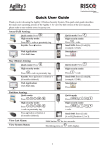
System Unsetting:
.
Quick mode: Press
Press
followed by code or
proximity tag.
High security mode:
> Code.
Press
Press the button.
Send SMS: Enter [Code][D]
(example 1234D).
Web Application:
Enter user code and click Unset.
Smartphone:
Press
.
Partition Unsetting:
/
/
Press
proximity tag.
>
Quick mode:
> code or
Press
/
/
>
.
High security mode:
Press
Press the button. All partitions
assigned to the button will be unset.
Duress Unsetting:
Press
Quick Zones Omit
Press
/
/
>
> code.
Send SMS: Enter [Code][D]
[Partition 1,2 or 3]
(example 1234D1).
followed by duress code.
> [Code]
[Zone No.]
[Define]
.
Panic Alarm:
and
Press both
simultaneously.
and
Press both
simultaneously.
keys
keys
Press the small blank button
(if engineer defined).
Fire Alarm:
Press
simultaneously for 2 seconds.
Emergency/Medical Alarm:
Press
simultaneously for 2 seconds.
Define Follow-Me:
Press
System Chime On/Off:
Press the button
Output Control
Press button
> [Code]
for 2 seconds.
/
2
[Follow Me]
/
for 2 seconds.
[Define]
.