1
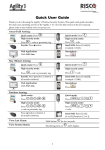
LED Indicators:
Power LED (Green)
On: Power OK.
Rapid Flash: AC trouble.
Slow Flash: Low battery
trouble.
Set/Alarm LED (Red)
On: System set.
Rapid Flash: Alarm.
Slow Flash: System in Exit
Delay.
Trouble LED (Orange)
Rapid Flash: Trouble.
Off: No trouble.
Part LED (Red)
On: System set at PART.
Off: System unset.
Ready LED (Green)
On: System ready.
Off: Open zones.
Slow Flash: Ready to set with
open entry/exit zone.
Sound Indicators:
Intrusion alarm:
Continues rapid beeping.
Fire alarm:
Staggered rapid beeping.
Exit delay:
Slow buzzer beeps until the Exit Delay time period expires.
Entry delay:
Slow buzzer beeps until the Entry Delay time period expires.
Confirm operation:
A one-second tone.
Reject operation:
Three rapid error beeps.
Set/Unset squawk:
1 sounder chirp: System set,
2 sounder chirps: System is unset,
4 sounder chirps: System unset after an alarm.
Edit User Codes:
1.Press
and enter your code.
2. Scroll to the option Codes/Tags and press
3.Scroll to User Codes/Tags and press
.
.
4.Select the option New/Change and press
.
5. Scroll to select the User Index number to which you want to assign a user code and press.
6. Enter and re-enter the new code followed by
.
7. Repeat the above steps for additional codes.
Assign Proximity Tag:
1. Follow steps 1-3 of the Edit User Code above.
2. Scroll to Proximity Tags and press
.
3. Select the option New/Change and press
.
4. Scroll to the User Index number to which you want to assign a tag and press
.
5. Within 10 seconds, hold the proximity tag at a distance of 1 to 2 cm from the keypad’s keys.
6. Repeat the above steps for additional codes.
3