1
Unit 3 – Spreadsheet Design
18.2. Data Validation
Data validation helps to prevent users from entering inaccurate or invalid data such as text in a cell that
should contain a number value. We will validate the overtime hours data to ensure that a numeric value
within a specified range is entered.
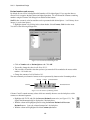
• Highlight cells B3 to B22 on the Overtime Collection worksheet.
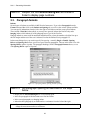
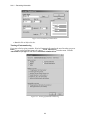
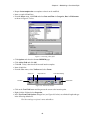
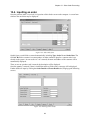
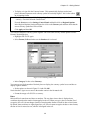
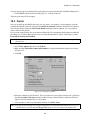
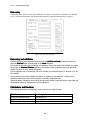
• Select Data, Validation and click on the Settings tab of the Data Validation dialogue box.
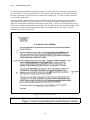
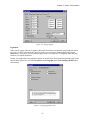
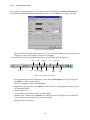
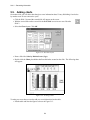
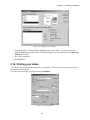
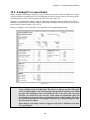
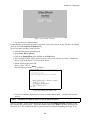
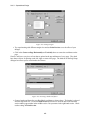
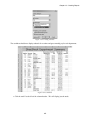
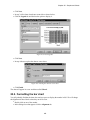
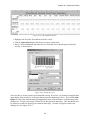
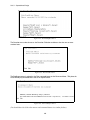
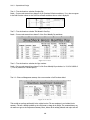
• The minimum overtime is half an hour and the maximum is 20 hours per week. Enter the settings
as shown below.
Figure 18.2: Settings for data validation
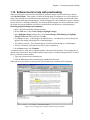
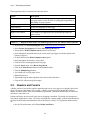
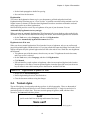
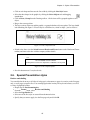
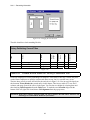
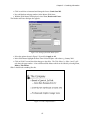
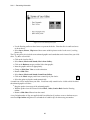
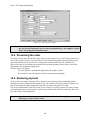
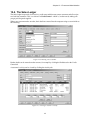
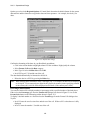
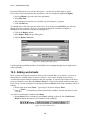
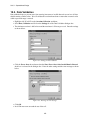
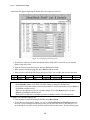
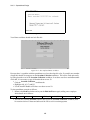
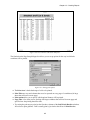
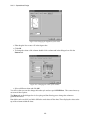
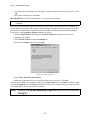
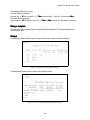
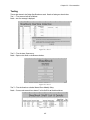
• Click the Error Alert tab and ensure that the Show Error Alert After Invalid Data Is Entered
check box is selected in the dialogue box. Enter the other settings and the error message as shown
below.
Figure 18.3: Entering an error message
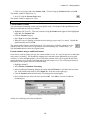
• Click OK.
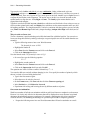
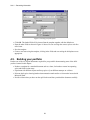
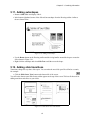
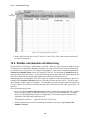
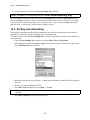
• In cell B4 enter some text and tab out of the cell.
150