1
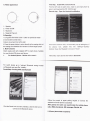
First stoρ :I"staII t"e APP
4"emu
Vse iphone to search” BT
4.1CIock disρ Iay
sWATCH” in app store and downIoad
00①
00
"
sooo"d
step:oρ eniρ hone a"dW臼 tCh’ s bI"etooth fu"Ctio"
For watch、 bluelooth:in“ seⅢ ngζ monuˉ ¨"BT se廿 ings” ¨ˉ
on
the"poweF and"Ⅵ 蔚bⅢ ty"
Third stθ
″ Connect watch wⅡ h ApP
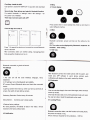
Press screen When in d∞ k standby刂 me,slVe up and down to
sMtch diferentinlerface
Press"Wto search the deMce and connθ
cllhe correct Bluel°
°th
handfree whθ
43Ca"Log
name oflhe APP
ARer∞ nneded,watch can no“
nθ d。 aⅢ
"ca"Ing
ng,massaging phone
book,qq,wechat,faoebook and so on
BIuθ looth
oonneCted,to check ca"reoord
44sθ tt∶ ngs
Aner bluet。 oth° 。
nnθ ol lhe mob"e phone wlh lhθ
0∵
lnsta"sync APP sonWare m user、
1The user∞
n se【
lhe cIock inte亻
aoθ
・ Ianguage,ˇ oi∞
,
b"ghtness
2BT se廿 ings∶ lum on tle Bluetooth andˇ
isiu"ly
BT oonnθ o}search BIuetooth deVioe and check the conneotθ
deˇ ioe
3L|ght up s。
reen when hand up when you hand up andlook a1
screθn,lhθ walch wⅢ auto"ght up s°
d
watch,and
h。 ne,ρ h。 nθ ‘ push
ρ
n。
play on lhe watch,remind by vibrate
°ns雨
"nca臼
"d、
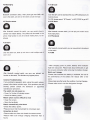
4.6Pedometer
躞
Vser can set steps largel,when reach lhe targel,watoh wⅢ
reen
haˇ
remind by"brate
0nIy keeρ the day、 data,θ ˇ
ery
sedentary RemindeⅡ Remind every30minutes
O∶
oo ρedoMter data auto reset,
the user can stop orresetthls pedometer when nθ
sbep MonitoⅡ monito"ng user℃ deep qu剐
4Restore factoγ
ty
θd
4.7Looking ρh° Ⅱe
se⒒ ings:
No need ρassword,w"de|eto a"data in lhe watch,w"l bθ
reslored to lhe factory defau"stale
Bluetoolh∞ nnecu。 n slams,use this fundon to nnd lhe phone,
4.5No刂 OCatlon
lhe
h° ne lm""brate or"ng
ρ
(Ph° ne
minimum required for0s:and∞ id44,l0s72)
e