1
Chapter 1 - Introductory
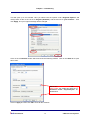
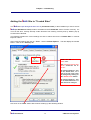
This will open up a new window. Here you select both the options under “Regional Options” and
change them so the 1st one is set to “English (Australia)” and the 2nd one to “your location”. Then
click Apply, and your regional settings will be changed.
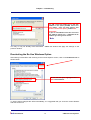
Click on the “Customize” button which will show the following window. Click on the Date tab to open
this screen.
Where the “Short date format” and “Long
date format” are, make sure they are in
Australian format: “day/month/year” as
shown here.
Click on Apply and then click OK to close all the windows.
ibais User Manual
1-3
© BA Insurance Systems