1
J74 Progressive (Standalone Edition) - User Manual
Page 15 of 47
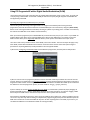
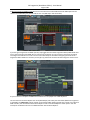
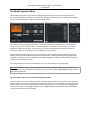
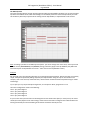
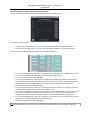
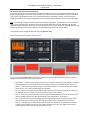
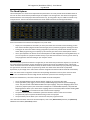
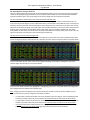
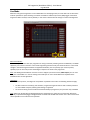
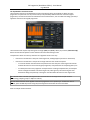
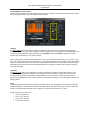
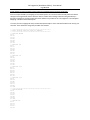
If we select C Major as scale, leaving all other parameters to default, this results in the following MIDI file:
Time 1: play chord degree 1 in the C Major scale which is C major chord = C-E-G
Time 2: play chord degree 5 in the C Major scale which is G major chord = G-B-D
Time 3: play chord degree 6 in the C Major scale which is A minor chord = A-C-E
Time 4: play chord degree 4 in the C Major scale which is F major chord = F-A-C
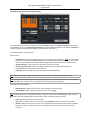
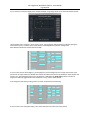
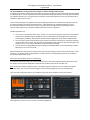
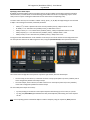
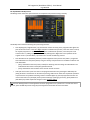
Tip: a similar view to the one above is available on the MIDI Clip View window which can be opened using the
[View Clip] button on the Chord Progression Editor.
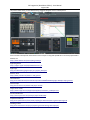
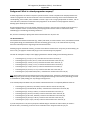
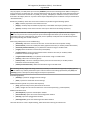
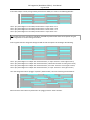
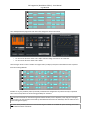
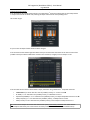
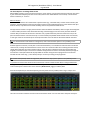
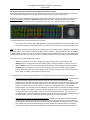
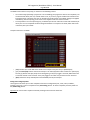
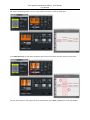
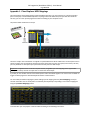
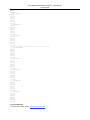
So far so good. Now let's change the settings and add 7th and Low options. This would give the following:
Time 1: play chord degree 1 in C Major with 7th and low tonic, a C major 7th chord = C-E-G-B (plus a low C)
Time 2: play chord degree 5 in C Major with 7th and low tonic, G dominant 7th chord = G-B-D-F (plus a low G)
Time 3: play chord degree 6 in C Major with 7th and low tonic, an A minor 7th chord = A-C-E-G (plus a low A)
Time 4: play chord degree 4 in C Major with 7th and low tonic, a F major 7th chord = F-A-C-E (plus a low F)
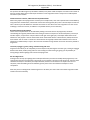
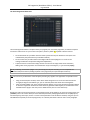
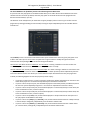
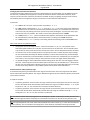
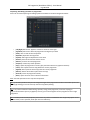
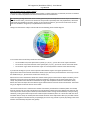
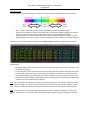
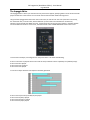
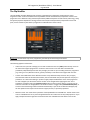
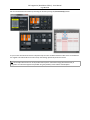
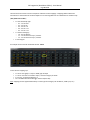
Let's now change the mode to arpeggio "arp-down" (Main window). The result of the file generated will be:
Where the same notes above are performed in an arpeggio, with the "down" direction.