1
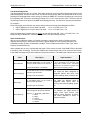
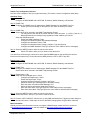
COM3000-SNMP – Quick Start Guide - Traps SimpleComTools, LLC You can tell from the messages that the customer has customized the names of the device, its location, the names of the inputs and the input states, as well as given the inputs unique severities, categories and types. This type of detail can sometimes result in a in a rather verbose message that your NMS may not prefer. Shortening the message can be done by either shortening the input attributes or eliminating them altogether. Here‟s an example moving the Severity and Category first, with shorter variables and without the Alarm Type: Message Text (9,8,1,3,5,7) Trap Heart Beat SYS, Informational, C1000, 22, HB, OK Digital Input 1 in Active State SEC, Critical, C1000, 22, Door1, OPEN Trap Transmissions and Retransmissions SNMP traps will be sent to the Primary and Secondary NMS upon any of the following events: Device Cold Start Scheduled Heartbeat Digital Input state changes Analog Input Set Point violations Device Temperature Set Point violations Retransmissions of the traps will be sent to both servers every 15 seconds until one of the servers acknowledges the trap. (See section Trap Acknowledgements for more details on formatting the ACK) Trap Identification There are two ways for an NMS to identify the source of the SNMP trap: 1) Examine the trap OID to obtain the source of the specific alarm 2) Examine the message details within the trap itself Trap Identification Using the Trap OID Each alarm point has unique trap OIDs that identify the input state and the status of trap acknowledgement. By sending the trap ACK status OID as the source, the COM3000 makes it easy to determine the source of the trap. For example, all (4) Digital Input variables fall under a single OID group .27404.3.3.2. Each of the inputs has a unique sub-group which contains (3) scalar OIDs – the current digital input status (Active or Inactive; 1 or 0), and the current status of the Active and the Inactive State trap acknowledgements. OID for all Digital Inputs: OID for the Digital Input 1 Group: OID for Digital Input 1 Status: OID for Digital Input 1 Active State Trap ACK: OID for Digital Input 1 Inactive State Trap ACK: .1.3.6.1.4.1.27404.3.3.2 .1.3.6.1.4.1.27404.3.3.2.1 .1.3.6.1.4.1.27404.3.3.2.1.1.0 .1.3.6.1.4.1.27404.3.3.2.1.2.0 .1.3.6.1.4.1.27404.3.3.2.1.3.0 (Group) (Sub-group) (Scalar 1) (Scalar 2) (Scalar 3) When the Digital Input 1 state changes to Active, a trap is sent with the OID for the Digital Input 1 Active State ACK, (: .1.3.6.1.4.1.27404.3.3.2.1.2.0). It is immediately known then that Digital Input 1 has gone into the Active state. Sending an ACK to this OID will stop the traps from continually being sent. (See section Trap Acknowledgements for more details on formatting the ACK). Also - by stepping back one OID number (from 2.0 to 1.0), the NMS can read the current state of the digital input that generated the alarm event if necessary. Trap Identification Using the Trap Message Text Another option for determining the source of the alarm would be to examine the trap message detail. Having a detailed message can provide a great deal more visibility into the source and type of the trap and can help speed the processing of operational decisions. In order to give users the greatest control over the trap message detail, the COM3000 provides the ability to add up to (11) variables to your trap message. Deciding which variables to include in the message is done by setting the Trap Message Format. (Refer to the section entitled Trap Message Format for more info). SimpleComTools, LLC 3