1
COM3000-SNMP – Quick Start Guide - Traps
SimpleComTools, LLC
Trap Types
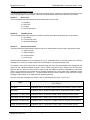
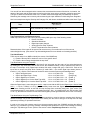
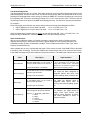
The COM3000 supports (12) different trap types broken into (3) basic categories: Informational, Warnings,
and Alarms. In an effort to provide additional granularity, the COM3000 provides (2) types for each of these
categories. This allows a great deal of flexibility for the end user to assign different types of traps to meet their
specific reporting requirements. Finally, there are (2) restore trap types for each of the 3 categories as well.
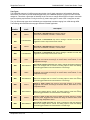
The (12) different trap types have individually pre-assigned trap numbers ranging from 1000 through 6500.
The following table describes the trap type and their intended application.
Trap
Number
Trap
Name
1000
Inform1
1500
2000
Inform1Restore
Inform2
Description
Non-critical or Informational trap message. Used for
items such as Heartbeat, Cold Start, or access alerts.
Non-critical or Informational trap restore message. Indicates the state that
triggered an Inform1 trap has returned to normal.
Non-critical or Informational trap message. Used for
items such as Heartbeat, Cold Start, or access alerts.
2500
Inform2Restore
Non-critical or Informational trap restore message. Indicates the state that
triggered an Inform2 trap has returned to normal.
3000
Warn1
Non-critical or minor WARNING trap used for Input state changes or set points.
Suggested uses include such things as access alerts, motion alarms, or low
temperature warnings.
3500
Warn1Restore
Non-critical WARNING RESTORE trap. Used to indicate the state that triggered
Warn1 has changed back to normal. For Analog Inputs it means the warning
level that triggered Warn1 has returned back to normal range.
4000
Warn2
Non-critical or minor WARNING trap used for Input state changes or set points.
Suggested uses include such things as access alerts, motion alarms, or low
temperature warnings.
4500
Warn2Restore
Non-critical WARNING RESTORE trap. Used to indicate the state that triggered
Warn2 has changed back to normal. For Analog Inputs it means the warning
level that triggered Warn2 has returned back to normal range.
5000
Alarm1
Critical or major ALARM trap used for input state changes or set points.
Suggested uses include such things as intrusion alarms, flood alarms, or low
temperature alarms.
5500
Alarm1Restore
Non-critical ALARM RESTORE trap. Used to indicate the state that triggered
Alarm1 has changed back to normal. For Analog Inputs it means the warning
level that triggered Alarm1 has returned back to normal range.
6000
Alarm2
Critical or major ALARM trap used for Digital Input state changes or Analog
Input set points. Suggested uses include such things as intrusion alarms, flood
alarms, or high temperature alarms.
6500
Alarm2Restore
Non-critical ALARM RESTORE trap. Used to indicate the state that triggered
Alarm2 has changed back to normal. For Analog Inputs it means the warning
level that triggered Alarm2 has returned back to normal range.
SimpleComTools, LLC
5