1
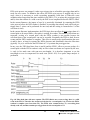
and the lengths between them vary accordingly, one can make maximum use of the available
information by setting the length to the interpulse spacing.
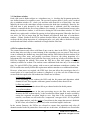
In principal, the very best filtering is accomplished by using cusp-like weights and time variant
filter length selection. There are serious costs associated with this approach however, both in
terms of computational power required to evaluate the sums in real time and in the complexity of
the electronics required to generate (usually from stored coefficients) normalized { Wi } sets on a
pulse by pulse basis.
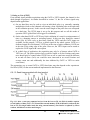
The Pixie-4 takes a different approach because it was optimized for high speed operation. It
implements a fixed length filter with all Wi values equal to unity and in fact computes this sum
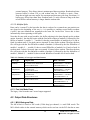
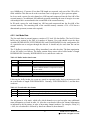
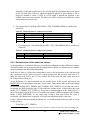
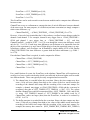
afresh for each new signal value k. Thus the equation implemented is:
LV x ,k = −
k − L− G
∑
Vi +
k
∑
Vi
(6.2)
i= k − 2 L− G+ 1 i= k − L+ 1
where the filter length is L and the gap is G . The factor L multiplying Vx ,k arises because the
sum of the weights here is not normalized. Accommodating this factor is trivial.
While this relationship is very simple, it is still very effective. In the first place, this is the digital
equivalent of triangular (or trapezoidal if G ≠ 0) filtering which is the analog industry’s standard
for high rate processing. In the second place, one can show theoretically that if the noise in the
signal is white (i.e. Gaussian distributed) above and below the step, which is typically the case
for the short shaping times used for high signal rate processing, then the average in Eqn. 6.2
actually gives the best estimate of Vx in the least squares sense. This, of course, is why triangular
filtering has been preferred at high rates. Triangular filtering with time variant filter lengths can,
in principle, achieve both somewhat superior resolution and higher throughputs but comes at the
cost of a significantly more complex circuit and a rate dependent resolution, which is
unacceptable for many types of precise analysis. In practice, XIA’s design has been found to
duplicate the energy resolution of the best analog shapers while approximately doubling their
throughput, providing experimental confirmation of the validity of the approach.
6.2 Trapezoidal Filtering in the Pixie-4
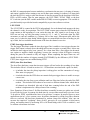
From this point onward, we will only consider trapezoidal filtering as it is implemented in the
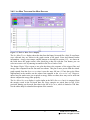
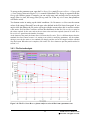
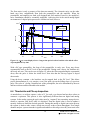
Pixie-4 according to Eqn. 6.2. The result of applying such a filter with Length L=1µs and Gap
G=0.4µs to a γ-ray event is shown in Figure 6.3. The filter output is clearly trapezoidal in shape
and has a rise time equal to L, a flattop equal to G, and a symmetrical fall time equal to L. The
basewidth, which is a first-order measure of the filter’s noise reduction properties, is thus 2L+G.
This raises several important points in comparing the noise performance of the Pixie-4 to analog
filtering amplifiers. First, semi-Gaussian filters are usually specified by a shaping time. Their rise
time is typically twice this and their pulses are not symmetric so that the basewidth is about 5.6
times the shaping time or 2.8 times their rise time. Thus a semi-Gaussian filter typically has a
slightly better energy resolution than a triangular filter of the same rise time because it has a
longer filtering time. This is typically accommodated in amplifiers offering both triangular and
semi-Gaussian filtering by stretching the triangular rise time a bit, so that the true triangular rise
37
PIXIE-4 User’s Manual V2.54
XIA 2013. All rights reserved.