1
4.6
Expansion Module MAC00-FD4
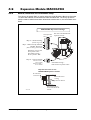
Zero search - how to activate.
In almost any system which is using some kind of position related mode it is necessary to
find the mechanical zero point before normal operation of the motor can take place.
Following description gives a guide line on how to activate the build-in Zero search function.
It is necessary to determine which kind of Zero search type that needs to be activated.
The MAC motors offers a number of various Zero search types. Please consult the chapter Mechanical Zero search, page 32 which explain in details which Zero search functions
that exist and how they perform the Zero search.
Please find the section specifying the object 0x25 that can be accessed explicitly for configuration from the Devicenet network.
Another method for doing Zero search is to setup the motor for doing Zero search at
startup selecting one of the “Power-up” Zero search modes. This can be done from the
MacTalk configuration software and can be setup permanent in the motor without any
further actions done through the DeviceNet interface. Please consult the chapter Mechanical Zero search, page 32.
If this method is prefered the motor will automaticaly perform the Zero search every time
the motor is powered up or the 24V control supply is cycled.
Reading and clearing error codes.
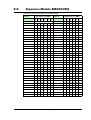
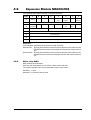
The register 35 is a combined error/status -register that represent the actual information
about errors and the current motor status (accelerating, decelerating, motor in position)
etc.
All this information is put into a single register that can be read all the time.
To clear the errors either write register 35= 0
Another method is to execute the special command 225. This is done by writing to register 211 which will clear any actual errors.
Please notice that some errors are regarded as fatal and needs 24V power cycle to be
cleared. Please consult the chapter Error messages and error handling, page 40 for further
details about all the error types and what may have caused the error situation.
Resetting the position.
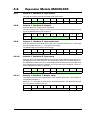
Sometimes it is necessary to reset the actual position counter.
When done manually it requires writing to multiple registers and special handling of the
motor.
All this can be done by sending a the special command 247 to the command register 211
which will set the actual and requested position = 0.
The motor will stay stationary if it is set in a position related mode afterwards.
222
JVL Industri Elektronik A/S - User Manual - Integrated Servo Motors MAC050 - 3000