1
HOBLink JWT
Software Version 2.3
User Manual
Issue:
October 29, 2002
HOB electronic GmbH & Co. KG
Schwadermühlstraße 3
90556 Cadolzburg
Germany
Phone: +49-9103-715-0
Fax.: +49-9103-715-271
E-mail: [email protected]
Web: www.hob.de/worldwide
User Manual
HOB, Inc.
5155 East River Road, Suite 411
Minneapolis, MN 55421-1025
USA
Phone: +1 763-571-9000
Fax: +1 763-572-1721
E-mail: [email protected]
Web: www.hobsoft.com
HOBLink JWT ___________________________________________________________
HOBLink JWT software and documentation 2002 by HOB
Information in this document is subject to change without notice, and does not represent a commitment on the
part of HOB. All rights are reserved. Reproduction of editorial or pictorial contents without express permission
is prohibited.
HOBLink JWT software and documentation have been tested and reviewed. Nevertheless, HOB will not be
liable for any loss or damage w hatsoever arising from the use of any information or particulars in, or any error
or omission in, this document.
IBM is a trademark of the IBM Corporation.
Sun Microsystems, HotJava, and Java are trademarks or registered trademarks of Sun Microsystems, Inc.
Netscape and Netscape Navigator are registered trademarks of Netscape Communications Corporation.
Microsoft and Microsoft Internet Explorer are registered trademarks of Microsoft Corporation.
All other product names are trademarks or registered trademarks of their respective corporations.
2
Connectivity from HOB
______________________________________________________________ HOBLink JWT
Table of Contents
1
Introduction
2
Installing HOBLink JWT
7
11
Overview ............................................................................................... 11
2.1
System Requirements .......................................................................... 11
Requirements for the Client ................................................................. 11
Requirements When Installing on the Web Server.............................. 12
Terminal Server/Terminal Services Supported by HOBLink JWT....... 13
2.2
Local Client vs. Web Server Installation .............................................. 13
Local Installation ................................................................................... 13
Web Server-based Installation............................................................. 14
2.3
Installation Procedure........................................................................... 14
Starting the Installation from the HOB Web Site (All Platforms) ......... 15
Starting the Installation from the HOB Product CD ............................. 15
Continuing the Installation (All Platforms)............................................ 16
3
Configuring HOBLink JWT (Client)
18
Overview ............................................................................................... 18
3.1
Setting Temporary Startup Options ..................................................... 18
3.2
First Configuration Steps ...................................................................... 19
Running the Configuration Program .................................................... 20
Creating a New / Editing an Existing Configuration ............................. 20
3.3
Configuring the Connection to the WTS .............................................. 20
Configuring a Direct Connection .......................................................... 21
Configuring a Connection with HOB Load Balancing .......................... 23
Configuring a Connection via Broadcast Function (Uses Load
Balancing)............................................................................................. 25
Configuring a Connection Using Server List (with Load Balancing) ... 28
Configuring a Connection via the Web Secure Proxy (Uses Load
Balancing)............................................................................................. 31
3.4
Further Configuration Options .............................................................. 35
Compression......................................................................................... 35
Limit User Options (Security) ............................................................... 36
Auto-logon ............................................................................................ 36
Desktop Properties ............................................................................... 37
Keyboard .............................................................................................. 39
Cut and Paste....................................................................................... 40
Application Serving............................................................................... 40
Computer name.................................................................................... 41
Connectivity from HOB
3
HOBLink JWT ___________________________________________________________
Printer Recognition ............................................................................... 41
Bandwidth restriction while printing ...................................................... 42
3.5
Printer Configuration............................................................................. 43
Universal Printer Support ..................................................................... 43
Configuration Parameters for Printing .................................................. 44
"Local Print" Options ............................................................................. 45
"Easy Print" Options ............................................................................. 46
"LPR/LPD Print" Options ...................................................................... 48
"IP Print" Options .................................................................................. 50
3.6
Configuration for Local Drive Mapping ................................................. 51
Configuring Local Drive Mapping ......................................................... 51
How to Use Local Drive Mapping ......................................................... 52
3.7
Configuring Application Publishing (Client) .......................................... 54
3.8
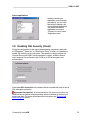
Enabling SSL Security (Client) ............................................................. 55
3.9
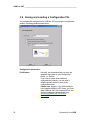
Saving and Loading a Configuration File ............................................. 56
Saving the Configuration via the File Menu ......................................... 57
Loading an Existing Configuration via the File Menu........................... 57
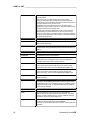
3.10 Specifying Configuration Parameters................................................... 58
Manually Editing the HTM Configuration File (Server Installation) ...... 61
How to Specify Parameters in the Command Line .............................. 61
3.11 Controlling Browser Behavior After HOBLink JWT is Terminated....... 61
4
Running HOBLink JWT
63
4.1
Running HOBLink JWT as an Applet (Server Installation) .................. 63
Running HOBLink JWT with Microsoft Internet Explorer or
Netscape Navigator .............................................................................. 63
4.2
Running HOBLink JWT as a Local Application.................................... 64
For Windows 9x / NT / ME / 2000 ........................................................ 64
For UNIX and UNIX-related Platforms ................................................. 65
For Apple Mac....................................................................................... 65
For OS/2 ............................................................................................... 65
5
The Basic Module for HOB Enhanced Terminal Services
66
5.1
Installing the Basic Module on the Server............................................ 66
5.2
How Does the Basic Module Work?..................................................... 67
6
Publishing Applications on the Terminal Server
71
What Does Application Publishing Mean? ........................................... 71
Requirements:....................................................................................... 71
6.1
4
Working with the HOB Application Publishing Manager ...................... 71
Publishing Applications......................................................................... 73
Connectivity from HOB
______________________________________________________________ HOBLink JWT
Configuring Servers.............................................................................. 77
6.2
Useful Options for Starting Applications .............................................. 79
How to Start a Published Application Maximized ................................ 79
Starting Multiple Applications in a Published Application Session...... 80
6.3
How to Register a Tryout Installation of the Application Publishing
Manager ............................................................................................... 82
7
HOB Server Farm Manager (Server Component)
83
7.1
Specifying a Farm Folder ..................................................................... 83
What is a Farm Folder?........................................................................ 83
How to Specify a Farm Folder.............................................................. 83
7.2
Configuring Your Server Farm ............................................................. 84
What is a Server Farm?....................................................................... 84
How to Configure a Server Farm ......................................................... 84
8
HOB Local Drive Mapping Manager (Server Component)
88
8.1
Overview ............................................................................................... 88
Requirements for Using HOB Local Drive Mapping ............................ 88
Quick Start Reference.......................................................................... 88
8.2
Working with the Program .................................................................... 89
Configure a Server Farm...................................................................... 89
Create a New Configuration ................................................................. 89
Delete existing configuration ................................................................ 91
Configuration Properties....................................................................... 92
Enable configuration........................................................................... 100
Restore default settings...................................................................... 102
Farm folder on Web server ................................................................ 103
8.3
Installing HOB Enhanced Terminal Services..................................... 104
Installing the HOB WTS XPert Module .............................................. 105
Installing the HOB Local Drive Mapping Manager............................. 106
9
Security and HOBLink JWT
108
9.1
SSL/TLS Security with HOBLink JWT ............................................... 108
Secure Communication with HOBLink Secure .................................. 108
HOBLink Secure Components ........................................................... 109
Installation Overview .......................................................................... 110
9.2
Installing HOBLink Secure and the Web Secure Proxy (for Server
Farms) ................................................................................................ 112
Background......................................................................................... 112
(A) Installation Procedure for Proxy Servers with One Network
Interface Card..................................................................................... 113
Connectivity from HOB
5
HOBLink JWT ___________________________________________________________
(B) Installation Procedure for Proxy Servers with More than One
Network Interface Card....................................................................... 116
9.3 Installing HOBLink Secure and the WinProxy (for Stand-alone
Servers)........................................................................................................ 118
Installation Procedure for a WinProxy Servers .................................. 118
Appendix
A.
122
Accessing Applications and Sessions via a Web Browser................ 122
How to Create the HTML Portal Page................................................ 122
B. Session Shadowing................................................................................ 124
C.
Hot Keys ............................................................................................. 125
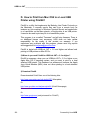
D. How to Print from Mac OS9 to a Local USB Printer using Print66? ..... 126
6
E.
Guidelines for Installing HOBLink JWT on a Web server.................. 130
General Guidelines ............................................................................. 130
Example 1: IIS (Windows).................................................................. 130
Example 2: Apache (Unix, Linux, Windows)...................................... 130
F.
Step-by-Step Instructions for an Installation of HOBLink JWT with
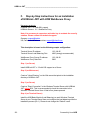
HOB WebSecure Proxy...................................................................... 132
Connectivity from HOB
______________________________________________________________ HOBLink JWT
1
Introduction
HOBLink JWT is a Web-based solution for multi-user, multi-platform access to
applications and data on Windows Terminal Servers. As a Java-based software,
HOBLink JWT provides a cost-effective and easy-to-use alternative for
accessing centralized Windows applications from a variety of platforms,
including Apple Mac, Unix/Linux and, of course Windows. It also reduces
administration workload and increases user productivity by giving system
administrators extensive control over user settings.
HOBLink JWT allows you to access Windows applications running on Windows
NT Server 4.0, Terminal Server Edition, as well as with Windows 2000 from any
platform which is running a Java Virtual Machine, e.g. Windows, Unix, Apple
Mac, OS/2, NCs, etc. (see System Requirements).
Here are the major highlights in a nutshell:
?? Cost-efficient, on-demand access to centralized Windows applications from
almost any platform.
?? Eliminates print hassles and workflow clogs with "Easy Print" functionality
and Universal Printer Support
?? Effective load balancing and easy-to-use application publishing help
streamline application delivery
?? When supplemented with HOB Web Secure Proxy, it prevents unauthorized
Web access to your Terminal Servers
Simple Yet Effective
HOBLink JWT enables fast and easy access to centralized Windows
applications without any redundant server component for the communication.
HOBLink JWT supports almost any hardware device with a Java-enabled
operating system. No additional client software or hardware is necessary. Just
install HOBLink JWT in your existing environment and you're up and running in
minutes!
Central Administration Saves Money
Based on the architecture provided by Microsoft Windows Terminal Services, all
Windows applications run centralized on the server and are managed from a
central location. As a server-based solution, HOBLink JWT compliments this
architecture, allowing for central user management and administration.
Due to this central installation and management, support costs can be drastically
reduced. Virtually no support is necessary on the client side.
HOBLink JWT's server-based architecture helps to reduce the Total Cost of
Ownership and the Total Cost of Application to a minimum.
Connectivity from HOB
7
HOBLink JWT ___________________________________________________________
Other chief features of HOBLink JWT at a glance:
?? Local drive mapping
?? Bandwidth restriction feature for printing
?? Universal Printer Support: Standard local printing, Easy Print (to any
printer), LPR/LPD print, IP print
?? Application publishing
?? Hot key support
?? Installs centrally on the Web server or locally on the client
?? Lean applet size: only 165 KB to 260 KB, depending on the browser
used
?? Includes integrated load balancing based on the measured CPU load
?? Uses TCP/IP as network protocol, RDP as communications protocol
?? Allows server-based computing in any heterogeneous network
environment
?? Network connection: Support for LAN and WAN, dial-up lines, ISDN,
xDSL, VPN
?? Integrates seamlessly into the Windows environment for any browser
?? Provides various screen modes: standard window, full-screen, in
browser window
?? Provides “session shadowing” (remote viewing of client sessions)
?? Includes “smart update” for version control
?? Bitmap caching (storing images in cache)
?? Provides international keyboard support
?? Client needs only a Java Virtual Machine, e.g. a browser
?? Supports Microsoft Terminal Server encryption
?? Supports encryption via SSL up to 256 bits (optional)
?? Allows for compression of data transmitted between the WTS and the
client based on MPPC (Microsoft Point-to-Point Compression)
?? Supports the Microsoft Remote Desktop Protocol 5 (RDP5) for
Windows 2000
Client is Local or Web Server-Based
HOBLink JWT can either be run as an application on your local client or
downloaded as an applet from your Intranet/Internet server. In the second case,
the administrator places pre-configured applets on a Web server and the users
download the very “lean” applet one time to their client. The “smart update”
function makes a version check at each login and only downloads the applet
when a new version is on the server.
8
Connectivity from HOB
______________________________________________________________ HOBLink JWT
Compatibility
HOBLink JWT supports communication with
Windows NT Server 4.0, Terminal Server Edition
-andWindows 2000 Server.
Communication with these servers is based on the Remote Desktop Protocol
from Microsoft. Windows NT Server 4.0, Terminal Server Edition, supports RDP
4, whereas Windows 2000 Server supports RDP 5.
The Terminal Services under Windows 2000 are located in the following servers:
Windows 2000 Server
Windows 2000 Advanced Server
Windows 2000 Datacenter Server
In addition, HOBLink JWT also supports access to the Windows XP Professional
Workstation (1 session).
For further information on HOBLink JWT, visit HOB on the Web:
Worldwide:
http://www.hob.de/www_us/produkte/connect/jwt.htm.
Or in the US:
http://www.hobsoft.com/products/jwt/jwt.html
Connectivity from HOB
9
HOBLink JWT ___________________________________________________________
10
Connectivity from HOB
______________________________________________________________ HOBLink JWT
2
Installing HOBLink JWT
Overview
Since HOBLink JWT is written in 100% Java, it can be installed on any platform
that is enabled for Java. This chapter covers what you need to know to install
HOBLink JWT on any common platform, including Windows, Apple Mac and
Unix/Linux derivatives. In most cases the installation will be made on a system
with a graphical user interface such as Windows; however, in case you need to
install on a system without a GUI, such as AS/400, this is also explained.
Fundamentally speaking, HOBLink JWT can be installed and run in two different
ways: either locally on a client computer or centrally on a Web server; both of
these methods are also described below.
The following components are included in HOBLink JWT:
?? HOBLink JWT, the Java client for Windows Terminal Server access
?? HOB Enhanced Terminal Services (Server Components), which includes:
?? HOB Basic Module (for Load Balancing, Server Component)
?? HOB WTS XPert Module (Server Component, optional)
?? HOB Application Publishing Manager (Server Component, optional)
?? HOB Enhanced Local Drive Mapping Manager (Server Component,
optional)
2.1 System Requirements
Requirements for the Client
Java Virtual Machine
HOBLink JWT requires a platform that is enabled for Java. This means that a
so-called Java Virtual Machine (JVM) must be installed on the client However,
since a Java Virtual Machine (JVM) is found in most popular Web browsers, you
normally do not have to install any additional software on your computer to run
HOBLink JWT.
We recommend using one of the following browsers:
?? Microsoft Internet Explorer:
Minimum: vers. 4.0;
Currently recommended: MS IE 5.0 or 5.5
Note: A JVM is not included with MS Internet Explorer v. 6.0 or higher, but
can be installed.
- or -
Connectivity from HOB
11
HOBLink JWT ___________________________________________________________
?? Netscape Navigator/Communicator:
Minimum: version 4.5
Currently recommended: version 4.7
Not recommended: Netscape 6.0, due to errors in the JVM
The standards for JVM’s are usually expressed in terms of JDK (Java
Development Kit) or JRE (Java Runtime Environment).
?? HOBLink JWT can be run on any platform that supports JDK (JRE) v. 1.1 or
higher.
?? If you’re using HOBLink JWT on Unix platforms, we recommend JDK (JRE)
v. 1.3.
?? For Apple Mac, you need Mac Runtime for Java (MRJ), Version 2.2 or
higher
You can download a JVM for your platform from the following Web sites:
Platform
Java Virtual Machine (Download for current version)
Windows
Java 1.1.8 from SUN:
(http://java.sun.com/products/jdk/1.1/jre/download-jre-windows.html )
Java 1.3 from SUN: (http://java.sun.com/j2se/1.3/jre )
MS jview Version 5.00.3167 or higher:
(http://www.microsoft.com/java/vm/dl_vm40.htm )
Java 1.3 from IBM: (http://ibm.com/java/jdk )
Do not use Java 1.3 from SUN
Do not use Java 1.2 from Blackdown
MRJ 2.2.3 or higher: (http://www.apple.com/java )
Java 1.1.7 or higher: (ftp://ftp.hursley.ibm.com/pub/java/fixes/os2/11/)
Linux/Unix
Apple Mac
OS/2
Hardware / Memory Requirements for the Client:
PC with Pentium Processor: The minimum requirement is an Intel Pentium
processor with 90 MHz and 64 MB RAM.
Apple Mac: Apple Mac OS (v. 8.5 or higher) G3, G4, iBook, Cube with at least
a 300 MHZ processor and a minimum of 128 MB RAM. We strongly recommend
using Microsoft Internet Explorer 5.0 on Mac.
Network Computers: The minimum requirement for Network Computers is 64
MB RAM.
Handheld Devices: HOBLink JWT requires 32 MB RAM on Windows CE
devices.
Requirements When Installing on the Web Server
HOBLink JWT can be installed either locally or centrally on a Web server.
HOBLink JWT supports all known Web servers in the market. There are no
special requirements.
12
Connectivity from HOB
______________________________________________________________ HOBLink JWT
Terminal Server/Terminal Services Supported by HOBLink
JWT
HOBLink JWT communicates with Microsoft Windows Terminal Servers /
Terminal Services supported by:
?? Microsoft Windows NT 4 Server – Terminal Server Edition and
?? Microsoft Windows 2000 Server Family
- Windows 2000 Server
- Windows 2000 Advanced Server
- Windows 2000 Data Center Server
?? Microsoft Windows XP Professional Workstation (one session)
Hardware / Memory Requirements for the Terminal Server
The hardware requirements for the Windows Terminals Servers depends on a
variety of factors, including the number of clients needing access, the
applications running on the servers and the behavior of the users (e.g. light or
power users). Therefore, in order to better calculate how your servers should be
equipped, we recommend you use the following guide from Microsoft:
"Windows 2000 Terminal Services Capacity and Scaling"
This guide can be downloaded from the following Web address:
http://www.microsoft.com/windows2000/techinfo/administration/terminal/tscaling.asp.
This does not, of course, eliminate the need to test as extensively as possible.
2.2 Local Client vs. Web Server Installation
HOBLink JWT can be installed either locally on a client PC or centrally on a Web
server.
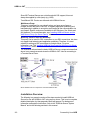
Local Installation
When installed on the client, it runs as a Java application on the local system
and attaches directly to the Terminal Server.
Local Installation for HOBLink JWT
Connectivity from HOB
13
HOBLink JWT ___________________________________________________________
This is often a good solution if your office only has a few workstations that need
Terminal Server access, or if you don’t have a Web server.
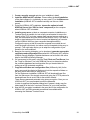
Web Server-based Installation
The second option is to install HOBLink JWT on a Web server and download it
as a Java applet to the client computer. From there, the applet is automatically
started and connects to the Terminal server.
Web Server Installation for HOBLink JWT
With the server-based model, you have all the advantages of centralized
maintenance and management. Your administrator only has to install and
maintain HOBLink JWT at one location (on the Web server) and it is available to
every workstation in your Intranet or the Internet – whether it’s 10 or 10,000.
You can also make use of the “Smart Update” feature, which installs the applet
in your browser and allows an applet download only when the software on the
server has been updated. (See also “Smart Update” below.)
2.3 Installation Procedure
HOB provides an easy-to-use installation program designed to work on a variety
of platforms (Windows, Apple Mac, Unix/Linux, etc.), and which can be run
either from CD or from the HOB Web server. In either case, the installation
process is started via the HTML page INSTALL.HTM.
During the installation on some platforms you will be asked to enter your product
key. If you don't have the product key at that time, close the dialog box or click
the "TRYOUT" button. The HOBLink JWT installation will then be continued and
HOBLink JWT will be installed as a TRYOUT version. You can enter the product
key later by running “Enter Product Key” from the HOBLink JWT program group
or installation folder.
14
Connectivity from HOB
______________________________________________________________ HOBLink JWT
Starting the Installation from the HOB Web Site (All
Platforms)
You can install HOBLink JWT directly from the HOB Web site under
http://www.hob.de/www_us/tests/tests.htm. The basic installation procedure is
the same in this case no matter what platform (with GUI) you have:
?? Check the entry for HOBLink JWT and fill out the form.
?? After you press “Send”, the INSTALL.HTM page will appear. (See
“Continuing the Installation” below to continue.)
Starting the Installation from the HOB Product CD
When installing from the HOB Installation CD, there are slight differences in the
procedure depending on which platform you have.
For Windows Platforms:
?? Insert HOB installation CD into the CD drive. If the HOB CD start image
does not appear, start “SetupCDExt.exe” from your CD drive root folder.
?? Choose “Install Software” from the main menu.
?? Enter product key or select “Continue” to install the tryout version
?? In the “CD Contents – Products" window:
- For the installation language, select “English”.
- Select “HOBLink JWT” from the list of products at the left
- Press “Install”
?? A “Security Warning” will appear for the “InstallAnywhere Web Installer”.
Click “Yes” to accept the security/authenticity of this software and continue.
?? The INSTALL.HTM page will appear.
?? Go to “Continuing the Installation” below to complete the installation.
For Apple Mac, Unix or Linux Platforms:
?? Insert HOB installation CD into the CD drive.
?? When the CD icon or symbol appears on the desktop, open it and go to the
installation folder, usually:
/software/JWT/JWTXX (where "XX" is the version number).
?? Open the “Install.htm” file in this folder.
?? A “Security Warning” will appear for the “InstallAnywhere Web Installer”.
Click “Yes” to accept the security/authenticity of this software and continue.
?? The INSTALL.HTM page will appear.
?? Go to “Continuing the Installation” below to complete the installation.
Connectivity from HOB
15
HOBLink JWT ___________________________________________________________
Continuing the Installation (All Platforms)
Once you have loaded INSTALL.HTM into your browser window, follow the
instructions there to install HOBLink JWT:
?? The installation page recognizes the platform you are using, so, normally,
you can simply choose the button labeled “Start Installer for …” near the top
of the page to run the installation.
If you are not sure you have an appropriate Java Virtual Machine (JVM)
installed for your platform, be sure to activate the check box labeled “Include
VM in download.” For information on which JVM you need, see “Java Virtual
Machine” under “Requirements” above.
?? If the “Start Installer” button does not appear specifically for your platform,
you can choose a download file for your platform by hand under “Available
Installers”. You can also download and install the appropriate JVM here also,
if needed. Then follow the corresponding instructions to start the install
program.
?? Once you choose an installation language, the installation program will start.
?? After confirming the license agreement, you get a message describing the
difference between the “Local” and “Server” installations. See two steps
below for further information.
?? In the next step you choose an installation folder for the HOBLink JWT
software. For a local installation, choose any folder name you wish on your
local client machine. For a Web server installation, choose the folder on your
Web server that you will designate as a "web share" so that it is accessible
from the Web. Please see "Guidelines for Installing HOBLink JWT on a Web
server".
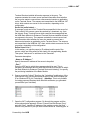
?? Next, the dialog below appears which lets you make the basic choice to
install HOBLink JWT:
?? as a Java application on your local client system
- or ?? as an program on a Web server which can be downloaded and run
as a Java applet in a browser on the client
Please refer to “Local Client vs. Web Server Installation” for
background information on Local vs. Web server installation.
16
Connectivity from HOB
______________________________________________________________ HOBLink JWT
?? Once you have chosen an option above and pressed "Next", you will see a
dialog that allows you to install encryption support for HOBLink JWT. Select
the check box "Install SSL support for HOBLink JWT" to do this.
Click on the "Install" button to complete the installation of the software on
this computer.
Note: This will install the necessary encryption software on your computer
but will not enable it. SSL support contained in another product (HOBLink
Secure), which must be purchased as an addition option. If you purchase
the HOBLink Secure option when you buy HOBLink JWT, you will receive a
product key, which enables HOBLink JWT and also SSL support.
For examples of how to complete the installation on a Web server, see
"Guidelines for Installing HOBLink JWT on a Web server".
Connectivity from HOB
17
HOBLink JWT ___________________________________________________________
3
Configuring HOBLink JWT (Client)
Overview
After you have installed the HOBLink JWT client software on the local client or
on the Web server, you have two options to proceed:
1. You can run HOBLink JWT immediately. If you do this, a “Startup Settings”
dialog will appear allowing you to enter basic options and make a quick
connection. This is primarily useful to test the installation and make sure a
connection is possible.
- or 2. You can run the HOBLink Configuration Tool and create one or more
configuration files for the client(s) you will be using.
In this chapter, we first briefly describe how to make a quick, temporary
configuration using the “Startup Settings” dialog. The rest of the chapter is
devoted to explaining how to set the options and parameters in the configuration
program for the HOBLink JWT client.
3.1 Setting Temporary Startup Options
If you start HOBLink JWT without first setting configuration parameters, the
Startup Settings dialog will appear which allows you to specify options for the
current session. These are the same options that can be set with the
configuration tool. However, these settings are only valid for the current session
– they cannot be saved!
18
Connectivity from HOB
______________________________________________________________ HOBLink JWT
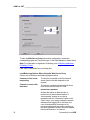
The Startup Settings dialog box
Via the tabs you can display the configuration dialogs and specify all the
necessary settings for your session.
In order to start HOBLink JWT and connect to a terminal server, the parameters
for "Name or IP Address" (server name) and "Port" (usually the default, 3389)
must be specified. For all other parameters, the default settings will be used if no
other values are defined.
Please refer to "First Configuration Steps" for a complete description of the
options and parameters.
To run: Once you have completed the configuration, you can set up a
connection to the server by clicking on the “Connect” button.
3.2 First Configuration Steps
The system administrator should normally set configuration parameters for each
client before they are started for the first time. For this purpose HOBLink JWT
provides a convenient configuration tool that lets you create your configuration
and saves it in a Java “Class” file. For local installations only the Class file is
required. For server installations an additional HTM file is created. These files
are then read when HOBLink JWT is started.
Central Management! You can create different configuration Class/HTM
files for various user groups, departments, platforms, etc., which you store
centrally on your web server. When the corresponding clients download the JWT
applets, each user views his session as it was individually configured for his
group.
Connectivity from HOB
19
HOBLink JWT ___________________________________________________________
Running the Configuration Program
To start the HOBLink JWT configuration tool:
?? Open the to HOBLink JWT program group (e.g., in Windows via the Start
menu) and choose the “Configuration” item.
–or–
?? Go to your installation folder and click on “Configuration”.
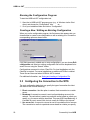
Creating a New / Editing an Existing Configuration
When you run the configuration program, the first screen that appears lets you
choose either to create a new configuration or edit an existing one. Choose the
corresponding option as shown below:
If you have previously created one or more configurations, you can choose Edit
configuration and select an existing configuration file from the dropdown list or
search for one using the “Search” button.
Configurations are saved in a Java “Class” file. For local installations only the
Class file is required. For server installations an additional HTM file is created.
These files are then read when HOBLink JWT is started.
For additional information, see Saving and Loading a Configuration File.
3.3 Configuring the Connection to the WTS
The next configuration dialog lets you specify the type of connection the client
will make to the Terminal Server(s):
?? Direct connection: Use this option to make a fixed connection to a certain
server.
?? Broadcast: A request to connect is sent to all participating servers in the
network. The connection is made to a particular server based on criteria you
specify, e.g. the server with the least load. This uses HOB Load Balancing. It
is suitable for use in some LANs, but not usually for WANs or the Internet.
?? Use server list: A request to connect is sent to a pre-defined list of servers.
The connection is made to a particular server based on criteria you specify,
20
Connectivity from HOB
______________________________________________________________ HOBLink JWT
e.g. the server with the least load. This uses HOB Load Balancing and is
suitable for use in local and wide area networks as well as the Internet.
?? Connection to We b Secure Proxy: Client access over the Web to the
Terminal Servers is directed through a “secure” proxy server that provides
optimum security for the WTS. This solution uses HOB Load Balancing and
requires the additional HOB software HOBLink Secure.
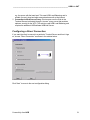
Configuring a Direct Connection
If you want the client to connect to a particular Terminal Server each time it logs
on, choose “Direct Connection” as shown in the window below.
Click “Next” to move to the next configuration dialog.
Connectivity from HOB
21
HOBLink JWT ___________________________________________________________
Configuration parameters:
Terminal Server
22
For this parameter, enter the IP address or the
name of the terminal server you wish to access.
You can also search for a terminal server with the
“Search Server” button. (Note: this finds only
servers on which the HOB Basic Module for
Enhanced Terminal Services is installed.)
Connectivity from HOB
______________________________________________________________ HOBLink JWT
Search Server
Use the “Search Server”
button to search your network
for available Windows
Terminal Servers that support
HOB Load Balancing. All
terminal servers found are
displayed in a list (see
below). Select the desired
entry and press “Choose” to
insert it under “Terminal
Server” in the main dialog
window.
NOTE: This search finds
only servers on which HOB
Basic Module for Enhanced
Terminal Services is
installed.
Port
Enter the port number for the connection here.
Default: Normally, you can simply choose this
default setting (3389)
User-defined: You can specify another port here, if
desired. E.g., this may be necessary if the
connection must pass a firewall, or if the default
RDP port on the terminal server has been changed
for any reason.
Connect automatically
When you run the HOBLink JWT client with a direct
connection, the “Startup Settings” window will
normally appear before the connection is made.
Enabling “Connect automatically” suppresses the
display of this dialog and you go directly to the
WTS logon screen.
Use SSL connection
Please refer to Enabling SSL Security (Client) for further information on
configuring a secure connection.
Configuring a Connection with HOB Load Balancing
The next three connection options in the “Connection Type” window –
(1) Broadcast, (2) User server list, and (3) Connect via Web Secure Proxy –
all make use of (and require) the HOB Load Balancing functionality. A short
introduction is provided below.
Connectivity from HOB
23
HOBLink JWT ___________________________________________________________
Note: In order to use HOB Load Balancing, the free Basic Module for HOB
Enhanced Terminal Services must be installed as a service on all Windows
Terminal Servers being used (for installation instructions see " The Basic
Module for HOB Enhanced Terminal Services”).
Quick Introduction to HOB Load Balancing
HOB Load Balancing is a critical function for enterprises employing server farms
(groups of Windows Terminal Servers). The load-balancing component in the
server farm is designed to optimally distribute the sessions among the different
Windows Terminal Servers. There are also benefits in maintenance and
administration, e.g. when a server must be powered down for maintenance
work.
Chief advantages of the HOB Load Balancing solution include:
?? True load balancing which actually measures the CPU load of each server
and allows connection based on this value.
?? When one WTS goes down within a server farm, the client can be
automatically connected to another available WTS.
?? HOB Load Balancing does not require continuous communication between
the servers (“master browser” concept). This eliminates potential connection
problems if the “master” fails and reduces the network “chatter” between
servers.
The system administrator can also flexibly configure the connection criteria so
that the client automatically connects to
?? the server with the least load
?? the first responding server
?? a server chosen by the user from a list of all responding servers.
Support for Disconnected Sessions
With Windows Terminal Servers there are two ways of terminating the session.
If the user correctly logs off, all running programs in the session are closed and
all server resources needed for this session (e.g. memory, CPU time) are
released. If, however, the user simply closes the window without logging off, the
session continues to run on the server. This means that it is possible to reconnect to this so-called “disconnected session” and immediately use the
programs that were active at the time of disconnection. With the HOB load
balancing solution, disconnected sessions can be automatically located and reconnected. Users are connected to the original server and can then continue
working in their applications exactly where they left off before the disconnection.
24
Connectivity from HOB
______________________________________________________________ HOBLink JWT
Configuring a Connection via Broadcast Function (Uses
Load Balancing)
If several terminal servers are being used in your enterprise (“server farm”), you
can activate the HOB Load Balancing function with the “Broadcast” option. In
this case, HOBLink JWT sends a broadcast request to all terminal servers in the
network. All terminal servers in the company that respond to the request are
available to choose from. The client is then connected to a particular server
based on your selection of one of the criteria in the next dialog (Load Balancing
Configuration).
Note: The “Broadcast” option will not normally work for a connection via the
Internet, since most routers do not allow broadcasts to pass.
At this time, the Netscape Communicator 4.x does not support this feature.
To start the Broadcast load-balancing configuration, choose Broadcast as
“Connection type” in the dialog box above.
Note: For information on Application Publishing, see Configuring Application
Publishing (Client).
Click on “Next” to proceed to the next dialog box:
Connectivity from HOB
25
HOBLink JWT ___________________________________________________________
Choose one of the following three load balancing options:
Connect to first server
responding
The client is connected to the first terminal server
that responds to the request.
Connect to server with
least load
The client is connected to the terminal server with
the least CPU load.
xxx Reconnect if possible:
Activate this option to allow the user to reconnect
to a disconnected session. A “disconnected”
session is one that is terminated with the
“Disconnect” option in the “Start” menu, or by
simply closing the session window without logging
off. In this case, the user will be able to
automatically reconnect to his previous session
and can continue working in the same application
exactly where he stopped before disconnecting. If
he has no disconnected session, he will be
connected to the server with the least load.
Show user all
responding servers
26
All available servers and their current CPU load
(in percent) are shown in a list. The user can
select one for his connection with a mouse click.
Connectivity from HOB
______________________________________________________________ HOBLink JWT
Load Balancing Port
Enter here the port number to be used to communicate with your server farm.
The default value is “4095”, but you may change this to any desired port number
not already in use. This client can then access any servers configured to “listen”
for this port.
For more info on configuring other port numbers on the server, see " The Basic
Module for HOB Enhanced Terminal Services”.
Configuration Tip!
It is possible to divide your servers into several different farms, each with a
different load balancing port. Via this option, you can then give this client access
to one of these server farms, if, for example it is to have access only to the
applications running there.
Use SSL connection
Please refer to Enabling SSL Security (Client) for further information on
configuring a secure connection.
Connectivity from HOB
27
HOBLink JWT ___________________________________________________________
Configuring a Connection Using Server List (with Load
Balancing)
As an alternative to using broadcast requests to set up a connection, you can
select the “User server list” option. In this case, a request to connect is sent to a
pre-defined list of servers. This option should be used whenever broadcast
requests from the client cannot reach the servers, which is always the case
when they must pass through routers (for example over the Internet). This option
also allows you to group servers together that have the same or similar
applications installed, for example. Then, instead of giving the user access to all
terminal servers, you can target his access to a particular subset of servers,
which have the applications he needs. You do this by creating different
configurations with separate lists of servers in your network. Then you make a
particular configuration (server list) available to certain users, user groups,
departments, etc. Each user or user group can access only the servers in the list
assigned to them by the administrator.
Configuration Tip! One advantage of creating groups of servers with the
Server List function is that it allows you to customize each server group to the
needs of a particular user group or groups. Only the applications used by user
group A need to be installed on the servers in the corresponding server group A.
Server group B may have other applications installed that are needed by the
user group(s) it serves.
28
Connectivity from HOB
______________________________________________________________ HOBLink JWT
To start the Server List load-balancing configuration, choose the corresponding
option as “Connection type” in the dialog box above.
Note: For information on Application Publishing, see Configuring Application
Publishing (Client).
Click “Next” to proceed to the next dialog box.
Load Balancing Options When Using the Server List
Choose one of the three load balancing options below:
Connect to first server
responding
The client is connected to the first terminal
server from the list that responds to the
request.
Connect to server with
least load
The client is connected to the terminal server
from the list with the least CPU load.
xxx
Reconnect if possible
Activate this option to allow the user to
reconnect to a disconnected session.
A “disconnected” session is one that is
terminated with the “Disconnect”
option in the “Start” menu, or by simply
closing the session window without
logging off. In this case, the user will
automatically reconnect to his previous
session and can continue working in
the same application exactly where he
stopped before disconnecting. If he
has no disconnected session, he will
be connected to the server with the
least load.
Show user all
responding servers
All available servers in the list along with their
current CPU load (in percent) are displayed,
allowing the user to select one for his
connection.
Load Balancing Port
Enter here the port number to be used to communicate with your server farm.
The default value is “4095”, but you may change this to any desired port number
not already in use. This client can then access any servers configured to listen
on this port.
Configuration Tip!:
It is possible to divide your servers into several different farms, each with a
different load balancing port. Via this option, you can then give this client access
Connectivity from HOB
29
HOBLink JWT ___________________________________________________________
to one of these server farms, if, for example it is to have access only to the
applications running there.
Use SSL connection
Please refer to Enabling SSL Security (Client) for further information on
configuring a secure connection.
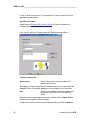
Click “Next” to go to the “Create server list” dialog box shown below:
Creating a server list
Server name
Under “Server name” enter the name or IP
address of the server
Alternatively, you can search for the available servers in your network via the
“Search” button. They will be displayed in a list allowing you to select one.
Port
Enter the port number for communication with
this server in the “Port” field. The default is
“4095”.
Once the server name and port have been entered, click on Add to List to
transfer the information to the list window.
To delete entries from the list, mark the desired entry and click on Remove.
30
Connectivity from HOB
______________________________________________________________ HOBLink JWT
Configuring a Connection via the Web Secure Proxy (Uses
Load Balancing)
If users have access to your Windows Terminal Servers over the Internet, then
the servers may be vulnerable to attacks from the outside. To achieve optimum
security for your servers, you should choose the Web Secure Proxy connection.
With this three-tier solution, the HOBLink JWT client is connected over a secure
SSL connection to the server farm via a proxy that supports both load balancing
and SSL encryption. The gateway is located in a DMZ (“demilitarized zone”),
that is, between two firewalls. This means that your Windows Terminal Servers
are protected by two firewalls and, in addition, only one port has to be opened in
the firewalls. You have the security of SSL encryption and can still use the HOB
Load Balancing and Application Publishing features.
Important! Requirements for setting up this type of connection are as
follows:
?? The HOBLink Secure software package must be installed on the client (or on
the Web server when the client program is installed on the Web server to be
downloaded as an applet).
?? The HOB Web Secure Proxy software must be installed on one of the
several machines in the DMZ.
Before starting this configuration, please thoroughly read the
information and instructions on installing and configuring HOBLink Secure
and the HOB Web Secure Proxy under "Security and HOBLink Secure" below.
Connectivity from HOB
31
HOBLink JWT ___________________________________________________________
To start the Web Secure Proxy connection configuration, choose the
corresponding option as “Connection type” in the initial dialog box shown above.
Note: For information on Application Publishing, see Configuring Application
Publishing (Client).
Click “Next” to proceed to the next dialog box.
Load Balancing Options When Using the Web Secure Proxy
Choose one of the three load balancing options below:
Connect to first server
responding
The client is connected to the first terminal
server from the list that responds to the
request.
Connect to server with
least load
The client is connected to the terminal server
from the list with the least CPU load.
xxx
32
Reconnect if possible
Activate this option to allow the user to
reconnect to a disconnected session. A
“disconnected” session is one that is
terminated with the “Disconnect” option in the
“Start” menu, or by simply closing the session
window without logging off. In this case, the
user will automatically reconnect to his
previous session and can continue working in
the same application exactly where he stopped
before disconnecting. If he has no
Connectivity from HOB
______________________________________________________________ HOBLink JWT
before disconnecting. If he has no
disconnected session, he will be connected to
the server with the least load.
Show user all
responding servers
All available servers in the list along with their
current CPU load (in percent) are displayed,
allowing the user to select one for his
connection.
Load Balancing Port
Enter here the port number to be used to communicate with your server farm.
The default value is “4095”, but you may change this to any desired port number
not already in use. This client can then access any servers configured to listen
on this port.
Use SSL connection
Please refer to Enabling SSL Security (Client) for further information on
configuring a secure connection.
> Click “Next” to go to the “Web Secure Proxy” dialog box shown below:
Connectivity from HOB
33
HOBLink JWT ___________________________________________________________
In the dialog above you can set the proxy IP address and port number for one or
more proxies. Once you have entered these values, click the “Add to list” button
to insert them into the list. To remove an entry, select it and click “Remove”.
To ensure the availability of your Terminal Servers, it is recommended to use
more than one proxy, especially when you have a significant number of clients
and/or Terminal Servers in use. If you have configured several proxies, the
clients’ connection is made on a random basis.
Proxy address:
Enter the DNS (Domain Name Service) name or IP address for the Web Secure
Proxy here.
Proxy port:
Enter the port number for the communication with the Web Secure Proxy here.
The default is “4095”.
For more information on the Web Secure Proxy, see "Installing HOBLink Secure
and the Web Secure Proxy".
34
Connectivity from HOB
______________________________________________________________ HOBLink JWT
3.4 Further Configuration Options
After completing the configuration of the connection types click on “Next” to
move on to the next dialog window with additional options.
Compression
The options in this section can help improve performance when the client is
connected to the Terminal Server over low-bandwidth lines.
Enable data compression
Select “Enable data compression” to activate the function to compress all data
sent from the Windows Terminal Server to the JWT client. Microsoft Point to
Point Compression (MPPC) based on the Lempel Ziv algorithm is used here.
This feature can significantly improve performance over low-bandwidth WAN or
dial-up lines; however, it is not usually advantageous and therefore not
recommended for use in a LAN or with higher speed lines.
Suppress mouse move events
When you set this parameter the mouse movements themselves are not
transmitted, which saves on bandwidth. (Naturally, mouse clicks are not
affected.)
Connectivity from HOB
35
HOBLink JWT ___________________________________________________________
Queue events
When enabled, this function collects events such as keyboard actions and
mouse events and sends them all at certain intervals. This improves
performance but can affect the handling of the program
Limit User Options (Security)
Limit user options
Select this parameter if you want to restrict
the user's configuration options to a
minimum (i. e., the user can set only the
keyboard layout and the desktop size).
Auto-logon
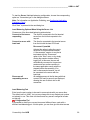
If you enable the Log on automatically box in this section, the values you enter
in the three fields that follow will be copied and automatically entered in the
Windows Terminal Server logon dialog.
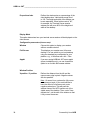
Configuration parameters:
36
Use currently logged on
user
When enabled, the user name for the
currently logged on user is automatically
entered into the box for “User name”.
User name
The Windows user name for logging on to
the Terminal Server.
Password
The corresponding user password for the
Terminal Server.
Domain
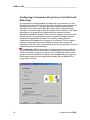
The domain for the Terminal Server.
Connectivity from HOB
______________________________________________________________ HOBLink JWT
Desktop Properties
After specifying the Auto-logon settings click on “Next” to move on to the
“Desktop Properties” dialog shown below.
Size of Screen Area
Here you set the size of the window (in pixels) in which your Windows Terminal
Server session will run.
Note: These options are applicable only when “Window” is set for the “Display
mode” parameter.
Configuration parameters (choose one):
Standard size
Sets the window size to the standard value
selected in the pull-down menu.
User-defined size
Width: Sets the window width for the Terminal
Server session. Values between 300 and 1600
are permitted. The width, however, must be a
multiple of four. If it isn't, it will be increased to
the next multiple of 4.
Height: Sets the window height for the
Terminal Server session. Valid entries are
between 200 and 1200.
Connectivity from HOB
37
HOBLink JWT ___________________________________________________________
Proportional size
Defines the window size as a percentage of the
client desktop size. Valid entries range from 1
to 100. The height and width of the window can
be set separately. When both are set at ”90”,
for example, the Terminal Server session
window size will cover 90% of the height and
width of the desktop.
Display Mode
This option determines how your terminal server session will be displayed on the
client screen.
Configuration parameters (choose one):
Window
Choose this option to display your session
within a movable window.
Full-Screen
This displays your session as a full-screen
desktop. You can switch to you local desktop
using the standard key combination for your
platform, e.g., in Windows with <Alt + Tab>.
Applet
If you are running HOBLink JWT as an applet
(server installation only), you can choose this
option to run it within the browser window.
Window Position
X position / Y position
Defines the distance from the left and the
upper screen edge in pixels. Negative values
are also possible.
Note: On some Linux systems the full-screen
mode does not work. If you would still like to
have the effect of full screen mode, enter
negative values here. This will push the
window frame of the WTS session out of the
visible area of the desktop. Then, under “Userdefined size”, set the size of the window so that
it fully covers the screen.
38
Connectivity from HOB
______________________________________________________________ HOBLink JWT
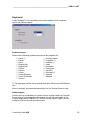
Keyboard
Under “Keyboard” in the next dialog, you’ll find the settings for the “Keyboard
layout” and “Hotkey support”.
Keyboard Layout
Select one the following keyboard layouts from the dropdown list:
??
??
??
??
??
??
??
??
??
??
??
Czech (*)
Danish
Dutch
English (UK)
English (US)
Finnish
Flemish
French
French (Belgium)
French (Canadian)
German
??
??
??
??
??
??
??
??
??
??
German (Swiss)
Hungarian (*)
Icelandic (*)
Italian
Norwegian
Portuguese
Slovak (*)
Slovenian (*)
Spanish
Swedish
(*) The languages marked with an asterisk have been tested under MS Windows
only.
Note: As a default, the standard keyboard layout of the Terminal Server is used.
Hotkey support
Hot keys are key combinations for certain common functions within the Terminal
Server session. In the Appendix to this manual you will find a description of the
hot keys supported by HOBLink JWT. With the “Hotkey support” option, you can
configure if and how the hot keys will be used.
Connectivity from HOB
39
HOBLink JWT ___________________________________________________________
- Enable:
Enables hot key support.
- Disable:
Disables hot key support
- Shift mode:
In addition to the hot key combination, the user
must press the Shift key to execute the desired
action. This is necessary, for example, when a
particular application already has a hot key
combination assigned to another function.
Cut and Paste
If you select “Share clipboard”, the Terminal Server session (from server) and
the local session will share the same clipboard for text entries. You can copy
and paste text in both directions between the remote session and the local
session.
Note: This feature is enabled only in combination with Windows 2000 Servers.
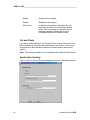
Application Serving
Click on “Next” to move to the next configuration dialog for “Application Serving”.
40
Connectivity from HOB
______________________________________________________________ HOBLink JWT
Under “Application serving” you determine whether the desktop will be displayed
when the Terminal Server session is started or whether a particular application
will be automatically started.
Configuration parameters (choose one):
Desktop
This setting (default) starts the normal
Windows desktop from the Windows Terminal
Server.
Program
This option automatically starts a particular
application on the terminal server immediately
after logon. The user has access only to this
application during the session.
Enter the name of the application to be started,
including complete path on the terminal server.
Set the entire entry inside quotes (“ “) if the
path contains spaces.
Working Directory
If desired, you can enter the path of the
working directory for the “Program” specified
above.
Please note: “Application serving” is not to be confused with “Application
Publishing”, which is another feature optionally available for HOBLink JWT.
Application publishing allows for configuration across several servers or server
farms, “publishing” individual applications so that they are available to all users.
For further information, see “Publishing Applications on the Terminal Server”
below.
Computer name
The character string entered here becomes the value for the %CLIENTNAME%
environment variable. By querying this variable, applications will be able to
determine the current user.
Printer Recognition
In addition to the setting up printers manually (option 1 below), you can also
choose option 2 or 3 here, so that locally installed printers are recognized and
automatically created in the terminal server session (on Windows platforms
only!).
Connectivity from HOB
41
HOBLink JWT ___________________________________________________________
You have the following options available:
Use configured printers
only
Only the printers you specifically configure
under “Printer configuration” below will be used
for your session.
Automatic printer
mapping
HOBLink JWT automatically recognizes locally
installed printers and maps them to the
terminal server session (Windows platforms
only!). You can then print to the same printers
from your WTS session as you can when
working locally.
Note: Printer drivers for your local printers must
already be installed on the terminal server.
Map only default printer
HOBLink JWT automatically recognizes your
local default printer and maps it to the terminal
server session (Windows platforms only!)
Note: Printer drivers for your local printers must
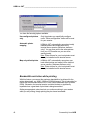
already be installed on the terminal server.
Bandwidth restriction while printing
With this feature, you can set the maximum bandwidth to be allowed for the
printer data stream, e.g. 8000, 16000 or 32000 bit/second. This is interesting for
clients that communicate with the WTS over narrow bandwidth lines (modem,
ISDN). Otherwise, the terminal session could be blocked or significantly
impeded when a great deal of print data is being transmitted.
Setting an appropriate value here lets you continue working in your session
while you are printing, though printing may be slowed somewhat.
42
Connectivity from HOB
______________________________________________________________ HOBLink JWT
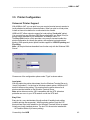
3.5 Printer Configuration
Universal Printer Support
With HOBLink JWT you can print from your remote (terminal server) session to
locally attached as well as to network printers. When you print to a local printer,
it does not have to be defined in or connected to the network.
HOBLink JWT offers extensive support for local printing ("local print" option).
You can print from any Windows 2000 Server application (e.g. Word, Excel) to
printers locally attached to your workstation, for example, via LPT1.
The Easy Print function, which provides a very easy-to-use and trouble-free
printer configuration for virtually any printer, also supports local and network
printing. Other special printer options include support for LPR/LPD printing and
IP printing.
Note: All the print features described here function only with the Windows 2000
Server!
Choose one of the configuration options under "Type" as shown above.
Local print:
With this option the printer data stream from the Windows Terminal Server is
“simply” forwarded 1:1 to the local or Windows network printer. HOBLink JWT
does not influence the printing. This requires that the printer drivers for all
printers used be installed on the Windows Terminal Server.
Note: printer drivers must be 100% compatible with the WTS; otherwise
problems can occur in your WTS session or with the WTS itself.
Easy Print:
Easy print is a very administrator-friendly method of handling local printing
(network printing also supported). With this printing method, only two PCL
printer drivers have to be installed on the Windows Terminal Server to support
virtually any locally installed printers. The two PCL drivers to be installed are:
- HP LaserJet Series II (for mono printing)
Connectivity from HOB
43
HOBLink JWT ___________________________________________________________
- HP DeskJet 500C (for color printing)
These are included standard with Windows 2000 Server and are independent
from the local drivers.
Locally, it is only necessary to install the local printer drivers for the printers to
be used. Since these are normally already set up, there is usually nothing to be
done additionally.
Note! Easy Print is not limited to HP printers. It supports all printers!
What advantages does Easy Print offer?
??No additional driver installation on the server
??No problems with unsuitable or unstable drivers on the server
??Support for GDI printers
??Support for printers that have no driver for Windows 2000 Server
How does Easy Print work?
When a print process is started, the Windows Terminal Server sends the print
data in PCL format to HOBLink JWT. HOBLink JWT reconstructs the PCL data
into the format to be printed and then forwards this to the locally installed printer
driver. This driver then sends the data via the printer port (e.g. LPT1) to the
printer that prints it. Server crashes caused by unstable printer drivers on the
WTS are not possible.
LPR/LPD print:
Here, HOBLink JWT acts like a Line Printer Requester and can print the data
stream of the Windows Terminal Server via a server that is serving as Line
Printer Daemon. A practical example: the Windows Terminal Server sends a
Word document via HOBLink JWT to a printer which is connected to a UNIX
server – a line printer daemon is installed on the server. It’s also possible to print
to LPD-enabled devices such as servers or print boxes.
IP print:
IP printing is comparable to LPR/LPD print support. In this case, however, the
print data stream is forwarded over HOBLink JWT via IP directly to a port. The
printer connected at this port then handles the printing. You can determine
whether or not IP printing is possible in your network by referring to the
documentation for the network adapter installed in the server or checking the
print server manual.
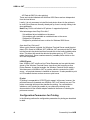
Configuration Parameters for Printing
In the following sections the configuration parameters for printing are described
in detail.
44
Connectivity from HOB
______________________________________________________________ HOBLink JWT
"Local Print" Options
This option allows for printing to a locally attached printer or to a network printer
from your remote (server) session.
Note: This feature is enabled only in combination with Windows 2000 Servers.
Once you have chosen "Local print" as the "Type", you can define the following
parameters for printing from your WTS session:
Name
With this option, you specify the name your
printer will be assigned in the terminal session.
Driver
Enter here the official name of the printer driver
for your printer (e.g. HP LaserJet Series II).
Note: These drivers must be installed on the
terminal servers!
Port
The port to which the printer is attached.
Examples:
“LPT1”: the local LPT port for this client (local
printing)
“\\server\sharedName”: the path for a printer in
a network (Microsoft, Novell, etc).
“/dev/ecpp0”: printer port under Unix.
Connectivity from HOB
45
HOBLink JWT ___________________________________________________________
File
Before printing, the use specifies a file in which
the print data are saved.
Comment
Make a comment or give a description of the
printer connection here, if desired.
After you have set the parameters above, click on “Add to list” and the
parameters will be confirmed and displayed in the "Type | Name" box, as shown
above.
To remove a printer configuration, select it from the window with the mouse and
click on “Remove”.
Please Note for Apple Mac Platforms:
This function is not available on Apple Mac platforms, since it is not possible to
write to the ports from Java.
There is, however, a workaround for Mac platforms using the "lpDaemon"
software. See "Printing under Apple Mac with lpDaemon" in the Appendix.
Please note that the lpDaemon freeware described does not support USB
printers. To access USB printers a licensed copy is required (not freeware).
"Easy Print" Options
46
Connectivity from HOB
______________________________________________________________ HOBLink JWT
Once you have chosen "Easy Print" as the "Type", you can define the following
parameters for printing from your WTS session:
Name
With this option, you specify the name your
printer will be assigned in the terminal session.
Driver
Enter here the name of one of the following
PCL printer drivers as universal driver:
- 300 DPI Color (for color printing)
- 300 DPI Black and White (for mono printing)
Since the data stream from server to client is
smaller with the mono driver, you should
choose the color driver only if you really need
to print in color.
Note: These drivers must be installed on the
terminal servers (normally standard).
After you have set the parameters above, click on “Add to list” and the
parameters will be confirmed and displayed in the "Type | Name" box, as shown
above.
To remove a printer configuration, select it from the window with the mouse and
click on “Remove”.
Troubleshooting: If problems arise with this function, they are usually
caused by the local (client) printer driver. In this case, we recommend updating
the current local printer driver for your printer. You will find current printer drivers
on the Web site of your printer manufacturer.
For OS/2 you find updated drivers at IBM:
http://service5.boulder.ibm.com/2bcprod.nsf .
Platform-dependent Considerations
Apple Mac
Due to a bug in the MRJ 2.2 (and all previous versions) Easy Print is not usable
on any Mac OS release before Mac OS X. The only workaround at this time is to
update your OS to version OS X or install Print66. See Appendix D.
Linux/Unix:
To use Easy Print on Linux or Unix you will need a PostScript printer or a tool
like PostScript that translates PostScript print jobs to the printer language your
printer understands.
Linux
If you are using Netscape Communicator on an Linux System you may get a
message similar to this after selecting the printer:
"Could not execute print command: [Ljava.lang.String;@805202f"
For a workaround, please contact our Support at [email protected].
Connectivity from HOB
47
HOBLink JWT ___________________________________________________________
"LPR/LPD Print" Options
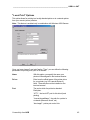
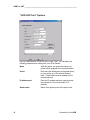
Once you have chosen "LPR/LPD print" as the "Type", you can define the
following parameters for printing from your WTS session:
48
Name
With this option, you specify the name your
printer will be assigned in the terminal session.
Driver
Enter here the official name of the printer driver
for your printer (e.g. HP LaserJet Series II).
Note: These drivers must be installed on the
terminal servers!
IP address:port
Enter the IP address and port used to access
the print server. The port is usually "515"
(default).
Queue name
Name of the printer queue in the print server.
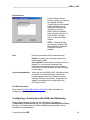
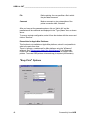
Connectivity from HOB
______________________________________________________________ HOBLink JWT
Mode
"buffer data" – (Default). Functions according
to the specification and uses memory space for
the buffer.
"with 0 length" – Sets the print job length to "0".
"with maximum length" – The print job is set to
the maximum length.
Note: "with 0 length" and "with maximum
length" do not work with all LPD servers. To be
certain, it must be tested in your environment.
Local port
"0" – With this entry the port is supplied by the
operating system.
"721" – Ports 721 to 731 (LPR spec) are used.
If other ports are entered, the specific port
entered will be used.
After you have set the parameters above, click on “Add to list” and the
parameters will be confirmed and displayed in the "Type | Name" box, as shown
above.
To remove a printer configuration, select it from the window with the mouse and
click on “Remove”.
Please Note for Linux/Unix Platforms:
On Linux/Unix systems a user other than root is not allowed to connect from
local ports lower than 1000.
For LPR the standard range for local ports is 721-731. If you have problems
using these ports, remove the content of the "local port" field above or set a
fixed port above 1000.
Connectivity from HOB
49
HOBLink JWT ___________________________________________________________
"IP Print" Options
Once you have chosen "IP print" as the "Type", you can define the following
parameters for printing from your WTS session:
Name
With this option, you specify the name your
printer will be assigned in the terminal session.
Driver
Enter here the official name of the printer driver
for your printer (e.g. HP LaserJet Series II).
Note: These drivers must be installed on the
terminal servers!
IP address
Enter the IP address of the print server.
Port
Port for the print server, e.g. HP server =
"9100"
After you have set the parameters above, click on “Add to list” and the
parameters will be confirmed and displayed in the "Type | Name" box, as shown
above.
To remove a printer configuration, select it from the window with the mouse and
click on “Remove”.
50
Connectivity from HOB
______________________________________________________________ HOBLink JWT
3.6 Configuration for Local Drive Mapping
The HOB Local Drive Mapping feature allows the user to view and use local
drives and the data they contain from within his Windows Terminal Server
session. This means, for example, that he can transfer data from a Terminal
Server folder to a local folder or vice versa, or save documents created on the
Terminal Server to a local drive. Any drive which can normally be designated
with a letter (e.g., "M:") can be mapped to the Terminal Server session, including
floppy drives, CD-ROM or DVD drives, ZIP drives, other portable storage media
and, of course, hard drives and partitions.
Prerequisites for Local Drive Mapping:
To be able to use Local Drive Mapping your Windows Terminal Server must run
one of the following operating systems:
?? Windows 2000 (Server, Advanced Server, Datacenter Server) or
?? Windows XP (future name, ".NET": Professional, Server, Advanced
Server, Datacenter Server)
If your Terminal Server has a Windows 2000 operating system, it is also
necessary to have the HOB WTS XPert Module installed on it. See "HOB Local
Drive Mapping Manager" for more information.
If you are running Windows XP/.NET, you have the option of using the built-in
local drive mapping.
However, we suggest installing HOB's Enhanced Terminal Services, since it
extends the range of options beyond what is possible with the Microsoft drive
mapping alone. (See the readme or online documentation for installation
instructions.)
Configuring Local Drive Mapping
Following the configuration for the printers, the dialog window for local drive
mapping will appear, as shown below:
Connectivity from HOB
51
HOBLink JWT ___________________________________________________________
Select "Use HOB Enhanced Terminal Services", if you want to use the benefits
of HOB's enhanced local drive mapping. If you don't select it, local drive
mapping will only be available if you are connected to a Windows XP (.NET)
server.
Proceed as follows for every drive you wish to map:
1. Select a drive letter as "Share point". This will be the letter with which you
can access your local drive from your Windows Terminal Server session.
2. Select your local path under "Local path". This can be a local drive (d: in the
example above) or a local directory (c:\Documents and Settings\Smith in the
example above, or e.g. /home/smith for Linux users).
3. Choose the desired access mode: "Read only", "Write only" or "Read/Write".
4. Click on "Add To List" to transfer the information to the list.
How to Use Local Drive Mapping
When you connect to your Windows Terminal Server (running HOB Enhanced
Terminal Services), your share names will be mapped as drive letters as shown
below.
52
Connectivity from HOB
______________________________________________________________ HOBLink JWT
Please note that the display name of the local path will be cut to 7 characters
and that all colons, slashes and backslashes will automatically be replaced with
underlines, since Windows does not allow them.
However, if the required drive letter on the Windows Terminal Server already
exists (e.g. C), your local drive will not be assigned a drive letter. Instead, you
can access it via the Windows Explorer (My Network Places => Entire Network
=> JWT Network => JWT), as shown below.
Recommendations/Restrictions
We recommend using a Java Virtual Machine with JDK/JRE version 1.2 or
higher, since some features (like determining if a file is hidden or not) will not
work with Java 1.1.
Connectivity from HOB
53
HOBLink JWT ___________________________________________________________
Unfortunately, it is currently not possible to determine the volume of a disk or the
available disk space.
3.7 Configuring Application Publishing (Client)
If you select a connection type which supports load balancing (“Direct
connection”, “Use server list” or “Connection via Web Secure Proxy”), you can
also enable Application Publishing for this client configuration.
With the Application Publishing option, you can define a specific published
application that will be started automatically when the WTS session is launched.
This is a dedicated session running only this specified application.
Prerequisites for Application Publishing: To be able to use Application
Publishing, the administrator must already have “published” certain applications
in the network over a specified “application name” using the optional
“Application Publishing Manager” from HOB. These published applications are
then accessible to the HOBLink JWT clients. The HOB Basic Module for
Enhanced Terminal Services must be installed on every server participating in
Application Publishing.
See "Publishing Applications on the Terminal Server" below.
Application Configuration Window (in first configuration dialog)
Configuration Options:
54
Connect to application
Check this box to activate Application Publishing
for this client configuration.
Application name
Specify the name of the published application that
will be automatically started at session launch.
This name must exactly match the “application
name” as published with the Application
Publishing Manager.
Connectivity from HOB
______________________________________________________________ HOBLink JWT
Search applications
Instead of entering an
application name manually
(see above), you can click
this button to display a list
of all published applications.
Just select the desired
application and click on
“Choose” to insert it under
“Application name”.
3.8 Enabling SSL Security (Client)
During the configuration for the type of load balancing connection (either with
the "Broadcast", "Server list" or "Web Secure Proxy" function), it is possible to
enable SSL security for the connection. This allows the client to access the
Terminal Server with HOB's "strong encryption" solution, HOBLink Secure,
which supports Secure Socket Layer 3 with up to 256-bit encryption and
authentication.
Select Use SSL connection in the window above to enable this client to use an
SSL-encrypted connection.
Important Prerequisite! As a requirement for this secure connection, the
HOBLink Secure optional software package must be installed on the server (or
proxy) and client. For further information and instructions, see "Security with
HOBLink Secure" below.
Connectivity from HOB
55
HOBLink JWT ___________________________________________________________
3.9 Saving and Loading a Configuration File
You complete the configuration for HOBLink JWT by saving the configuration
profile in the dialog window shown below:
Configuration parameters:
Profile name
56
Normally, we recommend that you leave the
standard name here for your configuration
profile, i.e. “Default”.
If you wish to create several different
configurations, however, you can enter a
different specific name for each of the
configurations here.
Please note, however, if you do this and you
have installed HOBLink JWT locally, you must
start HOBLink JWT with a command line and
give this class name as parameter (see
"Running HOBLink JWT as a Local
Application").
Connectivity from HOB
______________________________________________________________ HOBLink JWT
HTM File
(required for server
installation)
If you have installed HOBLink JWT on a server
to be run as an applet, then you must also
choose this option! The configuration is then
saved as a Hypertext Markup file that is used
to start the session. The standard name for the
file is "default.htm", but user-specific names
can also be used.
>> Smart Update
Choose Enable smart update to install
HOBLink JWT locally in the browser so that it
is not necessary to load it at the beginning of
each session. Instead, a version check is run
when the client connects to the server in which
the local applet is compared with that on the
server. The applet is downloaded again only if
the server version is newer than the one held
locally. (JavaScript must be enabled to use this
feature.)
>> Browser
content during
JWT session
When a HOBLink JWT session is run from a
browser, this initial browser window remains
open in the background in addition to the
Terminal Server session. With this option, you
can specify a HTML page that will be displayed
in this background browser window.
Saving the Configuration via the File Menu
You can save your configuration at any time during the configuration process by
choosing “Save Configuration File” from the “File” Menu. This menu item
displays the “Save Configuration As” dialog, allowing you to save your
configuration in a Java “Class” file as described above.
Loading an Existing Configuration via the File Menu
Configuration files are saved in the JWT installation folder as Java “CLASS” files
with the format “JHLTCuser*.class”. For example, if your configuration profile is
named “MyConfig”, then the class file will be named
“JHLTCuserMyConfig.class”.
To load an existing configuration, choose “Open Configuration File” from the
“File” menu. You can then load the desired “CLASS” file from the dialog box that
appears.
Connectivity from HOB
57
HOBLink JWT ___________________________________________________________
3.10 Specifying Configuration Parameters
HOBLink JWT allows you to specify parameters (e.g. the IP address of the
terminal server) by editing the HTM file for the applet or entering them in the
command line when you start the program.
The following parameters are available:
Name of
Parameter
58
Description
ADJUSTMENT
Set this parameter to MINIMAL if you want to restrict the user's
configuration options to keyboard layout and the desktop size.
Note however, that you have to specify a value for IPADDRESS
when setting this parameter.
ALTSHELL
Specifies the name (incl. path) of the application to be started
immediately after login. Set this between " " if the path contains
spaces.
AUTOCON
Permitted values: YES or NO. If set to YES, it tells HOBLink JWT
to connect directly to the Terminal Server without showing a
startup dialog.
AUTOLOGON
Permitted values: YES or NO. If set to YES, the user will be
automatically logged on to the Terminal Server with the user
settings entered. (see USERID, PASSWORD and DOMAIN).
AUTOMAPPRT
Permitted values: YES, DEFAULT or NO.
YES: All locally installed printers are automatically mapped to the
TS session.
DEFAULT: Only the local default printer is automatically mapped.
NO: The locally installed printers are not mapped to the TS
session.
Note: Automatic mapping of client printers is supported only for
Windows platforms.
BROADCAST
Sends out a broadcast to find available Terminal Servers.
Allowable Values:
FIRST (connects to the first replying server),
BEST (connects to the server which has least load),
SHOW (shows user all available Terminal Servers and tells him if
he is disconnected on any of them) and
RECONNECT (if user is disconnected from a certain server,
he/she will be reconnected to that server; otherwise he/she will be
connected to the server with least load).
Note that you must have installed the server component HOB
Basic Module for Terminal Services on each of your Terminal
Servers. Note also, that a broadcast will not work while connected
via the Internet, since most routers do not allow broadcasts to
pass.
At this time, this feature does not work with a Netscape Browser in
a local network.
CLIPBOARD
Set this parameter to "No" to disable clipboard sharing, i.e. support
for cut and paste between the local and the server (remote)
session (for text only!).
Connectivity from HOB
______________________________________________________________ HOBLink JWT
COMPRESSION
Specify “Yes” to enable data compression.
COMPUTERNAME
Sets the CLIENTNAME environment variable on the Windows
Terminal Server.
CONFIG
The name of the configuration file that contains the parameters for
this session. If not set, HOBLink JWT will look for a file called
"jwt.cfg". (This parameter is no longer used beginning with Vers.
2.1, but is still supported for compatibility reasons.)
DOMAIN
Your domain for the Terminal Server.
GATEPORT
Queries to the Basic Module for Terminal Services or the Web
Secure Proxy are sent to this port.
GEOMX
Distance (in pixels) of the left upper corner of the JWT window
from the left edge of the screen (see “Notes” below)
GEOMY
Distance (in pixels) of the left upper corner of the JWT window
from the upper edge of the screen (see “Notes” below)
(Notes:) GEOMX and GEOMY are operational only if the WINDOW
parameter is set to “FRAME”. “FRAME” is the default value for
WINDOW. GEOMX and GEOMY can also have negative values.
Example for usage: Some Java Virtual Machines for UNIX do not
support full-screen mode. You can work around this by configuring
“WINDOW=FRAME”, giving GEOMX and GEOMY negative values
and making WIDTH and HEIGHT larger than the actual screen
resolution. This g ives you a JWT window whose frame (border) is
not visible and appears as full-screen mode.
HEIGHT
The screen height for your session on the Terminal Server.
HOBLink JWT allows values between 200 and 1200.
HOTKEYS
Permitted values: YES, SHIFT or NO
YES: Hot keys are supported (see “Hot Keys” in Appendix for a list
of supported hot keys).
SHIFT: In addition to the hot key, the SHIFT key must be pressed
to execute the desired function.
NO: Hot key support is disabled.
IPADDRESS
Name or address of the Te rminal Server.
IPPORT
IP port of the Terminal Server (default value of 3389).
KEYBOARD
Your requested keyboard layout. HOBLink JWT currently supports
the following keyboards: Czech, Danish, Dutch, English (UK),
English (US), Finnish, Flemish, French, French (Belgium),
German, German (Swiss), Hungarian, Icelandic, Italian,
Norwegian, Portuguese, Slovak, Slovenian, Spanish, Swedish. If
this parameter is not present, the Terminal Server will expect its
default keyboard layout.
LBGATEWAY
Set this parameter to YES if you wish to use the Web Secure
Proxy (SSL-LB Gateway).
Connectivity from HOB
59
HOBLink JWT ___________________________________________________________
60
LIST
Goes through a list to find available Terminal Servers.
Allowable values:
FIRST (connects to the first replying server from the list),
BEST (connects to the server in the list which has least load),
SHOW (shows user all available Terminal Servers and tells him if
he is disconnected on any of them) and
RECONNECT (if user is disconnected from a certain server,
he/she will be reconnected to that server; otherwise he/she will be
connected to the server with least load).
Note that you must have installed the server component HOB
Basic Module for Terminal Services on each of your Terminal
Servers. You also have to specify the name of a list file containing
the names (or IP addresses) and IP ports of your Terminal Servers
(see LISTFILE parameter).
LISTAPP
Name of the application for Application Publishing
LISTFILE
Name of the file with the servers (names) whose load is to be
obtained (load balancing).
MOUSEMOVES
If the parameter is set to "No", the actual mouse movements are
not transmitted, saving bandwidth. Mouse clicks are naturally not
affected.
NOWARNING
Set to “Yes” to disable the display of all warnings.
PASSWORD
Your password for the Terminal Server.
PROFILE
The name of your configuration profile, e.g., “PROFILE=MyProfile”
corresponds to the configuration class “JHLTCuserMyProfile”.
(Important! The profile name is case-sensitive!)
SCREENRATIOX
Permitted values: 1 – 100 (in percent)
Portion of the client’s screen width in percent, which the JWT
window will occupy. Active only when WINDOW=FRAME is set.
SCREENRATIOY
Permitted values: 1 – 100 (in percent)
Portion of the client’s screen height in percent that the JWT
window will occupy. Active only when WINDOW=FRAME is set.
SHUTDOWN
If set to "Yes", the computer (client) will shut down when the WTS
session is ended.
SSL
Set this parameter to YES if you want to make a SSL connection.
In this case, the IPADRESS and PORT parameters must contain
the address and port of your redirector and your redirector must be
configured correctly. Note: To implement SSL security, HOBLink
Secure must be installed.
USERID
Your user name for the Terminal Server.
WIDTH
The screen width for your session on the Terminal Server.
HOBLink JWT allows values between 300 and 1600. The width,
however, must be a multiple of four. If it isn't, HOBLink JWT will
increase the value to the next multiple of 4.
WINDOW
Specifies the display mode. Valid entries are FRAME (creates a
movable window with frame) and FULLSCREEN.
If you wish to use HOBLink JWT with a browser, set this parameter
to APPLET.
Connectivity from HOB
______________________________________________________________ HOBLink JWT
WORKINGDIR
The name of the working directory for the application specified in
the ALTSHELL parameter.
Manually Editing the HTM Configuration File (Server
Installation)
Normally, when you install HOBLink JWT on a Web server, you will use the
configuration program to specify parameters and create the *.HTM configuration
file. It is, however, possible to edit this file manually, if you so desire.
To specify one or more of the parameters described above for a Web server
installation, edit the HTM configuration file as follows (the standard file name is
"default.htm" or "default_mac.htm" (for Apple Mac)):
1. Load the file to be edited into any text editor.
2. Edit the following line for each parameter (located between the the
<APPLET> and </APPLET> tags):
<param name="name of parameter" value="value of parameter">
Example: To connect to the Terminal Server MyServer.domain.com with a
desktop resolution of 1024 by 768 pixels, insert the following lines between
<APPLET> and </APPLET>:
<param name="IPADDRESS" value="MyServer.domain.com">
<param name="WIDTH" value="1024">
<param name="HEIGHT" value="768">
Please note: the name of the parameter and its value must be in quotes.
How to Specify Parameters in the Command Line
To specify one or more of the parameters in the command line, attach them to
the call for HOBLink JWT in the following way:
HOBLinkJWT NameOfFirstParam=Value NameOfSecondParam=Value
Example: You want to connect to the Terminal Server MyServer.domain.com
with a desktop resolution of 1024 by 768 pixels.
To do so, start HOBLink JWT the as follows:
HOBLinkJWT IPADDRESS=MyServer.domain.com WIDTH=1024 HEIGHT=768
Note: Please put strings in quotes if they have a space in their name.
3.11 Controlling Browser Behavior After HOBLink
JWT is Terminated
If you have HOBLink JWT on a Web server, you can control how the browser
should react after you have logged off the Terminal Server. This is done by
Connectivity from HOB
61
HOBLink JWT ___________________________________________________________
editing the HTM configuration file (the standard file name is "default.htm" or
"default_mac.htm" (for Apple Mac)). You can load the file into any text editor for
editing purposes.
Every HTM configuration file generated by the HOBLink JWT configuration tool
contains the following Java Script function:
<script language=JavaScript>
function ExecuteAfterJWT()
{
// this piece of code forces the browser to load the specified html
file.
//document.location.href="goodbye.htm";
// this piece of code closes the browser
// window.close();
}
</script>
This function is automatically called when HOBLink JWT is terminated; the
commands contained in it are then executed. Please note that Java Script must
be enabled in the browser being used.
As is described in the code itself, the first command allows you to display a
certain HTML page when HOBLink JWT is terminated:
document.location.href="ade.htm";
Simply remove the comment characters (“//”) in front of the line and replace
“goodbye.htm” with the file name of a HTML file you have prepared.
The second piece of code simply closes the browser, as is indicated.
62
Connectivity from HOB
______________________________________________________________ HOBLink JWT
4
Running HOBLink JWT
There are two primary modes for running HOBLink JWT:
?? If installed on a Web server, it is automatically downloaded to the client and
runs as an applet there.
?? If installed locally on the client, it runs there as a local Java application
This chapter describes how to start HOBLink JWT in these two modes, also
giving specific instructions for running the program on the most common
platforms.
4.1 Running HOBLink JWT as an Applet (Server
Installation)
If you have installed HOBLink JWT on a Web server to run as an applet, the
installation creates a standard HTML file (“default.htm”) that contains the
configuration and the start mechanism for the program (if you rename your
configuration, this files will be renamed accordingly).
As an application or start portal for users, we recommend setting up a Web page
in your Intranet or the Internet with one or more hyperlinks to the appropriate
HTM configuration file(s). Users only need to click on one of these links to
download the HOBLink JWT applet and automatically start their WTS sessions.
See "Accessing Applications and Sessions via a Web Browser" for further
information.
Please Note! If you start HOBLink JWT without first setting configuration
parameters, a dialog will appear which allows you to specify the required options
for the session, such as server name and port, window size, etc. (see “Setting
Temporary Startup Parameters”). These settings are not saved! To create
permanent configuration settings, start the configuration program from your
HOBLink JWT program group (under Windows in the Start menu, for example).
For a complete description of the configuration process, see “Configuring
HOBLink JWT”).
It’s also possible to specify parameters when starting HOBLink JWT by listing
them in the HTM start file. Please refer to “Specifying Configuration
Parameters”.
Running HOBLink JWT with Microsoft Internet Explorer or
Netscape Navigator
With Microsoft Internet Explorer or Netscape Navigator, unsigned applets may
only connect to the machine from which they were loaded. For this reason
HOBLink JWT comes with a digitally signed version for Microsoft Internet
Explorer ( jwtweb.cab ) and for Netscape Navigator ( jwtweb.jar ).
Connectivity from HOB
63
HOBLink JWT ___________________________________________________________
For Microsoft Internet Explorer
After the Internet Explorer loads the applet, a dialog appears asking if the user
wants to grant additional privileges to that applet. Press the <Yes> button to
allow this. Check <Always trust ...> if you do not want this dialog to reappear the
next time you use HOBLink JWT from within your Microsoft browser.
For Netscape Navigator
After Netscape Navigator loads the applet, two dialogs appear asking if the user
wants to grant additional privileges to that applet. Press the <Grant> button
twice to allow this. Check <Remember this decision> if you do not want this
dialog to reappear the next time you use HOBLink JWT from within your
Netscape browser.
4.2 Running HOBLink JWT as a Local Application
If you have installed HOBLink JWT as a local application, follow the instructions
below for your platform to run it.
Note! If you start HOBLink JWT without first setting configuration
parameters, a dialog will appear which allows you to specify the required options
for the session, such as server name and port, window size, etc. (see “Setting
Temporary Startup Parameters”). These settings are not saved! To create
permanent configuration settings, start the configuration program from you
HOBLink JWT program group (under Windows in the Start menu, for example).
For a complete description of the configuration process, see “Configuring
HOBLink JWT”).
It’s also possible to specify parameters when starting HOBLink JWT by inserting
them in the configuration file or the command line. Please refer to “Specifying
Parameters in the Configuration File”.
Attention: If your configuration profile is named something other than the
standard (“Default”), then you have to specify the name when you start the
program using the "PROFILE" parameter. For example, if your configuration
profile is named "myconfig", then you can start HOBLink JWT under Windows
using a command line as follows:
HOBLinkJWT PROFILE=myconfig
(!! The profile name is case-sensitive!!)
If you type a non-existent profile here, the default settings will be used.
For Windows 9x / NT / ME / 2000
?? To enter your product key, run "Enter Product Key" which can be found
in your installation directory.
?? From the Windows Start menu, go to your HOBLink JWT group and
choose “HOBLink JWT”.
NOTE: This method works only if your configuration file has the default
64
Connectivity from HOB
______________________________________________________________ HOBLink JWT
name "Default". See "Saving and Loading a Configuration File" for
further information.
?? Alternatively, you can run HOBLinkJWT.exe directly from your
installation folder.
For UNIX and UNIX -related Platforms
?? To enter your product key, run "Enter Product Key" which can be found
in your installation directory.
?? Depending on your system, there might be an icon to click on.
?? If there is no icon, change to the directory where you installed HOBLink
JWT and type in the following: HOBLinkJWT
Note: If HOBLink JWT does not start, it is possible that your execute
rights are missing in the system. In order to acquire the execute rights,
please go to the installation folder for HOBLink JWT enter the following
command:
chmod 775 *
Then try starting the program again.
For Apple Mac
?? To enter your product key, run "Enter Product Key", which can be found
in your installation directory.
?? To run HOBLink JWT, go to your installation folder and choose
“HOBLink JWT”.
For OS/2
?? Switch to the folder: \InstData\Java.
?? Start “setupos2.cmd”. HOBLink JWT will be installed.
?? The installation program does not automatically enable the program
with the product key. To do this, manually execute the command
“EnterJProductkey.cmd”. If the program is not enabled it will be closed.
Connectivity from HOB
65
HOBLink JWT ___________________________________________________________
5 The Basic Module for HOB Enhanced
Terminal Services
The Basic Module for HOB Enhanced Terminal Services is an easy-to install
server-side component, which provides your HOBLink JWT clients with added
functionality when connecting to the Windows Terminal Server. After this
software component is installed on each Windows Terminal Server in your
"server farm", it provides the service that allows clients to access the servers
using HOB Load Balancing and Application Publishing. As a service, it starts
and runs automatically in the background.
5.1 Installing the Basic Module on the Server
To install the Basic Module:
?? Switch to install mode on the terminal server.
?? Insert the HOBLink Software CD into the CD drive on the terminal
server. If the HOB CD start image does not appear, start
“SetupCDExt.exe” from your CD drive root folder.
?? Choose “Install Software” from the main menu.
?? In the “CD Contents – Products" window:
- Select “English” as language
- Select “Basic Module” from the list of products at the left
- Press “Install”
?? In the window that opens you will be prompted to enter the following
parameters.
(Note: See also "How Does the Basic Module Work" for a detailed
explanation with examples.)
Unique Name of
Configuration
Give your configuration a unique name
(e.g. LAN1). If no entry is made here,
“Default” will be assigned as configuration
name.
UDP Port
The default UDP Port is 4095. If you wish
you may also enter a different port
number here.
The User Datagram Protocol is a transport protocol
(Layer 4) of the OSI Reference Model and supports
connectionless data exchange between computers. UDP
was developed to give application processes the direct
possibility of sending datagrams that allow for transactionoriented data exchange. UDP is based directly on the IP
protocol.
The benefit of UDP is, due its simple structure, higher
data throughput as compared to TCP.
66
Connectivity from HOB
______________________________________________________________ HOBLink JWT
IP Address
If more than one network board is
installed in your system, enter the IP
address here for the board used for this
configuration.
Note:
The combination of UDP port and IP
address must be unique.
5.2 How Does the Basic Module Work?
The Basic Module has three main tasks:
?? Measuring the server load.
?? Receiving LB requests from HOBLink JWT clients and answering these
requests.
?? Publishing the applications configured with the Application Publishing
Manager.
The Basic Module measures the current server load
The Basic Module measures the actual CPU load of the server every 10
seconds. It keeps a history of 20 CPU load values. The actual server load is
calculated as a mean value of the 20 CPU load values, whereas the last value
counts double.
This assures that no peak value for a server is transmitted to the client, but
rather a meaningful value.
The Basic Module receives and answers requests from HOBLink JWT
clients
When a HOBLink JWT client wants to connect to a server or to an application
via Load Balancing, it sends a UDP packet over a specific UDP port to the
Terminal Servers. UDP, which stands for User Datagram Protocol, supports very
fast communication and needs very low bandwidth. When a Terminal server
wants to receive an UDP packet, it has to listen to the respective UDP port. The
HOB LB Service provides this.
The current server load is then sent to the JWT client.
The default UDP port is 4095, but in some cases it may be preferable to use a
different UDP port. Therefore, in HOBLink JWT you can specify the UDP port
that should be used. As a result, the port on which the LB Service listens has to
be modifiable. This can be done in two ways:
1. During Installation of HOB Load Balancing (Basic Module) the installation
program prompts the user to specify an UDP port:
Connectivity from HOB
67
HOBLink JWT ___________________________________________________________
2. In the Application Publishing Manager, you can also change the UDP port in
the dialog below. You reach it by pressing "Configure server farms" ->
"Configure server farm" -> "Configure Server":
During installation of the Basic Module you are asked to specify a "Unique name
of configuration". If you leave this field blank, the configuration name "Default" is
used. In the above example the names "LAN1" and "LAN2" were used. Every
time you install the service on the same server, you have to use a unique name.
68
Connectivity from HOB
______________________________________________________________ HOBLink JWT
What is the purpose of installing the Basic Module several times on one
server?
Consider the following example constellation:
You have one server with two NICs (Network Interface Cards). One has the
address 10.0.0.1 (NIC1), the other has 123.45.12.3 (NIC2)
Your server is accessible from your LAN from the INHOUSE user group via
NIC1, and is accessible from the Internet via NIC2. Your sales staff (OUTSIDE
user group) uses this way to access the server.
The INHOUSE group shell gets different published applications than the
OUTSIDE group. Let's say INHOUSE gets MS Word, Excel and PowerPoint, the
OUTSIDE group gets Internet Explorer and MS Outlook. How can this be
accomplished?
Solution:
1. Install the Basic Module. Specify the following parameters:
Connectivity from HOB
69
HOBLink JWT ___________________________________________________________
2. Install Basic Module a second time with following parameters:
3. In the Application Publishing Manager publish the applications Word, Excel
and PowerPoint and assign it to configuration INHOUSE.
4. In the Application Publishing Manager publish the applications Internet
Explorer and MS Outlook and assign them to configuration OUTSIDE (See
"Publishing Applications on the Terminal Server" for a detailed description
how to publish applications.)
5. Make sure, that the group INHOUSE uses UDP port 4095, and group
OUTSIDE uses port 5123.
Important: It is not required to have more than one NIC in the server to use
this technique. You can also bind two or more Basic Modules to one NIC. The
only requirement is that every combination of UDP port and IP address has to
be unique. That means you cannot have two Basic Modules on one server that
use the same UDP port and the same IP address.
70
Connectivity from HOB
______________________________________________________________ HOBLink JWT
6 Publishing Applications on the Terminal
Server
The HOB Application Publishing Manager enables you to publish applications
which are installed on the servers in your server farm. HOBLink JWT can
connect directly to these applications. The user does not need to know on
which server the applications are installed.
What Does Application Publishing Mean?
Application publishing is a special method of making applications installed on
Microsoft Terminal Servers accessible to HOBLink JWT clients. Users of
HOBLink JWT can connect directly to published applications and do not have
to specify the name of the Terminal Server. HOB Load Balancing determines
the server in the server farm with the least load that has published the
specified application and connects the HOBLink JWT clients to that server.
Therefore, installation of the Basic Module from HOB Enhanced Terminal
Services on each server in the server farm is required for the Application
Publishing Manager to function properly. The Basic Module is part of HOBLink
JWT and can be installed from the HOB software CD.
Requirements:
The Application Publishing Manager has to be installed on a Windows NT 4.0
workstation or Windows NT 4.0 server or on a Windows 2000 Professional
workstation or Windows 2000 server. The machine on which you install the
program needs to be able to establish a TCP/IP connection to the servers in
your server farm.
The Application Publishing Manager is a snap-in for the Microsoft Management
Console (MMC): Please read the documentation for MMC for information on
how to add a snap-in to MMC.
Version 1.1 of MMC or higher is required. You can download version 1.2 of
MMC from
http://www.microsoft.com/downloads/release.asp?ReleaseID=30330
6.1 Working with the HOB Application Publishing
Manager
Below the standard toolbars in the MMC console are two panes as shown in
the following figure. The pane on the left contains the console tree and the
pane on the right contains details about the selected node in the console tree.
The left pane is called "Scope Pane", the right one "Result Pane".
Connectivity from HOB
71
HOBLink JWT ___________________________________________________________
The program consists of two main parts:
?? Published Applications
?? Configure Servers
You can choose one of these parts by clicking on it in the scope pane or by
double-clicking it in the result pane.
When you start the program for the first time, you have to specify a "farm
folder" using the HOB Server Farm Manager. Please see the next chapter or
online help for the HOB Server Farm Manager for further information.
After these initial settings are made, you can start to publish your applications.
72
Connectivity from HOB
______________________________________________________________ HOBLink JWT
Publishing Applications
When you have configured your farm folder and your server farm(s), you can
start to publish applications.
You can do any of the following:
??
??
??
??
Publish a new application
Copy an existing application
Delete an application
Display and change the properties of an application
Publishing a New Application
There are two ways to start publishing a new application:
?? Right-click "Published Applications" in scope pane and select "New
Application".
?? Or, select "Published Applications" in the scope pane and press the "New
Application" button in the Toolbar.
The following dialog appears:
Connectivity from HOB
73
HOBLink JWT ___________________________________________________________
?? Type in the name of your application
?? Type in the path and the working directory of your application. You can use
the "Browse..." button to do this.
?? Press "Continue". The following dialog box appears:
The servers in your server farm appear in the "Available Servers | Config" list.
An explanation of different configurations on one server can be found here.
74
Connectivity from HOB
______________________________________________________________ HOBLink JWT
If a server has only one configuration, the name of that configuration is not
displayed. In the above example, we have one server with two configurations.
?? Select a server in the left list and press "Add -->" to move this server to the
right list, or press "Add all -->" to move all servers from the left list to the
right list. The right list is the list of the configured servers. That means each
server in that list publishes the new application.
?? Do not worry if you have servers on which the same application is installed
in different folders. You can adjust the path for each server separately later
in the properties section.
?? By pressing "<-- Remove" or "<-- Remove all" you transfer the selected
servers from the right to the left list.
?? Click "Finish" to complete the operation. The configured servers have now
been contacted and the application is published on those servers. The icon
for the new application is displayed in the result pane:
?? You can change the view type of the result pane either by clicking "View" in
the toolbar or by right-clicking the result pane and selecting "View". The
view type "Details" shows the paths and the working directories
additionally.
?? You are now ready to work with the new published application. Simply type
the name of the application in the corresponding field in the HOBLink JWT
"Startup Settings" dialog, as shown in the next illustration, or use the
configuration program of HOBLink JWT to generate a configuration which
directly connects you to the new application (see "Configuring Application
Publishing (Client)" in chapter 3, "Configuring HOBLink JWT").
Connectivity from HOB
75
HOBLink JWT ___________________________________________________________
Copying an Existing Application
?? Select the application you want to copy in the result pane.
?? Press either the copy button on the toolbar, or right-click the application in
the result pane and select "Copy".
?? The same dialog boxes as in "Publish a new application" appear now.
Adjust the settings to your needs and press "Finish" to save the new
application.
Deleting an application
?? Select the application you want to delete in the result pane.
?? Press either the delete button on the toolbar, or right-click the application in
the result pane and select "Delete".
76
Connectivity from HOB
______________________________________________________________ HOBLink JWT
?? The selected application is deleted.
Displaying and Changing the Properties of an Application
?? Select the application whose properties you want to display in the result
pane.
?? Press either the "Properties" button on the toolbar, or right-click the
application in the result pane and select "Properties".
The following dialog box will appear:
?? The path and working directory of the selected server in "Configured
Servers | Config" are displayed in the text boxes. Now you can easily
adjust these settings for each server separately, making it possible to have
an application installed in different folders on different servers.
?? Press "OK" after you are finished.
Configuring Servers
During the installation of the HOB Basic Module for Enhanced Terminal
Services on the servers in your server farm you have to specify the UDP port
which is used from Load Balancing and Application Publishing. You can
change this port later. For this execute the following steps:
Connectivity from HOB
77
HOBLink JWT ___________________________________________________________
?? Click on "Configure servers" in Scope Pane. In Result Pane the servers of
your server farm are now displayed. Double-click on the server you want to
configure.
?? The following dialog appears:
?? Every server on which the HOB Load Balancing Service is installed has at
least one configuration. How many configurations one server has is
dependent on how many times you install the HOB Basic Module on that
server. The concept behind installing the Basic Module several times on
one machine and the purpose of the settings "UDP port" and "IP address or
DNS name" is explained under "Installing the Basic Module".
?? Select the server you want to configure in the list.
?? Specify the desired UDP port. Press the link above ("Installing the Basic
Module") to view an explanation for this parameter.
?? If you configure a multihomed server (a server with more than one network
interface card (NIC)), enter the IP address or DNS name of the NIC that is
to use the specified UDP port. For a further explanation, click the link
above.
?? Finally, press "Apply changes" to activate the configuration.
?? If you press "OK" and you have not applied your changes, you will get a
message, which reminds you to apply the changes.
78
Connectivity from HOB
______________________________________________________________ HOBLink JWT
6.2 Useful Options for Starting Applications
How to Start a Published Application Maximized
Normally, when you start a published application you get a session window
with the application in it. The application is not maximized. It may look like this:
It is possible to start the application maximized in the session. That means you
do not see the desktop behind the application. It looks like this:
Connectivity from HOB
79
HOBLink JWT ___________________________________________________________
You can achieve this effect as follows:
?? Create a batch file on your terminal server, e.g. c:\apps\startmax.bat
?? Put the following command in the batch file:
start /MAX c:\winnt\system32\mspaint.exe
?? You have to adjust the command to your environment, of course.
?? Then publish an application as shown in the next dialog.
If you now connect to the Published Application "StartMax", the application will
appear maximized.
Starting Multiple Applications in a Published Application
Session
Normally, just one application is started when you connect to a published
application. If you want to work with two or more applications simultaneously,
you have to start two or more sessions side-by-side.
If you want to start two or more applications in one session this can be done in
the following way:
?? Create a batch file on your terminal server, e.g. c:\apps\twoapps.bat
?? Put the following commands in the batch file:
start c:\winnt\system32\write.exe
start c:\winnt\system32\mspaint.exe
?? You have to adjust the commands to your environment, of course.
80
Connectivity from HOB
______________________________________________________________ HOBLink JWT
?? Then publish the application as shown in the next dialog.
When you connect to the Published Application "TwoApps", you have two
applications in one session.
Connectivity from HOB
81
HOBLink JWT ___________________________________________________________
6.3 How to Register a Tryout Installation of the
Application Publishing Manager
If you have installed a tryout version of Application Publishing Manager, you
can register it by obtaining a product key from HOB.
You do not have to re-stall the program. Using a program called
"ProductKey.exe" you can register the tryout version. ProductKey.exe is
located in the installation folder of Application Publishing Manager.
To register a tryout version, do the following:
?? Run the program ProductKey.exe. The "Activate HOB Software Products"
dialog appears.
?? Select the installation folder for the Application Publishing Manager by
pressing the "Browse" button.
?? Select the Application Publishing Manager
?? Enter your product key. The dialog should now look like this:
?? Finally, press the "Activate" button.
?? To close the program, press "Exit".
82
Connectivity from HOB
______________________________________________________________ HOBLink JWT
7 HOB Server Farm Manager (Server
Component)
This program enables you to bundle Terminal servers in a unit that is called a
server farm. The Server Farm Manager is the physical root on which all other
HOB snapins for the Microsoft Management Console (MMC) are based. The
Server Farm Manager is used to define the communication partners of the
other snapins. Defining a server farm is mandatory before you can work with
other snapins.
To create your server farm,
?? First define a Farm Folder. This is the location where server farm related
data are stored.
?? Then define a server farm and add members to it.
7.1 Specifying a Farm Folder
What is a Farm Folder?
The farm folder is the place where the names of the servers in your server farm
are saved. When HOB Application Publishing Manager starts, it reads the
names of the member servers from the specified location.
You can specify either a local or remote file system where the information
should be saved, or you can use a Web server to provide this information.
If the administrator of the server farm always uses the same PC to publish
applications, it is advisable to specify a folder on his local files system, e.g.
c:\serverfarm\.
If the administrator has more than one PC where this program is installed, or if
there are several people who have to configure the server farm, you should
specify a folder, which is accessible from all these machines. You can either
specify a network path that is mapped to a letter, e.g. x:\serverfarm, or you can
use the UNC convention, e.g. \\servername\sharename.
If you want to use a Web server from where the information can be retrieved,
this is also possible.
How to Specify a Farm Folder
?? Select "Farm Folder" on the left pane and double-click "Specify a Farm
Folder" on the right pane. The following dialog appears:
Connectivity from HOB
83
HOBLink JWT ___________________________________________________________
?? Specify the location where the server farm information should be saved.
You can insert the path manually or use the "Browse..." button.
?? If the farm folder should be on a Web server, check the "Web server" radio
button and enter the URL of the Web server.
?? Press "OK" when you are finished.
Hint: If possible, use the "File system" option and not "Web server", because
saving the members of your server farm on "File system" is easier.
For a more detailed description of the saving process, see "Configuring Server
Farms" below.
7.2 Configuring Your Server Farm
What is a Server Farm?
A server farm consists of one or more Microsoft servers with Terminal Services
installed. It is advisable to define more than one server for a farm. Otherwise
you cannot take advantage of functions such as Load Balancing and Fault
Tolerance.
How to Configure a Server Farm
Click on "Server farms" on the left pane. Double-click "Configure server farms"
on the right window. The following dialog appears:
84
Connectivity from HOB
______________________________________________________________ HOBLink JWT
?? Press "Add server farm" to add a server farm.
?? In the dialog that appears enter the name of the new server farm and press
"OK". The new farm automatically becomes the current server farm.
?? It is also possible more than one server farm. Pressing "Set current server
farm" selects the farm you want to work with.
?? To delete a server farm, mark the farm in the list box, and press "Delete
server farm".
?? Now you have to specify the servers to be included in the farm. Do this by
pressing "Configure server farm". The following dialog appears:
Connectivity from HOB
85
HOBLink JWT ___________________________________________________________
?? Press "Add server". The following dialog appears
?? In the dialog box, enter the name of a server to be added to the farm. This
may be the IP Address or the DNS name of the server.
?? Alternatively, you can display your servers automatically by pressing the
“Search Servers” button. A broadcast message is sent over the port
specified in "Broadcast port". Whether or not the servers respond to the
message depends on the Basic Module for Enhanced Terminal Services
being installed. During the installation of the module the port is specified on
which messages can be received. The servers found are displayed in the
list. Choose the servers from the list that you want to add to your farm.
?? Press "OK" to return to the previous dialog.
Be sure that each server you add has the Basic Module of Enhanced
Terminal Services installed!
?? By pressing "Remove Server" you remove the selected server from the
farm.
?? After you have added all servers, press "Save Configuration". If you
configured your Farm Folder to be on a file system, the information is
saved automatically. If you want to save the server farm configuration on a
Web server, a save dialog box will appear. Save the file either directly to
86
Connectivity from HOB
______________________________________________________________ HOBLink JWT
the correct folder on your Web server, or save the file to a folder of your
choice and copy it manually to your Web server. Do not change the
specified file name!
Thread Settings for Server Farms
In the "Configure Server Farm" dialog, you have the option of setting the
maximum number of threads and the process priority either for the whole
server farm or for each server individually. These settings refer to the "HOB
WTS XPert Module". This module is the server component that allows HOB
Local Drive Mapping and HOB Local Port Mapping.
The module has to be installed on every terminal server that is to provide these
features. It can open up to 32 threads by default, each with a "normal" process
priority. These settings are sufficient in most cases. In rare cases during heavy
user load it may occur that normal priority is not enough or that the thread
threshold is reached. This results in loss of performance with Local Drive
Mapping or Local Port Mapping. You can determine the number of threads in
use in the Task Manager of the server. The process is called IBHWTSS1.EXE.
If the threshold is reached, increase it.
Setting the process priority to "High" or "Realtime" is only conditionally
advisable, because other processes may be affected. Use a test environment
first if you change these settings.
To change the default values for the whole farm select the farm in the list and
set the desired values. These values are automatically valid for all servers in
the farm. To set individual values select the respective server and change the
settings.
Note: Values can only be changed for servers, which have the HOB WTS
XPert Module installed.
Connectivity from HOB
87
HOBLink JWT ___________________________________________________________
8 HOB Local Drive Mapping Manager
(Server Component)
8.1 Overview
The HOB Local Drive Mapping feature allows the user to view and use local
drives and the data they contain from within his Windows Terminal Server
session. Any drive which can normally be designated with a letter (e.g., "M:")
can be mapped to the Terminal Server session, including floppy drives, CDROM or DVD drives, ZIP drives, other portable storage media and, of course,
hard drives and partitions. Starting with HOBLink JWT version 2.3, Local Drive
Mapping is supported as an option.
The HOB Local Drive Mapping Manager gives you the opportunity to configure
local drives. You may restrict access to certain local drives for instance, allow
access to certain file types or directories or search for viruses in files that were
transferred from the client to the server.
Refer to the necessary requirements below if you want to make use of Local
Drive Mapping.
Our Quick Start Reference outlines the steps to configure a new Local Drive
Mapping and how to enable it.
Requirements for Using HOB Local Drive Mapping
The following requirements must be met to be able to use HOB Local Drive
Mapping:
?? Windows 2000 Server, Windows 2000 Advanced Server, Windows 2000
Datacenter Server or Windows .NET Server is required for the Server.
HOB Local Drive Mapping does not work with Windows NT4.0 Terminal
Servers.
?? On any other server the HOB Enhanced Terminal Services must be
installed. For further information, see "HOB Enhanced Terminal Services"
below.
Quick Start Reference
The following steps are required to configure HOB Local Drive Mapping:
?? Install the HOB WTS XPert Module on the Terminal Server(s).
?? Install the HOB Enhanced Terminal Service Manager and the HOB Server
Farm Manager.
88
Connectivity from HOB
______________________________________________________________ HOBLink JWT
??
??
??
??
Create a Server Farm and configure it.
Create a HOB Local Drive Mapping configuration.
Set the access rules for this configuration.
Enable the configuration
8.2 Working with the Program
In this section you will find a detailed description of the Manager's individual
functions. In order to create a working configuration of HOB Local Drive
Mapping, follow the steps set forth in the "Quick Start Reference".
Configure a Server Farm
The HOB Local Drive Mapping Manager allows you to configure multiple
servers at a time. This requires bundling the servers to a single unit, i.e. a
server farm. The task can be accomplished by means of an additional snap-in,
the HOB Server Farm Manager.
The HOB Server Farm Manager is installed along with the HOB Local Drive
Mapping Manager as you can see in the following figure.
For more information on how to work with the HOB Server Farm Manager refer
to "HOB Server Farm Manager".
Create a New Configuration
There are two ways of creating a Local Drive Mapping configuration:
Connectivity from HOB
89
HOBLink JWT ___________________________________________________________
?? Clicking the indicated icon in the toolbar
?? Or, right-clicking the entry "HOB Local Drive Mapping Manager" and
selecting "New Configuration" in the popup menu.
The following dialog appears:
Indicate a name for the new configuration and click "OK". On the right pane of
the MMC an icon appears which represents the configuration just created. The
created sample configuration is entitled "Config_1".
90
Connectivity from HOB
______________________________________________________________ HOBLink JWT
The configuration process is now complete. You can continue by editing the
Configuration Properties (see below).
Delete existing configuration
There are two ways of deleting an existing configuration:
?? Selecting the configuration to be deleted on the right pane and clicking the
indicated icon in the toolbar:
?? Or, right-clicking the mouse and in the selecting "Delete" in the popup
menu.
If the configuration to be deleted is the currently enabled configuration, you are
prompted to disable the configuration before continuing.
Connectivity from HOB
91
HOBLink JWT ___________________________________________________________
Configuration Properties
There are three ways of displaying the configuration's properties:
?? Double-clicking the configuration icon on the right pane of the MMC.
?? Or, selecting the configuration icon on the right pane and clicking the
indicated icon in the toolbar.
?? Or, right-clicking the configuration icon and selecting "Properties" in the
popup menu.
The dialog that appears does not contain any access rules. This dialog allows
you to define rules that restrict access to local drives of the HOBLink JWT
client.
92
Connectivity from HOB
______________________________________________________________ HOBLink JWT
Note: If you want to allow users to have complete access (read & write access)
to all files of the mapped drives, it is not required to define any rules. This can
be achieved just by running the Installation for the HOB Enhanced Terminal
Services, which will automatically enable Local Drive Mapping without any
restrictions.
The rules that you can create vary in priority. You can set the priority of the
respective rules after you have defined them. The priority of the rule depends
on its position within the list. The higher you position the rule in the list the
higher is its priority. For more info on this subject, see "Change priority of
existing rules".
To add a new rule, refer to the section below "Add New Rules".
In addition, this dialog allows the following operations, explained in the
succeeding sections:
??
??
??
??
??
Modifying an existing rule.
Deleting an existing rule.
Changing the priority of the rules.
Enabling / disabling the rules.
Enabling / disabling a virus check.
Connectivity from HOB
93
HOBLink JWT ___________________________________________________________
Add new rules
To add a new rule to the configuration, press "Add" in the Properties dialog.
The following dialog appears:
A rule can either deny or allow access to files and directories. Please
remember the importance of the priority setting for the respective rules.
The methods for defining rules are as follows:
?? Denying access to files / directories
?? Allowing access to files / directories
?? Scan files for certain samples
Denying access to files / directories
"No access" is the default setting for a new rule. The settings of the “Rights”
group box do not have to be changed. Indicate the path to which the rule will
apply. The following table shows several examples:
94
Right
Path
Effect
no access
*.*
Denies access to all files of the mapped drives.
no access
*.exe
Denies access to all executable files of the
mapped drives
no access
\Program
Files\*.bat
Denies access to all batch files in the folder
PROGRAM FILES of the mapped drives.
no access
/etc/bin/*.*
Denies access to all files in the folder /etc/bin.
Connectivity from HOB
______________________________________________________________ HOBLink JWT
?? After you have indicated the path, press "OK" to create the new rule.
A rule always applies to the indicated directory and its subordinate levels.
Allowing access to files / directories
?? Disable the checkbox "No access", which automatically enables the
checkboxes "Read" and "Write". Enabled "Read" if you want to allow read
access to files resident on the HOBLink JWT client. Enable "Write" if you
want to allow writing files locally.
"Read" covers the right to display and execute files and folders
"Write" covers the right to create, modify and delete files and folders.
?? Now indicate the path, which the rule will apply to. The following table
shows several examples:
Right
Path
Effect
read
*.doc
allows reading all DOC files of the mapped
drives.
read
\download\*.*
allows reading all files in the folder
DOWNLOAD of the mapped drives.
read &
write
*.txt
allows reading & writing TXT files of the
mapped drives.
write
*.exe
allows writing EXE files to the mapped drives,
but denies reading and executing them on the
mapped drives.
?? After you have completed the settings, press "OK" to create the new rule.
A rule always applies to the indicated directory and its subordinate levels
Scan files for certain patterns
By restricting access rights you can deny copying unwanted files to the
Terminal Server. Quite frequently, for example, it is not allowed to transfer EXE
files from the client to the server. This effect can be achieved by defining a rule
that denies access to files with the file extension "EXE". However, this rule can
be evaded simply by renaming the files. For this reason, we have included a
function that allows you to indicate a byte pattern that can be used to scan files
on the HOBLink JWT client. If the indicated pattern is found, the access will be
denied.
Here is an example:
Connectivity from HOB
95
HOBLink JWT ___________________________________________________________
The administrator knows that several employees run computer games that are
installed on the mapped drives of the client computer. The file in question is
called winmine.exe. To prevent the employee from copying this file to the
Terminal Server regardless of the fact that he/she has renamed it, the
administrator defines a rule, which scans the files for a certain pattern.
Continue as follows:
1. Define a new rule and enable the "Use pattern".
Now you must indicate a byte pattern that is characteristic for the file.
Select the "From file..." button and then select the desired file. The
following message occurs:
2. HOB Local Drive Mapping Manager automatically identifies the file as an
executable file. This message does not occur for files that do not
correspond to the Microsoft Portable Executable File Format. Since a rule
is to be defined for a specific file, press the "No" button. The following
dialog appears.
96
Connectivity from HOB
______________________________________________________________ HOBLink JWT
3. The byte code of the file is displayed. Select the area of the file, which you
want to refer to and press "OK". The currently selected area appears in the
edit field. The associated offset is displayed.
4. Press "OK" to complete the rule.
All files to be read and transferred from the client will now be scanned at the
indicated offset for the selected pattern. If a pattern is found that matches that
pattern within the file, the access will be denied.
Connectivity from HOB
97
HOBLink JWT ___________________________________________________________
Modify existing rules
In order to display or modify properties of an existing rule select the desired
rule in the Properties dialog and select "Modify". The individual components of
a rule are described under "Add new rules".
Delete existing rules
In order to delete an existing rule select the desired rule in the Properties
dialog and press "Delete".
Change priority of existing rules
Priority becomes an issue of interest, if you define multiple rules within a
configuration.
The priority of a rule is determined by the order the rules appear in the list. The
higher the rule ranks in the list, the higher is its priority. Consider the following
scenario:
The administrator of an organization has the job of denying access to the
mapped client drives. The only folder that is exempt from that rule is the folder
"myDocuments", which holds Microsoft Word documents authorized for
reading. How can the task be achieved?
Taking into account that by default (i.e. without definition of any rules) all kinds
of access is allowed, you can easily see that two rules are necessary to solve
this problem:
?? One rule to deny the access
?? One rule to allow access to the specific folder
98
Connectivity from HOB
______________________________________________________________ HOBLink JWT
There are two possibilities for setting the priority of these rules:
Option 1:
Option 2:
Connectivity from HOB
99
HOBLink JWT ___________________________________________________________
In Option 1 the rule that denies access has a higher priority than the rule that
allows access. Since the rule is valid for all files (*.*) it will take effect. The
second rule, however, will no longer apply. Therefore method 1 cannot be used
for this scenario.
However, Option 2 leads to a different result. The rule that allows access has
top priority. It is valid for all DOC files in the folder "myDocuments". Read
access is allowed for these files. All other files are not affected by this method.
Therefore, the following rule that denies access will apply for all other files.
In general the following statement can be made:
If a rule applies to a file, it automatically takes effect. Following rules (indicating
a lower priority) will not apply to the file.
?? To change the priority of rules, select this rule and adjust its priority by
using the "Up" and "Down" buttons.
Enable / disable rules
By default the status of a rule is "enabled".
To disable a currently enabled rule, select the rule and press the "Disable"
button.
To enable a currently disabled rule, select the rule and press the "Enable"
button.
Alternatively, you may also delete rules that are no longer needed. However, it
is more efficient to disable a rule that is temporarily not used and enable it later
on demand instead of deleting it and re-defining it from scratch.
Virus check
This function is disabled in the current version of this program.
Enable configuration
After you have added rules to a configuration you must enable them:
During this operation the rules defined for the configuration are transferred to
all servers resident in the current Server Farm: For information on how to
create an configure a Server Farm refer to "HOB Server Farm Manager" or the
accompanying online help.
There are two ways of enabling a configuration:
?? Selecting the configuration to be enabled (in our example Config_2) and
then selecting the indicated icon in the toolbar.
100
Connectivity from HOB
______________________________________________________________ HOBLink JWT
?? Or, right-clicking the configuration to be enabled (in our example Config_2)
and selecting "Enable configuration" in the popup menu.
The following dialog appears:
If you do not want this message to occur next time you modify the enabled
configuration, disable the checkbox. See "Restore default settings" to learn
about how to enable the warning later on.
A special icon in the right pane of the HOB Local Drive Mapping Manager
represents the currently enabled configuration. In our example the enabled
configuration is Config_2.
Connectivity from HOB
101
HOBLink JWT ___________________________________________________________
To disable the currently enabled configuration use one of the two
alternatives described above.
Note: The traffic lights icon turns red if the currently enabled configuration
is selected.
Restore default settings
Various dialogs, which may come up on the screen while working with the snap
in display warnings that can be disabled (if desired) as shown in the following
figure:
If you want to restore the default settings, i.e. displaying the warning again,
continue as follows:
1. Right-click the entry "HOB Local Drive Mapping Manager"
2. Select "Restore default settings" in the popup menu.
102
Connectivity from HOB
______________________________________________________________ HOBLink JWT
Farm folder on Web server
Before you can enable a configuration in the HOB Local Drive Mapping
Manager you must define a server farm by means of the HOB Server Farm
Manager. It allows you to indicate where to store the farm settings. This
storage location is the "Farm Folder". For more information about this
operation refer to "HOB Server Farm Manager".
If you have indicated a Web server as Farm Folder, the configuration and its
accompanying rules cannot be stored automatically. In this case you must
complete this operation manually. When the program is run, the following
message indicates this situation:
You can suppress future messages by disabling the checkbox.
There are two ways of storing the settings:
?? Selecting the entry "HOB Local Drive Mapping Manager" on the left pane
and then selecting the indicated icon in the toolbar.
Connectivity from HOB
103
HOBLink JWT ___________________________________________________________
?? Or, right-clicking the entry "HOB Local Drive Mapping Manager" on the left
pane and then selecting "Save" in the popup menu'.
In the dialog that appears, select the Farm folder that is resident on a Web
server. If your Web server is not instantly accessible, select any folder. This
folder serves as temporary clipboard for the configuration files. The
message that appears after saving the files notifies you about the name of
the configuration files. You must then copy these files to the Web server.
Note: Due to these restrictions as to saving configurations we recommend to
create a Farm folder in a file system.
8.3 Installing HOB Enhanced Terminal Services
The communication between HOBLink JWT the Microsoft Terminal servers is
based on the Remote Desktop protocol (RDP).
Windows 2000 Server supports RDP Version 5.0, Windows .NET Server
supports RDP Version 5.1.
Connecting to local drives within a terminal session is supported by RDP
Version 5.1 or higher, i.e. Windows .NET
HOBLink JWT provides support for this feature with version 2.3 or higher.
In order to use Local Drive Mapping in combination with Windows 2000 servers
it is required to install a Server component that enhances RDP 5.0 by adding
104
Connectivity from HOB
______________________________________________________________ HOBLink JWT
the Local Drive Mapping function. This enhancement is provided by the HOB
Enhanced Terminal Services.
Important: HOB Local Drive Mapping is superior to the Local Drive Mapping,
which is implemented in Microsoft's RDP 5.1 in many ways. Therefore we also
recommend installing the HOB Enhanced Terminal Services on Windows .NET
servers.
In comparison to the Microsoft solution HOB Local Drive Mapping provides the
following bonus features:
?? Local drives can be mapped directly to specific driver letters
?? Microsoft always displays complete drives (starting with the ROOT) in the
sessions. The HOB solution allows you to restrict the access to certain
folders.
?? Read and write access rights can be defined
?? Restrict access to specific file types such as *.doc, *.exe, etc. can be
defined
?? Scans files resident on the HOBLink JWT client for specific byte patterns. If
the defined pattern is found in the files, access will be denied.
?? Checks files to be transferred to the server for potential viruses. If a virus is
detected the transfer is immediately aborted.
Installing the HOB WTS XPert Module
The HOB WTS XPert Module is a component of the HOB Enhanced Terminal
Services. Proceed as follows to install it:
1. Insert the HOBLink CD into the CD ROM drive of the Terminal server.
2. Run the installation of the HOB Enhanced Terminal Services.
3. In the course of the installation you can select several components. Select
the HOB WTS XPert Module as shown in the figure below:
Connectivity from HOB
105
HOBLink JWT ___________________________________________________________
4. Complete the installation and re-start the Terminal server. The HOB WTS
XPert Module is now ready.
Installing the HOB Local Drive Mapping Manager
The HOB Local Drive Mapping Manager is a component of the HOB Enhanced
Terminal Services. Proceed as follows to install it:
1. Insert the HOBLink CD into the CD ROM drive of the computer on which
you want to install this component. This does not necessarily have to be a
Terminal Server. From a central location you can configure multiple
servers.
2. Run the installation of the HOB Enhanced Terminal Services. In the course
of the installation you can select various components.
3. Select the HOB Local Drive Mapping Manager as shown in the figure
below. The HOB Server Farm Manager is included in this component and
will be installed automatically:
106
Connectivity from HOB
______________________________________________________________ HOBLink JWT
4. Complete the installation. The folder "HOB Enhanced Terminal Services"
now contains a link called "HOB Enhanced Terminal Services Manager",
which can be used to run both Managers within one Management Console.
Connectivity from HOB
107
HOBLink JWT ___________________________________________________________
9
Security and HOBLink JWT
This chapter describes how HOBLink JWT can be used with HOBLink Secure
to set up secure access to your Windows Terminal Servers.
Attention! This description is not designed to be a complete guide to installing
and using HOBLink Secure. Do not try to install HOBLink Secure without first
thoroughly reading the HOBLink Secure System Guide! This is available on the
HOBLink Secure Installation CD as a PDF document or can be ordered from
one of our offices (see http://www.hob.de/www_us/portrait/adress.htm).
9.1 SSL/TLS Security with HOBLink JWT
Data security, both in public networks like the Internet as well as in private
corporate networks, is a crucial, life-and-death issue for most enterprises.
When sensitive data falls into the wrong hands, it can lead to the ruin of a
company.
HOBLink JWT, of course, fully supports the integrated Microsoft encryption
functions for the RDP protocol, up to the high-level RC4 encryption with a 128bit key length. However, the Microsoft security solution has been shown to not
offer the best levels of security in some areas (e.g. regarding authenticity).
Secure Communication with HOBLink Secure
For this reason, HOB has developed a complete security package – HOBLink
Secure – which can be implemented with HOBLink JWT to provide maximum
security, “strong” encryption and excellent authentication. HOBLink Secure is
designed for use in TCP/IP networks on the basis of SSL, 3 (Secure Socket
Layer) and TLS (Transport Layer Security) and supports encryption with a key
length of up to 256 bits. Even when using the highest performance processors,
this “strong encryption” cannot be deciphered. In addition, it is possible to
compress the data (V42.bis), allowing for faster transmission rates, especially
with narrow bandwidths. Furthermore, an optional tool allows for managing and
creating certificates and keys.
HOBLink Secure provides the following key security features:
Confidentiality:
Data are only readable by the authorized recipient.
Confidential status is achieved by a combination of public key and symmetric
encryption. The data traffic between HOBLink JWT and Server are encrypted
by means of a key and encryption algorithms that were negotiated during the
session connection.
Integrity:
Others may not modify Data without notice on the way to the recipient.
HOBLink Secure uses a combination of public and private key along with Hash
functions (checksum) to insure integrity.
108
Connectivity from HOB
______________________________________________________________ HOBLink JWT
Mutual Authenticity:
Identification information can be exchanged by means of public key
certificates.
The identity of client and server are stored in encrypted form in public key
certificates.
Please note: HOBLink Secure must be purchased separately from HOBLink
JWT.
HOBLink Secure Components
There are a number of different scenarios possible when using HOBLink
Secure with HOBLink JWT, but in general, the same basic components are
usually required:
?? The HOBLink Security Manager
The HOBLink Security Manager generates configuration files for clients and
servers where HOBLink Secure is being used. Its most important task is
building and maintaining certificate databases for clients and servers. The
HOBLink Security Manager is a Java application that can be installed on any
computer with a JVM (Java Virtual Machine) (version 1.1.7 or higher). For
security reasons, we recommend using a stand-alone computer that is
protected from unauthorized access. The HOBLink Security Manager creates
the following certificate and configuration files:
hclient.cfg/ hserver.cfg (configuration file for Client and Server)
This file provides the configuration of the SSL settings.
hclient.cdb / hserver.cdb (Client and Server certificate database)
This database contains a list of Certificate Authorities and certificates used by
the client and is used to generate Client and Server certificate requests.
hclient.pwd / hserver.pwd (password file)
This file provides the encrypted password to open the *.cfg and *.cdb files.
?? SSL for Java
This component installs the client components for HOBLink Secure on a
computer with a JVM (version 1.1.4 or higher). Depending on the installation
model of the software (“local” or “server-based”), SSL for Java has to be
installed either on the local client or Web server. SSL for Java does not
represent a separate application but rather is always associated with HOB
connectivity software, and therefore must always be installed in the
corresponding folder for the client software.
Please note! This component is also included with the HOBLink JWT software
and can be automatically installed during the HOBLink JWT installation.
?? SSL Proxy Servers
An SSL proxy server or just “SSL proxy” is an application that sits between the
JWT client and the Terminal Server, handling the SSL secure communication
and acting as a protective re-director for the Terminal Servers. It may be
installed either on the WTS itself or on a separate machine (recommended).
Connectivity from HOB
109
HOBLink JWT ___________________________________________________________
Since MS Terminal Servers are not delivered with SSL support, this must
always be supplied by a third party (e.g. HOB).
Two different SSL Proxies are delivered with HOBLink Secure:
WebSecure Proxy.
This proxy is designed for use primarily when you have server farms or
multiple servers and want to use SSL. It supports application publishing and
load balancing in addition to encryption and handles all the communication via
one firewall. Specific versions are available for MS Windows, Sun Solaris and
AIX platforms. For more information, see “Installing HOBLink Secure and the
Web Secure Proxy (for Server Farms)” below.
WinProxy (Secure Tools for Windows)
This proxy can be used for SSL connections or non-SSL connections, but does
not support load balancing and application publishing. Therefore, it is most
suitable for setting up SSL connections to a single server. For more
information, see “The “Installing HOBLink Secure and the WinProxy (for Standalone Servers)” below.
The illustration below shows the basic HOBLink Secure components described
above in an example scenario where the HOBLink JWT client is connecting to
a Terminal Server Farm.
Basic HOBLink Secure components used with HOBLink JWT.
Installation Overview
The following is a general overview of the steps required to install HOBLink
Secure for use with HOBLink JWT using a proxy server. This is not a complete,
detailed description, but has purposely been kept general. For background
information and specific instructions, refer to the “HOBLink Secure System
Manual” and to the following sections in this manual.
110
Connectivity from HOB
______________________________________________________________ HOBLink JWT
1. Create a security concept and plan your installation in detail.
2. Install the HOBLink JWT software. Choose either the local installation
of the client software (i.e. individually on every user PC) or the Web server
installation (HOBLink JWT is installed centrally one time on a Web
server).
3. During the HOBLink JWT installation, choose the option to install
HOBLink Secure (the “SSL for Java” component) on the computer
where HOBLink JWT is installed.
4. Install a proxy server, at best on a separate computer. Installation on a
Terminal Server is possible, but not usually recommended to ensure the
integrity of the TS. If you have a server farm (several servers working as a
unit), we recommend using the HOBLink Web Secure Proxy. If you have a
single or stand-alone server or do not require load balancing you can also
use the HOBLink WinProxy (see component description above).
Configure the proxy so that all connection requests from outside do not
reach the target host directly, but rather must be forwarded via the proxy to
access it. This might also require you to adapt the configuration of your
firewall to the new conditions.
5. Based on the security philosophy you’ve developed, generate appropriate
certificates and configuration files (called the “HLSecurity Unit”) with the
HOBLink Security Manager. Detailed assistance can be found in the online
help for the HOBLink Security Manager.
6. We recommend, at this point, using the Test Client and Test Server from
the “Tools for Windows” (incl. with HOBLink Secure) to determine whether
the certificate databases and configuration files you created allow for
setting up an SSL-protected connection.
7. Copy the certificates and configuration files (HLSecurity Unit) for the
proxy server and the clients (or Web server) into the respective folders on
the proxy server and client (or Web server).
For the Web server installation, HOBLink JWT will download these files
from the Web server. We strongly recommend using the HTTPS protocol to
download these files to avoid "man-in-the-middle" attacks!
These files are password protected using strong encryption. Once you run
HOBLink JWT, you are prompted to enter the password.
In order to suppress the password dialog box in general, simply copy the
hclient.pwd file to the Java "user.home" directory of your virtual machine
8. Now the SSL encryption is enabled in the proxy and in the configuration for
HOBLink JWT and SSL-protected connections are available when
accessing the Windows Terminal Server.
Connectivity from HOB
111
HOBLink JWT ___________________________________________________________
9.2 Installing HOBLink Secure and the Web
Secure Proxy (for Server Farms)
The HOB Web Secure Proxy is a high-end Internet connectivity product
specially designed for use with MS Terminal Server farms. The proxy software
is usually installed on a computer located between the HOBLink JWT clients
and the Terminal Server farm, shielding the servers from unfriendly access or
attacks (normally from the Internet). This solution combines the SSL-encrypted
client-server communication with HOB’s advanced features for Terminal
Servers.
The Web Secure Proxy is included as a component of HOBLink Secure.
Background
Since many enterprises use firewalls to provide extra protection for their
Windows Terminal Servers, they usually wish to limit access to the servers by
opening just one firewall port. Unfortunately, when encryption, application
publishing and load balancing are needed in addition to the RDP session, more
than one port must normally be used (UDP, TCP/IP), opening a sizeable
security hole in the solution. For this reason, HOB developed the Web Secure
Proxy, which combines these four services and allows the entire process to be
handled over one port in the firewall.
Example – HOB Web Secure Proxy Solution
The Web Secure Proxy is located in the DMZ (de-militarized zone) between
two firewalls. It forwards the data related to load balancing, SSL encryption and
application publishing to the RDP clients on the one side and the Windows
112
Connectivity from HOB
______________________________________________________________ HOBLink JWT
Terminal Servers on the other side. This three-tier solution adds significantly to
security for the Windows Terminals Servers, since they remain protected by
two firewalls from the Internet. The only HOB software required on the
Windows Terminal is the HOB Basic Module for Enhanced Terminal Services.
(A) Installation Procedure for Proxy Servers with One
Network Interface Card
This description is suitable only for proxy servers that have only one network
interface card (not multihomed).
Please read the description below and decide what you want to enter in the
fields of the configuration dialog before starting the installation; the parameters
cannot be changed with a separate configuration tool! Please edit the file
"hobproxy.ini" if you want to adjust the settings.
Note: These instructions assume you’re installing HOBLink JWT on a Web
server (server-based installation).
1. Install "HOBLink JWT" with the option "server installation" (to be chosen
during installation). Make note of the path in which the software in installed
as the JWT "homedir".
2. During the HOBLink JWT installation, choose the option to install with SSL
support.
3. Make the JWT "homedir" accessible from the Web. Please refer to your
Web server manual to see how this is done.
4. Start the Installer of the Web Secure Proxy.
5. After detecting the number of network cards (NICs) in the machine, the
installation program shows the following dialog if you have one card.
Complete the options as described below:
Connectivity from HOB
113
HOBLink JWT ___________________________________________________________
Local Port:
The local port is the TCP/IP port on which the proxy is listening to SSLencrypted data from JWT (for example 55555).
Host name / IP address
Host port:
Enter the IP address of the Terminal Server and the IP port of the Terminal
Services (by default 3389, may have been changed by the administrator).
Instead of an IP address you can enter the DNS name of the WTS, if DNS
is available in your domain.
Enable logging in event log:
Check this box to log events to the Windows NT or Windows 2000 event
log. Events are successful or failed connections over the proxy, for
example.
Use Load Balancing 1):
Check this box, if you want to use HOB Load Balancing to connect to a
server. Host name / IP address and Host port will then be inactive (gray).
Note: We strongly recommend using the Web Secure Proxy only in
combination with this "Load Balancing" option. Running this proxy without
Load Balancing is equivalent to the solution provided by the "WinProxy"
described below.
The Web Secure Proxy interacts with the HOB Basic Module for Enhanced
Terminal Services, which has to be installed on every Terminal Server that
is to be accessible from "the outside".
Broadcast (radio button) 1):
A broadcast message is sent into the network. Every Terminal Server
which receives the message and has the HOB Basic Module for Enhanced
114
Connectivity from HOB
______________________________________________________________ HOBLink JWT
Terminal Services installed will send a response to the proxy. The
response contains the current server load and information about whether
the user who wants to connect has a disconnected session or application
on the Terminal Server. The answers are transmitted to the HOBLink JWT
client, which selects one server for the connection, depending on his
configuration.
Server list (radio button) 1):
A message is only sent to the Terminal Servers specified in the server list.
This is useful if the servers cannot be reached by a broadcast, e.g. from
the Internet. Every Terminal Server which receives the message and has
the HOB Basic Module for Enhanced Terminal Services installed will send
an response to the proxy. The response contains the current server load
and information about whether the user who wants to connect has a
disconnected session or application on the Terminal Server. The answers
are transmitted to the HOBLink JWT client, which selects one server for the
connection, depending on his configuration.
Define Server List 1):
In this section, you type the name (or IP address) and the port of the
servers, which are to be polled for their load in the corresponding, blanks.
Then press "Add server" to add them to the "Serverlist".
Parameter description:
- Name or IP Address 1):
Specify the name/IP address of the server to be polled.
- Port 1):
Enter the UDP port to which the messages should be sent. This is
necessary for broadcast and for server list and has to be the port on which
the Basic Module for Enhanced Terminal Services is listening. You specify
the port during installation of the Basic Module.
6. Copy or move the "hclient*" files from the "\sslsettings" subdirectory of the
Web Secure Proxy into the java home directory of the client computer (for
IE on Windows NT/2k it is "\winnt\java") . (Attention: This is only suitable
for testing purposes! Replace those files with certificates you generated
yourself after your first tests!)
7. Open the JWT configuration program. Go through the program until the
choice shown below appears. Choose "Connect via Web Secure Proxy"
and click "Next". Insert the IP address of the machine running the Web
Secure Proxy and the IP port you have chosen before as "incoming port" of
Connectivity from HOB
115
HOBLink JWT ___________________________________________________________
the proxy. Depending on how you want to access your server farm, you
then activate the appropriate option for connection to the Terminal Server
(e.g. "Connect to server with least load").
8. Save the profile and connect with HOBLink JWT using this profile.
----1)
These fields correspond to fields concerning "load balancing" in the HOBLink JWT
configuration.
(B) Installation Procedure for Proxy Servers with More
than One Network Interface Card
This description is applicable only for proxy servers that have more than one
network interface card (multihomed)
1. Go through the steps 1-3 of the previous installation procedure (A) (see
above)
2. Start the Installer for the Web Secure Proxy.
3. After detecting the number of network cards (NICs) in the machine, the
installation program shows the following dialog if you have more than one
116
Connectivity from HOB
______________________________________________________________ HOBLink JWT
card. Complete the options as described below:
The entry fields correspond to those described in the previous installation
procedure (A), except that the window has two additional fields in the
center designed to let you choose the logical neighborhood of the different
NICs.
Multihomed machines:
You have more than one network interface installed. Select the IP
addresses of the network interfaces to be used.
4. Go through the steps 4-6 of the previous installation procedure (A) (see
above).
Connectivity from HOB
117
HOBLink JWT ___________________________________________________________
9.3 Installing HOBLink Secure and the WinProxy
(for Stand-alone Servers)
If you have only one Windows Terminal Server or you do not plan to use the
HOB Load Balancing functionality (not recommended if you have more than
one server), you may employ the HOB "WinProxy" to provide SSL security for
your Terminal Server(s). The "WinProxy" is basically an SSL-enabled IP
redirector software product that can be installed on a computer located
between the HOBLink JWT clients and the Terminal Server(s) or directly on the
Terminal Server. Installation on the Terminal Server is usually not
recommended to avoid modification of the TS and ensure its independence.
Installation Procedure for a WinProxy Servers
Note: These instructions assume you’re installing HOBLink JWT on a Web
server (server-based installation).
1. Install "HOBLink JWT" with the option "server installation" (to be chosen
during installation). Make note of the path in which the software in installed
as the JWT "homedir".
2. During the HOBLink JWT installation, choose the option to install HOBLink
Secure (the “SSL for Java” component). Make sure to install it in the JWT
"homedir".
3. Make the JWT "homedir" accessible from the Web. Please refer to your
Web server manual to see how this is done.
4. Install "Secure Tools for Windows" (= "WinProxy") on the same machine
(for testing purposes only!) or another machine (recommended).
5. Start the WinProxy with the "SSL Proxy Admin" tool (refer to the on-line
help for more details).
118
Connectivity from HOB
______________________________________________________________ HOBLink JWT
6. Start the "SSL Proxy Manager" making sure you are using port 9000.
7. Create a new proxy rule: Choose a random incoming port number (for
example 55555). Insert the IP address of the Terminal Server and the IP
port of the Terminal Services (by default 3389; it may have been changed
by the administrator) as destination and make sure to check the "use SSL"
box.
8. Copy or move the "hclient*" files from the "sslsettings" subdirectory of the
WinProxy into the java home directory of the client computer (for IE on
Windows NT/2k it is "\winnt\java") . (This is only suitable for testing
purposes! Replace those files by certificates you generate yourself after
your first tests!).
Connectivity from HOB
119
HOBLink JWT ___________________________________________________________
9. Open the JWT configuration program. Go through the program until the
choice shown below appears. Configure a "direct connection" and click
"Next". Insert the IP address of the machine running the WinProxy and the
IP port you have chosen before as "incoming port" of the WinProxy. Check
the "use SSL" box.
10. Save the configuration profile and connect with JWT using this profile.
120
Connectivity from HOB
______________________________________________________________ HOBLink JWT
Connectivity from HOB
121
HOBLink JWT ___________________________________________________________
Appendix
A. Accessing Applications and Sessions via a
Web Browser
If an administrator is using a server-based computing solution to deploy
Windows-based applications, one of his primary goals is to make these
applications as easily accessible to users as possible. Since HOBLink JWT
can be run as a browser-based program from the Web server, it offers a very
simple method of doing this. Using any standard Web editor, the administrator
only needs to generate a Web portal page containing one or more links to the
configured JWT sessions he wants to use. A particular session may link to a
single application or several applications, or it may display the complete
Terminal Server desktop. The Web page may be very simple with only a single
link to one application/session, it may be an “application portal” with a number
of links or it may even be a complex “enterprise portal”, which offers a variety
of server-based functions.
How to Create the HTML Portal Page
After you have installed and configured HOBLink JWT on a Web server to run
as an applet, the installation creates two standard HTML files (in addition to
Java class files) which contain the configuration and the start mechanism for
the program:
?? “default.htm” for Netscape Communicator and Internet Explorer
?? "default_mac.htm" for Internet Explorer for Apple Mac, Applet Runner for
Apple Mac
(If you rename your configuration, these files will be renamed according.)
Each one of the configuration files created can specify starting a Terminal
Server session that connects to one or more published applications, that
connects directly to one or more applications via application serving, or that
connects to the Terminal Session desktop.
To complete the HTML portal page, you simply:
1. Create a HTML page with any Web editing tool (e.g. MS FrontPage)
2. Insert text or a symbol (icon) for a particular HOBLink JWT session.
3. Link the text or symbol to the HTM configuration file for that session.
122
Connectivity from HOB
______________________________________________________________ HOBLink JWT
An Web “portal” page created in HTML which allows for easy access to Terminal Server
applications via HOBLink JWT.
Connectivity from HOB
123
HOBLink JWT ___________________________________________________________
B. Session Shadowing
In General:
1) Session Shadowing is only possible with the following Windows 2000
Server:
- Windows 2000 Server
- Windows 2000 Advanced Server
- Windows 2000 DataCenter Server
2) Please disconnect all active sessions to the Windows Terminal Server
3) Session Shadowing can only be done when you run the "Terminal Services
Manager" from HOBLink JWT.
On the Windows Terminal Server:
1) Please go to: Start - Programs - Administrative Tools - Terminal Services
Configuration - Connections - RDP-Tcp.
2) Right mouse click on "RDP-TCP" - choose "Properties"
3) Go to the tab "Remote Control"
4) Choose the level of the "Remote Control" and whether it should require the
user's permission and also whether you want to "Interact with the session".
5) Choose "Apply" and hit "OK".
With HOBLink JWT:
1) Connect to the Windows 2000 Terminal Server with HOBLink JWT.
(Standard user)
2) Connect and login (with administrative rights) to the Windows 2000 Terminal
Server with HOBLink JWT.
When both sessions are running:
1) Then use the HOBLink JWT session with the administrative rights and go to:
Start - Programs - Administrative Tools - Terminal Services Manager
2) You will see all active sessions, please right mouse click the user session
and choose "Remote Control"
124
Connectivity from HOB
______________________________________________________________ HOBLink JWT
3) You will finally login to the user session.
C.
Hot Keys
Hot keys are shortcut key combinations for certain common functions within
the Terminal Server session, such as switching between applications. When
used correctly they can significantly speed up handling. The HOB hot keys are
aligned with the quasi standard set by Microsoft for hot keys in terminal server
sessions.
Hot Key in JWT
MS Standard (local)
Function
CTRL+ALT+END
same as
pressing
CTRL+ALT+DEL
Windows security box
ALT+PAGE UP
same as
pressing
ALT+TAB
switch to programs from left to
right
ALT+PAGE DOWN
same as
pressing
SHIFT+ALT+TAB
switch to programs from right to
left
ALT+INSERT
same as
pressing
ALT+ESC
switch through programs in the
order they were started
ALT+HOME
same as
pressing
CTRL+ESC
display START menu
ALT+DEL
same as
pressing
ALT+SPACE
display the windows pop-up
menu
CTRL+ALT+NUM-
same as
pressing
PRINTSCR
make a snapshot of the whole
session
CTRL+ALT+NUM+
same as
pressing
ALT+PRINTSCR
make a snapshot of the active
window session
Note: all key combinations (left column) are for HOBLink JWT in connection
with an active Windows Terminal Server session.
Connectivity from HOB
125
HOBLink JWT ___________________________________________________________
D. How to Print from Mac OS9 to a Local USB
Printer using Print66?
Print66 is a utility that implements the Berkeley Line Printer Protocols on
the Macintosh. It normally spools files sent from a remote host (for
instance an Unix machine or Windows Terminal Server) and sends them
to a LaserWriter on the Mac network, a Serial printer or an USB printer.
It can also be used to print any file to a LaserWriter printer.
This program is a so-called “Freeware” and will stay freeware. There is
no additional license cost necessary. HOB does not take neither
responsibility for the quality of this product nor warranty. If you
experience any problems with this program, please send bug reports
and suggestions to [email protected].
Print66 is tested with HOBLink JWT v. 2.2 and higher and allows local
printing to USB printers on Mac OS 9.x.
2) When do you need Print66 for HOBLink JWT v. 2.2 or higher?
Print66 is necessary, when you run HOBLink JWT v. 2.2 or higher on an
Apple Mac OS 9 operating system, and you want to print to a local
attached USB printer. This freeware is a workaround, because the Apple
Java Virtual Machine (MRJ) does not allow printing to a local attached
USB printer.
3) Download Print66
Please download Print66 from one of the following links:
http://www.macupdate.com/info.php/id/4727 (Macupdate)
Or
http://www.geocities.com/barijaona/print66/ (Print66 Homepage)
Recommended!
Or
http://www.google.com (and just search for “Print66”)
126
Connectivity from HOB
______________________________________________________________ HOBLink JWT
4)
Preparing the Windows 2000 Server (Terminal Server)
4.1 Prerequisite for this print solution is, that the same (Windows) printer
driver is installed on the Windows 2000 Server (Terminal Server).
4.2 We recommend installing the printer driver over “Print Server Properties”
on the Windows 2000 Server.
5)
Installation and configuration of Print66
5.1 You will need Stuffit Expander 5.1 or later to extract the archive
5.2 Make sure that your printer is running and also connected to your Mac
before you start the installation and configuration.
5.3 Install “Print66” on your Apple Mac OS 9.x
5.4 Copy the “LPD.config” that came with Print66 to the “Spool Folder”
directory in the “System Folder” of your Mac OS 9.x
5.5 Start “Drop Print USB”. This tool will show you the exact printer name.
The exact printer name is necessary for the configuration of the Print66
and also for the configuration of the printer section in HOBLink JWT.
Please make a note of this information.
5.6 Open the “LPD.config” file and prepare to edit it. You will need the printer
name and the IP address of your Mac. (See 5.5)
5.7 In the “LPD.config” file it is necessary to configure the following settings:
- Printer Settings
- Remote Host Settings
5.8 The following configuration was done for a HP Photosmart 1115 printer.
5.8.1
Printer Settings (in LPD.config)
Please go to section #3 “for an USB printer”. There is an example on
how a configuration can look like. Please copy this example and edit it
by typing the following (without #)
Example:
PRINTER “hp1115” USB “PHOTOSMART 1115:PHOTOSMART
1115”
Explanation:
”hp1115”
Connectivity from HOB
You can choose any name you want, but
remember it for your HOBLink JWT
configuration, this will be the “Queue name”.
127
HOBLink JWT ___________________________________________________________
PHOTOSMART 1115
5.8.2
Type the exact printer name here.
Please see also 5.5.
Remote Host Settings
Here you can choose, who shall be able to print to the USB printer that
is attached to the Mac.
Example:
HOST 162.53.65.21
HOST 162.53.65.22
Your local IP address
IP address of another Mac in the network
5.8.3
“Close & Save” the configuration
5.8.4
Start “Print66” by clicking “Print66.ppc” (for PowerPCs) or
“Print66.68k” (for older Macs).
Remember: You need to start Print66 every time again manually after
a reboot of your Mac unless by dragging the Print66.ppc (or
Print66.86k) or its alias to the “Startup Items Folder” (inside the
“Systems Folder”). Then Print66 will start automatically on each time
you boot the Mac.
128
6)
Configuration of HOBLink JWT v. 2.x
6.1
Start the HOBLink JWT “Configuration”
6.2
We strongly recommend (only for a local installation of HOBLink JWT)
editing the configuration “Default”, then hit “Next”
6.3
Please choose the “Connection Type” and configure the settings here.
For further information, please consult the manual.
6.4
Please proceed to “Printer recognition” and choose “Use configured
printers only”. Then hit “Next”.
6.5
Printer Configuration
6.5.1 Choose the print “Type”:
“LPR/LPD Print”
6.5.2 Choose a “Name”:
Photosmart (Any name is possible)
6.5.3 Choose a “Driver”:
PHOTOSMART 1115 (Please use the
exact driver name on the Windows
2000 Server (Start – Settings Printers - right mouse click the printer
- Model)
Connectivity from HOB
______________________________________________________________ HOBLink JWT
6.5.4
Type the “IP address:port”:
162.53.65.21:515 (Your local IP
address, the port does not need to
be changed in the LAN)
6.5.5
Type the “Queue name ”:
hp1115 (see also 5.8.1)
6.5.6
Choose the “Mode”:
Buffer data (recommended)
6.5.7
Local port:
Don’t specify a port here. Port will be
assigned automatically.
6.5.8
Add the configuration to the list by clicking “Add to list” and replace the
existing “Default” configuration.
7)
Printing
7.1 See also 5.8.4.
7.2 Start HOBLink JWT and connect to the Windows Terminal Server.
7.3 Open an application (e.g. Microsoft Word) and write your text
7.4 Start the print from the Word document
7.5 Choose the (Windows) printer driver of your local attached printer and hit
“Print”
7.6 The print output will be sent directly to the printer. Please expect a small
delay in printing.
For more information on Print66, please visit this Web site:
http://www.geocities.com/barijaona/print66/a1
Connectivity from HOB
129
HOBLink JWT ___________________________________________________________
E. Guidelines for Installing HOBLink JWT on a
Web server
The following offers brief guidelines on installing HOBLink JWT on a Web
server. Since there are so many different Web servers on the market, we have
chosen two of the most common Web servers as examples: the Microsoft
Internet Information Server (IIS) and the Apache Server.
General Guidelines
The destination directory chosen during the installation of HOBLink JWT has to
be made accessible for other users as a "web share", a "virtual directory" or
"Alias". All of those terms describe a physically existing directory on the server
that is assigned a nickname for external access.
Example 1: IIS (Windows)
This configuration can be completed with the administration tool "Microsoft
Management Console".
In the "Default Web Site" a new "Virtual Directory" should be created.
Basically, you simply enter the installation directory of HOBLink JWT and the
name of the Virtual Directory. There is much more you can define, of course, if
desired – for example access rights. Normal use of JWT requires only
permission to read information.
Example 2: Apache (Unix, Linux, Windows)
This Web Server is usually configured using a configuration file. This file is
normally called "httpd.conf" and contains a section called "Aliases". In this
section, you should add a line similar to
Alias /jwt/ "/usr/local/hljwt/"
(Where "jwt“ is the alias name and "/usr/local/hljwt/“ has to be replaced by the installation path you
have chosen)
The definition of more details is not mandatory, but possible, for example, with
the following construction:
<Directory "/usr/local/hljwt">
Options Indexes MultiViews
AllowOverride None
Order allow,deny
Allow from all
</Directory>
(Where "jwt“ is the alias name and "/usr/local/hljwt/“ has to be replaced by the installation path you
have chosen)
The exact meaning of the above lines is explained in the Apache
documentation.
130
Connectivity from HOB
______________________________________________________________ HOBLink JWT
Further information is available at www.apache.org.
The access rights to the alias are usually defined by the "normal" access
control mechanism of the operating system, because the Apache Web Server
identifies itself to the operating system as a normal user (also defined in the
"httpd.conf" file).
After changing the configuration file, you will need to restart the Apache Web
Server.
Connectivity from HOB
131
HOBLink JWT ___________________________________________________________
F. Step-by-Step Instructions for an Installation
of HOBLink JWT with HOB WebSecure Proxy
Necessary products:
HOBLink JWT v. 2.3 with SSL support
HOBLink Secure v. 2.1 / WebSecure Proxy
Note: It is necessary to request an activation key to evaluate the security
solution. Please contact the technical support:
Germany: [email protected]
US, Canada and all other countries: [email protected]
This description is based on the following sample configuration:
Terminal Server IP address:
Terminal Server Load Balancing Port:
12.3.164.85
4095 (strongly recommended)
WebSecure Proxy Server IP address:
WebSecure Proxy Gate-Port:
12.3.164.90
5000
Step 1 (on Server)
Install HOBLink JWT v. 2.3 with SSL support on a Server.
Step 2 (on Web server)
Create a “Virtual Directory” on the Web server that points to the installation
directory of HOBLink JWT.
Step 3 (on Server)
Create a “Direct Connection” to the Windows Terminal Server with HOBLink
JWT without SSL. This is recommended to check the connection to the
Windows Terminal Server/ farm. If that is fine, please proceed.
Step 4 (on Terminal Server)
Install the HOB Basic Module (Load Balancing) on each Windows Terminal
Server in your Terminal Server farm and configure the load balancing while the
installation process (Pic.1). Please do not change the “Default” name.
132
Connectivity from HOB
______________________________________________________________ HOBLink JWT
Pic.1
Step 5 (on Server)
Create a Configuration in HOBLink JWT over “Broadcast” or “Server list” and
set it to “Show user all responding servers” (Pic.2) to check the connection to
the Windows Terminal Server Farm and whether all Terminal Servers are
responding. When all Terminal Server are responding please proceed.
Pic. 2
Connectivity from HOB
133
HOBLink JWT ___________________________________________________________
Step 6 (on WebSecure Proxy Server)
Install the WebSecure Proxy and configure it while the installation. The local
port is the port on which the WebSecure Proxy is listening to the Internet. (Pic
3)
Pic. 3
You can chose between “Broadcast” and “Serverlist”. Broadcast is based on
UDP, so if your network does not allow UDP, then please chose “Serverlist”.
The port MUST be identical to the load balancing port.
Step 7 (on WebSecure Proxy Server)
Go to the Subdirectory “sslsettings” in the Installation directory of the
WebSecure Proxy and copy the following files (certificate) to the installation
directory of HOBLink JWT: hclient.pwd, hclient.cfg and hclient.cdb. These files
are responsible for the client authentication against the WebSecure Proxy.
They will be downloaded to the client machine at the first connection. The files
can then be found in the Java-Directory of the local operating system.
134
Connectivity from HOB
______________________________________________________________ HOBLink JWT
Step 8 (Server-Check)
Please use the task manager on …
… the Windows Terminal Server and check whether this service is running:
- ibselb05.exe
… the WebSecure Proxy Server and check whether this service is running:
- ibipgw08.exe
Step 9 (on Server)
Create a connection in HOBLink JWT by using SSL and the settings you have
defined for the WebSecure Proxy.
- Chose “Connect via WebSecure Proxy”
- Configure “Load Balancing” (Pic.4)
Pic. 4
Connectivity from HOB
135
HOBLink JWT ___________________________________________________________
- Configure the WebSecure Proxy settings (Pic. 5) and “Add to List”
Pic. 5
Save it as “Profile name” and “Create a HTM file. Do not activate “SmartUpdate until the connection has worked before.
Step 10 (on the client)
Launch a Web browser and type the URL with the *.htm configuration file of
HOBLink JWT, e.g.
http://taurus.unipress.com/jwt23/Defaultssllb.htm
URL:
http://webservername.domain.com/VirualDirectory/HOBLinkJWTConfig.htm
136
Connectivity from HOB