1
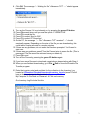
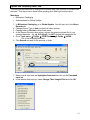
11. Close Millennium Offline Circulation, File
Exit.
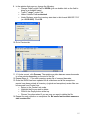
Copy file to review file
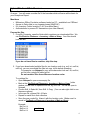
12. Open Dalva (character-based INNOPAC) and open III’s Inventory control
module.
From Main Menu, go to
C (Circulation subsystem)
A (Additional circulation functions)
P (Process PC transactions).
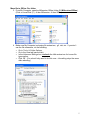
13. Enter your Millennium initials and password.
14. Go to C (Compare inventory to shelf list)
T (Transfer file of barcodes to Review file).
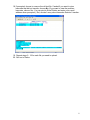
15. Choose an empty file to load the text file into. Make sure the empty files “Max
Records” is big enough to fit all the barcodes from the text file you are
transferring or you will get an error.
16. Enter the review file name in the following format: <initials> <date> <location
code> (ex. cg 9-19-05 mjf).
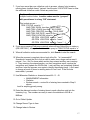
17. Choose the correct text file to transfer (check the number of items for a clue).
The filename will be something like rdi0806111913 (the number represents the
month-day-time).
7