1
Wonderware Fanless 10.4 & 12.1” TPC & OIC Touch Panel Computers User Manual
Introducing Wonderware Touch Panel Computers – Series B...................................................................3
Trademarks .............................................................................................................................................3
NOTES....................................................................................................................................................4
Symbols used in this Manual....................................................................................................................4
CE-CONFORMITY ..................................................................................................................................5
FCC Class A Radio Frequency ................................................................................................................5
1. INTRODUCTION .................................................................................................................................6
1.1. APPROPRIATE USE................................................................................................................................... 6
1.2 ITEM CHECKLIST........................................................................................................................................ 6
1.3 IMPORTANT SAFETY INSTRUCTIONS ....................................................................................................... 7
All cautions and warnings on the Panel PC should be noted.....................................................................7
2. OVERVIEW .........................................................................................................................................8
2.1 FEATURES:................................................................................................................................................. 8
3. INSTALLATION ...................................................................................................................................9
3.1 PANEL PC INSTALLATION NOTES ............................................................................................................. 9
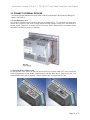
3.1.1 SEPARATION OF DISPLAY BEZEL AND PC BOX .........................................................................9
3.2 CONNECT EXTERNAL DEVICES .............................................................................................................. 10
3.3 CONNECT INTERNAL DEVICES ............................................................................................................... 12
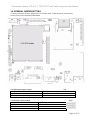
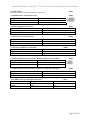
3.4 INTERNAL JUMPER SETTING .................................................................................................................. 13
3.5 SOFTWARE INSTALLATION ..................................................................................................................... 15
4. MAINTENANCE................................................................................................................................16
4.1 TECHNICAL SUPPORT ............................................................................................................................. 17
4.2 CLEANING ................................................................................................................................................ 17
5. TECHNICAL DETAILS.......................................................................................................................18
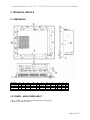
5.1 DIMENSIONS ............................................................................................................................................ 18
5.2 POWER – MAIN POWER INPUT................................................................................................................ 18
5.3 ENVIRONMENTAL SPECIFICATION ......................................................................................................... 19
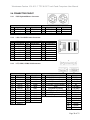
5.4 CONNECTOR PINOUT .............................................................................................................................. 20
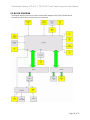
5.5 BLOCK DIAGRAM ..................................................................................................................................... 22
6. DISPOSAL.........................................................................................................................................23
7. RETURNING OF DEFECTIVE MERCHANDISE ................................................................................23
Page 2 of 23