1
The User’S Manual for GEA-8130A Network Analyzer
21. Data management: all testing results can be stored, checked, deleted and copied;
4.2
1.
2.
3.
4.
5.
6.
7.
8.
9.
10.
11.
12.
13.
14.
Characteristics
Small and portable, long battery endurance time;
Colorful touch screen, easy and flexible operaton;
Support two 10/100/1000Mbps electrical port and two 100/1000Mbps optical port;
Support mainstream Ethernet protocols DIX, IEEE802.3 SNAP;
Support DHCP checking and IP address acquisition way of static setting;
Support PPPoE dial-up connection test;
Traffic generation and analysis and 8 matched multiple streams;
Support RFC2544 network performance test;
Rich testing tools, include: cable length test, Cable map test, Cable find test, PoE test, Ping test,
Traceroute test and Blinking port test etc.
Support high-speed FTP download test, WEB browsing test;
Support statistics, filtration, capture and decoding function for various information in network;
Support network health check., network discovery and problem finding;
Flexible data management function, convenient for copy and tested data check;
Support system help function, acquire online help in any interface.
5
Appearance and Interfaces
5.1
Appearance
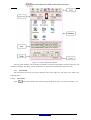
Indicator Area
Display Area
Button Operation
Area
Figure 5.1.1 Outside View
5.2
1.
2.
3.
4.
5.
Interfaces
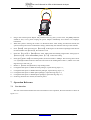
Electrical ports: electrical ports adopt RJ45 port, which are located at the top of equipment (the right
side is port 1; the left side is Port 2) and support electrical packages 10/100/1000M;
Optical port: optical port adopts SFP, which is located at the top of the equipment and supports
100/1000M;
Power: this equipment adopts external 15V/3A DC adaptor power, which is located on the left side of
the equipment;
USB: it is used for the tested data copy, system upgrading and so on, which is located on the right side
of the equipment;
System network card: RJ45 network interface, match relevant parameters in 【system setting】, it is
located on the right side of the equipment;
http://www.lzdd.com
Page 7