1
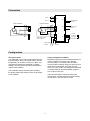
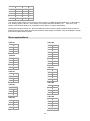
Connectors Alarm 1 Alarm 2 1 2 3 4 G A 3 2 4 1 6-wire connection 4-wire connection 4 +10V +10V 1 2 0V 3 + sense H - sense 0V 4 + input - input Supply voltage 24 VDC + input 1 2 - input F 3 4 2 3 2 H 1 1 4 2 3 F 4 Serial output RS-485 D1 D0 A B 3 Supply voltage 230 VAC 4 3 Strain gage sensors Max. 4 x 350 A 1 B 2 1 V output Common mA output External switch Common Configuration Using front panel The transmitter can be fully configurated using the front panel keys, but the numerical values can’t be fed precisely, since there are only four digits. The configuration settings are explained in chapter Settings, and using the front panel is described in chapter User interface. Using configuration software MekuWin program (free from Nokeval web site) is used to configure the device using RS-485 communication. If connection fails, check the communications settings using front panel keys to match those in MekuWin, and make sure the device is in SCL mode. The settings are described in chapter Settings, and the MekuWin program has a manual of its own. The transmitter keeps measuring and updating the analog output and alarms, but the serial output is not available. The transmitter keeps measuring during the configuration, and the MekuWin monitor function can be used to see the current results. 4