1
User’s Guide
®
rs
ve
e
sid
on
re
See
Wind
ows
vers
ion
e fo
r Macintosh v
er
si
TM
SMART Board Software
for Windows 98, 2000, ME, XP
and Windows NT
SMART Board Interactive Whiteboard
Rear Projection SMART Board Interactive Whiteboard
SMART Board for Flat-Panel Displays Interactive Overlay
Sympodium Interactive Lectern
TM
Registration Benefits
In the past, we’ve made new software features such as handwriting
recognition, USB support and SMART Recorder available as free
upgrades. Register your SMART product to be notified of free upgrades
like these. If you have a front projection SMART Board interactive
whiteboard, you’ll receive an additional three years of warranty coverage
when you register.
Keep the following information available in case you need to contact
Technical Support:
Serial Number
Date of Purchase
Register online at: www.smarttech.com/registration
Trademark Notice
SMART Board, Sympodium, DViT, X-Port, Notebook, OptiPro, LinQ and the SMART
logo are either registered trademarks or trademarks of SMART Technologies Inc.
Microsoft, Windows, Windows NT, PowerPoint and NetMeeting are either
registered trademarks or trademarks of Microsoft Corporation in the U.S. and/or
other countries. All other third-party product and company names are mentioned
for identification purposes only and may be trademarks of their respective owners.
Copyright Notice
© 1995–2004 SMART Technologies Inc. All rights reserved. No part of this
publication may be reproduced, transmitted, transcribed, stored in a retrieval
system or translated into any language in any form by any means without the prior
written consent of SMART. Information in this manual is subject to change without
notice and does not represent a commitment on the part of SMART.
Portions of this software are copyrighted by Intel Corporation.
Portions of this software are copyrighted by ParaGraph, a business unit of Vadem.
CalliGrapher® Copyright © 1997–2004 ParaGraph, a business unit of Vadem.
U.S. Patent Nos. 5,448,263; 6,141,000; 6,326,954; 6,337,681; 6,741,267 and
6,747,636. Canadian Patent No. 2,058,219. Other U.S., Canadian and foreign
patents pending.
Version 9.0 Printed in Canada 12/2004
Suite 300, 1207 – 11th Avenue SW
Calgary, AB CANADA T3C 0M5
Main Switchboard: 1.888.42.SMART (Canada/U.S.) or +1.403.245.0333 (all other countries)
Support Tel: 1.866.518.6791 (Canada/U.S.) or +1.403.228.5940 (all other countries)
Support Fax: +1.403.806.1256
[email protected] www.smarttech.com
Important Information for Owners of Front
Projection Interactive Whiteboards
NOTE: If you own any other SMART interactive product, refer to the
installation manual that came with your product for relevant warnings,
cautions, maintenance and cleaning instructions.
Safety Warnings and Precautions
WARNING
If you use a projector with your SMART Board
interactive whiteboard, carefully read the guide that
came with your projector. Do not stare into the beam of
light created by the projector. Instruct children not to
look in the direction of, or stare at, this beam of light.
WARNING
To reduce the risk of fire or electric shock, do not
expose any interactive product to rain or moisture.
For operating safety and to avoid damage, carefully read and observe
these instructions.
•
Read the guide that came with your projector carefully,
familiarizing yourself with all warnings and cautions.
•
If you move an interactive whiteboard that is mounted on a floor
stand, do so with care. Quick stops, excessive force and uneven
surfaces may cause the interactive whiteboard to overturn. If your
floor stand has anti-tip feet, retract them when you move the
interactive whiteboard.
•
If you are transporting the interactive whiteboard over a distance,
completely repackage it using the original packaging. If the
original packaging is no longer available, pack all components
with as much padding as reasonably possible to ensure that they
are not exposed to excessive vibration or shock.
•
You must connect the USB cable that came with your interactive
whiteboard to a computer that has a USB-compliant port and that
bears the USB logo. In addition, the USB source computer must
be compliant to CSA/UL/EN 60950 and bear the CE mark and
CSA and/or UL Mark(s) for CSA/UL 60950. This is for operating
Windows Version
Important Information
i
safety and to avoid damage to the SMART Board interactive
whiteboard.
•
Avoid setting up and using the interactive whiteboard in an area
with excessive levels of dust, humidity and smoke.
•
Avoid leaving cables on the floor. If you must run a cable over the
floor, lay the cable in a flat, straight line, and secure it to the floor
with tape or a cable management strip in a contrasting color.
Handle cables carefully and avoid excessive bending. Or
eliminate the need for a cable by purchasing a SMART Wireless
Serial Connection.
•
If you have a floor stand with anti-tip feet, make sure they’re
extended when the interactive whiteboard is in use.
•
Don’t add any extra weight or pressure to the interactive
whiteboard or its pen tray, because the brackets are designed
only for the weight of the interactive whiteboard.
•
If you require replacement parts, make sure the service
technician uses replacement parts specified by SMART
Technologies Inc., or parts with the same characteristics as the
original.
Safety Tips for Teachers
ii
•
Keep your back to the class when you write over a
projected image.
•
Step to the side of the interactive whiteboard
before you turn and face the class.
•
Supervise your students whenever they use the
interactive whiteboard.
•
Tell students not to look directly at the light beam
from the projector. Instead, encourage them to
keep their back to the class when working at the
interactive whiteboard. Before they turn to face the
class, they should take a big step (or even two)
sideways.
Important Information
Windows Version
Windows Version
•
Tell your students not to touch the projector, as it
can get very hot after it has been on for a few
minutes.
•
Don’t use a chair to increase a student’s reach. If
your students can’t reach the top of the interactive
whiteboard, lower it. You may need to remount a
wall-mounted unit in a lower position. If your
interactive whiteboard is mounted on a floor stand,
lower it with the help of another adult.
•
Remind students not to run in the vicinity of the
floor stand, as the floor stand legs may cause
them to trip.
Important Information
iii
iv
Important Information
Windows Version
Contents
Important Information for Owners of Front Projection Interactive
Whiteboards . . . . . . . . . . . . . . . . . . . . . . . . . . . . . . . . . . . . . . . . . . . . . .i
Safety Warnings and Precautions . . . . . . . . . . . . . . . . . . . . . . . . i
Safety Tips for Teachers . . . . . . . . . . . . . . . . . . . . . . . . . . . . . . . ii
Introducing SMART Board Software . . . . . . . . . . . . . . . . . . . . . . . . . . 1
Which SMART Products Use SMART Board Software . . . . . . . . 2
What Components Make Up SMART Board Software . . . . . . . . 3
What “Press” Means on SMART Products . . . . . . . . . . . . . . . . . 4
What State Your SMART Product Is In . . . . . . . . . . . . . . . . . . . . 4
Where to Find More Information . . . . . . . . . . . . . . . . . . . . . . . . . 6
What Version of This Software Should You Install? . . . . . . . . . . 7
What’s New . . . . . . . . . . . . . . . . . . . . . . . . . . . . . . . . . . . . . . . . . . . . . . 8
Quick Tour . . . . . . . . . . . . . . . . . . . . . . . . . . . . . . . . . . . . . . . . . . . . . . . 9
Advanced Features . . . . . . . . . . . . . . . . . . . . . . . . . . . . . . . . . . 11
The Next Steps . . . . . . . . . . . . . . . . . . . . . . . . . . . . . . . . . . . . . 12
More Training . . . . . . . . . . . . . . . . . . . . . . . . . . . . . . . . . . . . . . 12
Controlling the Computer . . . . . . . . . . . . . . . . . . . . . . . . . . . . . . . . . . 13
Clicking . . . . . . . . . . . . . . . . . . . . . . . . . . . . . . . . . . . . . . . . . . . 13
Aligning or Orienting the Interactive Screen . . . . . . . . . . . . . . . 14
Tips for Pressing . . . . . . . . . . . . . . . . . . . . . . . . . . . . . . . . . . . . 15
Tips for Using DViT Technology . . . . . . . . . . . . . . . . . . . . . . . . 16
Controlling a Projector or a Flat-Panel Display . . . . . . . . . . . . . 16
Using Video Devices . . . . . . . . . . . . . . . . . . . . . . . . . . . . . . . . . 17
Displaying Your Computer Screen . . . . . . . . . . . . . . . . . . . . . . 18
Writing, Typing and Drawing . . . . . . . . . . . . . . . . . . . . . . . . . . . . . . . 20
Writing in Ink Aware Applications . . . . . . . . . . . . . . . . . . . . . . . 20
Drawing in Ink Aware Applications . . . . . . . . . . . . . . . . . . . . . . 21
Writing over Applications That Aren’t Ink Aware . . . . . . . . . . . . 21
Writing and Drawing in Notebook Software. . . . . . . . . . . . . . . . 23
Writing Over Video . . . . . . . . . . . . . . . . . . . . . . . . . . . . . . . . . . 26
Typing Directly Into an Application or a Dialog Box. . . . . . . . . . 27
Typing and Formatting in Notebook Software . . . . . . . . . . . . . . 28
Windows Version
v
Making Other Kinds of Notations . . . . . . . . . . . . . . . . . . . . . . . 28
Adding Content into Notebook Software . . . . . . . . . . . . . . . . . . . . . .29
Using the Gallery . . . . . . . . . . . . . . . . . . . . . . . . . . . . . . . . . . . 29
Adding Web Links and File Attachments . . . . . . . . . . . . . . . . . 32
Adding Images and Flash Files . . . . . . . . . . . . . . . . . . . . . . . . 33
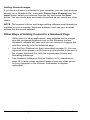
Other Ways of Adding Content to a Notebook Page . . . . . . . . 34
Erasing . . . . . . . . . . . . . . . . . . . . . . . . . . . . . . . . . . . . . . . . . . . . . . . . .35
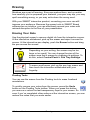
Erasing Your Note . . . . . . . . . . . . . . . . . . . . . . . . . . . . . . . . . . 35
Quick Erasing of Large Areas. . . . . . . . . . . . . . . . . . . . . . . . . . 36
Restoring Lost Notes . . . . . . . . . . . . . . . . . . . . . . . . . . . . . . . . 36
Capturing and Saving . . . . . . . . . . . . . . . . . . . . . . . . . . . . . . . . . . . . .37
Capturing with the Screen Capture Buttons in the Floating Tools38
Inserting Notes into Microsoft Word and Excel Files . . . . . . . . 39
Inserting Notes into PowerPoint Software . . . . . . . . . . . . . . . . 40
Inserting Your Notes into Other Ink Aware Applications. . . . . . 40
Capturing Your Work as a Video . . . . . . . . . . . . . . . . . . . . . . . 40
Saving the Notes You Make Over Videos . . . . . . . . . . . . . . . . 41
Saving in Other Formats. . . . . . . . . . . . . . . . . . . . . . . . . . . . . . 41
Saving Content from a Data or Videoconference . . . . . . . . . . . 41
Changing How the Software Works for You . . . . . . . . . . . . . . . . . . .42
Changing the Way You Access Tools . . . . . . . . . . . . . . . . . . . 42
Adjusting the Notebook Interface . . . . . . . . . . . . . . . . . . . . . . . 45
Changing the Appearance of Digital Ink . . . . . . . . . . . . . . . . . . 47
Recording a Different Screen Area. . . . . . . . . . . . . . . . . . . . . . 48
Changing the Way You Use PowerPoint Software. . . . . . . . . . 48
Sharing . . . . . . . . . . . . . . . . . . . . . . . . . . . . . . . . . . . . . . . . . . . . . . . . .49
Sending Your Notes by E-Mail . . . . . . . . . . . . . . . . . . . . . . . . . 51
Sharing Content from Other Applications . . . . . . . . . . . . . . . . . 51
Presenting . . . . . . . . . . . . . . . . . . . . . . . . . . . . . . . . . . . . . . . . . . . . . .53
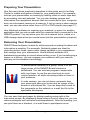
Preparing Your Presentation . . . . . . . . . . . . . . . . . . . . . . . . . . 54
Delivering Your Presentation . . . . . . . . . . . . . . . . . . . . . . . . . . 54
Controlling What Your Audience Sees . . . . . . . . . . . . . . . . . . . 55
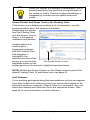
Capturing, Recording and Saving Your Presentation. . . . . . . . 58
vi
Windows Version
Presenting Your Notebook File . . . . . . . . . . . . . . . . . . . . . . . . . 58
Using PowerPoint Software. . . . . . . . . . . . . . . . . . . . . . . . . . . . 60
Presenting Remotely . . . . . . . . . . . . . . . . . . . . . . . . . . . . . . . . . 62
Special Situations . . . . . . . . . . . . . . . . . . . . . . . . . . . . . . . . . . . . . . . . 65
Connecting Multiple SMART Interactive Products. . . . . . . . . . . 65
Using SMART Board Software in Non-Projected Mode . . . . . . 66
Using the Display Control Icon Strip . . . . . . . . . . . . . . . . . . . . . 68
Maintenance of Front Projection Models . . . . . . . . . . . . . . . . . . . . . 69
Cleaning Your Front Projection Interactive Whiteboard . . . . . . 69
Preventing Damage to the Writing Surface . . . . . . . . . . . . . . . . 70
General Tips for Trouble-Free Performance . . . . . . . . . . . . . . . 70
Adjusting the Projected Image. . . . . . . . . . . . . . . . . . . . . . . . . . 71
Contacting SMART Technologies . . . . . . . . . . . . . . . . . . . . . . . . . . . 72
Contacting SMART Technical Support . . . . . . . . . . . . . . . . . . . 72
General Inquiries . . . . . . . . . . . . . . . . . . . . . . . . . . . . . . . . . . . . 72
Returning Defective Merchandise . . . . . . . . . . . . . . . . . . . . . . . 73
Registration . . . . . . . . . . . . . . . . . . . . . . . . . . . . . . . . . . . . . . . . 73
Sending Feedback. . . . . . . . . . . . . . . . . . . . . . . . . . . . . . . . . . . 73
Obtaining More Information . . . . . . . . . . . . . . . . . . . . . . . . . . . . 73
Index . . . . . . . . . . . . . . . . . . . . . . . . . . . . . . . . . . . . . . . . . . . . . . . . . . . 75
Windows Version
vii
viii
Windows Version
Introducing SMART Board Software
From the classroom to the boardroom, SMART products help you deliver
dynamic presentations to impress and inspire your audience, whether
they’re students, prospective clients or co-workers. With SMART Board
software, you can show documents, Web pages and videos on an
interactive screen that responds to the touch of your finger or a pen.
For example, if you’re a teacher, you can prepare engaging lessons with
Notebook software that are full of pictures, Flash files and more, and then
present these lessons to inspire students. If you’re a corporate trainer,
you can record one session using SMART Recorder, and then make the
file accessible on the company intranet so others can review it later. You
can also jot down notes during a meeting, take screen captures of the
notes and then e-mail them to all participants.
These are just a few examples of how you can use SMART Board
software. You’ll save time, resources and paper. And interactive products
are fun to use!
Take a few minutes to scan this guide and you’ll discover the many
features that are available with SMART Board software. This guide is
organized around the tasks commonly performed for preparing and
delivering presentations. You may be inspired to use the interactive
screen and SMART Board software to perform tasks that you traditionally
did on paper or a chalk board.
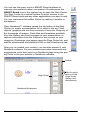
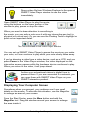
If you’re a teacher, a professor or a corporate trainer,
look for classroom-specific hints beside this picture.
when you see it throughout the guide.
When you see the picture on the left in this guide,
you’ll find suggestions for meetings and
demonstrations for the corporate world.
Windows Version
Introducing SMART Board Software
1
Which SMART Products Use SMART Board Software
SMART Board software works with front projection SMART Board, Rear
Projection SMART Board, and SMART Board for Flat-Panel Displays
interactive whiteboards, as well as Sympodium interactive pen displays
and interactive lecterns. Because you could be using any of these
products, the guide refers to “your SMART product,” instead of a specific
one.
Tips in boxes beside this illustration are specific to all
interactive whiteboards with a pen tray.
An interactive pen display icon identifies tips specific
to Sympodium products.
While you can install SMART Board software on any computer, you’ll
notice some limitations if you don’t have your SMART product connected
to the same computer. Some features or applications may not be
available unless you have an interactive product connected.
TIP
Record the serial number of your SMART product(s) in
the front of this guide, in case you ever need to call
SMART Technical Support for help.
2
Introducing SMART Board Software
Windows Version
What Components Make Up SMART Board Software
SMART Board software includes many tools and applications that will
help you get the most out of your interactive product. This software
includes:
•
the SMART Start Center, to access tools, applications and files
•
handwriting recognition, to convert your notes to typed text
•
Notebook software, an application for creating and delivering
presentations
•
SMART Gallery Collections, to insert images and templates on
Notebook pages
•
SMART Recorder, to save a recording of your actions on the
screen
•
SMART Video Player, to create notes over videos
•
SMART Keyboard, an on-screen keyboard for inputting text and
notes
•
Floating Tools, a set of tools for writing notes and drawing shapes
•
the SMART Board Control Panel, to change the software and
hardware settings
•
SMART Display Controls, to control your projector or flat-panel
display at the interactive screen. It’s also possible to switch
between a resident computer and a laptop with these controls.
•
SMART Bulb Saver, a screen saver that preserves the life of your
projector or flat-panel display
•
Mobile and Wireless Device Settings, to display the desktops of a
networked laptop computer that’s running SMART LinQ software
on the interactive screen
•
SMART Notebook Print Capture, to capture files to Notebook
software
•
SMART Board Diagnostics, a troubleshooting application
NOTE: If you’re using the Windows XP operating system with Service
Pack 2 installed, you must change a setting on Internet Explorer to
access the Help Center topics. Press Tools > Internet Options, and
press the Advanced button. Under Security, select the Allow active
content to run in files from my computer check box. To access the
Help Center, press any of the Help buttons in SMART Board software.
Windows Version
Introducing SMART Board Software
3
What “Press” Means on SMART Products
By touching the interactive screen, you can use interactive features,
control computer applications, and create annotations over these
applications in digital ink. However, depending on your SMART product,
the method of touch varies.
While interactive whiteboards respond to any physical touch on the
interactive surface, interactive pen displays only respond to the special
pen tool that comes with the product. In this guide, when you see “press”
in the text—for example, press the button to close the window—the
method of pressing depends on what product you have.
If you have a SMART Board interactive whiteboard, you can touch the
button with your finger. However, if you have a Sympodium interactive
lectern, press the Left Click button on the pen display and then touch the
pen tool tip to the interactive screen.
What State Your SMART Product Is In
This guide assumes that your SMART product is set up and ready to use,
which means:
•
your interactive product is properly installed. When you look at
the screen, you should see the computer desktop. If your product
uses a projector, that projector should be on and properly
connected to the computer. If you have a Sympodium lectern,
make sure you’ve turned on the interactive pen display and that
the video cables are properly connected.
If you’ve turned on the necessary equipment and you still can’t
see the computer’s desktop on the screen, read your product’s
installation instructions to check that the setup was done
correctly. Also check that the interactive product is connected to
your computer and a power source (if necessary).
Every SMART product has one or more light-emitting diodes
(LEDs) that indicate the state of the product. Interactive
whiteboards have a Ready Light and lights for each tool, while
Sympodium products have Power and Status LEDs.
For interactive whiteboards, if the Ready Light is a solid green,
your system is functioning properly. If it’s red, the pen tray is
receiving power but it isn’t communicating with SMART Board
software. If you haven’t installed this software, do so before
proceeding. If you’ve installed the software, ensure that the cable
4
Introducing SMART Board Software
Windows Version
between the computer and this interactive whiteboard is secure
at both ends. If you’re still having problems, call SMART
Technical Support (see page 72) or your dealer.
•
SMART Board software has been installed and is
running in projected mode. If it is, you’ll see the
SMART Board icon in the system tray. If you don’t SMART Board Icon
see the icon, check Start > All Program > SMART Board
Software and select SMART Board Tools. If this folder isn’t
there, you must install SMART Board software. You can do this
from the CD, a USB storage device or by downloading it.
The projected mode is the default mode for SMART Board
software. You’ll find the mode setting in SMART Board Settings
dialog box, which you can access from the SMART Board
Control Panel. If you need more help determining the mode or
changing it, open the SMART Board Software Help Center and
search for information on Projected Mode.
•
the interactive screen is properly oriented. Check the accuracy of
your touch. When you press the interactive screen, you should
see the pointer at the exact point of contact. If you don’t, orient
the screen so the computer can accurately track your contact.
See How To > Orient/Align the Screen in the SMART Board
Software Help Center for step-by-step instructions, including
changing the orientation level.
To begin the orientation process, simultaneously press
the Right Click and the Keyboard buttons on the pen
tray.
This guide is for users running Windows NT® 4.0 or the Windows® 98,
2000 or XP operating systems. If you’re using the Windows 95 operating
system, you must use SMART Board software version 7.1.3, which you’ll
find on the installation CD or on www.smarttech.com. There, you’ll also
find a matching version of the SMART Board Software User’s Guide.
Check the SMART Board Software Help Center for more system
requirements.
TIP
Windows Version
If you need to log on to your computer, you can do so
right at the interactive screen. Press the Keyboard
button on your SMART product to open the SMART
Keyboard and then press the virtual keys to enter your
user name and password.
Introducing SMART Board Software
5
Where to Find More Information
This guide provides an overview of the many features of SMART Board
software for a varied audience–from educators to business professionals
and from beginner computer users to power users. For detailed
information on the specific features of the software, explore the SMART
Board Help Center. There, you’ll find procedures and instructions for each
feature.
The Help Center contains links to a wide range of information, including
procedures for using each component (How To’s), descriptions of each
tool and the concepts around using the components, troubleshooting
hints, and more. As a result, you’ll find the level of information that you
need to help you use SMART Board software.
You should also check www.smarttech.com for more resources. At this
site, you’ll find information on each product, including setup instructions
and specifications. The Training Center of this website has learning
resources, free hands-on lessons and information on how to get more
training. You’ll find up-to-date, product-specific information in the Support
area of this website, including frequently asked questions (FAQs),
technical bulletins and resource centers.
You’ll find lesson plans, good practises and other
activities specific to teaching with a SMART product
on www.EdCompass.com.
6
Introducing SMART Board Software
Windows Version
What Version of This Software Should You Install?
You can install the full version of SMART Board software on any
computer. When you install SMART Board software, be sure you have
the correct privileges for your operating system. Some operating systems
only let a user with administrative rights install applications. Read the
instructions that came with your operating system for details specific to
your setup.
You can also install a condensed version of SMART Board software onto
a USB storage device. This scaled-down version is ideal for preparing
presentations on laptops. When you’re ready to present, you can open
your file on the computer that’s connected to the interactive product,
which will be running the full version of SMART Board software. You can
install the USB storage device version of SMART Board software (USB
Board) from the SMART Board software CD.
If you’re a network administrator, you can simultaneously install SMART
Board software on any number of computers from one central location. To
do this, use command line arguments that are described in the Help
Center topic Customizing the Installation of the Software.
If you need to uninstall SMART Board software, refer to the Help Center
topic entitled Uninstalling the Software for details.
Depending on your operating system and network settings, you might
have to log on to the computer before you can access SMART Board
software.
If the SMART product is in a shared room, consider
creating a meeting room logon identity for the
computer that’s connected to the SMART product.
Then give this identity access to commonly used
applications, such as SMART Board software and
Notebook software. This ensures that any user of the
meeting room can access the interactive tools and
applications of SMART Board software.
Windows Version
Introducing SMART Board Software
7
What’s New
If you’ve used SMART Board software before, you’ll notice some changes
in this version. These changes include:
•
the Start Center. This customizable toolbar lets you access
interactive tools or other programs.
•
new Floating Tools, such as the Creative Pen, shapes and the
Magnifier
•
new views of the SMART Keyboard
•
more content in Notebook software, including Macromedia®
Flash® files
•
easier access to common actions for objects on a Notebook page
•
right-click behavior when you press and hold the interactive
screen for approximately three seconds
•
the appearance of a border when you write over non-Ink Aware
applications
•
a Web-like list of SMART Board Control Panel options, including
the Mobile and Wireless Device Settings that let you use LinQ
software on a laptop computer
•
a setting in SMART Recorder for recording only a specific window
or a rectangular screen area
For more details on these and many other features, read What’s New in
the Help Center.
8
What’s New
Windows Version
Quick Tour
When you touch the interactive screen (with your finger if you’re using an
interactive whiteboard, or with the pen tool if you’re using an interactive
pen display), the computer interprets your touch as a left-click, just as if
you were using your mouse.
If you’re using a SMART Board™ interactive whiteboard, pick up a
colored pen from the pen tray and write on the screen. If you’re using a
Sympodium™ interactive pen display, press a Colored Ink button and
write on the screen with the pen tool. When you start writing, the Floating
Tools appear on your screen. You can use Area Capture button to save
your notes.
The Floating Tools
If your product has a pen tray, use the eraser to erase the digital ink. If
you’re using a pen display, press the Eraser button and drag the pen tool
across the screen.
You can write a note on the screen over any application and convert your
note to typed text by pressing and holding the note until you see a menu.
Select one of the choices and the typed version of your note appears at
the cursor location of your active file or dialog box.
If you prefer to type into an active application or dialog box, instead of
converting your handwritten note, use the SMART Keyboard. This onscreen keyboard has different views, so you can select the one that best
suits you. To change the view, open the SMART Keyboard from the Start
Center and then select the view that you want. For example, you can
open the Classic view of the SMART Keyboard to log on right at the
interactive screen, or you can open the Number Pad view to type a lot of
numbers.
Windows Version
Quick Tour
9
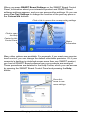
You can use the many tools in SMART Board software to
impress your audience when you present. Double-press the
SMART Board icon in the system tray to open the Start Center.
The Start Center is a vertical toolbar for quick access to the
SMART Board tools and any other applications you want to add.
You can customize the toolbar further by making it smaller or
transparent.
System
Tray Icon
Open Notebook™ software (press the top button in the Start
Center) to create a presentation full of colorful clip art, Flash
objects, graphics and text from a variety of sources. Drag any of
the thousands of images, Flash files and templates available
from the Gallery tab onto the pages of your presentation, or
capture information from the Internet or any source on your
computer. Rearrange your pages using the Page Sorter tab, and
add file attachments and website URLs on the Attachments tab.
After you’ve created your content, you can also present it with
Notebook software. As your audience provides comments and
suggestions, write their input on a Notebook page using the pen
tray tools or the pen buttons in Notebook software.
Start Center
Toolbar
Page Sorter
Tabs for quick
access to the
Page Sorter,
Gallery and
Attachments
Notebook Workspace
10
Quick Tour
Windows Version
Press the Keyboard button on your interactive
product to open the on-screen keyboard. This
way, you don’t have to leave the interactive
product to enter text.
For more help on performing specific tasks, open the Help
Center by pressing the Help button on the Start Center. Or visit
the Support and Training areas of www.smarttech.com for
more ways to learn about SMART Board software.
Keyboard
Button
Help
Button
Press the appropriate button on the bottom of the
Sympodium interactive pen display to quickly open
Notebook software, the on-screen SMART Keyboard
or the Floating Tools.
If you’re a first-time SMART product user, you can practise using the
interactive screen with two applications that were specially created for
use with a SMART product: SMART Number Cruncher and SMART
Speller. You can use these simple programs to practice writing on the
screen and to practice converting your writing to typed text. Download
these free programs from www.EdCompass.com.
Advanced Features
Video
Player
Button
SMART Board software is about more than just writing and
saving notes over still images on the interactive screen. For
example, you can play a video with SMART Video Player and
write over the moving images.
Record a file of everything you do at the interactive
product with SMART Recorder. If you have a microphone
connected, your file can include narration.
Recorder
Button
You can modify many of the tools in SMART Board software. For
example, you can customize the Start Center by adding additional
buttons, such as buttons for frequently used applications. When you open
the Floating Tools, the Classic tool set opens by default, giving you
access to the most commonly used tools. However, if you’re teaching
younger students, you might want to try the Creative tool set. Read the
Select a Tool Set, in the How To folder of the Help Center, for more
information.
Windows Version
Quick Tour
11
If you’re a guest laptop user who prefers not to install SMART Board
software on your computer, you can enable Mobile and Wireless Device
settings at the resident computer and use LinQ software to display files on
the interactive screen using a network connection. With this software,
your files stay on your laptop while you use the interactive tools of
SMART Board software on the SMART product to deliver a presentation.
The Next Steps
Challenge yourself to try new ways to do tasks that you normally do with
paper and pen. The more you use SMART Board software, the more
efficient you’ll become.
For example, SMART Board software helps you to reuse information by
encouraging you to save your material and notes on a computer instead
of on paper. You can also share your files with others.
Ask yourself: How can I use this tool to make my daily tasks easier? Or
What could I use this feature for? Your answers may surprise you.
Become a SMART Exemplary Educator by using your
SMART product in a valuable way and then sharing
your knowledge with others. Check
www.EdCompass.com for information on professional
development opportunities.
More Training
If you need more training, go to www.smarttech.com/Trainingcenter and
www.EdCompass.com. You can also use the exercises on these sites to
teach others, or to find out about how to receive more training.
12
Quick Tour
Windows Version
Controlling the Computer
Think of the interactive screen as an extension of your computer itself.
Press the screen to click as you would with a mouse. Anything that you
can do at your computer, you can accomplish at the interactive screen.
For example, you can use the SMART Keyboard to log on to your
computer.
If you can see the SMART Board icon in the system tray,
you have access to all the interactive applications and
tools included with SMART Board software. Press this icon
to see a menu of items or double-click it to open the Start
Center.
SMART Board Icon
Press a menu item or a button on the Start Center to open
that tool or application. You can also add buttons for other
applications that you commonly use, like Microsoft®
Internet Explorer®, Word® or PowerPoint® software, to
the Start Center. You can have up to 11 buttons on the
Start Center.
Clicking
The Start Center
Press on the interactive screen to left click (as you
normally would with a mouse). Before you know it, you’ll be browsing the
Internet, moving files and doing everything that you used to do with your
mouse.
Touch the interactive whiteboard firmly with your
finger.
When you get the hang of this, you can take full
advantage of SMART Board software.
If your press unintentionally produces digital ink or
erases a previous note, check that the pens and the
eraser are in their pen tray slots. If one tool isn’t in its
slot, the sensors in the pen tray register your touch as
if you were using that tool.
To double-click, press twice. For example, to open a program, press twice
on its desktop icon.
Windows Version
Controlling the Computer
13
Press the Left-Click button on a Sympodium
interactive pen display and then touch the pen
tool tip to the screen.
Tap twice for a double-click.
To right-click once, press and hold your finger or the pen tool on the
interactive screen. In approximately three seconds, the right-click menu
for the desktop or the active application appears. Another way to rightclick is to press the Right-Click button on your interactive product and
then touch the interactive screen to instantly see the right-click menu.
Whenever you right-click, your next press on the interactive screen
reverts to a left click.
If your SMART product uses DViT™ (Digital Vision
Touch) technology, you can use hand gestures to right
click. Read about them on page 16.
To move objects on the interactive screen, press the
object with one finger and, while maintaining pressure
on the object, use your other hand to touch the screen
at the new location. Then lift the finger that’s holding
the object. The object jumps to the new location.
Aligning or Orienting the Interactive Screen
For your press to appear exactly where you expect it, make sure your
SMART interactive product is properly aligned or oriented. This lets
SMART Board software know exactly where the image is on the product.
Your SMART product comes with a default setting that aligns a standard
computer screen image to the product. However, if the pointer appears a
slight distance away from where you’ve pressed, you should correct this
misalignment by orienting your unit.
To orient the unit, you press specific points on the interactive
screen. You access this orientation screen by pressing the SMART
Board icon or the More button on the Start Center and then
selecting Orient. This procedure can be four, nine or twenty presses,
depending on your Alignment/Orientation Precision setting. You can
14
Controlling the Computer
Windows Version
access this setting in the SMART Board Settings dialog box from the
SMART Board Control Panel.
For quick access to the Orientation screen, press the
two pen tray buttons at the same time to orient the
interactive whiteboard.
Tips for Pressing
Tell your students to press firmly on the interactive
screen. If you have an interactive whiteboard, they can
use a tool, such as a pointer or a dry-erase marker
(with its lid ON), to avoid funny sounds that may
emanate from sweaty fingers!
To drag, keep pressing firmly on the interactive
screen.
Your SMART product interprets your screen presses using a number of
default settings. One special setting is the Mouse Assist option. With this
feature active, it’s easier to activate items like scroll bars and Close
buttons, which may otherwise require precise pressing. With this setting,
you can tailor your interactive product to the abilities of its users.
Don’t lean your palm, arm or anything else against the
interactive screen. More than one point of contact with
the interactive screen can confuse the product’s
electronics.
If your students can’t reach the upper portion, you may
be able to lower the screen. If you have an adjustable
product such as a Rear Projection SMART Board
2000i interactive whiteboard or an interactive
whiteboard on a floor stand, you can lower it.
Remember to orient the front projection interactive
whiteboard after you move it.
Avoid standing on a chair or a stool to reach the top of
the interactive screen. Follow the safety tips outlined
on page ii.
Windows Version
Controlling the Computer
15
Tips for Using DViT Technology
If you have an interactive whiteboard that uses DViT technology, more
than one person can interact with the product at the same time. However,
you must first enable this Multiple Touch Mode for SMART Board
software to recognize more than one press. You can change any of these
settings through the Mouse Settings in the SMART Board Settings dialog
box, which you access from the SMART Board Control Panel. Read the
Tips section of the Help Center for more hints.
You can also use mouse gestures if your interactive screen uses DViT
technology. Gestures are a way of creating common mouse actions right
at the screen. For example, you can easily right-click or scroll without
having to step away from your screen. As a result, you avoid distracting
departures from the interactive screen.
With the gestures feature enabled, you can right-click by pressing the
screen with one finger and then pressing with a second finger to the right
of the first. In addition, you can scroll by touching the interactive
whiteboard with two fingers and then moving your fingers up or down the
screen. To use gestures, you must activate the Enable Mouse Gestures
and the Multiple Touch Mode settings. See How To > Change the
SMART Board Software Settings > Change Mouse Settings, in the
SMART Board Software Help Center for more information.
Controlling a Projector or a Flat-Panel Display
If your SMART product uses a projector or a flat-panel display, you can
control these devices right at the interactive screen using the SMART
Display Control. You can also set up a special screen saver that’s
optimized for a SMART Board interactive whiteboard, called the SMART
Bulb Saver.
Display Control
SMART Board software comes with Display Controls that work with a
screen saver to help preserve the life of your projector lamp or prevent an
after-image on your flat-panel display. These controls can save money for
you, because bulb and display replacements are expensive. When your
screen saver is activated, the Display Control turns off the projector lamp
or puts the flat-panel display into sleep mode.
16
Controlling the Computer
Windows Version
The Display Control works with most connected
projectors and flat-panel displays.
With the Display Control set up, you won’t have to search for the
projector’s or flat-panel display’s elusive remote control, because you can
press an on-screen button to control the volume, power and input source.
To set up this feature, you’ll need an active screen saver and an
appropriate data cable to connect the computer to the projector or
flat-panel display. (This cable often comes with the projector or flatpanel display.) Then activate the Display Control Settings in the
SMART Board Settings window (accessed from the SMART Board
Control Panel). An icon appears in your system tray. Press this icon
to access a menu of commands for controlling your projector or flat-panel
display.
SMART Bulb Saver
Consider using the SMART Bulb Saver as your screen saver. It’s tailored
for SMART products and, when you use it with the Display Control, it will
help conserve the life of your projector lamp or flat-panel display. You can
set the SMART Bulb Saver to activate after a period of computer inactivity
or the absence of a video signal. You’ll find this screen saver with your
operating system’s display settings. For complete information on setting it
up, see Activate SMART Bulb Saver, in the SMART Board Software Help
Center, for more information.
Using Video Devices
Just like the sportscasters on television, you can play a video
clip for your audience in SMART Video Player. As the video
plays, you can circle players, draw lines and write comments
over the images.
If you connect an external video device to your computer, such as a video
camera or a VCR (using a video capture card or a TV tuner card), SMART
Video Player automatically detects this hardware and it appears on the
Hardware menu. You can adjust your settings for this device and save
your adjustments. When you next use this device for your video input,
your settings are restored.
Windows Version
Controlling the Computer
17
TIP
Drag a video file from Windows Explorer to the opened
SMART Video Player window to see the video
immediately.
Open SMART Video Player to play the movie,
using the buttons on the lower portion of the
window to play, pause or stop the video.
Pause and Stop Buttons
When you want to draw attention to something in
the movie, you can write a note over it with any interactive pen tool (a
physical or a virtual one). Or you can use the Floating Tools to highlight or
point out an important detail.
The Tools Available in the Video Player Window
You can set up SMART Video Player to pause the movie as you make
your note, or it can continue to play while your note slowly fades away.
If you’re showing a video from a video device, such as a VCR, and you
press Pause in the Video Player window, the video displayed on the
interactive screen pauses while the hardware device continues to play.
When you return to the video, it will jump ahead.
Archive your educational videos in digital form to
preserve them. If you are connected to a network, you
can open them with SMART Video Player on your
SMART interactive product.
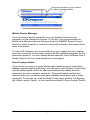
Displaying Your Computer Screen
Sometimes when you present, your audience can’t see small
details on the screen. To alleviate this situation, use the Magnifier
to enlarge an area of your screen.
From the Start Center, press the More button and add the
Magnifier tool. Drag the window around your screen to enlarge
the area inside it.
18
Controlling the Computer
Windows Version
Drag this window on your screen
to see it enlarged below
Mobile Device Manager
If you’re using a laptop computer, you can display files from your
computer on the interactive screen. To do this, you must activate the
Mobile and Wireless Device Settings (from the SMART Board Control
Panel) to allow a laptop to connect using LinQ software. See page 50 for
more information.
To use LinQ software, you must install it on your laptop and your laptop
must be connected to the same network as the resident computer for the
interactive product. You can download and read the LinQ Software User’s
Guide. Search for it on www.smarttech.com/support.
Guest Laptop Switch
If you prefer to connect a guest laptop with cables and your interactive
display supports laptop switching, you can set up the Display Control and
use the guest laptop switch to alternate between the laptop and the
interactive screen’s resident computer. This guest laptop switch also
requires that your computer have two available serial ports and a video
input port. To set this up, read the Help Center topic entitled Configuring
the Guest Laptop Switch, or the overview entitled A Guest Laptop Switch.
Windows Version
Controlling the Computer
19
Writing, Typing and Drawing
No matter which SMART interactive product you have, you can use its
pen(s) to write or draw over or into any computer image.
Open any application by pressing twice on its desktop icon. Then use
either the tools of SMART Board software or a pen tray pen (interactive
whiteboards) to write or draw, instead of a traditional mouse and
keyboard.
Press a Colored Ink button on the Sympodium
interactive pen display and use your pen to create
digital ink in that color.
Write with your finger! Pick up a pen with one hand
and touch the interactive whiteboard with your other
hand. Digital ink appears in the trail of your finger.
Go ahead. Start writing!
Write often on the screen to keep your class
interested, attentive and entertained. Let your
students write on the screen too. Interacting with the
lesson material helps your students learn through
discovery, which leads to better retention of your
lesson objectives.
Writing in Ink Aware Applications
With a number of applications, you can save your notes in the file that you
have open. These integrated applications (e.g., Microsoft Word, Excel,
Paint and PowerPoint) are called Ink Aware applications. For a complete
list of these applications, the supported version and special functions
within the application, see SMART Board Control Panel > Using Ink
Aware Applications in the SMART Board Software Help Center.
When you use an Ink Aware application, write in the active area of the
application. For Word, the active area is a page; for Paint, this area is the
canvas area. If you move your pen outside of this area, the ink doesn’t
appear. This makes it easy for you to press buttons on the toolbar with the
20
Writing, Typing and Drawing
Windows Version
pen still in your hand. Also, SMART Board software knows the ink color to
display based on the pen that you’re using.
Drawing in Ink Aware Applications
Microsoft Paint is one of several Ink Aware graphics applications. When
you open Paint on the interactive screen, you can use a pen tray pen (or
your finger) to draw a picture instead of using your mouse to select and
then manipulate a tool from the Paint toolbox, as you would normally.
Similarly, pick up the pen tray eraser and erase part of the picture. Or use
the Paint toolbox to further enhance the object you're creating.
You’ll find you’ve created a bitmap with much greater ease than normal:
You have the extra-large canvas of the screen to work on and the fine
artistic control that can only be achieved with a pen in your hand. You’ll
also find these same advantages when you’re running CorelDRAW® or
AutoCAD® software.
Refer to the SMART Board Software Help Center for a complete list of Ink
Aware applications and versions.
For details on saving your notes with these Ink Aware applications, see
the chapter on Saving, starting on page 37.
As you show a spreadsheet on the interactive product,
you can might need to amend some numbers based
on discussions in a meeting. Open your Excel
spreadsheet, press in the appropriate cell and write
the new number on your interactive screen. Then
press the Insert as Text button.
Writing over Applications That Aren’t Ink Aware
If your application is not Ink Aware, your writing appears on a
transparency layer over a frozen image of the desktop.
You’ll know the transparency layer is there because a border appears
around your screen. Inside this border, you can write or draw with digital
ink, erase it, or capture your notes to Notebook software. If you find the
border distracting, you can remove it by pressing the Right-Click button
on your interactive product, and touching the interactive screen. In the
menu that appears, select Show Border.
Windows Version
Writing, Typing and Drawing
21
Don’t be alarmed if your computer clock in the system tray doesn’t
change when the transparency layer is active. It will return to normal
when you return to a left click.
CAUTION
SMART Board software clears your notes if you touch
the screen after you put down a pen (interactive
whiteboards) or press the Left-Click button (interactive
pen displays). However, you can easily restore the
notes, as described on page 36.
When you write over an application that’s not Ink Aware, the Floating
Tools appear. Read the following section for information on using the
Floating Tools.
Students will better understand how the technology
works if you explain to them the concept of the
transparent layer over the computer image.
Floating Tools
If you’re preparing your presentation on a computer that’s not connected
to the interactive product, you can still write or draw with a pen. Click the
Pen button on the Floating Tools and use your mouse to draw a picture or
handwrite some notes. Similarly, you can use your mouse to produce
highlighter ink, create a variety of shapes or write using the Creative ink
button.
The Floating Tools are more than just the virtual counterpart of the
physical tools. In the Classic tool set (the default for SMART Board
software), you have access to many other tools, including Area Capture
and Highlighter. You can also add tools. For example, add the Shape and
Creative Pen buttons to the Floating Tools so you can make your notes
more engaging. For information on customizing the Floating Tools, turn to
page 43.
22
Writing, Typing and Drawing
Windows Version
Area Capture
Left-Click
Pen
Highlighter
Click to shrink
Undo
Click to add more tools
or to customize the toolbar
The Classic Tool Set
Eraser
Right-Click
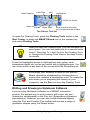
To open the Floating Tools, press the Floating Tools button in the
Start Center, or press the SMART Board icon in the system tray
and select Floating Tools.
TIP
After you open the Floating tools, you can collapse it to
save space. You can also add tools to or remove tools
from it. See How To > Add Tools to the Floating Tools
or Change the Floating Tools View in the Help Center
for details.
Press the Highlighter button to highlight text with yellow, semitransparent digital ink, just as you would with a highlighter pen. You
can cover words or any area of the screen with this illuminating ink.
Encourage your students to write on the SMART
Board interactive whiteboard by showing them a
screen that contains a handwritten note. To create this
note when you’re preparing the lesson on your
computer, use the Pen tool from the Floating Tools.
Writing and Drawing in Notebook Software
If you’re using Notebook software on a SMART interactive
product, the easiest way to write notes is with a pen tray pen
(interactive whiteboards) or the Pen tool (Sympodium interactive
pen displays). However, you can also create freehand objects
using the Pen and Creative Pen toolbar buttons and a range of
geometric shapes using the Shape button.
Windows Version
Writing, Typing and Drawing
23
You can write and draw in a myriad of colors, line widths and styles,
ranging from artistic to plain. If you like, you can use the Creative Pen to
write with a stream of stars, rainbow colors, happy faces or even flowers!
You can also connect your notes with lines that have arrowhead
ends using the Line button.
TIP
If you’re using Notebook software on an interactive
product, and you want to use the more creative tools
that are available with SMART Board software, don’t
use a pen tray pen! Instead, press the Creative Pen,
Line or Shape buttons on the Notebook toolbar, and
write with your finger in the workspace.
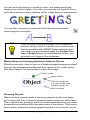
Manipulating and Changing Notebook Software Objects
Whatever you write, draw or type on a Notebook page becomes an object
that you can subsequently select and then resize, move, rotate, group
with other objects, link and modify in many other ways.
Click to rotate
Menu Arrow
Click to modify, link,
cut, copy, paste, lock
in place, group, etc.
Click to resize
Grouping Objects
When you write several words in the same general vicinity on a page,
you’ll notice that they’re already grouped together when you select them.
This is called smart grouping, and it occurs automatically when you create
handwritten annotations within the same area of the screen. This feature
keeps words, sentences and paragraphs together on the screen, so you
24
Writing, Typing and Drawing
Windows Version
can easily move them as a group. This feature also allows you to easily
select words and word groups as individual objects, rather than as
clusters of the separate, multiple pen strokes that you used to create
them.
TIP
If you want to write words on the same line, but don't
want them automatically grouped, write them in a
column, use different pens, or briefly return the pen to
the pen tray before picking it up again to write another
word.
You can deliberately group individual objects together so you can
manipulate them as one object by selecting Group from the Draw menu.
Protecting Objects from Editing
You can protect an object or a group of objects from being moved,
changed or grouped with other objects with the Draw > Lock in
Place command. When selected, a locked object displays a Lock
icon in its selection rectangle. Just click that icon to unlock the object.
Rearranging Stacked Objects
When you’re copying and pasting multiple objects onto the same page,
they often become stacked on top of one another. You may want to
rearrange them to reveal an object hidden within the stack.
Select the Bring Forward and Send Backward commands in the Draw >
Order menu to rearrange selected overlapped objects, one position at a
time, for selective visibility. The Bring to Front and Send to Back
commands in the Draw > Order menu take selected objects to the upper
and lower limits of the object stack; in other words, these commands
move an object all the way to the front or rear of the stack.
TIP
Windows Version
To align objects on your Notebook page, drag the ruler
or any of the ruled paper templates from the Gallery
(Professional > Paper Backgrounds and Tools).
You can place the ruler in the background or use it as
a transparent image.
Writing, Typing and Drawing
25
Linking Objects to Websites or Files
You can also link an object to a website or a document on your
computer or network. Just select Hyperlink from the selected
object’s menu arrow (in the upper-right corner of the selection
rectangle), and type the Internet address (URL) to which you want
to link. Click OK and a hyperlink button appears with the object
when you select it. Click the hyperlink button and your Web browser
opens at the specified URL.
Using Notebook Pages
With Notebook software, you can create a series of pages to
accommodate even your lengthiest presentation. When you fill up
one page with your notes, click the Insert Page button in the
toolbar to add another one.
The Page Sorter tab provides a comprehensive overview of all
Notebook pages in miniature form, and lets you perform all pagerelated tasks with ease. Open the Page Sorter to remove, clone
and rearrange pages, as well as change the page titles. The Page
Sorter is also convenient for moving and copying objects from one
page to another.
While you’re working on a page, you can extend it to add room for more
notes (click the words Extend Page at the bottom of the page) and you
can change the background color.
If you’re preparing your material on a computer that has SMART Board
software installed but no SMART product connected, you’ll notice a
transparent watermark on the Notebook page. This watermark will
disappear when you either connect the computer to a SMART product or
open the file on a computer that’s connected to a SMART product. Also,
the watermark won’t appear when you print the page.
Writing Over Video
With SMART Video Player, you can annotate over moving or still video
from a VCR or DVD player. To do this, you must first connect the VCR or
DVD player to a video capture card on the computer. You can write over
top of your video, play or freeze frames, and capture or clear your notes.
When you capture a note, it’s automatically sent as a screen capture to
Notebook software. See How To > Save > Capture a Note with the
Floating Tools in the Help Center for details.
26
Writing, Typing and Drawing
Windows Version
The ability to write over video will help you if you’re analyzing sports plays
or investigating details that occur in very quick visual sequence. For
example, imagine analyzing clues in a surveillance tape that you’re
playing through the computer. You can draw attention to an interesting
on-screen event with the pen tool.
For more information about using SMART Video Player, see page 17.
Typing Directly Into an Application or a Dialog Box
In almost every situation involving a computer, you will eventually need to
type text with a keyboard, even if it’s only to input text into a dialog box.
SMART Board software lets you do this at the screen as easily as if you
were sitting at your desktop, typing on the keyboard, and without
disrupting the flow of your presentation to access an actual keyboard.
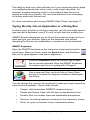
SMART Keyboard
Open the SMART Keyboard on the interactive screen and press the
virtual keys. When you finish, press the Send button, and the letters
that you’ve typed appear in the active application.
Press the Keyboard button on the pen tray to open
the on-screen keyboard. Drag the SMART Keyboard
to a higher spot if you’re typing with 10 fingers.
Use a sans-serif font, such as Arial or Comic Sans,
because it’s easier for beginner readers to distinguish
the letters.
You can change the views of the keyboard to make your most commonly
used functions available. These views include:
•
Classic, with its standard QWERTY keyboard layout
•
Simple and Simple Caps, with the keys in alphabetical order
•
Number Pad, for number input and mathematical equations
•
Shortcut, for writing keyboard shortcuts at the interactive screen
•
Write, for quick conversion of your handwritten letters
Windows Version
Writing, Typing and Drawing
27
For young students, you might want to show the
keyboard keys in alphabetical order instead of using
the QWERTY layout. If so, use the Simple view of
SMART Keyboard, instead of the Classic view.
Handwriting Recognition
You can inject handwritten words into any file or dialog box as typed text.
If your active application isn’t Ink Aware, you can insert a handwritten
note (that’s converted to typed text) directly into your file. To convert and
insert your note, press and hold your note. When the menu appears,
select Inject <your note> Here.
In Ink Aware applications, press the Insert as Text button, which
appears either in a three-button Aware toolbar or in your
application’s toolbar.
In Notebook software, select a handwritten word or a series of grouped
words, press the menu arrow in the upper-right corner of the selection
rectangle, and select a conversion option.
Typing and Formatting in Notebook Software
Just start typing in Notebook software. Text appears inside a resizable
text box, along with a Fonts toolbar that lets you change every aspect of
the text, including font, font size and style, justification and bulleting.
When you resize the text box, the text inside wraps accordingly.
Making Other Kinds of Notations
Your presentation may be complete, but you may still want to draw the
audience’s attention to key points or to simply entertain them with color
and animation. For more information on other ways to make notes, read
the section on Presenting that starts on page 53.
Floating Tools
You can add geometric shapes to your notes by adding the Shapes
button to the Floating Tools. You can customize these buttons so that with
one press you can add a star, a circle, a rectangle and more.
You can also add tools that focus the audience’s attention on certain
screen areas, such as the Pointer Tool, the Screen Shade and the
Spotlight. Or you can add applications such as the Calculator, the
SMART Keyboard and the Magnifier to the Floating Tools.
28
Writing, Typing and Drawing
Windows Version
Adding Content into Notebook Software
In other sections of this guide, we’ve discussed how to create and modify
objects in Notebook software (Writing and Drawing in Notebook Software
on page 23), as well as how to capture information from other sources
(Capturing with the Notebook Software Capture Tools on page 38).
In this section, we’ll focus on adding content to your presentation. For
example, you can add clip art, templates, images, Flash files, links to files
and Internet addresses to your Notebook file.
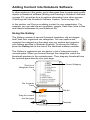
Using the Gallery
The Gallery consists of several thousand templates, clip art images
and Flash files, organized into categories. You can explore and
organize the categories in the same way you explore and organize
your folders and files in Windows Explorer. To access the Gallery,
press the Gallery tab at the side of the Notebook software window.
The Gallery is organized into two panes: a list of categories and a
contents pane. When you browse through the categories, watch the
thumbnail previews in the contents pane. Then drag any thumbnail from
the contents pane directly onto your page.
The List of
Categories Pane
Current Category
The Contents
Pane
Clip Art
Drag the content
onto the page
Template
Windows Version
Adding Content into Notebook Software
29
Gallery Categories
The Gallery is organized into three major categories: Education,
Professional and My Content.
If you’re a teacher, browse through the extensive Education category,
which is further broken down into subject categories for your
convenience. The Education category is loaded with clip art, templates
and Flash files that you can use as visual aids for teaching a wide variety
of topics to classes at all grade levels.
If you’re someone who prepares professional presentations, browse
through the templates and tools that are available in the Professional
category, including variously lined paper, graph paper, rulers and
protractors.
About Page Templates
A page template gives you a way to reuse content on your Notebook
pages. There are two types of templates in the Gallery: conventional
templates that come with the Gallery and customized templates that you
can make to reuse the content and images on a page you created.
The templates that come with the Gallery, including blank calendar
pages, agendas, ruled writing paper, graphic paper, and geographical
maps, can serve as the background for many different document types.
These are conventional templates that help you to format and present
information in a specific way. The content of these templates stays
permanently in the background, and can’t be selected or changed.
The templates that you create from your Notebook pages can include
text, shapes, imported images, Flash content and digital photos—
anything you can place on a Notebook page. When you convert a page
into a Gallery template, you are simply making its contents conveniently
available for reuse. These templates are not conventional, background
templates. In fact, when you open a self-created template, all the objects
on the page are just as you created them: selectable and changeable and
in the foreground. See Adding Your Own Content to the Gallery on
page 31, for more information on creating templates.
NOTE: To make your template behave like a conventional template,
select all the objects on the page and select Draw > Lock in Place. Then
select Draw > Order > Send to Back. The objects are placed in the
background, protected from accidental change.
30
Adding Content into Notebook Software
Windows Version
Templates are represented in the Gallery as an image of
a page with a turned-down corner.
When you drag a template onto the current page,
Notebook software creates a new page after your current
page, and applies the page template to the new page.
A Page Template
Some templates include a Snap To feature. For
example, if you add a map template (e.g., Europe) to a
page and then drag an associated clip art, such as the
United Kingdom, onto the map, the clip art will snap to
position if you put it near the proper place on the map.
Adding Your Own Content to the Gallery
To add your own clip art, flash files and Gallery collections from other
Notebook files, click the Add/Import button at the top of the Gallery and
select the appropriate command.
Customize the Gallery by adding pictures and text that you’d like to store
for later use from just about any source. For example, paste images and
text onto a page, and then add the page to the Gallery as a template. To
do this, click the Add/Import button and select Add Current Page to
Gallery. Although we recommend that you store new content in the My
Content category, the new template is added at the bottom of the
contents of the currently selected category.
You can import and export categories from other Notebook files as
Gallery collection files (with an .xbc extension). A collection file is simply
the contents of an entire category saved to a single file. Click the Add/
Import button and select Import Collection File to import collection files
from other Notebook files.
To export a category as a collection file, just click the category’s menu
arrow button and select Export as Collection File.
Windows Version
Adding Content into Notebook Software
31
Organizing Your Gallery Content
You can freely reorganize the contents of the Gallery by clicking on a
category and dragging it to another category folder, just as you would
rearrange files and folders in Windows Explorer.
As you add more images and templates to the Gallery, you may need to
change the file structure. It’s easy to add new subcategories: Just click
the Add/Import button and select Add New Subcategory. A text box
appears in the list of categories, below the selected category. Enter the
name of the new subcategory, and then add templates, images and Flash
Files to it.
My Content is a category in which you can place your own clip art, Flash
files and templates that you use often. We recommend that you only add
content to the My Content category, instead of the other categories. This
will make it easier to maintain the Professional and Education categories
in their original form.
NOTE: If you try to access the Gallery on a shared resource drive, you’ll
find that it’s locked. This means that you can neither add nor remove any
of the items from the Professional and Education categories. However,
you can still make changes to the My Content category.
For more detailed information on using the Gallery, see the Help Center.
Adding Web Links and File Attachments
Navigating to files or Web sites during a presentation can be awkward
and distracting: your presentation can lose its momentum, and
participants and students can lose their focus.
Instead, add files, shortcuts to files or the Web addresses into the
Attachments tab of Notebook software before your session. Then,
during the session, you can open files or sites in no more time than
it takes to press on the screen. Everyone remains on track and no
time is wasted.
Click the Attachments tab and then click the Import button
(located at the bottom of the tab) to browse to a website, file or file
shortcut. Then, when your presentation is in progress, press the
Attachments tab and then press on the file, file shortcut or Web link. The
target file or website will immediately appear.
32
Adding Content into Notebook Software
Windows Version
If file size is an issue, import a file shortcut to the Attachments tab instead
of a file copy. Unlike a file copy, a shortcut will add very little size to the
total size of your Notebook file. However, a certain amount of
compression does occur when you import a file copy into the Attachments
tab, so the file copy you attach will not be as large as the original file.
NOTE: If you add a file shortcut to the Attachments tab, make sure that
file is available when you give your presentation. For example, don’t
include a shortcut to a file located on your hard drive if you intend to
access the file from a network computer during your presentation. Put the
file on the network first, and then attach a shortcut to it.
Adding Images and Flash Files
You may want to add images or Flash files to your Notebook presentation
from sources other than the Gallery collections. Notebook software also
supports .bmp, .jpg, .pcx, .png, .tga, .gif, animated .gif, .tif and .wmf file
formats.
Just select Picture/Template > From File from the Insert menu, and
browse to the image you want to add. If you prefer, just copy and paste
the images.
To import a Flash file, select Flash File from the Insert menu and browse
to the file that you want to add to the page. If this is a Flash file that you
want to have on hand for future use, add it to your Gallery collection, as
described in Adding Your Own Content to the Gallery on page 31. During
your presentation, you can control the playback of a Flash object by
pressing that object’s menu arrow and selecting from the menu that
appears.
Menu Arrow
Windows Version
Adding Content into Notebook Software
33
Adding Scanned Images
If you have a scanner connected to your computer, you can scan pictures
directly into a Notebook file. Just select Picture from Scanner from the
Insert menu, select your scanner from the list, and press the Scan
button. You can move, size and rotate the picture as you would any other
object.
NOTE: The scanner’s driver and image-editing software must already be
installed on your computer. Notebook software can’t use your scanner
without this driver and software.
Other Ways of Adding Content to a Notebook Page
34
•
While you’re in other applications, drag selected text or images
onto the minimized Notebook icon on the Windows tool bar.
Notebook software will open and you can continue dragging the
selection directly onto the Notebook page.
•
Use the Print Capture tool that’s described on page 41. You can
import all of the pages in a file from any other source to the end of
the current Notebook file, with the original page breaks and
formatting preserved.
•
Use Notebook software’s Screen Capture tools, described on
page 38, to add screen captured images from any other source
on your computer or the Internet. Remember to respect
copyrights!
Adding Content into Notebook Software
Windows Version
Erasing
Mistakes are a part of learning. Everyone makes them, and no matter
how carefully you’ve prepared your material, your pen may slip, you may
spell something wrong, or you may write down the wrong word.
With your SMART interactive product, correcting your error can still
impress your audience. Because the eraser tools in SMART Board
software are so intuitive, you can effortlessly amend your notes with
minimal disruption to the flow of your presentation.
Erasing Your Note
Use the physical eraser to remove digital ink from the interactive screen.
At the interactive whiteboard, pick up the eraser and wipe it across the
screen. At the interactive pen display, push the Eraser button and drag
the pen across the screen.
TIP
Depending on your writing, the eraser may be too
large or too small. You can change the size of the
screen area that it erases by changing its settings. To
do this, select Control Panel > Pen Tray Settings.
To erase small areas, pick up the pen tray eraser and
then touch the interactive whiteboard with your
fingertip.
Floating Tools
You can use the eraser from the Floating tools to erase freehand
annotations.
To quickly remove your notes from the screen, press the Undo
button on the Floating Tools toolbar. When you press this button,
you remove or return the last transparency layer to your screen. So
even if you’ve completed other actions at the interactive screen, you can
restore the notes that you wrote earlier.
Windows Version
Erasing
35
Notebook Software
You can fully or partially erase any object that you create freehand
on a Notebook page using the pen tray eraser or the Eraser button
on the toolbar.
To erase other objects, including typewritten text, shapes, imported
pictures or Flash objects, select the object and click the Delete
toolbar button.
Quick Erasing of Large Areas
To clear a large area of electronic ink, use the physical eraser to encircle
the area, and then tap once inside. All freehand annotations inside that
area disappear.
This technique is called the “circle and tap” method of erasing.
Restoring Lost Notes
When you’re presenting, your notes will disappear if
you return to left-click mode (by returning the pen in
the pen tray or clicking the Left-Click button) and
then touch the interactive screen.
To prevent this inadvertent loss, SMART Board
software makes it easy for you to retrieve any note that you’ve written by
keeping a thumbnail image of your notes in the corner of the screen for
approximately five seconds. Press this thumbnail to restore the notes.
Alternatively, you can continue to present without restoring the note and
the thumbnail image fades away.
Floating Tools
Don’t worry if you want to retrieve a note after its thumbnail image
is gone. You can still recover it by opening the Floating Tools and
pressing the Undo button.
Notebook Software
To recover your erased or deleted objects in Notebook software,
press the Undo button in the toolbar.
36
Erasing
Windows Version
Capturing and Saving
Because any note you make may be critical, SMART Board software
makes it easy for you to save each one.
Don’t lose those spontaneous ideas that emerge in
meetings. Simply write them on the screen, and
capture them for further examination and discussion.
You can use the large whiteboard space of Notebook
software to keep your notes.
Your capture options differ, depending on whether the active application
is Ink Aware.
You can capture a specific area, a window or the entire screen from any
non-Ink Aware source on your computer using either the Floating Tools of
SMART Board software or Notebook software’s Screen Capture toolbar.
Both features accomplish the same function: capturing the image onto a
Notebook page.
In Ink Aware applications, such as Microsoft Word, Excel and
PowerPoint, you can integrate your note with the active application or
capture it to Notebook software. If you capture a note that you made over
an Ink Aware application to Notebook software, the image of the
application is converted into a background object, and the note becomes
a selectable foreground object.
Don’t lose the impromptu sketch on the screen of your
next award-winning product. Capture it to Notebook
software, where you can add notes to it or copy it
again. You can save this Notebook file to the company
network, post it to the intranet, or e-mail it in various
formats.
Windows Version
Capturing and Saving
37
Capturing with the Screen Capture Buttons in the
Floating Tools
When you write over an application that’s not Ink Aware,
the Floating Tools appear in collapsed view, with only the
Area Capture and Undo buttons visible. Use the Area
Capture button to capture what you’ve written
immediately, without fumbling through other software tools.
The Undo button is available for quickly restoring
annotations that you may have accidentally deleted.
Area Capture
Undo
The image you capture is made up of your notes and the underlying
application. By default, the newly captured image appears on a new
Notebook page, so if you’re already working in Notebook software, the
image won’t interfere with existing content.
When you expand the default Floating Tools toolbar (by pressing
the circular arrow button), you can add the Window Capture or
Screen Capture buttons to the Floating Tools. To do this, press the
More button. (See How To > Save > Capture a Note with Floating
Tools in the SMART Board Software Help Center for details.)
Capturing with the Notebook Software Capture Tools
You can open the Capture toolbar from the Notebook software View
menu. This three-button toolbar appears and remains open over any
active application or Web browser, allowing you to capture an image from
any source and have it automatically placed in a new (or the current)
page of Notebook software.
Click for
smaller size
Click to capture
screen
Click to
capture area
Click to capture window
Using Print Capture
If you can print text from an application, you can add that text to your
Notebook page.
38
Capturing and Saving
Windows Version
Print Capture is a convenient way to append entire multi-page files from
other Windows applications to the end of the current Notebook file. You
can immediately view all the pages of the imported file—one printed page
per Notebook page—with the original page breaks and formatting
preserved.
When you install Notebook software, the SMART Notebook Print Driver is
installed as a printer driver. This means that this printer driver will appear
in the list of printers and printer drivers in other Windows applications.
While you’re in that application, select Print. When the Print dialog box
appears, select the SMART Notebook Print Driver as the printer. The
printer driver works like any other printer, except its output is captured to
a Notebook file rather than printed on paper.
For example, you can print an entire Microsoft Word document using the
SMART Notebook Print Driver as the printer, and it will appear identically
in Notebook software, with its original Word formatting and page breaks
preserved.
Print specific pages of text that you’re discussing in
class into a Notebook file. Your class can follow along
during the class as you highlight text and make notes
on the screen.
Inserting Notes into Microsoft Word and Excel Files
When you’re working in Microsoft Word or Excel, you can add your notes
directly to the page. You can then keep these notes as a picture, or you
can convert them to typed text.
When you write on the interactive screen, the
SMART Aware toolbar appears. If you have
version 2000 or later of Word or Excel software,
this toolbar appears with the application’s other
toolbars. If you have an earlier version, a floating
toolbar appears. On either toolbar, press the Insert
as Shape button to keep your note as a picture, or
press the Insert as Text button to insert the note
as typed text.
Insert as Shape
Capture
Insert as Text
If you prefer not to alter the active file, you can capture your note (and an
image of the underlying application) into the current Notebook file. These
are inserted as two separate objects on the Notebook page.
Windows Version
Capturing and Saving
39
Have a student open a rough draft of their work on the
interactive product. Work through the editing process
together, making changes in the file as you go.
Inserting Notes into PowerPoint Software
SMART interactive products are specially designed to enhance your
PowerPoint presentations. See page 60 for information on presenting
with PowerPoint. During the presentation, you can write notes over the
slides and then save them in a few different ways.
The least obtrusive method of saving your notes is to save them with
each slide when you save your PowerPoint file. If you prefer to keep your
notes separate from your slide content, you can capture them to the
current Notebook file instead of your PowerPoint file. To do this, press the
Menu button on the PowerPoint toolbar and select Capture to
Notebook.
Move Back
One Slide
Menu Button
Move Forward
One Slide
Make your brainstorming meetings a true collaboration
with your coworkers. Write their comments on the
open slides and save these notes with each slide.
Inserting Your Notes into Other Ink Aware Applications
You can capture your notes as typed text in any application that accepts
text by injecting them into the active file at the cursor location. Press the
note and keep holding it until a menu appears. If you select the suggested
conversion of the word, that word appears in your active application.
Capturing Your Work as a Video
If you want a record of your actions at the interactive screen, use SMART
Recorder. This tool creates a video file, and if you have a microphone
connected, it automatically saves the audio as well, so you can narrate
your actions at the computer.
40
Capturing and Saving
Windows Version
You can record the entire screen, a specific rectangular area or a specific
window. Then you can post this video file on a network or a website to
make it available for others, or you can e-mail it (see page 49). The length
of your recording and its frame rate are shown on the title bar of SMART
Recorder.
Record a lesson for absent students. You can save
these video files to your school’s website so anyone
can review the lesson, which may also help your
students when they’re reviewing for exams.
If you will be absent, you can record the lesson or a
portion of it for your class, and your students won’t
miss you and your teaching style!
You can set the options for your recording by selecting the Menu >
Options. For example, you can set a higher sound and video quality.
However, this will increase the file size, which is a concern if your
computer has limited disk space, if you intend to e-mail the file or if you
want to post it on a website. Also, you can change the default save
directory and the location of the temporary files that are created when you
record the movie. At the same time, you can prevent the loss of your
recording by setting SMART Recorder to warn you when disk space runs
low.
Saving the Notes You Make Over Videos
You can save the notes that you make over the videos that you play with
SMART Video Player. To save the notes and a still image of the
underlying video to Notebook software, take a screen capture using the
Screen Capture button in the SMART Video Player window.
Saving in Other Formats
After you create your content in Notebook software, you can export your
document in HTML, as a PDF or in a variety of image formats. See
page 49 for more information.
Saving Content from a Data or Videoconference
If you’re watching a remote presentation from your computer and you
want to keep some of the material shown, use the screen capture tools to
do so. These tools are available from the Floating Tools (see page 38).
For more information on conferences, see page 62.
Windows Version
Capturing and Saving
41
Changing How the Software Works for You
Because it’s a productivity tool, you can modify SMART Board software to
change the way you create presentations and the way you deliver them.
As a result, you can create better presentations in less time.
Essentially, most options in SMART Board software are changeable,
including the views on the interactive screen, how digital ink appears and
more. Any changes that you make to SMART Board software are saved
with your logon ID for the computer, so the next time you log on, you’ll see
your custom settings. For details on how to change specific options,
search the How To topics of the Help Center.
Changing the Way You Access Tools
Place the interactive tools on the screen so everyone using the SMART
interactive product can reach the toolbars. You can move items around
on the screen, and in some cases, you can lock them into place.
Start Center
With the Start Center, you can access the interactive tools
and the applications that you use frequently. You can
easily add buttons for the tools that you use most often,
WinZip Button
and remove buttons for tools that you don’t use. The
in Start Center
applications you add can be SMART programs or any
other program that you use, such as Microsoft Word, Excel, PowerPoint
or your Web browser. The added application appears as a button
containing the application icon.
To add a button for an application or a tool, press the More
button at the bottom of the Start Center and select
Customize Start Center. Then press the Browse button to
add applications, or press the Add button to choose from a
list of available tools. Read How To > Add an Application to
the Start Center in the Help Center for more details.
TIP
42
More Button
You can drag files as well as applications from your
desktop or Windows Explorer directly onto the Start
Center. The added file or application appears as a
button with the application icon.
Changing How the Software Works for You Windows Version
For example, you can add a button for the Windows Calculator to
the Start Center. Then press this button to open it.
To work with your younger students at the interactive
whiteboard, keep the Start Center near the bottom of
the interactive screen, so they can reach it.
Floating Tools
Add buttons to the toolbar for tools that you may use often, or
remove buttons for tools that you don’t use. There are many tools
available in addition to those you see on the default tool set. To
view these other tools, click the More button and select Customize
Floating Tools. The available tools are listed in the Available Tools list.
If you prefer to work with a smaller version of the Floating Tools, you can
collapse it by pressing the circular Arrow button on the side of the
toolbar. This small version still includes the Area Capture button, so you
can capture anything you write to Notebook software, and the Undo
button, so you can retrieve any note that you accidentally remove.
Press here to see a
smaller toolbar
Press here to see
the full toolbar
You can customize the appearance of the Floating Tools by making the
toolbar more or less transparent and working with smaller-sized buttons.
Or you can select one of the Tool Sets, which include a number of default
tools and settings. To do this, press More > Customize Floating Tools.
On the Customize Floating Tools dialog box, press the Restore Default
Toolbar button, and select either the Classic or the Creative tool set.
You can also change the settings for individual tools. To do this, either
double-click or right-click a tool and select your new settings. Or press the
More button and select Customize This Tool.
SMART Board Control Panel
You can change many SMART Board software settings by opening
the SMART Board Control Panel.
Windows Version Changing How the Software Works for You
43
When you press SMART Board Settings on the SMART Board Control
Panel, information about your interactive product and SMART Board
software settings appears, and you can access other settings. Or you can
press Pen Tray Settings to change the function of the pen tray pens or
the Colored Ink buttons.
Click a link to access the corresponding settings
Click to open
the Help
Center for this
Control Panel
Status
Information
Many other options are available. For example, if you want more precise
touch control, you can change the default orientation precision. Or, if your
computer’s desktop is stretched across more than one SMART product,
you can tell SMART Board software how your products are arranged.
These procedures are detailed in the Help Center, which you can access
by opening the SMART Board Control Panel and pressing the Help
button.
Press this
arrow to see
more settings
44
Changing How the Software Works for You Windows Version
When you work with graphics and detailed images on
the interactive screen, you may need a finer
orientation so your screen presses are interpreted
more precisely. Read How To > Change SMART
Board Software Settings > Change the Touch
Precision, in the Help Center, for details on selecting
the Fine orientation setting.
Your SMART interactive product is an input device for your computer, and
SMART Board software has built-in features (like the Mouse settings) that
make it easier to work with applications. Read SMART Board Control
Panel > Mouse Settings, in the Help Center, to learn about these
features.
Adjusting the Notebook Interface
The Notebook interface is flexible enough to suit a variety of needs.
Using the Full Screen View
When you’re presenting to a group, use the Full Screen view of Notebook
software. In this view, the title bar, command menu and Windows task bar
disappear, giving you the greatest page area possible, with the toolbar
and tabs easily available.
To open the Full Screen view, press the Full Screen button. To
return to the Normal view, press it again.
Relocating the Toolbar
You can easily access a variety of commands on the Notebook software
toolbar. If you need to, you can move this toolbar to the bottom of the
screen, making it much more accessible to children and shorter adults.
To move the toolbar, press the drag handle on the far left of the toolbar,
and drag the toolbar to the bottom (or return it to the top) of the window.
Don’t worry about aligning the toolbar. If you drag it to the general vicinity
and remove your finger, it will snap into place.
Relocating, Expanding and Keeping the Side Tabs in View
By default, there are three tabs at the right side of the Notebook Software
window: the Page Sorter, Gallery and Attachments tabs. These tabs
disappear from view with your first click in the page area.
Windows Version Changing How the Software Works for You
45
If you’d rather move the tabs to the left side of the window, click the
Circular Arrow button at the bottom of the tabs. To keep the tabs in
view when you’re working on a page, clear the Auto-hide check box
at the bottom of the tabs.
TIP
If you’re dragging objects from one page to another,
keep the Page Sorter tab open by clearing the Autohide check box at the bottom of the tab. That way, you
can drop an object directly onto a page thumbnail
without dragging it onto the Page Sorter tab first (to
open it).
NOTE: These settings are remembered and restored each time you open
Notebook software.
Expanding the Page Sorter
You can make the Page Sorter larger (even taking up the entire page
area) by dragging its border. Of course, this has the effect of shrinking the
current page area, but if you’re rearranging pages, this is an optimal view.
Changing Your View of a Notebook Page
Notebook software lets you zoom in to get a close-up view of the page or
zoom out to see more of the page at a smaller size. Notebook software
provides zoom options between 50 and 300 percent.
The Entire Page option zooms out to fit the entire page on your display.
The Page Width option zooms in or out so the page occupies the entire
width of your display, while allowing you to extend the page by clicking
the Extend Page link at the bottom of the page.
46
Changing How the Software Works for You Windows Version
Changing the Appearance of Digital Ink
To create eye-catching notes, customize the ink for your product’s
interactive tools (pens for interactive whiteboards and pen tool buttons for
interactive lecterns), and for the Floating Tools.
For example, you can change:
•
the ink color
•
the thickness (width) and style (such as solid, dotted or dashed)
•
the style of the line ends
•
the transparency
•
fill properties of shapes
Changing the Ink Settings for the Physical Tools
You can change the behavior of each pen tray pen by
opening the SMART Board Control Panel and
pressing Pen Tray Settings. Select the pen you want
to change and set the new properties in the Customize
Pen dialog box.
You can customize the Colored Ink pen tool buttons
by opening the SMART Board Control Panel and
pressing Pen Tray Settings. Select the pen for the
Colored Ink button you want to change and set the
new properties in the Customize Pen dialog box.
Changing the Ink Settings for the Floating Tools
You can customize how each pen tool from the Floating Tools behaves by
double-clicking or right-clicking its toolbar button and changing its settings
in the Configure Tool dialog box.
TIP
To choose from a few differently colored pens in the
Floating Tools, click the More button, select
Customize Floating Tools and add more Pen
buttons. Then customize each pen with the settings
that you want.
Windows Version Changing How the Software Works for You
47
Recording a Different Screen Area
SMART Recorder can record a
portion of your screen, a specific
window or the entire screen. To select
an area or window to record, press the
Arrow button beside the Record
button.
Changing the Way You Use
PowerPoint Software
Some meetings are collaborative efforts that further a PowerPoint slide
show work-in-progress by adding notes to the slides. With SMART Board
software, you can save these notes with each slide or you can save them
to a Notebook file. Whichever method you select, you can make your
notes without interrupting the meeting flow or running the risk of losing
important points.
For more presentation tips and information, see page 53.
48
Changing How the Software Works for You Windows Version
Sharing
After you collaborate using your SMART interactive product, you may
want to share the results of your meeting. There are many ways to do this
with SMART Board software. The method that you use depends on what
you’re sharing and the format your recipients require.
Sharing a Recording
If you want others to review your entire meeting or lesson at a later date,
you can record it. With a microphone connected to your computer, you
can also record the narration (audio). (See page 40 for more information.)
Some teachers have recorded the solution to complex
mathematical equations using SMART Recorder, and
then posted the recording on a school website where
students can review it. This allows each student to go
through the steps, pausing or rewinding when they
need to, so they can learn at their own pace and better
understand how the solution was reached.
You’ll find ideas from other teachers about using
SMART products at www.EdCompass.com.
You can also e-mail a SMART Recorder file to others. These videos have
a special AVI format and are designed to be viewed using SMART Video
Player. If your recipients don’t have SMART Video Player, you can save
the file so they can view it with Windows Media Player, or you can press
Menu > Share Recording to open a wizard that creates a compact
executable file. You can then send this file, which contains the video and
its compression information, to others for viewing.
Saving Notebook Files in Different Formats
Make the material you create in Notebook software accessible to others
who don’t have Notebook software installed on their computer. You can
save it in HTML, as a PDF document, or as a series of image files.
TIP
Windows Version
Attachments aren’t included if you export your
Notebook file as a series of images. If you want to
include your attachments, export the file in HTML or
PDF (Adobe Acrobat Reader 6.0 software or later).
Sharing
49
Notebook software can automatically export your file at a specific interval
or whenever you open a different page. See the Notebook Help for
detailed information on exporting your file in the formats listed previously.
Sharing an Image of Your Notes or Screen
You can capture a picture of any screen and share it with others using the
tools available in Notebook software (see page 38). When you write on
the screen, the Floating Tools appear or you can launch the capture tools
from Notebook software. To do quick area captures or window captures,
add these buttons to the Floating Tools toolbar.
In a data conference or videoconference, you can
capture the content on the interactive screen at any
time by taking a screen capture. If you’re at your own
desktop during a conference, you can retain pertinent
information in Notebook software with these captures.
Sharing Files on Your Laptop
You can share files that are on your laptop computer in a meeting by
connecting over the network to the SMART product using LinQ software.
You must install this application on your laptop, and enable connections
through the Mobile and Wireless Device Settings on the computer that’s
connected to the interactive product. Both computers must be connected
to the same network.
When you use LinQ software, you don’t have to install SMART Board
software on your laptop and you don’t have to connect any wires. LinQ
software establishes a link with the interactive product through the
network, letting you use the interactive tools at the SMART product while
running a file on your computer.
You can install LinQ software on your laptop from the SMART Board
software CD or from www.smarttech.com/support/software/linq.asp.
There, you’ll also find a PDF file of the user’s guide with more information
on using this application.
Another way to share files that you have on a laptop computer is to
connect the laptop directly to the interactive product. For example, if
many laptop users access the interactive whiteboard in your room, you
may want to provide a serial cable (null modem) that’s connected to a
serial port on the interactive whiteboard’s computer and a video cable
50
Sharing
Windows Version
that’s connected to the projector. Then set up a Display Control and
enable the Guest Laptop switch that’s available from the Display Control’s
settings window. (Read the topics in SMART Board Control Panel >
Display Controls and Bulb Saver, in the Help Center, for specific setup
instructions.)
After you’ve set up SMART Board software and provided these cables,
any laptop user can connect to the projector to display the laptop’s
desktop and to the interactive whiteboard. To switch to the laptop’s image
output, use the projector’s remote control to change the input source. To
use all the features on the interactive whiteboard, you should install
SMART Board software on the laptop. The result is a quick setup time
and immediate access to the interactive whiteboard from the laptop.
Sending Your Notes by E-Mail
If you capture your notes in Notebook software, you can send the file with
an e-mail message. From the File menu, select Send To > Mail
Recipient. Notebook software launches your default e-mail program and
creates a new message with the file attached.
Printing Your Notebook Pages
You can print every page or specific individual pages from Notebook
software, just as you would for any standard Windows application. You
can also print your file “handout” style, with multiple Notebook pages
appearing on a single sheet of paper. You can also select how many
Notebook pages appear on each printed page.
You can prepare lesson activities and handouts ahead
of time by using Notebook software. If you make notes
during the class that are relevant to the handouts, print
the pertinent page(s) from your Notebook file.
Sharing Content from Other Applications
With SMART Board software, you can add files from many sources and
share them with your audience. No matter what application you’re using,
you can write notes over the file and then quickly convert these notes into
typed text that’s inserted at the cursor location. You can use this feature
to enter text in a Save As dialog box or to enter an Internet address in
your Web browser.
Windows Version
Sharing
51
For quick access to a specific file or a website from a Notebook page, you
can link an object on the page. When you press this link, the file or the
website opens immediately.
You can add buttons to the Start Center for tools and applications that
you commonly use. Then you can press these buttons to access the file
or program. To add another tool to the Start Center, press More >
Customize Start Center. In the Customize Start Center dialog box,
select or browse to a tool. For more detailed instructions, read How To >
Add an Application to the Start Center, in the Help Center.
You can add text into your Notebook file from other applications by
printing from that application with the Print Capture printer. See page 38
for more details on this feature.
When you use other applications, you can insert the notes that you write
on the interactive screen into that file (see page 27).
If your students are using computers that are
connected to a network, consider SynchronEyes
software. This computer lab software makes it easy for
teachers and students to share desktops on the
interactive screen so the entire class can see it. With
this software, you can also monitor and control student
computers from your own desktop or from the
interactive product.
For purchasing details or to download a trial version,
visit www.smarttech.com.
52
Sharing
Windows Version
Presenting
SMART interactive products add a “wow” to every presentation. Whether
your audience is in the same room or watching your screen over the
Internet, a presentation is more enjoyable for everyone when you write on
the interactive screen.
Increase your presentation’s visual impact by moving
items around the screen with your finger. The ease
with which you do this will impress your audience.
A variety of hardware and software
features help you deliver your
presentation. For example, writing with
a pen can be a more intuitive way to
interact with the computer screen. You
can use software tools like the
Magnifier to help the audience see your
content.
Read this section for suggestions on
how to use the SMART Board tools and
Notebook software to deliver
professional-level presentations.
A Presenter at the
Sympodium L250 Lectern
Minimize meeting setup time by using your laptop to
both prepare and deliver your presentation. You can
share your laptop file to the interactive product if you
install LinQ software. At the presentation computer,
ensure the Mobile and Wireless Device setting has
been enabled and that the two computers are on the
same network. (See page 50 for more details on LinQ
software.)
Because your file is still on your laptop, you can
navigate to its familiar location, and still use all the
interactive tools on the interactive product.
Windows Version
Presenting
53
Preparing Your Presentation
Use the many ideas previously described in this guide and in the Help
Center to create and gather content for your presentation. For example,
enliven your presentation or meeting by adding video or audio clips and
by accessing relevant websites. You can also display images and
information from peripheral devices that are connected to your computer,
such as a document camera or a scanner. If you’re using a video capture
card, you can also show video from a VCR or DVD player (see page 17).
Use Notebook software to organize your material, or save it in another
application that you can access with the computer that’s connected to the
SMART product. You can store your file on a network drive, a disk or a
USB storage device that you would insert into the presentation computer.
Delivering Your Presentation
SMART Board software is ideal for delivering and recording the ideas and
information a meeting. For example, Notebook pages are ideal for
recording action items, sales notes, status updates or any suggestions
that emerge from your discussions. Use Notebook software in a
brainstorming meeting to record ideas as they occur. If you’re delivering a
lesson or a lecture, you can engage your audience with your smooth
delivery on the interactive technology.
To demonstrate software to a group, show it on the
large screen of the SMART Board interactive
whiteboard. You can activate program components
with your finger or use the pen tray tools to circle
unique features, all while remaining visible in front of
your audience.
In code reviews, you can jot down comments from
your peers and save your notes and an image of the
screen in a Notebook file. You can keep this record of
the comments on the network or e-mail the file to the
applicable developers.
You can save time and paper by taking meeting notes right at the
interactive screen. By displaying these notes in front of everyone, you can
reduce ambiguity and minimize misinterpretations. After the meeting, you
can print them as a handout, or e-mail them to participants as an
54
Presenting
Windows Version
attachment. (See page 51 for information on sending an e-mail message
and printing pages.)
If you’re discussing a document in your meeting, you can add it to your
Notebook file and use it as a basis for discussion. The Print Capture
feature of SMART Board software will print any document into Notebook
software, with all the original formatting and page breaks intact. You can
also use the Screen Capture tools to insert content into your Notebook
file, or you can insert images from a scanner or digital camera. For more
information, see Capturing with the Notebook Software Capture Tools, on
page 38.
Avoid navigating to files or websites during a presentation. Use the
Attachments tab of Notebook to attach the file or URL beforehand. Then
press the tab and then double-press the stored file or link. For further
details, turn to page 32.
When you’ve delivered the content and made your notes, you can export
the Notebook file in a variety of formats, including PDF, HTML or as a
series of images.
Consider using SMART Ideas® concept-mapping
software to organize lessons and help students create
a graphic representation of their knowledge. Studies
suggest that concept maps, images and graphics
assist visual learners in representing ideas. On an
interactive product, your students can actively
discover the relationships between ideas by moving
objects around, thereby deepening their
understanding of many concepts.
Controlling What Your Audience Sees
When you’re presenting, take a moment to consider what the audience
sees. You should maximize applications to take advantage of the large
screen. Full screen views, like the one available in Notebook software,
are also easier for audiences to see.
NOTE: If you often use a particular presentation tool or application, you
might want to add that tool to the Start Center. To do this, open the Start
Center, press the More button (at the bottom) and select Customize
Start Center.
Windows Version
Presenting
55
The Magnifier
If there’s a detail on the screen that you want everyone to see, use
the Magnifier to enlarge it. Press the SMART Board icon in the
system tray, and then select Other SMART Tools > Magnifier.
Drag the smaller window over the screen area, and view the magnified
results in the larger window. Press the Close button in the larger window
to close the Magnifier.
The Screen Shade
Use the Screen Shade to hide content on the screen until you’re
ready to reveal it.
Press the SMART Board icon in the system tray, and select Other
SMART Tools > Screen Shade. The entire screen is then covered by a
shade. Handles at the top, bottom and both sides of the shade allow you
to drag it to selectively reveal the screen contents from any direction. To
remove the Screen Shade, press the Close button in its upper-right
corner.
The Spotlight
Use the Spotlight to illuminate a portion of the screen. Press the
SMART Board icon in the system tray, and then select Other
SMART Tools > Spotlight.
Like a theatrical spotlight that illuminates the principal actor on stage, this
tool reveals only a specific area of your screen, while the rest of the
screen is dimmed or completely hidden. As a result, your audience
focuses on what’s important.
You can use the spotlight to pique the audience’s curiosity, and when
you’re ready, you can enlarge the spotlit area to reveal more information.
To do this, drag the spotlight around the screen, and resize or rotate it
until it’s positioned just the way you want.
With the spotlight on, you can write notes anywhere on the screen, but
you can only activate screen components inside the spotlit area. You can
also change the shape of the spotlight and the transparency of the shade
that covers the non-spotlit area.
56
Presenting
Windows Version
TIP
When you change the spotlight’s transparency, you’re
actually specifying how much the non-spotlit area of
the screen is visible. Choose a higher percentage of
transparency to make the non-spotlit area more
visible.
Screen Pointer and Shape Tools in the Floating Tools
If the screen you’re displaying contains a lot of information, use the
screen pointer to direct the audience’s attention.
Simply drag this pointer
from the Floating Tools
onto the screen. As you
drag it, it changes its
orientation and position.
Another option is to
create a semitransparent rectangle
with the Floating Tools.
Like dragging a
highlighter over
important sections of the
screen, you can click the
The Screen Pointer In Use
Rectangle button on the
toolbar and touch the screen to highlight important areas.
NOTE: Neither the Screen Pointer nor the Shape tools are part of the
default Floating Tools. To add these tools, see page 43.
LinQ Software
If your meeting participants bring their presentations on their own laptops,
have them install LinQ software so they can connect their laptop to the
interactive product’s computer. When it’s their turn to present, they can
share their desktop and show the file on the interactive screen. (See
page 50 for more information on LinQ software.)
Windows Version
Presenting
57
To use LinQ software, your guest presenter must have
installed the application (from the SMART Board
software CD or from www.smarttech.com/support/
software/linq.asp) and must have access to your
network. Then they can share their laptop desktops to
show the presentation file on the interactive product.
This allows the presenter to use the interactive tools
without installing SMART Board software.
Capturing, Recording and Saving Your Presentation
As you deliver your presentation, you can use the SMART Board software
tools to save your notes or the entire presentation. Use the suggestions
here or see page 37 for more details on saving notes and content.
The Screen Capture Tools
You can capture important information and notes of suggestions made by
the audience into Notebook software with the screen capture tools.
SMART Recorder
Create a record of everything that you do on the interactive screen by
recording your actions and your words as a video file so you won’t miss a
single detail. You’ll need a microphone to record your speech.
Let your meeting or training session attendees review
the session (or portions of it) whenever they want. Use
SMART Recorder to save a copy of the session, and
then post this file on the intranet or make it available to
participants. This file might help participants refresh
their memories, or you can use it to train others who
missed the original course.
Presenting Your Notebook File
After you create your Notebook software presentation, press the Full
Screen button on the toolbar to deliver it in Full Screen view. This
view gives you the greatest page area possible, while still making
the toolbar and tabs easily available. The title bar, command menu and
Windows taskbar disappear in this view.
58
Presenting
Windows Version
Other handy presentation features include:
•
the Screen Shade, which focuses your audience’s attention.
Press the Screen Shade button on the toolbar to insert a
shade over the page and gradually drag it back to reveal the
text and graphics underneath. Handles appear at the top,
bottom and both sides of the shade, so you can selectively
reveal the page contents from any direction.
•
the Attachments tab, on which you can store files, shortcuts to
files and Internet addresses. A single press on a link in this tab
opens a file or a URL, so you have immediate access to external
information during your presentation.
Navigating through Your Notebook Presentation
In any view, you can navigate through your Notebook software
presentation by pressing:
• the Next Page button on the pen tray or the function buttons on the
Sympodium interactive pen display
• the Next Page or Previous Page buttons on the Notebook
software toolbar
• any Page Sorter thumbnail to go to the corresponding page
• the RIGHT ARROW or LEFT ARROW keys on your keyboard
Using the Physical Buttons
You can change the function of a physical button on your interactive
product so you can use it to navigate during your presentation. For
example, configure a pen tray button to advance to the next page in your
Notebook file.
Change this button
Change this button
If you use your interactive product mainly for delivering
presentations, you can configure a button to return to
the previous slide. See How To > Change Button
Behavior in the Help Center.
Windows Version
Presenting
59
Using PowerPoint Software
SMART Board software has been optimized for use with PowerPoint
software so that your presentation is smooth and professional. Even if
you aren’t familiar with all the interactive features of SMART products, the
intuitive tools will help you to deliver your slides with little or no training on
the interactive product.
You should show your presentation in the Slide Show view, which
maximizes the display area of the screen. Navigate through your
presentation by touching the interactive surface, so you can deliver your
content without interruptions.
TIPS
To advance your presentation by one slide, press
twice on the screen, making the second press to the
right of the first.
To reverse your presentation by one slide, press twice
on the screen, making the second press to the left of
the first.
You can also use the gestures option to right-click or scroll. See Tips for
Using DViT Technology on page 16 for details on this feature of SMART
Board software.
To keep the interest of your audience, write over your slides. SMART
Board software gives you a few options for the notes that you create over
your slides. These options are detailed in the next section.
Highlight key points with a large rectangle that has a
semi-transparent, yellow fill. Use the Rectangle tool
on the Floating Tools toolbar to do this.
60
Presenting
Windows Version
When you open your slide show, the Slide Show toolbar appears. You
can use this toolbar to access many options, including print and save
options. For complete details, refer to the Help Center.
Previous Page
Next Page
Open a Menu
Saving the Notes That You Make over PowerPoint Slides
As you deliver your PowerPoint presentation, you may want to preserve
the notes that you write over the slides. You can configure SMART Board
software to save these notes with the .ppt file or to save the notes and an
image of the underlying slide to Notebook software.
TIP
If you know that you’ll want to keep any notes that you
make, configure SMART Board software to save all
the notes at the end of the slide show. This minimizes
interruptions to the flow of your delivery, while keeping
all changes and notes that you make on the pertinent
slides.
However, this option isn’t available if you’re using a
read-only PowerPoint viewer program.
Controlling What the Audience Sees in a Presentation
SMART Board software lets you control what’s displayed on the screen
during your PowerPoint presentation. Your options include using the
Screen Shade and the Spotlight features. See page 56 for details.
Alternatively, you can temporarily divert attention away from the screen
by using the Black Screen effect, which hides the entire screen contents
from view. This option, which is available from the menu button on the
Slide Show toolbar (PowerPoint Commands > Black/Unblack Screen),
forces your audience to stop viewing the slide contents.
Windows Version
Presenting
61
Presenting Remotely
If you want to present remotely as part of a data conference or
videoconference, you can grab and hold the attention of your audience by
using all the tools of SMART Board software.
Deliver distance education through a data conference
and a conference telephone call. Have your students
connect using conferencing software and then you can
share your screen, highlight information on the screen
and write notes to clarify or answer questions.
LinQ software
If your meeting participants have laptops that are connected to the same
network as the interactive product, you can activate the Mobile and
Wireless Device settings on the computer that’s attached to the
interactive product. Then ask your meeting attendees to install LinQ
software (from the SMART Board software CD or from
www.smarttech.com/support/software/linq.asp), so they can connect and
share their files right from the laptop. See page 50 for more information
on LinQ software.
Bridgit Software
Although it’s not a component of SMART Board software, Bridgit software
is a powerful yet simple tool from SMART Technologies for setting up
data conferences and sharing your computer desktop with others.
Get effective feedback from clients by showing them
your ideas and your progress right from your screen in
real time using Bridgit software, without the bother of
scheduling sessions.
62
Presenting
Windows Version
Each meeting participant can write notes over the desktop and highlight
information. You can share your webcam with other participants and view
their webcams as well. You can also password-protect your conferences
to keep them secure.
NetMeeting® Software
If you’re in a NetMeeting software conference, you can save any notes
that you write on the Whiteboard component of that software with the
NetMeeting file.
Before you begin a data conference using NetMeeting software:
•
Make sure all sites are running the same version of SMART
Board software. If one site uses an earlier version, your meeting
will fail. To find out which version you’re running, access the
SMART Board Control Panel and press SMART Board
Settings.
•
Make sure all sites are running the same version of NetMeeting
software. Although you can use NetMeeting 2.01 software or
later, we recommend that you upgrade to NetMeeting 3.01
software.
•
If possible, all sites should use the same screen resolution to
minimize the need for scrolling. However, this isn’t always
possible because different projectors require different resolutions.
Set your computer resolution to match your projector resolution.
When you pick up a pen tray pen or press a pen-tool button on a lectern,
the Whiteboard Color and Line Width palettes in the Whiteboard
window display the default color and line width of that pen. However, like
all components of SMART Board software, you can change these
defaults to suit your preferences.
You can also use Notebook software in a NetMeeting session. When you
do this, all sites in the data conference can write onto the same page,
making it easy to collaborate. To do this, you must pass control of the
NetMeeting session to the remote site, and then that site can use
Notebook software.
Windows Version
Presenting
63
TIPS
•
Only the site that has control can save the file.
•
No matter which site presses the Save button, the
file is always saved at the site that first opened the
shared Notebook file.
•
If you’re using NetMeeting software to run AutoCAD or AutoCAD LT software on an interactive
product, be aware that remote sites can view the
SMART-Redline layer but can’t alter it. Only the
host site can write on this layer.
The SMART-Redline layer is a transparent layer
that holds any notes that you make with the
interactive tools. This layer is separate from other
AutoCAD layers, so your notes won’t alter the
original drawing. You can manage this layer like
you would any other layer.
•
64
If you want a fully collaborative data conference
with AutoCAD and NetMeeting software, you
should disable the Ink Aware status of AutoCAD
software. Then both the host and remote sites can
use touch to operate the tools in AutoCAD
software, and everyone can create notes and view
these notes with the interactive tools on a layer
external to AutoCAD software. You can save
these notes with the screen capture tools of the
software.
Presenting
Windows Version
Special Situations
SMART Board software is versatile enough that you can install your
SMART products in any configuration and then set up the software to
complement the installation.
Connecting Multiple SMART Interactive Products
You can connect more than one SMART interactive product to one
computer. For example, you can have a Sympodium interactive lectern
and a SMART Board interactive whiteboard connected to one computer,
while still having touch control of a file at either product, and still being
able to write, draw and erase from either location.
If you’re using more than one front projection SMART Board interactive
whiteboard, you’ll need a projector for each unit.
After you set up your equipment, take a moment to configure SMART
Board software, as described in the next few paragraphs.
First, decide how you want the displays to work together. You can display
the same desktop on all products, which allows people in various
locations to see the same image. To achieve this effect, you can daisy
chain the projectors or use a distribution amplifier to send the computer’s
video signal to more than one display (or projector).
Or you can display different views of the same desktop across the
interactive products. With this option, you have the flexibility of opening
one window on each screen, or splitting one application across multiple
screens. To set this up, you must send the video signal from the computer
to each display (or projector). To do this, your setup must include one of
the following:
•
a separate video card for each projector or each display
•
a video card that splits the video signal and sends it to multiple
displays or that accepts connections from multiple sources
•
a video distribution amplifier between the computer and the
projectors
If you’re stretching your computer’s desktop across more than one
interactive screen, you must tell SMART Board software how your
products are arranged. To do this, open the SMART Board Control Panel,
press SMART Board Settings, and select Arrange Video Output.
Windows Version
Special Situations
65
Depending on your setup, you may need to change the computer’s
display settings. For more information, read the documentation for your
video card.
If your meeting room has two SMART Board
interactive whiteboards side by side, you can work on
one application across the width of both screens.
Or you can split your desktop so that one application
opens on one interactive whiteboard, and another
application opens on the second interactive
whiteboard.
You must orient each interactive product separately so that the pointer is
properly aligned when you touch the product. To do this, open the
SMART Board Control Panel and select Align/Orient the SMART
Board. Refer to the Help Center for the specific procedure to orient each
display.
After you set up your multiple displays, each display has touch control.
However, some applications can’t accept cursor commands/mouse input
from more than one source at a time. This won’t be a problem if you use
Notebook software, because it can accept multiple inputs. You’ll need to
enable the multiple touch setting in Control Panel > SMART Board
Settings > Mouse Settings. Read the topics under How To > Changing
the SMART Board Software Settings > Mouse Settings in the Help Center
for instructions.
Using SMART Board Software in Non-Projected Mode
CAUTION
Do not use the non-projected mode if you own a
SMART Board interactive whiteboard with an OptiPro™
surface, a Sympodium interactive pen display, a Rear
Projection SMART Board or a SMART Board for FlatPanel Displays interactive whiteboard. These products
are optimized for use with SMART Board software in
projected mode. If your product has an OptiPro surface,
don’t mark it with dry-erase ink.
In Non-Projected (Whiteboard) mode, you can write on the screen with
dry-erase markers just as you would on an ordinary whiteboard. However,
66
Special Situations
Windows Version
unlike an ordinary whiteboard, what you write is simultaneously displayed
on a Notebook page.
In this mode, the computer scales the size of the writing area in Notebook
software to the size of the interactive screen. Since this scaling is
automatic, you don’t need to perform an orientation procedure. You do,
however, have to change some of the default settings for your interactive
product and SMART Board software.
Setting Up the Pen Tray for Non-Projected Use
If your interactive product comes with a pen tray, you can remove the
Projection button label from the label recess, revealing the Whiteboard
Mode button label underneath.
To remove this label,
insert the tip of a ballpoint
pen into the notch, and
pry up the label
This label matches the default pen tray button settings of SMART Board
software in non-projected mode. Like most options in SMART Board
software, you can change these settings.
The upper pen tray button is the New Page button, which is a very
important button for non-projected use. When you press this button, a
new page opens in the current Notebook file to receive your notes. The
bottom button is the Print button, which sends your current page of notes
to the computer’s default printer.
To equip the pen tray, purchase a set of high-quality, dry-erase markers
in black, blue, red and green. Place each pen in the matching color slot of
the pen tray.
Setting Up SMART Board Software for Non-Projected Use
The default mode for SMART Board software is the Projected (Mouse)
mode. However, if you’re using your interactive whiteboard without a
projector, you should change the software mode to Non-Projected
(Whiteboard). To access this option, open the SMART Board Control
Panel and select SMART Board Settings. Otherwise, when you write
Windows Version
Special Situations
67
anywhere other than on the Notebook page, you may accidentally
activate menu commands or other program elements.
NOTE: If you’re using SMART Board software in non-projected mode,
you can only connect one SMART interactive product to your computer.
Working with Your Notes in Non-Projected Mode
Open Notebook software.
When you write on the interactive whiteboard in non-projected mode, you
can see your note on the Notebook page. If you don’t want to keep your
notes, simply erase the dry-ink markings on the interactive whiteboard.
This erases the electronic ink on the computer as well.
To keep your notes, save your Notebook file.
To write on a new page, press the Insert Blank Page button in Notebook
software. With this blank page open, erase the dry-erase ink on your
interactive whiteboard and create a new set of notes.
Using the Display Control Icon Strip
If you have a SMART Board for Flat-Panel Displays interactive
whiteboard, you received a Display Control icon strip. (Previous models
also had a Tool Icon Strip and a Custom Strip.) You can set up and use
this strip to control your flat-panel display.
For details on using these strips, refer to the installation and user’s guide
that came with your model, and read the SMART Board Help Center
topics on the Display Control strip.
68
Special Situations
Windows Version
Maintenance of Front Projection Models
This section pertains to front projection SMART Board interactive
whiteboards only. For other SMART interactive products, refer to the
installation guide that came with your product for maintenance and
cleaning information.
Cleaning Your Front Projection Interactive Whiteboard
If the pen tray gets dirty, or if SMART Board software doesn’t register
your selected tool, you should clean the sensors in the pen tray slots. Use
a slightly damp cotton swab to wipe away the dirt. Do not pour water into
these slots.
Before you clean the SMART Board interactive whiteboard, log off the
computer. Otherwise, you will scramble the desktop icons or activate
application components when you touch the screen. You should also put
the projector on standby to more easily view dirt and streaks.
For optimal clarity, clean a frequently used interactive whiteboard
approximately once a week using a standard glass or whiteboard cleaner.
Just spray the screen with cleaning fluid and wipe with a paper towel.
To remove marks made with a permanent marker, you can use a cleaner
such as Expo® Board Doctor to remove them. Simply cover the marks
with the solvent, let it dry, and then erase the marks.
You can also use a dry-erase marker to remove marks from a permanent
marker because dry-erase ink contains solvents that work to remove
permanent ink. To do this, cover the permanent ink with the dry-erase ink
and wipe with a soft cloth while the ink is still wet. If any trace of the ink
remains, spray the area with standard glass or whiteboard cleaner and
wipe clean.
TIP
Windows Version
When removing permanent marker ink, avoid using
low-odor or non-scented dry-erase markers because
they don’t contain the appropriate solvents.
Maintenance of Front Projection Models
69
Preventing Damage to the Writing Surface
Keep sharp writing instruments, such as ballpoint or fine-point pens, away
from the interactive whiteboard. Although the front projection SMART
Board interactive whiteboard is very durable, these types of pens can
damage the analog-resistive surface if they’re applied with heavy
pressure.
Also avoid letting abrasive erasers or abrasive cleaning materials come in
contact with the interactive screen.
General Tips for Trouble-Free Performance
The Ready Light indicates the status of the interactive whiteboard. If the
Ready Light is a solid green, your system should be functioning properly.
If it’s red, the pen tray is receiving power, but it isn’t communicating with
SMART Board software. If you haven’t installed the software, you should
do so. If you’ve installed the software, ensure that the computer/
interactive whiteboard cable connection is secure at both ends.
Ensure that the interactive whiteboard is connected to a USB or COM port
that’s recognized by the operating system, and that it’s not being used by
another application.
Make sure all the pens and the eraser are placed securely in the pen tray
if you want to use your finger to click. If you lose a pen, place another
object in its pen tray slot. Otherwise, the interactive whiteboard senses
which tool is missing from the pen tray and the software assumes that the
missing tool is the one you’re currently using on the interactive surface.
If you mount the interactive whiteboard on the wall, leave enough room on
either side for you to stand beside it.
TIP
When you select a height for the interactive
whiteboard, consider the height of your shortest users.
70
Maintenance of Front Projection Models
Windows Version
Adjusting the Projected Image
For both rear and front projection SMART Board interactive whiteboards,
you can fix many image problems by shifting the projector or adjusting the
zoom lens. Optimally, you should have a margin of approximately 3/8"
(1.0 cm) on both the right and left sides of the screen.
You should ensure that the resolution settings for your projector and
computer match. Set the projector to its optimal image resolution by
following the instructions in your projector’s manual. Then set your
computer’s resolution to match.
If the resolutions don’t match, the computer’s image output won’t properly
fill the interactive screen and may shimmer or be distorted. You can
change your computer’s resolution in the Display Properties dialog box,
which you can access by double-clicking Display in the Windows Control
Panel. If you need further help setting your computer resolution, see the
Help for your operating system.
Windows Version
Maintenance of Front Projection Models
71
Contacting SMART Technologies
Contacting SMART Technical Support
SMART’s Technical Support team welcomes your call. However, you may
first want to contact your local reseller if you experience difficulties with
your SMART product, as they may be able to solve the problem without
delay.
All SMART products include free telephone, fax and e-mail support.
Telephone:
1.866.518.6791 (toll-free in Canada/U.S.) or
1.403.228.5940 (all other countries)
(Available 7 a.m. – 6 p.m. Mountain time from Monday
to Friday)
Fax: +1.403.806.1256
E-Mail: [email protected]
Website: www.smarttech.com/support
When you phone Technical Support, it will be helpful if you can access
your computer during the call. The support representative may ask you
for the following information:
•
the serial number of your interactive product
•
the version of the software that’s causing the problem and the
version of your computer’s operating system
General Inquiries
Main Switchboard: 1.888.42SMART (toll-free in Canada/U.S.) or
1.403.228.0333 (all other countries)
(Available 7 a.m. – 6 p.m. Mountain time from
Monday to Friday)
Fax: +1.403.228.2500
E-Mail: [email protected]
Address: SMART Technologies Inc.
Suite 300, 1207 – 11th Avenue SW
Calgary, AB CANADA T3C 0M5
72
Contacting SMART Technologies
Windows Version
Returning Defective Merchandise
All SMART 500 series interactive whiteboards, all Rear Projection
SMART Board interactive whiteboards and Sympodium interactive pen
displays are covered by a two-year limited equipment warranty. All
SMART Board for Flat-Panel Displays interactive whiteboards are
covered by a one-year limited equipment warranty. To return defective
merchandise, call SMART Technical Support. You will receive the
appropriate Return of Merchandise authorization and instructions for
transporting your unit to an authorized service center.
Warranty Shipping Charges
You are responsible for transporting the system to the service center, and
SMART pays return shipping via ground service on any product that’s
returned for service within the warranty period. If you request a rush
order, any associated charges are billed to you. Read the warranty that
was included with your SMART product for details.
NOTE: After the warranty period, you are responsible for transporting the
product to and from the service center.
Registration
A User Registration card was included with your SMART product. To help
us serve you better, fill in and mail this card to SMART Technologies Inc.
or register online at: www.smarttech.com/registration.
Sending Feedback
You can help us improve our documentation by e-mailing your comments
to [email protected]. We’d love to hear from you!
Obtaining More Information
Visit www.smarttech.com/support to:
•
download PDF versions of our user guides, installation
instructions and more
•
read technical bulletins, FAQs and tips
•
troubleshoot a problem
•
explore our resource centers to learn about conferencing and
room control systems
Windows Version
Contacting SMART Technologies
73
74
Contacting SMART Technologies
Windows Version
Index
A
Adding
Buttons to the Start Center 13
Content to the Gallery 31
File Attachments 32
Flash Files 33
Flash Files to the Gallery 33
Gallery Content 29
Images 33
Links 32
Pages 26
Scanned Images 34
Shapes 28
Shapes to a Notebook Page
23
Shortcuts 33
Text 28, 51
To Floating Tools 22, 43
To Start Center 42
Adjusting,Projected Image 71
Aligning 14
Annotations
During a Presentation 58
Attaching Files 32
AutoCAD 21
and NetMeeting 64
Auto-Hide, Notebook Software 46
B
Black Slides 61
Border 21
Removing 21
Brainstorming 40
Bridgit Software 62
Browse the Internet 13
Bulb Saver 17
Buttons
Non-Projected Mode 67
Windows Version
C
Capturing 37
Non-Projected Mode 68
on a Non-Projected Interactive
Whiteboard 68
Presentations 58
Categories of Gallery Content 30
Changing 42
a Floating Tool 47
Desktop Spotlight 56
Digital Ink 47
Eraser Size 35
Floating Tools 43
Notebook Interface 45
Objects in Notebook Software
24
PowerPoint Software 48
Recorder 48
Recording Locations 41
Resolution 71
Settings 44
Start Center 42
View of Notebook Page 46
Your Movie Recording
Settings 41
Circle 28
Classic Keyboard View 27
Classic Tool Set 22
Cleaning 69
Clicking 13
Code Reviews 54
Collections, see Gallery 31
Components of SMART Board
Software 3
Conferences
Presenting 62
Saving Content 41
Connecting
Laptop 50
Index
75
Controlling 13
Displays 16
PowerPoint Presentations 61
Presentations 55
Copying Objects Between Pages
26
CorelDRAW Drawing 21
Correcting Mistakes 35
Creating
Templates 30
Creative Ink 24
Floating Tools 22
Custom Strip 68
D
Data Conferences 41
Deleting
Non-Projected Mode 68
Demonstrating Software 54
Desktop
Stretching Across Multiple
Screens 65
Digital Ink
Changing 47
Removing 35
Display
Adjusting 71
Laptops 18
Display Control 16, 17
Icon Strip 68
Double-clicking 13
Dragging
onto Notebook Pages 34
to Start Center 42
DVD Player
Connecting 17, 26
DViT Technology 14
Tips for Using 16
E
Education, Content 30
E-Mailing
Notes 51
Recorder Files 49
76
Erasing 35
Large Areas 36
Excel
Capturing 37
Converting to Text 21
Inserting 39
Writing 20
Expanding the Page Sorter 46
Exporting
Gallery 31
Notebook Files 41
Extending a Page 26
F
Files
Formats 33
Linking 33
Linking to Objects 26
Flash Files 33
Flat-Panel Displays 16
Display Control 17
Icon Strips 68
Floating Tools
Adding 43
Capturing 38
Changing 43
Changing a Tool 47
Eraser 35
Undo 35, 36
Writing 22
Font 27
Formats
Notebook Files 49
Saving 41
Formatting Text 28
Front Projection 70
Cleaning 69
Maintenance 69
Multiple Products 65
Safety i
Full Screen View 45, 58
Using 55
Index
Windows Version
G
Gallery 29
Adding Content 31
Content 30
Organizing Content 32
Sharing Content 31
Templates 30
Grouping Objects 24
Guest Laptop Switch 19, 51
Guest Presenter 58
H
Handouts
Meeting Minutes 54
Printing Notebook Pages 51
Handwriting
Conversion 20, 28
Recognition 28
I
Icon Strips 68
Images 33
Scanning 34
Importing 32, 55
Flash Files 33
Injecting
PowerPoint 61
Text 28, 51
Ink Aware
Capturing 37
Definition 20
Drawing 21
Inserting 40
Writing 20
Ink Color 47
Interactive Whiteboards
Clicking 13
Writing 20
K
Keeping Side Tabs in View 45
Keyboard 27
Windows Version
L
Laptop
Connecting 19, 51
Sharing 50
LED 4, 70
Line
Ends 24, 47
Style 47
Thickness 47
Linking
Objects to Websites or Files 26
LinQ Software 19
Presenting 62
Saving 50
Locked Gallery 32
Locking Objects 25
Logging On 5
Lost Notes 36
M
Magnifier 18, 53, 56
Meetings 54
Mobile Device Manager 19, 50
Mode Non-Projected 66
More Information 6
Mouse Gestures 16
Mouse Settings 15, 16
Moving
Objects on the Interactive
Screen 14
Pages 26
Toolbar 45
Multiple Interactive Products 65
Multiple Touch Mode 16
N
Navigating 59
in Presentations 59
PowerPoint Software 60
NetMeeting 63
and AutoCAD 64
Network
LinQ Software 58
Software Installation 7
Index
77
Non-Ink Aware
Capturing 37
Non-Projected Mode 66
Normal View 45
Not Ink Aware 21
Notebook Software
Capturing 37, 38
Changing 45
Linking 32
Navigating 59
Non-Projected Mode 67
Preparing Presentations 54
Presenting 58
Saving in Different Formats 49
Shortcuts 33
Text 28
Writing 23
Notes
Capturing Video and Notes 41
Inserting in Ink Aware
Applications 40
Inserting into PowerPoint
Software 40
Inserting into Word or Excel
Files 39
Non-Projected Mode 68
Number Pad Keyboard View 27
O
Objects 24
Linking 26
Overlapping 25
Opening
Keyboard 27
Start Center 13
Operating System 5
Organization of the Gallery 29
Organizing
Presentations 54
Organizing Your Gallery Content
32
Orienting 5, 14
Changing Precision 45
Multiple Displays 66
78
P
Page Sorter 46
Pages 26
Paint, Drawing 21
Pausing a Video 18
Pen Tray, Non-Projected Use 67
Pens, Changing 44
Pictures, see Images 33
Play a Video 18
Pointer Tool 28, 57
PowerPoint
Capturing 37
Inserting 40
Writing 20
PowerPoint Software 60
Changing 48
Precautions i
Preparing Your Presentation 54
Presenting 53, 54
Conferences 62
Delivering 54
Displaying the Screen 18
Magnifier 56
Notebook Software 58
Notebook Views 45
Pointer Tool 57
PowerPoint Software 60
Preparing 54
Saving 58
Screen Shade 56
Spotlight 56
Pressing 4, 15
Previous Versions 5
Print Capture 38, 55
Printing
Notebook Pages 51
Using Print Capture to Add
Notes 52
Professional Content 30
Projected Image 71
Projector 16
Adjusting 71
Resolution 71
Index
Windows Version
Protecting Objects from Editing 25
R
Ready Light 4, 70
Recorder
Changing 48
E-Mail Files 49
Lessons 49
Saving Presentations 58
Recording 40
Rectangle 28
Removing
Border 21
Notes and Digital Ink 35
Resolution 71
Restoring Notes 35, 36
Right-clicking 14
Ruler 25
S
Safety Information i
Saving
Changes to the Software 42
Formats 41
PowerPoint Notes 61
Presentation 58
Video and Notes 41
Screen Capture
During a Presentation 58
Screen Saver 17
Screen Shade 28, 56
Notebook Software 59
Serial Number 2
Setting Up, Non-Projected Mode
66
Shapes 23, 57
Floating Tools 28
Sharing 49
From Other Applications 51
Gallery Content 31
Recorder 49
Shortcut Keyboard View 27
Windows Version
Shortcuts 33
Notebook Software 59
Side Tabs 45
Simple Keyboard View 27
SMART Board Interactive Whiteboard
Cleaning 69
Without a Projector 66
SMART Board Software
Changing the Mode 67
Non-Projected Mode 66
Settings 44
Versions 7
SMART Bulb Saver 17
SMART Ideas 55
SMART Products 2
Spotlight 28, 56
Stacking Objects 25
Star 28
Start Center 13
Changing 42
Starting the Software 5
Subcategories in the Gallery 32
Support, Contacting 72
Switching Laptops 51
Sympodium Interactive Pen Display
Clicking 14
Writing 20
T
Taking Meeting Notes 54
Teachers
Accommodating Younger
Students 43
Content 30
Recording Lessons 49
Safety Tips ii
Templates 30, 31
Text
Injecting 51
Index
79
Tips
Interactive Whiteboard
Performance 70
Pen Tray 70
Tips for Pressing 15
Titles 26
Tool Icon Strip 68
Tool Set 22
Touch Control, Changing Orientation Level 45
Transparency Layer
Removing Border 21
Transparent
Layer 21
Spotlight 57
Toolbar 43
Troubleshooting 4, 70
Types of Meetings 54
Typing
Into an Application or Dialog
Box 27
Notebook Software 28
80
V
VCR
Connecting 17, 26
Versions 7
Video
Capturing 40
Writing 26
Video Devices 17
Video Player 17
Videoconference 41
Screen Capture 50
W
Watermark 26
Web Links 32
Objects 26
Whiteboard Mode 66
Wireless Adapter ii
Word
Capturing 37
Inserting 39
Writing 20
Write Keyboard View 27
Writing 20
Floating Tools 22
Over Video 18, 26
Index
Windows Version