1
Chapter
1
Store and Load a Project By Using a Memory Card
A memory card stores the contents of the user memory at the time that you store
the project.
Introduction
IMPORTANT
Remember these guidelines with a memory card.
• Changes that you make after you store the project are not reflected in the
contents of the memory card.
• If you make changes to the project but do not store those changes, you
overwrite them when you load the project from a memory card. If this
occurs, you have to upload or download the project to go online.
• If you want to store changes such as online edits, tag values, or a
ControlNet network schedule, store the project again after you make the
changes.
You can store or load a project by using the memory card of a controller.
• If the controller loses power and does not have enough energy capacity, it
loses the project in user memory.
• A memory card lets you keep a copy of your project on the controller. The
controller does not need power to keep this copy.
• You can load the copy from the memory card to the user memory of the
controller:
– on every powerup.
– whenever there is no project in the controller and it powers-up.
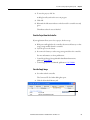
– anytime through the Logix Designer application.
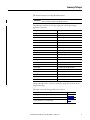
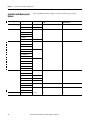
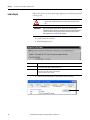
A store or load from a memory card has these parameters.
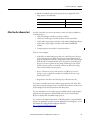
Table 1 - Memory Card Parameters
Parameter
Store and Load
How much time does a store or load take?
Less than three minutes
In what controller mode can I store or load a project?
Program mode
Can I go online with the controller during a store or load?
No
What is the state of the I/O during a store or load?
I/O remains in its configured state for Program mode
Rockwell Automation Publication 1756-PM017E-EN-P - November 2012
9