1
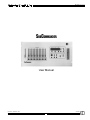
SubCommander
OVERVIEW
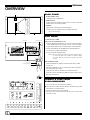
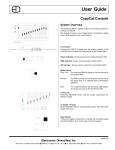
FRONT PANEL CONTROLS
2
3
4
5
7
6
8
1.
3.5 Disk Drive
DISPLAY KEYS:
2.
HOURS/PLAYBACK Access Button
3.
MIN/DIMMER Button
4.
SEC/LEVEL Button
5.
RUN/STOP/UP Button: (Raise key)
6.
RESET/DOWN Button: (Lower key)
CLOCK/EVENT CONTROLS:
7.
Clock Timer=Time
8.
Event Clock
9.
Power Key Switch:
ON
OFF
RECORD ACCESS
10. Page/Event Button & Display
9
1
13
FUNCTION KEYS:
(Access to Playback pages Display; 98-Event T/C Memory Display;
dual 8-segment LED display)
11. RECORD Button:
Access to 'Write' Disk
12. EDIT Button: Access Edit Memories
13. DISK Button: Access Disk Drive
14. REMOTE Button:
Remote access to recall station
15. MODE Switch:Access to Output Features
PILE ON:
"Highest Takes Precedence" to Primary
Output
PASS-THRU: No SubCommander output
SOLO:
SubCommander only output
16. Indicator LED's:
POWER:
Power ON condition
TIME CLOCK:Active TC program in operation
DMX:
DMX Input detected
OVERTEMP: Signal from Dimmer Bank heat sensors
14
16
10
1
11
12
15
FRONT PANEL PLAYBACKS
2
3
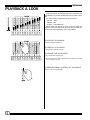
1. GRAND MASTER SLIDER:
2. PLAYBACK FADERS:
12 - 60mm potentiometers with output scales.
3. STATUS LED’S:
Green LED:
Indicates active memory on active page.
Red LED:
Indicates Playback active on another page.
Amber LED: Indicates active Edit mode.
4. PLAYBACK BUTTONS:
Forces assigned levels to Full.
Access to playback edits when used with Edit key.
Access to page numbers when used with Page key.
Access to remote recalls when used with Remote key.
4
3