1
Fadal
User Manual
Section 17: Pallet Changer
Mechanical
Overview
This section will describe the operation of the optional Pallet Changer. The
pallet changer may be operated within the program or by use of the UT
command. The pallets ride on rails with circular bearings. The pallet is locked in
place on the table with a hydraulic clamp.
This clamp is released with program coding of a pallet change or through the
utility menu function. The door operates with a hydraulic valve to open and
close. The pallets are moved by a mechanical arm. The two pallets are
identified as pallet A and pallet B. The forward pallet is pallet A. The rear pallet
is pallet B.
There are three pallet positions, loaded, stored, and working. The loaded
position is when the pallet is locked onto the table with the hydraulic brake. The
stored position is when the pallet is ready to be loaded onto the table. This
position locks into place with a mechanical release. The working position is
when the pallet is released from the stored position. The pallet must be moved
to this position manually. Push the release lever down to pull the table to the
working position. This is the outermost position that the pallet can be moved
to. This position is the most accessible to the operator for part changes.
There are three M Functions that may be used to operate the pallet changer.
These functions can be used to exchange pallets or utilize only one pallet.
Note: The machine parameter “DO YOU HAVE A PALLET CHANGER?” MUST be
answered YES for the pallet to operate.
G17.1 - G17.2 A/B
Word Swap
April 2003
The G17.1 word swap activates B-axis command substitution for the A-axis
command. This allows the use of the A-axis rotary moves in one program for
use with the rotary heads on both pallets. If the program calls for an A-axis
move and the rotary device is connected to the B-axis controller, the G17.1
code will swap the A word for a B word. Existing programs written for the dual
4th axis setups that contain the A and B words are allowed. The G17.1 will
automatically swap the B words to A words. The G17.2 word cancels A/B axis
command swap mode.
Section 17: Pallet Changer
391
Fadal
M31 Exchange
Pallets
User Manual
M31 performs a pallet exchange. The pallet changer will store the current pallet
on the machining table and load the other pallet onto the machining table. No
other machine movements will be made. This is the only code allowed on the
program line.
Note: All fixture and machine offsets MUST be canceled prior to attempting a
pallet change.
M32 Store Pallet B
and Load Pallet A
When Pallet B is on the table, M32.1 will STORE Pallet B (outside machining
area) and pallet arm will move to Pallet A. The machine will be placed in the
WAITING state and the pallet door will remain open until the START button is
pressed. When the START button is pressed Pallet A will be returned to the
table inside the machining area (LOADED).
When Pallet A is on the table, M32.1 will STORE Pallet A. The machine will be
placed in the WAITING state and the pallet door will remain open until the
START button is pressed.When the START button is pressed Pallet A will be
returned to the table inside the machining area (LOADED).
Note: All fixture and machine offsets MUST be canceled prior to attempting a
pallet change.
M32.1 Store Pallet B
& Load Pallet A &
Verify Pallet A has
been Loaded
When Pallet B is on the table, M32.1 will STORE Pallet B and LOAD Pallet A. If
Pallet A is at LOAD position (on machining table), M32.1 will verify Pallet A is at
LOAD (on machining table). No movement will occur.
M33 Store Pallet A
and Load Pallet B
When Pallet A is on the table, M33 will STORE Pallet A (outside the machining
area) and the pallet arm will move to Pallet B. The machine will be placed in the
WAITING state and the pallet door will remain open until the START button is
pressed. When the START button is pressed, Pallet B will be returned to the
table inside the machining area (LOADED).
When Pallet B is on the table, M33 will STORE Pallet B.The machine will be
placed in the WAITING state and the pallet door will remain open until the
START button is pressed. When the START button is pressed, Pallet B will be
returned to the table inside the machining area (LOADED).
Note: All fixture and machine offsets MUST be canceled prior to attempting a
pallet change.
392
Section 17: Pallet Changer
April 2003
Fadal
M33.1 Store Pallet A
& Load Pallet B &
Verify Pallet B has
been Loaded
User Manual
When Pallet A is on the table, M33.1 will STORE Pallet A and LOAD Pallet B.
If Pallet B is at LOAD position (on machining table), M33.1 will verify Pallet B is
at LOAD (on machining table). No movement will occur.
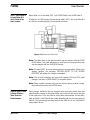
Figure 17-1 Pallet B at LOAD Position
Note: The table move to the pallet position may be stopped with the SLIDE
HOLD button. The pallet movement to and from the stored position may
also be stopped with the SLIDE HOLD button.
Note: The pallet MUST be in the stored position to change pallets. When in the
working position, the message “RETURN PALLET TO THE STORED
POSITION” will appear if a change is attempted.
Note: The air and hydraulics are turned off between M32 and M33 pallet
changes, and after a STORE PALLET in the pallet utilities.
Note: When a pallet is placed in the service position during a pallet change,
the machine tool enters the WAITING state.
Pallet A Rotary Table
& Pallet B Rotary
Table Override
Potentiometer
April 2003
Pallet changer machines that are equipped with dual rotary tables have two
potentiometers located on the sheet metal, one to the left and one to the right
of the pallet door. They are Pallet A rotary table potentiometer for the rotary
table on Pallet A, and Pallet B rotary table potentiometer for the rotary table on
Pallet B. This is assuming the rotary table on the Pallet A is A axis, and Pallet B
rotary table is B axis.
Section 17: Pallet Changer
393
Fadal
User Manual
Potentiometers will become active after Cold Starting the machine and then
enabling the M48.2, Pallet A rotary table override pot, or M48.3, Pallet B rotary
table override pot. These M codes may be used in a program or in MDI mode.
The intention of the potentiometers are to allow the operator to turn the rotary
table for removing or installing the workpiece.
The rotary tables will return automatically to the original position when the
M49.2, Pallet A Rotary Table Override Potentiometer Disable, or M49.3, Pallet
B Rotary Table Override Potentiometer Disable, is programmed. This may also
be done in a program or in MDI mode. The movement of the rotary table will be
slow when the potentiometer is turned. When the axis is returned with disable
codes (M49.2 or M49.3) the move will be automatic and slow in speed. This
rate of speed is not adjustable. The corresponding pot disable M code will lock
out the potentiometer and then bring the rotary tables to the last position. This
will ensure that the rotary tables are in the original position before returning to
the work area.
M48.2 Pallet A
Rotary Table
Override
Potentiometer
Enable
M48.2 enables the Pallet A rotary table axis override pot while Pallet A is
stored.
M49.2 Pallet A
Rotary Table
Override
Potentiometer
Disable
M49.2 disables the Pallet A rotary table axis override pot while Pallet A is
stored.
M48.3 Pallet B
Rotary Table
Override
Potentiometer
Enable
M48.3 enables the Pallet B rotary table axis override pot while Pallet B is
stored.
M49.3 Pallet B
Rotary Table
Override
Potentiometer
Disable
M49.3 disables the Pallet B rotary table axis override pot while Pallet B is
stored.
EXAMPLE:
394
N3 E0 X0Y0 A0
Section 17: Pallet Changer
April 2003
Fadal
User Manual
N4 M33.1 (STORE PALLET A, LOAD PALLET B IN MACHINING AREA
N5 M48.2 (PALLET A ROTARY OVERRIDE POT ENABLE
...
N506 M49.2 (PALLET A ROTARY OVERRIDE POT DISABLE
N507 E0 X0 Y0 A0
N508 M33.1 (STORE PALLET B ROTARY OVERRIDE POT ENABLE
...
N1017 M49.3 (PALLET B ROTARY OVERRIDE POT DISABLE
Remote Machine
Control
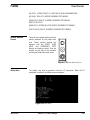
There are two remote machine control
panels mounted by the pallet work
area. These controls provide the
operator with the START, SLIDE
HOLD, and EMERGENCY STOP
buttons for machine control. They are
located on the side of the machine
enclosure at both pallet work areas.
START
GLEITHALT
NOTHALT
Figure 17-2 Remote Machine Control
Utility Menu
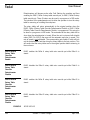
The pallets may also be operated using the UT command. When the UT
command is entered, the following menu appears:
Figure 17-3 Utility Menu
April 2003
Section 17: Pallet Changer
395
Fadal
User Manual
Figure 17-4 Pallet Controls Menu
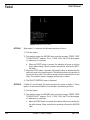
OPTION 1
When option 1 is selected, the following sequence will occur:
1) The door opens.
2) The machine enters the WAITING state, and the message “PRESS START
TO MOVE PALLET” appears. The X, Y, M48, F150, and G1 will also appear
if a table move is necessary.
a. When the START button is pressed, the machine will move to position
for the pallet change. When in position the machine will enter the WAITING state.
3) When the START button is pressed, the hydraulic clamp is released and the
pallet will move to the stored position. The table then moves into position to
receive the other pallet. The pallet is moved into the loaded position on the
table. The hydraulic clamp is engaged and the door is closed.
4) The PALLET CONTROLS menu is displayed.
OPTION 2
If Pallet B is on the table, this option performs the same as option 1. When
option 2 is selected and Pallet A is on the table, the following will occur:
1) The door opens.
2) The machine enters the WAITING state, and the message “PRESS START
TO MOVE PALLET” appears. The X, Y, M48, F150, and G1 will also appear
if a table move is necessary.
a. When the START button is pressed the machine will move to position for
the pallet change. When in position the machine will enter the WAITING
state.
396
Section 17: Pallet Changer
April 2003
Fadal
User Manual
3) When the START button is pressed the hydraulic clamp is released and the
pallet will move to the stored position. The machine enters the WAITING
state for the operator to change parts.
4) When the START button is pressed the pallet is returned to the loaded
position and the door closes.
5) The PALLET CONTROLS menu is displayed.
OPTION 3
If Pallet A is on the table, this option performs the same as option 1. When
option 2 is selected and Pallet B is on the table, the following sequence will
occur:
1) The door opens.
2) The machine enters the WAITING state, and the message, “PRESS START
TO MOVE PALLET” appears. The X, Y, M48, F150, and G1 will also appear
if a table move is necessary.
a. When the START button is pressed the machine will move to position for
the pallet change. When in position the machine will enter the WAITING
state.
3) When the START button is pressed the hydraulic clamp is released and the
pallet will move to the stored position. The machine enters the WAITING
state for the operator to change parts.
4) When the START button is pressed the pallet is returned to the loaded
position.
5) The PALLET CONTROLS menu is displayed.
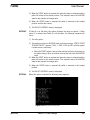
OPTION 4
When this option is selected the following menu appears:
Figure 17-5 Pallet Service Utility Menu
April 2003
Section 17: Pallet Changer
397
Fadal
User Manual
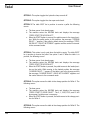
OPTION 1: This option toggles the hydraulic clamp on and off.
OPTION 2: This option toggles the door open and closed.
OPTION 3: The table MUST be in position to receive a pallet the following
occurs:
a. The door opens if not already open.
b. The machine enters the WAITING state and displays the message
“PRESS START TO MOVE PALLET”.
c. When the START button is pressed, the pallet moves to the stored position. While the pallet moves to this position, the message “STORING
PALLET...” appears. If the pallet is already stored, the message “STORING PALLET...PALLET IN STORAGE” appears and the control is returned
to the command mode.
OPTION 4: This option is only used when the table is empty. The table MUST
be in position to receive the pallet. See option 5 and 6. When the table is in
position, the following occurs:
a. The door opens if not already open.
b. The machine enters the WAITING state and displays the message
“PRESS START TO MOVE PALLET”
c. When the START button is pressed, the pallet moves to the loaded position on the table. While moving to the loaded position the message
“LOADING PALLET...” appears. If the table is not in the change position
the message “LOADING PALLET...RAILS NOT ALIGNED” appears and
the control returns to the command mode.
OPTION 5: This option moves the table to the change position for Pallet A. The
following occurs:
a. The door opens.
b. The machine enters the WAITING state and displays the message
“PRESS START TO MOVE PALLET”. The X, Y, M48, F150, and G1 will
also appear if a table move is necessary.
c. When the START button is pressed, the table moves to the change position for Pallet A.
OPTION 6: This option moves the table to the change position for Pallet B. The
following occurs:
398
Section 17: Pallet Changer
April 2003
Fadal
User Manual
a. The door opens.
b. The machine enters the WAITING state and displays the message
“PRESS START TO MOVE PALLET”. The X, Y, M48, F150, and G1 will
also appear if a table move is necessary.
c. When the START button is pressed, the table moves to the change position for Pallet B.
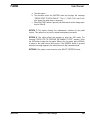
OPTION 7: This option displays the maintenance switches for the pallet
system. This option is to be used by trained maintenance personnel.
OPTION 8: This option allows the operator to enter the JOG mode. The
message “PRESS JOG TO CONTINUE OR MANUAL TO EXIT” appears. Press
the JOG button to enter the Jog mode. When in the Jog mode, press MANUAL
to return to the pallet service utility menu. If the MANUAL button is pressed
when this message appears, the control returns to the command mode.
OPTION 9: This option is used to return to the PALLET CONTROLS menu.
April 2003
Section 17: Pallet Changer
399
Fadal
User Manual
This page intentionally left blank.
400
Section 17: Pallet Changer
April 2003