1
VoiceAlert User Manual
while attempting to program it into the Base Receiver – so imitate the code
instead using a loose Sensor.
2.3
Recording the Base Receiver Zone messages
Slide the Setup Switch to RECORD. Speak clearly with your mouth at a
distance of about 15 cm away from the MIC situated on the top of the Base
Receiver and record your specific Zone message. Return the slide switch
to the RUN position when finished. There are six seconds of recording time
available for each Zone. Make use of the full six seconds by repeating a
message multiple times (e.g. “intruder in driveway!”, “intruder in driveway!”,
“intruder in driveway!”) to maximize the time that the Base Receiver is
reporting a trigger event. This will maximize the chance of hearing the
message. . If the PGM LED is flashing at any stage, you can press the
PLAYBACK button, and Base Receiver will broadcast all Zones that have
recently been activated.
2.4
Setting the Base Receiver low battery warning
You may want to hear a specific message e.g. “Low Battery on Sensor”
when a Sensor’s battery is getting low. To record this message, move the
Setup slide switch to RECORD. While holding down the PLAYBACK
button, say “Low Battery on Sensor” into the MIC. Return the slide switch
to the RUN position. To test the low battery message, press button #1 for 2
seconds. When any of the VA-6000T Sensor/Transmitters experience a
low battery condition, the LOW BATTERY LED will flash on the top of the
Base Receiver. It will also sound the Low Battery Message. Pressing the
PLAYBACK button, will broadcast Zone messages, followed by Low
Battery Message to identify any Sensors, with low batteries. After a new
battery is installed, trigger the Sensor again to cancel the low battery
message.
2.5
Installing Sensors
Once you have programmed the Sensors onto their respective Zones, you
will need to position the Sensors in and around your property such that
they give optimum detection while minimizing the chance of false triggers.
The VoiceAlert System 6 Operating Instructions Manual recommends
mounting the Sensors 2.2m above the ground, parallel to the mounting
surface. This is suitable for most applications however there are certain
situations that require Sensor to be mounted higher or lower and angled
either slightly up or down.
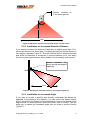
2.5.1 Standard Installation of Sensor
If you want to monitor a general area with no obstructions or pets then
follow the recommended height for mounting Sensors (2.2m) with the
Sensor parallel to the surface you have mounted it onto and no filter
inserts (Figure 5).
Copyright InFocus Trading 111 cc, 2009
7