1
3.5. Tools menu Alt+T...............................................................................
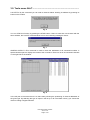
LOCATE F3 By this command you can seek a channel without knowing its address by pressing its
button on the module.
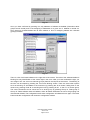
Fig. 6
You can STOP this function by pressing the STOP button. If there is more than one channel with the
same address, the LOCATE command does not run and a warning message is shown:
Fig. 7
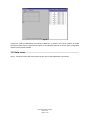
ADRESS CHECK F4 This command is used to check the addresses of all connected modules. A
special window opens to display the results of this command. There is a list of all connected channels
on the right side of the window.
Fig. 8
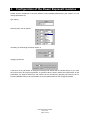
In the left part of the screen there is a chart clearly showing the positioning of channel addresses of
the given type. By selecting the type of output in the list (A or D in the Bank column) you choose the
chart for analog or digital channels.
User Manual PEX Software
www.cue.cz
Page 8 of 25