1
2. Installation and start of the PEX program
2.1. Program installation........................................................................
The program is delivered on CUE Application CD. Insert the CD to your computer, run the file
PEX_setup1605.exe and follow the installation wizard. This file is placed in folder \Software\PEX.
2.2. Start of the program ..........................................................................
2.2.1. Program start with modules Power Express ® online
Link the Power Express® system through the module PEC25 into the serial port of your computer. All
Power Express® modules must have power supply. Run the PEX program from the Windows Start
menu.
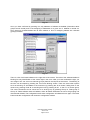
Fig. 1
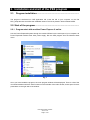
Once you have loaded the program, the main program window will be displayed. There is a list of the
connected modules with their serial numbers on the left side of the main window, and a space for their
parameters on the right side of the window.
User Manual PEX Software
www.cue.cz
Page 5 of 25