1
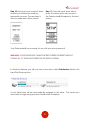
 Step 5: IMMEDIATELY press the [SETUP] key on the touch screen.
If the [SETUP] key is not selected within 3 seconds, the
DataLocker® will automatically connect to the host computer.
Step 6: Press “CHANGE PASSWORD” on
the touch screen.
Step 7: Press OK on the touch screen.
Type 000000 and press the enter key.
Step 8: Press the “OK” button on the
touch screen. Enter a new password 6
to 18 digits long and press the enter
key.
Step 9: Press OK on the touch screen.
Enter the same password you entered
in the previous step to confirm the new
password. Press the enter key.
8