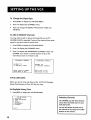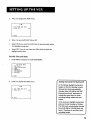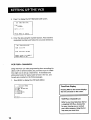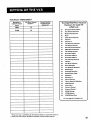
1
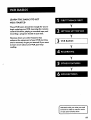
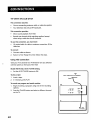
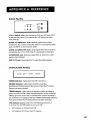
BACK
PANEL
AUDIO
IN FROM
ANT.
VIDEO
out@- @
,,._.F
OUT TO'IV
3CH.4
,.1 @-@
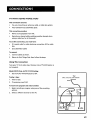
3 CH. 4 Switch
,_
Selects the channel
to see the VCR picture
if you connect
to which
e
you will
tune
the TV
the VCR using one of the
basic hookups.
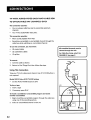
AUDIO
and VIDEO
component,
IN 1 Jacks
Receives signals from
like a VCR or camcorder,
jacks. Use INPUT on the remote
AUDIO
and VIDEO
component,
IN FROM
OUT Jacks
ANT. Jack
Sends signals from VCR to another
it is connected
Receives a signal from
an antenna
or cable
PANEL
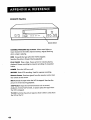
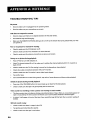
_,_ POWER
POWER Indicator
Indicator
RECORD and TIMER
_
VCR
(_ TIMER
• RECORD
Lights when the VCR isturned on.
Lights when
indicators
feature
has been activated.
TIMER
Indicator
Lights
flash when
during
the VCR is set for a timer
the VCR is recording.
an express
recording
ProTect Plus TM locking
or timer
set and there
or
a timer
recording
off.
is
is no cassette in the VCR. TIMER and RECORD indicators
ProTect Plus
VCR Indicator
recording
and the VCR is turned
Flashes when the clock is not set. Flashes when
flash when
to these jacks.
Passes signal to TV using the cable supplied.
INDICATOR
when
to these
attached.
OUT TO TV Jack
RECORD
it is connected
to select.
like a TV or VCR, when
system when
when
another
TM
locking feature
has been activated.
(Applies Only if the VCR Viewing Channel is 3
or 4). Pressthe TVeVCR button to turn on or off.
•
VCR indicator on: Picture from VCR.
•
VCR indicator off: Picture from TV channel.
45