1
AWARD BIOS SETUP
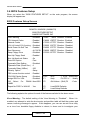
system.
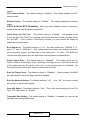
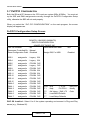
CPU Internal Cache : The default setting is “Enabled”. This setting enables the CPU
internal cache .
External Cache : The default setting is “Enabled”. This setting enables the external
cache.
CPU L2 Cache ECC Checking : When you select Enabled, memory checking is
enable when the external cache contains ECC.
Quick Power On Self Test : The default setting is “Enabled”. This speeds up the
Power On Self Test (POST) by skipping some items that are normally checked during
the full POST. If your system is functioning normally, you can choose this feature to
speed the booting process.
Boot Sequence : The default setting is “C:,A:”; the other options are “CDROM, C, A”
and “A, C” and “C, CDROM, A”. This setting determines where the computer looks first
for an operating system, the hard disk, or the floppy disk, … or other. The BIOS will
load the operating system from the disk drives in the sequence as selected here.
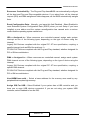
Swap Floppy Drive : The default setting is “Disabled”. This setting gives you an
option to swap A and B floppy disks. Normally, the floppy drive A is the one at the end
of the cable and drive B is at the other end. If you set this option to “Enabled”, the
Drive A will function as Drive B, and vice-versa under the DOS.
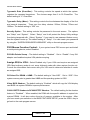
Boot Up Floppy Seek : The defaults setting is “Disabled”. When enabled, the BIOS
will check whether there is a floppy disk drive installed.
Boot Up Numlock Status : The default setting is “On”. If set “Off”, the cursor controls
will function on the numeric keypad.
Gate A20 Option : The default setting is “Fast”. This is the optimal setting for the CPU
card. The other option is “Normal”.
Typematic Rate Setting : The default setting is “Disabled”. If enabled, you can set the
typematic rate and typematic delay.
EM370 / 41