1
My Archive
(Continued)
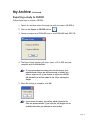
Exporting a study to CD/DVD
Follow these steps to create a CD/DVD:
1. Search for and then select the study you wish to create a CD/DVD of.
2. Click on the Export to CD/DVD button.
3. Choose to export as a DICOM DIR only or as a DICOM DIR and JPEG CD.
4. The Export Study window will open. Insert a CD or DVD into your
computer and click Write Disk.
To copy more than one study, press the Ctrl key on your
keyboard and click on the retrieved study or studies you
wish to export to CD. If you choose to export as a DICOM
DIR, Reveal™ Lite will be added to the CD for viewing the
images.
5. When the writing is complete, click OK.
If you choose to cancel, you will be asked if you wish to
clear the queued studies. If you click No, the images will be
available next time you attempt to write a disk.
Page 21