1
Before you start…......................................................................................................................3
1. The main user interface window...........................................................................................4
Status bar information display :...................................................................................................................4
1.1 Depth, logging speed, image resolution and sonde orientation information display..............5
1.2 Sonde and data replay controls..................................................................................................6
2. Logger, sonde and communications settings .......................................................................8
2.1 Logger settings............................................................................................................................8
Configuring the winch type and depth encoder parameters :...........................................................................8
Probe configuration settings.............................................................................................................................9
Communication settings and status................................................................................................................10
Settings.......................................................................................................................................................10
Status..........................................................................................................................................................10
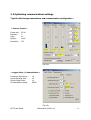
2.2 Optimising communications settings.......................................................................................11
Typical initial image transmission and communication configuration : .......................................................11
« Camera Control »...................................................................................................................................11
« Logger Setup / Communication » ..........................................................................................................11
Uphole communication initial configuration :...............................................................................................12
Downhole communication initial configuration :...........................................................................................12
Increasing uphole transmission speed :..........................................................................................................12
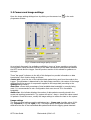
2.2 Camera and image settings......................................................................................................14
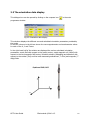
2.3 The orientation data display....................................................................................................16
3. Programme menus...............................................................................................................17
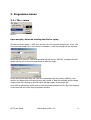
3.1 « File » menu.............................................................................................................................17
Open and play: Select an existing data file for replay....................................................................................17
Export :...........................................................................................................................................................18
Export image data to a bitmap file : ..........................................................................................................18
Export image data in LGX Format: .........................................................................................................19
LGX File Importation in WellCad : ..........................................................................................................20
Export data to a LAS 2.0 format file : .......................................................................................................21
New log..........................................................................................................................................................22
Log header: information concerning the client and borehole....................................................................22
Log header: log date, sequencing and borehole data.................................................................................23
Log header: casing and open hole data......................................................................................................24
Log header: free text field for remarks......................................................................................................24
Exit.................................................................................................................................................................24
3.2 « Setup » Menu.........................................................................................................................25
Camera Control : ...........................................................................................................................................25
Logger Setup :................................................................................................................................................25
Deviation Data : .............................................................................................................................................25
Imperial Depht :..............................................................................................................................................25
4. Appendices :.........................................................................................................................26
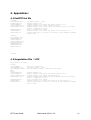
4.1 EmOPTV.tol file.......................................................................................................................26
4.2 Importation File *.OTV..........................................................................................................26
4.3 Troubleshooting and other options..........................................................................................27
I get an error message Can’t load FTD2xx.dll ..........................................................................................27
How can I configure the system for another logging sonde?.....................................................................27
I would like to change the image refresh rate to avoid display problems..................................................27
What does the audible alarm during logging signify ?..............................................................................27
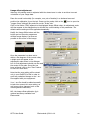
Image offset adjustment.............................................................................................................................28
OPTV User Guide
Electromind ©2011 r1.4
2