1
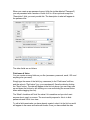
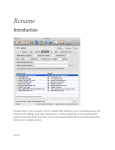
When you create a new password record (click the toolbar labeled "Password")
you are presented with a number of fields to fill in. All are optional except the
"Description" field, you must provide this. The description is what will appear in
the password list.
The other fields are as follows:
Field name & Value
You can create as many fields as you like (username, password, email, URL and
anything else you need).
Simply type the name of the field (e.g. username) in the "Field name" edit box,
and the value in "Field value" (e.g. your name/email). Save the data by clicking
the "Save" button. The data will appear in the list box above (you can drag rows
up and down the list box by left-clicking on a row and holding the mouse button
down while dragging the row).
The "Mask" checkbox will 'hide' the value if it is sensitive and you don't want
anyone else to see it on screen. The most useful purpose for this is to hide
passwords and URL's from view.
To edit a field name/value you have already created, select it in the list box and it
will appear in the name and value edit boxes. Once you have edited the data