1
OPC Server L, User’s Manual
10
Fig. 1.1:
Fig. 1.2:
Fig. 1.3:
Fig. 1.4:
Fig. 2.1:
Fig. 2.2:
Fig. 2.3:
Fig. 2.4:
Fig. 2.5:
Fig. 2.7:
Fig. 2.8:
Fig. 2.9:
Fig. 3.1:
Fig. 3.2:
Fig. 3.3:
Fig. 3.4:
Fig. 3.5:
Fig. 3.6:
Fig. 3.7:
Fig. 3.8:
Fig. 3.9:
Fig. 4.1:
Fig. 4.2:
Fig. 4.3:
Fig. 4.4:
Fig. 4.5:
Fig. 4.6:
Fig. 4.7:
Fig. 4.8:
Fig. 4.9:
Fig. 4.10:
Fig. 4.11:
Fig. 4.12:
Fig. 4.13:
Fig. 4.14:
Fig. 4.15:
Fig. 4.16:
Fig. 4.17:
Fig. 5.1:
Fig. 5.2:
Fig. 5.3:
Fig. 6.1:
Fig. 6.2:
Fig. 6.3:
List of Figures
List of Figures
From Proprietary Solutions to a Plug-and-Play Standard..........................................5
Use of Process Data in Business Applications ...........................................................7
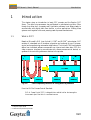
Easylon OPC Server Structure..................................................................................9
OPC Data Model...................................................................................................11
License Agreement.................................................................................................14
Choose Destination Location..................................................................................14
Server Type ...........................................................................................................15
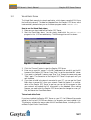
Name of Program Group .......................................................................................15
Installation in Progress ..........................................................................................16
Installation Completed...........................................................................................16
Programm Group after Installation........................................................................16
OPC Server Splash Screen ......................................................................................18
Project Settings......................................................................................................21
Protocol Window Settings .....................................................................................23
Options for OPC Events ........................................................................................23
Options for LNS Events .........................................................................................24
Archive Options ....................................................................................................24
Show or Hide Columns ..........................................................................................25
Group/Items Diagnosis ..........................................................................................25
General Options ....................................................................................................26
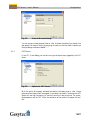
Entering License Key .............................................................................................27
Network Structure Window ..................................................................................29
Context-Menu of Network Variables .....................................................................30
Hierarchy of LNS Items .........................................................................................31
Add Monitor Set....................................................................................................32
Paste Network Variable .........................................................................................32
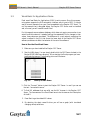
Copy Path String in the OPC Server ......................................................................34
Add Item in OPC Client........................................................................................34
Network Variable Properties..................................................................................35
Monitor Point Properties .......................................................................................35
Monitor Set Properties ...........................................................................................36
Config Properties...................................................................................................37
Value information for NVs and MPs ......................................................................37
Change Value ........................................................................................................38
Group/Item Diagnosis: General Information..........................................................39
Group/Item Diagnosis: Client Information.............................................................39
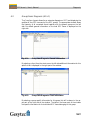
Group/Item Diagnosis: Group Information ............................................................40
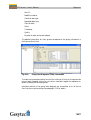
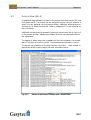
Extract of the Protocol Window with Context Menu..............................................41
Start-up of VBDemo..............................................................................................43
Start-up of VBA Demo..........................................................................................44
Graph of VBA Demo.............................................................................................45
NV Properties in OPC Server L..............................................................................47
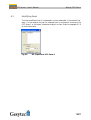
Integrating OPC Support to Visual Basic ...............................................................48
Starting the Visual Basic Editor .............................................................................48
58