1
5. General Hints
Here are a few general hints to make the Speech Motor Learning Program easier
to use and make it easier to manage many patient‟s data and word sets.
Don‟t create more than one patient file for a patient. Store the target
sounds for the patient in that single file – you can always add more
sounds later and then just save the file again. When you want to create
different nonword sets, use the Ranges option on the main screen of the
Speech Motor Learning Program to specify which sounds to use in the
creation of the word set. Don‟t create a different patient file for each
different nonword set.
We suggest that you create a directory where you store all your patient
files and word sets in. This will avoid confusion and will ensure that you
always know where to look for the files when you need them.
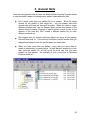
When you have more than one patient, it may also be a good idea to
create a subdirectory for each patient. In each patient‟s directory you can
then store the patient file, as well as all the word sets that you have
created for that patient. An example of such a structure in Windows
Explorer would be:
26