Transcript
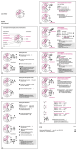
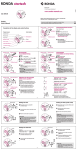
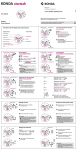
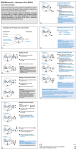
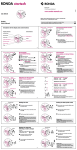
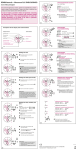
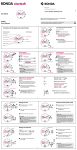
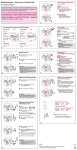
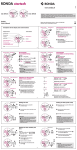
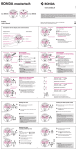
www.ronda-startech.com ALARM 1112 1 2 10 3 9 4 8 7 6 5 Cal. 4120.B 60 45 06 / 2009 Ronda AG CH-4415 Lausen/Switzerland 15 30 21 Battery type: 395 (diameter 9.5mm x 2.6mm / SR 927 SW) Accuracy: +20 / -10 seconds per month English User’s Manual In case your watch needs to be repaired or to raise claims under a guarantee, please contact the point of sales Description of the display and control buttons Display elements Control buttons Minute hand Hour hand 1112 1 2 10 3 9 4 8 7 6 5 Small minute hand 60 45 15 30 Small hour hand Crown Push-button 21 Second hand Date Setting the alarm time Alarm time Switching the alarm on / off Alarm time Activate the setting mode 1112 1 2 10 3 9 4 8 7 6 5 Press the push-button for at least 2 seconds. As soon as the small minute hand jumps forward one minute, this mode is active. 60 45 15 30 I 31 ,5% = 40mm Druchmesser Alarm time 5% = 40mm Druchmesser 45 15 Example: – Date / time on the watch: – Present date / time: 17 04 / 1:25 AM / 8:30 PM 30 I II 65,5% = 40mm Druchmesser Reference time 1112 1 2 10 3 9 4 8 7 6 5 60 45 Turn the crown until the correct date appears. 04 15 30 I II III *Continue to turn the crown until the current time 8:30 PM appears. Push the crown back into position I appears 03 . Second hand Once the set alarm time has been reached, a signal is emitted for 20 seconds. This signal is repeated after two minutes. Following brief pressing of the push-button, the signal is immediately switched off. 04 Turn the crown until yesterday’s date Reference time 1 beep alarm switched off 65,5% = 40mm Druchmesser continues to run). Date 2 beeps alarm switched on Please note: The alarm can be set maximum 12 hours before the desired alarm time. Pull out the crown to position II (watch 17 Push-button Setting the time and date Crown 60 pressing the push-button: 15 30 31 Short pressing (less than 1 second): the alarm time is moved forward by the minute. Long pressing (longer than 2 seconds): the alarm time is moved forward until the push-button is released. Please note: If the push-button is not activated for 10 seconds, the setting mode of the alarm time deactivates itself. At the same time, two beeps are emitted to indicate that the alarm is switched on. The alarm is switched on / off by briefly 60 45 I Setting Push-button 1112 1 2 10 3 9 4 8 7 6 5 1112 1 2 10 3 9 4 8 7 6 5 (the display changes from reference to alarm time.) Alarm time Pull out the crown to position III 1112 1 2 10 3 9 4 8 7 6 5 60 45 15 30 I II III (the second hand stops. The display changes from alarm time to reference time.) 1112 1 2 10 3 9 4 8 7 6 5 60 45 15 30 I ,5% = 40mm 0 3 Druchmesser 04 II III * Please observe the AM / PM clock rhythm. Setting the date (quick mode) 1112 1 2 10 3 9 4 8 7 6 5 ,5% = 40mm Druchmesser 60 45 15 30 I What is the reference time? Pull out the crown to position II (the watch The current time is displayed by means of the hour and minute hand. continues to run). Parallel to the current time, the reference time runs in the background: the alarm time refers itself to this reference time. Thus, resetting the time also requires the identical correction of the reference time. Turn the crown until the correct II date 01 appears. 31 Push the crown back into position I. 1112 1 2 10 3 9 4 8 7 6 5 45 15 30 I II ,5% = 40mm 0 1 Druchmesser Reference time Small minute hand 60 ,5% = 40mm Druchmesser 45 15 30 I 04 II III Reference time 1112 1 2 10 3 9 4 8 7 6 5 65,5% = 40mm Druchmesser Alarm time Setting the reference time (second hand stops. The display changes from alarm time to reference time.) 45 15 30 I II *Push the crown back into position I 1112 1 2 10 3 9 4 8 7 6 5 Activating the setting mode (the display changes from reference time to alarm time). A signal indicates that the alarm is switched off. III the reference time is moved forwards by the minute. Medium pressing: (1–2 seconds): the reference time is moved forwards by the hour. Long pressing (longer than 2 seconds): the reference time is moved forwards until the push-button is released. 60 45 15 30 I Press the push-button for at least 2 seconds. As soon as the small minute hand jumps forwards one minute, this mode is active. 04 Short pressing (less than 1 second): 60 04 Setting the date too quickly in quick mode can result in the incorrect date being displayed. Switching the date between 01 and 31 (position II) restores the syn-chronisation. *Pull out the crown to position III 1112 1 2 10 3 9 4 8 7 6 5 If the reference time is not synchronised with the current time, this results in the alarm signal being emitted at a different time to the set alarm time. Please note: The date of the following day must be set in the calendar changing phase between 9 PM and midnight. 60 Please note: Resetting the time also requires the identical correction of the reference time. Please refer to «setting the reference time». II III Please note: The reference time must display the same time as the current time. This means that resetting the current time also requires the identical correction of the reference time. Afterwards, the alarm time has to be reset. * To set your watch «to the exact second», the crown must be pulled out into position III when the second hand is in position 60. The crown must be pushed back «to the exact second» into position I (as a guideline: radio signal, radio clocks, etc.).