1
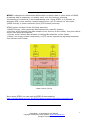
mobileNtrip application acts as a NTRIP Client. mobileNtrip has a VRS (Virtual Reference Station) option which enables reading NMEA format data from the GPS rover with sending it to the NTRIP Caster before receiving correction data. Normally, to assure the above, a set of different devices must be used. Apart from the GPS rover, data transfer connection is established using a mobile phone as a modem and a laptop computer or a palmtop with the NTRIP client application installed. Now, thanks to mobileNtrip, correction data can be received from the server and transferred to the GPS rover without the use of a laptop or a palmtop. A mobile phone is responsible for everything: connecting to the Caster via GPRS, sending NMEA string, receiving correction data, sending data via Bluetooth to the GPS rover and showing all needed parameters on the phone display. 2. Hardware. To operate with mobileNtrip, you need: GPS rover – with differential correction data function and Bluetooth module, a separate COM-Bluetooth converter with battery can be used also, e.g. http://www.sena.com/products/industrial, mobile phone – with at least Java MIDP 2.0 environment and Java Bluetooth API (JSR-82) support. List of supported phones you can check at: http://www.mobilentrip.com/devices.htm When selecting a phone, you should choose the one with a long life battery in order to provide enough power for Bluetooth module operation. A good choice is to have a spare phone battery during measurement works. mobileNtrip v. 3.52 Bluetooth User Manual Copyright © 2003-2010 4cell Systems. www.mobilentrip.com All rights reserved. 3