1
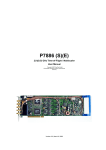
P7887
250 ps / 4 GHz Time-of-Flight / Multiscaler
User Manual
copyright FAST ComTec GmbH
Grünwalder Weg 28a, D-82041 Oberhaching
Germany
Version 3.03, May 26, 2009
Warranty Information
Warranty Information
FAST ComTec warrants proper operation of this software only when used with software and
hardware supplied by FAST ComTec. FAST ComTec assumes no responsibility for modifications
made to this software by third parties, or for the use or reliability of this software if used with
hardware or software not supplied by FAST ComTec. FAST ComTec makes no other warranty,
expressed or implied, as to the merchantability or fitness for an intended purpose of this software.
Software License
You have purchased the license to use this software, not the software itself. Since title to this
software remains with FAST ComTec, you may not sell or transfer this software. This license
allows you to use this software on only one compatible computer at a time. You must get FAST
ComTec's written permission for any exception to this license.
Backup Copy
This software is protected by German Copyright Law and by International Copyright Treaties. You
have FAST ComTec's express permission to make one archival copy of this software for backup
protection. You may not otherwise copy this software or any part of it for any other purpose.
Copyright 2001 - 2009 FAST ComTec Communication Technology GmbH,
D-82041 Oberhaching, Germany. All rights reserved.
This manual contains proprietary information; no part of it may be reproduced by any means
without prior written permission of FAST ComTec, Grünwalder Weg 28a, D-82041 Oberhaching,
Germany. Tel: ++49 89 66518050, FAX: ++49 89 66518040, http://www.fastcomtec.com .
The information in this manual describes the hardware and the software as accurately as
possible, but is subject to change without notice.
ComTec GmbH
II
Important Information on Hardware Compatibility
Important Information on Hardware Compatibility
The P788x Series Multiscalers are PCI Local Bus compliant devices. As such the board contains
the configuration space register organization as defined by the PCI Local Bus Specification.
Among the functions of the configuration registers is the storage of unique identification values for
our devices as well as storage of base address size requirements for correct operation specific to
each of our products.
The host computer that our products are installed in is responsible for reading and writing to/from
the PCI configuration registers to enable proper operation. This functionality is referred to as 'Plug
and Play' (PnP). As such, the host computer PnP BIOS must be capable of automatically
identifying a PCI compliant device, determining the system resources required by the device, and
assigning the necessary resources to the device. Failure of the host computer to execute any of
these operations will prohibit the use of the P788x Series Multiscalers in such a host computer
system.
It has been determined that systems that implement PnP BIOS, and contain only fully compliant
PnP boards and drivers, operate properly. However, systems that do not have a PnP BIOS
installed, or contain hardware or software drivers, which are not PnP compatible, may not
successfully execute PnP initialization. This can render the P788x Series inoperable. It is beyond
the ability of FAST ComTec's hardware or software to force a non-PnP system to operate P788x
Series Multiscalers.
ComTec GmbH
III
WARNINGS
WARNINGS
Damage to the P7887 board, the computer or injury to yourself may result if power is applied
during installation.
Static electricity discharges can severely damage the P7887. Use strict antistatic procedures
during the installation of the board.
Take care to provide ample airflow around the P7887 board.
Take care not to exceed the maximum input values as described in the technical data.
The START and STOP inputs are ultra high speed, high sensitivity inputs and thus, susceptible to
oscillation. Take care to apply low impedance (≤ 50 Ω) source signals and well shielded, 50 Ω
cables.
ComTec GmbH
IV
Table of Contents
Table of Contents
1. Introduction .............................................................................................................................. 1-1
2. Installation Procedure .............................................................................................................. 2-1
2.1. Hard- and Software Requirements ............................................................................. 2-1
2.2. Hardware Installation .................................................................................................. 2-1
2.3. Software Installation.................................................................................................... 2-2
2.4. Getting Started with a basic measurement................................................................. 2-3
2.4.1. Connecting the test signals ............................................................................ 2-3
2.4.2. Starting MCDWIN and setup for the measurement ....................................... 2-4
3. Hardware Description .............................................................................................................. 3-1
3.1. Overview ..................................................................................................................... 3-1
3.2. START / STOP Inputs................................................................................................. 3-2
3.3. SYNC / Monitor Outputs.............................................................................................. 3-3
3.4. TAG Inputs .................................................................................................................. 3-4
3.5. 'GO'-Line ..................................................................................................................... 3-5
3.6. FEATURE (Multi) I/O Connector................................................................................. 3-6
3.7. Timebase .................................................................................................................... 3-7
4. Functional Description ............................................................................................................. 4-1
4.1. Introduction ................................................................................................................. 4-1
4.2. Modes of Operation..................................................................................................... 4-1
4.2.1. Stop-After-Sweep Mode ................................................................................. 4-1
4.2.2. Continuous / Wrap-Around Mode................................................................... 4-1
4.2.3. Sequential Mode ............................................................................................ 4-1
4.2.4. Start Event Marker ......................................................................................... 4-2
4.2.5. Tagged Spectra Acquisition ........................................................................... 4-2
4.3. FIFO Concept.............................................................................................................. 4-2
4.4. Measurement Time Window, Acquisition Delay and Trigger Hold Off........................ 4-3
4.5. Sweep Counter ........................................................................................................... 4-4
5. Windows Server Program ........................................................................................................ 5-1
5.1. Server functions .......................................................................................................... 5-1
5.1.1. Initialisation files ............................................................................................. 5-1
5.1.2. Action menu ................................................................................................... 5-2
5.1.3. File menu........................................................................................................ 5-2
5.1.4. Settings dialog................................................................................................ 5-4
5.1.5. System definition dialog ................................................................................. 5-6
5.1.6. File formats..................................................................................................... 5-8
5.2. Control Language........................................................................................................ 5-9
5.3. Controlling the P7887 Windows Server via DDE...................................................... 5-14
5.3.1. Open Conversation ...................................................................................... 5-14
5.3.2. DDE Execute................................................................................................ 5-14
5.3.3. DDE Request ............................................................................................... 5-15
5.3.4. Close Conversation ...................................................................................... 5-16
5.3.5. DDE Conversation with GRAMS/386........................................................... 5-17
5.4. Controlling the P7887 Windows Server via DLL....................................................... 5-18
6. MCDWIN Software................................................................................................................... 6-1
6.1. File Menu .................................................................................................................... 6-2
6.2. Window Menu ............................................................................................................. 6-3
6.3. Region Menu............................................................................................................... 6-4
6.4. Options Menu.............................................................................................................. 6-7
6.5. Action Menu .............................................................................................................. 6-17
7. Programming and Software Options........................................................................................ 7-1
8. Appendix .................................................................................................................................. 8-1
ComTec GmbH
V
Table of Contents
8.1.
8.2.
8.3.
8.4.
8.5.
Performance Characteristics....................................................................................... 8-1
8.1.1. General........................................................................................................... 8-1
8.1.2. Timebase........................................................................................................ 8-1
8.1.3. Data Throughput ............................................................................................ 8-2
Specification................................................................................................................ 8-2
8.2.1. Absolute Maximum Ratings ........................................................................... 8-2
8.2.2. Recommended Operating Conditions ............................................................ 8-2
8.2.3. Power Requirements...................................................................................... 8-2
8.2.4. Connectors ..................................................................................................... 8-2
8.2.5. Physical .......................................................................................................... 8-4
Accessories................................................................................................................. 8-5
Trouble Shooting......................................................................................................... 8-6
Personal Notes............................................................................................................ 8-7
ComTec GmbH
VI
Table of Figures
Table of Figures
Figure 2.1: Add-on multi I/O port connector.................................................................................. 2-1
Figure 2.2: TAG input port connector............................................................................................ 2-2
Figure 2.3: Basic measurement timing diagram ........................................................................... 2-3
Figure 2.4: Basic measurement setup .......................................................................................... 2-3
Figure 2.5: Bracket mounted signal connectors ........................................................................... 2-4
Figure 2.6: P7887 / MCDWIN startup window .............................................................................. 2-4
Figure 2.7: P7887 Settings window .............................................................................................. 2-5
Figure 2.8: Input Threshold window.............................................................................................. 2-5
Figure 2.9: Axis Parameter window .............................................................................................. 2-6
Figure 2.10: Calibration of P7887 ................................................................................................. 2-6
Figure 2.11: MCDWIN properly setup........................................................................................... 2-7
Figure 2.12: Resulting spectrum of the basic measurement ........................................................ 2-7
Figure 3.1: P7887 PCI board ........................................................................................................ 3-1
Figure 3.2: Connectors on the mounting bracket.......................................................................... 3-2
Figure 3.3: START / STOP input schematic ................................................................................. 3-2
Figure 3.4: Trace of the STOP input sensitivity ............................................................................ 3-3
Figure 3.5: Fast-NIM SYNC_1 output schematic.......................................................................... 3-4
Figure 3.6: TAG input connector................................................................................................... 3-4
Figure 3.7: TAG input schematic .................................................................................................. 3-5
Figure 3.8: TAG input connector pinning ...................................................................................... 3-5
Figure 3.9: 'GO'-line connector ..................................................................................................... 3-5
Figure 3.10: 'GO'-line logic circuit schematic ................................................................................ 3-6
Figure 3.11: FEATURE (multi) I/O connector pinning................................................................... 3-6
Figure 3.12: FEATURE (multi) I/O port connector ........................................................................ 3-6
Figure 3.13: FEATURE (multi) I/O port schematic........................................................................ 3-7
Figure 4.1: Two step FIFO concept for highest data throughput .................................................. 4-3
Figure 5.1: P7887 Server Window ................................................................................................ 5-1
Figure 5.2: P7887 Ini File .............................................................................................................. 5-2
Figure 5.3: Data Operations dialog ............................................................................................... 5-2
Figure 5.4: Replay Settings dialog ................................................................................................ 5-3
Figure 5.5: Settings dialog ............................................................................................................ 5-4
Figure 5.6: Input Thresholds and DAC’s dialog ............................................................................ 5-6
Figure 5.7: System Definition dialog box for a single P7887 card ................................................ 5-6
Figure 5.8: System Definition dialog box, two P7887 cards ......................................................... 5-7
Figure 5.9: Remote control dialog................................................................................................. 5-8
Figure 5.10: Opening the DDE conversation with the P7887 in LabVIEW ................................. 5-14
Figure 5.11: Executing a P7887 command from a LabVIEW application................................... 5-15
Figure 5.12: Getting the total number of data with LabVIEW ..................................................... 5-15
Figure 5.13: Getting the data with LabVIEW .............................................................................. 5-16
Figure 5.14: Closing the DDE communication in LabVIEW........................................................ 5-16
Figure 5.15: Control Panel of the demo VI for LabVIEW ............................................................ 5-17
Figure 6.1: MCDWIN main window............................................................................................... 6-1
Figure 6.2: MCDWIN Map and Isometric display.......................................................................... 6-2
Figure 6.3: Print dialog box ........................................................................................................... 6-3
Figure 6.4: ROI Editing dialog box, left: Single spectra, right: 2D spectra.................................... 6-6
Figure 6.5: Single Gaussian Peak Fit ........................................................................................... 6-6
Figure 6.6: Log file Options for the Single Gaussian Peak Fit ...................................................... 6-7
Figure 6.7: Colors dialog box ........................................................................................................ 6-8
Figure 6.8: Color Palette dialog box.............................................................................................. 6-8
Figure 6.9: Single View dialog box................................................................................................ 6-9
Figure 6.10: MAP View dialog box.............................................................................................. 6-10
Figure 6.11: Slice dialog box....................................................................................................... 6-10
Figure 6.12: Isometric View dialog box ....................................................................................... 6-11
Figure 6.13: Axis Parameter dialog box...................................................................................... 6-11
Figure 6.14: Scale Parameters dialog box.................................................................................. 6-12
ComTec GmbH
VII
Table of Figures
Figure 6.15: Calibration dialog box ............................................................................................. 6-13
Figure 6.16: Comments dialog box ............................................................................................. 6-14
Figure 6.17: P7887 Settings dialog box ...................................................................................... 6-14
Figure 6.18: Data Operations dialog box .................................................................................... 6-15
Figure 6.19: System Definition dialog box .................................................................................. 6-15
Figure 6.20: Replay dialog box ................................................................................................... 6-16
Figure 6.21: Tool Bar dialog box................................................................................................. 6-16
Figure 6.22: Function keys dialog box ........................................................................................ 6-17
Figure 7.1: Autocorrelation software option .................................................................................. 7-1
ComTec GmbH
VIII
Introduction
1.
Introduction
The P7887 PCI board is one of the fastest commercially available multiple event time digitizers. It
can be used as an ultra fast Multiscaler/TOF system in Time-of-Flight Mass-Spectrometry and
time-resolved Single Photon Counting. The P7887 is capable of accepting one event (stop pulse)
in every time bin. Burst/peak count rates of up to 4 GHz can be handled with no deadtime
between timebins. A proprietary input logic securely prevents double counting.
The exceptionally dynamic range of up to 38 bit enables sweeps for an incredible 68.7 seconds
with a time resolution of 250 ps. A crystal stabilized PLL oscillator assures a resolution of typically
<400 ps FWHM at a full scale time range of 100 µs (measured in the last time bin of 400,000 time
bins and 30 minutes acquisition time). An optional available oven stabilized oscillator further
improves long-term and temperature stability.
A two step FIFO1 memory concept enables for ultra high event rate capability. Full 4 GHz bursts
can be buffered for at least 2 µs. The first 127 deep multi event FIFO buffers incoming events at a
maximum countrate of 4 GHz. A second 16k deep FIFO is filled at over 12 MHz and buffers the
subsequent data transfer over the PCI bus. Data reduction is performed by recording interesting,
i.e. inside a preselected time window arriving stop events only.
For experiments requiring repetitive sweeps the spectral data obtained from each sweep can be
summed in the PC enabling extremely high sweep repetition rates. A presettable 32 bit sweep
counter enables for exact normalization calculations.
The ultra fast discriminator inputs (±1V input voltage range) allow for a large range of START and
STOP input signals.
Eight TAG inputs allow for a wide range of spectra routing, multi detector experiments, sequential
acquisition etc.
An open-drain 'GO'-line (compatible to other products of FAST ComTec) allows for overall
experiment synchronization.
Two software configurable SYNC outputs provide synchronization and triggering of external
devices or experiment monitoring.
A versatile 8 bit digital I/O2 port may further satisfy your experimental needs.
The P7887 is a fully digital design with "state-of-the-art" components offering excellent
performance and reliability.
The high-performance hardware is matched by sophisticated software delivered with each P7887.
MCDWIN - the MS-WINDOWS based operating software - provides a powerful graphical user
interface for setup, data transfer and spectral data display.
Some of MCDWIN´s features are high-resolution graphics displays with zoom, linear and
logarithmic (auto)scaling, grids, ROIs3, Gaussian fit, calibration using diverse formulas and
FWHM4 calculations. Macro generation using the powerful command language allows task
oriented batch processing and self-running experiments.
"C"-Libraries are available for controlling functions from the user's application program. A DLL
(Dynamic Link Library) is available for operation in a Laboratory Automation environment.
1 FIFO: First In, First Out
2 I/O: Input / Output
3 ROI: Region Of Interest
4 FWHM: Full Width at Half Maximum
ComTec GmbH
1-1
Installation Procedure
2.
Installation Procedure
2.1.
Hard- and Software Requirements
The P7887 requires a personal computer (with INTEL compatible processor) with an available
PCI slot.
A Pentium II or higher processor and at least 64MB of memory are recommended.
A Microsoft WINDOWS NT 4.0 or higher operating system must be installed.
2.2.
Hardware Installation
Turn off the power to your computer system and remove the line cord. Discharge your body from
any static electricity by touching a grounded surface – e.g. the metal surface of the power supply
– before performing any further hardware procedure.
FAST ComTec assumes no liability for any damage, caused directly or indirectly, by improper
installation of any components by unqualified service personnel. If you do not feel comfortable
performing the installation, consult a qualified technician.
WARNING
Damage to the P7887 board, the computer or injury to yourself may result if power is applied
during installation.
Static electricity discharges can severely damage the P7887. Use strict antistatic procedures
during the installation of the board.
Open the cover of the computer case and insert the P7887 PCI board in an unused PCI slot. You
might first have to remove the cover from the rear of the PCI expansion slot you selected. After
the board is carefully seated in the PCI slot, make sure you fasten the board with a screw to the
mounting bracket.
WARNING
Take care to provide ample airflow around the P7887 board.
Figure 2.1: Add-on multi I/O port connector
Now install the add-on multi I/O port connector. In some computer cases special fittings are
available for some types of D-SUB connectors. These are particularly useful to save slots for
additional plug in boards. Otherwise mount the housing bracket with the 15-pin D-SUB connector
ComTec GmbH
2-1
Installation Procedure
in another available slot of your computer. Plug in the 16-pin socket connector (at the end of the
ribbon cable) into the 16 pin four-walled header named FEATURE I/O on the P7887 PCI board.
Figure 2.2: TAG input port connector
If you purchsed the TAG-bits input option install the TAG input port connector now. Also as before
a special fitting for the 15-pin D-SUB connector may be used if available. Otherwise mount the
housing bracket with the 15-pin D-SUB connector in another available slot of your computer. Plug
in the 16-pin socket connector (at the end of the ribbon cable) into the 16 pin four-walled header
named TAG INPUT on the P7887 PCI board.
2.3.
Software Installation
If you are using Windows 98, ME, Windows 2000 or XP, the hardware manager will recognize the
PCI card as a new hardware the first time after power on with the PCI card mounted, and will ask
for a driver. Please insert then the installation disk and specify the WDMDRIV directory on the
installation medium as the driver location.
To install the P7887 software on your hard disk insert the P7887 installation disk and start the
installation program by double clicking from the explorer
SETUP
A directory called C:\P7887 is created on the hard disk and all P7887 and MCDWIN files are
transferred to this directory. Drive C: is taken as default drive and \P7887 as default directory. It is
not mandatory that the P7887 operating software is located in this directory. You may specify
another directory during the installation or may copy the files later to any other directory.
When using Windows NT 4.0, the driver from the NTDRIVER subdirectory on the installation
medium can be installed by hand if not already done as follows, then Windows must be restarted:
A:> CD NTDRIVER <RETURN>
A:NTDRIVER> INSTALL <RETURN>
The Setup program has installed two shortcuts on the desktop, one icon is for Launch87.exe.
Launch87.exe starts the P7887 Hardware Server program P7887.EXE in high priority, this is
recommended when using DMA mode. The other icon starts directly the P7887.EXE in normal
priority. The server program will automatically call the MCDWIN.EXE program when it is
executed. The P7887 Server program controls the P7887 board but provides no graphics display
capability by itself. By using the MCDWIN program, the user has complete control of the P7887
along with the MCDWIN display capabilities.
If you have more than one P7887 modules installed, edit the line devices=1 in the file P7887.INI
and enter the number of modules. The frequency of the PLL in units of Hz has to be defined in
the P7887.INI file by a line like pllfreq=4e9.
To run the P7887 software, simply double click on the “P7887 Server Program“ icon. To close it,
close the P7887 server in the Taskbar.
ComTec GmbH
2-2
Installation Procedure
2.4.
Getting Started with a basic measurement
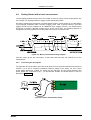
To ease getting familiar with the use of the P7887 we will now setup a basic measurement. We
use a simple TTL signal generator to supply START and STOP signals.
We want to measure the arrival time of multiple STOP events in a time window of 4 µs that begins
10 µs (delayed acquisition) after a START (Trigger) pulse. After a specific sweep a new start
(trigger) should not be accepted for an additional 50 µs (trigger hold off). The measurement
should run for exactly 1,000,000 sweeps (scans, shots) until it ends. The resulting spectrum is
suggested to look like a garden fence with peaks every 100 ns or 400 time bins.
Figure 2.3: Basic measurement timing diagram
First let's setup up the wire connections to the board and then start the software to run the
measurement.
2.4.1.
Connecting the test signals
The generator should be able to drive two 50 Ω inputs to some hundred millivolts and should not
exceed 1.7 V as not to exceed the absolute maximum ratings of the inputs. For this, a 50 Ω
power splitter divides the 10 MHz TTL signal into two branches. The two output signals of the
power splitter are connected to the ± 1 V discriminator START and STOP inputs on the PCI
bracket (ref. Figure 2.5).
Figure 2.4: Basic measurement setup
ComTec GmbH
2-3
Installation Procedure
Figure 2.5: Bracket mounted signal connectors
2.4.2.
Starting MCDWIN and setup for the measurement
Next step is to start the P7887 software by double clicking the corresponding icon. This will
automatically start the MCDWIN program. On startup the P7887 Server is iconized and one does
not have to worry about it since all hardware settings are also accessible from the MCDWIN
program which actually is the graphical user interface and which will appear now on your screen
(ref. Figure 2.6).
Figure 2.6: P7887 / MCDWIN startup window
ComTec GmbH
2-4
Installation Procedure
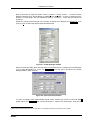
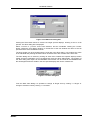
Now we first have to setup the P7887. Click on Options – Range, Preset … to find the P7887
Settings window pop up. Set the Range to 4096 time bins (Binwidth = 1) which corresponds to the
desired 1 µs time range. Set the Acquisition Delay to 10,000 ns = 10 µs and the Hold Off to
50,000 ns.
Enable the sweep preset and type in the number of sweeps as 1,000,000 (ref. Figure 2.7). Then
click on Inputs to select the desired input threshold levels.
Figure 2.7: P7887 Settings window
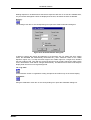
Select the Start and Stop inputs and set them to 'Customized' and a voltage level corresponding
to your signal amplitude (e.g. +0.5 V, ref. Figure 2.8). Now click OK to get back to the P7887
Settings window. Again click OK.
Figure 2.8: Input Threshold window
To verify the quality of the discriminated signals select START resp. STOP on the Fast NIM1
SYNC output (ref. Figure 2.7) and connect the SYNC_1 output to an oscilloscope. Take care to
1 NIM: Nuclear Instrument Modules. This is a standard for mechanical and electronic properties of such modules.
ComTec GmbH
2-5
Installation Procedure
terminate the cable with 50 Ω. Now you can online watch the effect of changing the input
thresholds.
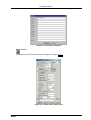
Now lets change the display to have a grid and the axis numbered. Click on Options – Axis….
Enable the grid and the axis ticks (ref. Figure 2.9). Also enable 'Use Calibration' to see the x-axis
in time units rather than channels. Then click OK.
Figure 2.9: Axis Parameter window
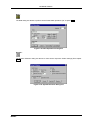
Now lets setup the scale calibration feature to see the actual time data in the spectrum. Click on
Options – Calibration…. and make sure 'Use Calibration' is enabled (ref. Figure 2.10) and the
calibration formula is set to p0 = 10,000 (offset) and p1 = 0.25 (time bin width).
Figure 2.10: Calibration of P7887
The hardware is initialized properly now and also the display should appear as in Figure 2.11. To
start the measurement now click on the Start button.
ComTec GmbH
2-6
Installation Procedure
Figure 2.11: MCDWIN properly setup
The measurement will begin to run and ends when 1,000,000 sweeps are done. The resulting
spectrum should look as in Figure 2.12. The peaks are separated by 400 channels or 100 ns. The
sweep counter shows that exactly 1,000,000 sweeps have been acquired.
Figure 2.12: Resulting spectrum of the basic measurement
ComTec GmbH
2-7
Hardware Description
3.
Hardware Description
3.1.
Overview
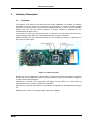
The P7887 is a full size PCI PC board with bus master capabilities. All settings are software
selectable. No jumper, switch, etc. configurations are necessary. It is able to measure multiple
events with a time resolution of 250 ps at an incredible burst rate of over 3 GHz. No deadtime
between the time bins and secure prevention of double counting is established by the
sophisticated input logic circuitry.
The concept of a two step onboard FIFO with an ultra fast 127 deep multi event FIFO and a
second 16k deep FIFO allows for unprecedented burst and average count rates.
Additional features are two onboard discriminators. This enables the inputs to be adjusted for a
large range of input signals.
Figure 3.1: P7887 PCI board
Besides, two SYNC outputs with a large variety of output signal options (all software selectable)
and the 'GO'-line (compatible to other FAST products) allow for easy synchronization or triggering
of other measurement equipment.
Furthermore a versatile, user configurable 8 bit digital I/O port allows for a whole bunch of
experimental control, monitor or whatsoever other tasks.
Moreover, the 8 bit TAG input allows for multi-detector configurations, sequential data acquisition
etc.
Additionally two 12 bit ±10 V analog voltage outputs are available.
ComTec GmbH
3-1
Hardware Description
3.2.
START / STOP Inputs
Figure 3.2: Connectors on the mounting bracket
The START (Trigger) and STOP (event) inputs are SMA types located on the mounting bracket
(ref. Figure 3.2). The input impedance is 50 Ω. The inputs are falling edge sensitive. The
threshold level is software tunable in a range of ±1.0 V.
WARNING
Take care not to exceed the maximum input values as described in the technical data (ref.
chapter 8.2.1).
Figure 3.3: START / STOP input schematic
WARNING
The START and STOP inputs are ultra high speed, high sensitivity inputs and thus, susceptible to
oscillation. Take care to apply low impedance (≤ 50 Ω) source signals and well shielded, 50 Ω
cables.
The discriminator signals, as detected by the input circuitry, may be monitored online with an
oscilloscope on the SYNC outputs. Thus, optimization of the threshold voltages was never as
easy. It is recommended to use the Fast NIM SYNC output for this purpose due to it's higher
bandwidth.
ComTec GmbH
3-2
Hardware Description
The high sensitivity of the START / STOP discriminators together with the monitoring feature on
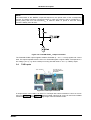
the SYNC outputs allow signal amplitudes even below 10 mV to be used (ref. Figure 3.4).
Figure 3.4: Trace of the STOP input sensitivity
3.3.
SYNC / Monitor Outputs
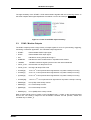
The SYNC outputs provide a large variety of output signals for a lot of synchronizing, triggering,
monitoring or whatever application. The selectable output signals are:
• START:
Discriminated START input signal
• STOP:
Discriminated STOP input signal
• ON:
indicates a running sweep when logic '1'
• WINDOW:
indicates the active measurement / acquisition time window
• 125MHz:
125 MHz continuous signal synchronous to the internal timebase
• FIFO1_FULL: the ultra fast 127 deep FIFO is full
• FIFO2_FULL: the large 16k deep FIFO is full
0
• COUNT[0]:
16 ns = 2 x 16 ns periodic timer signal active only while a sweep is running
• COUNT[1]:
32 ns = 2 x 16 ns periodic timer signal active only while a sweep is running
• COUNT[2]:
…
64 ns = 2 x 16 ns periodic timer signal active only while a sweep is running
• COUNT[26]:
1.074 s = 2 x 16 ns periodic timer signal active only while a sweep is running
• SWEEP[0]:
bit 0 (LSB) of the sweep counter
• SWEEP[1]:
bit 1 of the sweep counter
• SWEEP[2]:
…
bit 2 of the sweep counter
• SWEEP[31]:
bit 31 (MSB) of the sweep counter
1
2
26
Most of these signals may be output on the Fast-NIM SYNC_1 output on the mounting bracket
and on the TTL SYNC_2 output on the FEATURE connector as well (START, STOP and
125 MHz only on SYNC_1).
ComTec GmbH
3-3
Hardware Description
NOTE:
The initial states of the 'SWEEP' output bits depend on the preset value of the corresponding
counter. The sweep counter is a 32 bit up-counter. In case of a preset it is set to ( FFFFFFFFhex –
'preset_value') and runs until FFFFFFFFhex is reached. When no preset is used the sweep
counter is initially set to all zero.
Figure 3.5: Fast-NIM SYNC_1 output schematic
The Fast-NIM SYNC output supplies standard Fast-NIM (0…-0.7 V / 14 mA) signals into a 50 Ω
load. The output impedance also is 50 Ω. For Fast-NIM signals a logical 'TRUE' corresponds to a
low voltage (-0.7 V), e.g. while a sweep is running 'ON' will result in –0.7 V (= 'TRUE') output.
3.4.
TAG Inputs
Figure 3.6: TAG input connector
A unique feature of the P7887 is an 8 bit TTL TAG input with a time resolution of 16 ns. As can be
seen from Figure 3.6 and Figure 3.7 socket mounted 9 pin/8 R SIL PULL-UP and PULL-DOWN
resistors allow user configuration to a large range of line termination needs.
ComTec GmbH
3-4
Hardware Description
Figure 3.7: TAG input schematic
For a functional description of the TAG input refer chapter 4.2.5.
Figure 3.8: TAG input connector pinning
3.5.
'GO'-Line
The system-wide open-drain 'GO' line enables any connected device to start and stop all
participating measurement equipment simultaneously. This allows for easy synchronization of
electronic devices previously often not possible.
Figure 3.9: 'GO'-line connector
The 'GO' line is a system-wide open-drain wired-AND signal that can start and stop a
measurement. This line is also available on the Multi I/O port connector (ref Figure 3.11). The
'GO'-line may be enabled, disabled, set and reset by the software.
ComTec GmbH
3-5
Hardware Description
Figure 3.10: 'GO'-line logic circuit schematic
When watching of the 'GO'-line is enabled a low voltage will halt the measurement. When output
to the 'GO'-line is enabled starting a measurement will release (high impedance output) the 'GO'line whereas a halt of the measurement will pull down the 'GO'-line to a low state. Since it is an
open drain output wired AND connection with other devices is possible.
3.6.
FEATURE (Multi) I/O Connector
A very versatile 8 bit digital I/O port is implemented on the 16 pin four-walled header. The
supplied ribbon cable connects to a 15-pin female D-SUB connector fixed on a mounting bracket.
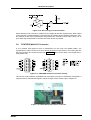
Since the resistors are socket mounted (ref. Figure 3.12) they can be easily user configured in a
most flexible way.
Figure 3.11: FEATURE (multi) I/O connector pinning
This I/O port is fully software controllable and each single (1-bit) port is individually configurable. It
might be used for external alert signals, sample changer control, status inputs / outputs etc.
Figure 3.12: FEATURE (multi) I/O port connector
ComTec GmbH
3-6
Hardware Description
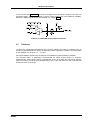
As can be seen from Figure 3.13 each bit of the digital I/O port might be configured as input only
(tri-stated output), pull-up (open drain) or driver output (small R I/O) with readback capability.
Wired-OR / AND connections are also feasible (ref. chapter 5.1.5 ).
Figure 3.13: FEATURE (multi) I/O port schematic
3.7.
Timebase
To derive the outstanding temperature and long-term stability the P7887 is equipped with an
onboard crystal stabilized PLL (phase locked loop) 4 GHz synthesizer oscillator. It is fine tunable
by the software in a range of 3.7 … 4.1 GHz.
For highest stability requirements an optional oven stabilized crystal oscillator is available.
The ovenized option is particularly recommended for longer sweep ranges or long-term
measurements. When figuring that a measurement at say 10 ms after the start has a dynamic
range of 40 million channels a low timebase drift of only 1 ppm will result in a 40(!) channels drift
at the end of the 10 ms range.
ComTec GmbH
3-7
Functional Description
4.
Functional Description
4.1.
Introduction
The P7887 measures the arrival time of STOP input events relative to a previous START signal.
The resolution or time bin width is 250 ps. The full dynamic range is 38 bit of which the lower
32 bit are transferred into the PC. The higher order bits are per se known by the system setup.
27 bits [5…31] of the timer are also accessible via the SYNC outputs ( COUNT[0…26], ref.
chapter 3.3). The measured data is transferred into the PC memory in list mode, i.e. as they are
acquired.
4.2.
Modes of Operation
4.2.1.
Stop-After-Sweep Mode
This might be the most usual mode of operation. When the P7887 is armed it waits for a START
input signal. When one occurs the sweep is started / triggered meaning the time starts to count.
Now the arrival times of the STOP input signals relative to the start are acquired.
An acquisition delay time might be selected to accept only STOP signals that arrive after the
selected delay.
When the selected measurement time range has elapsed the sweep and so the data acquisition
ends. After a short (≤ 200 ns) end-of-sweep deadtime the P7887 is ready for a new start and
begins a new sweep as soon as the next START signal arrives.
To reduce the overall average countrate a HOLD OFF might be selected that discards START
signals until the selected hold off time has elapsed.
4.2.2.
Continuous / Wrap-Around Mode
This mode features absolutely no end-of-sweep deadtime. It is applicable to cyclic experiments
allowing the P7887 to control the whole measurement. Once started, e.g. by the software or a
single start signal, the P7887 timer runs continuously wrapping around at the end of it's 38 bit
range. When one of the timer bits controls / triggers the external experimental setup via the
SYNC outputs you per se know that the higher data bits can be discarded.
6
The lowest order bit accessible (ref. chapter 3.3) is 2 x 250 ps = 16 ns (= COUNT[0] ).Thus, the
minimum cycle time is 32 ns corresponding to 'COUNT[0]' which toggles every 16 ns giving a
32 ns period.
Example:
8
Cyclic measurement with 2 x 32 ns = 8192 ns period. Trigger the external devices when
'COUNT[8]' toggles from 'TRUE' to 'FALSE'. Thus, the lower 7 + 8 = 15 bit of the acquired event
data may be histogrammed giving a 32kchannel spectrum.
4.2.3.
Sequential Mode
Like the stop-after-sweep mode but with a preselected number of sweeps. When the sweep
preset is reached the FIFO is emptied, the corresponding spectrum closed and a new sequence
with the same number of sweeps is started. Thus, the timely development of a histogrammed
distribution may be watched.
ComTec GmbH
4-1
Functional Description
4.2.4.
Start Event Marker
For e.g. off-line or replay analysis of an experiment start markers may be inserted into the list
mode data stream. This also enables to keep the full correlation of start and subsequent stop
events. So one always knows what stop events belong to a special start event.
In this case care should be taken not to fill up the fast 127 deep FIFO as this might lead to the
loss of data integrity when a start event marker is missed due to a full FIFO. The detection of a
filled FIFO is possible via some register flags and the SYNC outputs.
For sequential mode it is better to enable Start Events and use “Starts Preset” than the hardware
sweep counter, as the software can then count the number of sweeps and switch to the next
memory part without stopping the acquisition (ref. chapter 5.1.4 ).
4.2.5.
Tagged Spectra Acquisition
8 TAG inputs allow for sequenced spectra acquisition, multi detector configurations etc. The
8 TAGs are sampled synchronuously to the STOP input. The time resolution is 16 ns and the
STOP-to-TAG sampling delay is 112 ± 8 ns.
E.g. in a multi detector experiment it is feasible to measure which detector has fired and still
maintain the incredible 250 ps binwidth. This allows also for ultra fast coincidence measurements
with very little external logic required.
In case of using the TAG bits the upper 8 bits of the 32 bit time data word are replaced by the
TAGs. Thus, with TAGs usage the maximum time window range is reduced from the standard
1.07 s to 4.19 ms (ref. chapter 5.1.4 ).
4.3.
FIFO Concept
A two step FIFO concept is used to get the ultra high burst count rate of upto 4 GHz while also
providing a large average or sustained event rate.
The detected stop events are fed into a 127 deep, 16 ns wide ultra fast multiple event First-InFirst-Out memory. A sophisticated input logic allows to buffer stop events every 250 ps for at
least 2.032 µs which corresponds to a burst count rate of 4 GHz for a whole 8k spectrum (!). As a
matter of fact each of the 127 FIFO words contains a period of 16 ns regardless of the number of
stop events. This data is then transferred to the second 16k deep FIFO memory at over 12 MHz.
The depth of this second FIFO assures that high speed DMA data transfer over the PCI bus is
feasible without easily loosing data by a filled up FIFO.
ComTec GmbH
4-2
Functional Description
Figure 4.1: Two step FIFO concept for highest data throughput
When an experiment requires to be absolutely sure not to miss any single stop event the
condition of an occasionally filled FIFO is detectable via internal register flags and the SYNC
outputs. Thus, the experimental setup might be changed to prevent e.g. shadow effects or wrong
normalization that might occur from such a situation.
4.4.
Measurement Time Window, Acquisition Delay and Trigger Hold Off
The time window in which stop events are acquired is programmable over a wide range. The
begin (delay after the Start/Trigger) and end of the window is fully programmable. This enables to
detect even late events with large input count rates. This is due to the data reduction executed.
The fact is that all data, that occur outside the selected time window, are discarded.
An acquisition delay, programmable in increments of 16 ns, begins data acquisition only when the
selected time after the corresponding START signal has elapsed. Then data is sampled for the
selected time range. All events occurring before the acquisition offset time has elapsed are
discarded and do not contribute to the burst and average data rate.
32
The theoretical limit of the measurement window is 1 second ≅ 2 time bins which can be
32
38
positioned in 1 second (≅ 2 bin) increments of the 68 sec (≅ 2 bins) full dynamic range.
Example:
Average STOP data rate of 100 MHz. Interesting time window is 1 µs at 1 ms after the START /
TRIGGER signal:
In a time range of 1 ms the 100 MHz input rate would result in 100,000 STOP events which would
cause data loss due to filled FIFOs. When programming an acquisition offset of 1 ms and a 1 µs
measurement time window the resulting number of events per sweep is only 100. Thus, no data
loss at all will occur. And even with highest speed sweep repetition rate an average data rate of
only some 1000 sweeps/sec x 100 events/sweep = 100,000 events/sec has to be stored.
Additionally a trigger hold off time, also programmable in increments of 16 ns, can be selected to
further reduce the average datarate by accepting only a new start / trigger after this additional
time has elapsed.
Example:
Average number of STOP events per sweep is 1,000. Say your computer allows an average
transfer rate of 10 Mevents/s a maximum of 10MHz / 1000 = 10kHz sweep repetition rate can be
accepted. With a sweep length of e.g. <10 µs and start signals every 10 µs the average datarate
would be 100 MHz. A trigger hold off after every sweep of 90 µs will reduce the startrate to
10 kHz and thus the average countrate to 10kHz x 1,000 = 10MHz.
ComTec GmbH
4-3
Functional Description
4.5.
Sweep Counter
A presettable 32 bit sweep counter is incremented at every start of a sweep. In fact the sweep
counter counts the real start of a new sweep rather than the completion of sweeps. When the
preset is enabled and the preselected number of sweeps have occurred further start of a sweep
is disabled.
The individual bits may be output and watched on the SYNC outputs (ref. Chapter 3.3). They are
particularly useful when some experiment should be periodically changed after a fixed number of
sweeps.
ComTec GmbH
4-4
Windows Server Program
5.
Windows Server Program
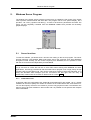
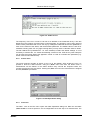
The window of the P7887 server program is shown here. It enables the full control of the P7887
card to perform measurements and save data. This program has no own spectra display, but it
provides - via a DLL („dynamic link library“) - access to all functions, parameters and data. The
server can be completely controlled from the MCDWIN software that provides all necessary
graphic displays.
Figure 5.1: P7887 Server Window
5.1.
Server functions
To start the software, just double click a shortcut icon linking to the server program. The server
program performs a test whether DMA mode works well on this computer, then starts MCDWIN
and gets iconized. Usually you will control everything from MCDWIN, but it is possible to work
with the server alone and independently from MCDWIN.
Note:
To go sure that no events are lost due to a full FIFO when working with MCDWIN and other
applications, we strongly recommend that the P7887 server program runs in high priority at high
counting rates if using DMA mode. This can be achieved by starting it with Launch87.EXE or by
using the Windows task manager (use the ‚Processes‘ tab and right click the entry of
P7887.EXE). Please note the remarks on DMA mode in section 5.1.4
5.1.1.
Initialisation files
At program start the configuration files P7887.INI and P7887A.CFG are loaded. Up to 4 P7887
modules can be used. Specify the number of modules in the P7887.INI file with a line devices=n.
You can also specify more than one module if you have only physical module. The software runs
then for the not physical modules in demo mode and it is possible to load spectra and compare
them in MCDWIN.
ComTec GmbH
5-1
Windows Server Program
Figure 5.2: P7887 Ini File
The frequency of the PLL in units of Hz has to be defined in the P7887.INI file by a line like
pllfreq=4e9. This is also a command of the control language. The frequency can be set in steps of
2 MHz. Other parameters that can be set only by editing the P7887.INI file are the updaterate in
msec for the refresh of the status, and the blocksize parameter. The default value of 1024 is for
moderate counting rates. For very high counting rates you may chose a value like 4096 or 16384.
The file P7887A.CFG (P7887B.CFG... for more modules) contains the default settings. It is not
necessary to edit this file, it is saved automatically. Instead of this .CFG file any other setup file
can be used if its name without the appendix ‘A.CFG’ is used as command line parameter (e.g.
P7887 TEST to load TESTA.CFG).
5.1.2.
Action menu
The server program normally is shown as an icon in the taskbar. After clicking the icon it is
opened to show the status window. Using the „Start“ menu item from the action menu a
measurement can be started. In the status window every second the acquired events, the
counting rate and the time are shown. Clicking the „Halt“ menu item the measurement is stopped
and via „Continue“ proceeded.
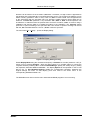
Figure 5.3: Data Operations dialog
5.1.3.
File menu
The Data... item in the File menu opens the Data Operations dialog box. Mark the checkbox
„Save at Halt“ to write a spectrum- and a configuration file at the stop of a measurement. The
ComTec GmbH
5-2
Windows Server Program
filename can be entered. If the checkbox „auto incr." is marked, a 3-digit number is appended to
the filename that is automatically incremented with each saving. The format of the data file can be
ASCII or binary (extension .ASC or .DAT). Click on „Save“ to write a data- and configuration file
of the actual data with the specified name. By pressing „Load“ previously stored data can be
loaded or a control file (extension .CTL) executed. With „Add“ or „Sub“ a stored spectrum can
be added to or subtracted from the present data. Check the checkbox „calib.“ to enforce using a
calibration and shift the data to be added according to the calibration. The „Smooth“ button
performs a n-point smoothing of the spectrum data. The number of points to average can be set
with the „Pts“ edit field between 2 and 21. „Erase“ clears the spectrum.
The menu item File – Replay... opens the Replay dialog.
Figure 5.4: Replay Settings dialog
Enable Replay Mode using the checkbox and specify a Filename of a list file (extension .LST) or
search one by pressing Browse... With the radio buttons it is possible either to choose the
complete list file by selecting All or a selected Start# Range. Specify the sweep range by editing
the respective edit fields from: and Preset: . The Replay Speed can be specified in units of 100
kB per sec. To Use Modified Settings enable the corresponding checkbox; otherwise the
original settings are used. To start Replay press then Start in the Action menu or the
corresponding MCDWIN toolbar icon.
The MCDWIN menu item in the file menu starts the MCDWIN program if it is not running.
ComTec GmbH
5-3
Windows Server Program
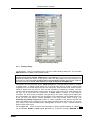
Figure 5.5: Settings dialog
5.1.4.
Settings dialog
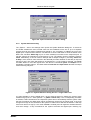
The Hardware... item in the Settings menu opens the P7887 Settings dialog box. The checkbox
DMA mode sets the DMA mode for data transfer.
DMA mode is recommended for high counting rates above 1 million events per second. For low
counting rates please disable "DMA mode" in the settings. Don't use then the shortcut on the
desktop for starting the server in high priority. When not using DMA, the server should run in
normal priority. For very high counting rates of several million events / sec edit the P7887.INI
and set a blocksize of 16384, start the server in high priority and use DMA mode.
The mode of the measurement can be Wrap around if the corresponding checkbox is crossed,
or Sweep mode. In Sweep mode usually via an external start signal a sweep is started, after
completion the next sweep starts with the next start pulse. Wrap around mode means that the
sweep is started once and runs for ever until the acquisition is stopped by software. The time
counter wraps around and keeps counting along from zero. This mode can be used together with
the sync out to synchronize the experiment. If Softw. Start is marked, no start signal is
necessary. The time-counter is masked corresponding to the chosen range and the higher bits
are not evaluated. The signal for the synchronisation of the experiment can be obtained from one
of the two Sync Out outputs. Another application of the wrap around mode is using it for
extremely long sweeps longer than 1 sec. For correct evaluation of the data the overflow has
then to be detected in the software if any stop time is suddenly lower than the last one, and the
long "sweep" has to be terminated with a Time preset. Of course in each 1 second interval at
least 2 events must occure.
Via the Sync out - combo boxes the Synchronisation / Monitor signals specified in chapter 3.3
can be selected: START or STOP signal, ON state (i.e. a sweep is running), WINDOW for the
ComTec GmbH
5-4
Windows Server Program
acquisition time window, 125 MHz as a synchronized time signal, when FIFO1_FULL or
FIFO2_FULL happens, or by specifying COUNT[0]..COUNT[26] with the Bits 0..26 of the time
counter. Furthermore, the bits of the sweep counter can be monitored at the Sync outputs by
specifying SWEEP[0]..SWEEP[31]. The time counter is incremented after 64 basic dwell times
after about 1 nsec.
A new acquisition mode "Time differences" is implemented for analyzing pulse trails. In this
mode the first stop event is used as a reference point and for following stop events the time
difference to the reference is calculated. The displayed spectra is then a relative time distribution
of stop events related to the reference point. Even wrap around mode works in this differential
mode. The first stop event that falls out of the chosen time range after a reference event is taken
as a new reference point.
If Start event generation is checked, a start event is inserted as a zero into the data stream and
counted by the software. The measurement can be stopped automatically after a specified
number of sweeps by checking Starts preset or Sweep preset. In the former case the start
events are used, in the latter case the hardware sweep counter. If Single sweeps is checked,
after the specified number of sweeps the measurement is stopped, the FIFOs read out and then
immediately the acquisition continues. The maximal possible event rate is lower in this mode, but
it is made as sure as possible that during a sweep no data are lost by a full FIFO. If DMA Mode is
checked, the data are acquired using DMA PCI bus master mode, otherwise by direct port
control. The maximum possible data transfer rate is higher in DMA mode, but after a preset
condition it takes some time to get out of the DMA read routine. Therefore for Single sweep mode
it is preferable not to use DMA mode to reduce the dead time. A List file can be written by
checking the corresponding checkbox Write List file. If No Histogram is checked, no
histogramming is made.
A series of measurements can be acquired into separate memory parts by checking Sequential
cycles and specifying the number of cycles. Each single measurement should be terminated by
any of the preset conditions, the complete run stops after performing the specified number of
cycles or is repeated accordingly if the specified number of Sequences is greater than 1.
Check Tagged spectra if you want to acquire up to 256 seperated spectra marked by tag bits as
mentioned in chapters 3.4 and 4.2.5. (MCDWIN will show the spectra in a 2 dimensional view).
If the checkbox Eventpreset is marked, the measurement will be stopped after acquiring more
events than specified in the corresponding edit field. The events are counted only if they are
within the ROI limits, i.e. >= the lower limit and < the upper limit. It is not necessary that this ROI
is within the spectra range. Another possibility is to acquire data for a given time via the Time
preset. In the edit field Range the length of the spectrum can be entered. A Bin width of 1
means the highest time resolution. The Binwidth can be chosen in powers of 2 up to 16777216
times the elementary dwell time. If an Acq. Delay is specified, data are acquired in a sweep not
before the specified time. Hold after sweep allows to wait a specified time after a sweep before
the next sweep can be started.
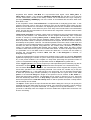
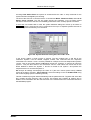
The Inputs... button opens the Input Thresholds and DAC’s dialog box. Here you can specify the
threshold level at the falling edge of the input signal. The combo box provides a choice between
standard Fast NIM (-0.4 V) and customized, i.e. Voltage level set by hand between -1 .. +1 V
(scroll bar or edit field). Also the voltages for the free usable DAC outputs DAC1 and DAC2 can
be set in this dialog.
ComTec GmbH
5-5
Windows Server Program
Figure 5.6: Input Thresholds and DAC’s dialog
5.1.5.
System definition dialog
The „System...“ item in the settings menu opens the System Definition dialog box. If more than
one P7887 modules are used, several cards can be combined to form one or up to 4 seperate
systems that can be started, stopped and erased by one command. In addition the use of the
Digital Input / Output and the GO-Line can defined: It can be used either to show the status of the
MCA if the checkbox Status Dig 0 (0..3 for more modules) is marked. At the respective pins +5
Volt are output if an acquisition is running and 0 V if not. The polarity can be inverted by checking
Invert. Alternatively, it can be used for example with a sample changer by checking "Value inc.
at Stop". Here, the 8 bit value entered in the edit field (a number between 0 and 255) is output at
the Dig I/O port. This value will always be incremented by 1 if the P7887 is stopped. The Invert
checkbox allows to invert the logical level. See also the commands pulse and waitpin how to
handshake a sample changer. The Radio buttons Push-Pull and Open Drain describe the output
mode of the Dig I/O ports.
Figure 5.7: System Definition dialog box for a single P7887 card
It is also possible to use the digital input 4 as an external trigger for starting the system (more
modules: Dig inputs 4..7 start systems 1..4) (DESY control line). If the corresponding checkbox
is marked, a start command for the respective system will not immediately start the system. After
the start command, the digital input will be permanently checked for its logical level. If the level
changes from high to low, the data for the system is cleared and it will then be started. It will stop
if the level returns to high (or vice versa if Invert is marked) and can again be restarted with the
next level change. A stop command for the system will finish the digital input checking. By
ComTec GmbH
5-6
Windows Server Program
checking Clear before Start the spectra is cleared before the start. A stop command for the
system will finish the digital input checking.
The Use of the GO-Line is controled via the 3 checkboxes Watch, Release at Start, and Low at
Sweep Preset reached. The GO line gates directly the hardware. "Low at Sweep preset
reached" means that the GO line is immediately pulled down when a sweep preset is reached.
If more than one P7887 card is used, the system definition dialog box comes up as shown in
Figure 5.8. Here the several units can be combined to form up to 4 separate systems that can be
started, stopped and erased by one command.
Figure 5.8: System Definition dialog box, two P7887 cards
In the shown setting a single system is formed. The two modules MC_A and MC_B are
combined. System 1 can be started, stopped, erased, and continued with the respective
commands in the Action 1 menu. It is also possible for example to form two independent systems
1 and 2: Click on the button labeled <<All below the list box „System1“ to remove all units from
system 1. They are then shown in the „Not active“ list box. Then select unit A and click on the
button labeled >> below the „System 1“ list box to include it into system 1 and perform the
respective action for unit B and System 2.
OK accepts all settings and displays the value of P (the time counter preset value). Cancel
rejects all changes. Pressing „Save Settings“ stores all settings in the file P7887A.CFG using
the control language (see the following section)
This file is loaded at program start automatically and the parameters set. Together with each data
file a header file with extension .887 is saved. This header also contains all settings and in
addition some information like the date and time of the measurement and comments entered in
the MCDWIN program.
ComTec GmbH
5-7
Windows Server Program
Figure 5.9: Remote control dialog
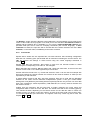
The Remote... button opens the Remote control dialog box. Here all settings can be made for the
control of the P7887 server program via a serial port. If the Checkbox Use Remote Control is
marked and the COMCTL.DLL is available (i.e. you have the optional MCDLAN software), the
specified COM port will be used for accepting commands (see Control language). If Echo
command is marked, the input line will be echoed after the newline character was sent. Echo
character, on the other hand, immediately echoes each character.
5.1.6.
File formats
Spectra data is written into two seperate files, one with extension .887 containing configuration
data and one containing pure spectra data with an extension indicating the chosen format. The
.887 file contains the settings in ASCII format using the control language described in
section 5.2.
Spectra data files with extension .asc contain in each line one decimal number in ASCII
containing the corresponding count value in the histogram.
Binary data files with extension .dat are written with 4 bytes per data value, as usual in the Intel
world in reverse order i.e. the least significant byte comes first.
Another ASCII file format is the x y format with extension .csv. It can be read for example with
Excel and contains the channel number and content as two decimal numbers in ASCII per line
seperated by a TAB character.
A special ASCII format for 2D files, also with extension .asc can be read with the MPAWIN
software for the FAST ComTec MPA/PC multiparameter system. It has got a small header
starting with a line [DISPLAY] and ending with a line [DATA] and then only for each non zero data
point a line containing 3 values seperated by TAB characters, the x and y channel numbers and
the channel content.
Listfiles have the extension .lst and start with a header containing the usual report and
configuration data in ASCII as in the .887 files. The header ends with a line containing [DATA].
Then follows the data, depending on the format chosen for the data file either in ASCII one
number per line, or in binary 4 bytes per number, as usual in the Intel world in the reverse order,
i.e. the least significant byte comes first. The highest 8 bits may contain tag bits if used, see
chapter 3.4 and 4.2.5.
ComTec GmbH
5-8
Windows Server Program
5.2.
Control Language
A sequence of commands that is stored in a file with extension .CTL can be executed by the
P7887 server program with the „Load“ command. A lot of these commands are used in the
configuration file P7887A.CFG, also the header files with extension .887 contain such commands
to set the parameters. Each command starts at the beginning of a new line with a typical
keyword. Any further characters in a line may contain a value or a comment. Following methods
are available to execute commands:
• Load the command file using the Load command in the file menu.
• Enable remote mode in the server and send commands via the serial connection. The
COMCTL.DLL is necessary which is part of the optional available MCDLAN software.
• Open a DDE connection and send the commands via DDE as described in chapter 5.3. The
application name for opening the DDE connection with the standard P7887 server program
P7887.EXE is P7887, the topic is 7887-. Implemented are the DDE Execute to perform any
command, and the DDE Request with items RANGE and DATA.
• Send the commands over a TCP/IP net using a remote shell and the optional available
MCDLAN software. It is necessary to have TCP/IP networking installed and that the remote
shell daemon program MCWNET is running. See the readme file on the installation disk.
• Send the commands via the DLL interface from LabVIEW, a Visual Basic program or any
other application (software including the complete source code of the DLL and examples
optional available).
• From your own Windows application, register a Windows message and then send the
command as can be seen in the DLL source code.
The file P7887A.CFG contains a complete list of commands for setting parameters. An example
is:
digio=0
; Use of digital I/O and GO-Line (hex):
; bit 0: status dig 0..3
; bit 1: Output digval and increment digval after stop
; bit 2: Invert polarity
; bit 3: Push-Pull output
; bit 4..7: Input pins 4..7 Trigger System 1..4
; bit 8: GOWATCH
; bit 9: GO High at Start
; bit 10: GO Low at Sweep preset reached
; bit 11: Clear before external triggered start
digval=0
; 8 bit digital I/O value for sample changer
range=4096
; sets histogram length
fstchan=0
; sets time offset = number of first channel / 64
holdafter=0
; sets hold after sweep in units of 64 basic dwelltimes
sweepmode=3a0
; (hex) sweepmode & 0xF: 0 = normal, 4=sequential
; bit 4: Softw. Start
; bit 5: DMA mode
; bit 6: Wrap around
ComTec GmbH
5-9
Windows Server Program
; bit 7: Start event generation
; bit 8: Enable Tag bits
swpreset=1000
; Sweep-Preset value
prena=0
; Presets enabled (hex)
; bit 0: real time preset enabled
; bit 1: single sweeps enabled
; bit 2: sweep preset enabled
; bit 3: ROI preset enabled
; bit 4: Starts preset enabled
syncout=0
; sync out (hex): bit 0..5 NIM sync out, bit 6..12 TTL sync out
; 0=OFF, 1=FIRST, 2=LAST, 3=FIFO1_FULL, 4=FIFO2_FULL,
; 5=COUNT[0],...,31=COUNT[26], 32...63=SWEEP[0]..SWEEP[31]
ssweeps=1
; number of single sweeps for single sweeps mode
cycles=1
; cycles for sequential mode or number ot tagged spectra
sequences=1
; sequences for sequential mode
dac01=066066
; (hex) LOWORD: START threshold
; HIWORD: STOP threshold
dac23=7ff07ff
; (hex) LOWORD: DAC1 value (+- 10V ),
; HIWORD: DAC2 value (+- 10V)
dac2=hexval
; defines the lower word of dac23.
dac3=hexval
; defines the higher word of dac23.
dac2+=val
; increments the lower word of dac23 by the (decimal) value val.
dac3+=val
; increments the higher word of dac23 by the (decimal) value val.
bitshift=0
, Bin width (0: 1, 1:2, 2:4, 3:8,...)
rtpreset=50
; Time preset (seconds)
evpreset=100000000 ; ROI preset
autoinc=0
; Enable Auto increment of filename
datname=data\spec2.asc
savedata=0
; Filename
; bit 0: 1 if auto save after stop
; bit 1: write list file
; bit 2: list file only, no histogram
fmt=dat
; Format (ASCII: asc, Binary: dat)
smoothpts=5
; Number of points to average for a smooth operation
roimin=0
; ROI lower limit (inclusive)
roimax=512
; ROI upper limit (exclusive)
caluse=0
; bit 0=1: Use calibration, higher bits: formula
calch0=0.00
; First calibration point channel
calvl0=0.000000
; First calibration point value
ComTec GmbH
5-10
Windows Server Program
calch1=100.00
; Second calibration point channel
calvl1=50.000000
; Second calibration point value
caloff=0.000000
; Calibration parameter: Offset
calfact=0.500000
; Calibration parameter: Factor
calunit=nsec
; Calibration unit
The following commands perform actions and therefore usually are not included in the
P7887A.CFG file:
fpll=4e9
; Set PLL frequency (Hz)
fpll+=-0.004e9
; Change PLL frequency (Hz)
start
; Clears the data and starts a new acquisition. Further
; execution of the .CTL file is suspended until measurements
; stops due to a preset.
start2
; Clears and starts system 2. Further execution suspended (see start).
start3
; Clears and starts system 3. Further execution suspended (see start).
start4
; Clears and starts system 4. Further execution suspended (see start).
halt
; Stops an acquisition if one is running.
halt2
; Stops acquisition of system 2 if running.
halt3
; Stops acquisition of system 3 if running.
halt4
; Stops acquisition of system 4 if running.
cont
; Continues an acquisition. If a Realtime preset is already
; reached, the time preset is prolongated by the value which
; was valid when the start command was executed. Further
; execution of the .CTL file is suspended (see start).
cont2
; Continues acquisition of system 2 (see cont).
cont3
; Continues acquisition of system 3 (see cont).
cont4
; Continues acquisition of system 4 (see cont).
savecnf
; Writes the settings into CFG file
MC_A
; Sets actual multichannel analyzer to MC_A for the rest of
; the controlfile.
MC_B ... MC_D
; Sets actual multichannel analyzer to MC_B ... MC_D for the
; rest of the controlfile.
savedat
; Saves data.
pushname
; pushes the actual filename on an internal stack that can hold 4 names.
popname
; pops the last filename from the internal stack.
load
; Loads data; the filename must be specified before with a
; command datname=...
add
; Adds data; the filename must be specified before with a
; command datname=...
sub
; Subtracts data from actual multichannel analyzer; the filename
; must be specified before with a command datname=...
smooth
; Smoothes the data in actual multichannel analyzer
ComTec GmbH
5-11
Windows Server Program
eras
; Clears the histogram
eras2
; Clears the data of system 2.
eras3
; Clears the data of system 3.
eras4
; Clears the data of system 4.
sweep
; Starts a sweep by software
exit
; Exits the Server (and MCDWIN) programs
alert Message
; Displays a Messagebox containing Message and an OK
; button that must be pressed before execution can continue
waitinfo 5000 Message; Displays a Messagebox containing Message, an OK
; and an END button. After the specified time (5000 msec)
; the Messagebox vanishes and execution continues. OK
; continues immediately, END escapes execution.
beep *
; Makes a beep. The character '*' may be replaced with
; '?', '!' or left empty. The corresponding sound is defined in the
; WIN.INI file in the [sounds] section.
delay 4000
; Waits specified time (4000 msec = 4 sec).
run controlfile
; Runs a sequence of commands stored in controlfile. This
; command cannot be nested, i.e. from the controlfile called a
; second run command cannot be executed.
onstart command
; The command is executed always after a start action when the
; acquisition is already running. The command can be any valid
; command, also 'run controlfile' is possible.
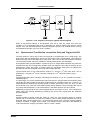
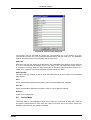
onstart off
; Switches off the 'onstart' feature. Also a manual Stop command
; switches it off.
onstop command
; The command is executed always after a stop caused by a
; preset reached. This can be used to program measure
; cycles. For example the command 'onstop start' makes a
; loop of this kind.
onstop off
; Switches off the 'onstop' feature. Also a manual Stop command
; switches it off.
oncycle command
; executes command after a cycle end in sequential mode.
; It is possible to enter up to 512 different such commands,
; each can be maximal 20 character long. The next in the
; series will be executed after the next cycle. When the last
; such entered command was executed the first one will be
; executed again after the next cycle.
oncycle off
; switches off the oncycle command executing.
lastrun=5
; Defines the file count for the last run in a measure cycle. After a
; file with this count or greater was saved with autoinc on, instead
; of the 'onstop command' the 'onlast command' is executed.
numruns=5
; Defines the file count for the last run in a measure cycle. The
; last count is the present one plus the numruns number.After a
; file with this count was saved with autoinc on, instead of the
; 'onstop command' the 'onlast command' is executed.
onlast command
; The command is executed after a stop caused by a preset
; reached or trigger instead of the 'onstop command', when the
; last file count is reached with autoinc on. This can be used to
; finish programmed measure cycles.
ComTec GmbH
5-12
Windows Server Program
onlast off
; Switches off the 'onlast' feature. Also a manual Stop command
; switches it off.
pulse 100
; Output a TTL pulse of 100 msec duration at dig 3 (pin 11)
waitpin 4000
; Waits 4000 ms for going the level at dig 7 (pin 13) going low.
; After a timeout a Message box warns and waits for pressing OK.
; Can be used for connecting a sample changer.
exec program
; Executes a Windows program or .PIF file. Example:
; exec notepad test.ctl opens the notepad editor and loads
; test.ctl.
deleteallrois
; Deletes all ROIs in the active Display of MCDWIN or the active
; multichannel analyzer if MCDWIN is not running.
deleteallrois MC_A
; Similar to the deleteallrois command, but using the argument allows to
; specify which spectrum should be treated independently of
; which child window is activated in MCDWIN
fitrois
; Makes a single peak Gaussian fit for all ROIs in the active
; Display of MCDWIN and dumps the result into a logfile. This is
; performed by the MCDWIN program and therefore can be
; made only if this application is running.
fitrois MC_A
; Similar to the fitroi command, but using the argument allows to
; specify which spectrum should be evaluated independently of
; which child window is activated in MCDWIN
autocal
; Makes a single peak Gaussian fit for all ROIs in the active
; Display of MCDWIN for which a peak value was entered in the
; MCDWIN Region Edit dialog and uses the results for a
; calibration. This is performed by the MCDWIN program and
; therefore can be made only if this application is running.
autocal MC_A
; Similar to the autocal command, but using the argument allows
; to specify which spectrum should be evaluated independently of
; which child window is activated in MCDWIN
The following commands make sense only when using the serial line, TCP/IP or DLL control:
MC_A?
; Sends the status of MC_A via the serial port and make MC_A
; actual.
MC_B?
; Sends the status of MC_B via the serial port and make MC_B
; actual.
MC_C?
; Sends the status of MC_C via the serial port and make MC_C
; actual.
MC_D?
; Sends the status of MC_D via the serial port and make MC_D
; actual.
?
; Send the status of the actual multi channel analyzer
sendfile filename
; Sends the ASCII file named filename over the serial line.
The execution of a control file can be ended from the Server or MCDWIN with the Halt button.
ComTec GmbH
5-13
Windows Server Program
5.3.
Controlling the P7887 Windows Server via DDE
The P7887 program can be a server for DDE (Dynamic Data Exchange). Many Windows
software packages can use the DDE standard protocols to communicate with other Windows
programs, for example GRAMS, FAMOS or LabVIEW. In the following the DDE capabilities of the
P7887 program are described together with a demo VI („Virtual Instrument“) for LabVIEW. It is
not recommended to use the DDE protocol for LabVIEW, as also a DLL interface is available that
is much faster. The following should be seen as a general description of the DDE conversation
capabilities of the P7887 program.
5.3.1.
Open Conversation
application: P7887
topic: 7887
Any application that wants to be a client of a DDE server, must open the conversation first by
specifying an application and a topic name. The application name is P7887 and the topic is 7887.
Figure 5.10: Opening the DDE conversation with the P7887 in LabVIEW
5.3.2.
DDE Execute
The DDE Execute command can be used to perform any action of the P7887 program. Any of the
Control command lines described in section 5.2 can be used. For example a sequence of control
commands saved in a file TEST.CTL can be executed by specifying the command
RUN TEST.CTL
The P7887 program then executes the command and, after finishing, it sends an Acknowledge
message to the DDE client. This can be used to synchronize the actions in both applications.
ComTec GmbH
5-14
Windows Server Program
Figure 5.11: Executing a P7887 command from a LabVIEW application
5.3.3.
DDE Request
The DDE Request is a message exchange to obtain the value of a specified item. Only two items
are defined for DDE request up to now: RANGE and DATA. The value is obtained as an ASCII
string, i.e. it must be converted by the client to get the numbers. All other parameters concerning
the setup can be obtained by the client application by reading and evaluating the configuration
file.
RANGE
The RANGE item can be used to obtain the total number of data.
Figure 5.12: Getting the total number of data with LabVIEW
DATA
With the DATA item the data is obtained. The value of this item is a multiline string that contains
in each line a decimal number as an ASCII string.
ComTec GmbH
5-15
Windows Server Program
Figure 5.13: Getting the data with LabVIEW
5.3.4.
Close Conversation
After finishing the DDE communication with the server program, it must be closed.
Figure 5.14: Closing the DDE communication in LabVIEW
The following figure shows the „Panel“ of the described VI for LabVIEW.
ComTec GmbH
5-16
Windows Server Program
Figure 5.15: Control Panel of the demo VI for LabVIEW
5.3.5.
DDE Conversation with GRAMS/386
The following file GRAMS887.CIF can be used to get the P7887 data into GRAMS/386 via DDE
using the „Collect“ menu:
P7887 DDE Test
Query
P7887
7887
DATA
save
end
spc
1 second
ComTec GmbH
5-17
Windows Server Program
5.4.
Controlling the P7887 Windows Server via DLL
The P7887 server program provides access to all functions, parameters and data via a DLL
(„dynamic link library“). So the server can be completely controlled by the MCDWIN software that
provides all necessary graphic displays.
In the following some parts of the header and definition files of the DP7887.DLL are listed, that
may help an experienced programmer to use the DLL for own applications. The arguments „item,
nDevice, nDisplay, nSystem“ are only for compatibility with other devices controlled by the
MCDWIN software and must be zero.
NOTE:
The complete documented sourcecode of the DLL including fundamental VI’s and an example
VI for LabVIEW and an example Visual Basic and C program is available as an option.
typedef struct{
int started;
double runtime;
double totalsum;
double roisum;
double roirate;
double nettosum;
double sweeps;
double stevents;
unsigned long maxval;
} ACQSTATUS;
//
//
//
//
//
//
//
//
//
aquisition status: 1 if running, 0 else
running time in seconds
total events
events within ROI
acquired ROI-events per second
ROI sum with background subtracted
Number of sweeps
Start Events
Maximum value in spectrum
typedef struct{
unsigned long range;
long prena;
// spectrum length
// bit 0: realtime preset enabled
// bit 1: single sweeps enabled
// bit 2: sweep preset enabled
// bit 3: ROI preset enabled
// bit 4: Starts preset enabled
long ssweeps;
// number of single sweeps for
// single sweeps mode
unsigned long roimin;
// lower ROI limit
unsigned long roimax;
// upper limit: roimin <= channel < roimax
double eventpreset;
// ROI preset value
double timepreset;
// time preset value
long savedata;
// bit 0: 1 if auto save after stop
// bit 1: write listfile
// bit 2: listfile only, no histogram
long fmt;
// format type: 0 == ASCII, 1 == binary
long autoinc;
// 1 if auto increment filename
long cycles;
// for sequential mode
long sweepmode;
// sweepmode & 0xF:
// 0 = normal, 4=sequential
// bit 4: Softw. Start
// bit 5: DMA mode
// bit 6: Wrap around
// bit 7: Start event generation
// bit 8: Enable tag bits
long syncout;
// sync out; bit 0..5 NIM syncout,
// bit 6..11 TTL syncout
long bitshift;
// Binwidth = 2 ^ (bitshift)
long digval;
// digval=0..255 value for samplechanger
long digio;
// Use of Dig I/O, GO Line:
// bit 0: status dig 0..3
// bit 1: Output digval and
//
increment digval after stop
// bit 2: Invert polarity
// bit 3: Push-Pull output
ComTec GmbH
5-18
Windows Server Program
//
//
//
//
//
//
//
//
//
//
//
//
//
//
//
//
//
long dac01;
long dac23;
double swpreset;
long nregions;
long caluse;
double fstchan;
long active;
long calpoints;
} ACQSETTING;
typedef struct{
unsigned long HUGE *s0;
unsigned long far *region;
unsigned char far *comment0;
double far *cnt;
HANDLE hs0;
HANDLE hrg;
HANDLE hcm;
HANDLE hct;
} ACQDATA;
typedef struct {
int nDevices;
int nDisplays;
int nSystems;
int bRemote;
unsigned int sys;
//
//
//
//
//
//
bit 4..7: Input pins 4..7
Trigger System 1..4
bit 8: GOWATCH
bit 9: GO High at Start
bit 10: GO Low at Stop
bit 11: Clear before
ext. triggered Start
LOWORD: DAC value (START)
HIWORD: DAC value (STOP)
LOWORD: DAC1, HIWORD: DAC2 value
sweep preset value
number of regions
bit 0 == 1 if calibration used,
higher bits: formula
first time channel * 32
1 for module enabled in system 1
number of calibration points
//
//
//
//
pointer
pointer
pointer
pointer
to
to
to
to
spectrum
regions
strings
counters
// Number of spectra = number of modules
// Number of active displays 0...nDevices
// Number of systems 0...4
// 1 if server controlled by MCDWIN
// System definition word:
bit0=0, bit1=0: MCD#0 in system 1
bit0=1, bit1=0: MCD#0 in system 2
bit0=0, bit1=1: MCD#0 in system 3
bit0=1, bit1=1: MCD#0 in system 4
bit2=0, bit3=0: MCD#1 in system 1 ...
bit6=1, bit7=1: MCD#3 in system 4
} ACQDEF;
/*** FUNCTION PROTOTYPES (do not change) ***/
BOOL APIENTRY DllMain(HANDLE hInst, DWORD ul_reason_being_called, LPVOID
lpReserved);
VOID APIENTRY StoreSettingData(ACQSETTING FAR *Setting, int nDisplay);
// Stores Settings into the DLL
int APIENTRY GetSettingData(ACQSETTING FAR *Setting, int nDisplay);
// Get Settings stored in the DLL
// Store System Definition into DLL
VOID APIENTRY StoreStatusData(ACQSTATUS FAR *Status, int nDisplay);
// Store the Status into the DLL
int APIENTRY GetStatusData(ACQSTATUS FAR *Status, int nDisplay);
// Get the Status
VOID APIENTRY Start(int nSystem);
// Start
VOID APIENTRY Halt(int nSystem);
// Halt
VOID APIENTRY Continue(int nSystem);
// Continue
VOID APIENTRY NewSetting(int nDevice);
// Indicate new Settings to Server
UINT APIENTRY ServExec(HWND ClientWnd);
// Execute the Server P7886.EXE
VOID APIENTRY StoreData(ACQDATA FAR *Data, int nDisplay);
ComTec GmbH
5-19
Windows Server Program
// Stores Data pointers into the DLL
int APIENTRY GetData(ACQDATA FAR *Data, int nDisplay);
// Get Data pointers
long APIENTRY GetSpec(long i, int nDisplay);
// Get a spectrum value
VOID APIENTRY SaveSetting(void);
// Save Settings
int APIENTRY GetStatus(int nDevice);
// Request actual Status from Server
VOID APIENTRY Erase(int nSystem);
// Erase spectra
VOID APIENTRY SaveData(int nDevice);
// Saves data
VOID APIENTRY GetBlock(long FAR *hist, int start, int end, int step,
int nDisplay);
// Get a block of spectrum data
VOID APIENTRY StoreDefData(ACQDEF FAR *Def);
int APIENTRY GetDefData(ACQDEF FAR *Def);
// Get System Definition
VOID APIENTRY LoadData(int nDisplay);
// Loads data
VOID APIENTRY AddData(int nDisplay);
// Adds data
VOID APIENTRY SubData(int nDisplay);
// Subtracts data
VOID APIENTRY Smooth(int nDisplay);
// Smooth data
VOID APIENTRY NewData(void);
// Indicate new ROI or string Data
VOID APIENTRY HardwareDlg(int item);
// Calls the Settings dialog box
VOID APIENTRY UnregisterClient(void);
// Clears remote mode from MCDWIN
VOID APIENTRY DestroyClient(void);
// Close MCDWIN
UINT APIENTRY ClientExec(HWND ServerWnd);
// Execute the Client MCDWIN.EXE
int APIENTRY LVGetDat(unsigned long HUGE *datp, int nDisplay);
// Copies the spectrum to an array
VOID APIENTRY RunCmd(int nDisplay, LPSTR Cmd);
// Executes command
int APIENTRY LVGetRoi(unsigned long FAR *roip, int nDisplay);
// Copies the ROI boundaries to an array
int APIENTRY LVGetCnt(double far *cntp, int nDisplay);
// Copies Cnt numbers to an array
int APIENTRY LVGetStr(char far *strp, int nDisplay);
// Copies strings to an array
EXPORTS
;
Functions in dp7887.c
StoreSettingData
GetSettingData
StoreStatusData
GetStatusData
Start
Halt
Continue
NewSetting
ServExec
StoreData
GetData
GetSpec
SaveSetting
GetStatus
Erase
SaveData
GetBlock
StoreDefData
GetDefData
LoadData
NewData
HardwareDlg
UnregisterClient
DestroyClient
ClientExec
LVGetDat
RunCmd
ComTec GmbH
@2
@3
@4
@5
@6
@7
@8
@9
@10
@11
@12
@13
@14
@15
@16
@17
@18
@19
@20
@21
@22
@23
@24
@25
@26
@27
@28
5-20
Windows Server Program
AddData
LVGetRoi
LVGetCnt
LVGetStr
SubData
Smooth
StoreExtSettingData
GetExtSettingData
ComTec GmbH
@29
@30
@31
@32
@33
@34
@35
@36
5-21
MCDWIN Software
6.
MCDWIN Software
The window of the MCDWIN program is shown here. It enables the full control of the P7887 card
via the server program to perform measurements, save data and to show the data online in
several windows.
The server program P7887.EXE automatically starts MCDWIN. If you try to start MCDWIN in
advance to the server, a message box warns that you should start the server first.
Figure 6.1: MCDWIN main window
A status window at the left side gives all information about the status of the P7887. A toolbar
provides fast access to many used functions in the menu. A status bar at the bottom gives help
about the meaning of the toolbar icons. A cursor appears when clicking the left mouse button
inside the graphics area. To get rid of the cursor, make a double click with the right mouse button
outside the graphics area. To define a region, press the right mouse button, and while keeping
the button pressed, drag a rectangle. In zoomed state a scrollbar appears that allows to scroll
through the spectrum.
MCDWIN has also viewing capabilities for two dimensional spectra. A single spectrum can be
converted into a two dimensional one by specifying the x dimension in the display option dialog. It
is possible to drag a rectangle and zoom into this rectangle. Rectangular ROIs can be set and the
ROISum and Net ROISum is displayed. The Net Sum is calculated the same way like in the
single view, by subtracting a linear interpolated background from the both outmost channels in xdirection. This Net sums are then summed up in y-direction. The ROI editing dialog is changed
into a Rectangular Editing dialog for MAP and ISO displays. The Cursor can be moved in x and y
direction using the mouse and the arrow keys, in ISO display only using the arrow keys.
ComTec GmbH
6-1
MCDWIN Software
Figure 6.2: MCDWIN Map and Isometric display
A status window at the left side gives all information about the status of the P7887. A toolbar
provides fast access to many used functions in the menu. A status bar at the bottom gives help
about the meaning of the toolbar icons. A cursor appears when clicking the left mouse button
inside the graphics area. The cursor can be moved using the arrow keys. To get rid of the cursor,
make a double click with the right mouse button outside the graphics area. To define a region,
press the right mouse button, and while keeping the button pressed, drag a rectangle. In zoomed
state a scrollbar appears that allows to scroll through the spectrum.
In the following the several menu functions are described together with the corresponding toolbar
icons.
6.1.
File Menu
Load..., Add..., Save, Save As...
These menu items provide the usual functions for loading and saving data common to most
Windows programs. When saving data, you have the choice between binary (.DAT) and ASCII
(.ASC) format. When you load data, select a header file (extension .887). This file contains the
information about the length and format of the data file, which is then automatically read.
It is also possible to load a file with extension .CTL containing commands which are then
executed. With „Add“ the data is added to the present data. The data loaded from a file is
corrected according to the calibration, if available.
Open New...
With the Open New menu item or the corresponding icon a new Display window will be created
and shown as the active window.
ComTec GmbH
6-2
MCDWIN Software
Open All
By selecting the Open All menu item, all available Displays are shown. The window of the last
opened Display becomes active.
Print...
The Print menu item opens the print dialog. It allows to arrange several pictures on a page into
zones. The number of zones in vertical and horizontal direction can be specified. The Color can
be black/white, RGB (colored) or Gray scale. RGB is recommended also for black laser printers.
Some info lines containing date, filename and title can be added. For each page a temporary file
PRINT1.WMF, PRINT2.WMF... will be created. This file is in Windows Metafile format and can be
exported into some other Windows applications.
Figure 6.3: Print dialog box
NOTE:
If printing takes a long time and disk activity is high, please note the following: The picture for the
printing is first built in the memory, but it may need quite a lot of memory if the printer resolution is
high and therefore Windows makes intense virtual memory swapping to disk if for example only
8 MB RAM are available. Therefore it is recommended: never use a 600 dpi printer driver for the
printout of spectra. For example for an HP Laser 4, install the PCL driver and use 300 dpi. The
PCL driver is also much more effective than a Postscript driver, printing is much faster. With
600 dpi, the maximum figure size is indeed limited to about 12 cm x 7 cm (Windows 9x cannot
handle on an easy way bitmaps larger than 16 MB).
Setup Printer...
The Setup Printer menu item allows to configure the printer.
Exit
The Exit menu item exits the MCDWIN.
6.2.
Window Menu
The Window menu allows to arrange the Display windows.
ComTec GmbH
6-3
MCDWIN Software
Tile
With the Tile menu item or clicking the corresponding icon, all opened and displayed MCDWIN
Display windows are arranged over the full MCDWIN client area trying to make the same size for
all windows.
Cascade
The Cascade menu item or respective icon arranges all windows in a cascade.
Arrange Icons
By the Arrange Icons menu item, the minimized MCDWIN Display windows are arranged in a
series at the bottom of the MCDWIN client area.
Close All
By selecting the Close All menu item, all Display windows are closed.
Window list
At the end of the Window menu, all created Display windows are listed with their names, the
current active window is checked. By selecting any of the names, this window becomes the active
and is displayed in front of all others.
6.3.
Region Menu
The Region menu contains commands for Regions and ROIs (Regions of Interest). A Region can
be marked in a display with the mouse using the right mouse button by dragging a rectangle over
the area one is interested in. A ROI, i.e. an already defined region in a single spectra can be
shown zoomed by double-clicking with the left mouse button on the corresponding colored area in
the bar at the bottom of the spectra display. A single mouse click with the left button on the
corresponding colored area makes this to the active ROI and lets the counts contained in this ROI
be displayed in the information lines of the respective window.
Zoom
The Zoom item or respective icon enlarges a Region to the maximum Display Spectrum size.
Back
The Back menu item or clicking the corresponding icon restores the last zoom view. A successive
Back command returns to the previous view.
Zoom Out
The Zoom Out menu item or clicking the corresponding icon reduces the actual zoom factor by 2,
if applicable.
ComTec GmbH
6-4
MCDWIN Software
Home
Clicking the Home menu item or the corresponding icon restores a Display to the basic
configuration.
Shape
Selecting the Shape menu item opens a submenu with the items Rectangle, X-Slice, Y-Slice, and
Polygon to choose the ROI shape.
Rectangle
Sets the region shape to a rectangle with arbitrary dimensions. To enter the rectangular region,
press the right mouse button, drag a rectangle, and release the button to define the region.
X-Slice
Sets the Region shape to the rectangle with maximum height.
Y-Slice
Sets the Region shape to the rectangle with maximum width.
Create
The Create menu item creates a new ROI from the current marked Region.
Delete
By selecting the Delete menu item or the respective icon, the current active ROI is deleted and
the previously defined ROI is activated.
Edit...
With the Edit item, a dialog box is opened which allows to edit the ROI list, i.e. create a new one,
delete, change and activate an existing ROI. Also the peak values (e.g. energy, mass etc.) for an
automatic calibration can be entered here. A ROI can be edited and added to the list. It can also
be made to the „Active ROI“, that is the special ROI that is used by the server program to
calculate the events within this ROI and look for an event preset. The ROI list can be cleared and
can be written to a file with extension .CTL, which can be directly loaded into the server to restore
the ROI list.
ComTec GmbH
6-5
MCDWIN Software
Figure 6.4: ROI Editing dialog box, left: Single spectra, right: 2D spectra
The selected ROI can be changed by clicking on it in the ROI list. In the MCDWIN spectrum
display the total and net sum of the selected ROI is displayed.
Fit...
By selecting the Fit... menu item or the respective icon, A single Gaussian peak fit with linear
background is performed for the currently marked region. The fitted curve is displayed and a
dialog box shows the results:
Figure 6.5: Single Gaussian Peak Fit
The full width at half maximum FWHM and Position of the Gaussian can be changed and a New
Fit can be performed, they even can be fixed to the entered value by marking the respective
checkbox. The Position and FWHM are displayed in channels and also in calibrated units, if a
calibration is available. The area of the Gaussian is also shown. For all values also the standard
deviations are given. The value of Q is the normalized chi**2. To take into account the systematic
error of the lineshape, you may multiply the errors with the squareroot of Q. Click on Save to
append a line containing the results to a Logfile with the specified name. OK closes the dialog
ComTec GmbH
6-6
MCDWIN Software
and the fitted function remains in the display - also if the display is refreshed -, whereas after
Cancel the curve no longer will be shown in a refreshed display. Options... opens a new dialog
box to define the information in the logfile:
Figure 6.6: Log file Options for the Single Gaussian Peak Fit
The several quantities are written in standard text format with Tabs as separators and a Newline
character at the end of each line, so the file can be read with standard calculation programs like
EXCEL. Click on Print Header to write a header line.
Fit ROIs
With the Fit ROIs item, for all ROIs a Single Gaussian Peak Fit is performed and the results are
dumped into the logfile.
Auto Calib
Makes a Gauss fit for all ROIs in the active Display for which a peak value was entered, and
performs a calibration using the fit results.
6.4.
Options Menu
The Options Menu contains commands for changing display properties like scale, colors etc.,
hardware settings, calibration and comments.
Colors...
The Colors menu item or respective icon opens the Colors dialog box.
ComTec GmbH
6-7
MCDWIN Software
Figure 6.7: Colors dialog box
It changes the palette or Display element color depending on which mode is chosen. The current
color and palette setup may be saved or a new one can be loaded.
Figure 6.8: Color Palette dialog box
To change on of the colors, select "Palette colors" and click on one of the colors. In the Color
Palette dialog box the RGB values can be edited or for a 256 color video driver one of the
Physical palette colors can be chosen.
ComTec GmbH
6-8
MCDWIN Software
Display...
The Display menu item or the corresponding icon opens for single spectra the Single view dialog
box.
Here the graphic display mode of single spectra can be chosen. The 'Type' combo box gives a
choice between dot, histogram, spline I and line. The 'Symbol' combo box gives a choice
between None, Circle, Triangle down, Triangle up, Cross, Snow-flake and Diamond. The symbols
can be filled by checking Fill, error bars can be displayed by checking Error Bar.
'Dot' means that each spectra point is shown as a small rectangle or the specified symbol, the
size can be adjusted with the size combo box. 'Histogram' is the usual display with horizontal and
vertical lines, 'spline I' means linear interpolation between the points, and 'line' means vertical
lines from the ground to each spectra point.
If the displayed spectra range contains more channels as pixel columns are available in the video
graphic display, usually only the maximum value of the channels falling into that pixel columns is
displayed. But it can also explicitly specified by marking the checkboxes „Max Pixel“, „Mean
Pixel“ or „Min Pixel“ which value will be displayed. It is also possible to display all three possible
values in different colors that can be chosen in the colors dialog. For the „Mean Pixel“ a
Threshold value can be entered; channel contents below this value then aren't taken into account
for the mean value calculation.
It is possible to change to a two dimensional view of the spectrum by specifying the x Dimension
and clicking the button ">> MAP".
Figure 6.9: Single View dialog box
For MAP displays the Display Options dialog is changed and allows a choice between four
Graphic types: bitmap dot, vector dot, bitmap contour and vector contour. Bitmap Dot is
recommended as a standard, because it makes a good and fast display. Vector Contour paints
colored contour lines. To calculate the lines takes a lot of time and causes the mouse pointer
changing to an hourglass. But it gives very impressive colored pictures suited especially for
presentation and when looking carefully at spectra details.
ComTec GmbH
6-9
MCDWIN Software
Figure 6.10: MAP View dialog box
Clicking the Slice button allows to create new single spectra displays, showing a slice in a 2D
spectra. The Slice dialog box is displayed.
Select “x=const” or “y=const” for the slice direction, and the coordinate. Clicking the "create"
button creates the new display window. In the title bar of the new window the name of the 2D
spectra and the slice coordinate is shown.
The slice position can be changed using the scroll bar in the Slice dialog, or by entering the value
in the edit fileld and pressing the button which is labeled “Set” after creation of the slice view.
The Slice dialog can be closed by clicking its close field. Created slice spectra displays remain
visible and their coordinates can be changed later using the Slice dialog again. The position of
the Slice dialog with respect to the MCDWIN main window can be saved in the MCDWIN.CNF
file. Rectangular ROIs are visible in the slice spectra display and can be created here.
Figure 6.11: Slice dialog box
From the MAP View dialog it is possible to change to Single view by clicking ">> Single" or
change to Isometric View by clicking ">> Isometric".
ComTec GmbH
6-10
MCDWIN Software
Figure 6.12: Isometric View dialog box
In isometric mode several single spectra are drawn behind each other. The Precession angle
around the vertical axis can be chosen in multiples of 90 degrees. The Tilt angle is between the x
and y axis and can be chosen between 15 and 89 degrees. The Height specifies the percentage
of the z-axis length respective to the whole drawing, it can be entered between 0 and 99. With
hidden it can be specified whether the hidden parts are not drawn. If "Monochrome" is checked,
the spectra are painted monochrome, otherwise in color.
Axis...
By the Axis... menu item or the respective icon, the Axis Parameters dialog box is opened.
Figure 6.13: Axis Parameter dialog box
It provides many choices for the axis of a display. The frame can be rectangular or L-shape, the
frame thickness can be adjusted (xWidth, yWidth). A grid for x and y can be enabled, the style
can be chosen between Solid, Dash, DashDot and DashDotDot. Ticks on each of the four frame
borders can be enabled, the tick length and thickness can be chosen. The style of the axis
ComTec GmbH
6-11
MCDWIN Software
labeling depends on enabled ticks at the bottom respective left side: If no ticks are enabled there,
only the lowest and highest values are displayed at the axis, otherwise the ticks are labeled.
Scaling...
The Scaling menu item or the corresponding icon opens the Scale Parameters dialog box.
Figure 6.14: Scale Parameters dialog box
It allows to change the ranges and attributes of a Spectrum axis. By setting the Auto scaling
mode, the MCDWIN will automatically recalculate the y-axe's maximum value for the visible
Spectrum region only. To keep the same height of the visible region for a longer time, deselect
the Auto scaling mode. Then with the scroll bar thumb one can quickly change the visible region
scale, otherwise the scale will be changed automatically. The Minimum auto scale mode helps to
display weak structures on a large background.
Lin / Log scale
Chose between Linear or Logarithmic scaling. All options have effect only on the active Display.
Calibration...
Using the Calibration menu item or the corresponding icon opens the Calibration dialog box.
ComTec GmbH
6-12
MCDWIN Software
Figure 6.15: Calibration dialog box
Make a choice of several calibration formulas. Enter some cursor positions and the corresponding
values (e.g. energy, mass etc.), click on Add and then on Calibrate. The obtained coefficients can
be inspected together with the statistical error, or they can be changed and entered by hand. If
‘use calibration’ is enabled, the calibrated values are displayed together with the channel position
of the cursor.
Comments...
Up to 13 comment lines with each 60 characters can be entered using the Comments dialog box.
The content of these lines is saved in the data header file. The first line automatically contains the
time and date when a measurement was started. The titles of each line can be changed by
editing the file COMMENT.TXT.
ComTec GmbH
6-13
MCDWIN Software
Figure 6.16: Comments dialog box
Range, Preset...
This dialog box allows to make all P7887 settings (ref. chapter 5.1.4).
Figure 6.17: P7887 Settings dialog box
ComTec GmbH
6-14
MCDWIN Software
Data...
The Data dialog box allows to perform all the P7887 data operations (ref. chapter 5.1.3).
Figure 6.18: Data Operations dialog box
System...
The System Definition dialog box allows to make all the respective P7887 settings (See chapter
5.1.5).
Figure 6.19: System Definition dialog box
ComTec GmbH
6-15
MCDWIN Software
Replay...
The menu item Options – Replay... opens the Replay settings dialog (ref. chapter 5.1.3).
Figure 6.20: Replay dialog box
Tool Bar...
Selecting the Tool Bar Menu item opens the Tool Bar Dialog Box. It allows to arrange the icons in
the Tool Bar.
Figure 6.21: Tool Bar dialog box
If it is enabled, an array of icons in the MCDWIN Menu is shown. Clicking the left mouse button
with the cursor positioned on an icon, the user can perform a corresponding MCDWIN Menu
command very quick.
It is also possible to include icons for free programmable function keys F1...F12 into the Toolbar.
The function keys can be programmed in the Function keys dialog. It can be accessed either by
clicking the "Function keys..." button or directly from the options menu.
ComTec GmbH
6-16
MCDWIN Software
Figure 6.22: Function keys dialog box
The functions can be executed by clicking the corresponding icon in the toolbar or by the
corresponding function key on the keyboard simultaneously with the CTRL key. The MCDWIN
window must be the active on the desktop and have the focus.
Status bar
With this menu item the Status bar at the bottom of the MCDWIN main window can be switched
on or off. A corresponding checkmark shows if it is active or not. The Status bar usually shows if
an acquisition is running. When the left mouse button is held down while the mouse cursor is on a
toolbar icon, it displays a short help message what the toolbar icon does.
Status window
The same way it is possible to hide or show the status window at the left side of the MCDWIN
main window.
Save
Stores all parameters defined in the Options menu to the MCDWIN.CNF config file.
Save As...
Stores all parameters defined in the Options menu to a user defined config file.
Retrieve...
Loads a new configuration.
6.5.
Action Menu
The Action Menu or corresponding toolbar icons contain the commands to start, stop, continue
and erase a measurement. If more than one system is formed, also more actions menus are
available, otherwise they are grayed or disabled.
ComTec GmbH
6-17
MCDWIN Software
Start
The Start toolbar button erases the histogram data and starts a new measurement.
Halt
The Halt toolbar button stops a measurement.
Continue
The Continue toolbar button continues a measurement.
Erase
The Erase toolbar button clears the histogram data.
ComTec GmbH
6-18
Programming and Software Options
7.
Programming and Software Options
The P7887 can be controlled by user-written programs using the DLL software interface with
example programs for Visual Basic, LabVIEW and C that is available as an option. Furthermore,
LINUX software is available as an option containing a driver, library and console test program. A
Windows software similar to the LINUX package that runs without the server using a stand-alone
DLL is also available on demand for customers who own one of the two available library
packages.
Auto-Correlation: an optional available expansion of the Server program allows to acquire data
into a two dimensional array M(i,j). The channel (i,j) is incremented when in a single sweep the
channel i and i+j has an event. The two dimensional MAP can be viewed in MCDWIN even
during the acquisition. Use the display options and switch to MAP and later to ISOMETRIC.
Figure 7.1: Autocorrelation software option
ComTec GmbH
7-1
Appendix - Performance Characteristics
8.
Appendix
8.1.
Performance Characteristics
8.1.1.
General
Resolution FWHM1:
at 10 µs ≅ 40,000 chs over 60 min: ........................ typ. < 180 ps
at 1 ms ≅ 4,000,000 chs over 60 min: .................... typ. < 350 ps
Oven stabilized option: ................................................................
at 100 ms ≅ 400,000,000 chs over 24 hours........... typ. < 300 ps
38
Dynamic range:
total: ............................................................ 2 x 250 ps = 68.7 s
32
in steps of: .................................................. 2 x 250 ps = 1.07 s
24
steps with TAGs used .............................2 x 250 ps = 4.19 ms
Differential non-linearity:
........................................................................................<< ± 1 %
Start / trigger delay:
.......................................................................................typ. 17 ns
Deadtime:
Start of sweep pipeline delay: .................................... 112 ± 8 ns
End of sweep: ................................................................ < 200 ns
between time bins: .............................................................. none
Sweep repetition time:
.............................. ≤ (Acq. Delay + Range + Hold Off + 320 ns)
8.1.2.
Timebase
Reference oscillator:
Nominal frequency: ..................................................10.000 MHz
Initial accuracy (25°C): .............................................. ≤ ± 50 ppm
Frequency stability:
in operating temperature range: .............................. ≤ ± 100 ppm
Oven stabilized option:
Nominal frequency: ..................................................10.000 MHz
Adjustment tolerance: .............................................. ≤ ± 0.3 ppm
Frequency stability:
in operating temperature range: ............................. ≤ ± 0.03 ppm
-9
vs. Supply voltage change ±5 %: ............................≤ ± 4.0 * 10
-10
vs. Short term: ......................................................≤ ±2.0 * 10 /s
-9
Aging: ..............................................................≤ ± 1.5 * 10 /day
-6
..............................................................................0.1 * 10 /year
........................................................... after 30 days of operation
Warm-up time: ................................................................ ≤ 1 min.
Synthesizer frequency:
Nominal: ............................................................................ 4 GHz
Tuning range: ........................................................ 3.7 – 4.1 GHz
1 Full width at half maximum. All FWHM data is derived from a gaussian fit.
ComTec GmbH
Appendix 8-1
Appendix - Specification
8.1.3.
Data Throughput
7
-1
DMA data rate into PC1:
........................................................................................ 10 sec
Burst STOP input rate:
............................................................................................ 4 GHz
Max. burst length:
(initially empty 127 deep FIFO_1) ................................ ≥ 2032 ns
FIFO_1-to-FIFO_2 rate:
....................................................................................≥ 12.5 MHz
(at burst input rate) ............................................... max. 15.5 MHz
8.2.
Specification
8.2.1.
Absolute Maximum Ratings
Input voltage:
any multi I/O port: .........................................-0.5 to VCC + 0.5 V
any TAG input port: ......................................-0.5 to VCC + 0.5 V
any discriminator input: ....................................................± 1.7 V
DC current:
any multi I/O port .............................................................± 20 mA
any TAG input port ..........................................................± 20 mA
any discriminator input: ................................................± 200 mA
any DAC output: .............................................................± 25 mA
8.2.2.
Recommended Operating Conditions
Supply voltage:
(from PC power supply).................................. +5 V, +12 V, -12 V
Temperature range:
....................................................................................... 0 to 50°C
GO Line load:
.......................................................................... min. 1 kΩ to VCC
or ....................................................................... min. 2 k to GND
8.2.3.
Power Requirements
Supply voltage:
VCC: ...................................................................... +5 V ± 0.25 V
................................................................................ +12 V ± 0.6 V
................................................................................. -12 V ± 0.6 V
Supply current:
+5 V: ....................................................................................2.2 A
+12 V: ..................................................................................0.2 A
-12 V: .................................................................................0.25 A
8.2.4.
Connectors
±1 V Discriminator Inputs
Location:
.......................................................................... mounting bracket
Connector:
...................................................................................female SMA
Impedance:
.............................................................................................. 50 Ω
1 depends largely on the computer used
ComTec GmbH
Appendix 8-2
Appendix - Specification
Input voltage range:
...........................................................................................± 1.0 V
Threshold voltage:
(power-up default = 0.0 V) .................................................±1.0 V
............................................................................ in steps of 1 mV
Sensitivity:
..............................................................................typ. < 10 mVpp
Bandwidth:
( - 3dB) .................................................................... typ. > 3 GHz
Fast-NIM SYNC_1 Output
Location:
.......................................................................... mounting bracket
Connector:
...................................................................................female SMA
Impedance:
.............................................................................................. 50 Ω
Output HIGH voltage:
(50 Ω load) ................................................................. typ. –0.0 V
Output LOW voltage:
(50 Ω load) .................................................................. typ. –0.8 V
Output short circuit current:
VOUT = GND ................................................................. typ. 28 mA
SYNC_2 Output
Location:
...................................... ref. FEATURE (multi) I/O port connector
Output HIGH voltage:
(at POUTi) IOutHIGH = -12mA ......................................... min. 2.4 V
Output LOW voltage:
(at POUTi) IOutLOW = 16mA ........................................ max. 0.45 V
Output short circuit current:
VOUT = GND (RPULL = ∞, RI/O = 0Ω) ..................... -15 to –180 mA
VOUT = 3.3 V (RPULL = ∞, RI/O = 0Ω) ........................40 to 210 mA
DAC 1 & 2 Outputs
Location:
.......................................................................... mounting bracket
Connector:
..................................................LEMOSA series 00 NIM-CAMAC
Output voltage range:
.............................................................................................± 10V
Resolution:
.......................................................................... 12 bit @ 4.88 mV
Digital I/O 0…7
Location:
...................................... ref. FEATURE (multi) I/O port connector
R PULL :
(default) .............................................................................1.0 kΩ
R I/O:
(default) ............................................................................... 22 Ω
Input HIGH voltage:
(at PINi, ref Figure 3.13. )1 .......................................... min. 2.0 V
Input LOW voltage:
(at PINi) ....................................................................... max. 1.2 V
Output HIGH voltage:
(at POUTi) IOutHIGH = -16mA ......................................... min. 2.4 V
Output LOW voltage:
(at POUTi) IOutLOW = 15mA ........................................ max. 0.45 V
Output short circuit current2: VOUT = GND (RPULL = ∞, RI/O = 0Ω) ..................... -15 to –180 mA
VOUT = 3.3 V (RPULL = ∞, RI/O = 0Ω) ........................40 to 210 mA
1 Note: input and output voltages are measured at the internal logic pads not at the external connectors. Thus, the corresponding
pull and series resistors must be considered to get the external voltages
2 Only one output at a time. Duration should not exceed 30 seconds.
ComTec GmbH
Appendix 8-3
Appendix - Specification
GO-Line
Location:
...................................................................................... PCI board
.......................................................... ref. multi I/O port connector
Connector:
2 pin header on PCI board: ........LUMBERG 2,5 MSFW 2(MBX)
suitable socket connector: ....................... LUMBERG 2,5 MBX 2
Line Type :
.................................................................open drain / wired-AND
Pull-Resistors:
............................................................................... 100kΩ to VCC
Input HIGH voltage:
...................................................................................... min. 2.0 V
Input LOW voltage:
..................................................................................... max. 1.2 V
Output LOW voltage:
IOutLOW = 15mA ............................................................ max. 0.8 V
TAG Input 0…7
Location:
........................................................ref. TAG input port connector
R PULL-UP :
(default) .................................................................... not installed
R PULL-DOWN :
(default) ............................................................................. 100 Ω
Input HIGH voltage:
...................................................................................... min. 2.0 V
Input LOW voltage:
..................................................................................... max. 1.2 V
Time resolution:
............................................................................................. 16 ns
Sampling delay:
TAG after cor. STOP: ................................................. 112 ± 8 ns
Pulse width:
........................................................................................... >16 ns
8.2.5.
Physical
PCI long board (ISA assembly, 5V)
Size:
(incl. retainer) ........................................................ 341 x 107 mm
Weight:
(board alone) .................................................................... ≈ 220 g
ComTec GmbH
Appendix 8-4
Appendix - Trouble Shooting
8.3.
Accessories
SMA – BNC adapter cables
Multi I/O port connector cable
TAG input port connector cable
ComTec GmbH
Appendix 8-5
Appendix - Personal Notes
8.4.
Trouble Shooting
•
System hangs on power-up: Take care that the board is well seated in the PCI connector.
Push it towards the bracket to ensure proper connections.
•
PCI device is not properly detected: Push the board in the PCI slot towards the bracket to
ensure proper connections.
•
Error message "P7887 A not found or FASTMPA device driver not installed!" at the first
start of the software:
Maybe you did not install the device drivers. If Windows 9x/2000/XP is installed with the
P7887 board plugged in, a wrong device driver for a "general PCI communication device"
may be installed. Check it using the Device manager, remove the wrong driver and install the
correct driver from the WDMDRIV directory on the diskette. On Windows NT change to the
subdirectory \ntdriver on your P7887 installation disk and run install.bat to install the driver for
the P7887 board.
•
Error message " Communication problem with board! Resource conflict?" at the first
start of the software: Try another PCI slot and remove all other PCI cards that are not
urgently used for the moment. Some computers (for example most DELL computers) have a
problem to recognize a second I/O port range reserved by a PCI card like the P7887 using
the AMCC S5933/S5935 PCI interface chip. In this case please use another computer.
ComTec GmbH
Appendix 8-6
Appendix - Personal Notes
8.5.
Personal Notes
ComTec GmbH
Appendix 8-7