1
Chapter 1
Introduction
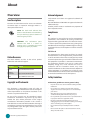
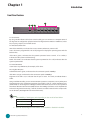
Front Panel Features
F4
F1
F2
F3
LAN1 LAN2 LAN3 LAN4 LAN5 LAN6
F1 Console Port
By using suitable rollover cable (Cisco console cable), you can connect to a computer terminal
for diagnostic or configuration purpose. Terminal Configuration Parameters: 115200 baud, 8 data
bits, no parity, 1stop bit, and no flow control.
F2 HDD/Status/Power LED
HDD: If the LED blinks, it indicates data access activities; otherwise, it remains off.
Status: This LED is programmable. You could program it to display the operating status with the
behavior like:
If the LED is green, it indicates that the system’s operational state is normal. If it is amber, it
indicates that the system is malfunctioning.
Power: If the LED is on it indicates that the system is powered on. If it is off, it indicates that the
system is powered off.
F3 Two USB 2.0 Ports
It connects to any USB devices, for example, a flash drive.
F4 6 Gigabit LAN ports
Left LED:If the LED is green, it indicates that the connection speed is 100Mbps.
If the LED is orange, it indicates that the connection speed is 1000Mbps.
Right LED: If the LED is on, it indicates that the port is active. If it blinks, it indicates there is
traffic.
Using suitable RJ-45 cable, you can connect FW-7541 System to a computer, or to any other piece
of equipment that has an Ethernet connection; for example, a hub or a switch. Moreover,1 pair
(LAN1-LAN2) can be configured as LAN Bypass when failure events occur. LAN 1 is also capable of
the Preboot Execution Environment (PXE) function. The LAN Bypass feature can be implemented
with watch dog timer functionality. Look for the Driver and User’s Manual CD for sample codes
on this function. (Read Appendix C for more information).
Note:
111 The availability of LAN Bypass varies depending on the model as listed below:
Model
Bypass or not
MB-7541A/C
Yes
MB-7541B/D
No
222 Both PXE and Lan Bypass functionalities can be enabled or disabled in the BIOS.
Network Application Platforms
3