1
Getting Started
1.
WizPLC 3.0 CoDeSys
About this document
Version
1.0
1.1
1.122
1.123
1.2
1.3
Date
15/10/2004
04/01/2005
31/05/2005
01/06/2005
03/06/2005
17/10/2005
Description
Initial version
Modified to be used as Quick Guide
English/clarification and other minor corrections
Reference correction and screen shot amendments
Layout changes
Final layout and updates
The goal of this document is to help you get started with WizPLC 3.0. It will be useful both to experienced
users of earlier versions of WizPLC and to new users of the product.
CoDeSys is a complete development environment for PLC programming. It complies with the IEC 611313 standard. WizPLC is the integration between CoDeSys System and Axeda Supervisor. The WizPLC
Runtime is a real PLC running on the Win32 platform. You can develop your PLC program in CoDeSys
and download it to the WizPLC Runtime. WizPLC allows you to directly access Wizcon tags in your PLC
program.
In this document, we assume that you are comfortable with the MS Windows environment, with PLC
programming and with Wizcon. Please refer to the Wizcon Quick Guide and/or User Manual if you have
no experience with Wizcon.
If you are an experienced user of the previous version WizPLC 2.21, please note that WizPLC has been
redesigned. Even though the main concept has not changed, some new features have been added,
while others have been removed. Please read this document carefully to get an overview of WizPLC 3.0.
This document focuses on integration between CoDeSys System and Axeda Supervisor / Wizcon.
Please refer to the CoDeSys Online Help to start with PLC programming with CoDeSys.
2.
How to use Wizcon tags in your WizPLC program?
It is possible to have direct access to Wizcon tags in your WizPLC program. You must first define which
tags you wish to access and then export them to the CoDeSys Studio as global variables. You must then
write your PLC program and download it to the WizPLC Runtime. In runtime mode, the value of each
variable is synchronized with the value of the corresponding Wizcon tag.
For increased performance, WizPLC 3.0 allows you to select the Wizcon tags that you want to use in your
PLC program.
Before being able to use Wizcon tags in your WizPLC 3.0 program, you must define which tags you want
to access. There are two ways to do this:
2.1.
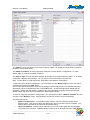
Wizcon tag export window
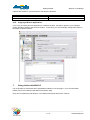
This tool is the easiest way to export Wizcon tags to WizPLC. It also allows access to both Wizcon
Network tags and System tags.
_________________________________________________________________________
3 / 11
Axeda Supervisor