1
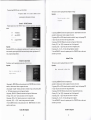
Thc prcscntsignal sOURCE mode:one ofAV and VGA
This function is uscd for regulatl血 g thc disp1犭 y brighmess ofimages
※ OperatIOn metllods of伍 e rcmotc con△oller and thc
opera△ oⅡ
:
operation patlcl on伍 cp岣 ector are曲 c saine.
Entcr picture mode to adjust
brigh1ness
section I sOURCE selection
ProJcction signal sourcc:
whcn‘ sOURCE’ button is
appcars
TV
TV sOURCE
l By pressing伍
AV
video sotlRCE
conioller,伍
PC
colnputcr sOURCE
c【
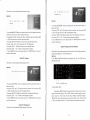
MENU】
c‘ 血notion
button on tllc opcraJon p洫
d orthc ΙMENU J button on tllc rcmote
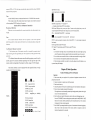
lmenu’ Windo、v can appear on thc scrccn
2By presslng【 ← 】and【 → 】bl】 ttons,the Whdow IssW忆
or 【↓】 buu0众 ,thC
3By pressing 【sOURCE】
:
By prcss血
g sOURCE on伍 e on伍 e pmjector opcraton pancl or伍 e蚯 gnal
rcmotc oon“ ollc△ rcq“ rcd slgnal sOURCE mode cala be direct灯 sclectC叱
source button on Jlc
slg】.lal
ohannels of T、
↑】
button,tlle screen enter an‘ imagc mode’ functlon mcnu
4.Pressing 【← 】 and 【→ ,,the screen enters‘
opera伍 oⅡ
hCd to‘ image’ ,and by pressing【
Cursor moves to the‘ linage modc’ posi伍 on
uscr’
ofthc‘ imagc mode’
.
5.By presshg 【↑】 or 【↓】buJon,thc cursor moves to%nghmess’ opton
6By pre“ ing 【← , or 【→ 】bu枕 on,thc image brIghhless^regulated
7Press伍 c【 MENU刀 bu说 on on仇 c opcratlon panel or伍 e 【W1ENU】 buton on thc rcmote
controller to quit thc mcnu
vidco,computcr and high dcflnition
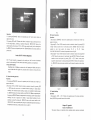
section IV Color
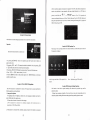
section II。
Tho血 noton泌
Con饣 ast Ratio
used for reglIh山呜 山e con廿 ast ratio ofdkn1nved imnσ eq
This mncti。 n is uscd for regulating伍
operatioⅡ
opera伍 on:
Enter
Enter
to picture
Ⅲode
c disp1ay color ofirp9σ eq
:
picture mode to adjust co1or
to
adjust contrast
l By pressllag tl,c【
I By prcssing the
【MENU】 bu赁 0n on the operatlon pallcl or the 【MENU】 button on the remote
MENU】 button on伍 e
operatlon pan
coniolle△ thc‘ 血nction menu’ Window can appcar on the screen on the sGreen
2By pressing【 ← 】and【 → 】buttons,the wllldoW【
Vindo、 v oan appear on the scrccn,
oontroller,a‘ finction mcnu’ 、
2By prc“ 山g【 ← 】and【 → 】buttons,the Whdow ls switchcd to‘
image’ ,and by pressing【
↑】
or‘
【↓】
bu钆 on,tlle cursor movcs to伍 c‘ mage
3By prc豳 ing 【sOURCE↑ 】button,伍
4Pres蚰 g 【← 】 al,d 【→ ,,伍 e
5By prcssllag 【↑,
6.By presslng 【← 】 or 【→ 】button,伍 e
or
6By prc豳 lng 【← 】 or
7Prcss thc【
MENU】
【↓】buton,伍 e oursor movcsto‘ Contrast ratlo’ optlon
【→ 】bu仗 on,the imagc oon“ ast rat【 o o regtlhed
button on the operatlon pancl or thc
【NIENU】
buttoⅡ
scrccn cnters‘ uscr’ oftllc‘ imagc mode’
5 By pre$sing 【↑】 or 【↓】blItton,伍 e cursor moVcs to‘ Color optlon
7 Press the【 ˇENU】
on山 e remotc
image oolor ls lcgLIlatcd,
buton on伍 c opcraton panel or伍 c 【MENU】
Con廿 oller to quitthe mcnu
coniollcr to quitthe menu
section III。
Brightness
↑】
mnGton mcnu
c scrcen enter an‘ imagc modc’
【↓】bu“ on,山 c cursor m【 ,Vcs to the‘ imagc modc’ posluon.
3By prcssing 【sOURCE↑ 】btltton,the screen entcr an‘ image modc’ funotion mcnu
‘
4,Prcssing 【← 】 and 【→ 】,tlae凹 reen entcⅡ uscr’ of伍 c‘ image modc’
or‘
s switchcd to‘ image’ ,and by pre“ ing【
mode’ posidon~
secⅡ on、L sharpness
bu⒒ on on thc remote